
Offline-first ER modeling desktop with EDA-style orthogonal routing and a fictional fulfillment demo
See the codeSee what people are saying (1)
README
ER Wiki
Readable ER diagrams for complex database schemas.
EDA-style routing for database relationships. When a schema no longer fits on a whiteboard, drawing every relationship is only half the problem. ER Wiki applies orthogonal routing, obstacle avoidance and shared buses to make those connections easier to follow.
Try Live Demo ↗ · Project introduction · Desktop download
Offline-first desktop · AGPL-3.0 · Local SQL import · No application telemetry
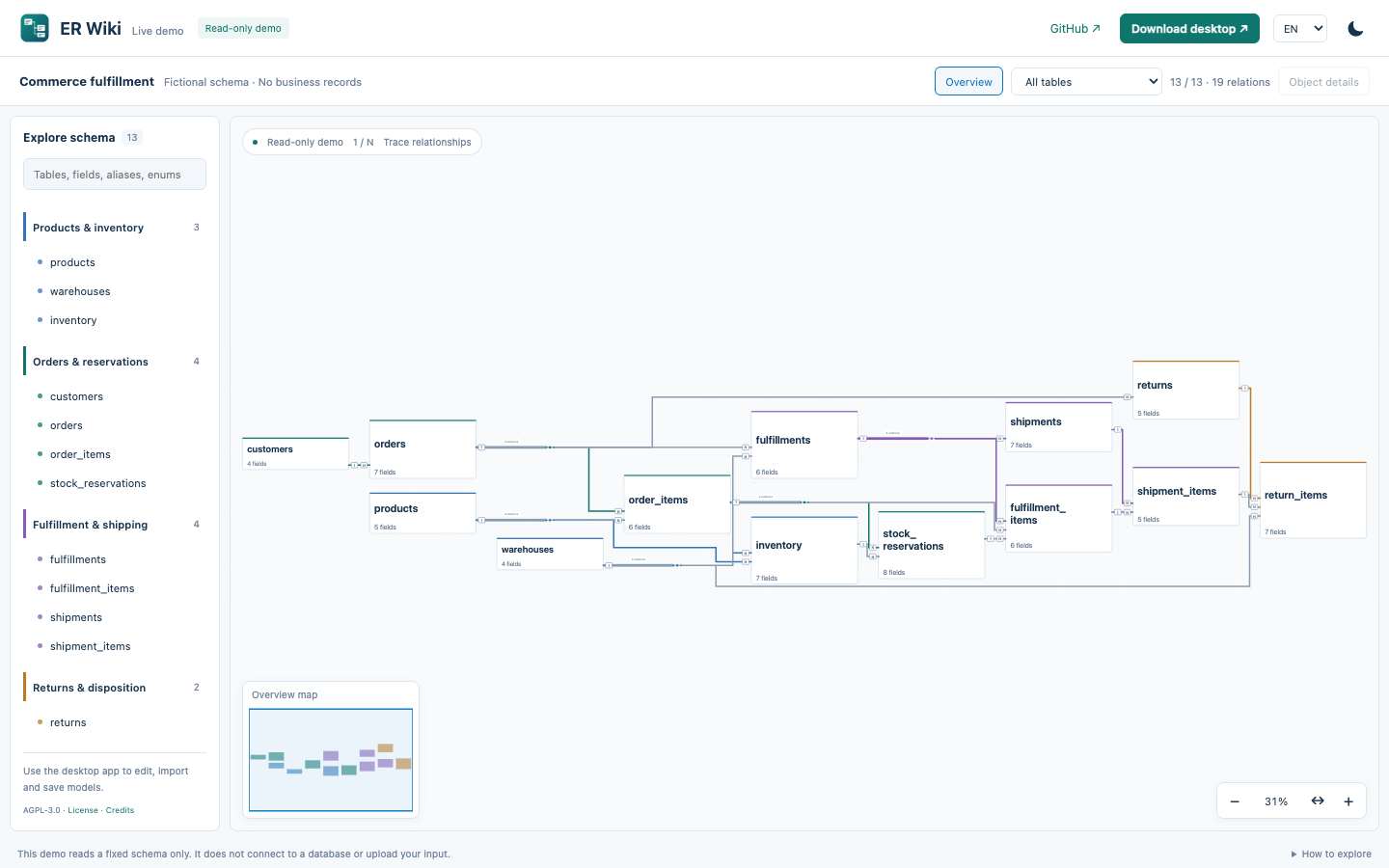
13 fictional tables / 19 relationships. This is the real web renderer, not a competitor comparison or a large-schema benchmark. Hover to trace; double-click a wire for its fields, cardinality and recorded evidence.

中文说明 · Contributing · Security
Why route relationships like circuits?
Growing schemas can turn into spaghetti diagrams: shared keys, high-fanout tables and cross-domain links compete for the same space. Database schemas and circuit schematics share that visualization problem — many nodes, many connections, limited 2D space. ER Wiki focuses on how relationships are routed, not just where the tables sit.
- Paths: ELK orthogonal layouts and libavoid obstacle routing.
- Connections: shared relation buses, high-fanout junctions and traceable Net Labels.
- Ports: connections on all four sides, preserving field mappings and 1/N cardinality.
- Navigation: full overview → domain → table → column, with search and a minimap.
Layout is heuristic, not globally optimal. Dense graphs may still be marked degraded. See implementation and trade-offs.
Work on the model, locally
The Electron desktop app imports SQL locally, edits table/relationship definitions, round-trips JSON and exports SVG/PNG. The hosted demo is read-only and uses precomputed layouts. Neither is a database migration engine or an automatic business-process inference tool.
The desktop works offline without a hosted account or application telemetry. Update checks contact GitHub only when requested; the hosted site uses normal web requests. Built on drawDB, ELK, libavoid, React and Electron; English/Chinese interface switching does not translate model content.
The official demo is the exception: it includes complete English and Chinese example configurations. They share the same table/field IDs and relationships; only explanatory text differs.
More reading and editing capabilities
- Orthogonal ER diagrams, shared relation buses and high-fanout junctions.
- Double-click a wire for a compact explanation of its fields, cardinality and evidence; choose individual relationships on a shared bus. Try it in the live demo.
- Four-sided field ports, obstacle-avoiding routing and topology-aware SPOrE compaction; field identity and 1/N cardinality stay intact.
- Direct length/precision editing, enum editing and live structural checks without adding a review-history workflow.
- Replace a complete model in the running workspace without restarting or creating another model copy.
- Zoom-aware table summaries: readable table names in the overview, fields when zoomed in.
- Searchable field inspector with display names, types, enum values and related tables.
- Consistent domain colors for internal relationships, neutral cross-domain wires and focused relation tracing.
- Full-model overview plus domain, table and column inspection.
- Centered table editing, annotations, enum values and explicit relation editing.
- Local JSON import/export, separate model switching, undo/redo and save controls.
- Local SQL parsing and preview before importing a new model.
- Per-model reading positions, field/alias/enum search and reading bookmarks.
- Stable geometry for text-only edits; structural edits trigger orthogonal layout.
- Versioned JSON, automatic/manual local backups and restore-as-copy.
- Pure-diagram SVG/PNG export for the viewport, domain or full model.
- Display preferences are separate from saved model content.
- Keyboard-first quick search (⌘/Ctrl+K), grouped actions and independently folding domains.
- Navigation minimap, cursor-anchored zoom, 100% reading scale and remembered layout direction.
- 1 / N endpoint cardinality, individual relationship tracing and focus within bundles or Net Labels.
- No hosted account, cloud-sharing service or application telemetry is required.
See the actual desktop
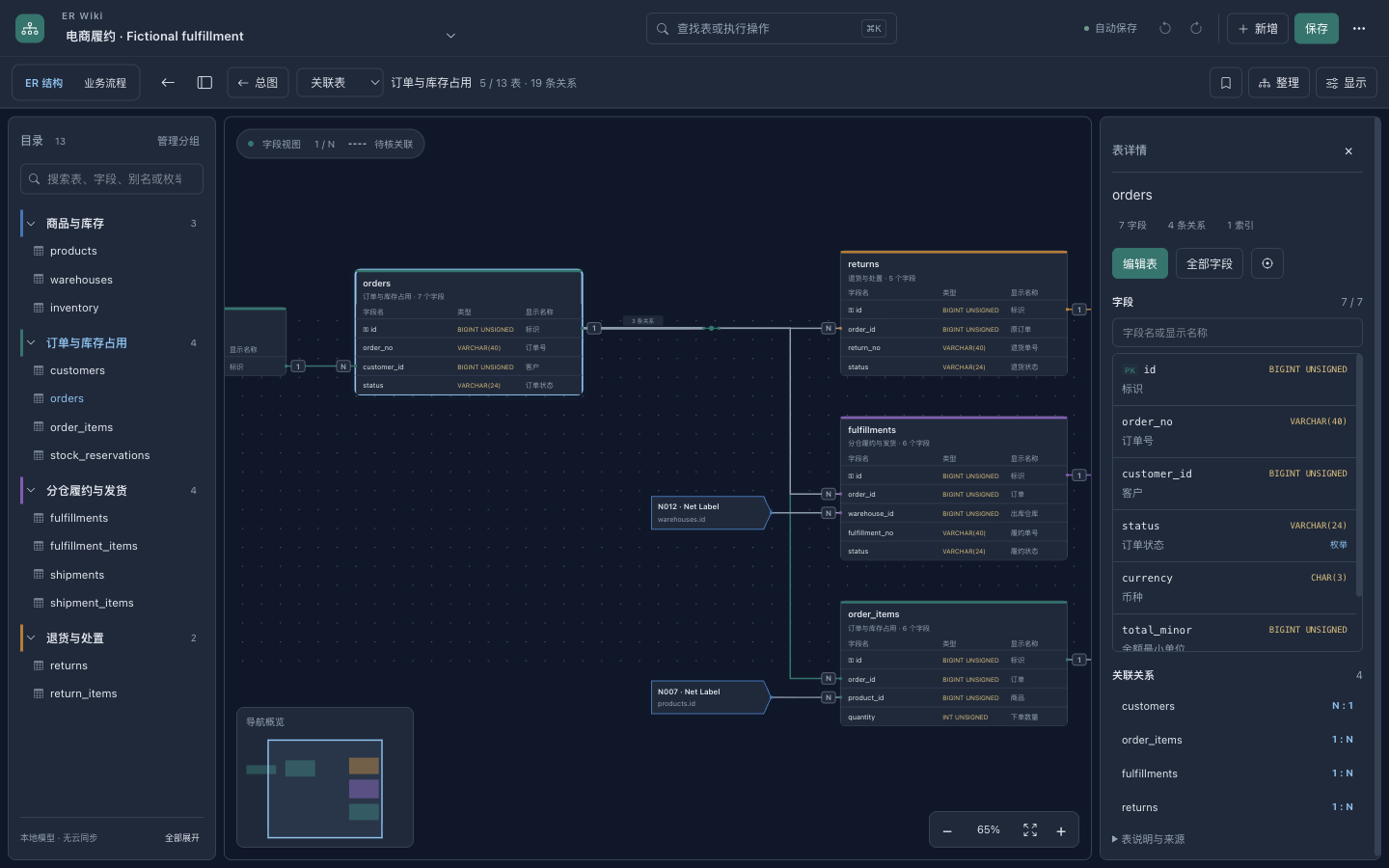
The ER diagram is the primary workspace. The directory keeps business domains within reach; selecting a table opens its fields and related tables without creating another copy of the model.
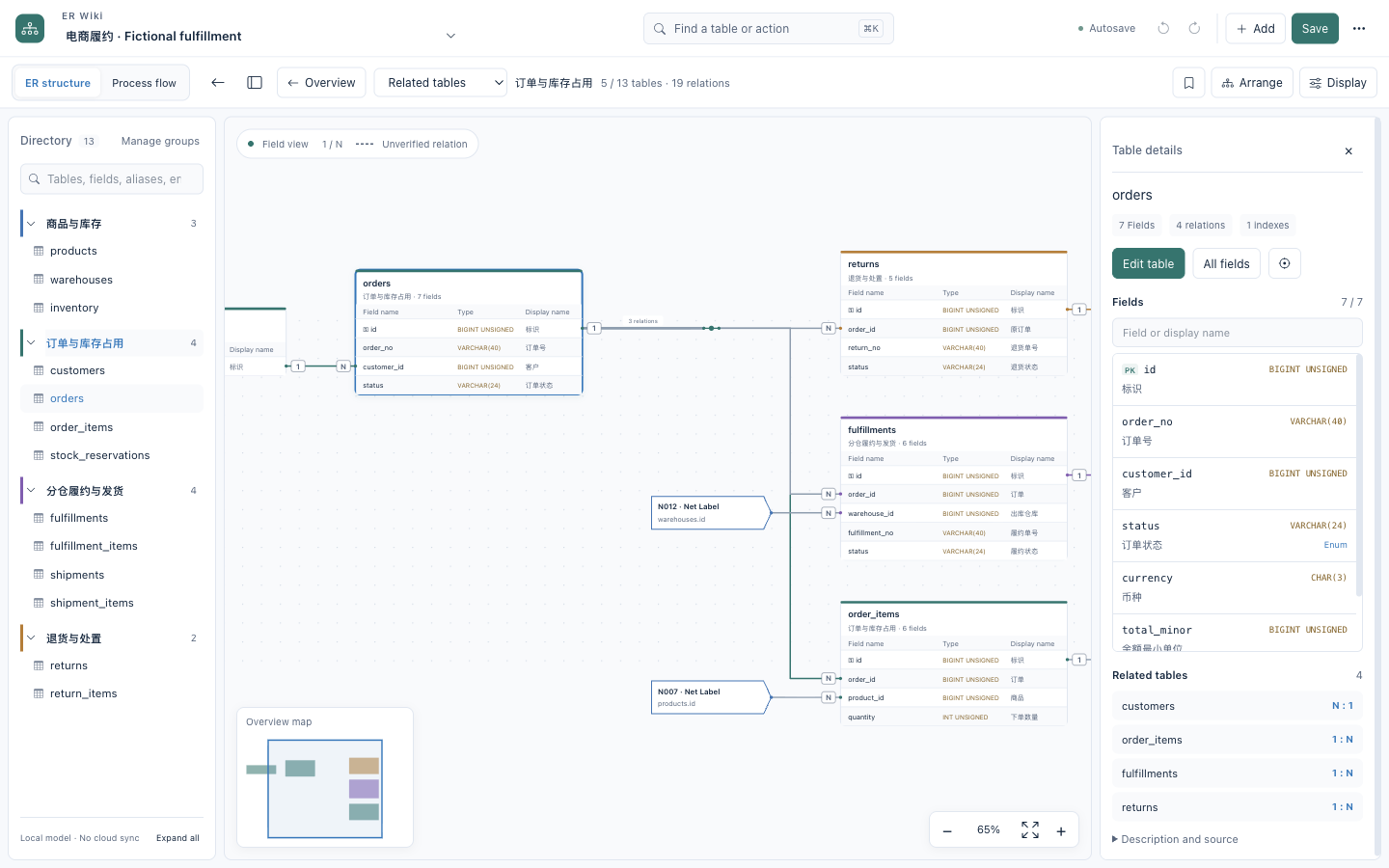
Fictional fulfillment example
The included example models products and warehouse stock → order reservations → split fulfillment → parcel shipment → returns. It has 13 tables and supports multi-warehouse allocation and partial shipments at the schema level.
These are real screenshots of the 0.2.0 macOS desktop app, loaded with the example JSON below. They are not a separately drawn mockup. They document that release; current source includes the newer four-sided routing and compaction described in workbench design. The live demo follows the deployed main branch.
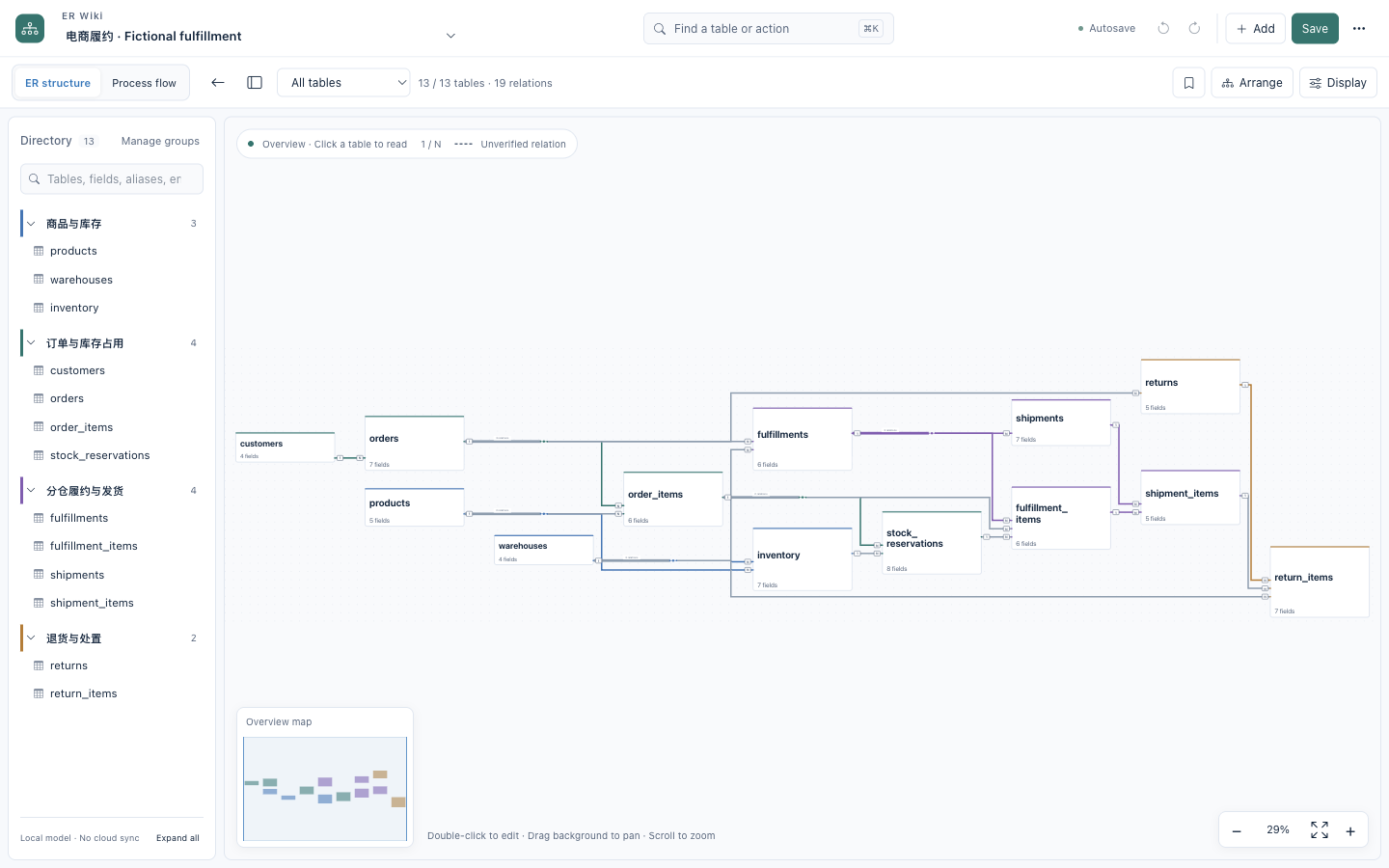
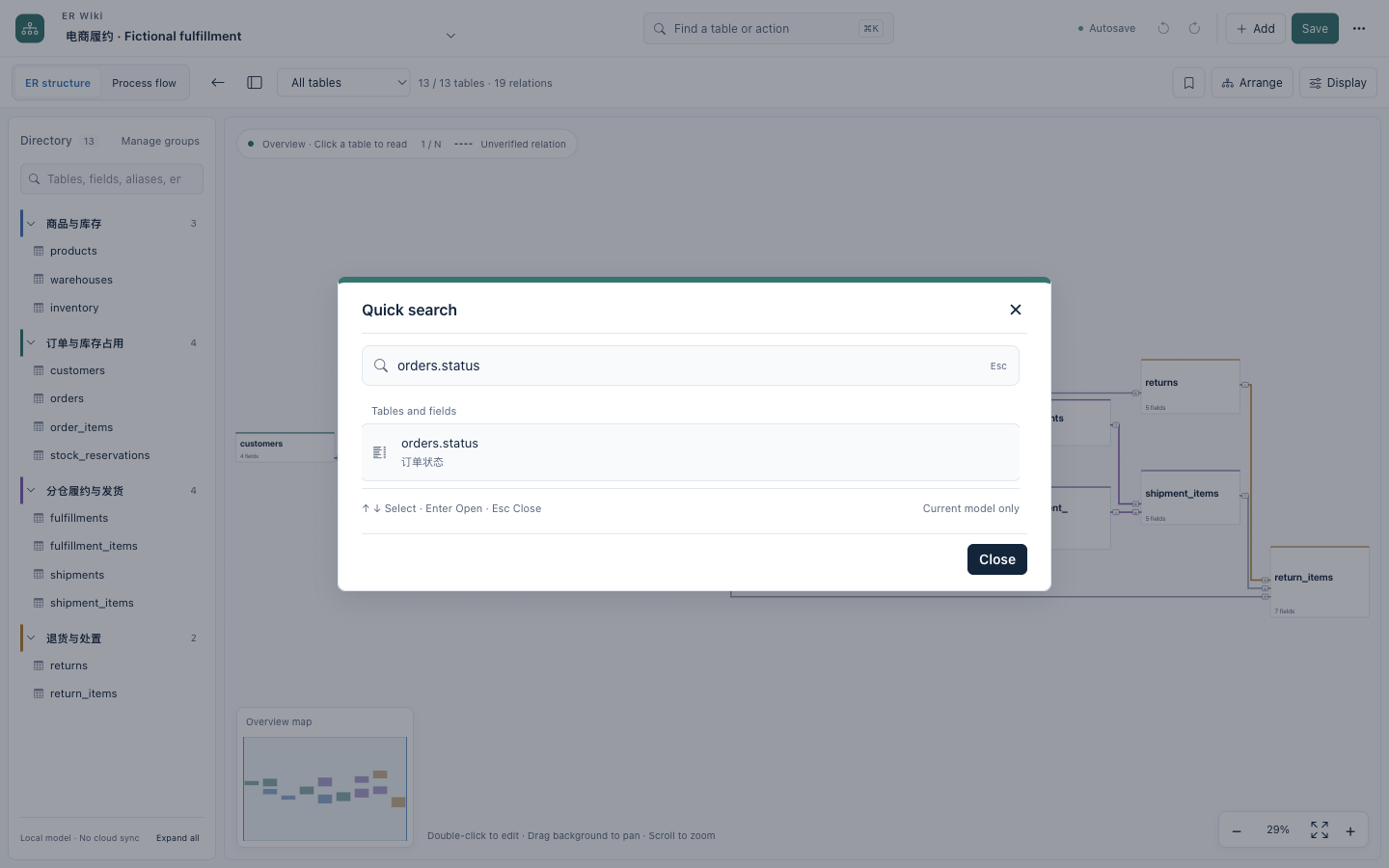
Read one-to-many endpoints and trace an individual relationship inside a bundle:
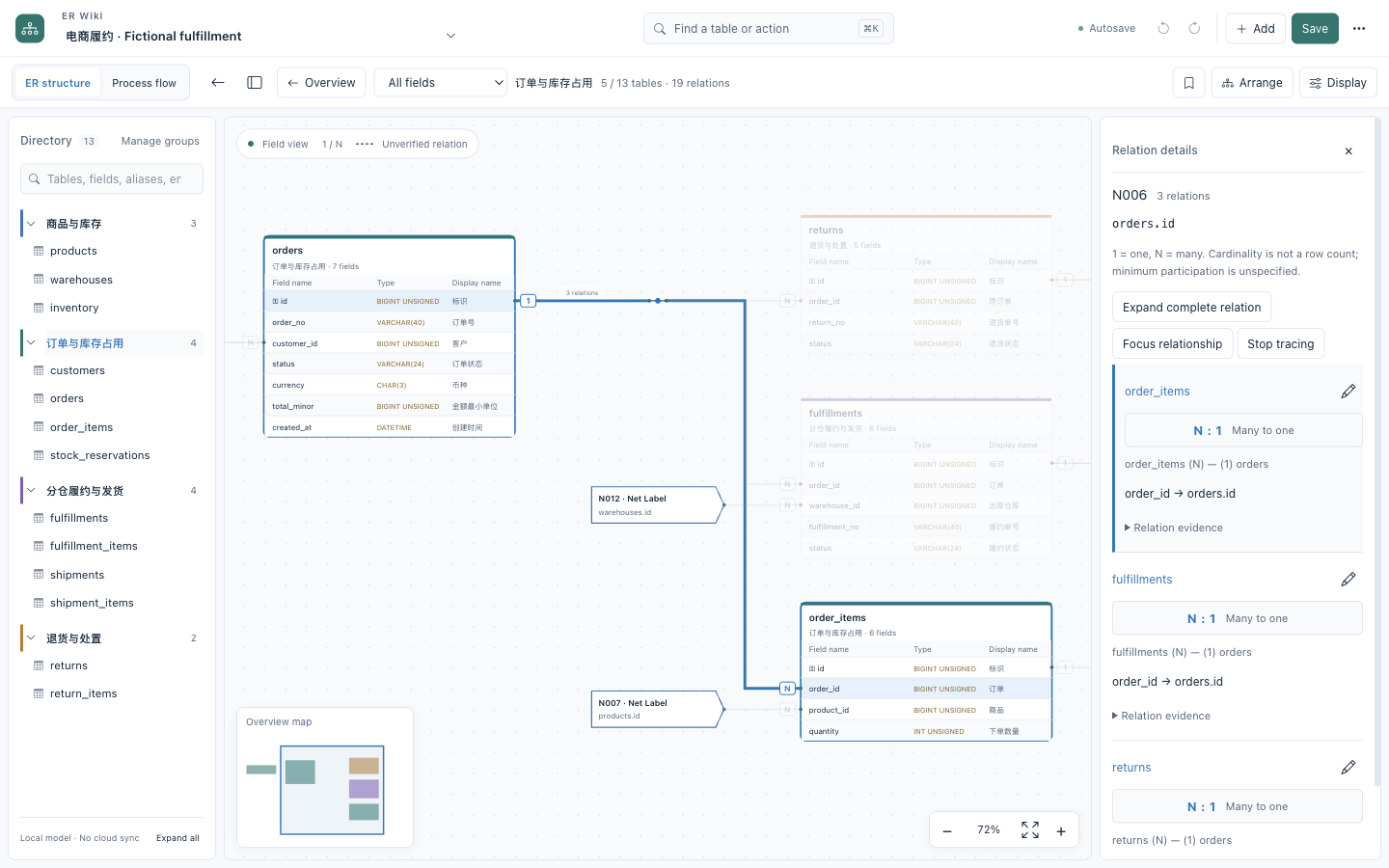
Domain drilldown, field details, table editing and quick search
Inspect one business domain while retaining references to the surrounding model:
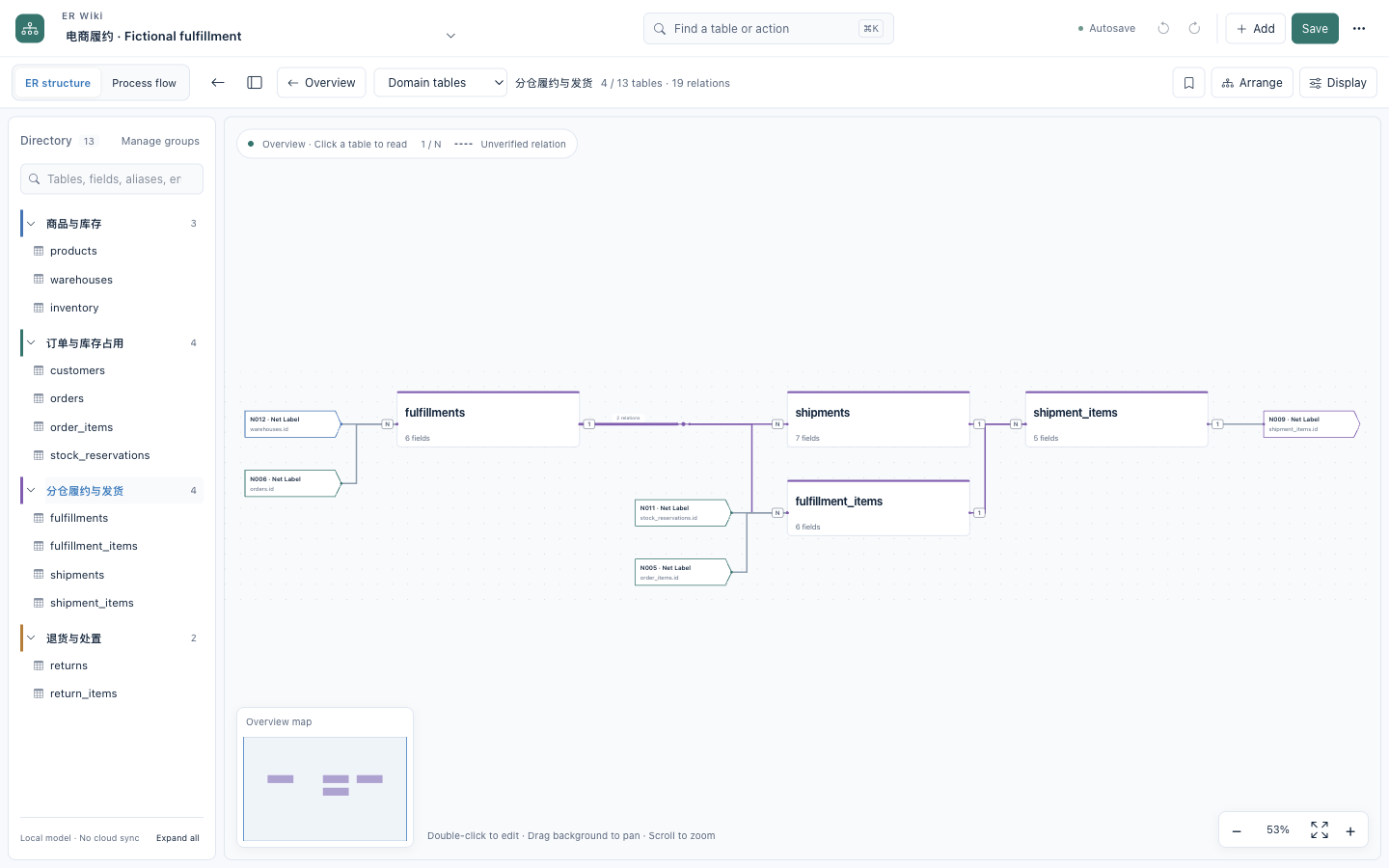
Focus on a field at reading size while keeping its context in the minimap:
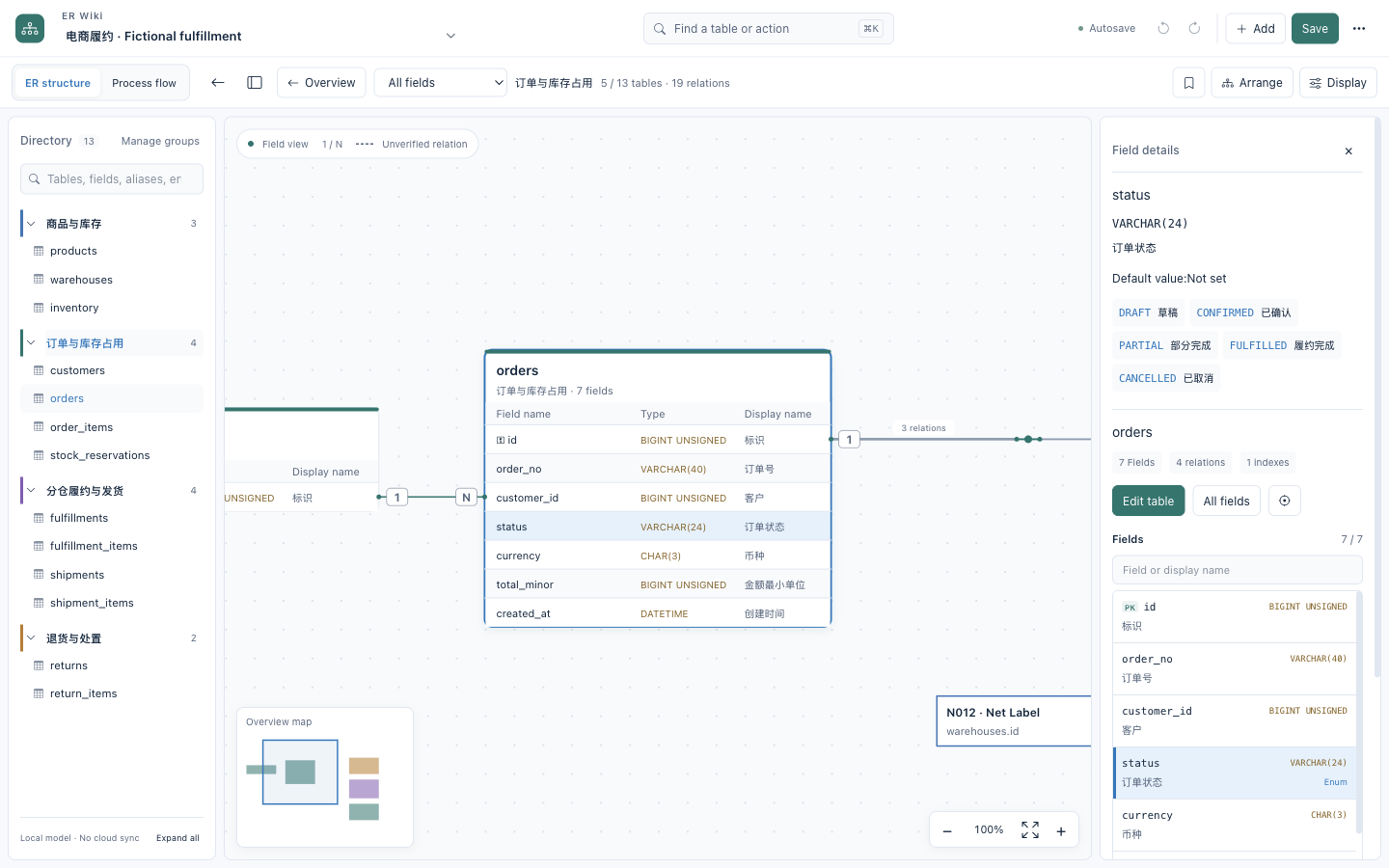
The same model in the actual table editor, including field names, types and display names:
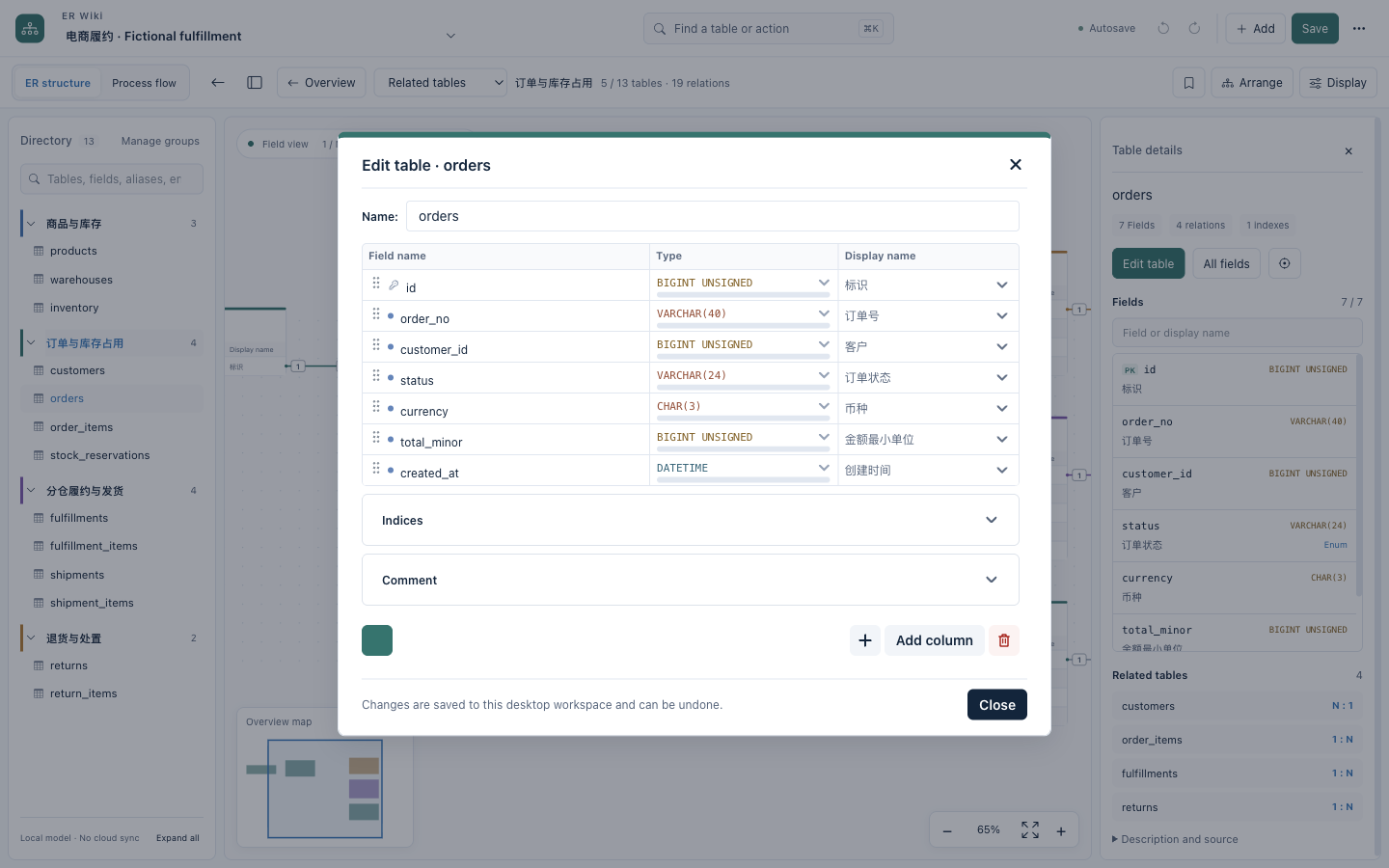
Quick search uses the same model and real desktop UI:
The same ER reading and editing tools are available in dark mode:
Optional process context
Switch to a lightweight process view when an explicit definition is available. Activity mappings link back to actual ER tables and fields. ER relationships do not generate a workflow automatically. There is no mixed ER/process diagram, BPMN designer or workflow engine. See process-view boundaries.
Model JSON · Example DDL · Reading guide · SVG exported by the app · Snapshot provenance
Desktop user guide · Installation and signing
The online demo reuses the desktop ER renderer, field inspector and minimap. Explore tables, domains, enums and 1/N relations in a browser. Editing, imports, persistence and process views remain desktop features. See demo scope and build instructions.
The Releases page is the source of truth for published versions and downloads.
This is an independently authored educational schema, not an export of a company database or Saleor's schema. Saleor's operations overview is a public reference for common stock and fulfillment concepts.
Build locally
Requirements: Git, Node.js 22.18+ and npm. The pinned renderer source and npm dependencies are downloaded at setup time; the installed desktop application does not need a development server.
npm ci
npm run setup
npm run scan
npm run build
npm start
Create a package for the current OS/architecture:
npm run package
Artifacts are written under desktop/release/<version>/. Published binary: macOS Apple Silicon (ARM64). Windows/Linux packaging paths
are not release-validated.
Local macOS packages are ad-hoc signed by default. Developer ID signing and
notarization are opt-in and require the maintainer's own credentials.
The community build uses a separate ER Wiki Community application-data directory. It does not read an existing private development profile.
Project layout
desktop/: Electron shell, EDA workspace and generic UI integration.desktop/native/: IPC, operating-system menus, command lifecycle and session policy.desktop/build/: normalized paths and the single pinned-upstream alias boundary.patches/: modifications to pinned upstream drawDB.upstream.json: original project URL and exact renderer commit.examples/: fictional model and illustrative DDL; no row data.scripts/: setup, offline assets, demo generation and publication guard.work/: generated upstream checkout, ignored by this repository.
See workbench design and source references for the module boundaries and UI patterns adopted from similar open-source projects.
Status and limits
This is a local schema reading/editing tool, not a database migration engine or a certified financial modeling tool. Layout selection is heuristic, not a global optimum. A drawn logical relationship is not automatically a database constraint.
See known limitations and the publication checklist. The CI badge and release page show live status. A passing build is not an independent review or full UI acceptance.
License and attribution
Distributed under GNU AGPL v3. drawDB remains credited as the upstream editor; this project is not affiliated with or endorsed by its maintainers. See NOTICE for provenance and third-party components. Packaged source includes the pinned upstream source plus the modifications and build scripts.
Contributors

53 commits
Similar repos


Languages
JavaScript
94.1%
CSS
5.7%
Offline-first ER modeling desktop with EDA-style orthogonal routing and a fictional fulfillment demo
See the codeSee what people are saying (1)
README
ER Wiki
Readable ER diagrams for complex database schemas.
EDA-style routing for database relationships. When a schema no longer fits on a whiteboard, drawing every relationship is only half the problem. ER Wiki applies orthogonal routing, obstacle avoidance and shared buses to make those connections easier to follow.
Try Live Demo ↗ · Project introduction · Desktop download
Offline-first desktop · AGPL-3.0 · Local SQL import · No application telemetry
13 fictional tables / 19 relationships. This is the real web renderer, not a competitor comparison or a large-schema benchmark. Hover to trace; double-click a wire for its fields, cardinality and recorded evidence.
中文说明 · Contributing · Security
Why route relationships like circuits?
Growing schemas can turn into spaghetti diagrams: shared keys, high-fanout tables and cross-domain links compete for the same space. Database schemas and circuit schematics share that visualization problem — many nodes, many connections, limited 2D space. ER Wiki focuses on how relationships are routed, not just where the tables sit.
- Paths: ELK orthogonal layouts and libavoid obstacle routing.
- Connections: shared relation buses, high-fanout junctions and traceable Net Labels.
- Ports: connections on all four sides, preserving field mappings and 1/N cardinality.
- Navigation: full overview → domain → table → column, with search and a minimap.
Layout is heuristic, not globally optimal. Dense graphs may still be marked degraded. See implementation and trade-offs.
Work on the model, locally
The Electron desktop app imports SQL locally, edits table/relationship definitions, round-trips JSON and exports SVG/PNG. The hosted demo is read-only and uses precomputed layouts. Neither is a database migration engine or an automatic business-process inference tool.
The desktop works offline without a hosted account or application telemetry. Update checks contact GitHub only when requested; the hosted site uses normal web requests. Built on drawDB, ELK, libavoid, React and Electron; English/Chinese interface switching does not translate model content.
The official demo is the exception: it includes complete English and Chinese example configurations. They share the same table/field IDs and relationships; only explanatory text differs.
More reading and editing capabilities
- Orthogonal ER diagrams, shared relation buses and high-fanout junctions.
- Double-click a wire for a compact explanation of its fields, cardinality and evidence; choose individual relationships on a shared bus. Try it in the live demo.
- Four-sided field ports, obstacle-avoiding routing and topology-aware SPOrE compaction; field identity and 1/N cardinality stay intact.
- Direct length/precision editing, enum editing and live structural checks without adding a review-history workflow.
- Replace a complete model in the running workspace without restarting or creating another model copy.
- Zoom-aware table summaries: readable table names in the overview, fields when zoomed in.
- Searchable field inspector with display names, types, enum values and related tables.
- Consistent domain colors for internal relationships, neutral cross-domain wires and focused relation tracing.
- Full-model overview plus domain, table and column inspection.
- Centered table editing, annotations, enum values and explicit relation editing.
- Local JSON import/export, separate model switching, undo/redo and save controls.
- Local SQL parsing and preview before importing a new model.
- Per-model reading positions, field/alias/enum search and reading bookmarks.
- Stable geometry for text-only edits; structural edits trigger orthogonal layout.
- Versioned JSON, automatic/manual local backups and restore-as-copy.
- Pure-diagram SVG/PNG export for the viewport, domain or full model.
- Display preferences are separate from saved model content.
- Keyboard-first quick search (⌘/Ctrl+K), grouped actions and independently folding domains.
- Navigation minimap, cursor-anchored zoom, 100% reading scale and remembered layout direction.
- 1 / N endpoint cardinality, individual relationship tracing and focus within bundles or Net Labels.
- No hosted account, cloud-sharing service or application telemetry is required.
See the actual desktop
The ER diagram is the primary workspace. The directory keeps business domains within reach; selecting a table opens its fields and related tables without creating another copy of the model.
Fictional fulfillment example
The included example models products and warehouse stock → order reservations → split fulfillment → parcel shipment → returns. It has 13 tables and supports multi-warehouse allocation and partial shipments at the schema level.
These are real screenshots of the 0.2.0 macOS desktop app, loaded with the example JSON below. They are not a separately drawn mockup. They document that release; current source includes the newer four-sided routing and compaction described in workbench design. The live demo follows the deployed main branch.
Read one-to-many endpoints and trace an individual relationship inside a bundle:
Domain drilldown, field details, table editing and quick search
Inspect one business domain while retaining references to the surrounding model:
Focus on a field at reading size while keeping its context in the minimap:
The same model in the actual table editor, including field names, types and display names:
Quick search uses the same model and real desktop UI:
The same ER reading and editing tools are available in dark mode:
Optional process context
Switch to a lightweight process view when an explicit definition is available. Activity mappings link back to actual ER tables and fields. ER relationships do not generate a workflow automatically. There is no mixed ER/process diagram, BPMN designer or workflow engine. See process-view boundaries.
Model JSON · Example DDL · Reading guide · SVG exported by the app · Snapshot provenance
Desktop user guide · Installation and signing
The online demo reuses the desktop ER renderer, field inspector and minimap. Explore tables, domains, enums and 1/N relations in a browser. Editing, imports, persistence and process views remain desktop features. See demo scope and build instructions.
The Releases page is the source of truth for published versions and downloads.
This is an independently authored educational schema, not an export of a company database or Saleor's schema. Saleor's operations overview is a public reference for common stock and fulfillment concepts.
Build locally
Requirements: Git, Node.js 22.18+ and npm. The pinned renderer source and npm dependencies are downloaded at setup time; the installed desktop application does not need a development server.
npm ci
npm run setup
npm run scan
npm run build
npm start
Create a package for the current OS/architecture:
npm run package
Artifacts are written under desktop/release/<version>/. Published binary: macOS Apple Silicon (ARM64). Windows/Linux packaging paths
are not release-validated.
Local macOS packages are ad-hoc signed by default. Developer ID signing and
notarization are opt-in and require the maintainer's own credentials.
The community build uses a separate ER Wiki Community application-data directory. It does not read an existing private development profile.
Project layout
desktop/: Electron shell, EDA workspace and generic UI integration.desktop/native/: IPC, operating-system menus, command lifecycle and session policy.desktop/build/: normalized paths and the single pinned-upstream alias boundary.patches/: modifications to pinned upstream drawDB.upstream.json: original project URL and exact renderer commit.examples/: fictional model and illustrative DDL; no row data.scripts/: setup, offline assets, demo generation and publication guard.work/: generated upstream checkout, ignored by this repository.
See workbench design and source references for the module boundaries and UI patterns adopted from similar open-source projects.
Status and limits
This is a local schema reading/editing tool, not a database migration engine or a certified financial modeling tool. Layout selection is heuristic, not a global optimum. A drawn logical relationship is not automatically a database constraint.
See known limitations and the publication checklist. The CI badge and release page show live status. A passing build is not an independent review or full UI acceptance.
License and attribution
Distributed under GNU AGPL v3. drawDB remains credited as the upstream editor; this project is not affiliated with or endorsed by its maintainers. See NOTICE for provenance and third-party components. Packaged source includes the pinned upstream source plus the modifications and build scripts.
Similar repos
Contributors
53 commits
Languages
JavaScript
94.1%
CSS
5.7%