
A loadout for every Focus: your Mac's Dock and wallpaper change with each Focus mode.
See the codeSee what people are saying
README
Loadout
A loadout for every Focus.
Give every Focus on your Mac its own Dock and its own wallpaper.
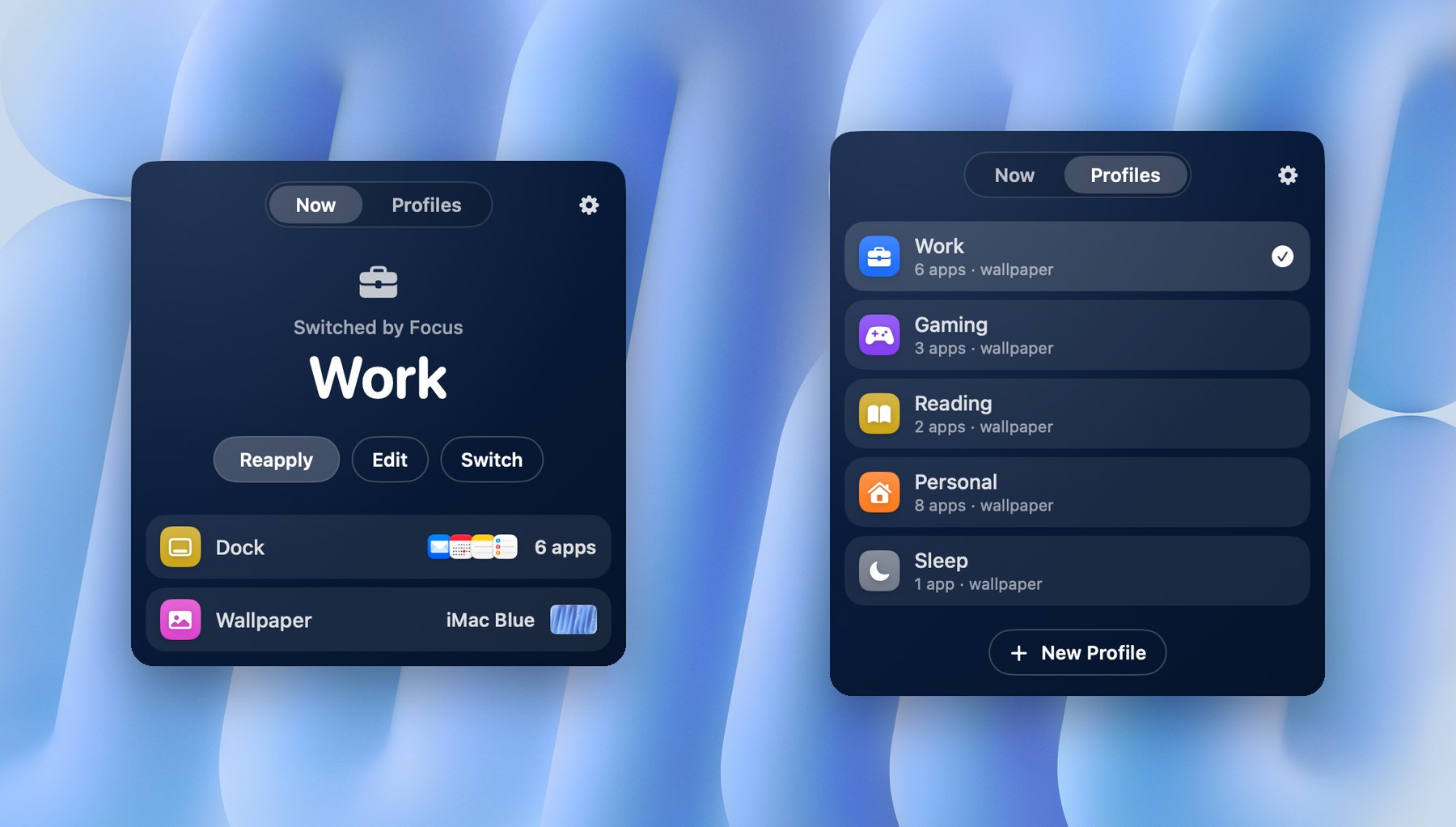
Loadout is a menu bar app. When a Focus turns on, it swaps your Dock apps, Dock folders and wallpaper for the ones you picked for that Focus. When the Focus ends, your usual setup comes back.
https://github.com/user-attachments/assets/2f1369d0-5e69-404c-a2d8-19ffaa8f47e0
Features
- A Dock per Focus. Each profile holds its own Dock apps and folders, in your order. Start from what's in your Dock right now and tick only the ones you want.
- Wallpaper that follows along. Choose an image, use your current wallpaper, or drop any image onto the profile. It's set on every display.
- Three ways to switch. A Focus Filter in System Settings, by hand from the menu bar, or the Apply Loadout Profile action in Shortcuts.
- Make it yours. Give each profile a colour and an icon. The menu bar panel and editor take on its tint.
- Private. No account, no analytics, no network access. Everything stays on your Mac.
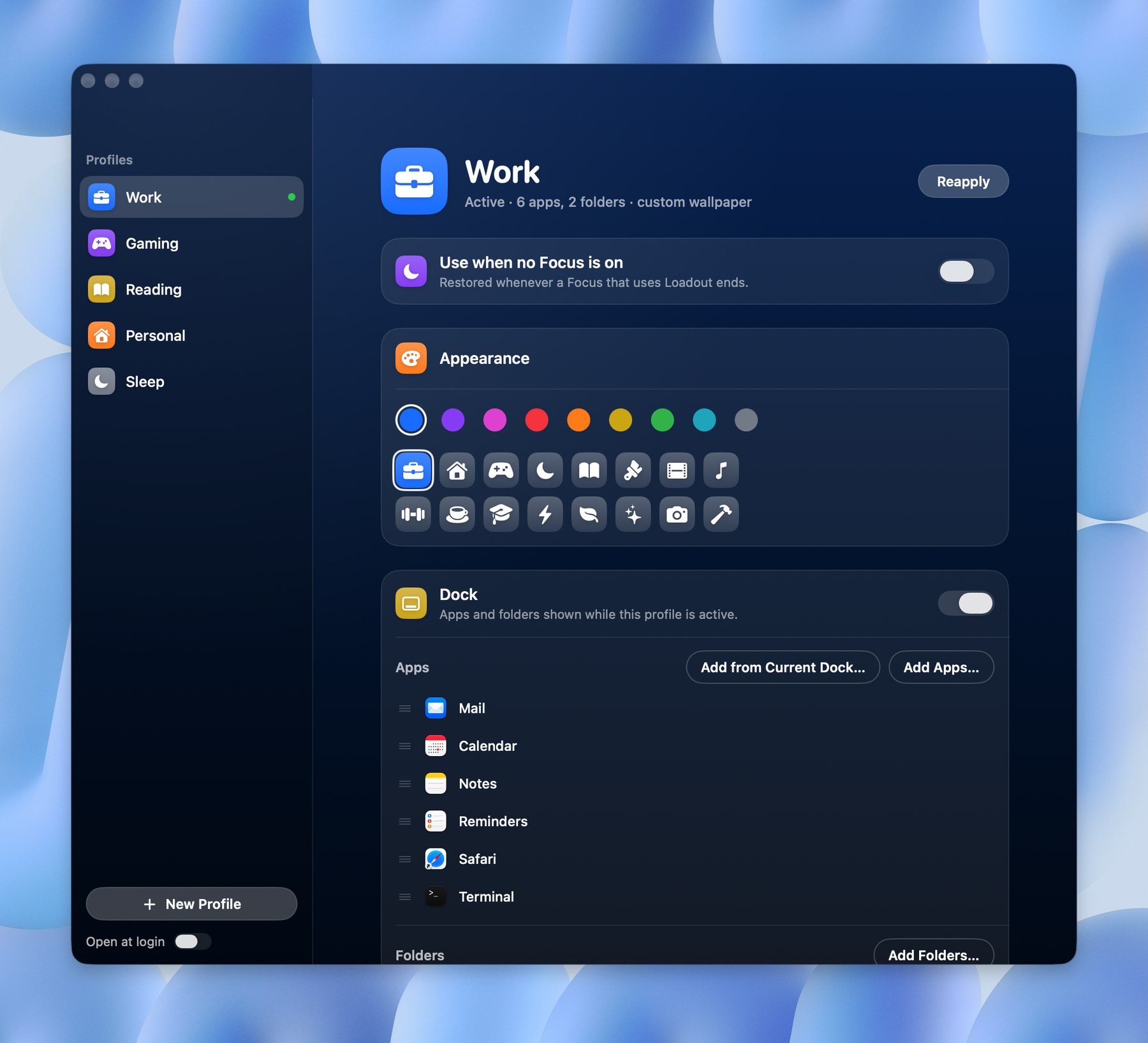 | 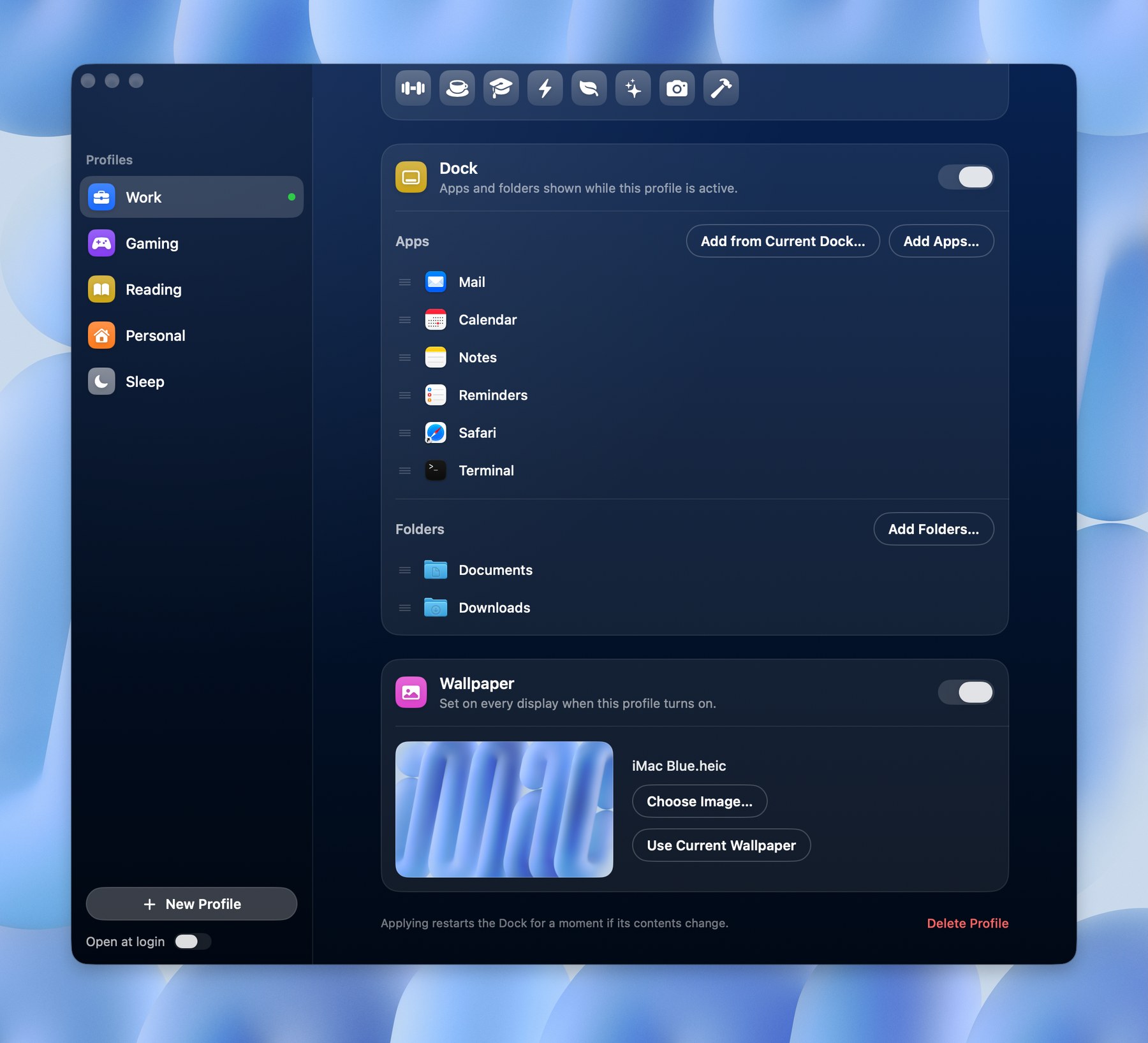 |
| Give each profile a colour and an icon | Pick its Dock apps, folders and wallpaper |
Requirements
- macOS 15 Sequoia or later
- Xcode 16 or later, to build it
Install
Download
- Download Loadout.dmg from the latest release.
- Open it and drag Loadout into Applications, then open Loadout.
- The first time, macOS says it can't verify the developer, because the app isn't notarized yet. Click Done, open System Settings › Privacy & Security, scroll down to the message about Loadout and click Open Anyway, then confirm with your password. After that it opens normally.
Build it yourself
-
Clone this repo and open
Loadout.xcodeprojin Xcode. -
Select the Loadout target › Signing & Capabilities and choose your own Team. A free Apple ID (Personal Team) works. Focus Filters only load from apps signed with a team, so an unsigned build will run but won't appear in Focus settings.
-
Press Run, or build from Terminal:
xcodebuild -project Loadout.xcodeproj -target Loadout -configuration Release SYMROOT="$PWD/build" DEVELOPMENT_TEAM=<your team ID> build -
Copy
build/Release/Loadout.appto/Applicationsand open it once so macOS registers its Focus Filter.
Set up
The first launch walks you through these steps.
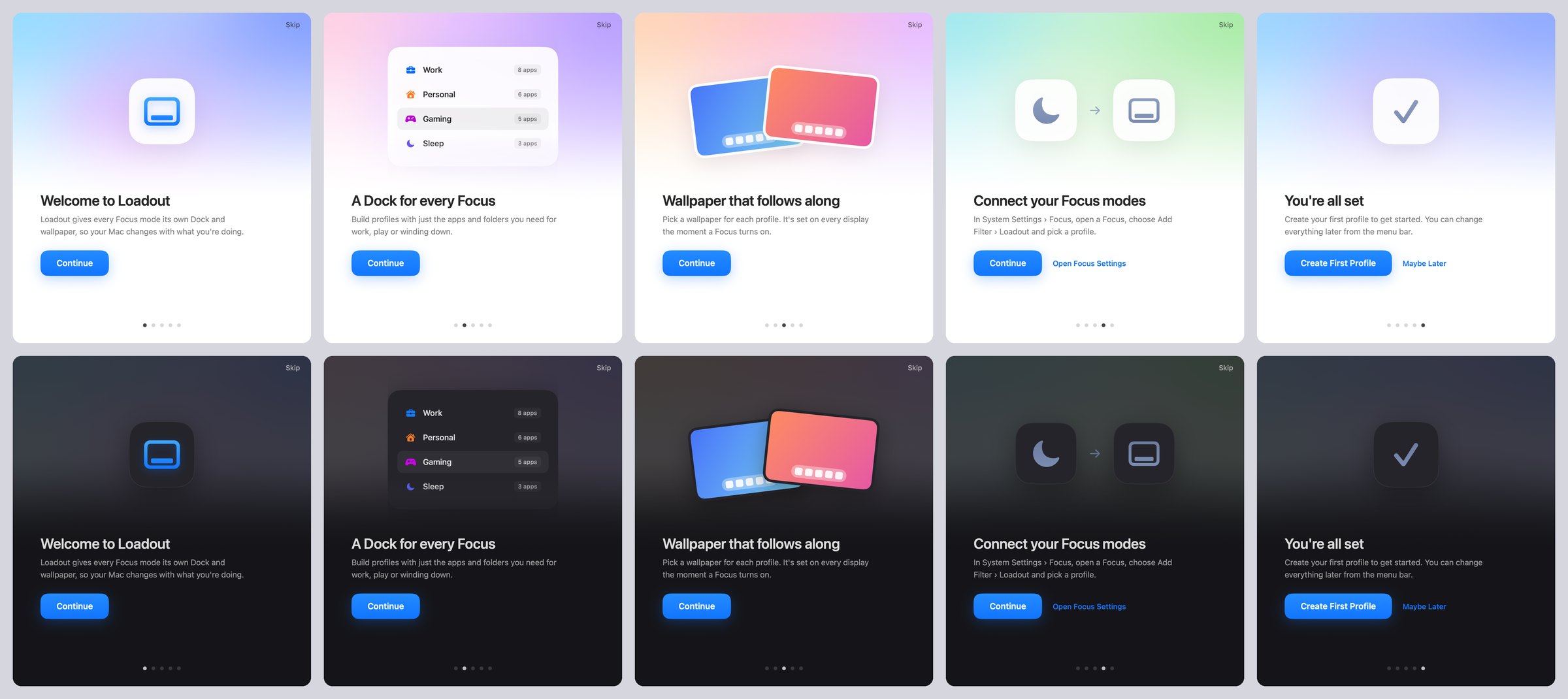
- Click the Loadout icon in the menu bar, then the gear › Edit Profiles…, and click New Profile (for example "Work").
- Under Dock, use Add from Current Dock… or Add Apps… / Add Folders…. Drag rows to reorder them.
- Under Wallpaper, choose an image or drop one onto the card.
- On the profile you want back when a Focus ends, turn on Use when no Focus is on.
- In System Settings › Focus, open a Focus, choose Add Filter › Loadout, and pick the profile.
- Repeat for each Focus.
You can also apply profiles by hand from the menu bar, or with the Apply Loadout Profile action in Shortcuts. To see the welcome screens again, use the gear › Show Welcome….
How it works
- The Dock is changed through the
com.apple.dockpreferences, then the Dock restarts (a short flicker), the same waydockutildoes. That's why the app isn't sandboxed. - A profile with no apps and no folders never touches your Dock, so an unfinished profile can't empty it.
- The wallpaper is set on every display, for the current Space only (a macOS limitation).
- Profiles are stored in
~/Library/Application Support/Loadout/profiles.json.
License
Similar repos


A loadout for every Focus: your Mac's Dock and wallpaper change with each Focus mode.
See the codeSee what people are saying
README
Loadout
A loadout for every Focus.
Give every Focus on your Mac its own Dock and its own wallpaper.
Loadout is a menu bar app. When a Focus turns on, it swaps your Dock apps, Dock folders and wallpaper for the ones you picked for that Focus. When the Focus ends, your usual setup comes back.
https://github.com/user-attachments/assets/2f1369d0-5e69-404c-a2d8-19ffaa8f47e0
Features
- A Dock per Focus. Each profile holds its own Dock apps and folders, in your order. Start from what's in your Dock right now and tick only the ones you want.
- Wallpaper that follows along. Choose an image, use your current wallpaper, or drop any image onto the profile. It's set on every display.
- Three ways to switch. A Focus Filter in System Settings, by hand from the menu bar, or the Apply Loadout Profile action in Shortcuts.
- Make it yours. Give each profile a colour and an icon. The menu bar panel and editor take on its tint.
- Private. No account, no analytics, no network access. Everything stays on your Mac.
| |
| Give each profile a colour and an icon | Pick its Dock apps, folders and wallpaper |
Requirements
- macOS 15 Sequoia or later
- Xcode 16 or later, to build it
Install
Download
- Download Loadout.dmg from the latest release.
- Open it and drag Loadout into Applications, then open Loadout.
- The first time, macOS says it can't verify the developer, because the app isn't notarized yet. Click Done, open System Settings › Privacy & Security, scroll down to the message about Loadout and click Open Anyway, then confirm with your password. After that it opens normally.
Build it yourself
-
Clone this repo and open
Loadout.xcodeprojin Xcode. -
Select the Loadout target › Signing & Capabilities and choose your own Team. A free Apple ID (Personal Team) works. Focus Filters only load from apps signed with a team, so an unsigned build will run but won't appear in Focus settings.
-
Press Run, or build from Terminal:
xcodebuild -project Loadout.xcodeproj -target Loadout -configuration Release SYMROOT="$PWD/build" DEVELOPMENT_TEAM=<your team ID> build -
Copy
build/Release/Loadout.appto/Applicationsand open it once so macOS registers its Focus Filter.
Set up
The first launch walks you through these steps.
- Click the Loadout icon in the menu bar, then the gear › Edit Profiles…, and click New Profile (for example "Work").
- Under Dock, use Add from Current Dock… or Add Apps… / Add Folders…. Drag rows to reorder them.
- Under Wallpaper, choose an image or drop one onto the card.
- On the profile you want back when a Focus ends, turn on Use when no Focus is on.
- In System Settings › Focus, open a Focus, choose Add Filter › Loadout, and pick the profile.
- Repeat for each Focus.
You can also apply profiles by hand from the menu bar, or with the Apply Loadout Profile action in Shortcuts. To see the welcome screens again, use the gear › Show Welcome….
How it works
- The Dock is changed through the
com.apple.dockpreferences, then the Dock restarts (a short flicker), the same waydockutildoes. That's why the app isn't sandboxed. - A profile with no apps and no folders never touches your Dock, so an unfinished profile can't empty it.
- The wallpaper is set on every display, for the current Space only (a macOS limitation).
- Profiles are stored in
~/Library/Application Support/Loadout/profiles.json.