
Theologia Search: A Deterministic Search Application for a Source-Faithful Collection of Christian Theological Books
Python
0
0 commits
updated Sep 19, 2026
See what people are saying (1)
README
Theologia Search
Download the latest release here.
Theologia Search is a deterministic search application for a source-faithful collection of Christian theological books. It retrieves and ranks evidence from a local SQLite index. It does not generate theological conclusions, summaries, or answers with an AI model.
This folder is the retrieval and application layer. The factual knowledge base is maintained separately and supplies the source evidence, citations, and metadata used to build the index.
1. Project Overview
Aim
The project makes a large historical theology collection searchable while keeping every result traceable to its source. Search expansion, morphology, ranking, author periods, and result clusters are deterministic retrieval aids. They do not replace reading the cited passage or make a doctrinal judgment.
Current database
The current primary index contains:
- 66 author-period records.
- 287 indexed source volumes.
- 277 volumes with evidence records.
- 118,242 evidence records.
- 882 registered search terms.
- 31 configured morphology forms and 326,782 morphology matches.
- 5,061 mentioned-author links covering 60 distinct mentioned authors.
- Three historical result groups:
- Before the Council of Nicaea, up to 325 AD.
- After the Council of Nicaea and before the Reformation, 326-1516 AD.
- After the Reformation, 1517 AD and later.
For a complete author and volume listing, see CATALOG.txt.
What users receive
Users receive ranked evidence passages with source title, author, heading, snippet, evidence ID, and context actions. Regular search returns up to the selected limit independently within each historical period. Advanced search can combine concept, author, mentioned author, period, book, and chapter metadata.
The work author and mentioned author are separate concepts. A passage in Augustine's City of God that discusses Origen remains attributed to Augustine for historical grouping and period classification, while Origen remains searchable through the Mentioned author field.
The installer contains the searchable index and application resources. It does not contain the raw knowledge-base repository or original book PDFs.
Search policy
- No AI models or embeddings are used for retrieval.
- No generated theological summaries or conclusions are stored.
- Query expansion is human-curated and deterministic.
- Morphology and term-family matching are conservative search aids.
- SQLite is a generated index and should be rebuilt from the KB rather than edited manually.
2. Build and Install
Build-machine prerequisites
The build process targets Windows 10 and Windows 11. The build machine needs:
- Python.
- PySide6, installed from
requirements-gui.txt. - PyInstaller, installed from
requirements-build.txt. - Inno Setup 6.
- The generated SQLite index at
generated/semantic_index.sqlite.
End users do not need Python, pip, PySide6, PyInstaller, Inno Setup, or an internet connection.
Install the Python build requirements:
python -m pip install -r ./requirements-gui.txt
python -m pip install -r ./requirements-build.txt
Create the installer
From this theologia_search folder, run:
./installer/build_installer.ps1 -PythonExe ".\.venv\Scripts\python.exe"
The script validates the SQLite manifest, creates the PyInstaller application folder, validates the packaged payload, runs the executable startup self-test, and invokes Inno Setup.
It recreates these generated folders automatically:
build/
dist/
release/
The final installer is:
release/Theologia Search Setup.exe
Precompiled installers and separately downloadable SQLite datasets are available on the Theologia Search GitHub Releases page.
The installer includes the Python runtime, PySide6 and Qt libraries, the SQLite
database, search configuration, fonts, artwork, README, and CATALOG.txt.
The current installed payload is approximately 1.9 GB; the compressed setup file
is substantially smaller.
Licensing
Theologia Search is distributed under the non-commercial terms in
license/LICENSE.txt. Third-party font terms and CCEL
copyright information are documented in license/THIRD-PARTY-NOTICES.txt.
The generated SQLite database includes indexed content derived in part from
CCEL editions. Those third-party materials remain subject to their own
licenses and rights.
Install and distribute
The installer uses a per-user default location under:
%LOCALAPPDATA%/Theologia Search
The user can choose another installation directory in the wizard. The installer creates a Start Menu shortcut and offers an optional Desktop shortcut. It also registers a normal Windows uninstaller.
The setup executable should be published as a release asset on the Theologia
Search GitHub Releases page.
Users only need to download and run the setup file; they do not need the
repository, index_manifest.json, or the original SQLite file.
3. Using the Installed Qt GUI
The packaged application launches as TheologiaSearch.exe. The Python
development launch is described in the next section.
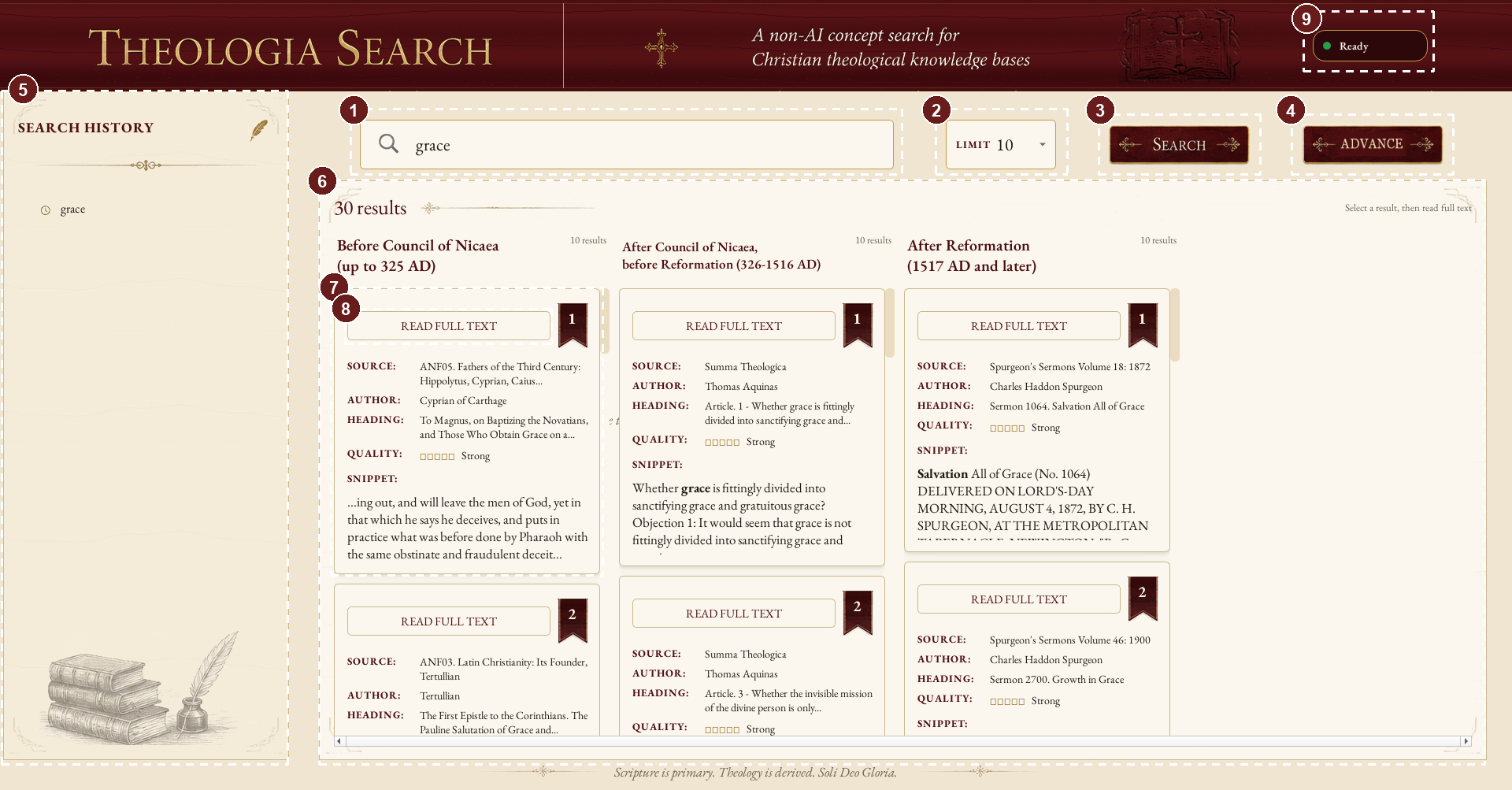
The screenshot uses numbered dotted callouts without overlaid explanatory text. The numbered areas are:
- Search field.
- Result limit. The limit applies independently to each historical section.
- Regular search button.
- Advanced search button.
- Search history.
- Historical period sections.
- A result card with citation, author, heading, quality, and snippet.
- Full-context action.
- Application status.
Regular search
- Enter a word or phrase in the Search field, such as
graceorrelationship between three persons in trinity. - Choose a result limit. A limit of
10means up to 10 results in each historical period, not 10 total. - Select Search or press Enter.
- Read the three period columns independently. An empty period is meaningful only when the requested concept and filters have no matching evidence there.
Results show the source, work author, heading, quality label, score, and a highlighted snippet. The score is a bounded comparison score for the same query; it is not a probability or a measure of theological truth.
Result details
- Source identifies the indexed volume.
- Author is the work or evidence author used for historical grouping.
- Heading identifies the chapter or section when available.
- Quality reports the strength of literal, structural, morphology, and curated-term matches.
- Snippet provides local evidence context and highlighted matches.
- Read Full Text opens the surrounding source context from the index.
Search history appears in the left panel. It is saved per Windows user at:
%LOCALAPPDATA%/Theologia Search/gui_search_history.json
History is separate from the read-only bundled database. Clearing history does not change the index.
Advanced search
Select Advanced to combine metadata fields with a concept search. The available fields are:
- Concept or phrase: the deterministic text search query.
- Author: the work or evidence author.
- Mentioned author: a person discussed in the evidence, separate from the work author.
- Period: the historical period of the work author.
- Book: source volume or book title.
- Chapter: chapter or section heading.
Each metadata field has an AND or OR connector. AND requires the selected
metadata branches to match together. OR accepts a row when at least one
branch matches. Text fields use case-insensitive token-substring matching.
Numeric chapter terms use complete-token matching, so chapter 29 does not
match chapter 129.
Metadata-only searches are supported. An explicitly selected period is a hard scope; an unrestricted search still shows the period sections independently.
Reading historical results correctly
Historical grouping follows the work author. Mentioned or discussed authors do not change the period of the work. For example, Origen can appear in the Mentioned author field for a passage from Augustine's City of God, but the result remains in the Nicene-to-Reformation grouping because Augustine wrote the work after Nicaea.
4. Python GUI Development and Debugging
Install GUI dependencies
python -m pip install -r ./requirements-gui.txt
Launch the Qt GUI
From this folder:
python ./qt_gui.py
The Qt GUI reads the default index from:
generated/semantic_index.sqlite
It also requires:
generated/index_manifest.json
concept_query_lexicon.json
assets/fonts/
assets/png/
The SQLite file is intentionally ignored by Git because it is approximately
1.9 GB. It must be obtained separately when setting up a fresh checkout; it is
not downloaded automatically by git clone.
For a source checkout, the only large data file that must be supplied outside Git is the SQLite database. Place it here before launching the GUI:
generated/semantic_index.sqlite
Download the SQLite database from the matching release on the Theologia Search GitHub Releases page. The packaged application already contains the database; this separate download is only for developers running the project from source.
The matching generated/index_manifest.json must also be present beside it.
That manifest is small and is tracked in this repository, but replace it with
the matching manifest whenever the SQLite file comes from a different index
build. No other dataset download is required: the lexicon, fonts, artwork,
search code, and optional generated search metadata are already part of the
repository.
Both files contain the same embedded dataset_version. The version is a
release label, not part of either filename. After downloading or replacing a
dataset, print both values from the repository root:
python -c 'import json,sqlite3; m=json.load(open("generated/index_manifest.json",encoding="utf-8")); c=sqlite3.connect("generated/semantic_index.sqlite"); print("Manifest:", m.get("dataset_version")); print("SQLite:", c.execute("select value from metadata where key=''dataset_version''").fetchone()[0])'
The two values must match. Do not edit only the manifest to make an unrelated SQLite file appear valid; the manifest and database must be generated or distributed as a matched pair.
Downloading a newer released dataset
- Download the newer SQLite database and its matching
index_manifest.jsonfrom the corresponding release on the Theologia Search GitHub Releases page. - Replace both
generated/semantic_index.sqliteandgenerated/index_manifest.json. - Do not mix files from different downloads.
- Open the manifest and confirm its
dataset_version. - Run the command above and confirm the SQLite value is identical.
- Check synchronization:
python ./check_index_sync.py
- Run the search tests before launching the GUI:
python -m unittest discover -s tests -q
Alternatively, keep the database elsewhere and pass its full path with the
CLI --index option or the Python index_path argument. The packaged
installer already includes the SQLite database and does not require this
separate setup step.
Launch the legacy Tkinter GUI
python ./gui.py
The Tkinter interface remains available as a fallback. The Qt interface is the packaged and recommended desktop application.
Use an external index from Python
The GUI helpers accept an explicit index path. This is useful when the database is stored outside the repository:
from pathlib import Path
from gui import run_search

output = run_search(
    "grace",
    index_path=Path(r"..\data\semantic_index.sqlite"),
    lexicon_path=Path("concept_query_lexicon.json"),
    period_sections=True,
    limit=10,
)
for row in output.results:
    print(row["evidence_id"], row["author"], row["snippet"])
For the CLI, use the same external database with --index:
python ./search.py --index "../data/semantic_index.sqlite" --concept "grace"
Debugging checklist
- Missing semantic index: place
semantic_index.sqliteundergenerated/, or pass an explicit external path. - Missing lexicon: restore
concept_query_lexicon.jsonfrom the repository. - Stale manifest: run
check_index_sync.pyand rebuild the index. - SQLite error or damaged index: replace the database with a fresh build; do not patch the SQLite file manually.
- PySide6 import error: install
requirements-gui.txtin the Python environment used to launch the GUI. - Startup resource error: confirm the assets, lexicon, manifest, and database paths are beside the source or packaged application.
- History permission error: confirm the current Windows user can write to
%LOCALAPPDATA%/Theologia Search.
Run the regression tests with:
python -m unittest discover -s tests -q
5. CLI and Python API
Basic CLI search
python ./search.py --concept "grace" --period-sections --limit 10
Useful examples:
# Search and show deterministic expansion
python ./search.py --concept "relationship between three persons in trinity" --period-sections --cluster-results --show-expansion --limit 10

# Show raw terms, mechanical variants, phrases, and FTS terms
python ./search.py --concept "animal soul" --show-query-plan

# Filter by work author
python ./search.py --concept "grace" --author "Augustine of Hippo" --limit 10

# Filter by mentioned or discussed author
python ./search.py --concept "doctrine" --mentioned-author "Origen" --limit 10

# Filter by source ID, source title, PDF path, or unique substring
python ./search.py --concept "grace" --source "NPNF1_02" --limit 10

# Filter by heading or outline section
python ./search.py --concept "grace" --section "City of God" --limit 10

# Emit machine-readable JSON Lines
python ./search.py --concept "grace" --period-sections --jsonl --limit 10

# Omit snippets from readable output
python ./search.py --concept "grace" --no-snippet --limit 10

# Add corpus-derived neighboring terms
python ./search.py --concept "trinity" --cooccurrence-expansion --show-expansion

# Show recurring nearby phrases for human review
python ./search.py --concept "animal soul" --show-discovered-phrases
The CLI supports --source, --author, --authors,
--mentioned-author, --mentioned-authors, --section, --limit,
--candidate-limit, --period-sections, --cluster-results,
--show-expansion, --show-query-plan, --show-discovered-phrases,
--cooccurrence-expansion, --jsonl, --no-snippet, and
--rebuild-index.
The full combination of advanced metadata fields is available through the Qt
dialog and Python API. The CLI's --section option is the direct command-line
heading/chapter filter.
Python API
The main retrieval API is in search.py:
search_concept(...): search one concept against a database connection.search_concept_by_period(...): return independent period-grouped results.search_advanced(...): combine concept and metadata criteria.search_advanced_by_period(...): run advanced search independently by period.AdvancedSearchCriteria: structured concept, author, mentioned-author, period, book, chapter, and connector inputs.load_lexicon(...): load the curated query expansion file.validate_advanced_criteria(...): validate advanced criteria.configure_search_connection(...): configure SQLite search behavior.
Typical integration code:
import json
import sqlite3
from pathlib import Path

import search

index_path = Path("generated/semantic_index.sqlite")
lexicon = search.load_lexicon(Path("concept_query_lexicon.json"))
with sqlite3.connect(index_path) as con:
    con.row_factory = sqlite3.Row
    groups, expansion = search.search_concept_by_period(
        con,
        "grace",
        lexicon,
        limit=10,
    )
    for group in groups:
        for row in group["results"]:
            print(json.dumps({
                "period": group["period_id"],
                "evidence_id": row["evidence_id"],
                "author": row["author"],
                "source_title": row["source_title"],
                "heading": row["heading"],
                "snippet": row["snippet"],
                "score": row["concept_score"],
            }, ensure_ascii=False))
Result rows preserve source-faithful fields including evidence_id,
source_id, source_title, pdf_file, author,
author_period_id, author_period_label, mentioned_authors,
page_number, heading, outline_path, verbatim_text, and
snippet. Diagnostic fields include concept_score, quality_label,
quality_grade, matched_raw_terms, matched_registered_terms,
matched_lemmas, matched_morphology_forms,
matched_term_families, raw_phrase_matches, and
proximity_matches.
Future AI integration
An AI application can use this API as a retrieval and citation layer:
- Send the user's question or concept to deterministic search.
- Apply author, mentioned-author, period, book, or chapter filters when known.
- Pass returned evidence text and citation fields to the AI as context.
- Require citations using
evidence_id, author, source title, heading, and snippet.
The AI should treat scores as ranking signals, not truth values. It should not invent claims when no evidence is returned, and it should preserve the work-author versus mentioned-author distinction.
6. Updating the SQLite Index from the External KB
The factual knowledge base is maintained in a separate repository. This
repository reads that KB and creates a generated SQLite retrieval index. The
search project does not edit christian_kb_* source files.
Standard rebuild
Assuming the KB repository is available at a relative path such as
../knowledge_base:
python ./build_index.py --kb-dir "../knowledge_base"
The default output is:
generated/semantic_index.sqlite
generated/index_manifest.json
The default layer is primary. Other supported layers are:
python ./build_index.py --kb-dir "../knowledge_base" --layer extended
python ./build_index.py --kb-dir "../knowledge_base" --layer archival
python ./build_index.py --kb-dir "../knowledge_base" --layer all
Check and synchronize
Check whether the current SQLite index matches the KB:
python ./check_index_sync.py --kb-dir "../knowledge_base"
Rebuild automatically when the index is missing or stale:
python ./check_index_sync.py --kb-dir "../knowledge_base" --sync
The check compares schema, builder version, KB generation timestamp, layer, author-period metadata, and other manifest values. It does not patch the SQLite file in place.
After a rebuild
- Confirm the manifest and evidence counts.
- Run the full regression suite.
- Run representative regular and advanced searches.
- Verify author and mentioned-author behavior.
- Run
check_index_sync.pyagain. - Rebuild the Windows installer so the new SQLite file is bundled:
./installer/build_installer.ps1 -PythonExe ".\.venv\Scripts\python.exe"
When building a newer dataset release, first update the DATASET_VERSION
constant in build_index.py, for example from 1.0.0 to 1.1.0:
DATASET_VERSION = "1.1.0"
Then rebuild from the external KB:
python ./build_index.py --kb-dir "../knowledge_base"
The build regenerates the normal paths generated/semantic_index.sqlite and
generated/index_manifest.json, writing the same configured version into both.
Confirm the two embedded values with the command in the source-checkout
section, run synchronization and regression tests, and rebuild the installer
if the new dataset will be distributed. The runtime checks only that the two
embedded values agree; it does not require a particular version number or a
versioned filename.
Do not manually edit the SQLite database to correct KB attribution or metadata. Fix the source KB or its builder, rebuild the affected KB data, and then rebuild the search index.
Similar repos


Languages
Python
98.9%
Theologia Search: A Deterministic Search Application for a Source-Faithful Collection of Christian Theological Books
Python
0
0 commits
updated Sep 19, 2026
See what people are saying (1)
README
Theologia Search
Download the latest release here.
Theologia Search is a deterministic search application for a source-faithful collection of Christian theological books. It retrieves and ranks evidence from a local SQLite index. It does not generate theological conclusions, summaries, or answers with an AI model.
This folder is the retrieval and application layer. The factual knowledge base is maintained separately and supplies the source evidence, citations, and metadata used to build the index.
1. Project Overview
Aim
The project makes a large historical theology collection searchable while keeping every result traceable to its source. Search expansion, morphology, ranking, author periods, and result clusters are deterministic retrieval aids. They do not replace reading the cited passage or make a doctrinal judgment.
Current database
The current primary index contains:
- 66 author-period records.
- 287 indexed source volumes.
- 277 volumes with evidence records.
- 118,242 evidence records.
- 882 registered search terms.
- 31 configured morphology forms and 326,782 morphology matches.
- 5,061 mentioned-author links covering 60 distinct mentioned authors.
- Three historical result groups:
- Before the Council of Nicaea, up to 325 AD.
- After the Council of Nicaea and before the Reformation, 326-1516 AD.
- After the Reformation, 1517 AD and later.
For a complete author and volume listing, see CATALOG.txt.
What users receive
Users receive ranked evidence passages with source title, author, heading, snippet, evidence ID, and context actions. Regular search returns up to the selected limit independently within each historical period. Advanced search can combine concept, author, mentioned author, period, book, and chapter metadata.
The work author and mentioned author are separate concepts. A passage in Augustine's City of God that discusses Origen remains attributed to Augustine for historical grouping and period classification, while Origen remains searchable through the Mentioned author field.
The installer contains the searchable index and application resources. It does not contain the raw knowledge-base repository or original book PDFs.
Search policy
- No AI models or embeddings are used for retrieval.
- No generated theological summaries or conclusions are stored.
- Query expansion is human-curated and deterministic.
- Morphology and term-family matching are conservative search aids.
- SQLite is a generated index and should be rebuilt from the KB rather than edited manually.
2. Build and Install
Build-machine prerequisites
The build process targets Windows 10 and Windows 11. The build machine needs:
- Python.
- PySide6, installed from
requirements-gui.txt. - PyInstaller, installed from
requirements-build.txt. - Inno Setup 6.
- The generated SQLite index at
generated/semantic_index.sqlite.
End users do not need Python, pip, PySide6, PyInstaller, Inno Setup, or an internet connection.
Install the Python build requirements:
python -m pip install -r ./requirements-gui.txt
python -m pip install -r ./requirements-build.txt
Create the installer
From this theologia_search folder, run:
./installer/build_installer.ps1 -PythonExe ".\.venv\Scripts\python.exe"
The script validates the SQLite manifest, creates the PyInstaller application folder, validates the packaged payload, runs the executable startup self-test, and invokes Inno Setup.
It recreates these generated folders automatically:
build/
dist/
release/
The final installer is:
release/Theologia Search Setup.exe
Precompiled installers and separately downloadable SQLite datasets are available on the Theologia Search GitHub Releases page.
The installer includes the Python runtime, PySide6 and Qt libraries, the SQLite
database, search configuration, fonts, artwork, README, and CATALOG.txt.
The current installed payload is approximately 1.9 GB; the compressed setup file
is substantially smaller.
Licensing
Theologia Search is distributed under the non-commercial terms in
license/LICENSE.txt. Third-party font terms and CCEL
copyright information are documented in license/THIRD-PARTY-NOTICES.txt.
The generated SQLite database includes indexed content derived in part from
CCEL editions. Those third-party materials remain subject to their own
licenses and rights.
Install and distribute
The installer uses a per-user default location under:
%LOCALAPPDATA%/Theologia Search
The user can choose another installation directory in the wizard. The installer creates a Start Menu shortcut and offers an optional Desktop shortcut. It also registers a normal Windows uninstaller.
The setup executable should be published as a release asset on the Theologia
Search GitHub Releases page.
Users only need to download and run the setup file; they do not need the
repository, index_manifest.json, or the original SQLite file.
3. Using the Installed Qt GUI
The packaged application launches as TheologiaSearch.exe. The Python
development launch is described in the next section.
The screenshot uses numbered dotted callouts without overlaid explanatory text. The numbered areas are:
- Search field.
- Result limit. The limit applies independently to each historical section.
- Regular search button.
- Advanced search button.
- Search history.
- Historical period sections.
- A result card with citation, author, heading, quality, and snippet.
- Full-context action.
- Application status.
Regular search
- Enter a word or phrase in the Search field, such as
graceorrelationship between three persons in trinity. - Choose a result limit. A limit of
10means up to 10 results in each historical period, not 10 total. - Select Search or press Enter.
- Read the three period columns independently. An empty period is meaningful only when the requested concept and filters have no matching evidence there.
Results show the source, work author, heading, quality label, score, and a highlighted snippet. The score is a bounded comparison score for the same query; it is not a probability or a measure of theological truth.
Result details
- Source identifies the indexed volume.
- Author is the work or evidence author used for historical grouping.
- Heading identifies the chapter or section when available.
- Quality reports the strength of literal, structural, morphology, and curated-term matches.
- Snippet provides local evidence context and highlighted matches.
- Read Full Text opens the surrounding source context from the index.
Search history appears in the left panel. It is saved per Windows user at:
%LOCALAPPDATA%/Theologia Search/gui_search_history.json
History is separate from the read-only bundled database. Clearing history does not change the index.
Advanced search
Select Advanced to combine metadata fields with a concept search. The available fields are:
- Concept or phrase: the deterministic text search query.
- Author: the work or evidence author.
- Mentioned author: a person discussed in the evidence, separate from the work author.
- Period: the historical period of the work author.
- Book: source volume or book title.
- Chapter: chapter or section heading.
Each metadata field has an AND or OR connector. AND requires the selected
metadata branches to match together. OR accepts a row when at least one
branch matches. Text fields use case-insensitive token-substring matching.
Numeric chapter terms use complete-token matching, so chapter 29 does not
match chapter 129.
Metadata-only searches are supported. An explicitly selected period is a hard scope; an unrestricted search still shows the period sections independently.
Reading historical results correctly
Historical grouping follows the work author. Mentioned or discussed authors do not change the period of the work. For example, Origen can appear in the Mentioned author field for a passage from Augustine's City of God, but the result remains in the Nicene-to-Reformation grouping because Augustine wrote the work after Nicaea.
4. Python GUI Development and Debugging
Install GUI dependencies
python -m pip install -r ./requirements-gui.txt
Launch the Qt GUI
From this folder:
python ./qt_gui.py
The Qt GUI reads the default index from:
generated/semantic_index.sqlite
It also requires:
generated/index_manifest.json
concept_query_lexicon.json
assets/fonts/
assets/png/
The SQLite file is intentionally ignored by Git because it is approximately
1.9 GB. It must be obtained separately when setting up a fresh checkout; it is
not downloaded automatically by git clone.
For a source checkout, the only large data file that must be supplied outside Git is the SQLite database. Place it here before launching the GUI:
generated/semantic_index.sqlite
Download the SQLite database from the matching release on the Theologia Search GitHub Releases page. The packaged application already contains the database; this separate download is only for developers running the project from source.
The matching generated/index_manifest.json must also be present beside it.
That manifest is small and is tracked in this repository, but replace it with
the matching manifest whenever the SQLite file comes from a different index
build. No other dataset download is required: the lexicon, fonts, artwork,
search code, and optional generated search metadata are already part of the
repository.
Both files contain the same embedded dataset_version. The version is a
release label, not part of either filename. After downloading or replacing a
dataset, print both values from the repository root:
python -c 'import json,sqlite3; m=json.load(open("generated/index_manifest.json",encoding="utf-8")); c=sqlite3.connect("generated/semantic_index.sqlite"); print("Manifest:", m.get("dataset_version")); print("SQLite:", c.execute("select value from metadata where key=''dataset_version''").fetchone()[0])'
The two values must match. Do not edit only the manifest to make an unrelated SQLite file appear valid; the manifest and database must be generated or distributed as a matched pair.
Downloading a newer released dataset
- Download the newer SQLite database and its matching
index_manifest.jsonfrom the corresponding release on the Theologia Search GitHub Releases page. - Replace both
generated/semantic_index.sqliteandgenerated/index_manifest.json. - Do not mix files from different downloads.
- Open the manifest and confirm its
dataset_version. - Run the command above and confirm the SQLite value is identical.
- Check synchronization:
python ./check_index_sync.py
- Run the search tests before launching the GUI:
python -m unittest discover -s tests -q
Alternatively, keep the database elsewhere and pass its full path with the
CLI --index option or the Python index_path argument. The packaged
installer already includes the SQLite database and does not require this
separate setup step.
Launch the legacy Tkinter GUI
python ./gui.py
The Tkinter interface remains available as a fallback. The Qt interface is the packaged and recommended desktop application.
Use an external index from Python
The GUI helpers accept an explicit index path. This is useful when the database is stored outside the repository:
from pathlib import Path
from gui import run_search

output = run_search(
    "grace",
    index_path=Path(r"..\data\semantic_index.sqlite"),
    lexicon_path=Path("concept_query_lexicon.json"),
    period_sections=True,
    limit=10,
)
for row in output.results:
    print(row["evidence_id"], row["author"], row["snippet"])
For the CLI, use the same external database with --index:
python ./search.py --index "../data/semantic_index.sqlite" --concept "grace"
Debugging checklist
- Missing semantic index: place
semantic_index.sqliteundergenerated/, or pass an explicit external path. - Missing lexicon: restore
concept_query_lexicon.jsonfrom the repository. - Stale manifest: run
check_index_sync.pyand rebuild the index. - SQLite error or damaged index: replace the database with a fresh build; do not patch the SQLite file manually.
- PySide6 import error: install
requirements-gui.txtin the Python environment used to launch the GUI. - Startup resource error: confirm the assets, lexicon, manifest, and database paths are beside the source or packaged application.
- History permission error: confirm the current Windows user can write to
%LOCALAPPDATA%/Theologia Search.
Run the regression tests with:
python -m unittest discover -s tests -q
5. CLI and Python API
Basic CLI search
python ./search.py --concept "grace" --period-sections --limit 10
Useful examples:
# Search and show deterministic expansion
python ./search.py --concept "relationship between three persons in trinity" --period-sections --cluster-results --show-expansion --limit 10

# Show raw terms, mechanical variants, phrases, and FTS terms
python ./search.py --concept "animal soul" --show-query-plan

# Filter by work author
python ./search.py --concept "grace" --author "Augustine of Hippo" --limit 10

# Filter by mentioned or discussed author
python ./search.py --concept "doctrine" --mentioned-author "Origen" --limit 10

# Filter by source ID, source title, PDF path, or unique substring
python ./search.py --concept "grace" --source "NPNF1_02" --limit 10

# Filter by heading or outline section
python ./search.py --concept "grace" --section "City of God" --limit 10

# Emit machine-readable JSON Lines
python ./search.py --concept "grace" --period-sections --jsonl --limit 10

# Omit snippets from readable output
python ./search.py --concept "grace" --no-snippet --limit 10

# Add corpus-derived neighboring terms
python ./search.py --concept "trinity" --cooccurrence-expansion --show-expansion

# Show recurring nearby phrases for human review
python ./search.py --concept "animal soul" --show-discovered-phrases
The CLI supports --source, --author, --authors,
--mentioned-author, --mentioned-authors, --section, --limit,
--candidate-limit, --period-sections, --cluster-results,
--show-expansion, --show-query-plan, --show-discovered-phrases,
--cooccurrence-expansion, --jsonl, --no-snippet, and
--rebuild-index.
The full combination of advanced metadata fields is available through the Qt
dialog and Python API. The CLI's --section option is the direct command-line
heading/chapter filter.
Python API
The main retrieval API is in search.py:
search_concept(...): search one concept against a database connection.search_concept_by_period(...): return independent period-grouped results.search_advanced(...): combine concept and metadata criteria.search_advanced_by_period(...): run advanced search independently by period.AdvancedSearchCriteria: structured concept, author, mentioned-author, period, book, chapter, and connector inputs.load_lexicon(...): load the curated query expansion file.validate_advanced_criteria(...): validate advanced criteria.configure_search_connection(...): configure SQLite search behavior.
Typical integration code:
import json
import sqlite3
from pathlib import Path

import search

index_path = Path("generated/semantic_index.sqlite")
lexicon = search.load_lexicon(Path("concept_query_lexicon.json"))
with sqlite3.connect(index_path) as con:
    con.row_factory = sqlite3.Row
    groups, expansion = search.search_concept_by_period(
        con,
        "grace",
        lexicon,
        limit=10,
    )
    for group in groups:
        for row in group["results"]:
            print(json.dumps({
                "period": group["period_id"],
                "evidence_id": row["evidence_id"],
                "author": row["author"],
                "source_title": row["source_title"],
                "heading": row["heading"],
                "snippet": row["snippet"],
                "score": row["concept_score"],
            }, ensure_ascii=False))
Result rows preserve source-faithful fields including evidence_id,
source_id, source_title, pdf_file, author,
author_period_id, author_period_label, mentioned_authors,
page_number, heading, outline_path, verbatim_text, and
snippet. Diagnostic fields include concept_score, quality_label,
quality_grade, matched_raw_terms, matched_registered_terms,
matched_lemmas, matched_morphology_forms,
matched_term_families, raw_phrase_matches, and
proximity_matches.
Future AI integration
An AI application can use this API as a retrieval and citation layer:
- Send the user's question or concept to deterministic search.
- Apply author, mentioned-author, period, book, or chapter filters when known.
- Pass returned evidence text and citation fields to the AI as context.
- Require citations using
evidence_id, author, source title, heading, and snippet.
The AI should treat scores as ranking signals, not truth values. It should not invent claims when no evidence is returned, and it should preserve the work-author versus mentioned-author distinction.
6. Updating the SQLite Index from the External KB
The factual knowledge base is maintained in a separate repository. This
repository reads that KB and creates a generated SQLite retrieval index. The
search project does not edit christian_kb_* source files.
Standard rebuild
Assuming the KB repository is available at a relative path such as
../knowledge_base:
python ./build_index.py --kb-dir "../knowledge_base"
The default output is:
generated/semantic_index.sqlite
generated/index_manifest.json
The default layer is primary. Other supported layers are:
python ./build_index.py --kb-dir "../knowledge_base" --layer extended
python ./build_index.py --kb-dir "../knowledge_base" --layer archival
python ./build_index.py --kb-dir "../knowledge_base" --layer all
Check and synchronize
Check whether the current SQLite index matches the KB:
python ./check_index_sync.py --kb-dir "../knowledge_base"
Rebuild automatically when the index is missing or stale:
python ./check_index_sync.py --kb-dir "../knowledge_base" --sync
The check compares schema, builder version, KB generation timestamp, layer, author-period metadata, and other manifest values. It does not patch the SQLite file in place.
After a rebuild
- Confirm the manifest and evidence counts.
- Run the full regression suite.
- Run representative regular and advanced searches.
- Verify author and mentioned-author behavior.
- Run
check_index_sync.pyagain. - Rebuild the Windows installer so the new SQLite file is bundled:
./installer/build_installer.ps1 -PythonExe ".\.venv\Scripts\python.exe"
When building a newer dataset release, first update the DATASET_VERSION
constant in build_index.py, for example from 1.0.0 to 1.1.0:
DATASET_VERSION = "1.1.0"
Then rebuild from the external KB:
python ./build_index.py --kb-dir "../knowledge_base"
The build regenerates the normal paths generated/semantic_index.sqlite and
generated/index_manifest.json, writing the same configured version into both.
Confirm the two embedded values with the command in the source-checkout
section, run synchronization and regression tests, and rebuild the installer
if the new dataset will be distributed. The runtime checks only that the two
embedded values agree; it does not require a particular version number or a
versioned filename.
Do not manually edit the SQLite database to correct KB attribution or metadata. Fix the source KB or its builder, rebuild the affected KB data, and then rebuild the search index.
Similar repos
Languages
Python
98.9%