
Desktop app for searching Kafka messages — locally indexed, not scanned. macOS and Windows open beta. (kafka search)
See the codeREADME

A desktop search engine for your Kafka messages
Find matching Kafka messages among millions — in seconds, on your own machine.
Local indexing · No extra infrastructure · No sign-up · Your data stays local
⬇ Download · Website · Install guide · Issues
What it does
| 🔎 Search, not scan | Keyword or field search across millions of indexed rows, in seconds |
| 🧩 Compound conditions | AND / OR / NOT over keys, headers and nested JSON fields |
| 🕒 Narrow by time | Exact time range, or drill down from a time-series chart |
| 👁 Watch a keyword | Pin one, leave it open — the chart advances on its own |
| 🧬 Decode payloads | JSON · Avro · Protobuf — local schemas or Confluent Schema Registry |
| 📤 Export results | JSONL / CSV / TSV, optionally gzip or zstd |
| 🔐 Connects where you are | AWS MSK (IAM) · SASL/SCRAM · SSL/TLS · Confluent Schema Registry |
| 🔌 Works offline | Indexed data stays searchable when the cluster is unreachable |



Demo
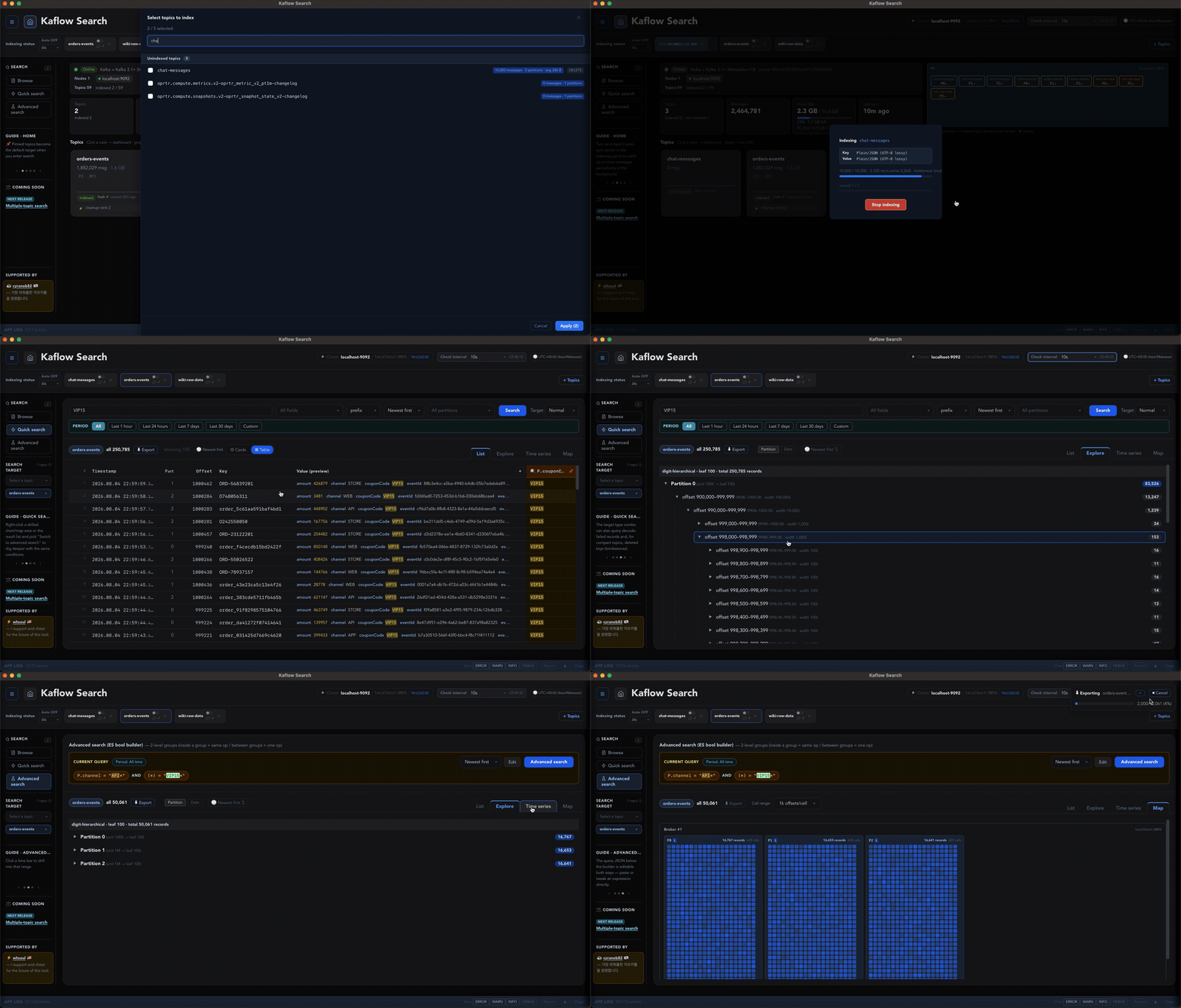
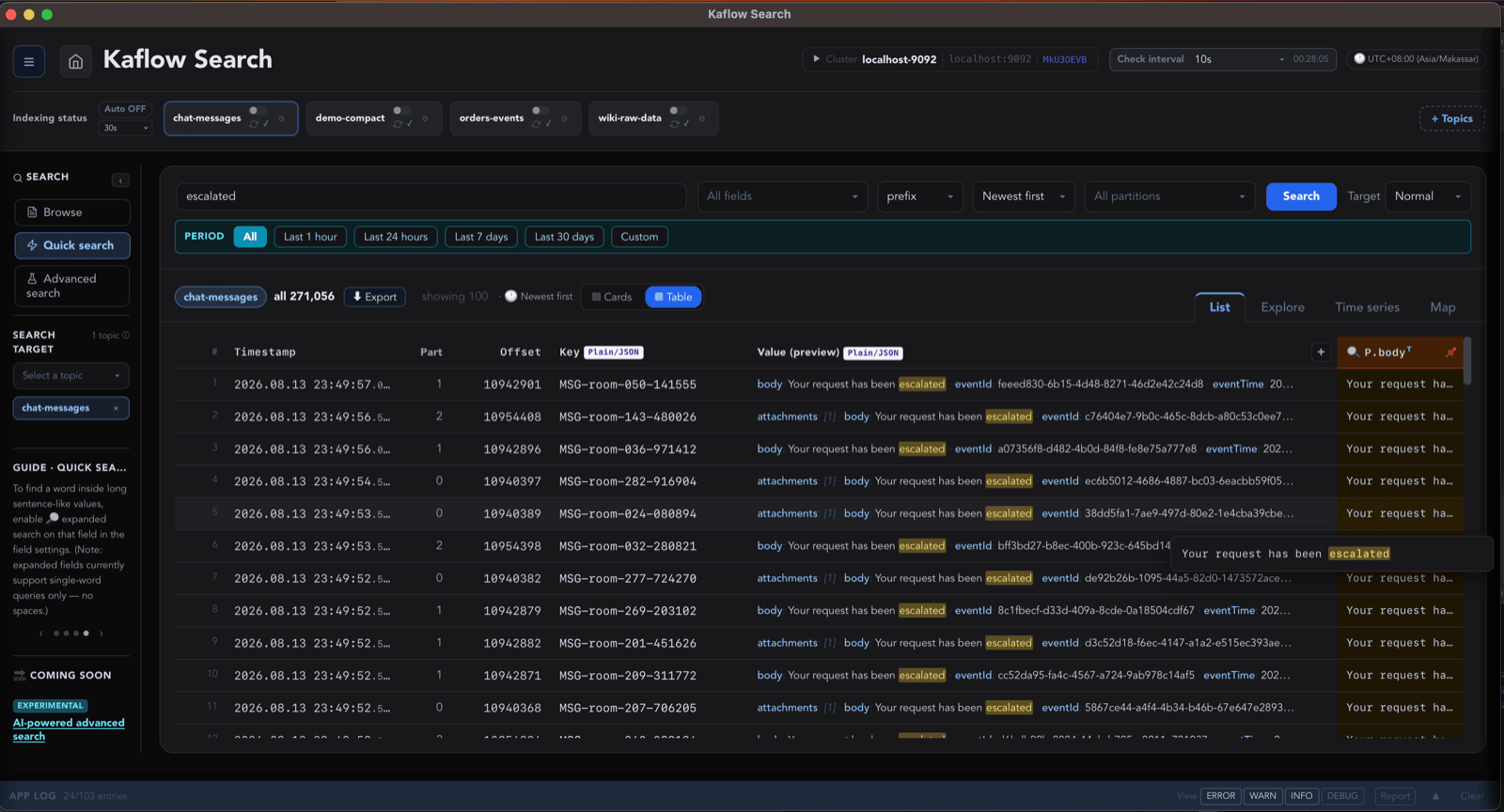 Search results | 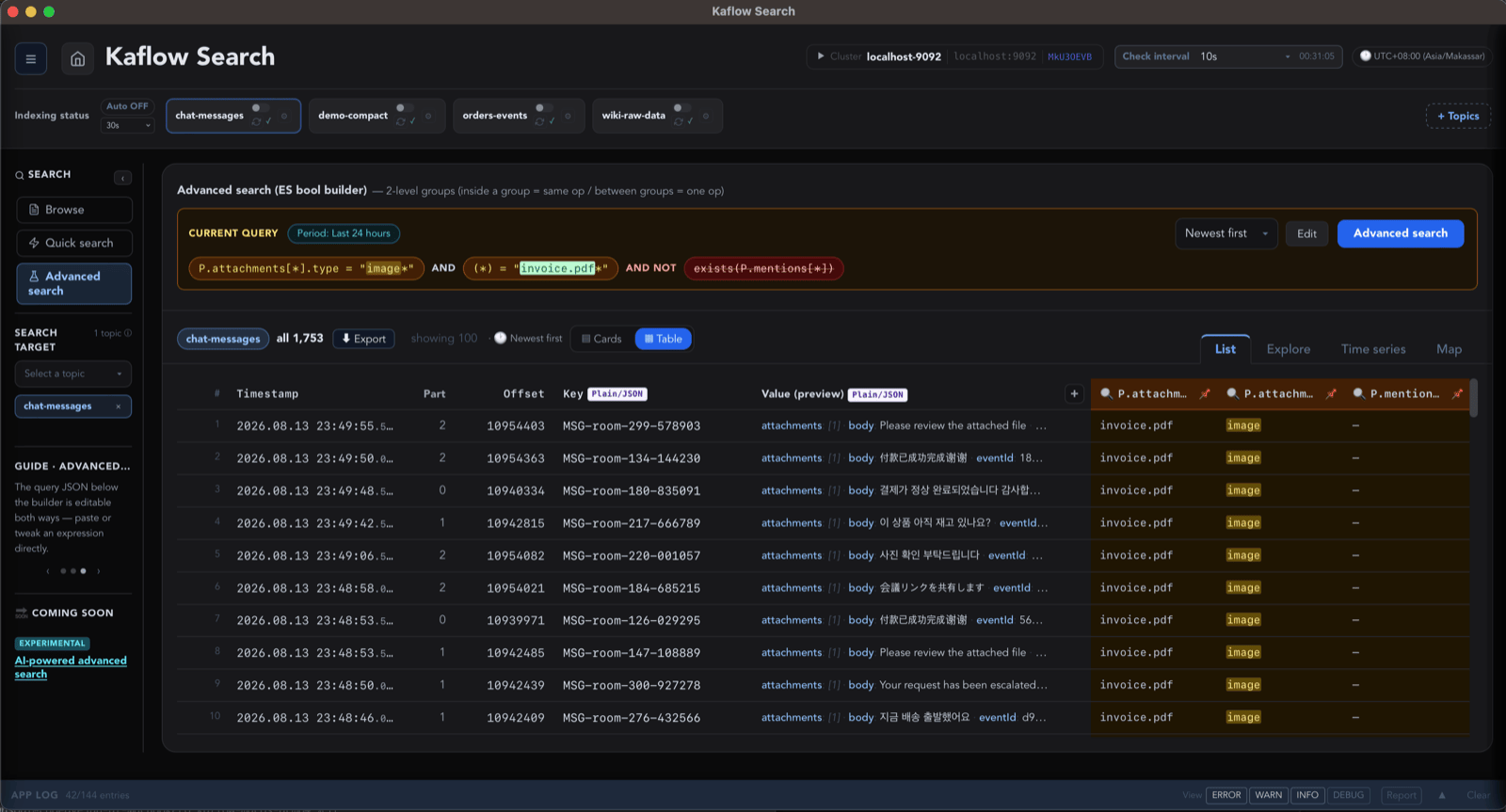 Compound conditions | 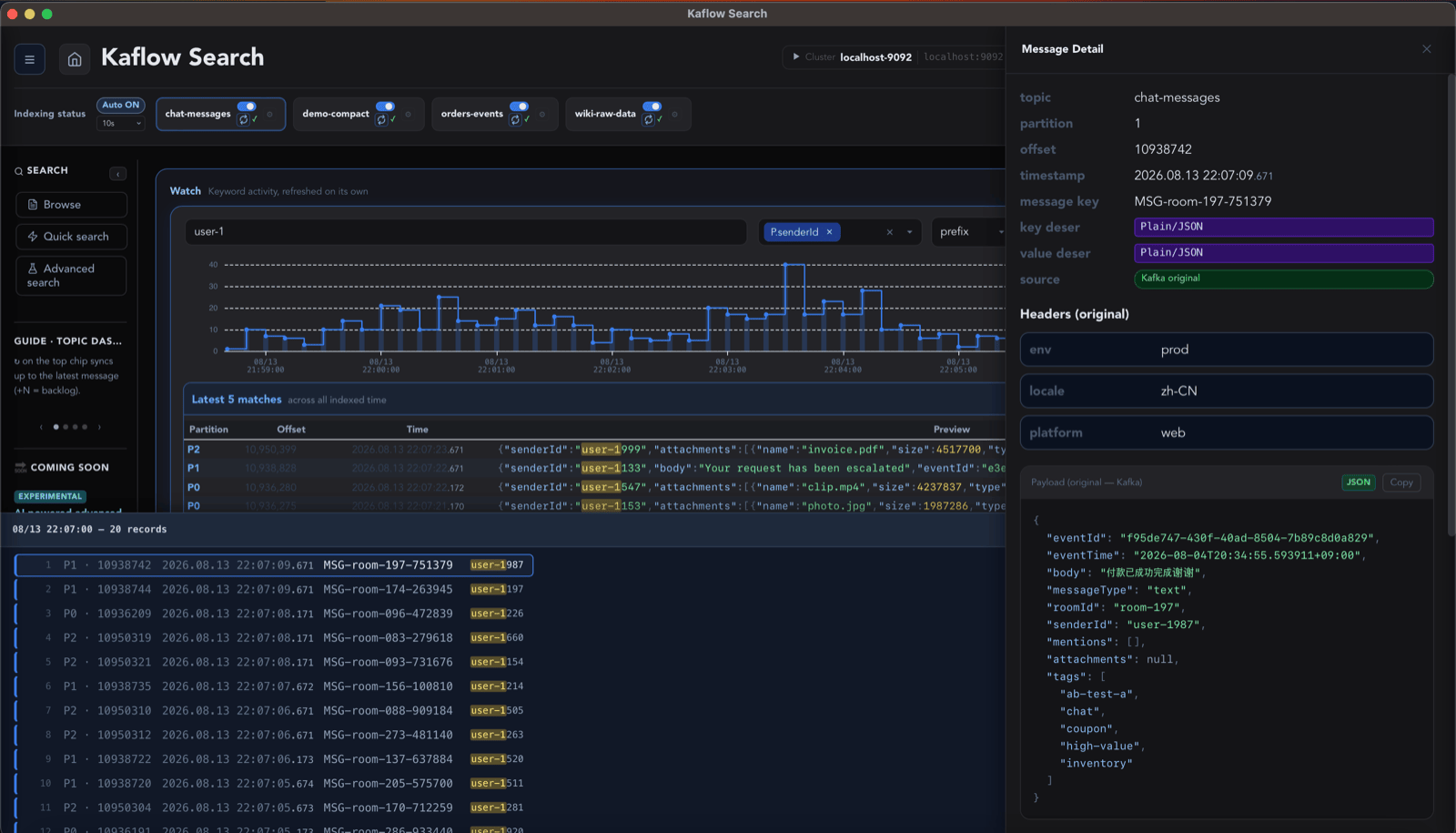 Message detail |
Download
macOS — install with Homebrew:
brew install --cask whsoul/tap/kaflow-search && open -a "Kaflow Search"
The command selects the right build for Apple Silicon or Intel. On first launch, follow the one-time macOS approval steps.
| OS | Architecture | File |
|---|---|---|
| macOS | Apple Silicon | .dmg |
| macOS | Intel | .dmg |
| Windows | x64 | .exe / .msi |
| Linux | — | Built if enough people want it — add your vote |
⬇ Get the latest release — download only from here.
Requirements — macOS 11 (Big Sur) or later, or Windows 10 or later (x64) · Apache Kafka 2.4 or later (which environments)
| Size | 75–85 MB to download, about 105 MB once installed |
| Free space | On top of that, allow 10 GB or more per cluster for the local index (two clusters = 20 GB or more). The index limit is adjustable in settings |
| Disk type | SSD recommended. Indexing is write-heavy — an HDD works but will be noticeably slower |
No separate database or service is required.
🔔 Want to know when a new version lands? Use [Watch ▾] → Custom → ☑ Releases at the top of this repository and you'll be notified on every release — handy if you're waiting on a platform that's still in progress.
Install
⚠️ Your OS will warn you. That is expected.
Kaflow Search is not yet registered as a verified developer with Apple or Microsoft — that requires paid certificates this project hasn't purchased. So your OS flags it as coming from an unidentified developer. It does not mean anything harmful was found. Allow it once using the steps below and it runs normally from then on.
(If you want to, you can also check that your download wasn't tampered with. Not required.)
macOS — System Settings → "Open Anyway"
Homebrew (recommended)
brew install --cask whsoul/tap/kaflow-search && open -a "Kaflow Search"
This installs the build for your Mac and attempts the first launch. If Homebrew reports that
/Applications/Kaflow Search.app already exists, quit Kaflow Search and move the previous
manually installed app out of Applications, then run the command again. Your settings and local
indexes remain in ~/.kaflow; moving the app itself does not remove them.
When macOS shows the message in step 2 below, click OK, then continue with step 3.
Manual DMG installation
-
Open the
.dmgand drag Kaflow Search into your Applications folder.💡 Don't launch it from inside the DMG. Move it first, then run it from Applications — otherwise you'll go through the approval twice. (Approval applies to one file, so approving the copy inside the DMG doesn't carry over to the one you copied out.)
-
Launch it from Applications. When this appears, click OK:
"Kaflow Search" can't be opened because Apple cannot check it for malicious software. -
Go to System Settings → Privacy & Security, and under Security click [Open Anyway]. Confirm once more in the dialog that follows.
"Kaflow Search" was blocked from use because it is not from an identified developer.(The button only appears right after step 2 was blocked. If you don't see it, launch the app again.)
Some setups ask twice — once after installing, once on first launch. Nothing is wrong; just approve it the same way again. It won't ask after that.
To skip all of it, run this once in Terminal instead, then open the app normally:
xattr -dr com.apple.quarantine "/Applications/Kaflow Search.app"
(Once per installed version. Exact wording varies by macOS version.)
Windows — Continue past the "Unknown publisher" warning
Windows may show an Unknown publisher or Microsoft Defender SmartScreen warning during installation. As on macOS, this appears because Kaflow Search does not yet use a paid code-signing certificate; it does not mean Windows found anything harmful. Select More info → Run anyway to continue.
Starting with v0.1.3, the Microsoft Visual C++ runtime is linked into the app, so there is nothing
extra to install. If you are still using the v0.1.2 Windows Preview and it closes immediately after
launch, update to the latest release. As a fallback for that Preview build, install the
Microsoft Visual C++ Redistributable (x64).
The old runtime issue may appear in Windows Event Viewer as MSVCP140.dll, VCRUNTIME140.dll, or
exception code 0xc0000005.
If it still does not start, open a bug report and include your Windows version and any Event Viewer error shown for Kaflow Search.
Getting started
| Step | Note | |
|---|---|---|
| 1 | Connect to a cluster | Passwords are never saved — entered per connection |
| 2 | Pick topics to index | Deserializer and cleanup policy are auto-suggested from a sample |
| 3 | Index | One pass over the topic. The app stays usable while it runs |
| 4 | Search | Keyword, or conditions across keys / headers / JSON fields |
Connecting to AWS MSK (IAM auth)
MSK isn't a separate menu — it lives inside the SASL mechanism list. On the connect screen:
- Security protocol →
SASL_SSL(MSK requires TLS;SASL_PLAINTEXTwill not connect) - SASL mechanism →
AWS MSK IAM (IAM access key) - If you have
~/.aws/credentials, a profile picker appears — pick one and the access key and region are filled in for you. (With a single profile it applies directly, no picker.) - Otherwise, or for SSO-only profiles, enter them yourself: AWS Access Key ID /
AWS Secret Access Key / Region (e.g.
ap-northeast-2— where your MSK cluster lives)
Keys are not stored — they're used for that connection only, and re-entered or re-loaded from the profile next time.
If it fails with
Access denied, the failure dialog offers a minimum-privilege IAM policy JSON you can copy. MSK returns the same message for a mistyped key, a wrong region, missing permissions and a permission boundary alike — so the app lists what to check instead of guessing the cause.
Details
Why a local index
A large Kafka cluster does not mean copying the whole cluster onto your computer. You choose the topics that matter, and Kaflow keeps their local search indexes within a configured storage budget.
| The problem | Kafka is a log, not a database — there's no way to look up "the message with this order ID" |
| What Kaflow does | Reads each topic once, builds a local index. Every later search hits the index, not Kafka |
| Selective indexing | You choose which topics to index. Kaflow does not automatically index every topic in the cluster |
| Bounded local storage | A configurable storage budget and cleanup policies keep local indexes from growing without bound |
| Scope | Searches what is still in your topics — it mirrors Kafka retention, it is not an archive |
| Management tools | No overlap, no conflict. Keep yours for operating the cluster; use Kaflow to find things |
Data and safety
| Messages, indexes, queries | Processed on your machine. Never uploaded to any Kaflow server |
| Passwords, tokens, secret keys | Never stored. Held in memory for the session, re-entered on each connection |
Stored locally (~/.kaflow/) | Non-secret metadata only — protocol, mechanism, username, certificate paths |
| Writes to your cluster | None. Read-only: Metadata, ApiVersions, DescribeConfigs, DescribeTopicPartitions, Fetch, ListOffsets. No Produce, no admin calls — it cannot alter topics, consumer groups or ACLs |
| Read load on your cluster | Only while indexing and syncing. Searching, exploring and exporting all run off the local index, so repeating them sends nothing to the cluster (opening a message's raw payload is the exception) |
| Sent to Kaflow | On startup, and again every few hours while the app is open, for version support and announcements: random instance ID · hashed machine ID · app version · OS/arch · UI language. Nothing about your Kafka setup or messages |
| Diagnostic reports | Generated locally, sent only if you choose to |
Full detail, including retention: PRIVACY.md
Verifying your download wasn't tampered with (optional)
This is not required to install or run the app. Skip it and everything works fine. It's here for people who want the extra assurance.
Every release ships a SHA256SUMS file, and the release notes list the same SHA-256
values. Computing the fingerprint of your download and comparing it tells you the file wasn't
corrupted in transit or swapped out along the way.
# macOS — put SHA256SUMS in the same folder and check everything at once
shasum -a 256 -c SHA256SUMS
# Windows — compute the value and compare it against the release notes by eye
Get-FileHash <file> -Algorithm SHA256
If a value doesn't match, don't use that file — delete it and download again.
⚠️ Know the limit. The file and its checksum live on the same page, so if the release page itself were compromised, both would change together and this check wouldn't catch it. Guarding against that is what developer verification (code signing) does — which this project doesn't have yet.
Before you connect
- Confirm you're authorized to read the cluster and topics
- Follow your organization's security and data-handling policy
- Local indexes and exports are unencrypted on disk — store accordingly
- Prefer a least-privilege Kafka account
- Strip credentials and message contents before sharing logs
Supported environments
| Security protocol | PLAINTEXT · SSL · SASL_PLAINTEXT · SASL_SSL |
| SASL mechanism | PLAIN · SCRAM-SHA-256 · SCRAM-SHA-512 · OAUTHBEARER · AWS MSK IAM |
| Certificates | PEM · PKCS#12 (.p12 / .pfx) |
| Schema Registry | Confluent (Avro, Protobuf, incl. schema references) |
| Kafka versions | Target 2.4 – 4.x · verified: Kafka 2.4.x (local), AWS MSK with IAM |
Other versions and managed services are expected to work but aren't verified yet — tell us how it went. Connection success also depends on broker config, network policy and provider-specific auth, not the version alone.
What you can search
| Target | Example |
|---|---|
| Message key | K.orderId — plain value or nested JSON |
| Payload | P.customer.email — plain text or nested JSON |
| Header | H.trace-id |
| Arrays | P.items[*].sku — flattened to one path |
| Condition | |
|---|---|
| Match | exact · prefix · lexical range within a field |
| Boolean | AND / OR / NOT, with minimum-match count for OR |
| Filters | timestamp range · partition / offset range |
| Words | word-level matching on fields you mark as tokenized |
| Exploring | |
|---|---|
| Charts | time-series with drill-down into matching messages |
| Trees | offset tree · date tree · partition placement · latest messages |
| Detail | JSON highlighting, copy |
| Export | JSONL / CSV / TSV × gzip / zstd — runs off the local index, works offline |
Resource limits
Limits on disk, on scale, and on how indexes are kept and cleaned up are set so that Kaflow stays well-behaved on your machine. The app shows the ones in force under Settings, and enforces exactly what it shows.
Indexing time and disk use vary with message count, size, partitions, indexed fields and disk speed. No fixed performance is guaranteed.
Project status
Version 0.1.3 — open beta. Usable for daily work.
Known limitations
| One topic at a time | Multi-topic search is the next feature |
| Text-based ranges | Numeric/date range search (amount 50–100) not available yet |
| Manual updates | No auto-update — new versions are installed by hand |
| Unsigned | See Install |
⚠️ No results means nothing matched in your local index — not that the message never existed in Kafka. It may predate your index, or fall outside the fields and range you indexed.
Feedback
Report a bug · Connection problem · All issues
Each form asks only for what turns out to settle the question. For connection problems that is the service, the Kafka version, how you authenticate, and whether other clients reach the cluster from the same machine.
🔒 Never put passwords, tokens, private keys, certificates or real message contents in a public issue.
Supporting the project
Built and maintained independently. Support is voluntary — not a purchase, subscription or commitment to any feature or timeline. Free usage terms are the same either way.
What support would go toward: code-signing certificates for macOS and Windows — which is why the install warnings are still there. Beyond that, testing across more platforms and Kafka versions, and release infrastructure.
This repository
Official public repository — releases, documentation, issues, roadmap.
| Source-available, not open source | The frontend source and the search engine implementation are not here |
| What is here | Public API contracts · mock engine · desktop shell · a runnable demo build |
| Why | Transparency and evaluation. No open-source license applies unless a file says so — see LICENSE |
| Contributions | Code contributions aren't accepted. Issues and feedback very much are |
Legal — LICENSE (repository terms) · EULA (한국어) · Privacy (한국어) · Third-party notices
Proprietary software, currently free for personal use and internal business use under the EULA. Reselling, modifying, reverse-engineering, redistributing or bundling into another product is restricted. Future features or services may carry different terms, announced before they apply.
The app's interface is available in English · 한국어 · 日本語 · 中文.
Trademarks — Apache Kafka and Kafka are trademarks of the Apache Software Foundation. Kaflow Search is not affiliated with, endorsed by or sponsored by the ASF. Other names and marks belong to their respective owners.
Contributors

123 commits
See what people are saying
Similar repos


Languages
Rust
68.2%
HTML
21.3%
JavaScript
6.2%
CSS
4.2%
Desktop app for searching Kafka messages — locally indexed, not scanned. macOS and Windows open beta. (kafka search)
See the codeREADME
A desktop search engine for your Kafka messages
Find matching Kafka messages among millions — in seconds, on your own machine.
Local indexing · No extra infrastructure · No sign-up · Your data stays local
⬇ Download · Website · Install guide · Issues
What it does
| 🔎 Search, not scan | Keyword or field search across millions of indexed rows, in seconds |
| 🧩 Compound conditions | AND / OR / NOT over keys, headers and nested JSON fields |
| 🕒 Narrow by time | Exact time range, or drill down from a time-series chart |
| 👁 Watch a keyword | Pin one, leave it open — the chart advances on its own |
| 🧬 Decode payloads | JSON · Avro · Protobuf — local schemas or Confluent Schema Registry |
| 📤 Export results | JSONL / CSV / TSV, optionally gzip or zstd |
| 🔐 Connects where you are | AWS MSK (IAM) · SASL/SCRAM · SSL/TLS · Confluent Schema Registry |
| 🔌 Works offline | Indexed data stays searchable when the cluster is unreachable |
Demo
Search results | Compound conditions | Message detail |
Download
macOS — install with Homebrew:
brew install --cask whsoul/tap/kaflow-search && open -a "Kaflow Search"
The command selects the right build for Apple Silicon or Intel. On first launch, follow the one-time macOS approval steps.
| OS | Architecture | File |
|---|---|---|
| macOS | Apple Silicon | .dmg |
| macOS | Intel | .dmg |
| Windows | x64 | .exe / .msi |
| Linux | — | Built if enough people want it — add your vote |
⬇ Get the latest release — download only from here.
Requirements — macOS 11 (Big Sur) or later, or Windows 10 or later (x64) · Apache Kafka 2.4 or later (which environments)
| Size | 75–85 MB to download, about 105 MB once installed |
| Free space | On top of that, allow 10 GB or more per cluster for the local index (two clusters = 20 GB or more). The index limit is adjustable in settings |
| Disk type | SSD recommended. Indexing is write-heavy — an HDD works but will be noticeably slower |
No separate database or service is required.
🔔 Want to know when a new version lands? Use [Watch ▾] → Custom → ☑ Releases at the top of this repository and you'll be notified on every release — handy if you're waiting on a platform that's still in progress.
Install
⚠️ Your OS will warn you. That is expected.
Kaflow Search is not yet registered as a verified developer with Apple or Microsoft — that requires paid certificates this project hasn't purchased. So your OS flags it as coming from an unidentified developer. It does not mean anything harmful was found. Allow it once using the steps below and it runs normally from then on.
(If you want to, you can also check that your download wasn't tampered with. Not required.)
macOS — System Settings → "Open Anyway"
Homebrew (recommended)
brew install --cask whsoul/tap/kaflow-search && open -a "Kaflow Search"
This installs the build for your Mac and attempts the first launch. If Homebrew reports that
/Applications/Kaflow Search.app already exists, quit Kaflow Search and move the previous
manually installed app out of Applications, then run the command again. Your settings and local
indexes remain in ~/.kaflow; moving the app itself does not remove them.
When macOS shows the message in step 2 below, click OK, then continue with step 3.
Manual DMG installation
-
Open the
.dmgand drag Kaflow Search into your Applications folder.💡 Don't launch it from inside the DMG. Move it first, then run it from Applications — otherwise you'll go through the approval twice. (Approval applies to one file, so approving the copy inside the DMG doesn't carry over to the one you copied out.)
-
Launch it from Applications. When this appears, click OK:
"Kaflow Search" can't be opened because Apple cannot check it for malicious software. -
Go to System Settings → Privacy & Security, and under Security click [Open Anyway]. Confirm once more in the dialog that follows.
"Kaflow Search" was blocked from use because it is not from an identified developer.(The button only appears right after step 2 was blocked. If you don't see it, launch the app again.)
Some setups ask twice — once after installing, once on first launch. Nothing is wrong; just approve it the same way again. It won't ask after that.
To skip all of it, run this once in Terminal instead, then open the app normally:
xattr -dr com.apple.quarantine "/Applications/Kaflow Search.app"
(Once per installed version. Exact wording varies by macOS version.)
Windows — Continue past the "Unknown publisher" warning
Windows may show an Unknown publisher or Microsoft Defender SmartScreen warning during installation. As on macOS, this appears because Kaflow Search does not yet use a paid code-signing certificate; it does not mean Windows found anything harmful. Select More info → Run anyway to continue.
Starting with v0.1.3, the Microsoft Visual C++ runtime is linked into the app, so there is nothing
extra to install. If you are still using the v0.1.2 Windows Preview and it closes immediately after
launch, update to the latest release. As a fallback for that Preview build, install the
Microsoft Visual C++ Redistributable (x64).
The old runtime issue may appear in Windows Event Viewer as MSVCP140.dll, VCRUNTIME140.dll, or
exception code 0xc0000005.
If it still does not start, open a bug report and include your Windows version and any Event Viewer error shown for Kaflow Search.
Getting started
| Step | Note | |
|---|---|---|
| 1 | Connect to a cluster | Passwords are never saved — entered per connection |
| 2 | Pick topics to index | Deserializer and cleanup policy are auto-suggested from a sample |
| 3 | Index | One pass over the topic. The app stays usable while it runs |
| 4 | Search | Keyword, or conditions across keys / headers / JSON fields |
Connecting to AWS MSK (IAM auth)
MSK isn't a separate menu — it lives inside the SASL mechanism list. On the connect screen:
- Security protocol →
SASL_SSL(MSK requires TLS;SASL_PLAINTEXTwill not connect) - SASL mechanism →
AWS MSK IAM (IAM access key) - If you have
~/.aws/credentials, a profile picker appears — pick one and the access key and region are filled in for you. (With a single profile it applies directly, no picker.) - Otherwise, or for SSO-only profiles, enter them yourself: AWS Access Key ID /
AWS Secret Access Key / Region (e.g.
ap-northeast-2— where your MSK cluster lives)
Keys are not stored — they're used for that connection only, and re-entered or re-loaded from the profile next time.
If it fails with
Access denied, the failure dialog offers a minimum-privilege IAM policy JSON you can copy. MSK returns the same message for a mistyped key, a wrong region, missing permissions and a permission boundary alike — so the app lists what to check instead of guessing the cause.
Details
Why a local index
A large Kafka cluster does not mean copying the whole cluster onto your computer. You choose the topics that matter, and Kaflow keeps their local search indexes within a configured storage budget.
| The problem | Kafka is a log, not a database — there's no way to look up "the message with this order ID" |
| What Kaflow does | Reads each topic once, builds a local index. Every later search hits the index, not Kafka |
| Selective indexing | You choose which topics to index. Kaflow does not automatically index every topic in the cluster |
| Bounded local storage | A configurable storage budget and cleanup policies keep local indexes from growing without bound |
| Scope | Searches what is still in your topics — it mirrors Kafka retention, it is not an archive |
| Management tools | No overlap, no conflict. Keep yours for operating the cluster; use Kaflow to find things |
Data and safety
| Messages, indexes, queries | Processed on your machine. Never uploaded to any Kaflow server |
| Passwords, tokens, secret keys | Never stored. Held in memory for the session, re-entered on each connection |
Stored locally (~/.kaflow/) | Non-secret metadata only — protocol, mechanism, username, certificate paths |
| Writes to your cluster | None. Read-only: Metadata, ApiVersions, DescribeConfigs, DescribeTopicPartitions, Fetch, ListOffsets. No Produce, no admin calls — it cannot alter topics, consumer groups or ACLs |
| Read load on your cluster | Only while indexing and syncing. Searching, exploring and exporting all run off the local index, so repeating them sends nothing to the cluster (opening a message's raw payload is the exception) |
| Sent to Kaflow | On startup, and again every few hours while the app is open, for version support and announcements: random instance ID · hashed machine ID · app version · OS/arch · UI language. Nothing about your Kafka setup or messages |
| Diagnostic reports | Generated locally, sent only if you choose to |
Full detail, including retention: PRIVACY.md
Verifying your download wasn't tampered with (optional)
This is not required to install or run the app. Skip it and everything works fine. It's here for people who want the extra assurance.
Every release ships a SHA256SUMS file, and the release notes list the same SHA-256
values. Computing the fingerprint of your download and comparing it tells you the file wasn't
corrupted in transit or swapped out along the way.
# macOS — put SHA256SUMS in the same folder and check everything at once
shasum -a 256 -c SHA256SUMS
# Windows — compute the value and compare it against the release notes by eye
Get-FileHash <file> -Algorithm SHA256
If a value doesn't match, don't use that file — delete it and download again.
⚠️ Know the limit. The file and its checksum live on the same page, so if the release page itself were compromised, both would change together and this check wouldn't catch it. Guarding against that is what developer verification (code signing) does — which this project doesn't have yet.
Before you connect
- Confirm you're authorized to read the cluster and topics
- Follow your organization's security and data-handling policy
- Local indexes and exports are unencrypted on disk — store accordingly
- Prefer a least-privilege Kafka account
- Strip credentials and message contents before sharing logs
Supported environments
| Security protocol | PLAINTEXT · SSL · SASL_PLAINTEXT · SASL_SSL |
| SASL mechanism | PLAIN · SCRAM-SHA-256 · SCRAM-SHA-512 · OAUTHBEARER · AWS MSK IAM |
| Certificates | PEM · PKCS#12 (.p12 / .pfx) |
| Schema Registry | Confluent (Avro, Protobuf, incl. schema references) |
| Kafka versions | Target 2.4 – 4.x · verified: Kafka 2.4.x (local), AWS MSK with IAM |
Other versions and managed services are expected to work but aren't verified yet — tell us how it went. Connection success also depends on broker config, network policy and provider-specific auth, not the version alone.
What you can search
| Target | Example |
|---|---|
| Message key | K.orderId — plain value or nested JSON |
| Payload | P.customer.email — plain text or nested JSON |
| Header | H.trace-id |
| Arrays | P.items[*].sku — flattened to one path |
| Condition | |
|---|---|
| Match | exact · prefix · lexical range within a field |
| Boolean | AND / OR / NOT, with minimum-match count for OR |
| Filters | timestamp range · partition / offset range |
| Words | word-level matching on fields you mark as tokenized |
| Exploring | |
|---|---|
| Charts | time-series with drill-down into matching messages |
| Trees | offset tree · date tree · partition placement · latest messages |
| Detail | JSON highlighting, copy |
| Export | JSONL / CSV / TSV × gzip / zstd — runs off the local index, works offline |
Resource limits
Limits on disk, on scale, and on how indexes are kept and cleaned up are set so that Kaflow stays well-behaved on your machine. The app shows the ones in force under Settings, and enforces exactly what it shows.
Indexing time and disk use vary with message count, size, partitions, indexed fields and disk speed. No fixed performance is guaranteed.
Project status
Version 0.1.3 — open beta. Usable for daily work.
Known limitations
| One topic at a time | Multi-topic search is the next feature |
| Text-based ranges | Numeric/date range search (amount 50–100) not available yet |
| Manual updates | No auto-update — new versions are installed by hand |
| Unsigned | See Install |
⚠️ No results means nothing matched in your local index — not that the message never existed in Kafka. It may predate your index, or fall outside the fields and range you indexed.
Feedback
Report a bug · Connection problem · All issues
Each form asks only for what turns out to settle the question. For connection problems that is the service, the Kafka version, how you authenticate, and whether other clients reach the cluster from the same machine.
🔒 Never put passwords, tokens, private keys, certificates or real message contents in a public issue.
Supporting the project
Built and maintained independently. Support is voluntary — not a purchase, subscription or commitment to any feature or timeline. Free usage terms are the same either way.
What support would go toward: code-signing certificates for macOS and Windows — which is why the install warnings are still there. Beyond that, testing across more platforms and Kafka versions, and release infrastructure.
This repository
Official public repository — releases, documentation, issues, roadmap.
| Source-available, not open source | The frontend source and the search engine implementation are not here |
| What is here | Public API contracts · mock engine · desktop shell · a runnable demo build |
| Why | Transparency and evaluation. No open-source license applies unless a file says so — see LICENSE |
| Contributions | Code contributions aren't accepted. Issues and feedback very much are |
Legal — LICENSE (repository terms) · EULA (한국어) · Privacy (한국어) · Third-party notices
Proprietary software, currently free for personal use and internal business use under the EULA. Reselling, modifying, reverse-engineering, redistributing or bundling into another product is restricted. Future features or services may carry different terms, announced before they apply.
The app's interface is available in English · 한국어 · 日本語 · 中文.
Trademarks — Apache Kafka and Kafka are trademarks of the Apache Software Foundation. Kaflow Search is not affiliated with, endorsed by or sponsored by the ASF. Other names and marks belong to their respective owners.
See what people are saying
Similar repos
Contributors
123 commits
Languages
Rust
68.2%
HTML
21.3%
JavaScript
6.2%
CSS
4.2%