
See what people are saying
README
BaaS - Business logic As A Service
🚀 BaaS
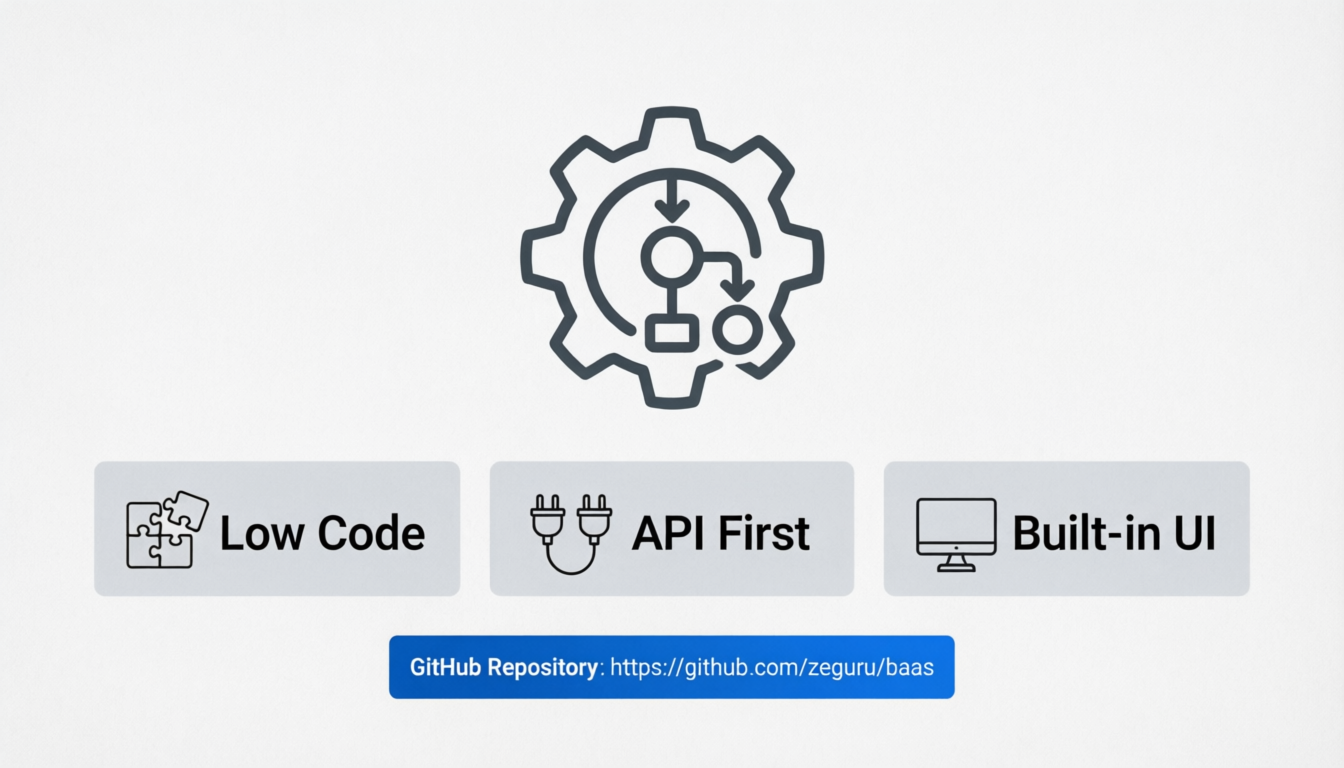
Explainable, low-code decision engine with API and built-in UI
Power business rules, workflows, and AI guardrails with a fully open-source, developer-friendly engine designed for clarity, control, and auditability.
Background
The Rule Engine design pattern did not reach its full potential. Not in terms of the vision but on adoption and implementation due to many practical limitations.
There are many awesome rule engines, but
- Expensive, not open source
- Not stack-agnostic
- Require heavy coding
- Some lack a decent webui
- Others lack a decision trace
- Hard to plug in to context of AI agents
- Complex DSL
- Fear of breaking things
✨ Features
- Deterministic rule evaluation
- Explainable decision traces
- API-first design
- Built-in UI for rule creation and testing
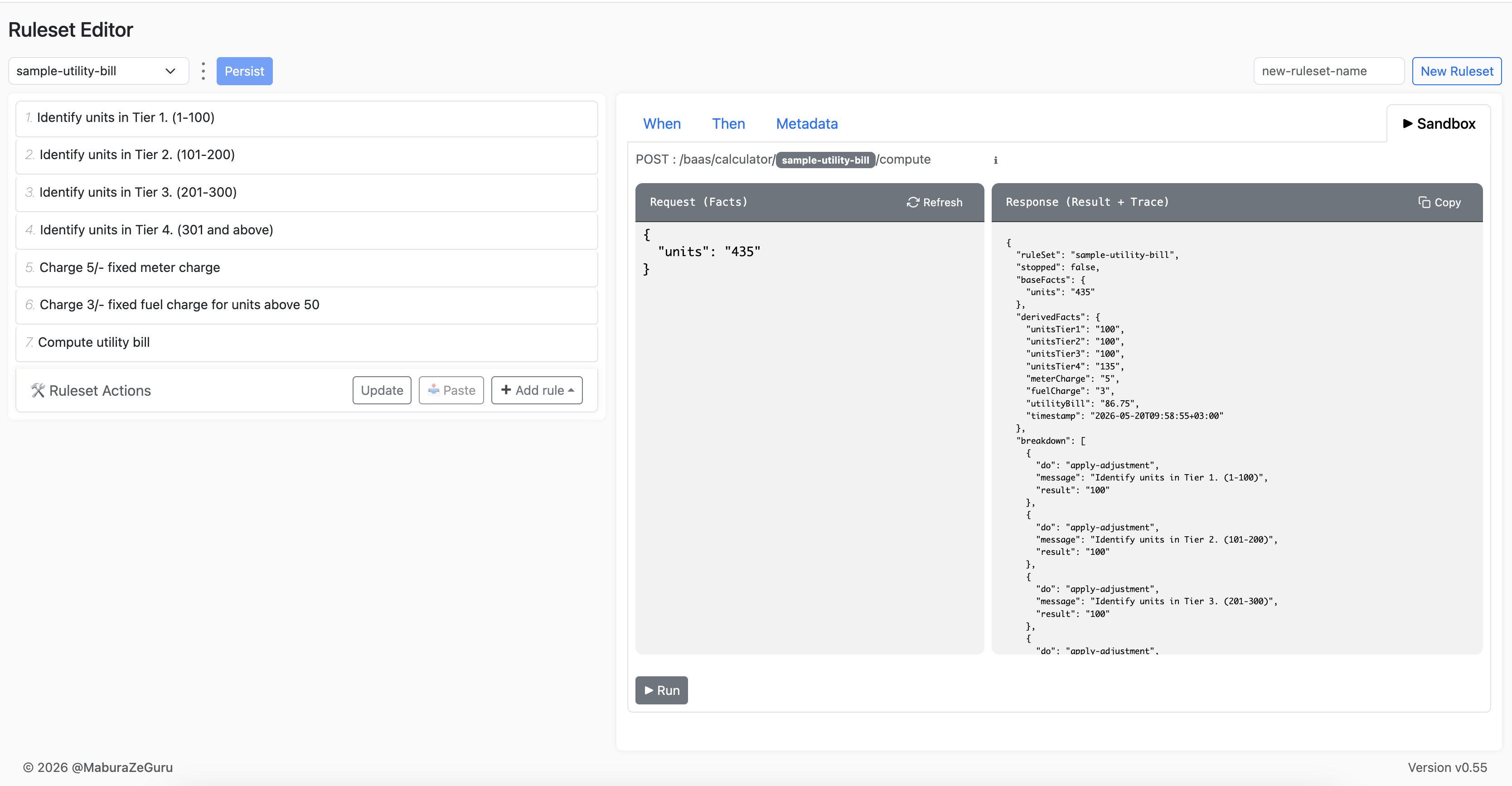
- Interactive Sandbox
- Docker-ready for instant setup
- Sample rules included
- Works great as guardrails for AI systems
📸 Overview
Core flow:
- Create a ruleset (container for a group of rules)
- Add new rules, one by one, via
- Web UI
- copy from another ruleset and customize
- rest api (advanced)
- Update ruleset
- Adjust execution order
- Meta -> priority
- Drag and drop
- Update ruleset
- Try Ruleset
- Review response
- ✅ Results:
derivedFacts - 🧠 Decision trace:
breakdown
- ✅ Results:
- Repeat
- Persist to save to db
🚀 Quick Start - for the inpatient
1. Run with Docker
docker run -p 3000:3000 zeguru/baas:latest
2. Access the app
- API: http://localhost:3000/baas
- Editor UI: http://localhost:3000/baas/editor
- OpenApi: http://localhost:3000/baas/docs
Option: Docker Compose
version: '3.8'

services:
  app:
    image: zeguru/baas:latest
    ports:
      - "3000:3000"
    environment:
      - NODE_ENV=dev
Production Setup
1. Using Docker
    docker run -d \
    -p 3000:3000 \
    -e DB_TYPE=mysql \
    -e DB_HOST=server.xyz.com \
    -e DB_PORT=3306 \
    -e DB_DATABASE=baas \
    -e DB_USERNAME=user \
    -e DB_PASSWORD=password \
    zeguru/baas:0.57
NB: adjust accordingly:
        eg image -> zeguru/baas:latest
        eg port -> 80
        eg dbtype -> mariadb|postgres|oracledb|mssql
2. Access the app
- API: http://BASE_URL:3000/baas
- Editor UI: http://BASE_URL:3000/baas/editor
Docker Compose
version: "3.9"

services:
  app:
    image: zeguru/baas:latest
    container_name: baas-app
    restart: unless-stopped
    ports:
      - "3000:3000"
    environment:
      DB_TYPE: mysql
      DB_HOST: mysql
      DB_PORT: 3306
      DB_DATABASE: baas
      DB_USERNAME: root
      DB_PASSWORD: secret
NB: using a .env file
version: "3.9"

services:
  app:
    image: zeguru/baas:latest
    container_name: baas-app
    restart: unless-stopped
    ports:
      - "3000:3000"
    env_file:
      - .env
Run
docker-compose up -d
DSL
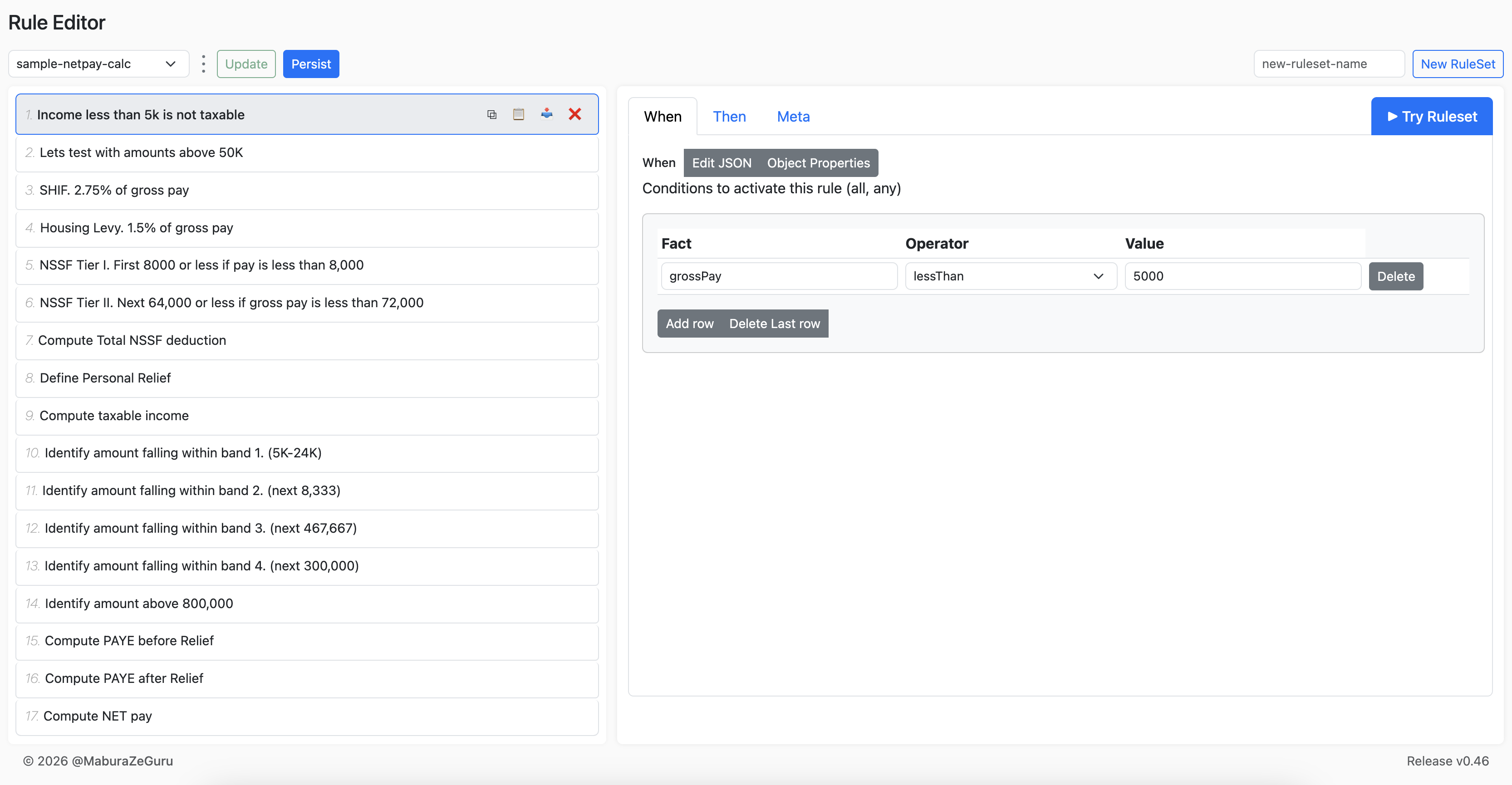
A. Rule Condition
Define preconditions for rule execution.
Supported Operators:
alwaysisDefinedlessThanlessThanInclusivegreaterThangreaterThanInclusiveequalequalIgnoreCasenotEqualnotEqualIgnoreCaseininIgnoreCasenotInnotInIgnoreCase
B. Rule Definition:
Rule Action: main options:
advicevalidationapply-adjustment
i. advice
Simply logs a message.
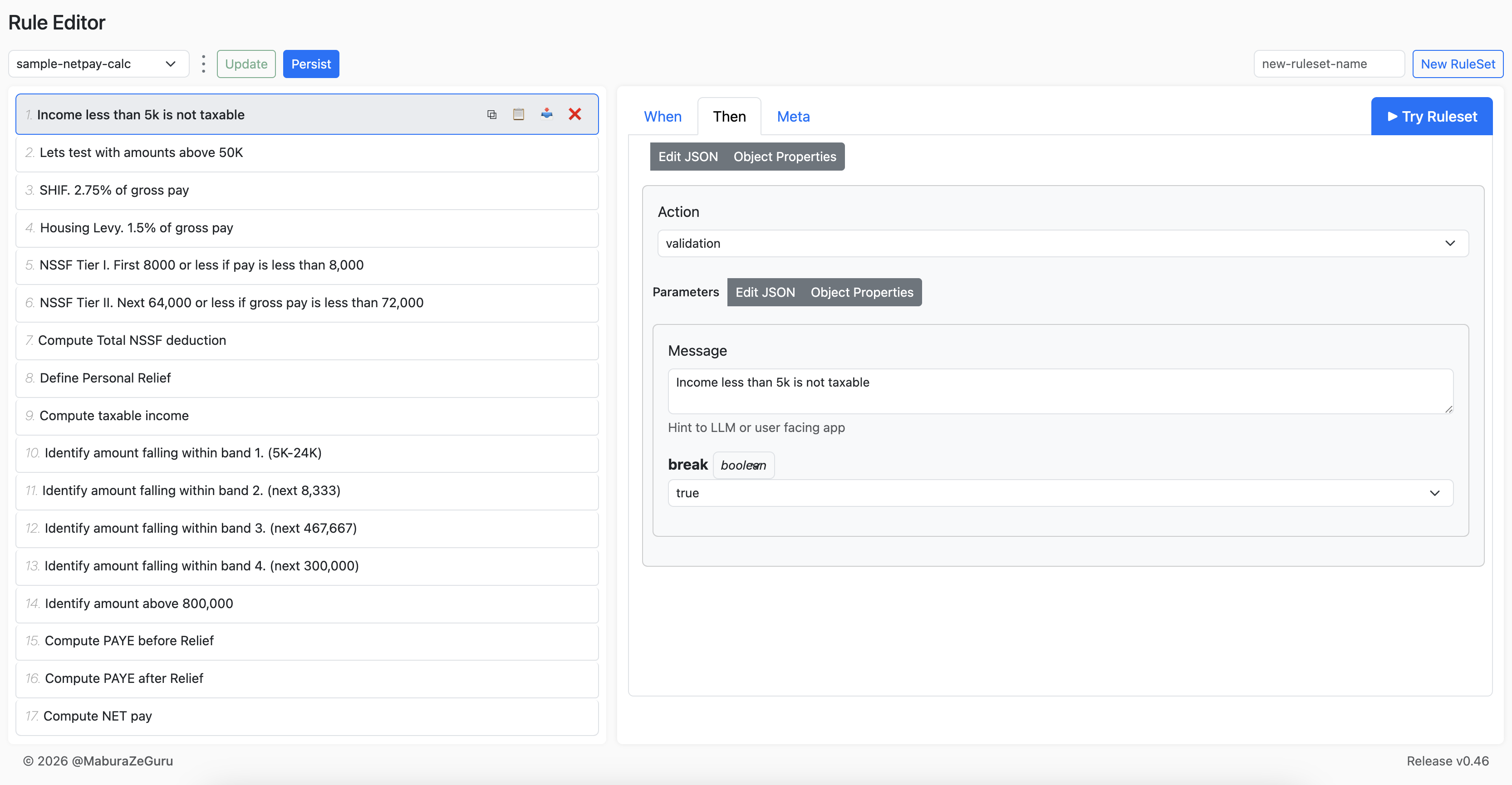
ii. validation
Message with an option to break, ie stop the execution and return immediately.
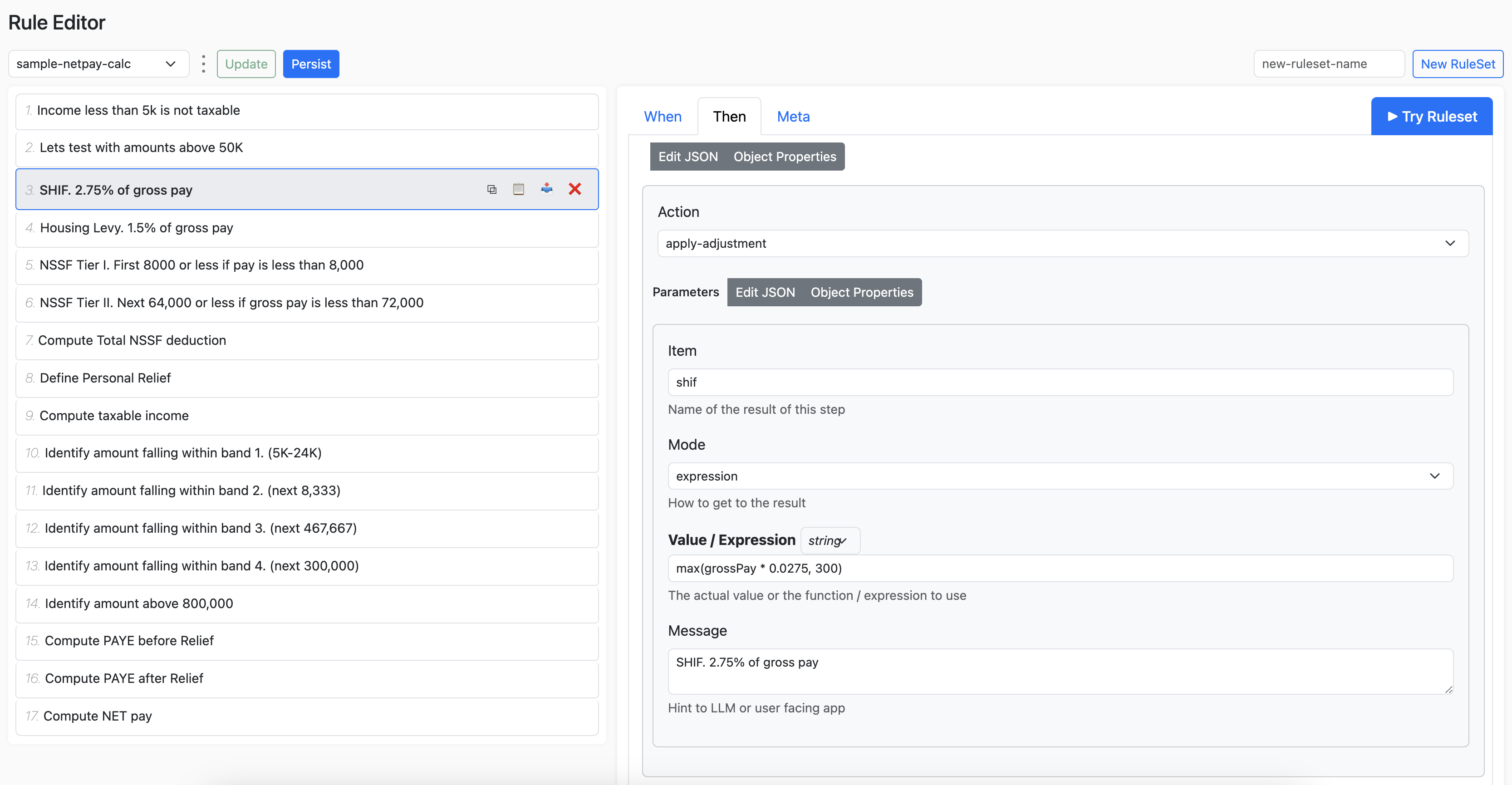
iii. apply-adjustment
Perform a calculation, transformation or a process.
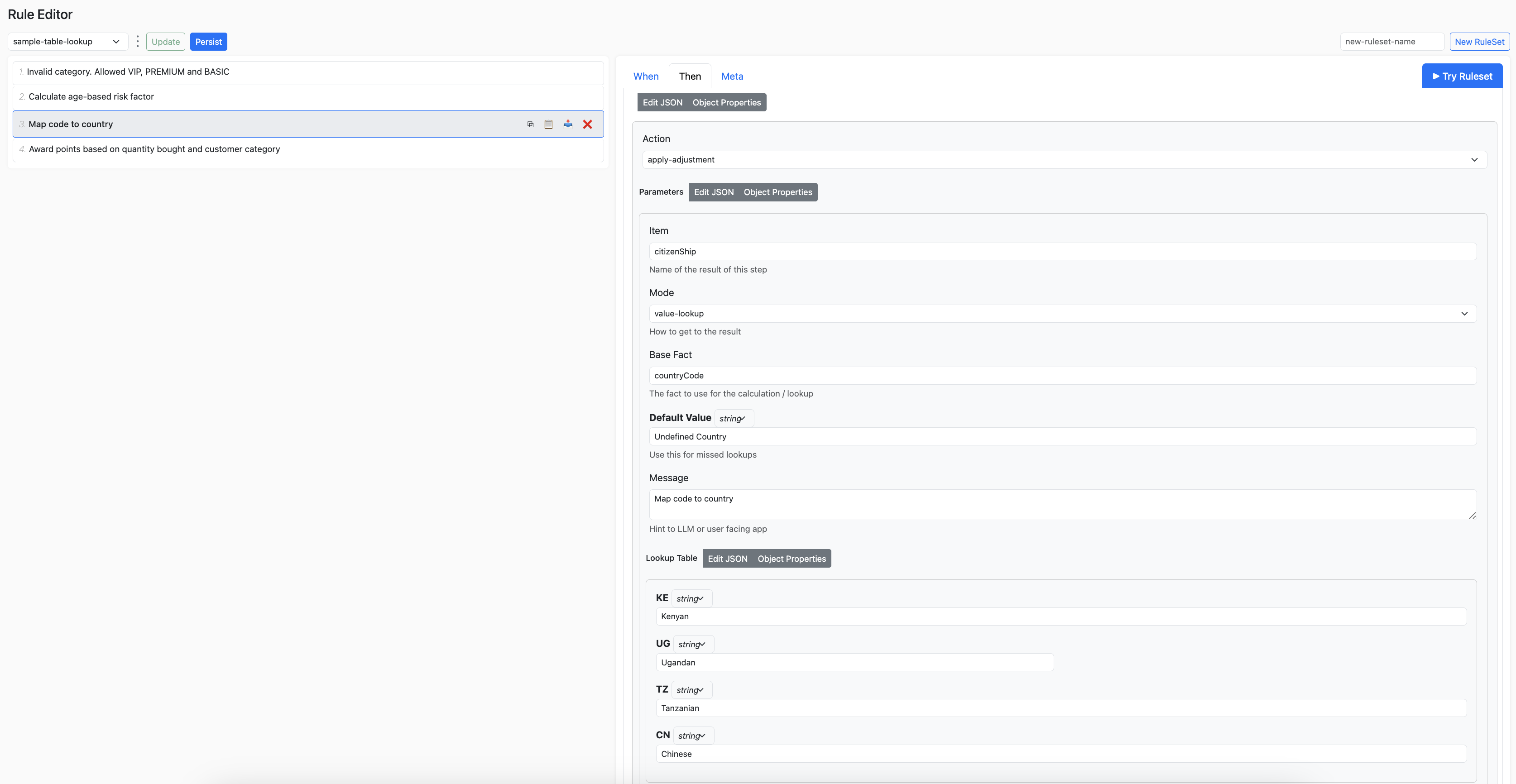
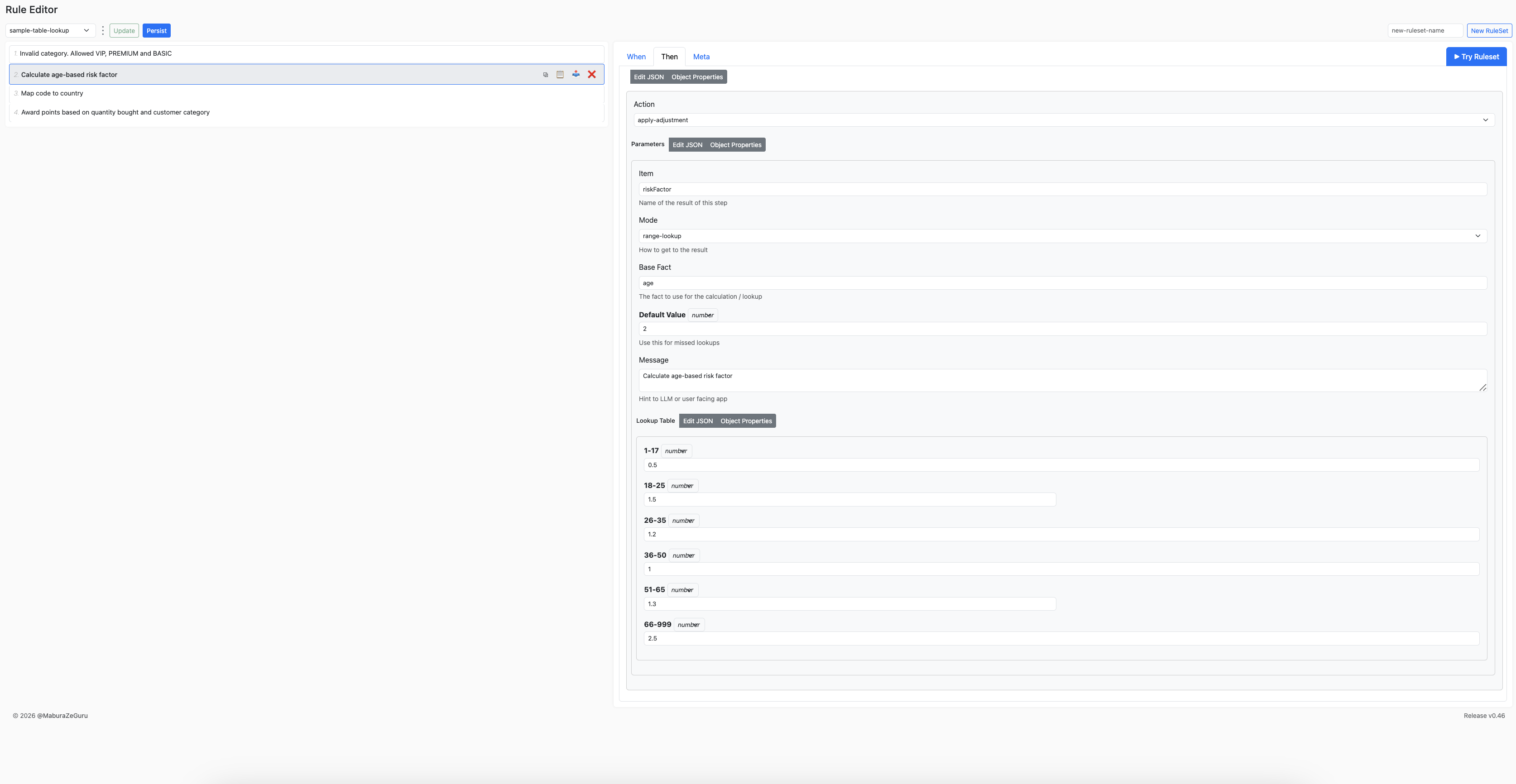
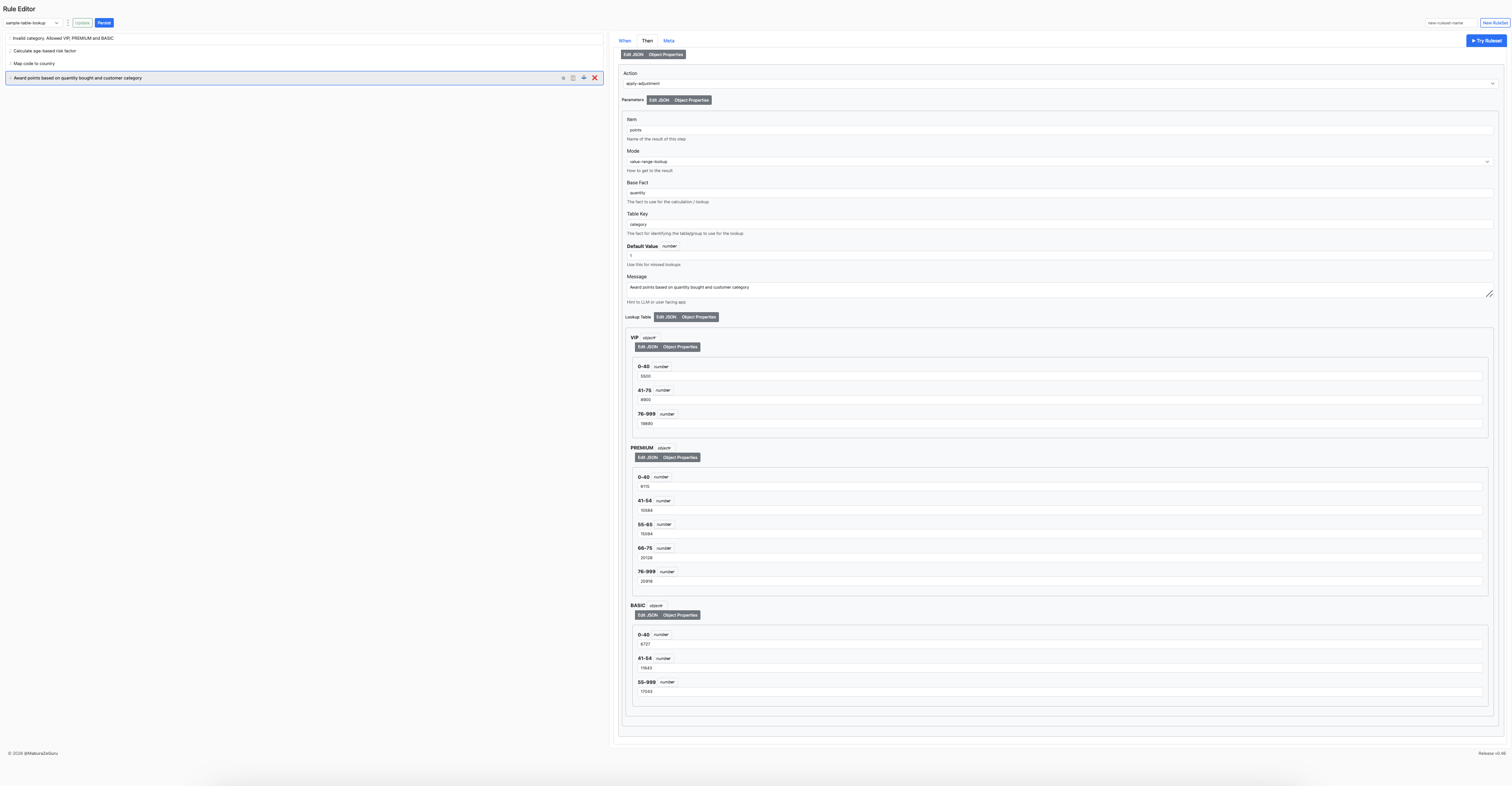
Modes available:
fixedexpression- Lookups:
value-lookup,range-lookup,value-range-lookup
Expression
Powered by MathJS (https://mathjs.org/)
Value Lookup
Range Lookup
Value Range Lookup
Sandbox
🧪 Example Usage
Evaluate Business Logic: Calculate Net Pay
Request
POST baas/calculator/sample-netpay-calc/compute
    {
    "grossPay": "150000"
    }
Response
baseFacts are the original facts passed.
derivedFacts includes all computed values.
breakdown is the object that explains each fired rule and the result at that instance.
This can be displayed on a user interface or added to the LLM context when used in an AI agent.
stopped=false means that the evaluation was not interrupted/stopped by any rule.
{
  "ruleSet": "sample-netpay-calc",
  "stopped": false,
  "baseFacts": {
    "grossPay": "150000"
  },
  "derivedFacts": {
    "shif": 4125,
    "housingLevy": 2250,
    "nssfTier1": 8000,
    "nssfTier2": 64000,
    "nssfTotal": 4320,
    "personalRelief": 2400,
    "taxableIncome": 143625,
    "band1": 24000,
    "band2": 8333,
    "band3": 111292,
    "grossPAYE": 37870.85,
    "finalPAYE": 35470.85,
    "netPay": 103834.15,
    "timestamp": "2026-04-08T11:17:45+03:00"
  },
  "breakdown": [
    {
      "do": "apply-adjustment",
      "message": "SHIF. 2.75% of gross pay",
      "result": 4125
    },
    {
      "do": "apply-adjustment",
      "message": "Housing Levy. 1.5% of gross pay",
      "result": 2250
    },
    {
      "do": "apply-adjustment",
      "message": "NSSF Tier I. First 8000 or less if pay is less than 8,000",
      "result": 8000
    },
    {
      "do": "apply-adjustment",
      "message": "NSSF Tier II. Next 64,000 or less if gross pay is less than 72,000",
      "result": 64000
    },
    {
      "do": "apply-adjustment",
      "message": "Compute Total NSSF deduction",
      "result": 4320
    },
    {
      "do": "apply-adjustment",
      "message": "Define Personal Relief",
      "result": 2400
    },
    {
      "do": "apply-adjustment",
      "message": "Compute taxable income",
      "result": 143625
    },
    {
      "do": "apply-adjustment",
      "message": "Identify amount falling within band 1. (5K-24K)",
      "result": 24000
    },
    {
      "do": "apply-adjustment",
      "message": "Identify amount falling within band 2. (next 8,333)",
      "result": 8333
    },
    {
      "do": "apply-adjustment",
      "message": "Identify amount falling within band 3. (next 467,667)",
      "result": 111292
    },
    {
      "do": "apply-adjustment",
      "message": "Compute PAYE before Relief",
      "result": 37870.85
    },
    {
      "do": "apply-adjustment",
      "message": "Compute PAYE after Relief",
      "result": 35470.85
    },
    {
      "do": "apply-adjustment",
      "message": "Compute NET pay",
      "result": 103834.15
    }
  ]
}
Sample Rule
NB: A single rule is not very useful by itself. Multiple rules need to be grouped into what we call a ruleset in order to implement some business logic (eg price calculator, quote generator, etc).
A single rule
{
        "when": {
            "all": [
                { "fact": "numberOfCofeeCups","operator": "greaterThan","value": 3}
            ]
        },
        "then": {
            "do": "advice",
            "with": {
                "message": "Too much coffee detected! Switch to water before you start coding in circles."
            }
        },
        "priority": 10
    }
A named group of rules, aka ruleset
[
    {
        "when": {
            "all": [
                { "fact": "numberOfCofeeCups","operator": "greaterThan", "value": 3}
                ]
        },
        "then": {
            "do": "advice",
            "with": {
                "message": "Too much coffee detected! Switch to water before you start coding in circles."
            }
        },
        "priority": 10
    },
    {
        "when": {
            "all": [
                { "fact": "numberOfCommitsToday","operator": "lessThan","value": 1}
            ]
        },
        "then": {
            "do": "advice",
            "with": {
                "message": "No commits yet? Time to make some magic happen."
            }
        },
        "priority": 10
    },
    {
        "when": {
            "all": [
                {
                    "fact": "numberOfProductionIncidents","operator": "greaterThanInclusive", "value": 1
                }
            ]
        },
        "then": {
            "do": "advice",
            "with": {
                "message": "Tackling production incidents ? May the force be with you."
            }
        },
        "priority": 10
    },
    {
        "when": {
            "all": [
                {"fact": "releaseDay","operator": "equalIgnoreCase","value": "Friday"}
            ]
        },
        "then": {
            "do": "advice",
            "with": {
                "message": "Deploying on Friday? May the rollback odds be ever in your favor."
            }
        },
        "priority": 10
    },
    {
        "when": {
            "all": [
                {"fact": "numberOfCofeeCups","operator": "lessThanInclusive","value": 3},
                {"fact": "numberOfCommitsToday","operator": "greaterThanInclusive","value": 1},
                {"fact": "numberOfProductionIncidents","operator": "lessThan","value": 1},
                {"fact": "releaseDay","operator": "notEqualIgnoreCase","value": "Friday"}
            ]
        },
        "then": {
            "do": "advice",
            "with": {
                "message": "Balanced caffeine, steady commits, no incidents and no Friday releases. You are living the dream."
            }
        },
        "priority": 5
    }
]
Evaluating RuleSets
All the facts defined in the ruleset must be set and sent as a request. Found under the when object.
🧠 Decision Trace (Explainability)
Every evaluation includes a breakdown:
- Shows which rules were evaluated
- Shows the order of evaluation
- Shows the result at each step/rule
- Human readable and usable in Agent context
- Helps in explanations, auditing and debugging purposes
🧩 Use Cases
- 🛒 Pricing & discount calculator
- 🔐 Product logic
- 💳 Quote Generator
- 🤖 AI input/output guardrails
- 🚀 Add determinism in your AI agents for non-probabilistic business logic
- 📸 Conversational SMS / USSD
- ✅ Session management
- 🤝 Serial input processing
- ⚙️ Backend as a service
- 🖥️ Educational purposes
🛠️ Development
Install dependencies
npm install
Run locally
npm run start:dev
📁 Project Structure
/public         # Editor
/samples        # Sample Rulesets
/readme         # Documentation for sample rulesets
/src/calculator     # Main rule evaluator/calculator
/src/common         # Utils and DTOs
/src/meta           # Dynamic metadata for ui
/src/ruleset        # Ruleset management
/src/session        # Session logic
🤝 Contributing
Contributions are welcome and encouraged!
We need help in
- documentation
- tests
- web ui
- bugfixes
BaaS aims for simplicity.
- No Hyperlinks
- Clean page
- Few Operations, that work so well
How to contribute
-
Fork the repository
-
Clone your fork
git clone https://github.com/YOUR_USERNAME/baas.git cd repo-name -
Add upstream (important!)
This links your local repo to the original repo:
git remote add upstream https://github.com/zeguru/baas.gitNow you have
- Original repo → `upstream` - Your fork → `origin` -
Create a feature branch
git checkout -b feature/amazing-feature -
Make changes and Commit
git add . git commit -m "Add amazing feature" -
Push to your fork (not upstream!)
git push origin feature/amazing-feature -
Open a Pull Request
From your fork
Target:
- base repo → original repo (upstream) - head repo → your fork (origin) -
Fill the PR documentation
NOTEs
Keep your fork updated
a. Sync with upstream
git checkout main
git fetch upstream
git merge upstream/main
b. Push updated main
git push origin main
Contribution Guidelines
- Keep PRs focused and small
- Document your PR accordingly
- Write clear commit messages
- Add tests where applicable
- Your PR must reference an open issue
🧪 Running Tests
npm run test:cov
npm run test
📌 Roadmap
- Rule versioning
- Execution Stats
- Support more databases
- Api key and JWT
- ENVIRONMENT VARIABLES for tuning runtime behaviour
- SDK
- Headless mode (run without editor/docs)
💬 Feedback & Discussions
- Open an issue for bugs or feature requests
- Use discussions for questions and ideas
🙌 Credits
Built with:
- Node.js
- NestJS - https://nestjs.com/
- MathJS - https://mathjs.org/
- Marked - https://github.com/markedjs/marked
- Json Editor - https://github.com/json-editor/json-editor?tab=readme-ov-file
- The awesome json-rules-engine - https://github.com/CacheControl/json-rules-engine/blob/master/docs/rules.md
Inspired by the need for:
- Stack flexibility
- Speed - zero deployment
- Explainable product logic
- Transparent decision-making
- Developer-friendly rule systems
- Reliable AI guardrails for business rules
📄 License
GNU Affero General Public License v3 (AGPL)
⭐ Support
If you find this project useful:
- Star the repo ⭐
- Share it with others
- Contribute!
🔥 Final Note
This project aims to be the decision layer for modern applications—from traditional systems to AI-powered workflows.
Resist all temptations to make this tool complex !
Similar repos


Languages
TypeScript
54.0%
JavaScript
28.4%
HTML
9.4%
CSS
7.8%
See what people are saying
README
BaaS - Business logic As A Service
🚀 BaaS
Explainable, low-code decision engine with API and built-in UI
Power business rules, workflows, and AI guardrails with a fully open-source, developer-friendly engine designed for clarity, control, and auditability.
Background
The Rule Engine design pattern did not reach its full potential. Not in terms of the vision but on adoption and implementation due to many practical limitations.
There are many awesome rule engines, but
- Expensive, not open source
- Not stack-agnostic
- Require heavy coding
- Some lack a decent webui
- Others lack a decision trace
- Hard to plug in to context of AI agents
- Complex DSL
- Fear of breaking things
✨ Features
- Deterministic rule evaluation
- Explainable decision traces
- API-first design
- Built-in UI for rule creation and testing
- Interactive Sandbox
- Docker-ready for instant setup
- Sample rules included
- Works great as guardrails for AI systems
📸 Overview
Core flow:
- Create a ruleset (container for a group of rules)
- Add new rules, one by one, via
- Web UI
- copy from another ruleset and customize
- rest api (advanced)
- Update ruleset
- Adjust execution order
- Meta -> priority
- Drag and drop
- Update ruleset
- Try Ruleset
- Review response
- ✅ Results:
derivedFacts - 🧠 Decision trace:
breakdown
- ✅ Results:
- Repeat
- Persist to save to db
🚀 Quick Start - for the inpatient
1. Run with Docker
docker run -p 3000:3000 zeguru/baas:latest
2. Access the app
- API: http://localhost:3000/baas
- Editor UI: http://localhost:3000/baas/editor
- OpenApi: http://localhost:3000/baas/docs
Option: Docker Compose
version: '3.8'

services:
  app:
    image: zeguru/baas:latest
    ports:
      - "3000:3000"
    environment:
      - NODE_ENV=dev
Production Setup
1. Using Docker
    docker run -d \
    -p 3000:3000 \
    -e DB_TYPE=mysql \
    -e DB_HOST=server.xyz.com \
    -e DB_PORT=3306 \
    -e DB_DATABASE=baas \
    -e DB_USERNAME=user \
    -e DB_PASSWORD=password \
    zeguru/baas:0.57
NB: adjust accordingly:
        eg image -> zeguru/baas:latest
        eg port -> 80
        eg dbtype -> mariadb|postgres|oracledb|mssql
2. Access the app
- API: http://BASE_URL:3000/baas
- Editor UI: http://BASE_URL:3000/baas/editor
Docker Compose
version: "3.9"

services:
  app:
    image: zeguru/baas:latest
    container_name: baas-app
    restart: unless-stopped
    ports:
      - "3000:3000"
    environment:
      DB_TYPE: mysql
      DB_HOST: mysql
      DB_PORT: 3306
      DB_DATABASE: baas
      DB_USERNAME: root
      DB_PASSWORD: secret
NB: using a .env file
version: "3.9"

services:
  app:
    image: zeguru/baas:latest
    container_name: baas-app
    restart: unless-stopped
    ports:
      - "3000:3000"
    env_file:
      - .env
Run
docker-compose up -d
DSL
A. Rule Condition
Define preconditions for rule execution.
Supported Operators:
alwaysisDefinedlessThanlessThanInclusivegreaterThangreaterThanInclusiveequalequalIgnoreCasenotEqualnotEqualIgnoreCaseininIgnoreCasenotInnotInIgnoreCase
B. Rule Definition:
Rule Action: main options:
advicevalidationapply-adjustment
i. advice
Simply logs a message.
ii. validation
Message with an option to break, ie stop the execution and return immediately.
iii. apply-adjustment
Perform a calculation, transformation or a process.
Modes available:
fixedexpression- Lookups:
value-lookup,range-lookup,value-range-lookup
Expression
Powered by MathJS (https://mathjs.org/)
Value Lookup
Range Lookup
Value Range Lookup
Sandbox
🧪 Example Usage
Evaluate Business Logic: Calculate Net Pay
Request
POST baas/calculator/sample-netpay-calc/compute
    {
    "grossPay": "150000"
    }
Response
baseFacts are the original facts passed.
derivedFacts includes all computed values.
breakdown is the object that explains each fired rule and the result at that instance.
This can be displayed on a user interface or added to the LLM context when used in an AI agent.
stopped=false means that the evaluation was not interrupted/stopped by any rule.
{
  "ruleSet": "sample-netpay-calc",
  "stopped": false,
  "baseFacts": {
    "grossPay": "150000"
  },
  "derivedFacts": {
    "shif": 4125,
    "housingLevy": 2250,
    "nssfTier1": 8000,
    "nssfTier2": 64000,
    "nssfTotal": 4320,
    "personalRelief": 2400,
    "taxableIncome": 143625,
    "band1": 24000,
    "band2": 8333,
    "band3": 111292,
    "grossPAYE": 37870.85,
    "finalPAYE": 35470.85,
    "netPay": 103834.15,
    "timestamp": "2026-04-08T11:17:45+03:00"
  },
  "breakdown": [
    {
      "do": "apply-adjustment",
      "message": "SHIF. 2.75% of gross pay",
      "result": 4125
    },
    {
      "do": "apply-adjustment",
      "message": "Housing Levy. 1.5% of gross pay",
      "result": 2250
    },
    {
      "do": "apply-adjustment",
      "message": "NSSF Tier I. First 8000 or less if pay is less than 8,000",
      "result": 8000
    },
    {
      "do": "apply-adjustment",
      "message": "NSSF Tier II. Next 64,000 or less if gross pay is less than 72,000",
      "result": 64000
    },
    {
      "do": "apply-adjustment",
      "message": "Compute Total NSSF deduction",
      "result": 4320
    },
    {
      "do": "apply-adjustment",
      "message": "Define Personal Relief",
      "result": 2400
    },
    {
      "do": "apply-adjustment",
      "message": "Compute taxable income",
      "result": 143625
    },
    {
      "do": "apply-adjustment",
      "message": "Identify amount falling within band 1. (5K-24K)",
      "result": 24000
    },
    {
      "do": "apply-adjustment",
      "message": "Identify amount falling within band 2. (next 8,333)",
      "result": 8333
    },
    {
      "do": "apply-adjustment",
      "message": "Identify amount falling within band 3. (next 467,667)",
      "result": 111292
    },
    {
      "do": "apply-adjustment",
      "message": "Compute PAYE before Relief",
      "result": 37870.85
    },
    {
      "do": "apply-adjustment",
      "message": "Compute PAYE after Relief",
      "result": 35470.85
    },
    {
      "do": "apply-adjustment",
      "message": "Compute NET pay",
      "result": 103834.15
    }
  ]
}
Sample Rule
NB: A single rule is not very useful by itself. Multiple rules need to be grouped into what we call a ruleset in order to implement some business logic (eg price calculator, quote generator, etc).
A single rule
{
        "when": {
            "all": [
                { "fact": "numberOfCofeeCups","operator": "greaterThan","value": 3}
            ]
        },
        "then": {
            "do": "advice",
            "with": {
                "message": "Too much coffee detected! Switch to water before you start coding in circles."
            }
        },
        "priority": 10
    }
A named group of rules, aka ruleset
[
    {
        "when": {
            "all": [
                { "fact": "numberOfCofeeCups","operator": "greaterThan", "value": 3}
                ]
        },
        "then": {
            "do": "advice",
            "with": {
                "message": "Too much coffee detected! Switch to water before you start coding in circles."
            }
        },
        "priority": 10
    },
    {
        "when": {
            "all": [
                { "fact": "numberOfCommitsToday","operator": "lessThan","value": 1}
            ]
        },
        "then": {
            "do": "advice",
            "with": {
                "message": "No commits yet? Time to make some magic happen."
            }
        },
        "priority": 10
    },
    {
        "when": {
            "all": [
                {
                    "fact": "numberOfProductionIncidents","operator": "greaterThanInclusive", "value": 1
                }
            ]
        },
        "then": {
            "do": "advice",
            "with": {
                "message": "Tackling production incidents ? May the force be with you."
            }
        },
        "priority": 10
    },
    {
        "when": {
            "all": [
                {"fact": "releaseDay","operator": "equalIgnoreCase","value": "Friday"}
            ]
        },
        "then": {
            "do": "advice",
            "with": {
                "message": "Deploying on Friday? May the rollback odds be ever in your favor."
            }
        },
        "priority": 10
    },
    {
        "when": {
            "all": [
                {"fact": "numberOfCofeeCups","operator": "lessThanInclusive","value": 3},
                {"fact": "numberOfCommitsToday","operator": "greaterThanInclusive","value": 1},
                {"fact": "numberOfProductionIncidents","operator": "lessThan","value": 1},
                {"fact": "releaseDay","operator": "notEqualIgnoreCase","value": "Friday"}
            ]
        },
        "then": {
            "do": "advice",
            "with": {
                "message": "Balanced caffeine, steady commits, no incidents and no Friday releases. You are living the dream."
            }
        },
        "priority": 5
    }
]
Evaluating RuleSets
All the facts defined in the ruleset must be set and sent as a request. Found under the when object.
🧠 Decision Trace (Explainability)
Every evaluation includes a breakdown:
- Shows which rules were evaluated
- Shows the order of evaluation
- Shows the result at each step/rule
- Human readable and usable in Agent context
- Helps in explanations, auditing and debugging purposes
🧩 Use Cases
- 🛒 Pricing & discount calculator
- 🔐 Product logic
- 💳 Quote Generator
- 🤖 AI input/output guardrails
- 🚀 Add determinism in your AI agents for non-probabilistic business logic
- 📸 Conversational SMS / USSD
- ✅ Session management
- 🤝 Serial input processing
- ⚙️ Backend as a service
- 🖥️ Educational purposes
🛠️ Development
Install dependencies
npm install
Run locally
npm run start:dev
📁 Project Structure
/public         # Editor
/samples        # Sample Rulesets
/readme         # Documentation for sample rulesets
/src/calculator     # Main rule evaluator/calculator
/src/common         # Utils and DTOs
/src/meta           # Dynamic metadata for ui
/src/ruleset        # Ruleset management
/src/session        # Session logic
🤝 Contributing
Contributions are welcome and encouraged!
We need help in
- documentation
- tests
- web ui
- bugfixes
BaaS aims for simplicity.
- No Hyperlinks
- Clean page
- Few Operations, that work so well
How to contribute
-
Fork the repository
-
Clone your fork
git clone https://github.com/YOUR_USERNAME/baas.git cd repo-name -
Add upstream (important!)
This links your local repo to the original repo:
git remote add upstream https://github.com/zeguru/baas.gitNow you have
- Original repo → `upstream` - Your fork → `origin` -
Create a feature branch
git checkout -b feature/amazing-feature -
Make changes and Commit
git add . git commit -m "Add amazing feature" -
Push to your fork (not upstream!)
git push origin feature/amazing-feature -
Open a Pull Request
From your fork
Target:
- base repo → original repo (upstream) - head repo → your fork (origin) -
Fill the PR documentation
NOTEs
Keep your fork updated
a. Sync with upstream
git checkout main
git fetch upstream
git merge upstream/main
b. Push updated main
git push origin main
Contribution Guidelines
- Keep PRs focused and small
- Document your PR accordingly
- Write clear commit messages
- Add tests where applicable
- Your PR must reference an open issue
🧪 Running Tests
npm run test:cov
npm run test
📌 Roadmap
- Rule versioning
- Execution Stats
- Support more databases
- Api key and JWT
- ENVIRONMENT VARIABLES for tuning runtime behaviour
- SDK
- Headless mode (run without editor/docs)
💬 Feedback & Discussions
- Open an issue for bugs or feature requests
- Use discussions for questions and ideas
🙌 Credits
Built with:
- Node.js
- NestJS - https://nestjs.com/
- MathJS - https://mathjs.org/
- Marked - https://github.com/markedjs/marked
- Json Editor - https://github.com/json-editor/json-editor?tab=readme-ov-file
- The awesome json-rules-engine - https://github.com/CacheControl/json-rules-engine/blob/master/docs/rules.md
Inspired by the need for:
- Stack flexibility
- Speed - zero deployment
- Explainable product logic
- Transparent decision-making
- Developer-friendly rule systems
- Reliable AI guardrails for business rules
📄 License
GNU Affero General Public License v3 (AGPL)
⭐ Support
If you find this project useful:
- Star the repo ⭐
- Share it with others
- Contribute!
🔥 Final Note
This project aims to be the decision layer for modern applications—from traditional systems to AI-powered workflows.
Resist all temptations to make this tool complex !
Similar repos
Languages
TypeScript
54.0%
JavaScript
28.4%
HTML
9.4%
CSS
7.8%