
open-source routing system designed for payment processing
Rust
131
494 commits
updated Sep 26, 2026
README




Decision Engine
Routing control plane for payment decisions
Open-Source • Rust • Rule-Based • Success-Rate Based
Configure routing rules, run gateway decisions, and inspect routing outcomes from APIs or the dashboard.
What is Decision Engine?
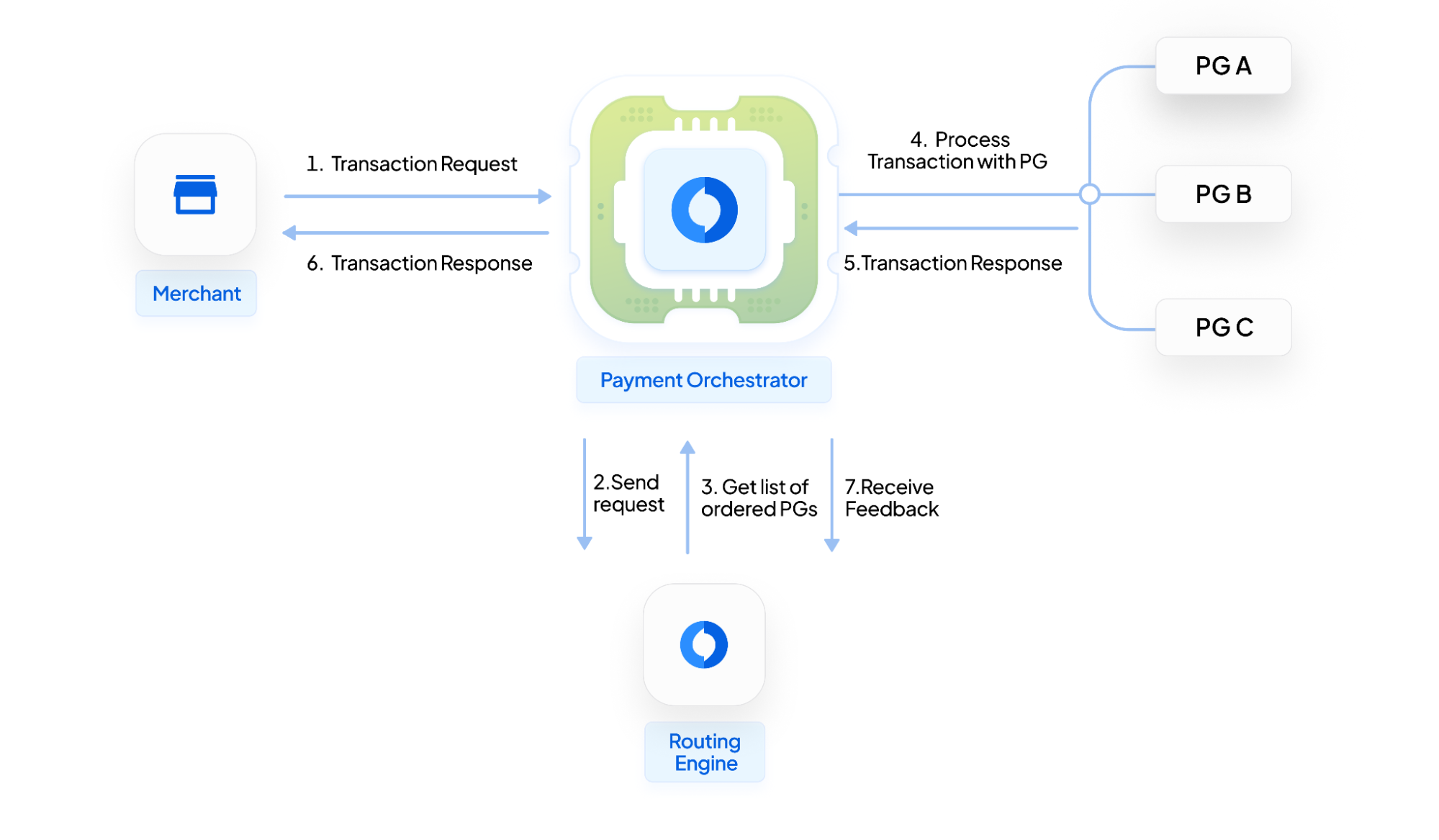
Decision Engine is a Rust service that sits between your orchestrator and your list of payment gateways. When a payment comes in, it picks the best available gateway based on rules you configure — priority ordering, success-rate scoring, volume splits, or debit-network gates — and returns the decision over HTTP.
┌─────────────┐     ┌──────────────────┐     ┌─────────────┐
│  Payment    │────▶│  Decision Engine │────▶│  Best       │
│  Request    │     │  (Fast routing)  │     │  Gateway    │
└─────────────┘     └──────────────────┘     └─────────────┘
It runs as a standalone service — no vendor lock-in, no mandatory orchestrator. Your existing stack calls it over HTTP before dispatching to a gateway, and over time it improves decisions using outcome feedback you push back via the score update API.
What it ships today:
- Rule-based routing — define priority rules per merchant using Euclid, Juspay's open rule engine
- Success-rate ordering — gateways ranked dynamically from transaction outcome feedback
- Multi-objective (cost-aware) routing — re-ranks gateways to balance approval rate against per-gateway processing cost, favoring cheaper gateways when they don't meaningfully hurt auth
- Cost data ingestion — learns each connector's real fee from settlement reports and invoices, at a fine-grained per-cluster level, to power cost-aware routing
- A/B testing — split live traffic between a control and variant routing strategy with a guardrail and built-in significance testing
- Autopilot & auto-calibration — background self-tuning of success-rate hedging and bucket size from observed traffic
- Volume splits — distribute traffic across gateways by percentage
- Debit routing gates — per-merchant toggle for debit-network routing
- Downtime detection — auto-excludes gateways that are failing
- Analytics — ClickHouse-backed tables for routing outcomes, decision audit, and experiment results
- Dashboard — React UI for configuring rules and inspecting decisions
- Multi-DB — MySQL and PostgreSQL support
- Team management — invite and manage members per merchant account
Quick Start
Docker (Recommended)
git clone https://github.com/juspay/decision-engine.git
cd decision-engine
docker compose --profile postgres-ghcr up -d
API is ready at http://localhost:8080. That's it.
For API + dashboard + docs together:
docker compose --profile dashboard-postgres-ghcr up -d
Open:
- API:
http://localhost:8080 - Dashboard:
http://localhost:8081/dashboard/ - Docs:
http://localhost:8081/introduction - API guide (curl examples):
http://localhost:8081/api-refs/api-ref - API reference (OpenAPI):
http://localhost:8081/api-reference
For deployed docs or dashboard environments, use the same paths under your deployed host, e.g. https://<docs-host>/api-refs/api-ref.
CockroachDB
CockroachDB is PostgreSQL wire-protocol compatible, so it runs on the existing postgres build,
migrations_pg, and pg_database config — no separate feature or backend. The
docker-compose.cockroach.yml overlay swaps the postgresql service for a single-node CockroachDB.
Full local dev (the oneclick.sh flow), with CockroachDB instead of PostgreSQL:
./oneclick.sh --cockroach
The DB is published on host 26257 (CockroachDB's native port) so it coexists with a local
PostgreSQL on 5432; --cockroach points the migrator, seed, and backend there automatically.
Docker-only (app runs in-container against the CockroachDB service):
docker compose -f docker-compose.yaml -f docker-compose.cockroach.yml --profile postgres-local up -d
API stays on http://localhost:8080; the CockroachDB DB Console is at http://localhost:8090. For a
secure cluster (e.g. CockroachDB Cloud), set pg_sslmode (and pg_ssl_root_cert) under
[pg_database] in your config.
From Source
Prerequisites: Rust 1.85+, MySQL or PostgreSQL, Redis, just
git clone https://github.com/juspay/decision-engine.git
cd decision-engine

# Edit config/development.toml with your DB, Redis, and ClickHouse connection details
# (config/development.toml already exists with all required sections)
MySQL (default features):
cargo build --release --features release
diesel migration run   # set DATABASE_URL=mysql://user:pass@host/dbname first
RUSTFLAGS="-Awarnings" cargo run --features release
PostgreSQL:
cargo build --release --no-default-features --features middleware,kms-aws,postgres
just migrate-pg        # sets DATABASE_URL from env or justfile defaults
RUSTFLAGS="-Awarnings" cargo run --no-default-features --features postgres
For the full local dev environment (API + dashboard on port 5173 + docs), run:
./oneclick.sh
This brings up Postgres, Redis, ClickHouse, Kafka, an OpenTelemetry collector and Prometheus via Docker Compose, runs migrations, and starts the API server and dashboard locally. The API pushes its metrics to the collector on localhost:4317; browse them at http://localhost:9898/metrics or in Prometheus at http://localhost:9090. See Local Setup Guide for full details and options like ONECLICK_KEEP_INFRA=1.
Verify
curl http://localhost:8080/health
# → {"message":"Health is good"}
Documentation
| Resource | Description |
|---|---|
| Installation Guide | Docker, source build, database setup — end to end |
| Local Setup Guide | CLI, Docker, Compose profiles, and Helm |
| MySQL Setup Guide | MySQL-specific walkthrough |
| PostgreSQL Setup Guide | PostgreSQL-specific walkthrough |
| API Guide | Copy-paste curl examples for every route family, including cost ingestion, A/B testing, and autopilot |
| API Reference (Swagger) | Interactive Swagger UI — browse and try every endpoint against the OpenAPI spec |
| Multi-Objective Routing | Cost-aware post-step that re-ranks gateways on expected value |
| Configuration Guide | All config options explained |
| Deep Dive Blog | How the routing logic works |
| Performance Benchmarks | Throughput and latency of the /decide-gateway endpoint under sustained load |
Architecture
High-Level Flow
Integration Pattern
Decision Engine fits into an existing payment stack without replacing your orchestrator. The orchestrator calls Decision Engine to get a gateway recommendation, then dispatches to that gateway. Card data stays in your vault — Decision Engine never touches it.
Contributing
Contributions are welcome — bug reports, feature requests, docs, or code.
# Fork & clone
git clone https://github.com/YOUR_USERNAME/decision-engine.git

# Create a branch
git checkout -b feature/your-feature

# Make changes and test
cargo test

# Submit a PR
See CONTRIBUTING.md for guidelines, and check good first issues if you're new to the codebase.
Community
| Platform | Purpose |
|---|---|
 | Real-time help and discussions |
| GitHub Discussions | Feature requests and ideas |
| GitHub Issues | Bug reports |
License
Licensed under GNU AGPL v3.0.
Built by Juspay
Contributors


Similar repos


Languages
Rust
59.0%
TypeScript
34.3%
Shell
2.3%
Python
1.4%
HTML
1.3%
JavaScript
1.0%
open-source routing system designed for payment processing
Rust
131
494 commits
updated Sep 26, 2026
README
Decision Engine
Routing control plane for payment decisions
Open-Source • Rust • Rule-Based • Success-Rate Based
Configure routing rules, run gateway decisions, and inspect routing outcomes from APIs or the dashboard.
What is Decision Engine?
Decision Engine is a Rust service that sits between your orchestrator and your list of payment gateways. When a payment comes in, it picks the best available gateway based on rules you configure — priority ordering, success-rate scoring, volume splits, or debit-network gates — and returns the decision over HTTP.
┌─────────────┐     ┌──────────────────┐     ┌─────────────┐
│  Payment    │────▶│  Decision Engine │────▶│  Best       │
│  Request    │     │  (Fast routing)  │     │  Gateway    │
└─────────────┘     └──────────────────┘     └─────────────┘
It runs as a standalone service — no vendor lock-in, no mandatory orchestrator. Your existing stack calls it over HTTP before dispatching to a gateway, and over time it improves decisions using outcome feedback you push back via the score update API.
What it ships today:
- Rule-based routing — define priority rules per merchant using Euclid, Juspay's open rule engine
- Success-rate ordering — gateways ranked dynamically from transaction outcome feedback
- Multi-objective (cost-aware) routing — re-ranks gateways to balance approval rate against per-gateway processing cost, favoring cheaper gateways when they don't meaningfully hurt auth
- Cost data ingestion — learns each connector's real fee from settlement reports and invoices, at a fine-grained per-cluster level, to power cost-aware routing
- A/B testing — split live traffic between a control and variant routing strategy with a guardrail and built-in significance testing
- Autopilot & auto-calibration — background self-tuning of success-rate hedging and bucket size from observed traffic
- Volume splits — distribute traffic across gateways by percentage
- Debit routing gates — per-merchant toggle for debit-network routing
- Downtime detection — auto-excludes gateways that are failing
- Analytics — ClickHouse-backed tables for routing outcomes, decision audit, and experiment results
- Dashboard — React UI for configuring rules and inspecting decisions
- Multi-DB — MySQL and PostgreSQL support
- Team management — invite and manage members per merchant account
Quick Start
Docker (Recommended)
git clone https://github.com/juspay/decision-engine.git
cd decision-engine
docker compose --profile postgres-ghcr up -d
API is ready at http://localhost:8080. That's it.
For API + dashboard + docs together:
docker compose --profile dashboard-postgres-ghcr up -d
Open:
- API:
http://localhost:8080 - Dashboard:
http://localhost:8081/dashboard/ - Docs:
http://localhost:8081/introduction - API guide (curl examples):
http://localhost:8081/api-refs/api-ref - API reference (OpenAPI):
http://localhost:8081/api-reference
For deployed docs or dashboard environments, use the same paths under your deployed host, e.g. https://<docs-host>/api-refs/api-ref.
CockroachDB
CockroachDB is PostgreSQL wire-protocol compatible, so it runs on the existing postgres build,
migrations_pg, and pg_database config — no separate feature or backend. The
docker-compose.cockroach.yml overlay swaps the postgresql service for a single-node CockroachDB.
Full local dev (the oneclick.sh flow), with CockroachDB instead of PostgreSQL:
./oneclick.sh --cockroach
The DB is published on host 26257 (CockroachDB's native port) so it coexists with a local
PostgreSQL on 5432; --cockroach points the migrator, seed, and backend there automatically.
Docker-only (app runs in-container against the CockroachDB service):
docker compose -f docker-compose.yaml -f docker-compose.cockroach.yml --profile postgres-local up -d
API stays on http://localhost:8080; the CockroachDB DB Console is at http://localhost:8090. For a
secure cluster (e.g. CockroachDB Cloud), set pg_sslmode (and pg_ssl_root_cert) under
[pg_database] in your config.
From Source
Prerequisites: Rust 1.85+, MySQL or PostgreSQL, Redis, just
git clone https://github.com/juspay/decision-engine.git
cd decision-engine

# Edit config/development.toml with your DB, Redis, and ClickHouse connection details
# (config/development.toml already exists with all required sections)
MySQL (default features):
cargo build --release --features release
diesel migration run   # set DATABASE_URL=mysql://user:pass@host/dbname first
RUSTFLAGS="-Awarnings" cargo run --features release
PostgreSQL:
cargo build --release --no-default-features --features middleware,kms-aws,postgres
just migrate-pg        # sets DATABASE_URL from env or justfile defaults
RUSTFLAGS="-Awarnings" cargo run --no-default-features --features postgres
For the full local dev environment (API + dashboard on port 5173 + docs), run:
./oneclick.sh
This brings up Postgres, Redis, ClickHouse, Kafka, an OpenTelemetry collector and Prometheus via Docker Compose, runs migrations, and starts the API server and dashboard locally. The API pushes its metrics to the collector on localhost:4317; browse them at http://localhost:9898/metrics or in Prometheus at http://localhost:9090. See Local Setup Guide for full details and options like ONECLICK_KEEP_INFRA=1.
Verify
curl http://localhost:8080/health
# → {"message":"Health is good"}
Documentation
| Resource | Description |
|---|---|
| Installation Guide | Docker, source build, database setup — end to end |
| Local Setup Guide | CLI, Docker, Compose profiles, and Helm |
| MySQL Setup Guide | MySQL-specific walkthrough |
| PostgreSQL Setup Guide | PostgreSQL-specific walkthrough |
| API Guide | Copy-paste curl examples for every route family, including cost ingestion, A/B testing, and autopilot |
| API Reference (Swagger) | Interactive Swagger UI — browse and try every endpoint against the OpenAPI spec |
| Multi-Objective Routing | Cost-aware post-step that re-ranks gateways on expected value |
| Configuration Guide | All config options explained |
| Deep Dive Blog | How the routing logic works |
| Performance Benchmarks | Throughput and latency of the /decide-gateway endpoint under sustained load |
Architecture
High-Level Flow
Integration Pattern
Decision Engine fits into an existing payment stack without replacing your orchestrator. The orchestrator calls Decision Engine to get a gateway recommendation, then dispatches to that gateway. Card data stays in your vault — Decision Engine never touches it.
Contributing
Contributions are welcome — bug reports, feature requests, docs, or code.
# Fork & clone
git clone https://github.com/YOUR_USERNAME/decision-engine.git

# Create a branch
git checkout -b feature/your-feature

# Make changes and test
cargo test

# Submit a PR
See CONTRIBUTING.md for guidelines, and check good first issues if you're new to the codebase.
Community
| Platform | Purpose |
|---|---|
| Real-time help and discussions |
| GitHub Discussions | Feature requests and ideas |
| GitHub Issues | Bug reports |
License
Licensed under GNU AGPL v3.0.
Built by Juspay
Similar repos
Contributors
Languages
Rust
59.0%
TypeScript
34.3%
Shell
2.3%
Python
1.4%
HTML
1.3%
JavaScript
1.0%