
[NeurIPS 2023] ImageReward: Learning and Evaluating Human Preferences for Text-to-image Generation
Python
1,705
43 commits
updated Oct 29, 2025
README
ImageReward
📃 Paper • 🖼 Dataset • 🌐 中文博客 • 🤗 HF Repo • 🐦 Twitter
🔥🔥 News! 2024/12/31: We released the next generation of model, VisionReward, which is a fine-grained and multi-dimensional reward model for stable RLHF for visual generation (text-to-image / text-to-video)!
🔥 News! 2023/9/22: The paper of ImageReward is accepted by NeurIPS 2023!
ImageReward: Learning and Evaluating Human Preferences for Text-to-Image Generation
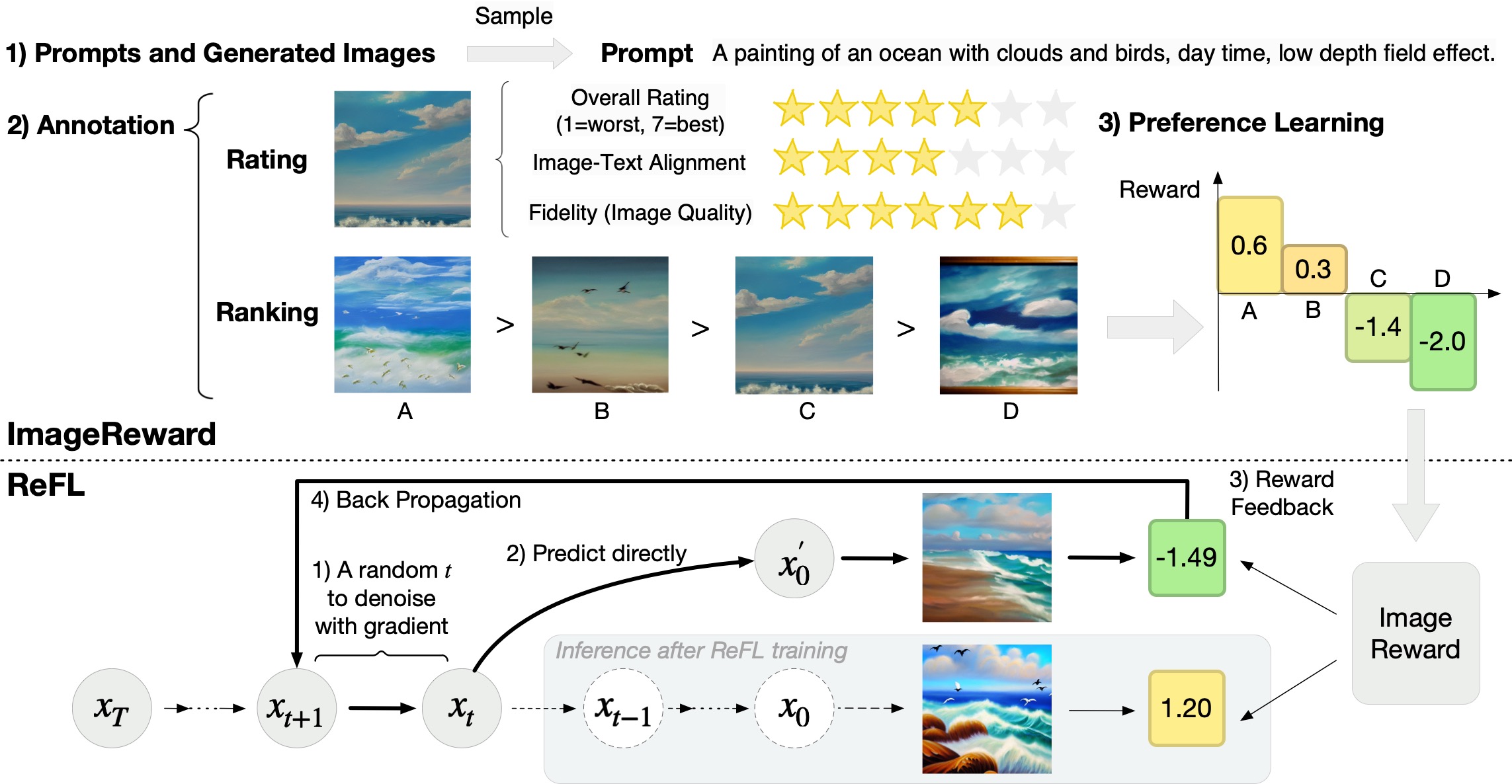
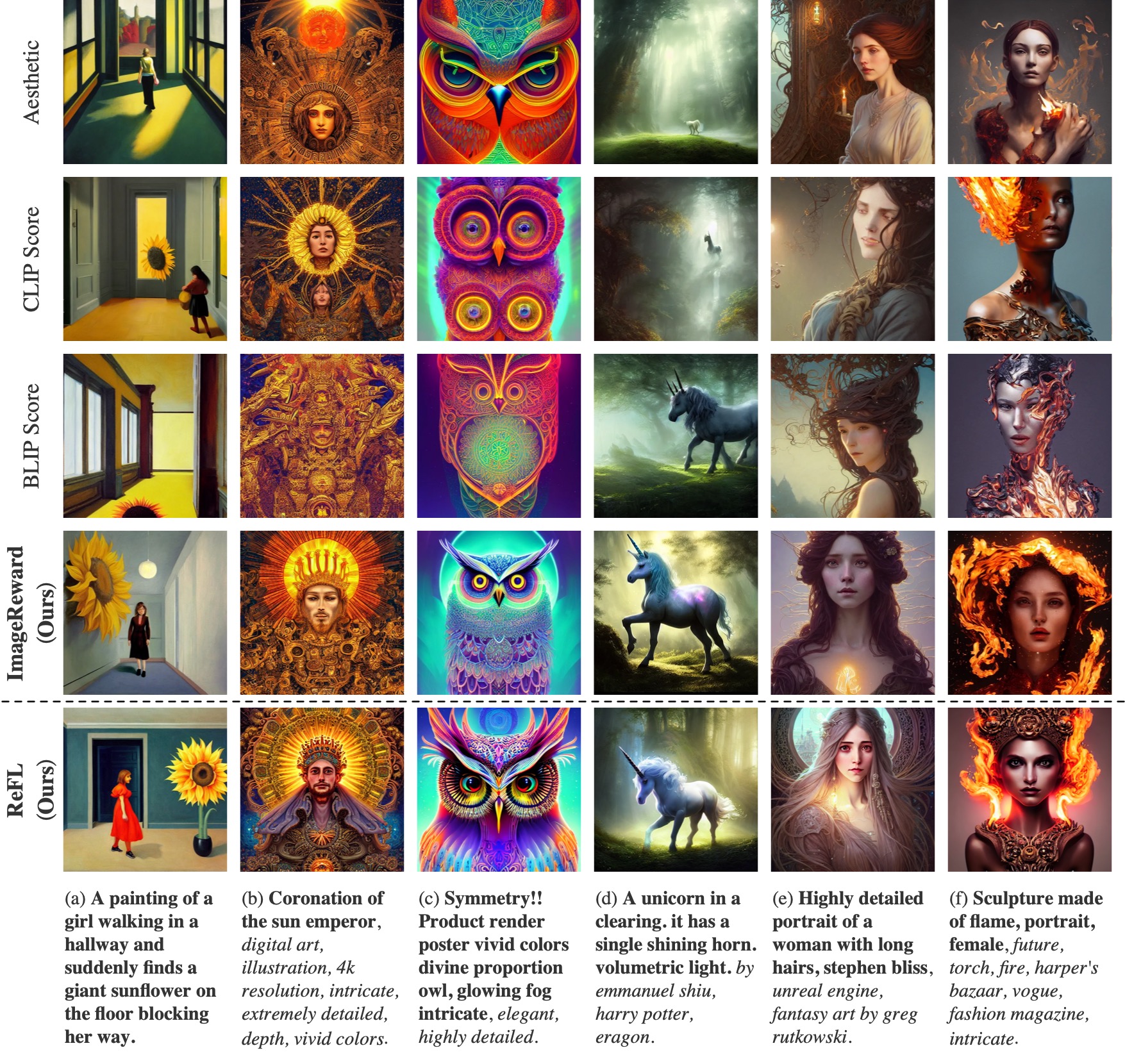
ImageReward is the first general-purpose text-to-image human preference RM, which is trained on in total 137k pairs of expert comparisons, outperforming existing text-image scoring methods, such as CLIP (by 38.6%), Aesthetic (by 39.6%), and BLIP (by 31.6%), in terms of understanding human preference in text-to-image synthesis.
Additionally, we introduce Reward Feedback Learning (ReFL) for direct optimizing a text-to-image diffusion model using ImageReward. ReFL-tuned Stable Diffusion wins against untuned version by 58.4% in human evaluation.
Both ImageReward and ReFL are all packed up to Python image-reward package now!


Try image-reward package in only 3 lines of code for ImageReward scoring!
# pip install image-reward
import ImageReward as RM
model = RM.load("ImageReward-v1.0")

rewards = model.score("<prompt>", ["<img1_obj_or_path>", "<img2_obj_or_path>", ...])
Try image-reward package in only 4 lines of code for ReFL fine-tuning!
# pip install image-reward
# pip install diffusers==0.16.0 accelerate==0.16.0 datasets==2.11.0
from ImageReward import ReFL
args = ReFL.parse_args()
trainer = ReFL.Trainer("CompVis/stable-diffusion-v1-4", "data/refl_data.json", args=args)
trainer.train(args=args)
If you find ImageReward's open-source effort useful, please 🌟 us to encourage our following developement!
- ImageReward
Quick Start
Install Dependency
We have integrated the whole repository to a single python package image-reward. Following the commands below to prepare the environment:
# Clone the ImageReward repository (containing data for testing)
git clone https://github.com/THUDM/ImageReward.git
cd ImageReward

# Install the integrated package `image-reward`
pip install image-reward
Example Use
We provide example images in the assets/images directory of this repo. The example prompt is:
a painting of an ocean with clouds and birds, day time, low depth field effect
Use the following code to get the human preference scores from ImageReward:
import os
import torch
import ImageReward as RM

if __name__ == "__main__":
    prompt = "a painting of an ocean with clouds and birds, day time, low depth field effect"
    img_prefix = "assets/images"
    generations = [f"{pic_id}.webp" for pic_id in range(1, 5)]
    img_list = [os.path.join(img_prefix, img) for img in generations]
    model = RM.load("ImageReward-v1.0")
    with torch.no_grad():
        ranking, rewards = model.inference_rank(prompt, img_list)
        # Print the result
        print("\nPreference predictions:\n")
        print(f"ranking = {ranking}")
        print(f"rewards = {rewards}")
        for index in range(len(img_list)):
            score = model.score(prompt, img_list[index])
            print(f"{generations[index]:>16s}: {score:.2f}")
The output should be like as follow (the exact numbers may be slightly different depending on the compute device):
Preference predictions:

ranking = [1, 2, 3, 4]
rewards = [[0.5811622738838196], [0.2745276093482971], [-1.4131819009780884], [-2.029569625854492]]
          1.webp: 0.58
          2.webp: 0.27
          3.webp: -1.41
          4.webp: -2.03
ReFL
Install Dependency
pip install diffusers==0.16.0 accelerate==0.16.0 datasets==2.11.0
Example Use
We provide example dataset for ReFL in the data/refl_data.json of this repo. Run ReFL as following:
bash scripts/train_refl.sh
Demos of ImageReward and ReFL
Training code for ImageReward
-
Download data: 🖼 Dataset.
-
Make dataset.
cd train
python src/make_dataset.py
-
Set training config:
train/src/config/config.yaml -
One command to train.
bash scripts/train_one_node.sh
Integration into Stable Diffusion Web UI
We have developed a custom script to integrate ImageReward into SD Web UI for a convenient experience.
The script is located at sdwebui/image_reward.py in this repository.
The usage of the script is described as follows:
- Install: put the custom script into the
stable-diffusion-webui/scripts/directory - Reload: restart the service, or click the "Reload custom script" button at the bottom of the settings tab of SD Web UI. (If the button can't be found, try clicking the "Show all pages" button at the bottom of the left sidebar.)
- Select: go back to the "txt2img"/"img2img" tab, and select "ImageReward - generate human preference scores" from the "Script" dropdown menu in the lower left corner.
- Run: the specific usage varies depending on the functional requirements, as described in the "Features" section below.
Features
Score generated images and append to image information
Usage
- Do not check the "Filter out images with low scores" checkbox.
- Click the "Generate" button to generate images.
- Check the ImageReward at the bottom of the image information below the gallery.
Demo video
https://github.com/THUDM/ImageReward/assets/98524878/9d8a036d-1583-4978-aac7-4b758edf9b89
Automatically filter out images with low scores
Usage
- Check the "Filter out images with low scores" checkbox.
- Enter the score lower limit in "Lower score limit". (ImageReward roughly follows the standard normal distribution, with a mean of 0 and a variance of 1.)
- Click the "Generate" button to generate images.
- Images with scores below the lower limit will be automatically filtered out and will not appear in the gallery.
- Check the ImageReward at the bottom of the image information below the gallery.
Demo video
https://github.com/THUDM/ImageReward/assets/98524878/b9f01629-87d6-4c92-9990-fe065711b9c6
View the scores of images that have been scored
Usage
- Upload the scored image file in the "PNG Info" tab
- Check the image information on the right with the score of the image at the bottom.
Example

Other Features
Memory Management
- ImageReward model will not be loaded until first script run.
- "Reload UI" will not reload the model nor unload it, but reuses the currently loaded model (if it exists).
- A "Unload Model" button is provided to manually unload the currently loaded model.
FAQ
How to adjust the Python environment used by the SD Web UI (e.g. reinstall a package)?
Note that SD Web UI has two ways to set up its Python environment:
- If you launch with
python launch.py, Web UI will use the Python environment found in yourPATH(in Linux, you can check its exact path withwhich python). - If you launch with a script like
webui-user.bat, Web UI creates a new venv environment in the directorystable-diffusion-webui\venv.- Generally, you need some other operations to activate this environment. For example, in Windows, you need to enter the
stable-diffusion-webui\venv\Scriptsdirectory, runactivateoractivate.bat(if you are using cmd) oractivate.ps1(if you are using PowerShell) from . - If you see the prompt
(venv)appear at the far left of the command line, you have successfully activated venv created by the SD Web UI.
- Generally, you need some other operations to activate this environment. For example, in Windows, you need to enter the
After activating the right Python environment, just do what you want to do true to form.
Reproduce Experiments in Table 1
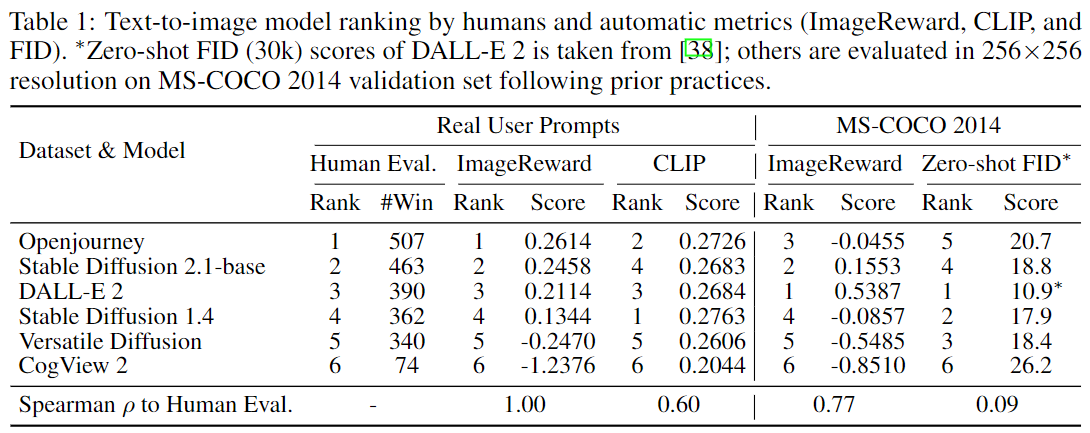
Note: The experimental results are produced in an environment that satisfies:
- (NVIDIA) Driver Version: 515.86.01
- CUDA Version: 11.7
torchVersion: 1.12.1+cu113 According to our own reproduction experience, reproducing this experiment in other environments may cause the last decimal place to fluctuate, typically within a range of ±0.1.
Run the following script to automatically download data, baseline models, and run experiments:
bash ./scripts/test-benchmark.sh
Then you can check the results in benchmark/results/ or the terminal.
If you want to check the raw data files individually:
- Test prompts and corresponding human rankings for images are located in
benchmark/benchmark-prompts.json. - Generated outputs for each prompt (originally from DiffusionDB) can be downloaded from Hugging Face or Tsinghua Cloud.
- Each
<model_name>.zipcontains a directory of the same name, in which there are in total 1000 images generated from 100 prompts of 10 images each. - Every
<model_name>.zipshould be decompressed intobenchmark/generations/as directory<model_name>that contains images.
- Each
Reproduce Experiments in Table 3
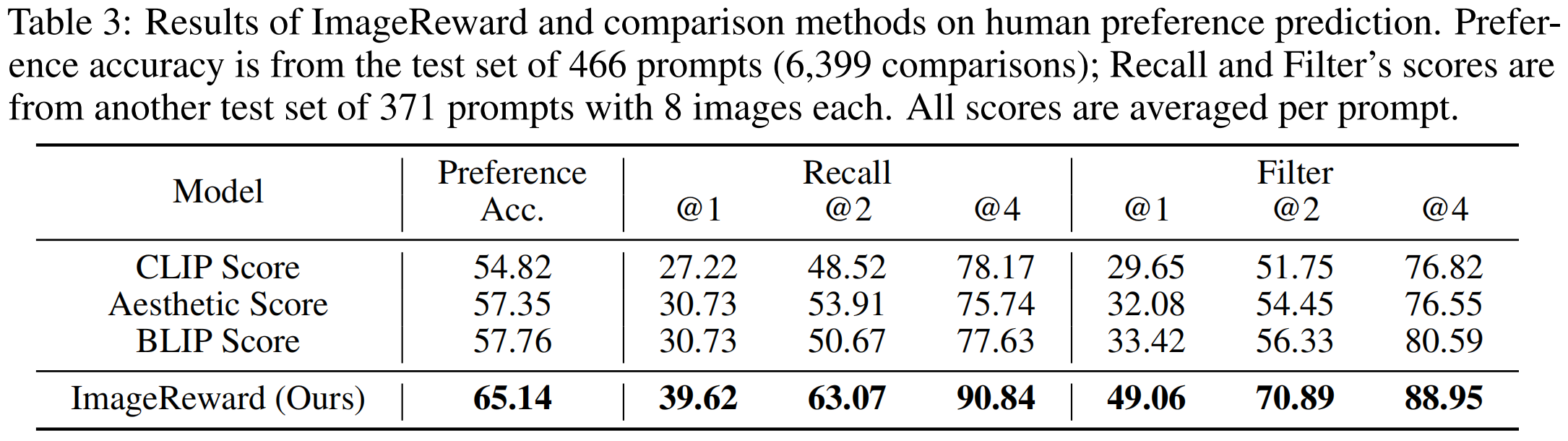
Run the following script to automatically download data, baseline models, and run experiments:
bash ./scripts/test.sh
If you want to check the raw data files individually:
- Test prompts and corresponding human rankings for images are located in
data/test.json. - Generated outputs for each prompt (originally from DiffusionDB) can be downloaded from Hugging Face or Tsinghua Cloud. It should be decompressed to
data/test_images.
Citation
@inproceedings{xu2023imagereward,
  title={ImageReward: learning and evaluating human preferences for text-to-image generation},
  author={Xu, Jiazheng and Liu, Xiao and Wu, Yuchen and Tong, Yuxuan and Li, Qinkai and Ding, Ming and Tang, Jie and Dong, Yuxiao},
  booktitle={Proceedings of the 37th International Conference on Neural Information Processing Systems},
  pages={15903--15935},
  year={2023}
}
Significant stargazers

897 followers · starred Apr 2023

25 followers · starred Oct 2023

282 followers · starred Apr 2023

65 followers · starred Dec 2023
Similar repos




Languages
Python
99.1%
[NeurIPS 2023] ImageReward: Learning and Evaluating Human Preferences for Text-to-image Generation
Python
1,705
43 commits
updated Oct 29, 2025
README
ImageReward
📃 Paper • 🖼 Dataset • 🌐 中文博客 • 🤗 HF Repo • 🐦 Twitter
🔥🔥 News! 2024/12/31: We released the next generation of model, VisionReward, which is a fine-grained and multi-dimensional reward model for stable RLHF for visual generation (text-to-image / text-to-video)!
🔥 News! 2023/9/22: The paper of ImageReward is accepted by NeurIPS 2023!
ImageReward: Learning and Evaluating Human Preferences for Text-to-Image Generation
ImageReward is the first general-purpose text-to-image human preference RM, which is trained on in total 137k pairs of expert comparisons, outperforming existing text-image scoring methods, such as CLIP (by 38.6%), Aesthetic (by 39.6%), and BLIP (by 31.6%), in terms of understanding human preference in text-to-image synthesis.
Additionally, we introduce Reward Feedback Learning (ReFL) for direct optimizing a text-to-image diffusion model using ImageReward. ReFL-tuned Stable Diffusion wins against untuned version by 58.4% in human evaluation.
Both ImageReward and ReFL are all packed up to Python image-reward package now!
Try image-reward package in only 3 lines of code for ImageReward scoring!
# pip install image-reward
import ImageReward as RM
model = RM.load("ImageReward-v1.0")

rewards = model.score("<prompt>", ["<img1_obj_or_path>", "<img2_obj_or_path>", ...])
Try image-reward package in only 4 lines of code for ReFL fine-tuning!
# pip install image-reward
# pip install diffusers==0.16.0 accelerate==0.16.0 datasets==2.11.0
from ImageReward import ReFL
args = ReFL.parse_args()
trainer = ReFL.Trainer("CompVis/stable-diffusion-v1-4", "data/refl_data.json", args=args)
trainer.train(args=args)
If you find ImageReward's open-source effort useful, please 🌟 us to encourage our following developement!
- ImageReward
Quick Start
Install Dependency
We have integrated the whole repository to a single python package image-reward. Following the commands below to prepare the environment:
# Clone the ImageReward repository (containing data for testing)
git clone https://github.com/THUDM/ImageReward.git
cd ImageReward

# Install the integrated package `image-reward`
pip install image-reward
Example Use
We provide example images in the assets/images directory of this repo. The example prompt is:
a painting of an ocean with clouds and birds, day time, low depth field effect
Use the following code to get the human preference scores from ImageReward:
import os
import torch
import ImageReward as RM

if __name__ == "__main__":
    prompt = "a painting of an ocean with clouds and birds, day time, low depth field effect"
    img_prefix = "assets/images"
    generations = [f"{pic_id}.webp" for pic_id in range(1, 5)]
    img_list = [os.path.join(img_prefix, img) for img in generations]
    model = RM.load("ImageReward-v1.0")
    with torch.no_grad():
        ranking, rewards = model.inference_rank(prompt, img_list)
        # Print the result
        print("\nPreference predictions:\n")
        print(f"ranking = {ranking}")
        print(f"rewards = {rewards}")
        for index in range(len(img_list)):
            score = model.score(prompt, img_list[index])
            print(f"{generations[index]:>16s}: {score:.2f}")
The output should be like as follow (the exact numbers may be slightly different depending on the compute device):
Preference predictions:

ranking = [1, 2, 3, 4]
rewards = [[0.5811622738838196], [0.2745276093482971], [-1.4131819009780884], [-2.029569625854492]]
          1.webp: 0.58
          2.webp: 0.27
          3.webp: -1.41
          4.webp: -2.03
ReFL
Install Dependency
pip install diffusers==0.16.0 accelerate==0.16.0 datasets==2.11.0
Example Use
We provide example dataset for ReFL in the data/refl_data.json of this repo. Run ReFL as following:
bash scripts/train_refl.sh
Demos of ImageReward and ReFL
Training code for ImageReward
-
Download data: 🖼 Dataset.
-
Make dataset.
cd train
python src/make_dataset.py
-
Set training config:
train/src/config/config.yaml -
One command to train.
bash scripts/train_one_node.sh
Integration into Stable Diffusion Web UI
We have developed a custom script to integrate ImageReward into SD Web UI for a convenient experience.
The script is located at sdwebui/image_reward.py in this repository.
The usage of the script is described as follows:
- Install: put the custom script into the
stable-diffusion-webui/scripts/directory - Reload: restart the service, or click the "Reload custom script" button at the bottom of the settings tab of SD Web UI. (If the button can't be found, try clicking the "Show all pages" button at the bottom of the left sidebar.)
- Select: go back to the "txt2img"/"img2img" tab, and select "ImageReward - generate human preference scores" from the "Script" dropdown menu in the lower left corner.
- Run: the specific usage varies depending on the functional requirements, as described in the "Features" section below.
Features
Score generated images and append to image information
Usage
- Do not check the "Filter out images with low scores" checkbox.
- Click the "Generate" button to generate images.
- Check the ImageReward at the bottom of the image information below the gallery.
Demo video
https://github.com/THUDM/ImageReward/assets/98524878/9d8a036d-1583-4978-aac7-4b758edf9b89
Automatically filter out images with low scores
Usage
- Check the "Filter out images with low scores" checkbox.
- Enter the score lower limit in "Lower score limit". (ImageReward roughly follows the standard normal distribution, with a mean of 0 and a variance of 1.)
- Click the "Generate" button to generate images.
- Images with scores below the lower limit will be automatically filtered out and will not appear in the gallery.
- Check the ImageReward at the bottom of the image information below the gallery.
Demo video
https://github.com/THUDM/ImageReward/assets/98524878/b9f01629-87d6-4c92-9990-fe065711b9c6
View the scores of images that have been scored
Usage
- Upload the scored image file in the "PNG Info" tab
- Check the image information on the right with the score of the image at the bottom.
Example
Other Features
Memory Management
- ImageReward model will not be loaded until first script run.
- "Reload UI" will not reload the model nor unload it, but reuses the currently loaded model (if it exists).
- A "Unload Model" button is provided to manually unload the currently loaded model.
FAQ
How to adjust the Python environment used by the SD Web UI (e.g. reinstall a package)?
Note that SD Web UI has two ways to set up its Python environment:
- If you launch with
python launch.py, Web UI will use the Python environment found in yourPATH(in Linux, you can check its exact path withwhich python). - If you launch with a script like
webui-user.bat, Web UI creates a new venv environment in the directorystable-diffusion-webui\venv.- Generally, you need some other operations to activate this environment. For example, in Windows, you need to enter the
stable-diffusion-webui\venv\Scriptsdirectory, runactivateoractivate.bat(if you are using cmd) oractivate.ps1(if you are using PowerShell) from . - If you see the prompt
(venv)appear at the far left of the command line, you have successfully activated venv created by the SD Web UI.
- Generally, you need some other operations to activate this environment. For example, in Windows, you need to enter the
After activating the right Python environment, just do what you want to do true to form.
Reproduce Experiments in Table 1
Note: The experimental results are produced in an environment that satisfies:
- (NVIDIA) Driver Version: 515.86.01
- CUDA Version: 11.7
torchVersion: 1.12.1+cu113 According to our own reproduction experience, reproducing this experiment in other environments may cause the last decimal place to fluctuate, typically within a range of ±0.1.
Run the following script to automatically download data, baseline models, and run experiments:
bash ./scripts/test-benchmark.sh
Then you can check the results in benchmark/results/ or the terminal.
If you want to check the raw data files individually:
- Test prompts and corresponding human rankings for images are located in
benchmark/benchmark-prompts.json. - Generated outputs for each prompt (originally from DiffusionDB) can be downloaded from Hugging Face or Tsinghua Cloud.
- Each
<model_name>.zipcontains a directory of the same name, in which there are in total 1000 images generated from 100 prompts of 10 images each. - Every
<model_name>.zipshould be decompressed intobenchmark/generations/as directory<model_name>that contains images.
- Each
Reproduce Experiments in Table 3
Run the following script to automatically download data, baseline models, and run experiments:
bash ./scripts/test.sh
If you want to check the raw data files individually:
- Test prompts and corresponding human rankings for images are located in
data/test.json. - Generated outputs for each prompt (originally from DiffusionDB) can be downloaded from Hugging Face or Tsinghua Cloud. It should be decompressed to
data/test_images.
Citation
@inproceedings{xu2023imagereward,
  title={ImageReward: learning and evaluating human preferences for text-to-image generation},
  author={Xu, Jiazheng and Liu, Xiao and Wu, Yuchen and Tong, Yuxuan and Li, Qinkai and Ding, Ming and Tang, Jie and Dong, Yuxiao},
  booktitle={Proceedings of the 37th International Conference on Neural Information Processing Systems},
  pages={15903--15935},
  year={2023}
}
Similar repos
Significant stargazers
897 followers · starred Apr 2023
25 followers · starred Oct 2023
282 followers · starred Apr 2023
65 followers · starred Dec 2023
Languages
Python
99.1%