ComfyUI Depth Anything (v1/v2/v3/distill-any-depth) Tensorrt Custom Node (up to 14x faster) ⚡
Python
136
54 commits
updated Jun 4, 2026



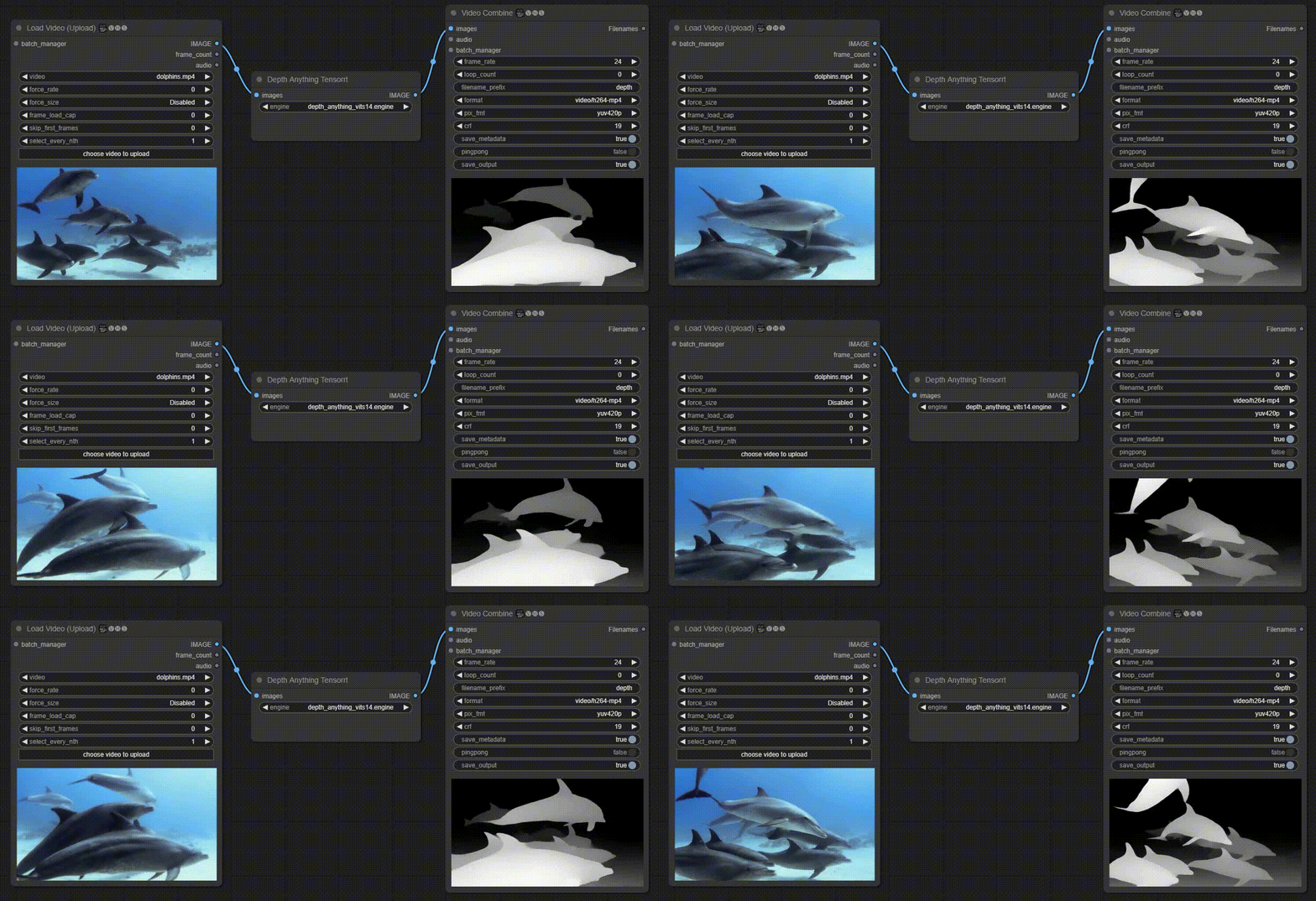
This repo provides a ComfyUI Custom Node implementation of the Depth-Anything-Tensorrt in Python for ultra fast depth map generation (up to 14x faster than comfyui_controlnet_aux)
Last tested: 03 June 2026 (ComfyUI v0.23.0 | Torch 2.12.0 | Python 3.12.3 | H100 | CUDA 13.0 | Ubuntu 24.04)
If you like my projects and wish to see updates and new features, please consider supporting me. It helps a lot!







Special thanks to livepeer.org for having supported the project!


Note: The following results were benchmarked on FP16 engines inside ComfyUI
| Device | Model | Model Input (WxH) | Image Resolution (WxH) | FPS |
|---|---|---|---|---|
| RTX4090 | Depth-Anything-S | 518x518 | 1280x720 | 35 |
| RTX4090 | Depth-Anything-B | 518x518 | 1280x720 | 33 |
| RTX4090 | Depth-Anything-L | 518x518 | 1280x720 | 24 |
| H100 | Depth-Anything-L | 518x518 | 1280x720 | 125+ |
Note: The following results were benchmarked on FP16 engines inside ComfyUI
| Device | Model | Model Input (WxH) | Image Resolution (WxH) | FPS |
|---|---|---|---|---|
| H100 | Depth-Anything-S | 518x518 | 1280x720 | 213 |
| H100 | Depth-Anything-B | 518x518 | 1280x720 | 180 |
| H100 | Depth-Anything-L | 518x518 | 1280x720 | 109 |
Note: The following results were benchmarked on FP16 engines inside ComfyUI
| Device | Model | Model Input (WxH) | Image Resolution (WxH) | FPS |
|---|---|---|---|---|
| RTX5090 | DA3Mono-Large | 518x518 | 1280x720 | 85 |
| RTX5090 | DA3Metric-Large | 518x518 | 1280x720 | 85 |
Note: The following results were benchmarked on FP16 engines inside ComfyUI
| Device | Model | Model Input (WxH) | Image Resolution (WxH) | FPS |
|---|---|---|---|---|
| H100 | Distill-Any-Depth-Multi-Teacher-Small | 518x518 | 1280x720 | 76 |
| H100 | Distill-Any-Depth-Multi-Teacher-Base | 518x518 | 1280x720 | 68 |
| H100 | Distill-Any-Depth-Multi-Teacher-Large | 518x518 | 1280x720 | 59 |
| H100 | Distill-Any-Depth-Dav2-Teacher-Large-2w-iter | 518x518 | 1280x720 | 57 |
Navigate to the ComfyUI /custom_nodes directory
git clone https://github.com/yuvraj108c/ComfyUI-Depth-Anything-Tensorrt.git
cd ./ComfyUI-Depth-Anything-Tensorrt
pip install -r requirements.txt
There are two ways to build TensorRT engines:
Right Click -> tensorrt -> Depth Anything Engine BuilderThe engine will be automatically downloaded and built in the specified location. Refresh the webpage or strike 'r' on your keyboard, and the new engine will appear in the Depth Anything Tensorrt node.
python export_trt.py --onnx-path ./depth_anything_vitl14-fp16.onnx --trt-path ./depth_anything_vitl14-fp16.engine
/models/tensorrt/depth-anything directoryRight Click -> tensorrt -> Depth Anything TensorrtFor more control over depth visualization, use the advanced pipeline:
Depth Anything Tensorrt Advanced
        │ depths
        ▼
Depth Temporal Stabilizer Fast GPU    (optional, recommended for video)
        │ depths
        ▼
Depth Map Display
Depth Anything Tensorrt Advanced (Right Click -> tensorrt -> Depth Anything Tensorrt Advanced)
Depth Temporal Stabilizer Fast GPU (Right Click -> tensorrt -> Depth Temporal Stabilizer Fast GPU)
| Parameter | Default | Range | Description |
|---|---|---|---|
temporal_strength | 0.45 | 0.0 – 0.95 | Controls how strongly stable pixels inherit depth from the previous stabilized frame. Higher values reduce more flicker but may introduce trails. |
depth_consistency | 0.05 | 0.001 – 0.50 | Controls which depth changes are considered stable enough to smooth. Lower values better preserve motion and object edges. |
align_depth_range | true | true/false | Corrects frame-to-frame global relative-depth scale and offset pulsing before temporal smoothing. |
alignment_strength | 0.70 | 0.0 – 1.0 | Controls how strongly global depth-range alignment is applied. Increasing this usually has less ghosting risk than increasing temporal smoothing. |
Depth Map Display (Right Click -> tensorrt -> Depth Map Display)
| Parameter | Default | Range | Description |
|---|---|---|---|
colormap | — | grayscale, inferno, viridis, plasma, magma, turbo, jet, hot, cool, spring, summer, autumn, winter, bone, rainbow, ocean, hsv, parula, pink | Color scheme for depth visualization |
invert | false | true/false | Flip depth so near becomes far and vice versa |
contrast | 1.0 | 0.1 – 5.0 | Spread of depth values around the midpoint |
brightness | 0.0 | -1.0 – 1.0 | Shifts all depth values up or down |
gamma | 1.0 | 0.1 – 5.0 | Non-linear tone curve. Below 1.0 reveals detail in distant regions, above 1.0 in near regions |
percentile_clip | 2.0 | 0.0 – 20.0 | Clips outlier depth values at this percentile from both ends before normalizing. Prevents extreme values from compressing the useful range |
03/06/2026
02/06/2026
31/01/2026
29/01/2026
config/models.json10/01/2026
16/09/2025
08/07/2025
20/05/2025
02/07/2024
26/04/2024
7/04/2024
30/03/2024
27/03/2024
ComfyUI Depth Anything (v1/v2/v3/distill-any-depth) Tensorrt Custom Node (up to 14x faster) ⚡
Python
136
54 commits
updated Jun 4, 2026
This repo provides a ComfyUI Custom Node implementation of the Depth-Anything-Tensorrt in Python for ultra fast depth map generation (up to 14x faster than comfyui_controlnet_aux)
Last tested: 03 June 2026 (ComfyUI v0.23.0 | Torch 2.12.0 | Python 3.12.3 | H100 | CUDA 13.0 | Ubuntu 24.04)
If you like my projects and wish to see updates and new features, please consider supporting me. It helps a lot!
Special thanks to livepeer.org for having supported the project!
Note: The following results were benchmarked on FP16 engines inside ComfyUI
| Device | Model | Model Input (WxH) | Image Resolution (WxH) | FPS |
|---|---|---|---|---|
| RTX4090 | Depth-Anything-S | 518x518 | 1280x720 | 35 |
| RTX4090 | Depth-Anything-B | 518x518 | 1280x720 | 33 |
| RTX4090 | Depth-Anything-L | 518x518 | 1280x720 | 24 |
| H100 | Depth-Anything-L | 518x518 | 1280x720 | 125+ |
Note: The following results were benchmarked on FP16 engines inside ComfyUI
| Device | Model | Model Input (WxH) | Image Resolution (WxH) | FPS |
|---|---|---|---|---|
| H100 | Depth-Anything-S | 518x518 | 1280x720 | 213 |
| H100 | Depth-Anything-B | 518x518 | 1280x720 | 180 |
| H100 | Depth-Anything-L | 518x518 | 1280x720 | 109 |
Note: The following results were benchmarked on FP16 engines inside ComfyUI
| Device | Model | Model Input (WxH) | Image Resolution (WxH) | FPS |
|---|---|---|---|---|
| RTX5090 | DA3Mono-Large | 518x518 | 1280x720 | 85 |
| RTX5090 | DA3Metric-Large | 518x518 | 1280x720 | 85 |
Note: The following results were benchmarked on FP16 engines inside ComfyUI
| Device | Model | Model Input (WxH) | Image Resolution (WxH) | FPS |
|---|---|---|---|---|
| H100 | Distill-Any-Depth-Multi-Teacher-Small | 518x518 | 1280x720 | 76 |
| H100 | Distill-Any-Depth-Multi-Teacher-Base | 518x518 | 1280x720 | 68 |
| H100 | Distill-Any-Depth-Multi-Teacher-Large | 518x518 | 1280x720 | 59 |
| H100 | Distill-Any-Depth-Dav2-Teacher-Large-2w-iter | 518x518 | 1280x720 | 57 |
Navigate to the ComfyUI /custom_nodes directory
git clone https://github.com/yuvraj108c/ComfyUI-Depth-Anything-Tensorrt.git
cd ./ComfyUI-Depth-Anything-Tensorrt
pip install -r requirements.txt
There are two ways to build TensorRT engines:
Right Click -> tensorrt -> Depth Anything Engine BuilderThe engine will be automatically downloaded and built in the specified location. Refresh the webpage or strike 'r' on your keyboard, and the new engine will appear in the Depth Anything Tensorrt node.
python export_trt.py --onnx-path ./depth_anything_vitl14-fp16.onnx --trt-path ./depth_anything_vitl14-fp16.engine
/models/tensorrt/depth-anything directoryRight Click -> tensorrt -> Depth Anything TensorrtFor more control over depth visualization, use the advanced pipeline:
Depth Anything Tensorrt Advanced
        │ depths
        ▼
Depth Temporal Stabilizer Fast GPU    (optional, recommended for video)
        │ depths
        ▼
Depth Map Display
Depth Anything Tensorrt Advanced (Right Click -> tensorrt -> Depth Anything Tensorrt Advanced)
Depth Temporal Stabilizer Fast GPU (Right Click -> tensorrt -> Depth Temporal Stabilizer Fast GPU)
| Parameter | Default | Range | Description |
|---|---|---|---|
temporal_strength | 0.45 | 0.0 – 0.95 | Controls how strongly stable pixels inherit depth from the previous stabilized frame. Higher values reduce more flicker but may introduce trails. |
depth_consistency | 0.05 | 0.001 – 0.50 | Controls which depth changes are considered stable enough to smooth. Lower values better preserve motion and object edges. |
align_depth_range | true | true/false | Corrects frame-to-frame global relative-depth scale and offset pulsing before temporal smoothing. |
alignment_strength | 0.70 | 0.0 – 1.0 | Controls how strongly global depth-range alignment is applied. Increasing this usually has less ghosting risk than increasing temporal smoothing. |
Depth Map Display (Right Click -> tensorrt -> Depth Map Display)
| Parameter | Default | Range | Description |
|---|---|---|---|
colormap | — | grayscale, inferno, viridis, plasma, magma, turbo, jet, hot, cool, spring, summer, autumn, winter, bone, rainbow, ocean, hsv, parula, pink | Color scheme for depth visualization |
invert | false | true/false | Flip depth so near becomes far and vice versa |
contrast | 1.0 | 0.1 – 5.0 | Spread of depth values around the midpoint |
brightness | 0.0 | -1.0 – 1.0 | Shifts all depth values up or down |
gamma | 1.0 | 0.1 – 5.0 | Non-linear tone curve. Below 1.0 reveals detail in distant regions, above 1.0 in near regions |
percentile_clip | 2.0 | 0.0 – 20.0 | Clips outlier depth values at this percentile from both ends before normalizing. Prevents extreme values from compressing the useful range |
03/06/2026
02/06/2026
31/01/2026
29/01/2026
config/models.json10/01/2026
16/09/2025
08/07/2025
20/05/2025
02/07/2024
26/04/2024
7/04/2024
30/03/2024
27/03/2024







