
See what people are saying
README
ComfyUI-SeedVR2-VideoUpscaler-with-TensorRT
| EN | 中文 |

Official release of SeedVR2 for ComfyUI that enables high-quality video and image upscaling.
This repository is a fork of the official repository (https://github.com/numz/ComfyUI-SeedVR2_VideoUpscaler), created under the Apache 2.0 license. It independently implements support for ConvRot INT8 and NVFP4 quantized models, along with VRAM-saving features.
Workflow & Node Examples
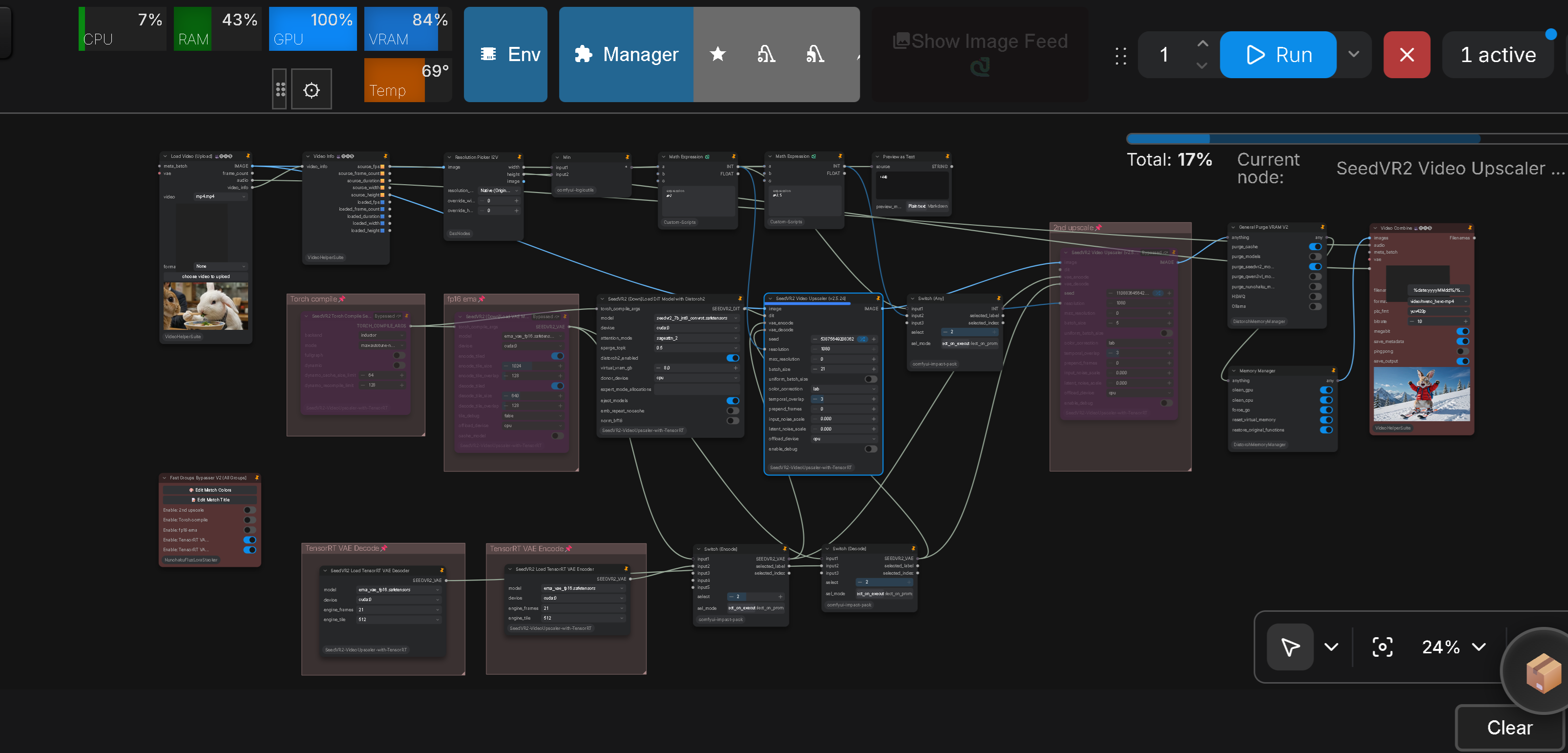
Complete Workflow Overview (TensorRT VAE & Quantized Models)
- Workflow JSON:
example_workflows/SeedVR2_tensorrt.json
TensorRT VAE Encoder & Decoder Nodes
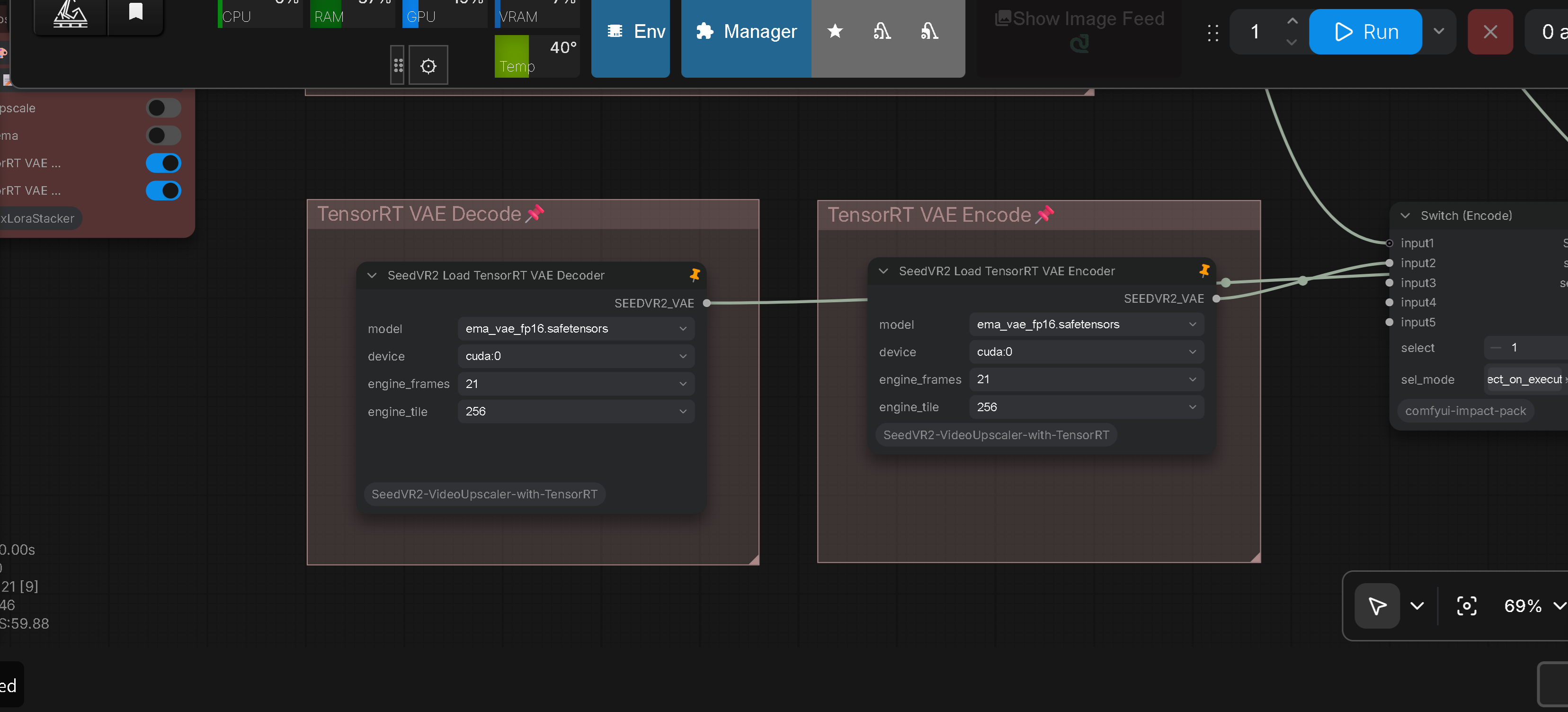
The SeedVR2 Load TensorRT VAE Encoder and SeedVR2 Load TensorRT VAE Decoder nodes provide two selectors: engine_frames (engine frame size; auto = largest available) and engine_tile (spatial tile; auto / 256 / 512). auto keeps the default preference (Encoder: 512px first; Decoder: 256px first, 512px legacy fallback), while 256 / 512 strictly restrict the engine to that tile — if no engine exists for the selected tile, the node raises an explicit error instead of silently falling back.
TensorRT VAE Engine Builder Node
- Workflow JSON:
example_workflows/Tensor Build.json
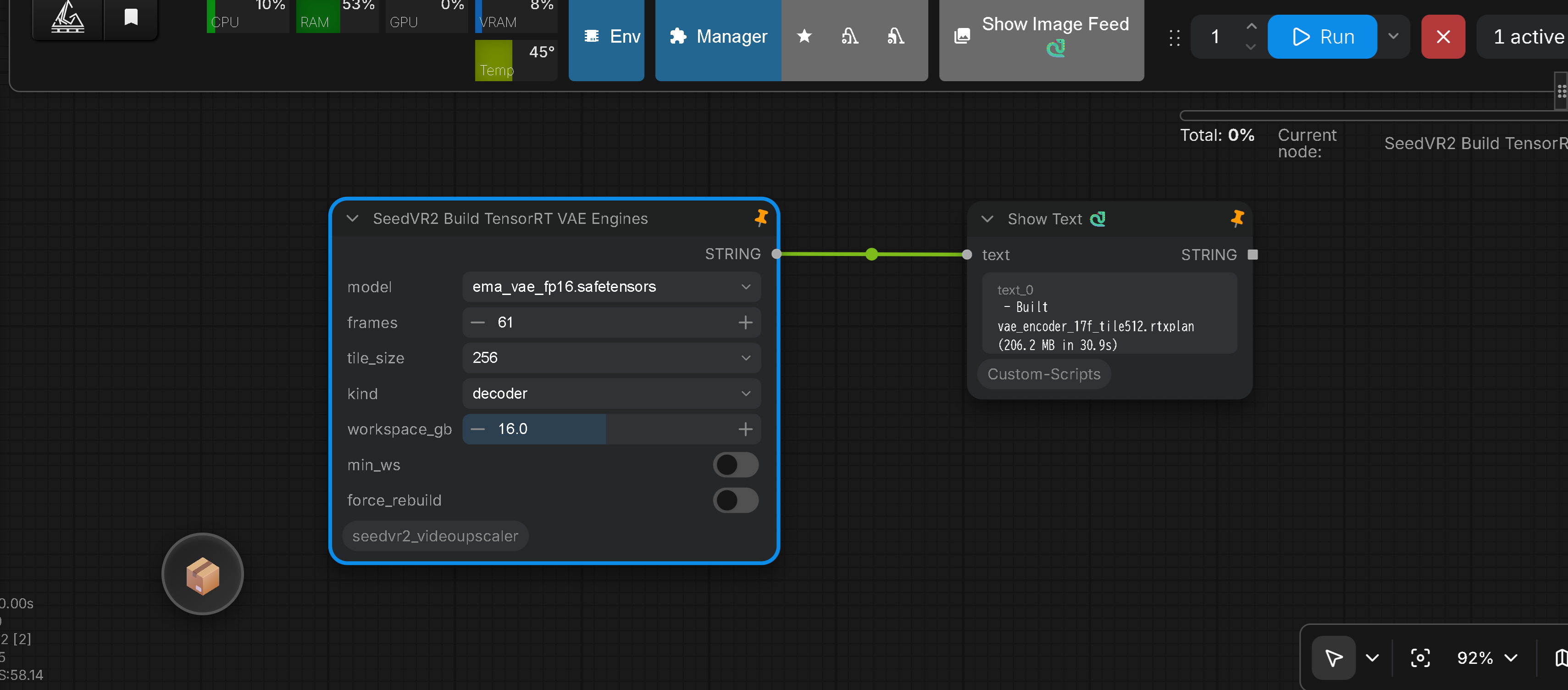
The SeedVR2 Build TensorRT VAE Engines node builds dedicated TensorRT RTX VAE engines (.rtxplan) on demand directly within ComfyUI by running GPU tracing (tools/cloud_export_gpu.py) and TensorRT compilation (tools/cloud_build_engine.py).
Built engines land in tensorrt_backend/artifacts/ and automatically populate the engine_frames dropdown in the TensorRT VAE Decoder loader upon restarting ComfyUI.
Node Parameters & Settings
model: Source PyTorch VAE model checkpoint (e.g.ema_vae_fp16.safetensors).frames: Target frame count for the engine. Automatically normalized to the required 4n+1 sequence format (e.g.5,21,29,61,89,101,185,205).tile_size: Spatial tile size (256or512):256: Smaller spatial patches; lower compilation and runtime VRAM. Recommended for long frame sequences (60f–185f+) on 16GB–24GB VRAM GPUs.512: Larger spatial patches; requires significantly higher compilation VRAM. Supported for both Encoder and Decoder engines.
kind: Select which engine to build:both: Builds both encoder and decoder engines.decoder: Builds the VAE decoder engine only (recommended for Phase 3 acceleration).encoder: Builds the VAE encoder engine only.
workspace_gb: Maximum TensorRT workspace memory limit in GB during compilation (default:8.0–16.0GB).min_ws: When enabled (True), performs a binary search to discover the minimal buildable workspace, reducing runtime VRAM allocation (build time is slightly longer).force_rebuild: When enabled (True), rebuilds and overwrites existing engine files.- Output (
STRING): Outputs build status, generated engine filename, file size, and total compilation time. Connect to aShow Textnode to inspect results in real time.
How to Use & Build Engines
- Place the
SeedVR2 Build TensorRT VAE Enginesnode in your workflow. - Select your desired target frame count (
frames), spatialtile_size, andkind(e.g.decoder). - Click Queue Prompt to run the build. The node executes ONNX export and TensorRT compilation in the background.
- Once completed, restart ComfyUI. The newly built engine frame size will appear in the
engine_frameslist of theSeedVR2 Load TensorRT VAE Decodernode.
SeedVR2 (Down)Load DiT Model with Distorch2 Node
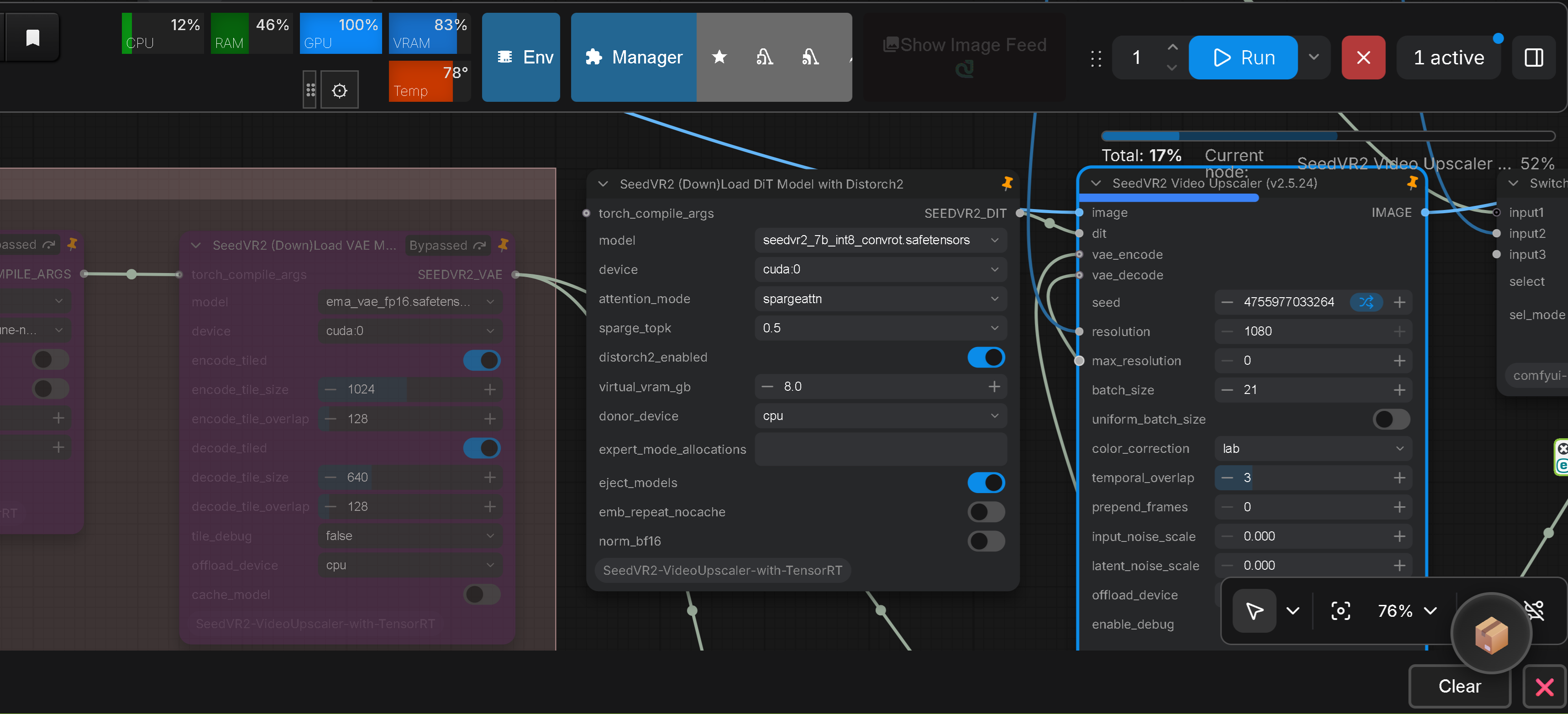
The SeedVR2 (Down)Load DiT Model with Distorch2 node hosts the entire (quantized) DiT in system RAM and streams it to the compute device during denoising, using the vendored DisTorch2 backend (from ComfyUI-MultiGPU / pollockjj, GPL-3.0). It keeps the same DiT output type (SEEDVR2_DIT) as the standard loader, so it connects to the SeedVR2 Video Upscaler node identically.
Node Parameters & Settings
model: DiT checkpoint (e.g.seedvr2_7b_int8_convrot.safetensors). Quantized (INT8 / NVFP4) and FP16 checkpoints are both supported.device: Compute device for DiT inference.attention_mode/sparge_topk: Attention backend and SpargeAttn KV keep ratio (identical to the standard loader).distorch2_enabled: Enable DisTorch2 placement. When off, behaves like the standard loader.virtual_vram_gb: Virtual-VRAM budget in GB reserved on the compute device for streaming.0= keep the whole model on the donor (default placement).donor_device: Device that physically hosts the packed DiT weights (typicallycpu= system RAM).expert_mode_allocations: Advanced per-block device allocation string, e.g."cpu,cpu,cuda:0". Empty = derive placement fromdevice/virtual_vram_gb.eject_models: Eject other resident models before placement to free VRAM (recommended ON).emb_repeat_nocache: Disable theemb_repeatcache during Phase 2. ON recomputes every use (saves resident VRAM; output bit-identical).norm_bf16: RMS/QK norm precision during Phase 2. OFF = stock fp32 path (quality-priority). ON = bf16 norm path (saves resident VRAM; output differs from the fp32 path).
The node reports its final placement in the console ([MultiGPU DisTorch V2] ... Final Allocation String and the per-device layer distribution table).
Documentation
For details, refer to the official repository:
https://github.com/numz/ComfyUI-SeedVR2_VideoUpscaler
Technical Guides (This Fork)
- 3B INT8 / NVFP4 Model Registry Guide
- INT8 Native Ops Inference Guide
- NVFP4 & torch.compile Guide
- Speed & VRAM Headroom Analysis
- Windows Parallel Compile Fix
- Cloud Environment Dependency Guide
Changelog
🙏 Credits
This ComfyUI implementation is a collaborative project by NumZ and AInVFX (Adrien Toupet), based on the original SeedVR2 by ByteDance Seed Team.
Special thanks to our community contributors including naxci1, thehhmdb, s-cerevisiae, benjaminherb, cmeka, FurkanGozukara, JohnAlcatraz, lihaoyun6, Luchuanzhao, Luke2642, proxyid, q5sys, and many others for their improvements, bug fixes, and testing in the official repository (https://github.com/numz/ComfyUI-SeedVR2_VideoUpscaler).
TensorRT VAE backend
The TensorRT VAE encode/decode engine in this repository was inspired by VRGDG-SeedVR2-TensorRT-Studio (Apache 2.0). I had considered porting the DiT to TensorRT, but gave up due to the many difficulties involved and instead focused on improving performance by creating a ComfyUI node that supports ConvRot INT8/NVFP4 quantized models. The idea of porting the VAE encode/decode to TensorRT, however, came from this project — without that work, this approach would never have been conceived. Sincere respect and gratitude to the original author.
DisTorch2 backend
The SeedVR2 (Down)Load DiT Model with Distorch2 node uses a DisTorch2 backend that is a
verbatim copy of ComfyUI-MultiGPU by
pollockjj (also distributed as comfyui-multigpu). The copied files live in src/distorch2/
(distorch_2.py, wrappers.py, device_utils.py, model_management_mgpu.py) and are
byte-for-byte identical to the upstream sources; src/core/distorch2_placement.py is this
repository's own bridge that feeds the SeedVR2 DiT into that backend. All credit for the DisTorch2
implementation belongs to the upstream author(s); see
ComfyUI-MultiGPU for the original project.
📜 License
The code in this repository is released under the Apache 2.0 license, as found in the LICENSE file.
The TensorRT VAE backend is inspired by VRGDG-SeedVR2-TensorRT-Studio, which is also released under the Apache 2.0 license. Attribution and copyright notices are retained in accordance with Apache 2.0 requirements.
DisTorch2 backend (GPL-3.0 notice). The vendored DisTorch2 backend under src/distorch2/ is a
verbatim copy of ComfyUI-MultiGPU, which is
released under the GNU General Public License v3.0 (GPL-3.0), whereas the rest of this
repository is under Apache 2.0. GPL-3.0 is a copyleft license: the GPL-3.0 obligations attach
to those copied files — their source is provided here, the upstream copyright and license
notices are retained in full in each copied file, and any party redistributing or modifying
src/distorch2/ must comply with GPL-3.0.
Similar repos



Languages
Python
97.1%
Jupyter Notebook
2.4%
See what people are saying
README
ComfyUI-SeedVR2-VideoUpscaler-with-TensorRT
| EN | 中文 |
Official release of SeedVR2 for ComfyUI that enables high-quality video and image upscaling.
This repository is a fork of the official repository (https://github.com/numz/ComfyUI-SeedVR2_VideoUpscaler), created under the Apache 2.0 license. It independently implements support for ConvRot INT8 and NVFP4 quantized models, along with VRAM-saving features.
Workflow & Node Examples
Complete Workflow Overview (TensorRT VAE & Quantized Models)
- Workflow JSON:
example_workflows/SeedVR2_tensorrt.json
TensorRT VAE Encoder & Decoder Nodes
The SeedVR2 Load TensorRT VAE Encoder and SeedVR2 Load TensorRT VAE Decoder nodes provide two selectors: engine_frames (engine frame size; auto = largest available) and engine_tile (spatial tile; auto / 256 / 512). auto keeps the default preference (Encoder: 512px first; Decoder: 256px first, 512px legacy fallback), while 256 / 512 strictly restrict the engine to that tile — if no engine exists for the selected tile, the node raises an explicit error instead of silently falling back.
TensorRT VAE Engine Builder Node
- Workflow JSON:
example_workflows/Tensor Build.json
The SeedVR2 Build TensorRT VAE Engines node builds dedicated TensorRT RTX VAE engines (.rtxplan) on demand directly within ComfyUI by running GPU tracing (tools/cloud_export_gpu.py) and TensorRT compilation (tools/cloud_build_engine.py).
Built engines land in tensorrt_backend/artifacts/ and automatically populate the engine_frames dropdown in the TensorRT VAE Decoder loader upon restarting ComfyUI.
Node Parameters & Settings
model: Source PyTorch VAE model checkpoint (e.g.ema_vae_fp16.safetensors).frames: Target frame count for the engine. Automatically normalized to the required 4n+1 sequence format (e.g.5,21,29,61,89,101,185,205).tile_size: Spatial tile size (256or512):256: Smaller spatial patches; lower compilation and runtime VRAM. Recommended for long frame sequences (60f–185f+) on 16GB–24GB VRAM GPUs.512: Larger spatial patches; requires significantly higher compilation VRAM. Supported for both Encoder and Decoder engines.
kind: Select which engine to build:both: Builds both encoder and decoder engines.decoder: Builds the VAE decoder engine only (recommended for Phase 3 acceleration).encoder: Builds the VAE encoder engine only.
workspace_gb: Maximum TensorRT workspace memory limit in GB during compilation (default:8.0–16.0GB).min_ws: When enabled (True), performs a binary search to discover the minimal buildable workspace, reducing runtime VRAM allocation (build time is slightly longer).force_rebuild: When enabled (True), rebuilds and overwrites existing engine files.- Output (
STRING): Outputs build status, generated engine filename, file size, and total compilation time. Connect to aShow Textnode to inspect results in real time.
How to Use & Build Engines
- Place the
SeedVR2 Build TensorRT VAE Enginesnode in your workflow. - Select your desired target frame count (
frames), spatialtile_size, andkind(e.g.decoder). - Click Queue Prompt to run the build. The node executes ONNX export and TensorRT compilation in the background.
- Once completed, restart ComfyUI. The newly built engine frame size will appear in the
engine_frameslist of theSeedVR2 Load TensorRT VAE Decodernode.
SeedVR2 (Down)Load DiT Model with Distorch2 Node
The SeedVR2 (Down)Load DiT Model with Distorch2 node hosts the entire (quantized) DiT in system RAM and streams it to the compute device during denoising, using the vendored DisTorch2 backend (from ComfyUI-MultiGPU / pollockjj, GPL-3.0). It keeps the same DiT output type (SEEDVR2_DIT) as the standard loader, so it connects to the SeedVR2 Video Upscaler node identically.
Node Parameters & Settings
model: DiT checkpoint (e.g.seedvr2_7b_int8_convrot.safetensors). Quantized (INT8 / NVFP4) and FP16 checkpoints are both supported.device: Compute device for DiT inference.attention_mode/sparge_topk: Attention backend and SpargeAttn KV keep ratio (identical to the standard loader).distorch2_enabled: Enable DisTorch2 placement. When off, behaves like the standard loader.virtual_vram_gb: Virtual-VRAM budget in GB reserved on the compute device for streaming.0= keep the whole model on the donor (default placement).donor_device: Device that physically hosts the packed DiT weights (typicallycpu= system RAM).expert_mode_allocations: Advanced per-block device allocation string, e.g."cpu,cpu,cuda:0". Empty = derive placement fromdevice/virtual_vram_gb.eject_models: Eject other resident models before placement to free VRAM (recommended ON).emb_repeat_nocache: Disable theemb_repeatcache during Phase 2. ON recomputes every use (saves resident VRAM; output bit-identical).norm_bf16: RMS/QK norm precision during Phase 2. OFF = stock fp32 path (quality-priority). ON = bf16 norm path (saves resident VRAM; output differs from the fp32 path).
The node reports its final placement in the console ([MultiGPU DisTorch V2] ... Final Allocation String and the per-device layer distribution table).
Documentation
For details, refer to the official repository:
https://github.com/numz/ComfyUI-SeedVR2_VideoUpscaler
Technical Guides (This Fork)
- 3B INT8 / NVFP4 Model Registry Guide
- INT8 Native Ops Inference Guide
- NVFP4 & torch.compile Guide
- Speed & VRAM Headroom Analysis
- Windows Parallel Compile Fix
- Cloud Environment Dependency Guide
Changelog
🙏 Credits
This ComfyUI implementation is a collaborative project by NumZ and AInVFX (Adrien Toupet), based on the original SeedVR2 by ByteDance Seed Team.
Special thanks to our community contributors including naxci1, thehhmdb, s-cerevisiae, benjaminherb, cmeka, FurkanGozukara, JohnAlcatraz, lihaoyun6, Luchuanzhao, Luke2642, proxyid, q5sys, and many others for their improvements, bug fixes, and testing in the official repository (https://github.com/numz/ComfyUI-SeedVR2_VideoUpscaler).
TensorRT VAE backend
The TensorRT VAE encode/decode engine in this repository was inspired by VRGDG-SeedVR2-TensorRT-Studio (Apache 2.0). I had considered porting the DiT to TensorRT, but gave up due to the many difficulties involved and instead focused on improving performance by creating a ComfyUI node that supports ConvRot INT8/NVFP4 quantized models. The idea of porting the VAE encode/decode to TensorRT, however, came from this project — without that work, this approach would never have been conceived. Sincere respect and gratitude to the original author.
DisTorch2 backend
The SeedVR2 (Down)Load DiT Model with Distorch2 node uses a DisTorch2 backend that is a
verbatim copy of ComfyUI-MultiGPU by
pollockjj (also distributed as comfyui-multigpu). The copied files live in src/distorch2/
(distorch_2.py, wrappers.py, device_utils.py, model_management_mgpu.py) and are
byte-for-byte identical to the upstream sources; src/core/distorch2_placement.py is this
repository's own bridge that feeds the SeedVR2 DiT into that backend. All credit for the DisTorch2
implementation belongs to the upstream author(s); see
ComfyUI-MultiGPU for the original project.
📜 License
The code in this repository is released under the Apache 2.0 license, as found in the LICENSE file.
The TensorRT VAE backend is inspired by VRGDG-SeedVR2-TensorRT-Studio, which is also released under the Apache 2.0 license. Attribution and copyright notices are retained in accordance with Apache 2.0 requirements.
DisTorch2 backend (GPL-3.0 notice). The vendored DisTorch2 backend under src/distorch2/ is a
verbatim copy of ComfyUI-MultiGPU, which is
released under the GNU General Public License v3.0 (GPL-3.0), whereas the rest of this
repository is under Apache 2.0. GPL-3.0 is a copyleft license: the GPL-3.0 obligations attach
to those copied files — their source is provided here, the upstream copyright and license
notices are retained in full in each copied file, and any party redistributing or modifying
src/distorch2/ must comply with GPL-3.0.
Similar repos
Languages
Python
97.1%
Jupyter Notebook
2.4%