AI writing assistant for Mac, Windows, and Linux. Press a shortcut in any app, say what to write, and Feather drafts the reply from what's on your screen.
See the code

Press a shortcut. Tell your computer what to write.
An AI writing assistant for Mac, Windows, and Linux that drafts replies from what's on your screen.



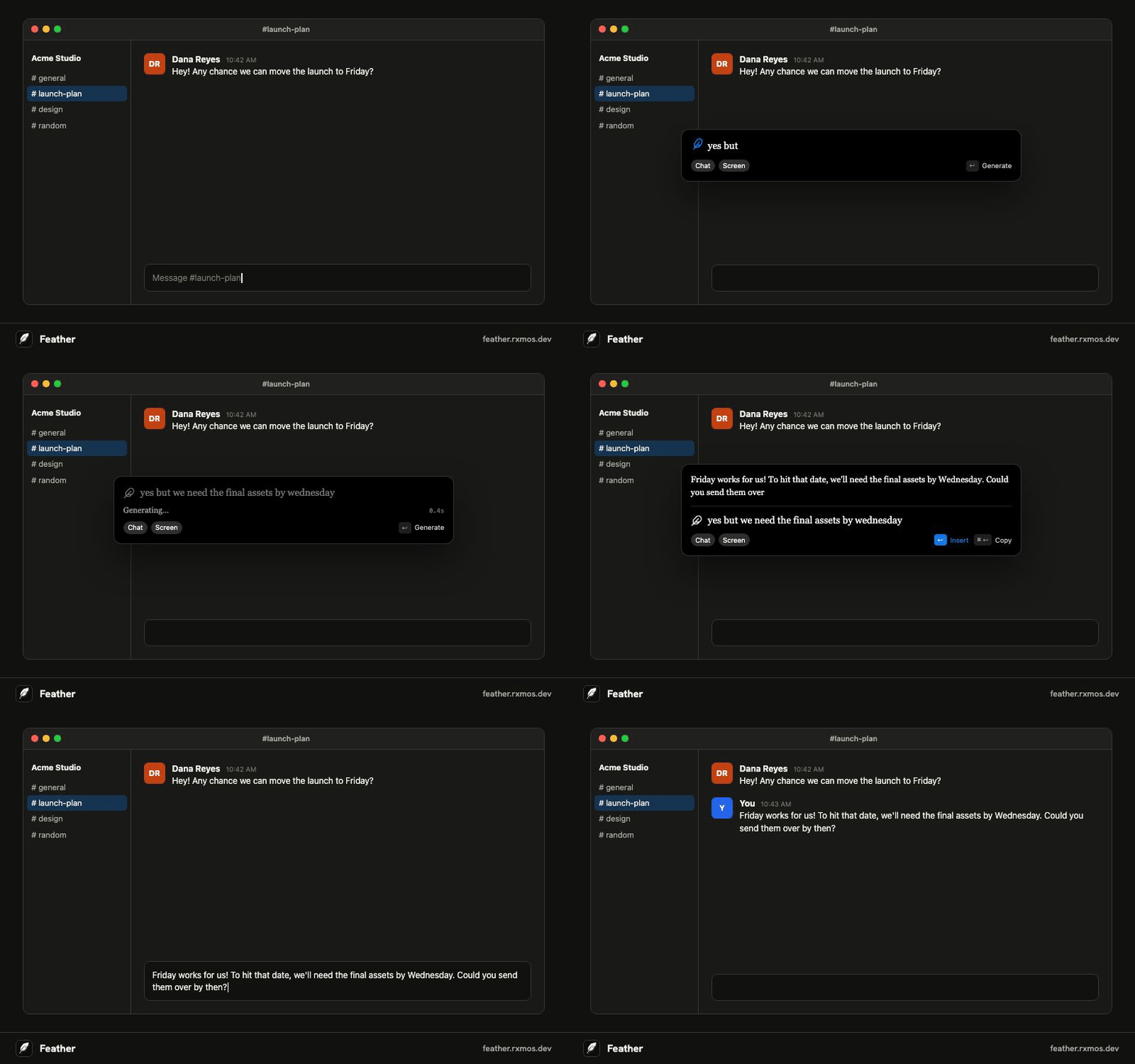
While working in any app, press ⌥ Space, describe what you want to write, and Feather generates
it from the context around your cursor. Press Return (Enter on Windows and Linux) again to
paste it into the field you were using.
Reply that I can do tomorrow at 2 pm, in a formal tone.
Sources/), Tauri on Windows and Linux
(desktop/), MIT licensed.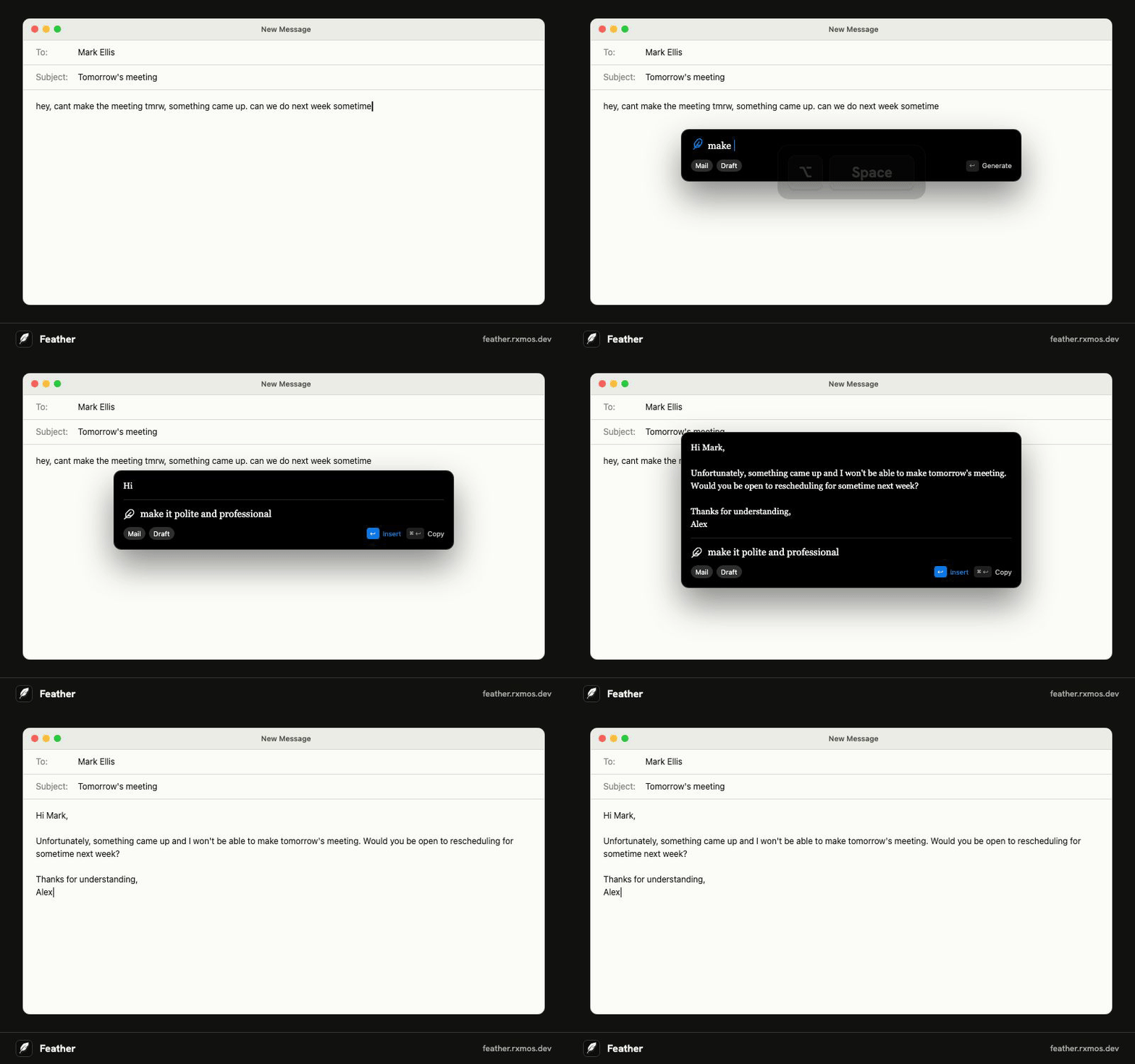 | 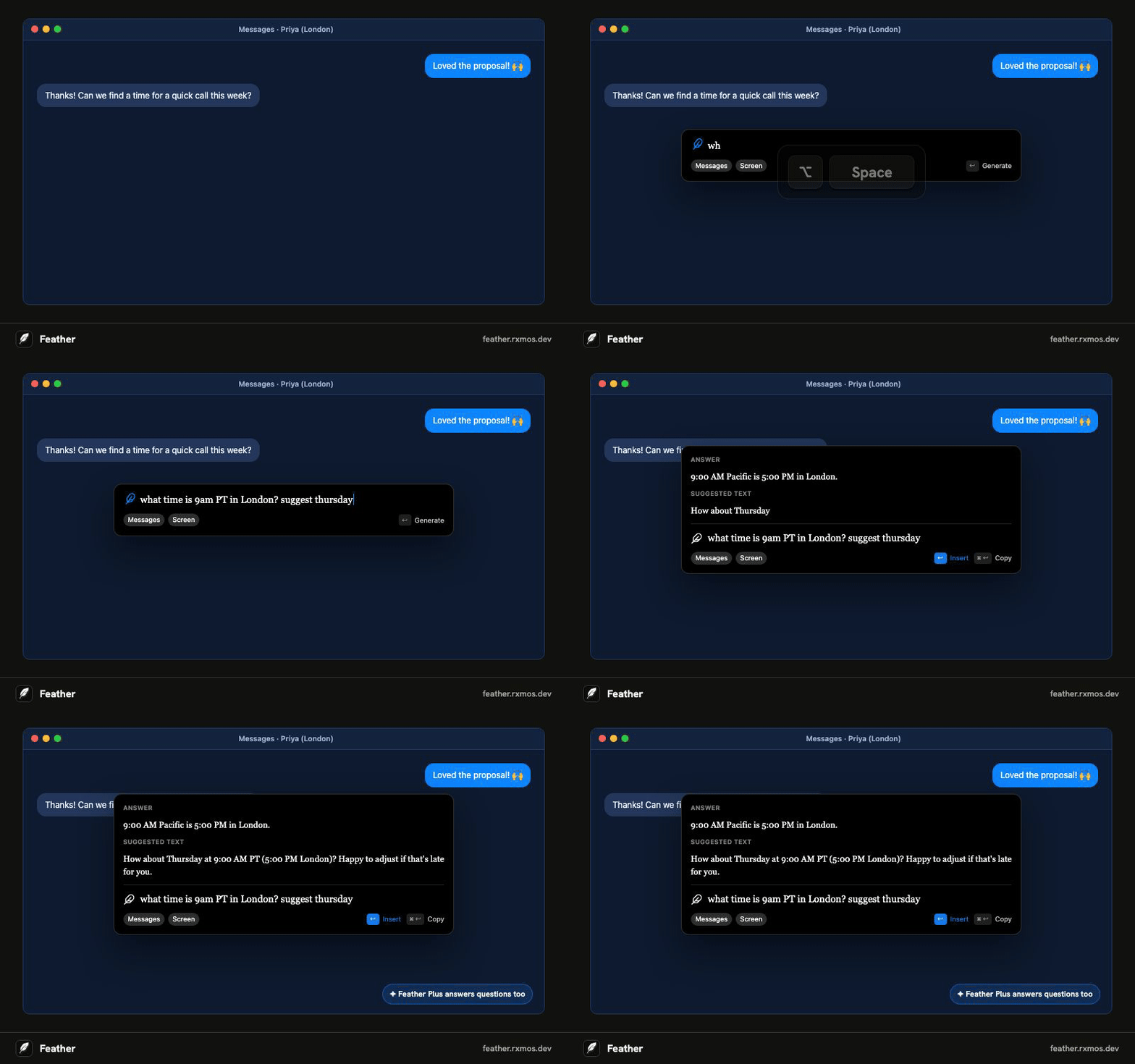 |
| Rewrite a rough draft | Answer with what's on screen |
It lives in the menu bar on macOS and in the system tray on Windows and Linux. The two apps stay in parity.
When you invoke Feather, it captures the available context from the frontmost app and sends it with your instruction to the selected provider. Context can include:
The reply streams into Feather's panel. You can insert it, copy it, regenerate it, or keep writing an instruction to refine it.
Nothing is captured until you press the shortcut, and screen context is discarded when the panel closes. To let you bring back a recent conversation with ↑, Feather keeps your last 5 instructions and replies in a file on this computer only; it never saves screen context there. Feather logs generation timings only; it does not log screen contents, instructions, or responses.
Set up a provider in Feather > Settings > Connection. Providers you have set up are listed first, with the one in use marked; click Use to switch. The first one you set up is used right away, and removing the one in use switches to another that is set up.
Feather Plus is the hosted option: no API key needed. Click Set Up… next to Feather Plus in Settings > Connection, sign in with a one-time email link, and pick a plan. The account and usage are in Settings > Feather Plus.
| Plan | Price | Includes |
|---|---|---|
| Plus Monthly | $4/month | Hundreds of replies a month |
| Plus Yearly | $36/year | Hundreds of replies a month, renewed every month |
Both are the same Feather Plus, billed differently. Each month includes a set amount of model use, shown in Settings as a percentage used. Feather never stores your instructions, screen context, or replies; they pass through its server to the model provider, which handles them under its own data policy. Only your email, plan, and request, token, and cost counts are kept.
Bringing your own Claude API key, ChatGPT account, or OpenCode Go key stays free.
Claude uses the Anthropic Messages API. Paste a Claude API key from the
Claude Console in Settings, then select a model. The default
model is claude-haiku-5-5.
Your API key is stored in the macOS Keychain. Usage is billed to your Anthropic account.
OpenCode Go uses its OpenAI-compatible streaming API. Paste an OpenCode Go API
key in Settings, then select a model from the available-model list. The default
model is deepseek-v4.1-flash.
Your API key is stored in the macOS Keychain. Model availability and usage are managed by your OpenCode subscription.
ChatGPT connects through a browser sign-in flow. Select ChatGPT in Settings and choose Sign in with ChatGPT. Feather stores the resulting session credentials in the macOS Keychain and refreshes them when needed.
Select one of the ChatGPT models offered in Settings. Access and model availability depend on your ChatGPT account.
Screen Recording is required by the current permissions flow even when the screenshot option is disabled. Relaunch Feather after granting it.
feather.rxmos.dev/download picks the right file for your system. Every build is also published on the GitHub Releases page:
Feather-<version>-arm64.dmg for Apple Silicon Macs, macOS 14 or laterFeather-<version>-x86_64.dmg for Intel Macs, macOS 14 or laterFeather-<version>-windows-x64-setup.exe for Windows 10 or later, 64-bitFeather-<version>-linux-x86_64.AppImage for LinuxThe Mac builds are signed with an Apple Developer ID and notarized by Apple, so they open like any other app downloaded from the internet.
After Feather opens, grant Accessibility and Screen Recording in its Settings page. You can also grant them manually in System Settings > Privacy & Security > Accessibility and Screen Recording. Quit and reopen Feather after granting Screen Recording.
Feather checks for updates on launch and every hour. When a new version is out it asks before installing, and the permissions carry over. You can also choose Check for Updates… from the menu-bar icon.
Free code signing for the Windows installer is provided by SignPath.io, with a certificate from the SignPath Foundation.
v* tag, and signed
only after it is approved.The default shortcut is ⌥ Space. Choose one of these presets in Settings:
| Shortcut | Action |
|---|---|
⌥ Space | Open Feather (default) |
⌃ ⌥ Space | Open Feather |
⇧ ⌘ Space | Open Feather |
⌃ ⌥ ↩ | Open Feather |
| Key | Action |
|---|---|
Return | Generate a result, then insert it into the focused field |
⌘ Return | Copy the result |
⌘ R | Regenerate the result |
Esc | Hide Feather so you can adjust the source window and capture again |
If Feather cannot paste into the target field, it copies the result instead.
Requirements:
From the repository root:
swift build
swift test
scripts/bundle.sh          # produces dist/Feather.app
open dist/Feather.app
The bundle script uses ad-hoc signing by default. macOS ties Accessibility and Screen Recording grants to the code signature, so use a stable signing identity while developing to retain those permissions between builds:
CODESIGN_IDENTITY="Apple Development: Your Name (TEAMID)" scripts/bundle.sh
Set VERSION to override the app version embedded in the bundle:
VERSION=1.0.0 scripts/bundle.sh
Local builds leave the updater off. To publish a release, push a version tag; the
Release macOS workflow builds both architectures, signs them, and publishes the
disk images with a signed Sparkle feed per architecture:
git tag v0.1.7 && git push origin v0.1.7
FeatherCore contains the pure, testable logic for prompt construction,
provider requests, and server-sent-event parsing. The Feather target contains
the macOS app, including the menu-bar UI, permissions, hotkey, screen capture,
and text insertion.
Run the unit tests with:
swift test
AppKit, Accessibility, and ScreenCaptureKit behavior should also be verified by running the bundled app.
Feather is released under the MIT License.
AI writing assistant for Mac, Windows, and Linux. Press a shortcut in any app, say what to write, and Feather drafts the reply from what's on your screen.
See the code
Press a shortcut. Tell your computer what to write.
An AI writing assistant for Mac, Windows, and Linux that drafts replies from what's on your screen.
While working in any app, press ⌥ Space, describe what you want to write, and Feather generates
it from the context around your cursor. Press Return (Enter on Windows and Linux) again to
paste it into the field you were using.
Reply that I can do tomorrow at 2 pm, in a formal tone.
Sources/), Tauri on Windows and Linux
(desktop/), MIT licensed. | |
| Rewrite a rough draft | Answer with what's on screen |
It lives in the menu bar on macOS and in the system tray on Windows and Linux. The two apps stay in parity.
When you invoke Feather, it captures the available context from the frontmost app and sends it with your instruction to the selected provider. Context can include:
The reply streams into Feather's panel. You can insert it, copy it, regenerate it, or keep writing an instruction to refine it.
Nothing is captured until you press the shortcut, and screen context is discarded when the panel closes. To let you bring back a recent conversation with ↑, Feather keeps your last 5 instructions and replies in a file on this computer only; it never saves screen context there. Feather logs generation timings only; it does not log screen contents, instructions, or responses.
Set up a provider in Feather > Settings > Connection. Providers you have set up are listed first, with the one in use marked; click Use to switch. The first one you set up is used right away, and removing the one in use switches to another that is set up.
Feather Plus is the hosted option: no API key needed. Click Set Up… next to Feather Plus in Settings > Connection, sign in with a one-time email link, and pick a plan. The account and usage are in Settings > Feather Plus.
| Plan | Price | Includes |
|---|---|---|
| Plus Monthly | $4/month | Hundreds of replies a month |
| Plus Yearly | $36/year | Hundreds of replies a month, renewed every month |
Both are the same Feather Plus, billed differently. Each month includes a set amount of model use, shown in Settings as a percentage used. Feather never stores your instructions, screen context, or replies; they pass through its server to the model provider, which handles them under its own data policy. Only your email, plan, and request, token, and cost counts are kept.
Bringing your own Claude API key, ChatGPT account, or OpenCode Go key stays free.
Claude uses the Anthropic Messages API. Paste a Claude API key from the
Claude Console in Settings, then select a model. The default
model is claude-haiku-5-5.
Your API key is stored in the macOS Keychain. Usage is billed to your Anthropic account.
OpenCode Go uses its OpenAI-compatible streaming API. Paste an OpenCode Go API
key in Settings, then select a model from the available-model list. The default
model is deepseek-v4.1-flash.
Your API key is stored in the macOS Keychain. Model availability and usage are managed by your OpenCode subscription.
ChatGPT connects through a browser sign-in flow. Select ChatGPT in Settings and choose Sign in with ChatGPT. Feather stores the resulting session credentials in the macOS Keychain and refreshes them when needed.
Select one of the ChatGPT models offered in Settings. Access and model availability depend on your ChatGPT account.
Screen Recording is required by the current permissions flow even when the screenshot option is disabled. Relaunch Feather after granting it.
feather.rxmos.dev/download picks the right file for your system. Every build is also published on the GitHub Releases page:
Feather-<version>-arm64.dmg for Apple Silicon Macs, macOS 14 or laterFeather-<version>-x86_64.dmg for Intel Macs, macOS 14 or laterFeather-<version>-windows-x64-setup.exe for Windows 10 or later, 64-bitFeather-<version>-linux-x86_64.AppImage for LinuxThe Mac builds are signed with an Apple Developer ID and notarized by Apple, so they open like any other app downloaded from the internet.
After Feather opens, grant Accessibility and Screen Recording in its Settings page. You can also grant them manually in System Settings > Privacy & Security > Accessibility and Screen Recording. Quit and reopen Feather after granting Screen Recording.
Feather checks for updates on launch and every hour. When a new version is out it asks before installing, and the permissions carry over. You can also choose Check for Updates… from the menu-bar icon.
Free code signing for the Windows installer is provided by SignPath.io, with a certificate from the SignPath Foundation.
v* tag, and signed
only after it is approved.The default shortcut is ⌥ Space. Choose one of these presets in Settings:
| Shortcut | Action |
|---|---|
⌥ Space | Open Feather (default) |
⌃ ⌥ Space | Open Feather |
⇧ ⌘ Space | Open Feather |
⌃ ⌥ ↩ | Open Feather |
| Key | Action |
|---|---|
Return | Generate a result, then insert it into the focused field |
⌘ Return | Copy the result |
⌘ R | Regenerate the result |
Esc | Hide Feather so you can adjust the source window and capture again |
If Feather cannot paste into the target field, it copies the result instead.
Requirements:
From the repository root:
swift build
swift test
scripts/bundle.sh          # produces dist/Feather.app
open dist/Feather.app
The bundle script uses ad-hoc signing by default. macOS ties Accessibility and Screen Recording grants to the code signature, so use a stable signing identity while developing to retain those permissions between builds:
CODESIGN_IDENTITY="Apple Development: Your Name (TEAMID)" scripts/bundle.sh
Set VERSION to override the app version embedded in the bundle:
VERSION=1.0.0 scripts/bundle.sh
Local builds leave the updater off. To publish a release, push a version tag; the
Release macOS workflow builds both architectures, signs them, and publishes the
disk images with a signed Sparkle feed per architecture:
git tag v0.1.7 && git push origin v0.1.7
FeatherCore contains the pure, testable logic for prompt construction,
provider requests, and server-sent-event parsing. The Feather target contains
the macOS app, including the menu-bar UI, permissions, hotkey, screen capture,
and text insertion.
Run the unit tests with:
swift test
AppKit, Accessibility, and ScreenCaptureKit behavior should also be verified by running the bundled app.
Feather is released under the MIT License.



