Cotabby is local AI autocomplete for your entire Mac. Open source. On device. Everywhere you type.
See the code

Open-source, local-first AI autocomplete for macOS.







Cotabby is free and open-source — maintained by two students. If it's useful to you, please consider supporting Cotabby's future.
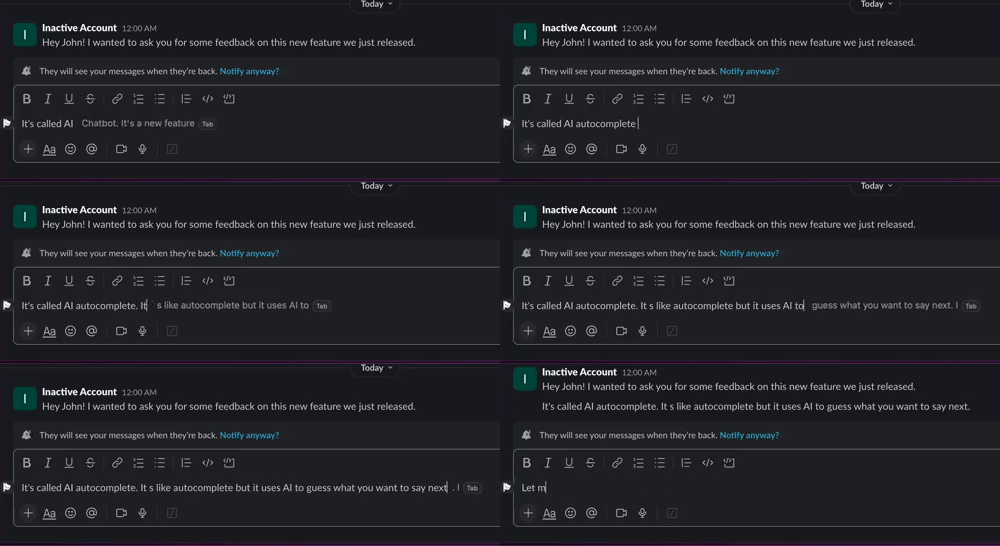
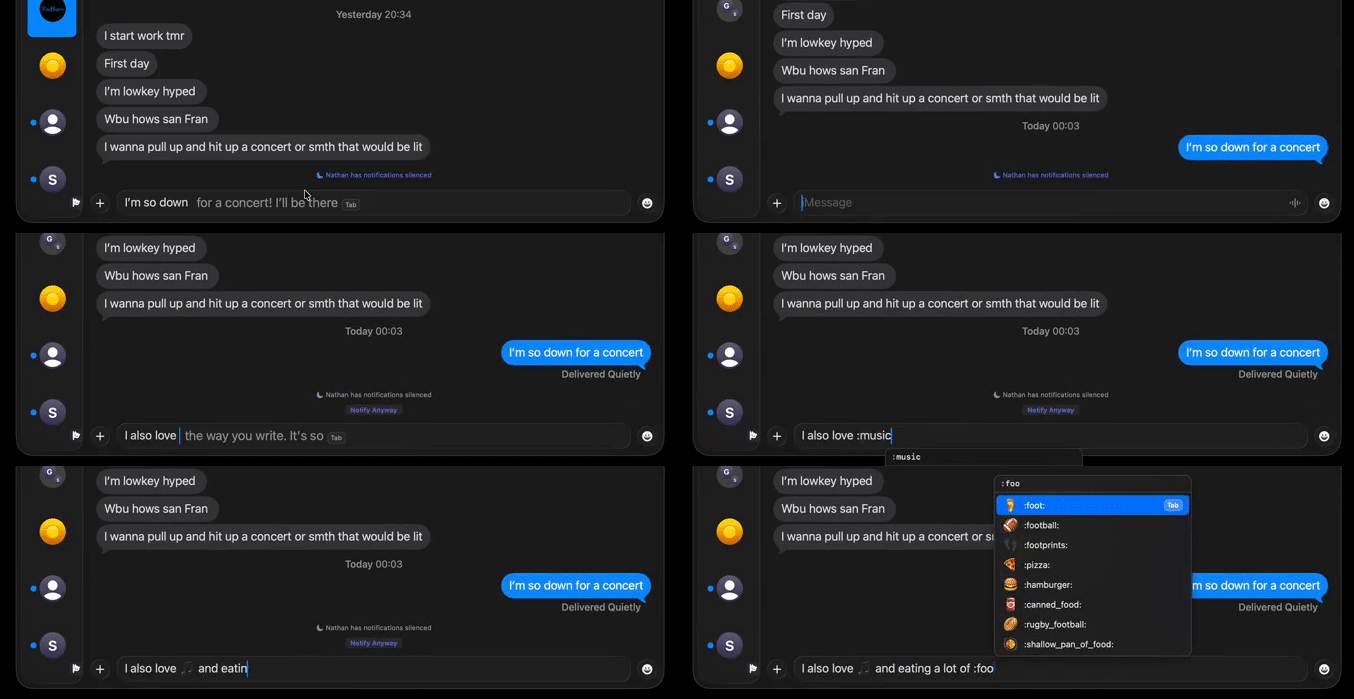
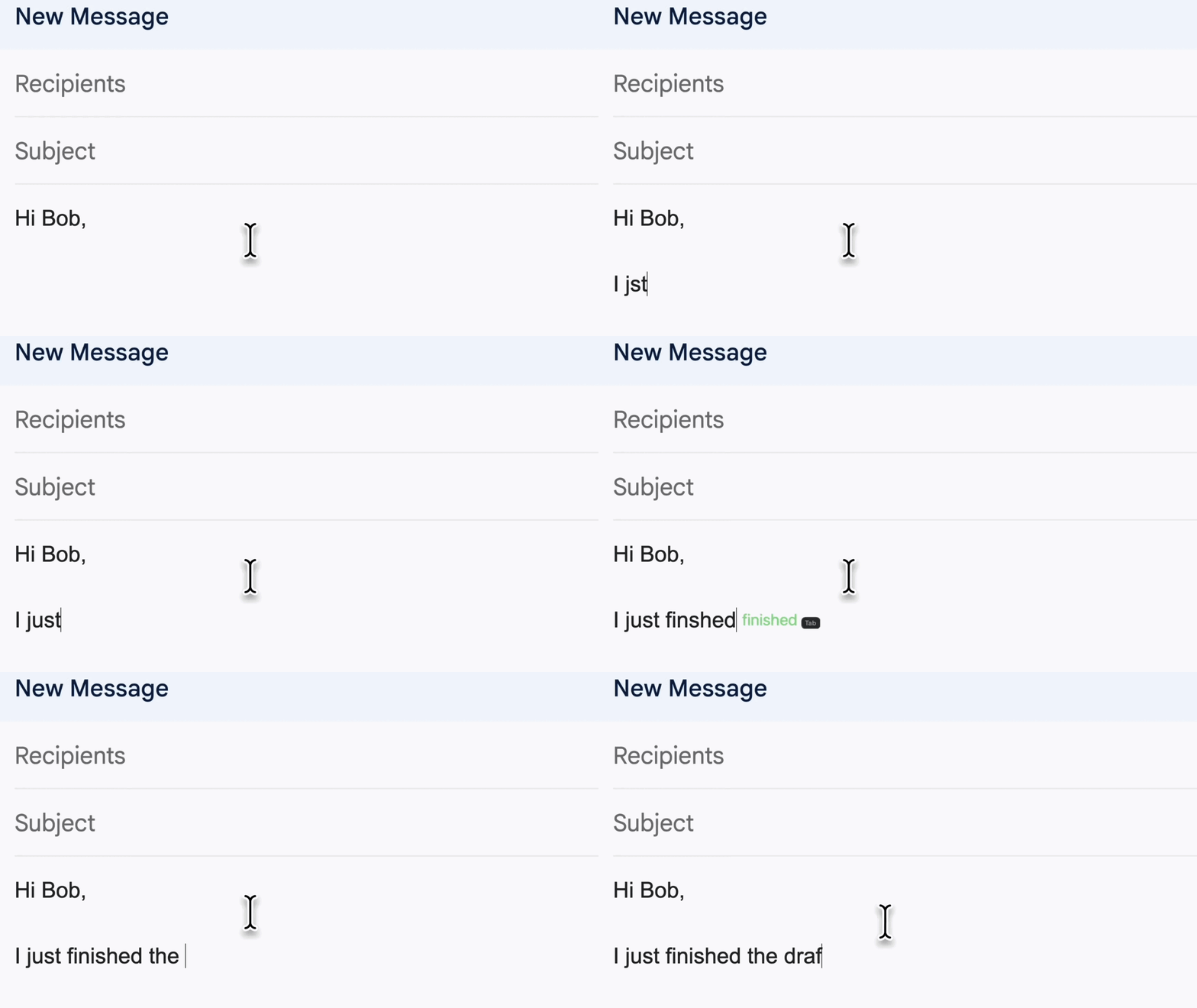
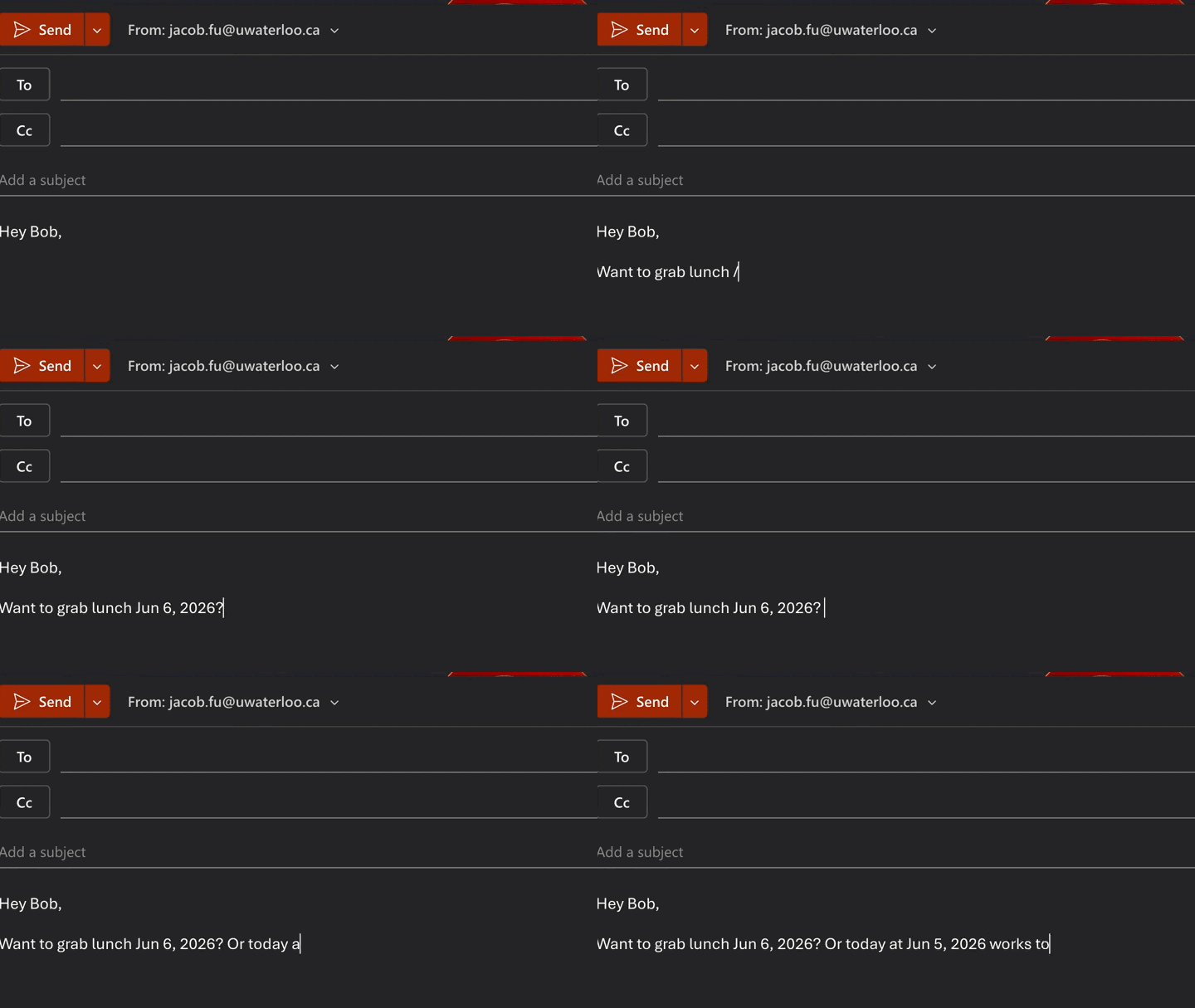
Cotabby adds AI autocomplete to almost any text field on your Mac. As you type, a gray suggestion appears inline next to your cursor. Press Tab to accept it a word at a time, or keep typing to ignore it.
The default Apple Intelligence and Open Source engines run on your Mac. No account or telemetry is required. An optional OpenAI-compatible engine can connect to a server you configure.
 |  |
 |  |
Tab accepts a word at a time:rocket: and accept it without leaving the field/ for quick math, unit and currency conversion, dates, and random valuesPrivacy is the whole point, so Cotabby's default engines keep generation on your Mac:
Cotabby generates suggestions in three ways. You choose which in Settings → Engine:
If your Mac supports Apple Intelligence, that's the easiest place to start. Otherwise, use the Open Source engine and pick one of the built-in models:
| Model | Size | Good for |
|---|---|---|
tabby-2-nano | ~0.8 GB | Older or low-memory Macs; fastest |
tabby-2-mini | ~1.4 GB | A solid everyday balance |
tabby-2-base | ~4.5 GB | Higher-quality suggestions |
tabby-2-pro | ~5.0 GB | Best quality |
Download any of them straight from Cotabby's menu bar.
Under the hood, the Open Source engine runs local GGUF base models in-process through llama.cpp (via CotabbyInference). Instead of prompting an instruction-tuned chat model, Cotabby treats the model as a pure text continuer and conditions it on your name, writing style, language, and on-screen context.
| Model | File | Size | Source |
|---|---|---|---|
tabby-2-nano | Qwen3.5-0.8B-Base.i1-Q6_K.gguf | ~0.8 GB | Hugging Face |
tabby-2-mini | Qwen3.5-2B-Base.i1-Q4_K_M.gguf | ~1.4 GB | Hugging Face |
tabby-2-base | gemma-4-E2B.i1-Q6_K.gguf | ~4.5 GB | Hugging Face |
tabby-2-pro | gemma-4-E4B.i1-Q4_K_M.gguf | ~5.0 GB | Hugging Face |
Bring your own model. Any GGUF small enough to run on-device works. Drop a .gguf file into Cotabby's models folder and refresh the model list from the menu bar. Browse the unsloth GGUF collection for more variants — smaller quants (Q3_K_M, Q4_K_S) trade quality for size; larger models give better completions at the cost of memory and per-token latency.
For the full suggestion pipeline, see ARCHITECTURE.md.
Compatibility: macOS 14.0 or later. The Apple Intelligence engine needs macOS 26 or later on a supported Mac; on older systems, use the Open Source engine.
brew tap FuJacob/cotabby
brew install --cask cotabby
Upgrade later with brew upgrade --cask cotabby. The tap lives at FuJacob/homebrew-cotabby.
Grab the latest release from cotabby.app and drag Cotabby into your Applications folder.
Start typing in almost any text field. When a gray suggestion appears:
Tab — accept the next word. (Prefer whole phrases? Switch this in Settings → Acceptance Mode.)` (backtick) — accept the entire suggestion at once.Esc, or just keep typing — dismiss it.Every shortcut is rebindable under Settings → Shortcuts.
Cotabby works inside other apps, so macOS asks for a few permissions. Each one maps to a specific feature, and Cotabby walks you through them on first launch:
Cotabby blocks generation, presentation, and insertion in password and other secure fields.
Requires Xcode and Command Line Tools. Apple Silicon is strongly recommended for local model performance. For setup, build, test, and contribution workflow details, start with CONTRIBUTING.md.
git clone https://github.com/FuJacob/cotabby.git Cotabby
cd Cotabby
scripts/prepare_cotabby_workspace.sh
open build/cotabby-dependencies/Cotabby.xcworkspace
Use the Cotabby Dev scheme for local work. The workspace temporarily supplies the native APIs in our pending CotabbyInference patch; preparation is automatic in CI and release builds.
If you want to understand the runtime and suggestion pipeline before contributing, read ARCHITECTURE.md.
Contributions are welcome. See CONTRIBUTING.md for setup, build, and PR guidelines, and CODE_OF_CONDUCT.md for community expectations. For a tour of the runtime and suggestion pipeline, read ARCHITECTURE.md.
Originally created by @FuJacob, now developed and maintained by @FuJacob, @jam-cai. and @akramj13
Cotabby is licensed under the GNU Affero General Public License v3.0. You can use, study, modify, and redistribute the app, but if you distribute a modified version or make one available to users over a network, you must provide the corresponding source code under the same license.
Third-party dependencies, emoji data, and downloadable model weights keep their own licenses and usage terms. Bundled third-party notices (SymSpell and the autocorrect frequency dictionary) are reproduced in THIRD_PARTY_LICENSES.md.
600 followers · starred May 2026
5,122 followers · starred May 2026
461 followers · starred Oct 2026
292 followers · starred Sep 2026
Cotabby is local AI autocomplete for your entire Mac. Open source. On device. Everywhere you type.
See the code
Open-source, local-first AI autocomplete for macOS.
Cotabby is free and open-source — maintained by two students. If it's useful to you, please consider supporting Cotabby's future.
Cotabby adds AI autocomplete to almost any text field on your Mac. As you type, a gray suggestion appears inline next to your cursor. Press Tab to accept it a word at a time, or keep typing to ignore it.
The default Apple Intelligence and Open Source engines run on your Mac. No account or telemetry is required. An optional OpenAI-compatible engine can connect to a server you configure.
| |
| |
Tab accepts a word at a time:rocket: and accept it without leaving the field/ for quick math, unit and currency conversion, dates, and random valuesPrivacy is the whole point, so Cotabby's default engines keep generation on your Mac:
Cotabby generates suggestions in three ways. You choose which in Settings → Engine:
If your Mac supports Apple Intelligence, that's the easiest place to start. Otherwise, use the Open Source engine and pick one of the built-in models:
| Model | Size | Good for |
|---|---|---|
tabby-2-nano | ~0.8 GB | Older or low-memory Macs; fastest |
tabby-2-mini | ~1.4 GB | A solid everyday balance |
tabby-2-base | ~4.5 GB | Higher-quality suggestions |
tabby-2-pro | ~5.0 GB | Best quality |
Download any of them straight from Cotabby's menu bar.
Under the hood, the Open Source engine runs local GGUF base models in-process through llama.cpp (via CotabbyInference). Instead of prompting an instruction-tuned chat model, Cotabby treats the model as a pure text continuer and conditions it on your name, writing style, language, and on-screen context.
| Model | File | Size | Source |
|---|---|---|---|
tabby-2-nano | Qwen3.5-0.8B-Base.i1-Q6_K.gguf | ~0.8 GB | Hugging Face |
tabby-2-mini | Qwen3.5-2B-Base.i1-Q4_K_M.gguf | ~1.4 GB | Hugging Face |
tabby-2-base | gemma-4-E2B.i1-Q6_K.gguf | ~4.5 GB | Hugging Face |
tabby-2-pro | gemma-4-E4B.i1-Q4_K_M.gguf | ~5.0 GB | Hugging Face |
Bring your own model. Any GGUF small enough to run on-device works. Drop a .gguf file into Cotabby's models folder and refresh the model list from the menu bar. Browse the unsloth GGUF collection for more variants — smaller quants (Q3_K_M, Q4_K_S) trade quality for size; larger models give better completions at the cost of memory and per-token latency.
For the full suggestion pipeline, see ARCHITECTURE.md.
Compatibility: macOS 14.0 or later. The Apple Intelligence engine needs macOS 26 or later on a supported Mac; on older systems, use the Open Source engine.
brew tap FuJacob/cotabby
brew install --cask cotabby
Upgrade later with brew upgrade --cask cotabby. The tap lives at FuJacob/homebrew-cotabby.
Grab the latest release from cotabby.app and drag Cotabby into your Applications folder.
Start typing in almost any text field. When a gray suggestion appears:
Tab — accept the next word. (Prefer whole phrases? Switch this in Settings → Acceptance Mode.)` (backtick) — accept the entire suggestion at once.Esc, or just keep typing — dismiss it.Every shortcut is rebindable under Settings → Shortcuts.
Cotabby works inside other apps, so macOS asks for a few permissions. Each one maps to a specific feature, and Cotabby walks you through them on first launch:
Cotabby blocks generation, presentation, and insertion in password and other secure fields.
Requires Xcode and Command Line Tools. Apple Silicon is strongly recommended for local model performance. For setup, build, test, and contribution workflow details, start with CONTRIBUTING.md.
git clone https://github.com/FuJacob/cotabby.git Cotabby
cd Cotabby
scripts/prepare_cotabby_workspace.sh
open build/cotabby-dependencies/Cotabby.xcworkspace
Use the Cotabby Dev scheme for local work. The workspace temporarily supplies the native APIs in our pending CotabbyInference patch; preparation is automatic in CI and release builds.
If you want to understand the runtime and suggestion pipeline before contributing, read ARCHITECTURE.md.
Contributions are welcome. See CONTRIBUTING.md for setup, build, and PR guidelines, and CODE_OF_CONDUCT.md for community expectations. For a tour of the runtime and suggestion pipeline, read ARCHITECTURE.md.
Originally created by @FuJacob, now developed and maintained by @FuJacob, @jam-cai. and @akramj13
Cotabby is licensed under the GNU Affero General Public License v3.0. You can use, study, modify, and redistribute the app, but if you distribute a modified version or make one available to users over a network, you must provide the corresponding source code under the same license.
Third-party dependencies, emoji data, and downloadable model weights keep their own licenses and usage terms. Bundled third-party notices (SymSpell and the autocorrect frequency dictionary) are reproduced in THIRD_PARTY_LICENSES.md.
600 followers · starred May 2026
5,122 followers · starred May 2026
461 followers · starred Oct 2026
292 followers · starred Sep 2026