
[SIGGRAPH 2026] OmniRoam: World Wandering via Long-Horizon Panoramic Video Generation
See the codeREADME

OmniRoam: World Wandering via Long-Horizon Panoramic Video Generation





Yuheng Liu1*, Xin Lin2, Xinke Li3, Baihan Yang2, Chen Wang4*, Kalyan Sunkavalli5, Yannick Hold-Geoffroy5, Hao Tan5, Kai Zhang5, Xiaohui Xie1, Zifan Shi5, Yiwei Hu5
(*Work done during an internship at Adobe)
1UC Irvine, 2UC San Diego, 3City University of Hong Kong, 4University of Pennsylvania, 5Adobe Research
Video
https://github.com/user-attachments/assets/8e26dd1b-43ad-4b0a-8e99-5f97dc637980
Updates
- [2026-07] We have an Oral Presentation at SIGGRAPH.
- [2026-04] 🎉 Initial release of code, models, and datasets
- [2026-03] 🎉 Our paper is accepted to SIGGRAPH 2026!
Introduction
Modeling scenes using video generation models has garnered growing research interest in recent years. However, most existing approaches rely on perspective video models that synthesize only limited observations of a scene, leading to issues of completeness and global consistency.
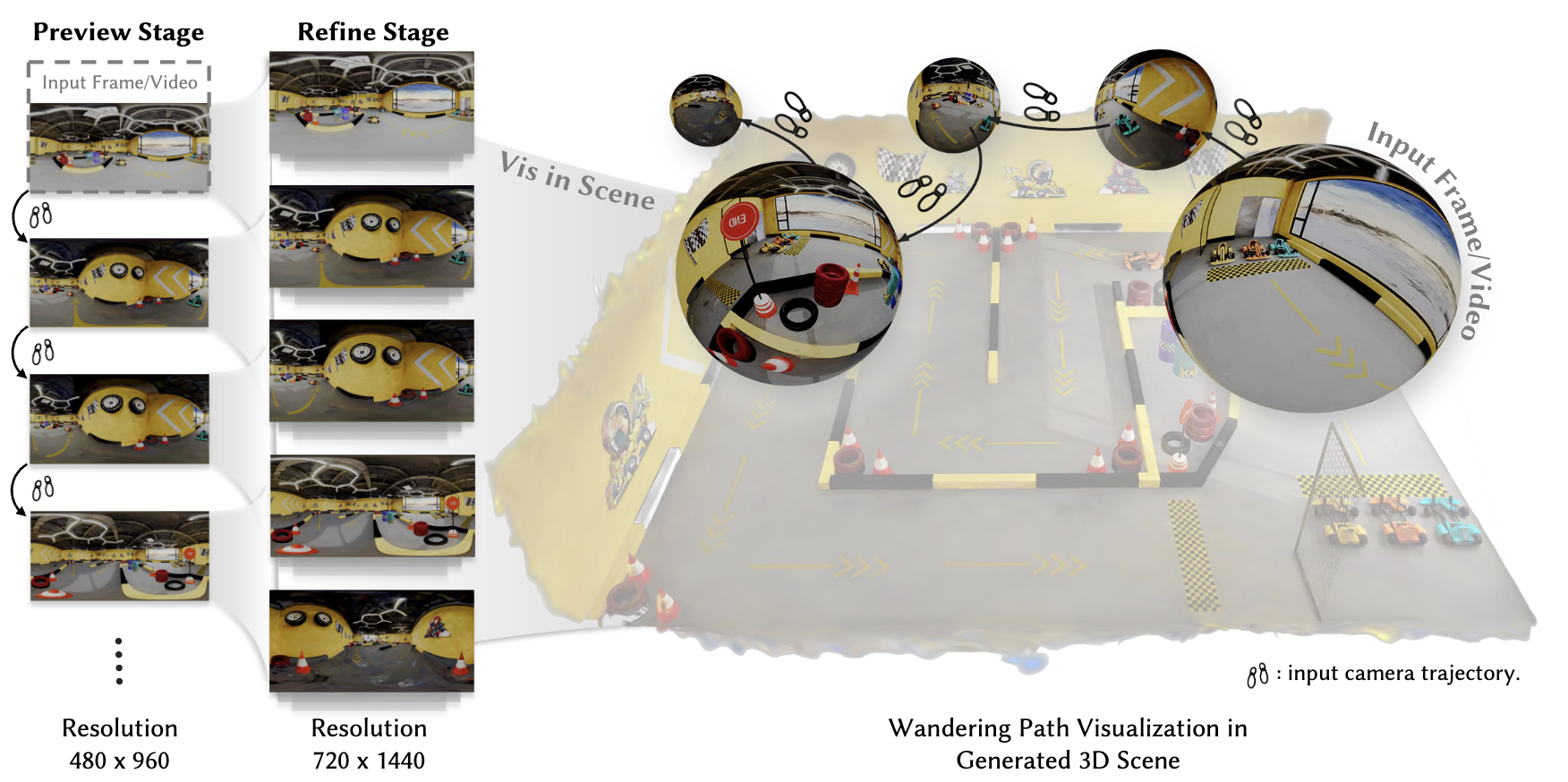
We propose OmniRoam, a controllable panoramic video generation framework that exploits the rich per-frame scene coverage and inherent long-term spatial and temporal consistency of panoramic representation, enabling long-horizon scene wandering. Our framework begins with a preview stage, where a trajectory-controlled video generation model creates a quick overview of the scene from a given input image or video. Then, in the refine stage, this video is temporally extended and spatially upsampled to produce long-range, high-resolution videos, thus enabling high-fidelity world wandering.
To train our model, we introduce two panoramic video datasets that incorporate both synthetic and real-world captured videos. Experiments show that our framework consistently outperforms state-of-the-art methods in terms of visual quality, controllability, and long-term scene consistency, both qualitatively and quantitatively. We further showcase several extensions of this framework, including real-time video generation and 3D reconstruction.
Environment Setup
Prerequisites
- OS: Linux (tested on Ubuntu 20.04+)
- GPU: CUDA-compatible GPU with ≥20GB VRAM (≥36GB recommended for refine stage)
- CUDA: 11.8 or higher
- Python: 3.9+
- FFmpeg: For video processing
Step 1: Create Conda Environment
# Download Rust and Cargo
curl --proto '=https' --tlsv1.2 -sSf https://sh.rustup.rs/ | sh
. "$HOME/.cargo/env"

# Clone repository
git clone https://github.com/yuhengliu02/OmniRoam.git
cd OmniRoam

# Create and activate conda environment
conda create -n omniroam python=3.10
conda activate omniroam

# Install DiffSynth-Studio
# DiffSynth-Studio: https://github.com/modelscope/DiffSynth-Studio
pip install -e .
Step 2: Download Base Model (Wan2.1-T2V-1.3B)
OmniRoam is built upon the Wan-AI Wan2.1-T2V-1.3B video diffusion model.
# Download using provided script
python download_wan2.1.py

# Or manually download from Hugging Face
# Visit: https://huggingface.co/Wan-AI/Wan2.1-T2V-1.3B
# Download to: models/Wan-AI/Wan2.1-T2V-1.3B/
Step 3: Download OmniRoam Models
Download the Preview, Self-forcing, and Refine stage checkpoints:
# Option 1: Using our download script
python download_omniroam_models.py

# Option 2: Manual download from Hugging Face
# Visit: https://huggingface.co/Yuheng02/OmniRoam
# Download the following files:
# - preview.ckpt    → models/OmniRoam/Preview/
# - self-forcing.pt → models/OmniRoam/Self-forcing/
# - refine.ckpt     → models/OmniRoam/Refine/
Final model directory structure:
models/
├── Wan-AI/
│   └── Wan2.1-T2V-1.3B/
└── OmniRoam/
    ├── Preview/
    │   └── preview.ckpt
    ├── Self-forcing/
    │   └── self-forcing.pt
    └── Refine/
        └── refine.ckpt
Step 4: Install Self-Forcing Package (Optional)
The Self-forcing stage requires additional dependencies:
Please refer to Self-Forcing/README.md for installation instructions.
OmniRoam Studio
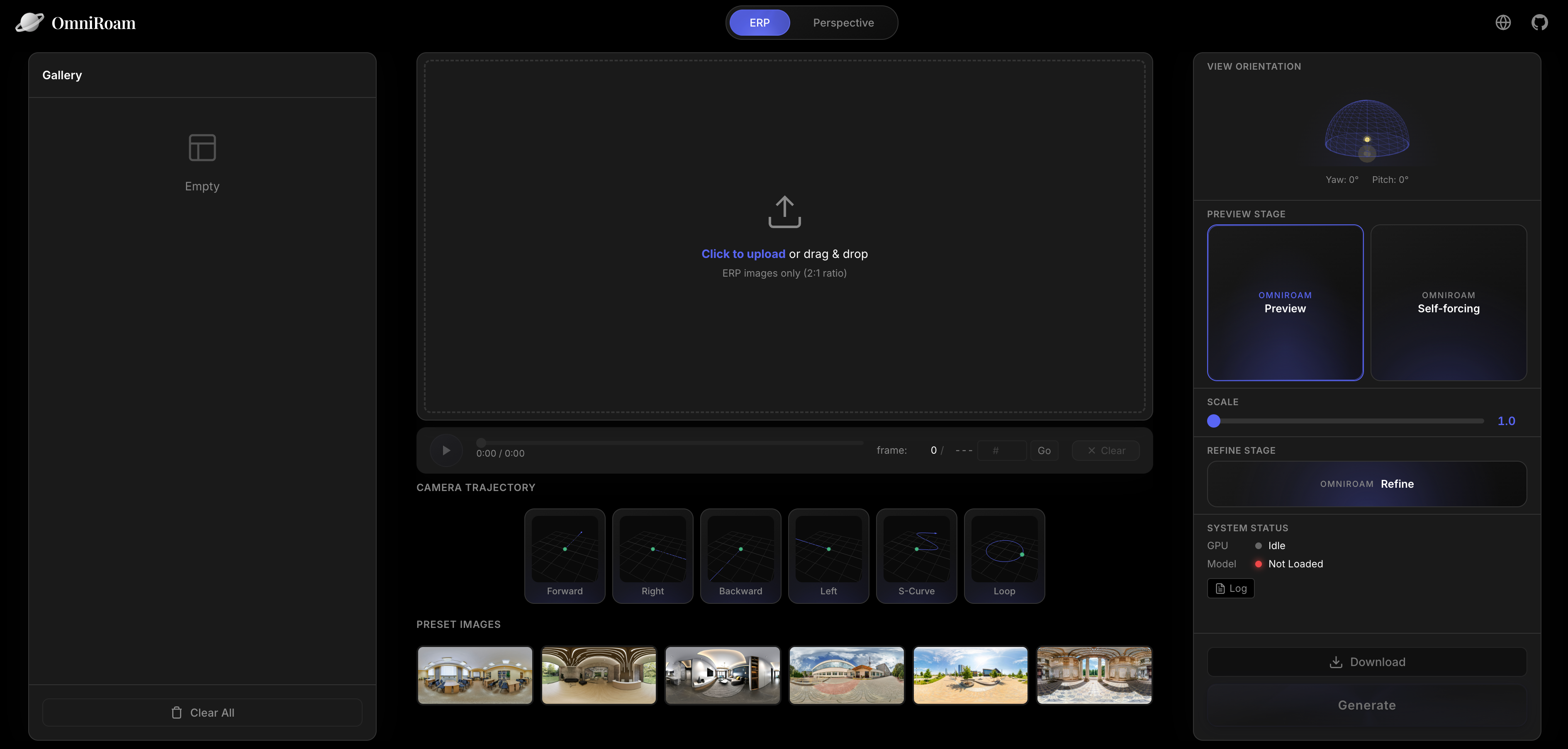
We provide OmniRoam Studio, an interactive web-based interface for easy video generation with real-time preview and 360° panoramic viewing.
Features
- 🎬 Multi-stage generation pipeline (Preview, Self-forcing, Refine)
- 🖼️ Interactive 360° panoramic video player
- 🎯 Visual trajectory presets with real-time preview
- 📊 Built-in gallery with download support
- ⚙️ Customizable generation parameters
Quick Start
cd Studio

# Run before installing all dependencies

# Terminal 1: Start backend
conda activate omniroam
python main.py

# Terminal 2: Start frontend
cd frontend
npm install  # First time only
npm run dev
For detailed Studio documentation, see Studio/README.md
Dataset
InteriorGS-360video Dataset
We render panoramic videos from the InteriorGS 3D Gaussian Splatting dataset using our custom rendering pipeline.
Note: Due to current policy restrictions, you need to process the InteriorGS dataset using our open-source rendering tools.
Rendering Pipeline
We provide a complete Blender-based rendering pipeline to generate panoramic videos from InteriorGS 3DGS models:
cd InteriorGS-Render

# Download 3DGS models and camera trajectories (see InteriorGS-Render/README.md)
# Then run rendering
./run_simple.sh 1 2 3 4 5 200  # Process splits 1-5 out of 200
Output: Each dataset generates:
- 800-frame panoramic video (1920x960, 30fps)
- Camera trajectory JSON file
- PNG image sequence
For detailed rendering instructions, see InteriorGS-Render/README.md
Dataset Structure
After rendering, organize your dataset as follows:
data/InteriorGS-360video/
├── 0001_839920/
│   ├── pano_camera0/
│   │   ├── frame_0001.png
│   │   ├── frame_0002.png
│   │   └── ...
│   ├── video.mp4
│   └── transforms.json
├── 0002_123456/
└── ...
Inference
Results
https://github.com/user-attachments/assets/6323d12f-4df1-4924-8b46-6e78ab1c64ee
Preview Stage
Generate quick preview videos from panoramic images:
# Basic usage
python infer_omniroam.py \
  --local_images_dir vis_images \
  --height 480 \
  --width 960 \
  --num_frames 81 \
  --ckpt_path models/OmniRoam/Preview/preview.ckpt \
  --enable_speed_control \
  --speed_fixed 1.0 \
  --use_cam_traj \
  --traj_mode fixed \
  --traj_preset forward \
  --re_scale_pose fixed:1.0 \
  --traj_s_curve_amp_m 1.4 \
  --traj_loop_radius_m 1.5 \
  --cfg_scale 5.0 \
  --num_inference_steps 50 \
  --output_dir ./vis_ours_480p_speed_1_forward \
  --devices cuda:0,cuda:1,cuda:2,cuda:3,cuda:4,cuda:5,cuda:6,cuda:7

# Or use the provided script
./infer_preview.sh
Trajectory Presets: forward, backward, left, right, s_curve, loop
Set scale using --speed_fixed between 1.0 and 8.0.
Self-Forcing Stage
For fast preview generation with Self-forcing distillation:
cd Self-Forcing

# Run inference on local panoramas
./inference_local_panoramas.sh

# Or use custom inference script
python custom_inference.py \
  --config_path configs/self_forcing_dmd_omniroam.yaml \
  --checkpoint_path models/OmniRoam/Self-forcing/self-forcing.pt \
  --local_folder /path/to/panoramas \
  --traj_preset forward \
  --traj_step_m 1.0 \
  --output_folder ./self_forcing_output \
  --num_samples 5
Parameters:
--traj_preset: Camera trajectory (forward,backward,left,right)--traj_step_m: Step size in meters per latent timestep--speed_scalar: Speed multiplier (default: 1.0)--height: Output height (default: 480)--width: Output width (default: 960)
Refine Stage
Upscale and extend preview videos to high resolution and long-horizon:
# Refine preview videos
python infer_omniroam.py \
  --enable_refine \
  --refine_local_dir path/to/generated/preview/videos \
  --refine_num_segments 8 \
  --refine_degrade_down_h 480 \
  --refine_degrade_down_w 960 \
  --refine_use_crossfade \
  --refine_crossfade_alpha 0.5 \
  --height 720 \
  --width 1440 \
  --num_frames 81 \
  --ckpt_path models/OmniRoam/Refine/refine.ckpt \
  --output_dir ./refined \
  --devices cuda:0,cuda:1,cuda:2,cuda:3,cuda:4,cuda:5,cuda:6,cuda:7

# Or use the provided script
./infer_refine.sh
Parameters:
--refine_num_segments: Number of temporal segments for long video generation
Training
Data Preparation
Render InteriorGS Dataset (see Dataset section above)
Training Preview Stage
./train_preview.sh
Configuration:
- Edit
train_preview.shto customize:- Data paths (
DATA_ROOT,SPLIT_JSON) - Model paths (
PRETRAIN_MODEL_PATH) - Training hyperparameters (batch size, learning rate, etc.)
- Output directory (
OUTPUT_DIR)
- Data paths (
Training Refine Stage
# Train refine model for upsampling
./train_refine.sh
Configuration:
- Similar to preview training, edit
train_refine.shfor custom settings - Requires preview-stage generated videos as input
Monitoring Training
Training logs and checkpoints are saved to OUTPUT_DIR:
OUTPUT_DIR/
├── checkpoints/
│   ├── checkpoint_epoch_001.ckpt
│   ├── checkpoint_epoch_002.ckpt
│   └── ...
├── logs/
│   └── training.log
└── samples/
    └── epoch_001/
Project Structure
OmniRoam/
├── configs/                    # Configuration files
├── data/                       # Dataset directory
├── diffsynth/                  # Core diffusion synthesis modules
├── models/                     # Model checkpoints
├── output/                     # Training outputs
├── Self-Forcing/               # Self-forcing stage code
├── Studio/                     # Web interface
├── InteriorGS-Render/          # Dataset rendering pipeline
├── Tools/                      # Utility tools
├── infer_omniroam.py           # Main inference script
├── train_omniroam.py           # Main training script
├── download_wan2.1.py          # Download base model
└── download_omniroam_models.py # Download OmniRoam models
Tools
Perspective Conversion
Convert equirectangular panoramas to perspective view:
cd Tools

# Single direction
python erp_to_perspective.py -i input.mp4 -o output.mp4 --direction forward

# Batch processing
python erp_to_perspective.py --batch "vis_ours_480p_speed_1_{dir}/in_01/generated.mp4"
Camera Trajectory Visualization
Visualize camera trajectories:
cd Tools
python panoramic_cam.py --traj_type forward --num_cameras 40 --step 0.1
Acknowledgments
We thank the following projects for their inspiring work, our code is partially based on the code from these projects:
- ReCamMaster: Camera-controlled generative rendering from a single video
- Self-Forcing: Self-forcing distillation for fast diffusion models
- Wan-AI: Base video diffusion model
- InteriorGS: 3D Gaussian Splatting dataset
Citation
If you find OmniRoam useful for your research, please cite:
@article{omniroam2026,
  title={OmniRoam: World Wandering via Long-Horizon Panoramic Video Generation},
  author={Yuheng Liu and Xin Lin and Xinke Li and Baihan Yang and Chen Wang and Kalyan Sunkavalli and Yannick Hold-Geoffroy and Hao Tan and Kai Zhang and Xiaohui Xie and Zifan Shi and Yiwei Hu},
  journal={SIGGRAPH},
  year={2026}
}
License
This project is released under the Adobe Research License for noncommercial research purposes only.
Contact
For questions or issues:
- Email: yuhengliu02@gmail.com
- GitHub Issues: Open an issue
Similar repos


Languages
Python
95.3%
Vue
3.4%
[SIGGRAPH 2026] OmniRoam: World Wandering via Long-Horizon Panoramic Video Generation
See the codeREADME
OmniRoam: World Wandering via Long-Horizon Panoramic Video Generation
Yuheng Liu1*, Xin Lin2, Xinke Li3, Baihan Yang2, Chen Wang4*, Kalyan Sunkavalli5, Yannick Hold-Geoffroy5, Hao Tan5, Kai Zhang5, Xiaohui Xie1, Zifan Shi5, Yiwei Hu5
(*Work done during an internship at Adobe)
1UC Irvine, 2UC San Diego, 3City University of Hong Kong, 4University of Pennsylvania, 5Adobe Research
Video
https://github.com/user-attachments/assets/8e26dd1b-43ad-4b0a-8e99-5f97dc637980
Updates
- [2026-07] We have an Oral Presentation at SIGGRAPH.
- [2026-04] 🎉 Initial release of code, models, and datasets
- [2026-03] 🎉 Our paper is accepted to SIGGRAPH 2026!
Introduction
Modeling scenes using video generation models has garnered growing research interest in recent years. However, most existing approaches rely on perspective video models that synthesize only limited observations of a scene, leading to issues of completeness and global consistency.
We propose OmniRoam, a controllable panoramic video generation framework that exploits the rich per-frame scene coverage and inherent long-term spatial and temporal consistency of panoramic representation, enabling long-horizon scene wandering. Our framework begins with a preview stage, where a trajectory-controlled video generation model creates a quick overview of the scene from a given input image or video. Then, in the refine stage, this video is temporally extended and spatially upsampled to produce long-range, high-resolution videos, thus enabling high-fidelity world wandering.
To train our model, we introduce two panoramic video datasets that incorporate both synthetic and real-world captured videos. Experiments show that our framework consistently outperforms state-of-the-art methods in terms of visual quality, controllability, and long-term scene consistency, both qualitatively and quantitatively. We further showcase several extensions of this framework, including real-time video generation and 3D reconstruction.
Environment Setup
Prerequisites
- OS: Linux (tested on Ubuntu 20.04+)
- GPU: CUDA-compatible GPU with ≥20GB VRAM (≥36GB recommended for refine stage)
- CUDA: 11.8 or higher
- Python: 3.9+
- FFmpeg: For video processing
Step 1: Create Conda Environment
# Download Rust and Cargo
curl --proto '=https' --tlsv1.2 -sSf https://sh.rustup.rs/ | sh
. "$HOME/.cargo/env"

# Clone repository
git clone https://github.com/yuhengliu02/OmniRoam.git
cd OmniRoam

# Create and activate conda environment
conda create -n omniroam python=3.10
conda activate omniroam

# Install DiffSynth-Studio
# DiffSynth-Studio: https://github.com/modelscope/DiffSynth-Studio
pip install -e .
Step 2: Download Base Model (Wan2.1-T2V-1.3B)
OmniRoam is built upon the Wan-AI Wan2.1-T2V-1.3B video diffusion model.
# Download using provided script
python download_wan2.1.py

# Or manually download from Hugging Face
# Visit: https://huggingface.co/Wan-AI/Wan2.1-T2V-1.3B
# Download to: models/Wan-AI/Wan2.1-T2V-1.3B/
Step 3: Download OmniRoam Models
Download the Preview, Self-forcing, and Refine stage checkpoints:
# Option 1: Using our download script
python download_omniroam_models.py

# Option 2: Manual download from Hugging Face
# Visit: https://huggingface.co/Yuheng02/OmniRoam
# Download the following files:
# - preview.ckpt    → models/OmniRoam/Preview/
# - self-forcing.pt → models/OmniRoam/Self-forcing/
# - refine.ckpt     → models/OmniRoam/Refine/
Final model directory structure:
models/
├── Wan-AI/
│   └── Wan2.1-T2V-1.3B/
└── OmniRoam/
    ├── Preview/
    │   └── preview.ckpt
    ├── Self-forcing/
    │   └── self-forcing.pt
    └── Refine/
        └── refine.ckpt
Step 4: Install Self-Forcing Package (Optional)
The Self-forcing stage requires additional dependencies:
Please refer to Self-Forcing/README.md for installation instructions.
OmniRoam Studio
We provide OmniRoam Studio, an interactive web-based interface for easy video generation with real-time preview and 360° panoramic viewing.
Features
- 🎬 Multi-stage generation pipeline (Preview, Self-forcing, Refine)
- 🖼️ Interactive 360° panoramic video player
- 🎯 Visual trajectory presets with real-time preview
- 📊 Built-in gallery with download support
- ⚙️ Customizable generation parameters
Quick Start
cd Studio

# Run before installing all dependencies

# Terminal 1: Start backend
conda activate omniroam
python main.py

# Terminal 2: Start frontend
cd frontend
npm install  # First time only
npm run dev
For detailed Studio documentation, see Studio/README.md
Dataset
InteriorGS-360video Dataset
We render panoramic videos from the InteriorGS 3D Gaussian Splatting dataset using our custom rendering pipeline.
Note: Due to current policy restrictions, you need to process the InteriorGS dataset using our open-source rendering tools.
Rendering Pipeline
We provide a complete Blender-based rendering pipeline to generate panoramic videos from InteriorGS 3DGS models:
cd InteriorGS-Render

# Download 3DGS models and camera trajectories (see InteriorGS-Render/README.md)
# Then run rendering
./run_simple.sh 1 2 3 4 5 200  # Process splits 1-5 out of 200
Output: Each dataset generates:
- 800-frame panoramic video (1920x960, 30fps)
- Camera trajectory JSON file
- PNG image sequence
For detailed rendering instructions, see InteriorGS-Render/README.md
Dataset Structure
After rendering, organize your dataset as follows:
data/InteriorGS-360video/
├── 0001_839920/
│   ├── pano_camera0/
│   │   ├── frame_0001.png
│   │   ├── frame_0002.png
│   │   └── ...
│   ├── video.mp4
│   └── transforms.json
├── 0002_123456/
└── ...
Inference
Results
https://github.com/user-attachments/assets/6323d12f-4df1-4924-8b46-6e78ab1c64ee
Preview Stage
Generate quick preview videos from panoramic images:
# Basic usage
python infer_omniroam.py \
  --local_images_dir vis_images \
  --height 480 \
  --width 960 \
  --num_frames 81 \
  --ckpt_path models/OmniRoam/Preview/preview.ckpt \
  --enable_speed_control \
  --speed_fixed 1.0 \
  --use_cam_traj \
  --traj_mode fixed \
  --traj_preset forward \
  --re_scale_pose fixed:1.0 \
  --traj_s_curve_amp_m 1.4 \
  --traj_loop_radius_m 1.5 \
  --cfg_scale 5.0 \
  --num_inference_steps 50 \
  --output_dir ./vis_ours_480p_speed_1_forward \
  --devices cuda:0,cuda:1,cuda:2,cuda:3,cuda:4,cuda:5,cuda:6,cuda:7

# Or use the provided script
./infer_preview.sh
Trajectory Presets: forward, backward, left, right, s_curve, loop
Set scale using --speed_fixed between 1.0 and 8.0.
Self-Forcing Stage
For fast preview generation with Self-forcing distillation:
cd Self-Forcing

# Run inference on local panoramas
./inference_local_panoramas.sh

# Or use custom inference script
python custom_inference.py \
  --config_path configs/self_forcing_dmd_omniroam.yaml \
  --checkpoint_path models/OmniRoam/Self-forcing/self-forcing.pt \
  --local_folder /path/to/panoramas \
  --traj_preset forward \
  --traj_step_m 1.0 \
  --output_folder ./self_forcing_output \
  --num_samples 5
Parameters:
--traj_preset: Camera trajectory (forward,backward,left,right)--traj_step_m: Step size in meters per latent timestep--speed_scalar: Speed multiplier (default: 1.0)--height: Output height (default: 480)--width: Output width (default: 960)
Refine Stage
Upscale and extend preview videos to high resolution and long-horizon:
# Refine preview videos
python infer_omniroam.py \
  --enable_refine \
  --refine_local_dir path/to/generated/preview/videos \
  --refine_num_segments 8 \
  --refine_degrade_down_h 480 \
  --refine_degrade_down_w 960 \
  --refine_use_crossfade \
  --refine_crossfade_alpha 0.5 \
  --height 720 \
  --width 1440 \
  --num_frames 81 \
  --ckpt_path models/OmniRoam/Refine/refine.ckpt \
  --output_dir ./refined \
  --devices cuda:0,cuda:1,cuda:2,cuda:3,cuda:4,cuda:5,cuda:6,cuda:7

# Or use the provided script
./infer_refine.sh
Parameters:
--refine_num_segments: Number of temporal segments for long video generation
Training
Data Preparation
Render InteriorGS Dataset (see Dataset section above)
Training Preview Stage
./train_preview.sh
Configuration:
- Edit
train_preview.shto customize:- Data paths (
DATA_ROOT,SPLIT_JSON) - Model paths (
PRETRAIN_MODEL_PATH) - Training hyperparameters (batch size, learning rate, etc.)
- Output directory (
OUTPUT_DIR)
- Data paths (
Training Refine Stage
# Train refine model for upsampling
./train_refine.sh
Configuration:
- Similar to preview training, edit
train_refine.shfor custom settings - Requires preview-stage generated videos as input
Monitoring Training
Training logs and checkpoints are saved to OUTPUT_DIR:
OUTPUT_DIR/
├── checkpoints/
│   ├── checkpoint_epoch_001.ckpt
│   ├── checkpoint_epoch_002.ckpt
│   └── ...
├── logs/
│   └── training.log
└── samples/
    └── epoch_001/
Project Structure
OmniRoam/
├── configs/                    # Configuration files
├── data/                       # Dataset directory
├── diffsynth/                  # Core diffusion synthesis modules
├── models/                     # Model checkpoints
├── output/                     # Training outputs
├── Self-Forcing/               # Self-forcing stage code
├── Studio/                     # Web interface
├── InteriorGS-Render/          # Dataset rendering pipeline
├── Tools/                      # Utility tools
├── infer_omniroam.py           # Main inference script
├── train_omniroam.py           # Main training script
├── download_wan2.1.py          # Download base model
└── download_omniroam_models.py # Download OmniRoam models
Tools
Perspective Conversion
Convert equirectangular panoramas to perspective view:
cd Tools

# Single direction
python erp_to_perspective.py -i input.mp4 -o output.mp4 --direction forward

# Batch processing
python erp_to_perspective.py --batch "vis_ours_480p_speed_1_{dir}/in_01/generated.mp4"
Camera Trajectory Visualization
Visualize camera trajectories:
cd Tools
python panoramic_cam.py --traj_type forward --num_cameras 40 --step 0.1
Acknowledgments
We thank the following projects for their inspiring work, our code is partially based on the code from these projects:
- ReCamMaster: Camera-controlled generative rendering from a single video
- Self-Forcing: Self-forcing distillation for fast diffusion models
- Wan-AI: Base video diffusion model
- InteriorGS: 3D Gaussian Splatting dataset
Citation
If you find OmniRoam useful for your research, please cite:
@article{omniroam2026,
  title={OmniRoam: World Wandering via Long-Horizon Panoramic Video Generation},
  author={Yuheng Liu and Xin Lin and Xinke Li and Baihan Yang and Chen Wang and Kalyan Sunkavalli and Yannick Hold-Geoffroy and Hao Tan and Kai Zhang and Xiaohui Xie and Zifan Shi and Yiwei Hu},
  journal={SIGGRAPH},
  year={2026}
}
License
This project is released under the Adobe Research License for noncommercial research purposes only.
Contact
For questions or issues:
- Email: yuhengliu02@gmail.com
- GitHub Issues: Open an issue
Similar repos
Languages
Python
95.3%
Vue
3.4%