
[SIGGRAPH Asia 2025] WorldExplorer: Towards Generating Fully Navigable 3D Scenes
See the codeREADME
[SIGGRAPH Asia 2025] WorldExplorer: Towards Generating Fully Navigable 3D Scenes
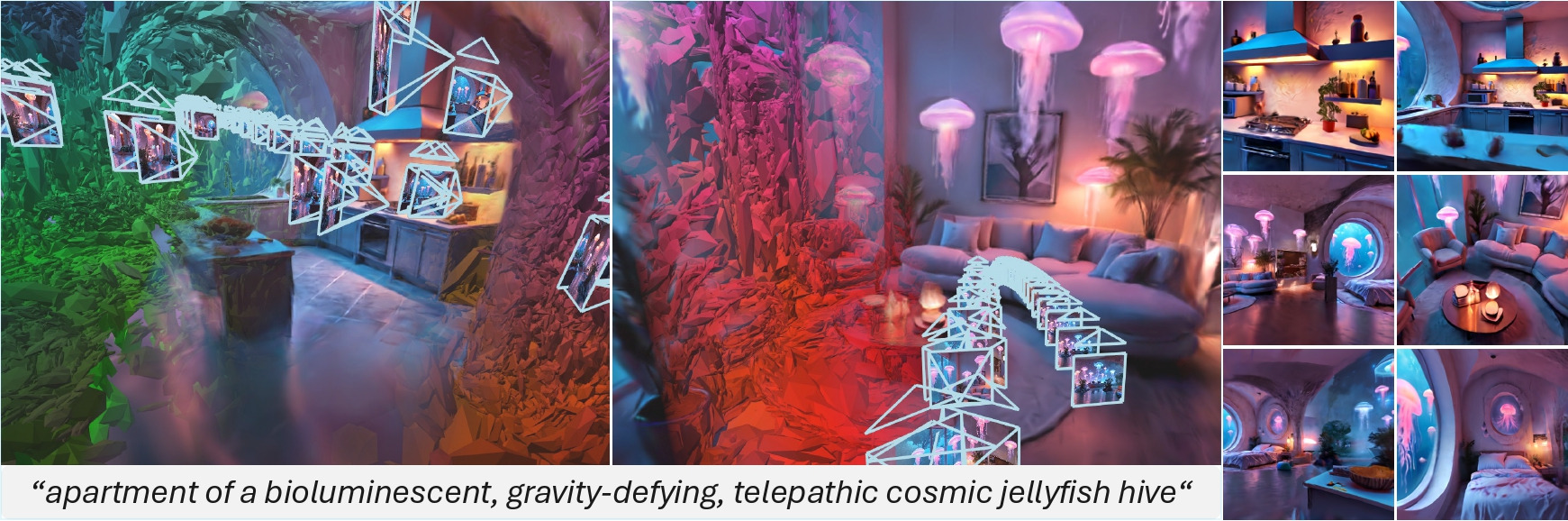
WorldExplorer produces high-quality scenes that remain stable under large camera motion, enabling realistic and unrestricted exploration.
This is the official repository for the SIGGRAPH Asia 2025 paper "WorldExplorer: Towards Generating Fully Navigable 3D Scenes".
[arXiv] [Project Page] [Video]
If you find WorldExplorer useful for your work please consider giving a star ⭐️ and citing:
@inproceedings{schneider_hoellein_2025_worldexplorer,
  author    = {Schneider, Manuel-Andreas and H\"{o}llein, Lukas and Nie\ss{}ner, Matthias},
  title     = {{WorldExplorer}: Towards Generating Fully Navigable {3D} Scenes},
  booktitle = {Proceedings of the SIGGRAPH Asia 2025 Conference Papers},
  year      = {2025},
  publisher = {Association for Computing Machinery},
  url       = {https://doi.org/10.1145/3757377.3763946},
  doi       = {10.1145/3757377.3763946},
  pages     = {1--11},
  series    = {SA Conference Papers '25}
}
Installation
We have tested the below instructions with PyTorch 2.8.0+cu128, CUDA 12.8, PyTorch3D 0.7.8.
conda env create -f environment.yml
conda activate worldexplorer

cd model/stable-virtual-camera
pip install -e .
cd ../..

CUDA_HOME=/usr/local/cuda-12.8 pip install "git+https://github.com/facebookresearch/pytorch3d.git@stable"
pip install diffusers["torch"] transformers protobuf transformers[sentencepiece] easydict plyfile
pip install --upgrade pip setuptools && pip install git+https://github.com/nerfstudio-project/nerfstudio.git@50e0e3c
pip install -U xformers --index-url https://download.pytorch.org/whl/cu128
If you encounter this issue during 3DGS optimization, it's likely that your CUDA version is not consistent between terminal sessions (check through nvcc --version). You can ensure the CUDA version stays fixed by setting the PATH variable in your ~/.bashrc. For CUDA 12.8, this can be done by running:
echo 'export PATH=/usr/local/cuda-12.8/bin:$PATH' >> ~/.bashrc
Authenticate with Hugging Face
The FLUX.1-dev model used for initial image generation is gated and requires authentication.
-
Request access to the model on its Hugging Face page: https://huggingface.co/black-forest-labs/FLUX.1-dev
-
Log in through the terminal and add a read-only token:
pip install -U "huggingface_hub[cli]"
hf auth login
The weights of the model will automatically be downloaded and saved the first time you generate a scene.
Usage
WorldExplorer provides a command-line interface through worldexplorer.py for generating scene scaffolds (panoramas with known camera extrinsics and intrinsics) and 3D scenes.
Quick Start
Generate a complete 3D scene from a text description:
python worldexplorer.py generate "bioluminescent, gravity-defying, telepathic cosmic jellyfish hive"
Please note that full 3D scene generation takes about 6 to 7 hours as 32 videos are generated in the process. The simplest way to track your progress is by checking the output at ./scenes/[theme_name]_[translation_scaling_factor]_[timestamp]/img2trajvid.
Available Commands
1. generate - Full Pipeline (Scaffold + 3D Expansion)
Generates panoramic images from text and expands them into navigable 3D scenes.
# Indoor scene with automatic selection (CLIP-based)
python worldexplorer.py generate "Modern Apartment" --mode automatic

# Indoor scene with manual selection (yiels best results!)
python worldexplorer.py generate "Cozy Library" --mode manual

# Indoor scene with fast mode
python worldexplorer.py generate "Rustic Farmhouse (Wood, Leather, Wool)" --mode fast

# Custom/outdoor scene (requires four separate prompts for each viewing direction)
python worldexplorer.py generate --custom

# Skip 3D expansion (scaffold only)
python worldexplorer.py generate "Beach House" --skip-expansion
Options:
--mode, -m: Panorama scaffold generation mode -fast(single output),automatic(CLIP selection), ormanual(human curation)--translation-scaling, -t: Movement scale factor (default: 3.0). The higher the translation scaling factor, the further your trajectories will expand into the scene. For indoor scenes the recommended range is 2.0 to 7.0, and for outdoors scenes 8.0 to 20.0.--skip-expansion: Generate scaffold only without 3D expansion--custom, -c: Custom mode for outdoor scenes or custom indoor scenes--root-dir: Directory containing original trajectories
2. scaffold - Generate Panoramic Images Only
Creates panoramic images without expanding to 3D.
# Generate scaffold with theme
python worldexplorer.py scaffold "Mountain Cabin"

# Custom scene with user prompts
python worldexplorer.py scaffold --custom
Options:
--mode, -m: Panorama scaffold generation mode (fast/automatic/manual)--custom, -c: Enable custom prompt input
3. expand - expand panorama with videos exploring the scene & convert all frames to 3D
Expands previously generated panoramic images into a 3D scene through iterative video generation, VGGT pointcloud estimation and gaussian-splatting optimization. A selection of initial panoramas from our paper can be downloaded [here]. Simply provide the respective input path to the expand command below.
# Expand existing scaffold
python worldexplorer.py expand "./panoramas/[name]/[timestamp]/final"

# Expand with specific translation scaling
python worldexplorer.py expand "./panoramas/[name]/[timestamp]/final" --translation-scaling 10.0
Options:
--translation-scaling, -t: Movement scale factor. The higher the values the further your trajectories will expand from the central position into the scene.--root-dir: Directory containing original trajectories
Requirements: The input folder must contain 8 images named 000.png through 007.png.
4. --help flag
You can use the --help flag at any level to show how a given command should be used.
python worldexplorer.py --help
python worldexplorer.py generate --help
Panorama Scaffold Generation Modes
The scaffold is created in two steps: 4 images are created looking into (North, West, South, East) views. Then, 4 additional images are created in-between using projection&inpainting. Control how the inpainting is performed:
- manual: Generates multiple inpainting variations for human curation (best quality results)
- automatic: Generates multiple inpainting variations and uses CLIP for automatic selection
- fast: Quickest option, generates a single inpainting output per view
Translation Scaling Factors
The translation scaling factor controls movement scale in the 3D scene:
- Indoor scenes: Use 3.0 (default), recommended range 2 - 8
- Outdoor scenes: Use 10.0, recommended range 6 - 20
Custom Scene Generation
For outdoor or highly specific scenes, use custom mode:
python worldexplorer.py generate --custom
You'll be prompted to provide 4 prompts (North, West, South, East) views and the translation scaling factor.
Manual Curation Workflow
For best results with manual selection:
- Generate scaffold with manual mode:
python worldexplorer.py scaffold "Art Gallery" --mode manual
-
Review generated variations in the output folder
-
Copy selected images (001, 003, 005, 007) to the final folder
-
Run expansion:
python worldexplorer.py expand "./panoramas/art_gallery/[timestamp]/final"
Point-Cloud Initialization
We subsample all generated video frames to create the pointcloud initialization with VGGT in a memory-efficient way, controlled by the --num-images-for-vggt parameter (default: 40). We recommend to set the parameter according to the available GPU memory, following the official memory guidelines.
Time Estimates for RTX 3090
- Scaffold generation: ~5 minutes (fast mode)
- Scene expansion: 6-7 hours (full 3D scene generation)
Output Structure
Generated scenes are saved in:
- Scaffolds:
./panoramas/[theme_name]/[timestamp]/ - Scene Expansion Videos:
./scenes/[theme_name]_[translation_scaling_factor]_[timestamp]/ - Trained 3DGS Scenes:
./nerfstudio_output/[scene_id]/splatfacto/[timestamp]/ - Exported 3DGS PLY files:
./nerfstudio_output/[scene_id]/splatfacto/[timestamp]/exports/splat/splat.ply
Viewing scenes with ns-viewer
After training completes, you can view your 3D scene using nerfstudio's interactive viewer:
# View the trained model using the config file
ns-viewer --load-config ./nerfstudio_output/[scene_id]/splatfacto/[timestamp]/config.yml
While this issue is being resolved though this PR, you can use the below command to circumvent it before the PR is merged:
python -c "import sys, torch; sys.argv = ['ns-viewer', '--load-config', './nerfstudio_output/[scene_id]/splatfacto/[timestamp]/config.yml']; orig = torch.load; setattr(torch, 'load', lambda *a, **k: orig(*a, **{**k, 'weights_only': False})); from nerfstudio.scripts.viewer.run_viewer import entrypoint; entrypoint()"
The viewer will start and provide a URL (typically http://localhost:7007) that you can open in your browser.
Viewer Controls
- Mouse drag: Rotate camera view
- WASD/Arrow keys: Move camera position
- Scroll wheel: Zoom in/out
- Shift + drag: Pan camera
- Space: Reset camera to default position
- P: Take screenshot
- T: Toggle UI panels
- R: Toggle render mode (RGB/Depth/etc.)
Tips for Best Viewing Experience:
- The viewer shows real-time rendering of your gaussian splatting model
- Use the "Render" panel to adjust visualization settings (background color, render resolution)
- The "Camera" panel lets you save/load camera paths for creating smooth flythrough videos
- Export panel allows you to save renders or create videos of camera paths
- For large scenes, adjust the "Max Render Resolution" if performance is slow
Alternatively, the exported 3DGS PLY files can be viewed with common online viewers like SuperSplat or Spark.
Acknowledgements
Our work builds on top of amazing open-source networks and codebases. We thank the authors for providing them.
- Stable Virtual Camera [1]: a generalist diffusion model for Novel View Synthesis (NVS), generating 3D consistent novel views of a scene, given any number of input views and target cameras. Powered by Stability AI.
- Depth Anything V2 [2]: a foundation model for Monocular Depth Estimation.
- VGGT [3]: a feed-forward neural network that directly infers all key 3D attributes of a scene, including extrinsic and intrinsic camera parameters, point maps, depth maps, and 3D point tracks, from one, a few, or hundreds of its views, within seconds.
- Video Depth Anything [4]: based on Depth Anything V2, which can be applied to arbitrarily long videos without compromising quality, consistency, or generalization ability.
- 3D Gaussian Splatting [5]: allows for novel-view synthesis of scenes captured with multiple photos or videos at fast speed.
- Nerfstudio [6]: provides a simple API that allows for a simplified end-to-end process of creating, training, and testing NeRFs and gaussian-splatting.
[1] Stable Virtual Camera: Generative View Synthesis with Diffusion Models, Jensen (Jinghao) Zhou, Hang Gao, Vikram Voleti, Aaryaman Vasishta, Chun-Han Yao, Mark Boss, Philip Torr, Christian Rupprecht, and Varun Jampani
[2] Depth Anything V2, NeurIPS 2024, Lihe Yang, Bingyi Kang, Zilong Huang, Zhen Zhao, Xiaogang Xu, Jiashi Feng, and Hengshuang Zhao
[3] VGGT: Visual Geometry Grounded Transformer, CVPR 2025 (Best Paper Award), Jianyuan Wang, Minghao Chen, Nikita Karaev, Andrea Vedaldi, Christian Rupprecht, and David Novotny
[4] Video Depth Anything: Consistent Depth Estimation for Super-Long Videos, CVPR 2025 (Highlight), Sili Chen, Hengkai Guo, Shengnan Zhu, Feihu Zhang, Zilong Huang, Jiashi Feng, Bingyi Kang
[5] 3D Gaussian Splatting for Real-Time Radiance Field Rendering, SIGGRAPH 2023, Bernhard Kerbl, Georgios Kopanas, Thomas Leimkühler, George Drettakis
[6] Nerfstudio: A modular framework for neural radiance field development, Tancik, Matthew and Weber, Ethan and Ng, Evonne and Li, Ruilong and Yi, Brent and Wang, Terrance and Kristoffersen, Alexander and Austin, Jake and Salahi, Kamyar and Ahuja, Abhik and others
Contributors

10 commits

1 commits
Similar repos





Languages
Python
99.7%
[SIGGRAPH Asia 2025] WorldExplorer: Towards Generating Fully Navigable 3D Scenes
See the codeREADME
[SIGGRAPH Asia 2025] WorldExplorer: Towards Generating Fully Navigable 3D Scenes
WorldExplorer produces high-quality scenes that remain stable under large camera motion, enabling realistic and unrestricted exploration.
This is the official repository for the SIGGRAPH Asia 2025 paper "WorldExplorer: Towards Generating Fully Navigable 3D Scenes".
[arXiv] [Project Page] [Video]
If you find WorldExplorer useful for your work please consider giving a star ⭐️ and citing:
@inproceedings{schneider_hoellein_2025_worldexplorer,
  author    = {Schneider, Manuel-Andreas and H\"{o}llein, Lukas and Nie\ss{}ner, Matthias},
  title     = {{WorldExplorer}: Towards Generating Fully Navigable {3D} Scenes},
  booktitle = {Proceedings of the SIGGRAPH Asia 2025 Conference Papers},
  year      = {2025},
  publisher = {Association for Computing Machinery},
  url       = {https://doi.org/10.1145/3757377.3763946},
  doi       = {10.1145/3757377.3763946},
  pages     = {1--11},
  series    = {SA Conference Papers '25}
}
Installation
We have tested the below instructions with PyTorch 2.8.0+cu128, CUDA 12.8, PyTorch3D 0.7.8.
conda env create -f environment.yml
conda activate worldexplorer

cd model/stable-virtual-camera
pip install -e .
cd ../..

CUDA_HOME=/usr/local/cuda-12.8 pip install "git+https://github.com/facebookresearch/pytorch3d.git@stable"
pip install diffusers["torch"] transformers protobuf transformers[sentencepiece] easydict plyfile
pip install --upgrade pip setuptools && pip install git+https://github.com/nerfstudio-project/nerfstudio.git@50e0e3c
pip install -U xformers --index-url https://download.pytorch.org/whl/cu128
If you encounter this issue during 3DGS optimization, it's likely that your CUDA version is not consistent between terminal sessions (check through nvcc --version). You can ensure the CUDA version stays fixed by setting the PATH variable in your ~/.bashrc. For CUDA 12.8, this can be done by running:
echo 'export PATH=/usr/local/cuda-12.8/bin:$PATH' >> ~/.bashrc
Authenticate with Hugging Face
The FLUX.1-dev model used for initial image generation is gated and requires authentication.
-
Request access to the model on its Hugging Face page: https://huggingface.co/black-forest-labs/FLUX.1-dev
-
Log in through the terminal and add a read-only token:
pip install -U "huggingface_hub[cli]"
hf auth login
The weights of the model will automatically be downloaded and saved the first time you generate a scene.
Usage
WorldExplorer provides a command-line interface through worldexplorer.py for generating scene scaffolds (panoramas with known camera extrinsics and intrinsics) and 3D scenes.
Quick Start
Generate a complete 3D scene from a text description:
python worldexplorer.py generate "bioluminescent, gravity-defying, telepathic cosmic jellyfish hive"
Please note that full 3D scene generation takes about 6 to 7 hours as 32 videos are generated in the process. The simplest way to track your progress is by checking the output at ./scenes/[theme_name]_[translation_scaling_factor]_[timestamp]/img2trajvid.
Available Commands
1. generate - Full Pipeline (Scaffold + 3D Expansion)
Generates panoramic images from text and expands them into navigable 3D scenes.
# Indoor scene with automatic selection (CLIP-based)
python worldexplorer.py generate "Modern Apartment" --mode automatic

# Indoor scene with manual selection (yiels best results!)
python worldexplorer.py generate "Cozy Library" --mode manual

# Indoor scene with fast mode
python worldexplorer.py generate "Rustic Farmhouse (Wood, Leather, Wool)" --mode fast

# Custom/outdoor scene (requires four separate prompts for each viewing direction)
python worldexplorer.py generate --custom

# Skip 3D expansion (scaffold only)
python worldexplorer.py generate "Beach House" --skip-expansion
Options:
--mode, -m: Panorama scaffold generation mode -fast(single output),automatic(CLIP selection), ormanual(human curation)--translation-scaling, -t: Movement scale factor (default: 3.0). The higher the translation scaling factor, the further your trajectories will expand into the scene. For indoor scenes the recommended range is 2.0 to 7.0, and for outdoors scenes 8.0 to 20.0.--skip-expansion: Generate scaffold only without 3D expansion--custom, -c: Custom mode for outdoor scenes or custom indoor scenes--root-dir: Directory containing original trajectories
2. scaffold - Generate Panoramic Images Only
Creates panoramic images without expanding to 3D.
# Generate scaffold with theme
python worldexplorer.py scaffold "Mountain Cabin"

# Custom scene with user prompts
python worldexplorer.py scaffold --custom
Options:
--mode, -m: Panorama scaffold generation mode (fast/automatic/manual)--custom, -c: Enable custom prompt input
3. expand - expand panorama with videos exploring the scene & convert all frames to 3D
Expands previously generated panoramic images into a 3D scene through iterative video generation, VGGT pointcloud estimation and gaussian-splatting optimization. A selection of initial panoramas from our paper can be downloaded [here]. Simply provide the respective input path to the expand command below.
# Expand existing scaffold
python worldexplorer.py expand "./panoramas/[name]/[timestamp]/final"

# Expand with specific translation scaling
python worldexplorer.py expand "./panoramas/[name]/[timestamp]/final" --translation-scaling 10.0
Options:
--translation-scaling, -t: Movement scale factor. The higher the values the further your trajectories will expand from the central position into the scene.--root-dir: Directory containing original trajectories
Requirements: The input folder must contain 8 images named 000.png through 007.png.
4. --help flag
You can use the --help flag at any level to show how a given command should be used.
python worldexplorer.py --help
python worldexplorer.py generate --help
Panorama Scaffold Generation Modes
The scaffold is created in two steps: 4 images are created looking into (North, West, South, East) views. Then, 4 additional images are created in-between using projection&inpainting. Control how the inpainting is performed:
- manual: Generates multiple inpainting variations for human curation (best quality results)
- automatic: Generates multiple inpainting variations and uses CLIP for automatic selection
- fast: Quickest option, generates a single inpainting output per view
Translation Scaling Factors
The translation scaling factor controls movement scale in the 3D scene:
- Indoor scenes: Use 3.0 (default), recommended range 2 - 8
- Outdoor scenes: Use 10.0, recommended range 6 - 20
Custom Scene Generation
For outdoor or highly specific scenes, use custom mode:
python worldexplorer.py generate --custom
You'll be prompted to provide 4 prompts (North, West, South, East) views and the translation scaling factor.
Manual Curation Workflow
For best results with manual selection:
- Generate scaffold with manual mode:
python worldexplorer.py scaffold "Art Gallery" --mode manual
-
Review generated variations in the output folder
-
Copy selected images (001, 003, 005, 007) to the final folder
-
Run expansion:
python worldexplorer.py expand "./panoramas/art_gallery/[timestamp]/final"
Point-Cloud Initialization
We subsample all generated video frames to create the pointcloud initialization with VGGT in a memory-efficient way, controlled by the --num-images-for-vggt parameter (default: 40). We recommend to set the parameter according to the available GPU memory, following the official memory guidelines.
Time Estimates for RTX 3090
- Scaffold generation: ~5 minutes (fast mode)
- Scene expansion: 6-7 hours (full 3D scene generation)
Output Structure
Generated scenes are saved in:
- Scaffolds:
./panoramas/[theme_name]/[timestamp]/ - Scene Expansion Videos:
./scenes/[theme_name]_[translation_scaling_factor]_[timestamp]/ - Trained 3DGS Scenes:
./nerfstudio_output/[scene_id]/splatfacto/[timestamp]/ - Exported 3DGS PLY files:
./nerfstudio_output/[scene_id]/splatfacto/[timestamp]/exports/splat/splat.ply
Viewing scenes with ns-viewer
After training completes, you can view your 3D scene using nerfstudio's interactive viewer:
# View the trained model using the config file
ns-viewer --load-config ./nerfstudio_output/[scene_id]/splatfacto/[timestamp]/config.yml
While this issue is being resolved though this PR, you can use the below command to circumvent it before the PR is merged:
python -c "import sys, torch; sys.argv = ['ns-viewer', '--load-config', './nerfstudio_output/[scene_id]/splatfacto/[timestamp]/config.yml']; orig = torch.load; setattr(torch, 'load', lambda *a, **k: orig(*a, **{**k, 'weights_only': False})); from nerfstudio.scripts.viewer.run_viewer import entrypoint; entrypoint()"
The viewer will start and provide a URL (typically http://localhost:7007) that you can open in your browser.
Viewer Controls
- Mouse drag: Rotate camera view
- WASD/Arrow keys: Move camera position
- Scroll wheel: Zoom in/out
- Shift + drag: Pan camera
- Space: Reset camera to default position
- P: Take screenshot
- T: Toggle UI panels
- R: Toggle render mode (RGB/Depth/etc.)
Tips for Best Viewing Experience:
- The viewer shows real-time rendering of your gaussian splatting model
- Use the "Render" panel to adjust visualization settings (background color, render resolution)
- The "Camera" panel lets you save/load camera paths for creating smooth flythrough videos
- Export panel allows you to save renders or create videos of camera paths
- For large scenes, adjust the "Max Render Resolution" if performance is slow
Alternatively, the exported 3DGS PLY files can be viewed with common online viewers like SuperSplat or Spark.
Acknowledgements
Our work builds on top of amazing open-source networks and codebases. We thank the authors for providing them.
- Stable Virtual Camera [1]: a generalist diffusion model for Novel View Synthesis (NVS), generating 3D consistent novel views of a scene, given any number of input views and target cameras. Powered by Stability AI.
- Depth Anything V2 [2]: a foundation model for Monocular Depth Estimation.
- VGGT [3]: a feed-forward neural network that directly infers all key 3D attributes of a scene, including extrinsic and intrinsic camera parameters, point maps, depth maps, and 3D point tracks, from one, a few, or hundreds of its views, within seconds.
- Video Depth Anything [4]: based on Depth Anything V2, which can be applied to arbitrarily long videos without compromising quality, consistency, or generalization ability.
- 3D Gaussian Splatting [5]: allows for novel-view synthesis of scenes captured with multiple photos or videos at fast speed.
- Nerfstudio [6]: provides a simple API that allows for a simplified end-to-end process of creating, training, and testing NeRFs and gaussian-splatting.
[1] Stable Virtual Camera: Generative View Synthesis with Diffusion Models, Jensen (Jinghao) Zhou, Hang Gao, Vikram Voleti, Aaryaman Vasishta, Chun-Han Yao, Mark Boss, Philip Torr, Christian Rupprecht, and Varun Jampani
[2] Depth Anything V2, NeurIPS 2024, Lihe Yang, Bingyi Kang, Zilong Huang, Zhen Zhao, Xiaogang Xu, Jiashi Feng, and Hengshuang Zhao
[3] VGGT: Visual Geometry Grounded Transformer, CVPR 2025 (Best Paper Award), Jianyuan Wang, Minghao Chen, Nikita Karaev, Andrea Vedaldi, Christian Rupprecht, and David Novotny
[4] Video Depth Anything: Consistent Depth Estimation for Super-Long Videos, CVPR 2025 (Highlight), Sili Chen, Hengkai Guo, Shengnan Zhu, Feihu Zhang, Zilong Huang, Jiashi Feng, Bingyi Kang
[5] 3D Gaussian Splatting for Real-Time Radiance Field Rendering, SIGGRAPH 2023, Bernhard Kerbl, Georgios Kopanas, Thomas Leimkühler, George Drettakis
[6] Nerfstudio: A modular framework for neural radiance field development, Tancik, Matthew and Weber, Ethan and Ng, Evonne and Li, Ruilong and Yi, Brent and Wang, Terrance and Kristoffersen, Alexander and Austin, Jake and Salahi, Kamyar and Ahuja, Abhik and others
Similar repos
Contributors
10 commits
1 commits
Languages
Python
99.7%