
README
Backlog.md for VS Code



A VS Code extension for browsing and managing Backlog.md tasks directly in your editor.
Backlog.md is human-friendly and machine-accessible tool for managing a project task list and backlog in Markdown format.
You can think of it as Trello or a lightweight Jira - but that lives right in your repo, and that both humans and AI agents can collaborate on.
Features
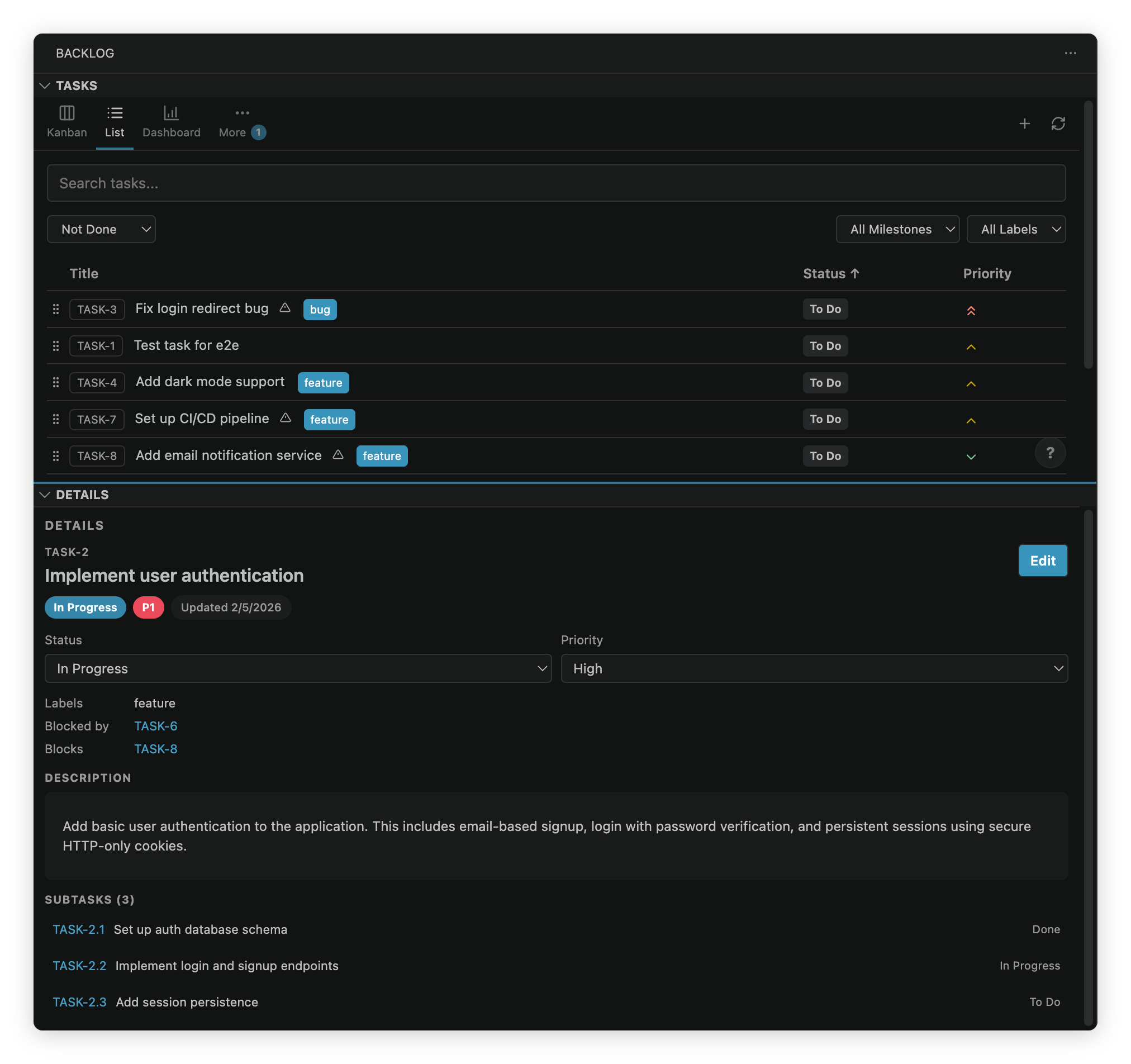
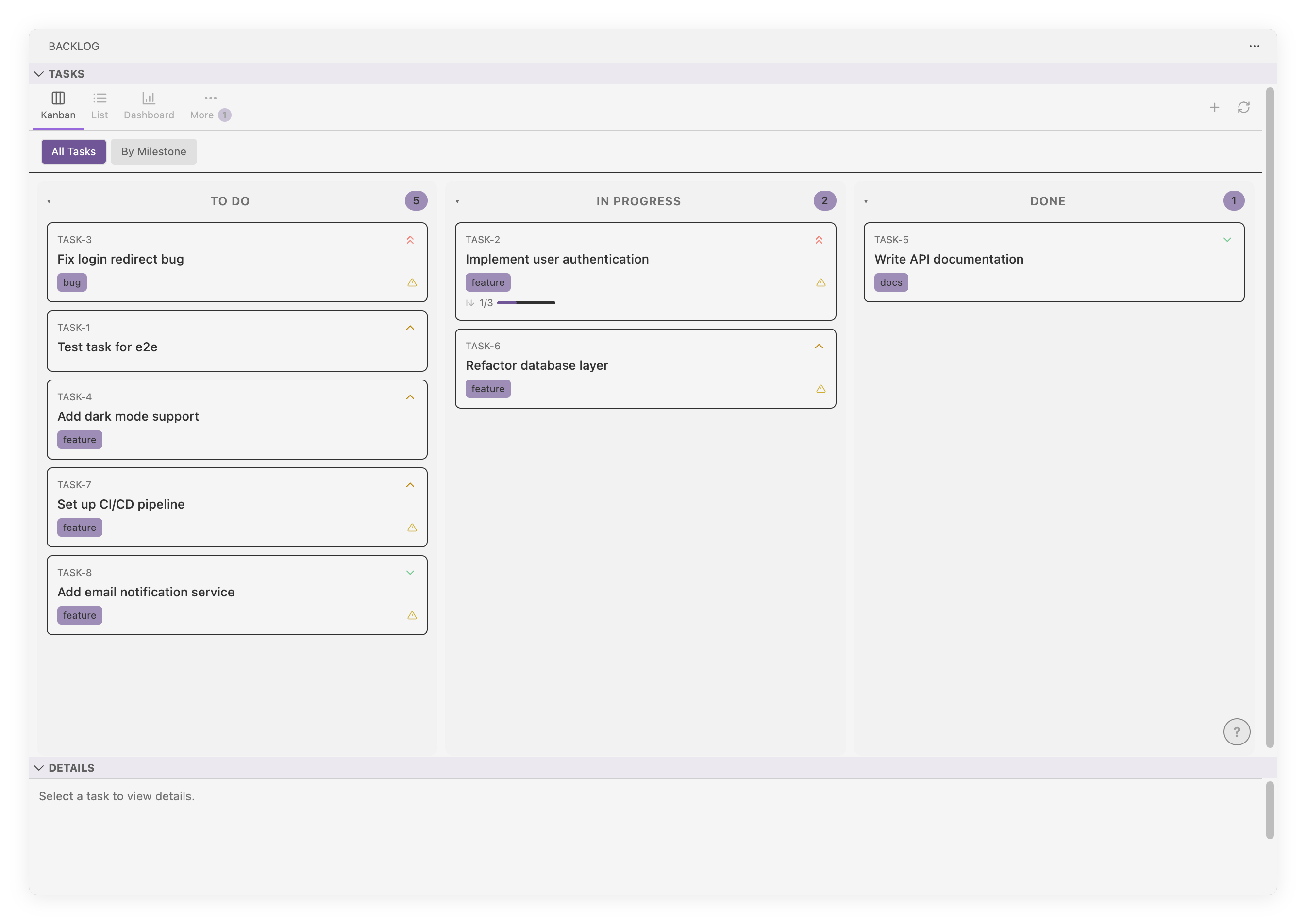
- Kanban Board — Drag-and-drop tasks between status columns (Draft, To Do, In Progress, Done)
- Task List — Sortable, filterable table view with search and column customization
- Open in an editor tab — View the board full-width in the editor area, not just the sidebar (the "Open Board in Editor Tab" toolbar button or command). The editor tab and sidebar stay in sync; clicking a task there opens its details as an editor tab (the board is a tab-click away).
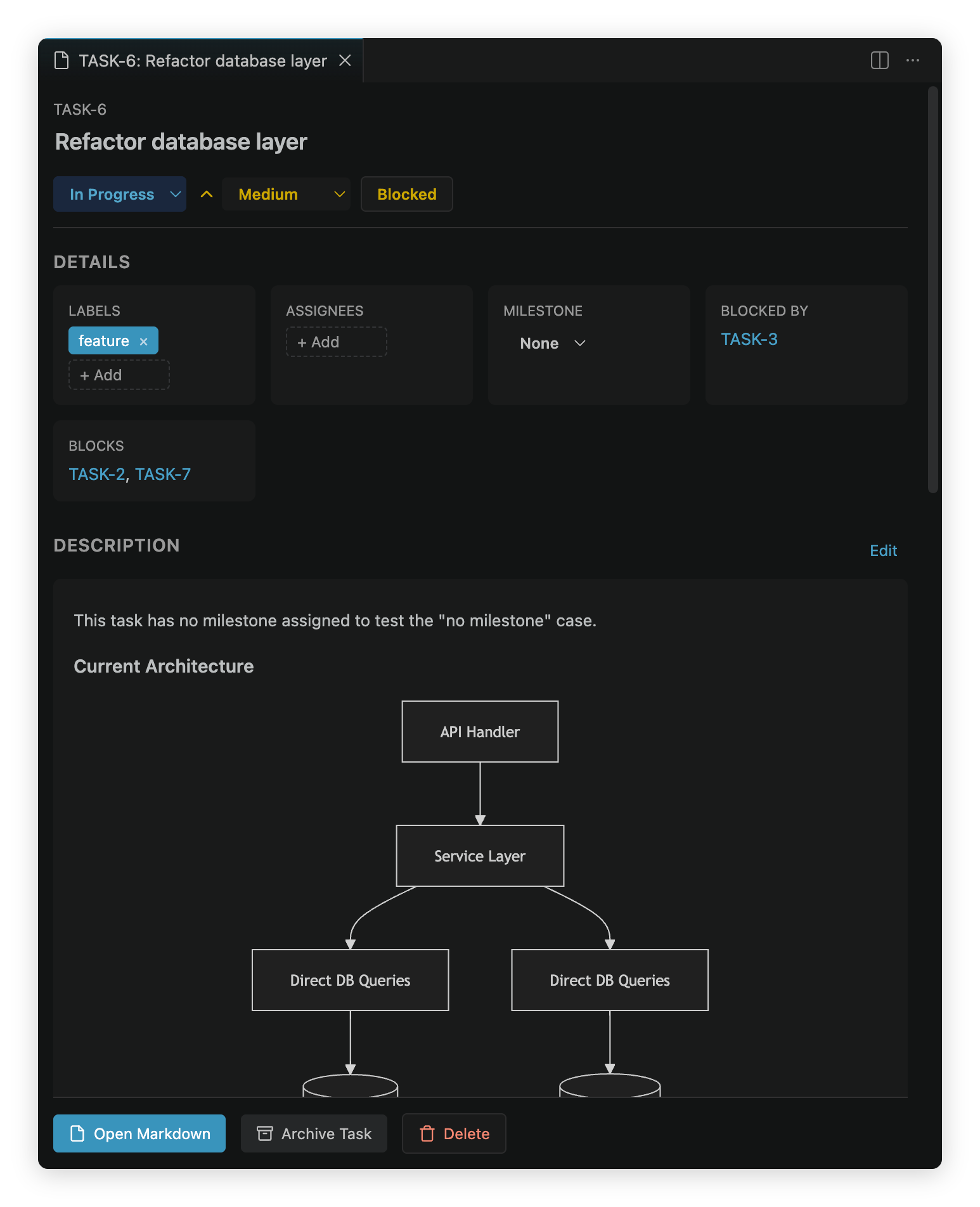
- Rich Markdown rendering — Including styling and Mermaid.js diagrams
- Format-aware editing — Status dropdowns, quick linking of dependencies, Markdown shortcuts in descriptions, and checklist management for acceptance criteria / definition-of-done
- Real-time Sync — File watcher automatically syncs changes from disk
- Editor Intelligence — Autocomplete, clickable links, and hover info for Markdown task files
- Multi-backlog workspaces — Switch between multiple backlog folders in the same workspace
- Advanced feature support — Supports Backlog.md options like remote/cross-branch tasks
- Project-aware setup — One-command setup for Backlog.md CLI
- Theme Support — Plays nice with Light, Dark, and High Contrast themes
More screenshots
Installation
From a Marketplace
The extension is available on both the VS Code Marketplace and Open VSX.
- Open VS Code (or a compatible editor like VSCodium for Open VSX)
- Go to Extensions (Ctrl+Shift+X / Cmd+Shift+X)
- Search for "Backlog.md"
- Click Install
From VSIX File
- Download the
.vsixfile from GitHub Releases - In VS Code, open the Command Palette (Ctrl+Shift+P / Cmd+Shift+P)
- Run "Extensions: Install from VSIX..."
- Select the downloaded file
Getting Started
The extension activates when it detects a project set up by Backlog.md (backlog/config.yml or backlog/tasks/*.md).
If you haven't already installed and initialized backlog.md, the extension will guide you through it when you open it.
Editor Intelligence
When you open a backlog task file (e.g., via "Open Markdown" or by opening a .md file inside backlog/tasks/), the extension provides smart editor features on top of the normal Markdown editing experience:
- Frontmatter autocomplete — Context-aware suggestions when editing
status:,priority:,milestone:,labels:,assignee:, anddependencies:fields. Milestones are sourced frombacklog/milestones/*.mdfirst (with config fallback), and other values come fromconfig.ymland existing tasks. - Task ID autocomplete — Type a task prefix (e.g.,
TASK-) anywhere in the body or independencies:to see suggestions of all known task IDs with their titles. - Clickable task links — Task IDs like
TASK-42in the document body become clickable links that open the referenced task's detail view. - Hover info — Hover over any task ID to see a tooltip with the task's title, status, priority, milestone, labels, and a description preview.
Keyboard Shortcuts
Press ? in the tasks view to see all shortcuts, or use the ? button in the bottom-right corner.
| Key | Action |
|---|---|
? | Show keyboard shortcuts |
z | Kanban view |
x | List view |
c | Drafts view |
v | Archived view |
j / k | Next / previous task |
h / l | Previous / next column (kanban) |
Enter | Move keyboard focus to details panel |
/ | Focus search |
n | Create new task |
e | Open edit view for focused task |
r | Refresh views |
Esc | Close popup |
Commands
Open the Command Palette (Ctrl+Shift+P / Cmd+Shift+P) and type "Backlog":
| Command | Description |
|---|---|
| Backlog: Initialize Backlog | Set up a new backlog in the current workspace |
| Backlog: Open Kanban Board | Open the Kanban board view |
| Backlog: Open Board in Editor Tab | Open the board full-width in the editor area |
| Backlog: Open Task List | Open the task list view |
| Backlog: Open Dashboard | Open the dashboard overview |
| Backlog: Show Documents | Browse project documents |
| Backlog: Show Decisions | Browse decision records |
| Backlog: Create Task | Create a new task file |
| Backlog: Create Milestone | Create a new milestone |
| Backlog: Open Task Markdown | Open the raw Markdown file for the current task |
| Backlog: Select Active Backlog | Switch backlogs (in a multi-folder workspace) |
| Backlog: Set Up Agent Integration | Install Backlog.md CLI and configure AI agent integration |
| Backlog: Refresh | Refresh tasks from disk |
Settings
Configure extension settings in VS Code Settings (Ctrl+, / Cmd+,), then search for Backlog.
Task ID Display
Use backlog.taskIdDisplay to control how task IDs appear in card and list views:
full(default):TASK-123number:123(or2.1for subtask IDs likeTASK-2.1)hidden: do not show task IDs
You can also set it in settings.json:
{
  "backlog.taskIdDisplay": "full"
}
Requirements
- VS Code 1.108.0 or later
- A workspace containing a
backlog/folder set up through Backlog.md'sbacklog init
Contributing
Please read our Contributing Guidelines for development setup and guidelines before submitting a pull request.
License
MIT — see LICENSE for details.
Similar repos


Languages
TypeScript
82.4%
Svelte
12.3%
CSS
3.8%
README
Backlog.md for VS Code
A VS Code extension for browsing and managing Backlog.md tasks directly in your editor.
Backlog.md is human-friendly and machine-accessible tool for managing a project task list and backlog in Markdown format.
You can think of it as Trello or a lightweight Jira - but that lives right in your repo, and that both humans and AI agents can collaborate on.
Features
- Kanban Board — Drag-and-drop tasks between status columns (Draft, To Do, In Progress, Done)
- Task List — Sortable, filterable table view with search and column customization
- Open in an editor tab — View the board full-width in the editor area, not just the sidebar (the "Open Board in Editor Tab" toolbar button or command). The editor tab and sidebar stay in sync; clicking a task there opens its details as an editor tab (the board is a tab-click away).
- Rich Markdown rendering — Including styling and Mermaid.js diagrams
- Format-aware editing — Status dropdowns, quick linking of dependencies, Markdown shortcuts in descriptions, and checklist management for acceptance criteria / definition-of-done
- Real-time Sync — File watcher automatically syncs changes from disk
- Editor Intelligence — Autocomplete, clickable links, and hover info for Markdown task files
- Multi-backlog workspaces — Switch between multiple backlog folders in the same workspace
- Advanced feature support — Supports Backlog.md options like remote/cross-branch tasks
- Project-aware setup — One-command setup for Backlog.md CLI
- Theme Support — Plays nice with Light, Dark, and High Contrast themes
More screenshots
Installation
From a Marketplace
The extension is available on both the VS Code Marketplace and Open VSX.
- Open VS Code (or a compatible editor like VSCodium for Open VSX)
- Go to Extensions (Ctrl+Shift+X / Cmd+Shift+X)
- Search for "Backlog.md"
- Click Install
From VSIX File
- Download the
.vsixfile from GitHub Releases - In VS Code, open the Command Palette (Ctrl+Shift+P / Cmd+Shift+P)
- Run "Extensions: Install from VSIX..."
- Select the downloaded file
Getting Started
The extension activates when it detects a project set up by Backlog.md (backlog/config.yml or backlog/tasks/*.md).
If you haven't already installed and initialized backlog.md, the extension will guide you through it when you open it.
Editor Intelligence
When you open a backlog task file (e.g., via "Open Markdown" or by opening a .md file inside backlog/tasks/), the extension provides smart editor features on top of the normal Markdown editing experience:
- Frontmatter autocomplete — Context-aware suggestions when editing
status:,priority:,milestone:,labels:,assignee:, anddependencies:fields. Milestones are sourced frombacklog/milestones/*.mdfirst (with config fallback), and other values come fromconfig.ymland existing tasks. - Task ID autocomplete — Type a task prefix (e.g.,
TASK-) anywhere in the body or independencies:to see suggestions of all known task IDs with their titles. - Clickable task links — Task IDs like
TASK-42in the document body become clickable links that open the referenced task's detail view. - Hover info — Hover over any task ID to see a tooltip with the task's title, status, priority, milestone, labels, and a description preview.
Keyboard Shortcuts
Press ? in the tasks view to see all shortcuts, or use the ? button in the bottom-right corner.
| Key | Action |
|---|---|
? | Show keyboard shortcuts |
z | Kanban view |
x | List view |
c | Drafts view |
v | Archived view |
j / k | Next / previous task |
h / l | Previous / next column (kanban) |
Enter | Move keyboard focus to details panel |
/ | Focus search |
n | Create new task |
e | Open edit view for focused task |
r | Refresh views |
Esc | Close popup |
Commands
Open the Command Palette (Ctrl+Shift+P / Cmd+Shift+P) and type "Backlog":
| Command | Description |
|---|---|
| Backlog: Initialize Backlog | Set up a new backlog in the current workspace |
| Backlog: Open Kanban Board | Open the Kanban board view |
| Backlog: Open Board in Editor Tab | Open the board full-width in the editor area |
| Backlog: Open Task List | Open the task list view |
| Backlog: Open Dashboard | Open the dashboard overview |
| Backlog: Show Documents | Browse project documents |
| Backlog: Show Decisions | Browse decision records |
| Backlog: Create Task | Create a new task file |
| Backlog: Create Milestone | Create a new milestone |
| Backlog: Open Task Markdown | Open the raw Markdown file for the current task |
| Backlog: Select Active Backlog | Switch backlogs (in a multi-folder workspace) |
| Backlog: Set Up Agent Integration | Install Backlog.md CLI and configure AI agent integration |
| Backlog: Refresh | Refresh tasks from disk |
Settings
Configure extension settings in VS Code Settings (Ctrl+, / Cmd+,), then search for Backlog.
Task ID Display
Use backlog.taskIdDisplay to control how task IDs appear in card and list views:
full(default):TASK-123number:123(or2.1for subtask IDs likeTASK-2.1)hidden: do not show task IDs
You can also set it in settings.json:
{
  "backlog.taskIdDisplay": "full"
}
Requirements
- VS Code 1.108.0 or later
- A workspace containing a
backlog/folder set up through Backlog.md'sbacklog init
Contributing
Please read our Contributing Guidelines for development setup and guidelines before submitting a pull request.
License
MIT — see LICENSE for details.
Similar repos
Languages
TypeScript
82.4%
Svelte
12.3%
CSS
3.8%