
VS Code extension · inline markdown · WYSIWYG · GFM · LaTeX · Mermaid · task lists
JavaScript
146
84 commits
updated Sep 13, 2026
README
Markdown Inline Editor






Typora-like Markdown editing in VS Code. Write in a clean, WYSIWYG-style view with context-aware syntax shadowing, GFM pipe tables, inline Mermaid and LaTeX math rendering, hover previews, and clickable task lists.
Your files stay 100% standard Markdown. This extension uses editor decorations — it never rewrites your document.
- Install: VS Code Marketplace • OpenVSX • Download VSIX
- Jump to: Why people install it • Demo • Get started • 3-state syntax shadowing • Customize • Supported features • FAQ
- Project: Repository • Changelog • Issues • Roadmap
Why people install it
- No preview pane needed: headings, emphasis, links, images, lists, code, GFM tables, math, and Mermaid render inline where you write.
- Rendered -> Ghost -> Raw syntax shadowing: Markdown markers stay out of the way until you need them, then fade in on the active line or fully reveal for precise edits.
- GFM tables: pipe characters and cell text are drawn as an aligned grid; place the cursor anywhere in the table to reveal raw
|syntax for editing. - Inline Mermaid and LaTeX math: render
```mermaiddiagrams,$...$,$$...$$, and```mathblocks directly in the editor. - Interactive Markdown: click task list checkboxes to toggle them, hover links to see targets, and hover images to preview them.
- Safe for real workflows: files remain plain Markdown, and diffs stay raw by default for Git, merge editor, and Copilot inline review contexts.
- Theme-aware, configurable, and fast: matches your VS Code theme, lets you tune colors/opacity/behavior, and uses a shared parse cache to avoid lag during normal editing.
Demo
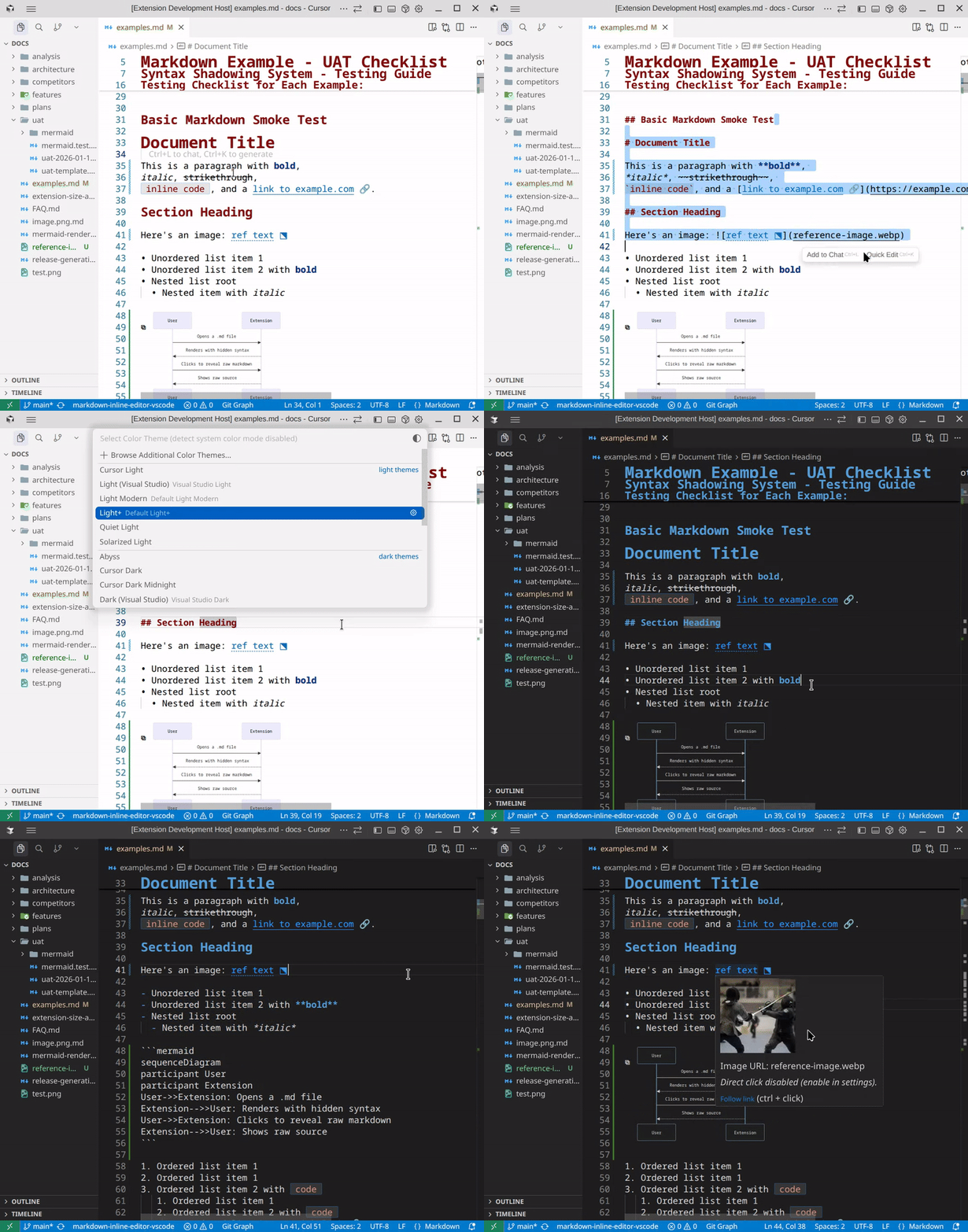
Tip: move the cursor onto a line to see faint “ghost” markers; click/select to reveal raw Markdown for precise edits.
Get started
- Install:
- Open a Markdown file (
.md) to activate the extension. (It also supports editors withmarkdown/md/mdxlanguage IDs once active.) - Start typing – formatting appears inline while syntax is hidden (Rendered state).
- Move the cursor onto a line – syntax fades in for edit cues (Ghost state).
- Click/select inside formatted text – raw Markdown becomes fully visible (Raw state).
- Toggle anytime – Command Palette → Toggle Markdown Decorations (command id:
mdInline.toggleDecorations) or use the editor title bar eye icon.
Requirement: VS Code 1.88+ (Cursor is supported too).
If decorations aren’t showing, see the FAQ.
Why inline (instead of a preview pane)?
VS Code’s Markdown preview is great for reading. Markdown Inline Editor is for writing: it keeps you in the editor, reduces syntax noise, and reveals raw Markdown only where you’re editing.
Feature videos
- Start here: Watch the feature
- Mermaid: Watch inline Mermaid rendering
- Task lists: Watch checkbox toggling + syntax shadowing
Commands
- Toggle Markdown Decorations (
mdInline.toggleDecorations): Enable/disable inline Markdown rendering.
Recommended extensions (optional)
- Markdown All in One: Shortcuts, auto-formatting, table of contents, preview, and more.
- Mermaid Chart: Mermaid authoring tools and preview.
3-state syntax shadowing
The extension uses an intelligent 3-state syntax shadowing system that adapts syntax visibility based on your editing context:
Rendered State (Default)
- Syntax markers are hidden – see only formatted content
- Clean, distraction-free reading experience
- Example:
**bold**appears as bold with no visible markers
Ghost State (Cursor on line)
- Syntax markers appear faintly (30% opacity by default, configurable)
- Provides edit cues without cluttering the view
- Only applies to constructs on the active line, not the entire document
- Example: Cursor on a line with
**bold**shows faint**markers
Raw State (Cursor/selection inside construct)
- Syntax markers are fully visible for direct editing
- Precise scope detection – only the specific construct you're editing shows raw
- Example: Cursor inside
**bold**reveals the full**bold**syntax
Special behavior for structural markers:
- Blockquotes, lists, and checkboxes stay fully rendered on active lines unless you directly click on the marker
- Headings show raw
#markers and remove styling when cursor is on the heading line - Ordered list numbers always remain visible
- Tables switch the entire table to raw Markdown (all rows) when your cursor or selection is on any line inside the table
Configure ghost opacity: markdownInlineEditor.decorations.ghostFaintOpacity (default: 0.3)
Configure emoji shortcodes: markdownInlineEditor.emojis.enabled (default: true)
Supported Features
The extension supports the following Markdown (and common GitHub-flavored) features with inline rendering and syntax hiding. Formatting appears inline while syntax markers stay hidden—click any text to reveal and edit raw Markdown.
Text Formatting
- Bold (
**text**) • Details - Italic (
*text*) • Details - Bold + Italic (
***text***) • Details - Strikethrough (
~~text~~) • Details - Inline Code (
`code`) • Details
Structure
- Headings (
# H1through###### H6) • Details - Links (
[text](url)) • Details - Mentions & issue references (
@user,@org/team,#123,@owner/repo#456) • Details • Issue #25 - Autolinks & bare links (
<https://…>/user@example.com) • Details • Issue #24 - Images (
) • Details - Blockquotes (
> quote) • Details - Horizontal Rules (
---,***,___) • Details - GFM Tables (pipe tables,
|---|separator row,:---/:---:/---:column alignment) • Details
Lists
Code
- Code Blocks (
```lang) • Details - YAML Frontmatter • Details • Issue #27
- Emoji Support (
:smile:) • Details • Issue #30 - Mermaid Diagrams (
```mermaid) • Details • Issue #26 - LaTeX/Math (
$...$,$$...$$,```math) • Details • Issue #6
Configuration
- Show Raw Markdown in Diffs • Details • Issue #20
- Customizable Syntax Colors (headings, links, lists, code, emphasis, blockquote, image, horizontal rule, checkbox) • Details • Issue #49
Customize (optional)
Everything works out of the box. If you want to tune the experience, open Settings and search for “Markdown Inline Editor” (all keys start with markdownInlineEditor.).
- Ghost markers visibility (
decorations.ghostFaintOpacity, default0.3)- Lower it for a cleaner look, raise it for stronger edit cues.
- Diff view behavior (
defaultBehaviors.diffView.applyDecorations, defaultfalse)- Keep
falseto review raw Markdown in diffs; settrueif you want the same inline rendering in diffs too.
- Keep
- Single-click links (
links.singleClickOpen, defaultfalse)- Opens links/images without Ctrl/Cmd-click, but may interfere with text selection.
- Mentions & issue refs (
mentions.enabled, defaulttrue;mentions.linksEnabled, unset = infer fromgit remote)- Style GitHub-style
@user/#123; optional clickable targets when forge context is available. See Mentions & references.
- Style GitHub-style
- Emoji shortcodes (
emojis.enabled, defaulttrue)- Disable if you prefer seeing
:shortcode:text.
- Disable if you prefer seeing
- Syntax colors (
colors.heading1…colors.checkbox, 15 options includinginlineCodeBackground)- Optional hex overrides (e.g.
#e06c75) for headings, links, list markers, inline code, inline code background, emphasis, blockquote, image, horizontal rule, checkbox. Unset or invalid values use theme-derived defaults (for headings, unset keeps the editor’s markdown heading syntax colors rather than forcing a single foreground). See Customizable Syntax Colors.
- Optional hex overrides (e.g.
Example settings.json
{
  "markdownInlineEditor.decorations.ghostFaintOpacity": 0.25,
  "markdownInlineEditor.defaultBehaviors.diffView.applyDecorations": false,
  "markdownInlineEditor.links.singleClickOpen": false,
  "markdownInlineEditor.emojis.enabled": true
}
Roadmap
Want to help? Pick an item below and open a PR (or add feedback in the linked issue/spec).
Work in progress
- Default feature activation – configure which features are decorated by default • Spec
Medium priority
- Per-file toggle state • Spec • Issue #28
- Column alignment in tables with markup • Spec • Issue #21
- Default decorator rendering – open files with decorations on/off by default • Spec
- Image UX improvements • Spec
- Highlighting support • Spec
Low priority
- Ordered list auto-numbering • Spec • Issue #31
- HTML tags • Issue #29 (spec TBD)
- Footnotes • Issue #32 (spec TBD)
Getting Started (Developers)
Quick Setup (TLDR)
git clone https://github.com/SeardnaSchmid/markdown-inline-editor-vscode.git
cd markdown-inline-editor-vscode
npm install
npm run compile
npm test
Press F5 to launch the Extension Development Host and test your changes.
Dependencies
Key Technologies:
- TypeScript 5.9+ – Type-safe development
- VS Code API 1.88.0+ – Editor integration and decoration system
- remark – Markdown parser for precise AST-based parsing
- unified – AST processing framework
- remark-gfm – GitHub Flavored Markdown support
- Vitest – Testing framework
Runtime Requirements:
- Node.js 20 or higher
- VS Code 1.88.0+ (or Cursor IDE)
Production Dependencies:
remark-gfm,remark-parse,unified,unist-util-visit
Development Dependencies:
- TypeScript, Vitest, ESLint, VS Code extension tools
Architecture
src/
├── extension.ts          # Extension entry point and activation
├── config.ts             # Centralized configuration access
├── diff-context.ts       # Unified diff view detection and policy
├── link-targets.ts       # Unified link/image URL resolution
├── markdown-parse-cache.ts # Shared parsing and caching service
├── parser.ts             # Markdown AST parsing (remark-based)
├── parser-remark.ts     # Remark dependency helper
├── decorations.ts        # VS Code decoration type definitions
├── decorator.ts          # Decoration orchestration
├── decorator/
│   ├── decoration-type-registry.ts  # Decoration type lifecycle
│   ├── visibility-model.ts          # 3-state filtering logic
│   ├── checkbox-toggle.ts           # Checkbox click handling
│   └── decoration-categories.ts    # Decoration type categorization
├── link-provider.ts      # Clickable link provider
├── link-hover-provider.ts # Hover provider for link URLs
├── image-hover-provider.ts # Hover provider for image previews
├── link-click-handler.ts # Single-click navigation handler
├── position-mapping.ts   # Position mapping utilities (CRLF handling)
└── */__tests__/         # Comprehensive test suites
    ├── parser/__tests__/              # Parser tests
    ├── markdown-parse-cache/__tests__/ # Parse cache tests
    ├── diff-context/__tests__/        # Diff context tests
    ├── link-targets/__tests__/        # Link target resolution tests
    ├── link-provider/__tests__/       # Link provider tests
    ├── image-hover-provider/__tests__/ # Image hover tests
    ├── link-hover-provider/__tests__/  # Link hover tests
    └── link-click-handler/__tests__/   # Click handler tests
How it works:
- Parser (
parser.ts) – Uses remark to parse Markdown into an AST and extract scopes - Shared Cache (
markdown-parse-cache.ts) – Single parse cache instance shared across all components - Decorator (
decorator.ts) – Orchestrates decoration management with 3-state syntax shadowing - Scope-based detection – Precisely identifies markdown constructs for context-aware syntax visibility
- 3-state model – Rendered (hidden), Ghost (faint), Raw (visible) states adapt to editing context
- Hover providers – Show image previews and link URLs on hover (use shared cache)
- Click handler – Optional single-click navigation for links and images (uses shared cache)
Testing
The project maintains comprehensive test coverage with 560+ passing tests across 40+ test suites:
- Parser tests (
parser/__tests__/) – Core markdown parsing logic (including GFM tables, math, Mermaid regions) - Parse cache tests (
markdown-parse-cache/__tests__/) – Shared caching and LRU eviction - Diff context tests (
diff-context/__tests__/) – Diff view detection and policy - Link target tests (
link-targets/__tests__/) – Link/image URL resolution - Image hover provider tests (
image-hover-provider/__tests__/) – Image preview hover functionality - Link hover provider tests (
link-hover-provider/__tests__/) – Link URL hover functionality - Link click handler tests (
link-click-handler/__tests__/) – Single-click navigation behavior - Link provider tests (
link-provider/__tests__/) – Clickable link provider functionality
Run tests with npm test or npm run test:watch for development.
Installing
npm install
Key Commands
| Command | Description |
|---|---|
npm run compile | Compile TypeScript to JavaScript |
npm run bundle | Bundle with esbuild |
npm test | Run all tests |
npm run test:watch | Run tests in watch mode |
npm run test:coverage | Generate coverage report |
npm run lint | Run ESLint |
npm run validate | Run docs lint + tests + build |
npm run package | Create .vsix package |
npm run clean | Clean build artifacts |
npm run build | Full build (compile + bundle + package) |
npm run release | Automated release workflow |
Executing
Option 1: VS Code Launch Configuration
Create .vscode/launch.json with the extension host configuration, then press F5 to launch the Extension Development Host.
Option 2: Manual Build & Test
npm run compile
npm run package
code --install-extension dist/extension.vsix
Contributing
Contributions are welcome! This project follows Conventional Commits and maintains high code quality standards.
Quick Start
git checkout -b feat/my-feature
# Make changes, write tests
npm test && npm run lint
git commit -m "feat(parser): add support for definition lists"
Contribution Guidelines (TLDR)
- Read first:
CONTRIBUTING.mdfor detailed workflow - Code style: TypeScript strict mode, JSDoc comments, comprehensive tests
- Commit format:
<type>(<scope>): <description>- Types:
feat,fix,docs,style,refactor,perf,test,chore
- Types:
- Testing: All changes must include tests
- Performance: No regressions – maintain efficient code execution
See CONTRIBUTING.md for full contribution guidelines and AGENTS.md for agent roles and architecture details.
Known Limitations & Reporting Bugs
Known Limitations
- GFM tables – Multi-line cells, nested block content in cells, and perfect alignment when every cell mixes multiple inline formats are limited or not supported yet • Issue #21 • Issue #23
- Ordered list auto-numbering – Planned (numbers remain visible today) • Issue #31
- H1 heading clipping – Text can go out of window when H1 is on first line • #4
- Very large files – Files over ~1MB may parse more slowly (see FAQ)
- Sidebar button – A "Markdown Inline" button appears in the activity bar for Mermaid rendering (hidden webview). You can ignore it—it's not interactive. See FAQ for details.
Reporting Bugs
If you encounter an issue not covered in the FAQ, please open an issue with:
- VS Code version
- Extension version
- Steps to reproduce
- Expected vs. actual behavior
- Screenshots/GIFs if applicable
For common issues and solutions, see the FAQ.
License
MIT License – See LICENSE.txt
Acknowledgments
Special thanks to these projects, which inspired or enabled this extension:
- markdown-inline-preview-vscode by domdomegg – Original concept and codebase for using VS Code decorations to hide markdown syntax (MIT License, Copyright (c) Adam Jones (domdomegg))
- Markdown Inline Preview by markdown-inline-preview – Horizontal rule implementation using border-bottom approach that prevents editor width expansion
- Markdown WYSIWYG by remcohaszing – Decoration-based markdown editor with similar approach
- markless by tejasvi – Advanced decoration-based markdown editor with Mermaid and LaTeX support
- Typora – Original inspiration for the inline markdown editing concept
- Obsidian – Markdown-based knowledge management application that inspired the editing experience
Contributors
Contributors


Similar repos


Languages
JavaScript
78.7%
TypeScript
20.1%
Shell
1.2%
VS Code extension · inline markdown · WYSIWYG · GFM · LaTeX · Mermaid · task lists
JavaScript
146
84 commits
updated Sep 13, 2026
README
Markdown Inline Editor
Typora-like Markdown editing in VS Code. Write in a clean, WYSIWYG-style view with context-aware syntax shadowing, GFM pipe tables, inline Mermaid and LaTeX math rendering, hover previews, and clickable task lists.
Your files stay 100% standard Markdown. This extension uses editor decorations — it never rewrites your document.
- Install: VS Code Marketplace • OpenVSX • Download VSIX
- Jump to: Why people install it • Demo • Get started • 3-state syntax shadowing • Customize • Supported features • FAQ
- Project: Repository • Changelog • Issues • Roadmap
Why people install it
- No preview pane needed: headings, emphasis, links, images, lists, code, GFM tables, math, and Mermaid render inline where you write.
- Rendered -> Ghost -> Raw syntax shadowing: Markdown markers stay out of the way until you need them, then fade in on the active line or fully reveal for precise edits.
- GFM tables: pipe characters and cell text are drawn as an aligned grid; place the cursor anywhere in the table to reveal raw
|syntax for editing. - Inline Mermaid and LaTeX math: render
```mermaiddiagrams,$...$,$$...$$, and```mathblocks directly in the editor. - Interactive Markdown: click task list checkboxes to toggle them, hover links to see targets, and hover images to preview them.
- Safe for real workflows: files remain plain Markdown, and diffs stay raw by default for Git, merge editor, and Copilot inline review contexts.
- Theme-aware, configurable, and fast: matches your VS Code theme, lets you tune colors/opacity/behavior, and uses a shared parse cache to avoid lag during normal editing.
Demo
Tip: move the cursor onto a line to see faint “ghost” markers; click/select to reveal raw Markdown for precise edits.
Get started
- Install:
- Open a Markdown file (
.md) to activate the extension. (It also supports editors withmarkdown/md/mdxlanguage IDs once active.) - Start typing – formatting appears inline while syntax is hidden (Rendered state).
- Move the cursor onto a line – syntax fades in for edit cues (Ghost state).
- Click/select inside formatted text – raw Markdown becomes fully visible (Raw state).
- Toggle anytime – Command Palette → Toggle Markdown Decorations (command id:
mdInline.toggleDecorations) or use the editor title bar eye icon.
Requirement: VS Code 1.88+ (Cursor is supported too).
If decorations aren’t showing, see the FAQ.
Why inline (instead of a preview pane)?
VS Code’s Markdown preview is great for reading. Markdown Inline Editor is for writing: it keeps you in the editor, reduces syntax noise, and reveals raw Markdown only where you’re editing.
Feature videos
- Start here: Watch the feature
- Mermaid: Watch inline Mermaid rendering
- Task lists: Watch checkbox toggling + syntax shadowing
Commands
- Toggle Markdown Decorations (
mdInline.toggleDecorations): Enable/disable inline Markdown rendering.
Recommended extensions (optional)
- Markdown All in One: Shortcuts, auto-formatting, table of contents, preview, and more.
- Mermaid Chart: Mermaid authoring tools and preview.
3-state syntax shadowing
The extension uses an intelligent 3-state syntax shadowing system that adapts syntax visibility based on your editing context:
Rendered State (Default)
- Syntax markers are hidden – see only formatted content
- Clean, distraction-free reading experience
- Example:
**bold**appears as bold with no visible markers
Ghost State (Cursor on line)
- Syntax markers appear faintly (30% opacity by default, configurable)
- Provides edit cues without cluttering the view
- Only applies to constructs on the active line, not the entire document
- Example: Cursor on a line with
**bold**shows faint**markers
Raw State (Cursor/selection inside construct)
- Syntax markers are fully visible for direct editing
- Precise scope detection – only the specific construct you're editing shows raw
- Example: Cursor inside
**bold**reveals the full**bold**syntax
Special behavior for structural markers:
- Blockquotes, lists, and checkboxes stay fully rendered on active lines unless you directly click on the marker
- Headings show raw
#markers and remove styling when cursor is on the heading line - Ordered list numbers always remain visible
- Tables switch the entire table to raw Markdown (all rows) when your cursor or selection is on any line inside the table
Configure ghost opacity: markdownInlineEditor.decorations.ghostFaintOpacity (default: 0.3)
Configure emoji shortcodes: markdownInlineEditor.emojis.enabled (default: true)
Supported Features
The extension supports the following Markdown (and common GitHub-flavored) features with inline rendering and syntax hiding. Formatting appears inline while syntax markers stay hidden—click any text to reveal and edit raw Markdown.
Text Formatting
- Bold (
**text**) • Details - Italic (
*text*) • Details - Bold + Italic (
***text***) • Details - Strikethrough (
~~text~~) • Details - Inline Code (
`code`) • Details
Structure
- Headings (
# H1through###### H6) • Details - Links (
[text](url)) • Details - Mentions & issue references (
@user,@org/team,#123,@owner/repo#456) • Details • Issue #25 - Autolinks & bare links (
<https://…>/user@example.com) • Details • Issue #24 - Images (
) • Details - Blockquotes (
> quote) • Details - Horizontal Rules (
---,***,___) • Details - GFM Tables (pipe tables,
|---|separator row,:---/:---:/---:column alignment) • Details
Lists
Code
- Code Blocks (
```lang) • Details - YAML Frontmatter • Details • Issue #27
- Emoji Support (
:smile:) • Details • Issue #30 - Mermaid Diagrams (
```mermaid) • Details • Issue #26 - LaTeX/Math (
$...$,$$...$$,```math) • Details • Issue #6
Configuration
- Show Raw Markdown in Diffs • Details • Issue #20
- Customizable Syntax Colors (headings, links, lists, code, emphasis, blockquote, image, horizontal rule, checkbox) • Details • Issue #49
Customize (optional)
Everything works out of the box. If you want to tune the experience, open Settings and search for “Markdown Inline Editor” (all keys start with markdownInlineEditor.).
- Ghost markers visibility (
decorations.ghostFaintOpacity, default0.3)- Lower it for a cleaner look, raise it for stronger edit cues.
- Diff view behavior (
defaultBehaviors.diffView.applyDecorations, defaultfalse)- Keep
falseto review raw Markdown in diffs; settrueif you want the same inline rendering in diffs too.
- Keep
- Single-click links (
links.singleClickOpen, defaultfalse)- Opens links/images without Ctrl/Cmd-click, but may interfere with text selection.
- Mentions & issue refs (
mentions.enabled, defaulttrue;mentions.linksEnabled, unset = infer fromgit remote)- Style GitHub-style
@user/#123; optional clickable targets when forge context is available. See Mentions & references.
- Style GitHub-style
- Emoji shortcodes (
emojis.enabled, defaulttrue)- Disable if you prefer seeing
:shortcode:text.
- Disable if you prefer seeing
- Syntax colors (
colors.heading1…colors.checkbox, 15 options includinginlineCodeBackground)- Optional hex overrides (e.g.
#e06c75) for headings, links, list markers, inline code, inline code background, emphasis, blockquote, image, horizontal rule, checkbox. Unset or invalid values use theme-derived defaults (for headings, unset keeps the editor’s markdown heading syntax colors rather than forcing a single foreground). See Customizable Syntax Colors.
- Optional hex overrides (e.g.
Example settings.json
{
  "markdownInlineEditor.decorations.ghostFaintOpacity": 0.25,
  "markdownInlineEditor.defaultBehaviors.diffView.applyDecorations": false,
  "markdownInlineEditor.links.singleClickOpen": false,
  "markdownInlineEditor.emojis.enabled": true
}
Roadmap
Want to help? Pick an item below and open a PR (or add feedback in the linked issue/spec).
Work in progress
- Default feature activation – configure which features are decorated by default • Spec
Medium priority
- Per-file toggle state • Spec • Issue #28
- Column alignment in tables with markup • Spec • Issue #21
- Default decorator rendering – open files with decorations on/off by default • Spec
- Image UX improvements • Spec
- Highlighting support • Spec
Low priority
- Ordered list auto-numbering • Spec • Issue #31
- HTML tags • Issue #29 (spec TBD)
- Footnotes • Issue #32 (spec TBD)
Getting Started (Developers)
Quick Setup (TLDR)
git clone https://github.com/SeardnaSchmid/markdown-inline-editor-vscode.git
cd markdown-inline-editor-vscode
npm install
npm run compile
npm test
Press F5 to launch the Extension Development Host and test your changes.
Dependencies
Key Technologies:
- TypeScript 5.9+ – Type-safe development
- VS Code API 1.88.0+ – Editor integration and decoration system
- remark – Markdown parser for precise AST-based parsing
- unified – AST processing framework
- remark-gfm – GitHub Flavored Markdown support
- Vitest – Testing framework
Runtime Requirements:
- Node.js 20 or higher
- VS Code 1.88.0+ (or Cursor IDE)
Production Dependencies:
remark-gfm,remark-parse,unified,unist-util-visit
Development Dependencies:
- TypeScript, Vitest, ESLint, VS Code extension tools
Architecture
src/
├── extension.ts          # Extension entry point and activation
├── config.ts             # Centralized configuration access
├── diff-context.ts       # Unified diff view detection and policy
├── link-targets.ts       # Unified link/image URL resolution
├── markdown-parse-cache.ts # Shared parsing and caching service
├── parser.ts             # Markdown AST parsing (remark-based)
├── parser-remark.ts     # Remark dependency helper
├── decorations.ts        # VS Code decoration type definitions
├── decorator.ts          # Decoration orchestration
├── decorator/
│   ├── decoration-type-registry.ts  # Decoration type lifecycle
│   ├── visibility-model.ts          # 3-state filtering logic
│   ├── checkbox-toggle.ts           # Checkbox click handling
│   └── decoration-categories.ts    # Decoration type categorization
├── link-provider.ts      # Clickable link provider
├── link-hover-provider.ts # Hover provider for link URLs
├── image-hover-provider.ts # Hover provider for image previews
├── link-click-handler.ts # Single-click navigation handler
├── position-mapping.ts   # Position mapping utilities (CRLF handling)
└── */__tests__/         # Comprehensive test suites
    ├── parser/__tests__/              # Parser tests
    ├── markdown-parse-cache/__tests__/ # Parse cache tests
    ├── diff-context/__tests__/        # Diff context tests
    ├── link-targets/__tests__/        # Link target resolution tests
    ├── link-provider/__tests__/       # Link provider tests
    ├── image-hover-provider/__tests__/ # Image hover tests
    ├── link-hover-provider/__tests__/  # Link hover tests
    └── link-click-handler/__tests__/   # Click handler tests
How it works:
- Parser (
parser.ts) – Uses remark to parse Markdown into an AST and extract scopes - Shared Cache (
markdown-parse-cache.ts) – Single parse cache instance shared across all components - Decorator (
decorator.ts) – Orchestrates decoration management with 3-state syntax shadowing - Scope-based detection – Precisely identifies markdown constructs for context-aware syntax visibility
- 3-state model – Rendered (hidden), Ghost (faint), Raw (visible) states adapt to editing context
- Hover providers – Show image previews and link URLs on hover (use shared cache)
- Click handler – Optional single-click navigation for links and images (uses shared cache)
Testing
The project maintains comprehensive test coverage with 560+ passing tests across 40+ test suites:
- Parser tests (
parser/__tests__/) – Core markdown parsing logic (including GFM tables, math, Mermaid regions) - Parse cache tests (
markdown-parse-cache/__tests__/) – Shared caching and LRU eviction - Diff context tests (
diff-context/__tests__/) – Diff view detection and policy - Link target tests (
link-targets/__tests__/) – Link/image URL resolution - Image hover provider tests (
image-hover-provider/__tests__/) – Image preview hover functionality - Link hover provider tests (
link-hover-provider/__tests__/) – Link URL hover functionality - Link click handler tests (
link-click-handler/__tests__/) – Single-click navigation behavior - Link provider tests (
link-provider/__tests__/) – Clickable link provider functionality
Run tests with npm test or npm run test:watch for development.
Installing
npm install
Key Commands
| Command | Description |
|---|---|
npm run compile | Compile TypeScript to JavaScript |
npm run bundle | Bundle with esbuild |
npm test | Run all tests |
npm run test:watch | Run tests in watch mode |
npm run test:coverage | Generate coverage report |
npm run lint | Run ESLint |
npm run validate | Run docs lint + tests + build |
npm run package | Create .vsix package |
npm run clean | Clean build artifacts |
npm run build | Full build (compile + bundle + package) |
npm run release | Automated release workflow |
Executing
Option 1: VS Code Launch Configuration
Create .vscode/launch.json with the extension host configuration, then press F5 to launch the Extension Development Host.
Option 2: Manual Build & Test
npm run compile
npm run package
code --install-extension dist/extension.vsix
Contributing
Contributions are welcome! This project follows Conventional Commits and maintains high code quality standards.
Quick Start
git checkout -b feat/my-feature
# Make changes, write tests
npm test && npm run lint
git commit -m "feat(parser): add support for definition lists"
Contribution Guidelines (TLDR)
- Read first:
CONTRIBUTING.mdfor detailed workflow - Code style: TypeScript strict mode, JSDoc comments, comprehensive tests
- Commit format:
<type>(<scope>): <description>- Types:
feat,fix,docs,style,refactor,perf,test,chore
- Types:
- Testing: All changes must include tests
- Performance: No regressions – maintain efficient code execution
See CONTRIBUTING.md for full contribution guidelines and AGENTS.md for agent roles and architecture details.
Known Limitations & Reporting Bugs
Known Limitations
- GFM tables – Multi-line cells, nested block content in cells, and perfect alignment when every cell mixes multiple inline formats are limited or not supported yet • Issue #21 • Issue #23
- Ordered list auto-numbering – Planned (numbers remain visible today) • Issue #31
- H1 heading clipping – Text can go out of window when H1 is on first line • #4
- Very large files – Files over ~1MB may parse more slowly (see FAQ)
- Sidebar button – A "Markdown Inline" button appears in the activity bar for Mermaid rendering (hidden webview). You can ignore it—it's not interactive. See FAQ for details.
Reporting Bugs
If you encounter an issue not covered in the FAQ, please open an issue with:
- VS Code version
- Extension version
- Steps to reproduce
- Expected vs. actual behavior
- Screenshots/GIFs if applicable
For common issues and solutions, see the FAQ.
License
MIT License – See LICENSE.txt
Acknowledgments
Special thanks to these projects, which inspired or enabled this extension:
- markdown-inline-preview-vscode by domdomegg – Original concept and codebase for using VS Code decorations to hide markdown syntax (MIT License, Copyright (c) Adam Jones (domdomegg))
- Markdown Inline Preview by markdown-inline-preview – Horizontal rule implementation using border-bottom approach that prevents editor width expansion
- Markdown WYSIWYG by remcohaszing – Decoration-based markdown editor with similar approach
- markless by tejasvi – Advanced decoration-based markdown editor with Mermaid and LaTeX support
- Typora – Original inspiration for the inline markdown editing concept
- Obsidian – Markdown-based knowledge management application that inspired the editing experience
Contributors
Similar repos
Contributors
Languages
JavaScript
78.7%
TypeScript
20.1%
Shell
1.2%