
Git stats for friends: sign in with GitHub, join a crew, compare commits, lines, streaks. Private repos counted locally, numbers only.
See the codeSee what people are saying
README
gitstats
Compare coding activity with friends. Private and work repos are counted on your own computer; only numbers leave it.
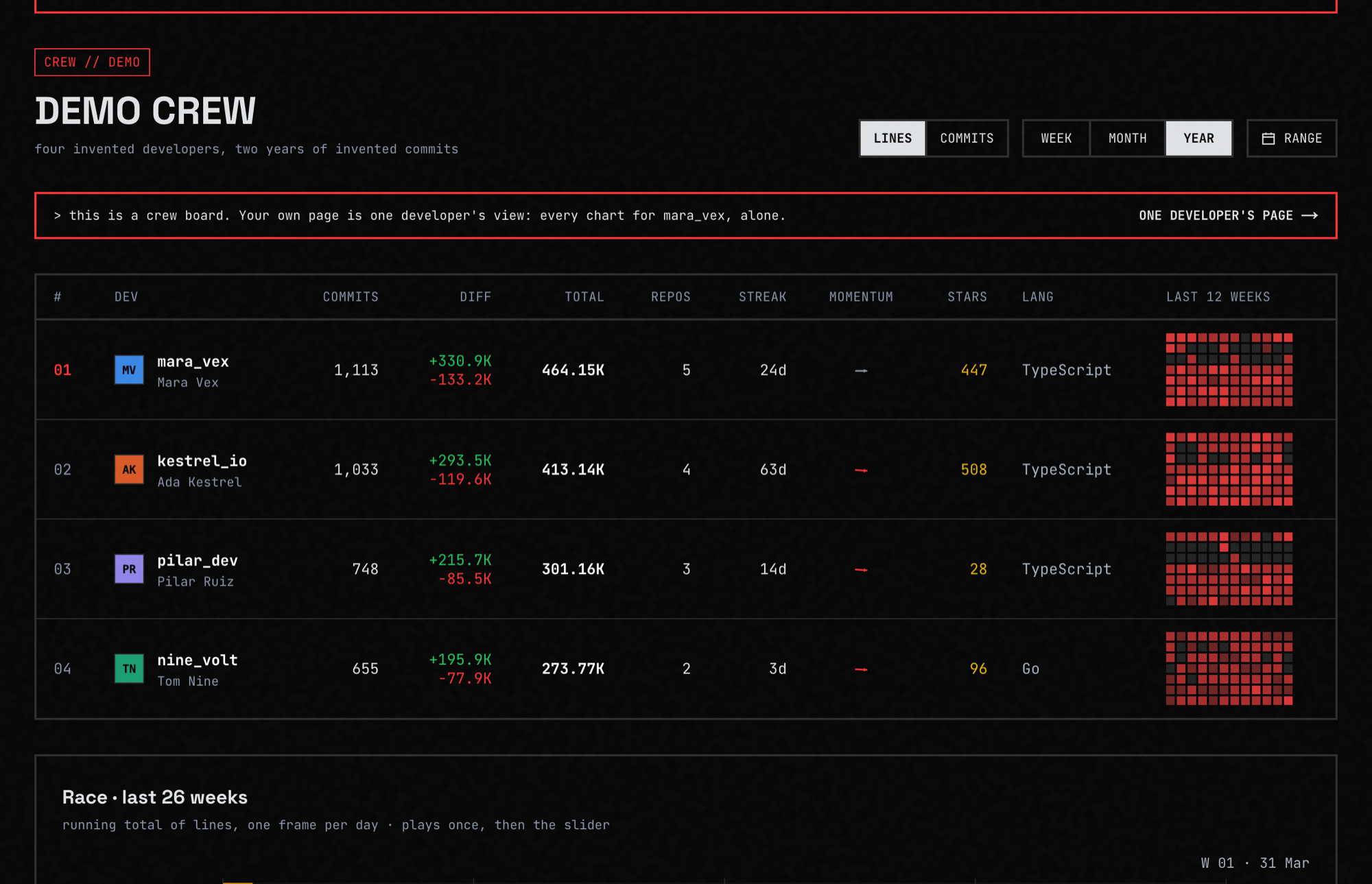
Try it: gitstats.org · See a board: gitstats.org/demo
Features
- Crews. Sign in with GitHub, share an invite code, and your friends land on one board.
- Lines or commits, week, month or year. Pick a metric and a window; the board and every chart follow it.
- Private and work repos count too. A small CLI counts your commits locally and sends numbers only; repo names stay on your computer unless you opt in.
- Your own page. Daily lines, a year calendar, streaks, the repos you worked in, and how you compare to last period.
- Streaks your way. Choose what counts as a streak day.
- You choose who sees what. Separate settings for your crews and for everyone, and any repo name can be hidden.
- Share it. A share card for chats and a badge for your GitHub profile.
- Ask your AI assistant. A read-only MCP server lets Claude Code, Codex or Cursor answer "how was my week" from your numbers. Setup: gitstats.org/docs#mcp.
- Open source, MIT. The server and the CLI; self-host it if you like.
Put it in your README
[](https://gitstats.org/gh/YOUR-LOGIN)
Pick a window and copy your own snippet at gitstats.org/widget.
How privacy works
- Sign-in asks GitHub for your public profile and email only. It never asks for the
reposcope. - The GitHub access token is not stored. Public activity is read at night with a server token that has no scopes.
- Private and work repos are counted by a small CLI on your computer. It sends numbers: lines, commits, a language.
- Repo names stay on your computer unless you turn them on with
gitstats names on. - You decide what your crews and everyone else can see, and you can export or delete everything at any time.
More: gitstats.org/privacy and docs/PRIVATE-ACTIVITY.md.
Run it locally
You need a free Neon database, a GitHub OAuth App and a GitHub token with no scopes. Then:
cp .env.example .env.local          # fill it in; each line says where the value comes from
npm ci
npm run db:migrate
npx tsx --env-file=.env.local scripts/seed-demo.ts
npm run dev
Open http://localhost:3000/demo to see every chart with fake data.
Step-by-step setup, environment variables, self-hosting and known limits: docs/SELF-HOSTING.md.
Links
- Live: gitstats.org
- CLI: github.com/yaroslavhaidash/gitstats-cli
- How it fits together: docs/ARCHITECTURE.md
- Where it is heading: ROADMAP.md
- Contributing: CONTRIBUTING.md
Contributors

43 commits
Similar repos


Languages
TypeScript
99.3%
Git stats for friends: sign in with GitHub, join a crew, compare commits, lines, streaks. Private repos counted locally, numbers only.
See the codeSee what people are saying
README
gitstats
Compare coding activity with friends. Private and work repos are counted on your own computer; only numbers leave it.
Try it: gitstats.org · See a board: gitstats.org/demo
Features
- Crews. Sign in with GitHub, share an invite code, and your friends land on one board.
- Lines or commits, week, month or year. Pick a metric and a window; the board and every chart follow it.
- Private and work repos count too. A small CLI counts your commits locally and sends numbers only; repo names stay on your computer unless you opt in.
- Your own page. Daily lines, a year calendar, streaks, the repos you worked in, and how you compare to last period.
- Streaks your way. Choose what counts as a streak day.
- You choose who sees what. Separate settings for your crews and for everyone, and any repo name can be hidden.
- Share it. A share card for chats and a badge for your GitHub profile.
- Ask your AI assistant. A read-only MCP server lets Claude Code, Codex or Cursor answer "how was my week" from your numbers. Setup: gitstats.org/docs#mcp.
- Open source, MIT. The server and the CLI; self-host it if you like.
Put it in your README
[](https://gitstats.org/gh/YOUR-LOGIN)
Pick a window and copy your own snippet at gitstats.org/widget.
How privacy works
- Sign-in asks GitHub for your public profile and email only. It never asks for the
reposcope. - The GitHub access token is not stored. Public activity is read at night with a server token that has no scopes.
- Private and work repos are counted by a small CLI on your computer. It sends numbers: lines, commits, a language.
- Repo names stay on your computer unless you turn them on with
gitstats names on. - You decide what your crews and everyone else can see, and you can export or delete everything at any time.
More: gitstats.org/privacy and docs/PRIVATE-ACTIVITY.md.
Run it locally
You need a free Neon database, a GitHub OAuth App and a GitHub token with no scopes. Then:
cp .env.example .env.local          # fill it in; each line says where the value comes from
npm ci
npm run db:migrate
npx tsx --env-file=.env.local scripts/seed-demo.ts
npm run dev
Open http://localhost:3000/demo to see every chart with fake data.
Step-by-step setup, environment variables, self-hosting and known limits: docs/SELF-HOSTING.md.
Links
- Live: gitstats.org
- CLI: github.com/yaroslavhaidash/gitstats-cli
- How it fits together: docs/ARCHITECTURE.md
- Where it is heading: ROADMAP.md
- Contributing: CONTRIBUTING.md
Similar repos
Contributors
43 commits
Languages
TypeScript
99.3%