
See what people are saying
README
GitHub Stats
Turn your GitHub history into a shareable developer stats page, updated automatically every week and hosted free on GitHub Pages.
No server · No database · No coding required · Runs entirely in your own GitHub account
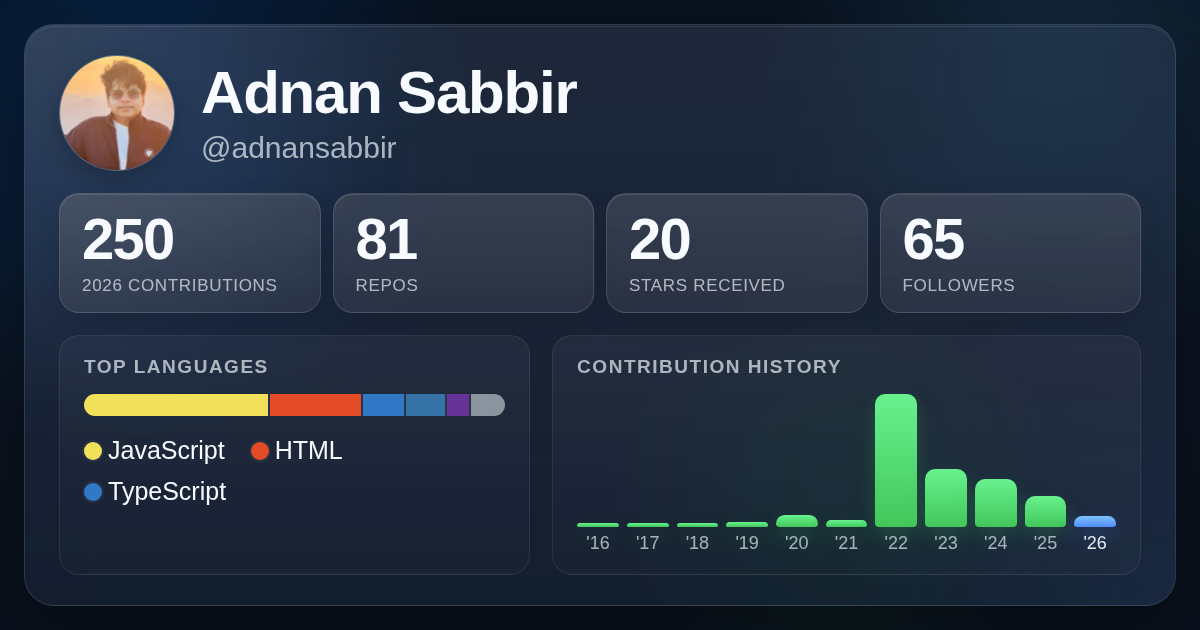
Contributions for every year since you joined · top languages · stars · repositories · followers
See live example · 🍴 Create my GitHub Stats
Free to use. Your token stays in your fork's GitHub Actions secrets and only needs read access.
Create your own
Fork → Add token → Enable Pages → Run → 🎉 your-username.github.io/github-stat
No files to edit. Your fork automatically uses your own GitHub account, so there's no username to change anywhere.
- Fork this repo: github.com/adnansabbir/github-stat/fork. Continue from your fork's README.
- Create a token: open Generate new token, give it any name, set a long Expiration (e.g. 1 year; the default is only 30 days), keep Public repositories, click Generate token and copy it.
- Add it to your fork: Settings → Secrets and variables → Actions → New repository secret,
name
GH_STATS_TOKEN, paste the token. - Turn on Pages: Settings → Pages → Source: GitHub Actions.
- Run it: open the Actions tab, click I understand my workflows, go ahead and enable them, then Fetch GitHub stats → Run workflow.
🎉 A few minutes later, it's live:
| What | Where |
|---|---|
| Your page | https://<your-username>.github.io/github-stat/ |
| Card image | https://<your-username>.github.io/github-stat/card.png |
| JSON endpoint | https://<your-username>.github.io/github-stat/stats.json |
From then on it refreshes itself every Sunday. If you find it useful, consider starring the repo ⭐
Your page includes
- ✅ Your own public stats page at
https://<your-username>.github.io/github-stat/ - ✅ A 1200×630 card image that shows up when you share the link on LinkedIn, Facebook or X
- ✅ Buttons on the page to share it, copy the link, download the image or open your GitHub profile
- ✅ A
stats.jsonendpoint you can use on your own website - ✅ Automatic weekly updates, with nothing to maintain
- ✅ Optionally, totals that include your private repos (their names are never shown)
Use it on LinkedIn, in your portfolio, in a README or blog post (card.png), or on your own site
(stats.json).
Options
Include private repos
By default only public repos and public contributions are counted. To include private ones:
- When creating the token, choose All repositories, and under Permissions → Repository permissions set Contents to Read-only.
- In your fork, go to Settings → Secrets and variables → Actions → Variables → New repository
variable, name
INCLUDE_PRIVATE_REPO, valuetrue.
Private repos only add to the totals, which are shown on your public page and in stats.json.
Their names are never published.
About the token
- It is created in your account and stored only in your fork's secrets. It is read-only: it can read your profile and repos, but cannot change anything.
- GitHub emails you a few days before it expires. Create a new one and replace the
GH_STATS_TOKENsecret, or the weekly updates stop (the last page stays live). - It is not named
GITHUB_TOKENbecause GitHub Actions reserves that name for its own bot token, which cannot read your profile.
Updates
- The workflow runs every Sunday at 00:00 UTC, and whenever you click Run workflow.
- Nothing is committed to your repo: each run publishes a fresh copy of the site to GitHub Pages.
- If a run fails, the previous week's page stays live, and GitHub emails you.
- If only the card image can't be rendered, the stats and page are still published, with a text-only link preview and no download button; the run shows a warning.
- If you rename your fork, replace
github-statin the URLs with the new name.
Link previews
LinkedIn, Facebook and X keep their own copy of a link preview (LinkedIn and X for about a week, Facebook for up to 30 days), so a shared link can show older stats. To refresh it right away, paste the link into LinkedIn's Post Inspector or Facebook's Sharing Debugger (click Scrape Again).
Developer documentation
What's in the JSON
| Section | What it contains |
|---|---|
generated_at | When the stats were fetched (UTC, ISO 8601) |
include_private | Whether private repos and contributions were counted |
profile | Name, bio, company, location, avatar, profile URL, join date, … |
followers | Follower and following counts |
repos | Owned repos: total, sources and forks |
stars | Stars across owned non-fork repos |
languages | Bytes of code per language across non-fork repos, with percentages |
yearly_contributions | Contributions per calendar year since the account was created |
Data comes from the GitHub GraphQL API.
Without private repos, yearly contributions count commits, issues, pull requests, reviews and created repos in public repos. GitHub lists at most 100 repos per contribution type per year, so a year spread over more repos is slightly undercounted.
Configuration
| Name | Where | Required | Default | Description |
|---|---|---|---|---|
GH_STATS_TOKEN | Actions secret / .env | yes | Your fine-grained personal access token | |
INCLUDE_PRIVATE_REPO | Actions variable / .env | no | false | true to count private repos and private contributions |
Run locally
Only needed if you want to change the code.
python3 -m venv .venv
source .venv/bin/activate
pip install -r requirements.txt
cp .env.example .env   # then fill in GH_STATS_TOKEN
python -m github_stats # prints the stats as JSON
To preview the page, build the site the same way the workflow does and serve it:
mkdir -p site && cp -r web/. site/
python -m github_stats > site/stats.json   # your real stats (needs GH_STATS_TOKEN)
# or: cp sample-stats.json site/stats.json # made-up data, no token needed
python -m http.server -d site 8000         # open http://localhost:8000
After editing web/, run cp -r web/. site/ again and refresh.
To also render the card image and link preview tags (site/card.png):
pip install -r requirements-og.txt                   # once
python -m playwright install --only-shell chromium   # once
SITE_URL=http://localhost:8000 python -m github_stats.og site
Run it on a fresh copy of web/ each time; it tells you if the copy was already processed. On WSL
or a minimal Debian/Ubuntu install, if Chromium fails with error while loading shared libraries,
run python -m playwright install --with-deps --only-shell chromium instead (needs sudo).
Open http://localhost:8000/?og to see the 1200×630 layout used for the image.
The page lives in web/ (index.html, style.css, app.js); site/ is build output and is
not committed.
Contributors

7 commits
Similar repos


Languages
Python
34.8%
CSS
31.0%
JavaScript
25.7%
HTML
8.5%
See what people are saying
README
GitHub Stats
Turn your GitHub history into a shareable developer stats page, updated automatically every week and hosted free on GitHub Pages.
No server · No database · No coding required · Runs entirely in your own GitHub account
Contributions for every year since you joined · top languages · stars · repositories · followers
See live example · 🍴 Create my GitHub Stats
Free to use. Your token stays in your fork's GitHub Actions secrets and only needs read access.
Create your own
Fork → Add token → Enable Pages → Run → 🎉 your-username.github.io/github-stat
No files to edit. Your fork automatically uses your own GitHub account, so there's no username to change anywhere.
- Fork this repo: github.com/adnansabbir/github-stat/fork. Continue from your fork's README.
- Create a token: open Generate new token, give it any name, set a long Expiration (e.g. 1 year; the default is only 30 days), keep Public repositories, click Generate token and copy it.
- Add it to your fork: Settings → Secrets and variables → Actions → New repository secret,
name
GH_STATS_TOKEN, paste the token. - Turn on Pages: Settings → Pages → Source: GitHub Actions.
- Run it: open the Actions tab, click I understand my workflows, go ahead and enable them, then Fetch GitHub stats → Run workflow.
🎉 A few minutes later, it's live:
| What | Where |
|---|---|
| Your page | https://<your-username>.github.io/github-stat/ |
| Card image | https://<your-username>.github.io/github-stat/card.png |
| JSON endpoint | https://<your-username>.github.io/github-stat/stats.json |
From then on it refreshes itself every Sunday. If you find it useful, consider starring the repo ⭐
Your page includes
- ✅ Your own public stats page at
https://<your-username>.github.io/github-stat/ - ✅ A 1200×630 card image that shows up when you share the link on LinkedIn, Facebook or X
- ✅ Buttons on the page to share it, copy the link, download the image or open your GitHub profile
- ✅ A
stats.jsonendpoint you can use on your own website - ✅ Automatic weekly updates, with nothing to maintain
- ✅ Optionally, totals that include your private repos (their names are never shown)
Use it on LinkedIn, in your portfolio, in a README or blog post (card.png), or on your own site
(stats.json).
Options
Include private repos
By default only public repos and public contributions are counted. To include private ones:
- When creating the token, choose All repositories, and under Permissions → Repository permissions set Contents to Read-only.
- In your fork, go to Settings → Secrets and variables → Actions → Variables → New repository
variable, name
INCLUDE_PRIVATE_REPO, valuetrue.
Private repos only add to the totals, which are shown on your public page and in stats.json.
Their names are never published.
About the token
- It is created in your account and stored only in your fork's secrets. It is read-only: it can read your profile and repos, but cannot change anything.
- GitHub emails you a few days before it expires. Create a new one and replace the
GH_STATS_TOKENsecret, or the weekly updates stop (the last page stays live). - It is not named
GITHUB_TOKENbecause GitHub Actions reserves that name for its own bot token, which cannot read your profile.
Updates
- The workflow runs every Sunday at 00:00 UTC, and whenever you click Run workflow.
- Nothing is committed to your repo: each run publishes a fresh copy of the site to GitHub Pages.
- If a run fails, the previous week's page stays live, and GitHub emails you.
- If only the card image can't be rendered, the stats and page are still published, with a text-only link preview and no download button; the run shows a warning.
- If you rename your fork, replace
github-statin the URLs with the new name.
Link previews
LinkedIn, Facebook and X keep their own copy of a link preview (LinkedIn and X for about a week, Facebook for up to 30 days), so a shared link can show older stats. To refresh it right away, paste the link into LinkedIn's Post Inspector or Facebook's Sharing Debugger (click Scrape Again).
Developer documentation
What's in the JSON
| Section | What it contains |
|---|---|
generated_at | When the stats were fetched (UTC, ISO 8601) |
include_private | Whether private repos and contributions were counted |
profile | Name, bio, company, location, avatar, profile URL, join date, … |
followers | Follower and following counts |
repos | Owned repos: total, sources and forks |
stars | Stars across owned non-fork repos |
languages | Bytes of code per language across non-fork repos, with percentages |
yearly_contributions | Contributions per calendar year since the account was created |
Data comes from the GitHub GraphQL API.
Without private repos, yearly contributions count commits, issues, pull requests, reviews and created repos in public repos. GitHub lists at most 100 repos per contribution type per year, so a year spread over more repos is slightly undercounted.
Configuration
| Name | Where | Required | Default | Description |
|---|---|---|---|---|
GH_STATS_TOKEN | Actions secret / .env | yes | Your fine-grained personal access token | |
INCLUDE_PRIVATE_REPO | Actions variable / .env | no | false | true to count private repos and private contributions |
Run locally
Only needed if you want to change the code.
python3 -m venv .venv
source .venv/bin/activate
pip install -r requirements.txt
cp .env.example .env   # then fill in GH_STATS_TOKEN
python -m github_stats # prints the stats as JSON
To preview the page, build the site the same way the workflow does and serve it:
mkdir -p site && cp -r web/. site/
python -m github_stats > site/stats.json   # your real stats (needs GH_STATS_TOKEN)
# or: cp sample-stats.json site/stats.json # made-up data, no token needed
python -m http.server -d site 8000         # open http://localhost:8000
After editing web/, run cp -r web/. site/ again and refresh.
To also render the card image and link preview tags (site/card.png):
pip install -r requirements-og.txt                   # once
python -m playwright install --only-shell chromium   # once
SITE_URL=http://localhost:8000 python -m github_stats.og site
Run it on a fresh copy of web/ each time; it tells you if the copy was already processed. On WSL
or a minimal Debian/Ubuntu install, if Chromium fails with error while loading shared libraries,
run python -m playwright install --with-deps --only-shell chromium instead (needs sudo).
Open http://localhost:8000/?og to see the 1200×630 layout used for the image.
The page lives in web/ (index.html, style.css, app.js); site/ is build output and is
not committed.
Similar repos
Contributors
7 commits
Languages
Python
34.8%
CSS
31.0%
JavaScript
25.7%
HTML
8.5%