Powerful Pixiv batch downloader. Batch download artworks and novels, filter works, rename when downloading, convert animated images, and more. 浏览器扩展程序,批量下载 Pixiv 上的插画和小说。过滤作品、下载时重命名、转换动态图片等。
See the codeEnglish | 简体中文 | 繁體中文 | 日本語 | 韩国语 | Russian
Powerful Pixiv Downloader
This is a browser extension that lets you download images and novels from Pixiv in batch.
Available languages: Simplified Chinese, Traditional Chinese, Japanese, English、Korean、Russian.
The main function:
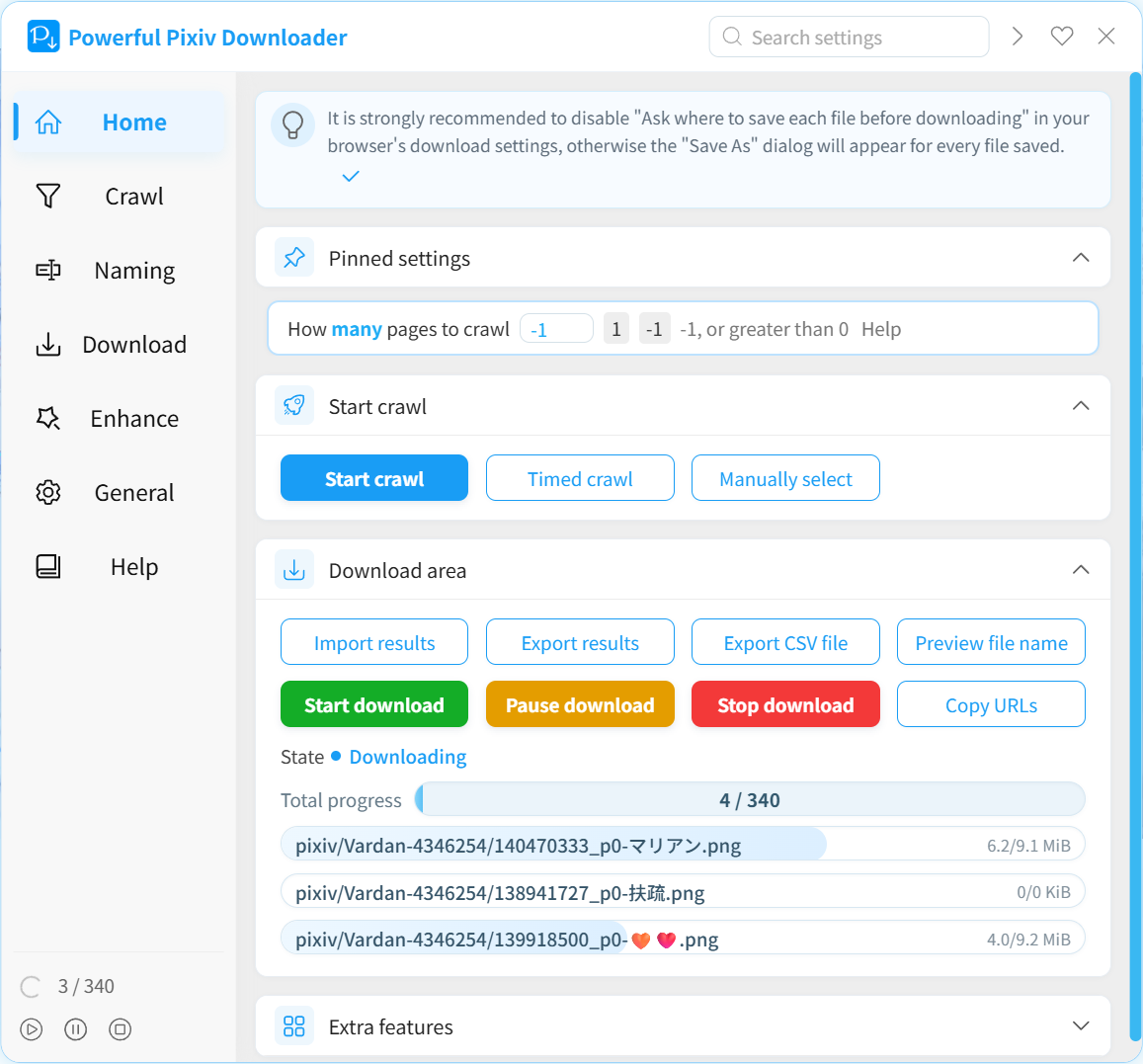
Screenshot:
Browsers with Chromium core, such as Chrome and Edge, can install this extension from the Chrome Web Store.
Firefox browsers can install this extension from Add-Ons.
Please check the Wiki page: Offline Installation
If you want to install this extension in a browser on Android, we recommend using the Quetta browser. It is a mobile browser with the Chromium core, and you can install extensions online from the Chrome Web Store — very convenient. View tutorial
This downloader runs on Pixiv.net pages. When you browse Pixiv, you can open the downloader panel at any time to use it.
Note:

Thank you for your support!
Thanks 光の軌跡 for translating Japanese.
Thanks KOZ39 for translating Korean.
Thanks bropines for translating Russian.
Thanks Reinford0 for testing and improving this tool.
Thanks z2n for improvements to the project build of this tool.
This tool needs to be installed Node.JS first during development.
Clone this project (or fork first) and install dependencies:
git clone https://github.com/xuejianxianzun/PixivBatchDownloader.git

cd ./PixivBatchDownloader

npm i
So far, the initialization is complete.
You can load the dist folder as an extension in the extension management of your browser for local debugging.
The npm command of this project:
npm run ts // compile ts file to dist folder
npm run less // compile less files to the dist folder
npm run fmt // format all files

npm run pre-build // execute fmt, ts, less commands (compile all code, but do not package)

npm run build // execute fmt, ts, less commands, and copy other files needed for packaging to the dist folder, and finally pack the dist folder into a zip file
When you modify the code and compile it, the code will be compiled to the dist folder. You need to refresh the offline loaded extension in the browser's extension management, and then refresh the pixiv page to apply the new code.
249 followers · starred Sep 2024
4,648 followers · starred Aug 2022
18 followers · starred Aug 2020
70 followers · starred Jun 2025
Powerful Pixiv batch downloader. Batch download artworks and novels, filter works, rename when downloading, convert animated images, and more. 浏览器扩展程序,批量下载 Pixiv 上的插画和小说。过滤作品、下载时重命名、转换动态图片等。
See the codeEnglish | 简体中文 | 繁體中文 | 日本語 | 韩国语 | Russian
Powerful Pixiv Downloader
This is a browser extension that lets you download images and novels from Pixiv in batch.
Available languages: Simplified Chinese, Traditional Chinese, Japanese, English、Korean、Russian.
The main function:
Screenshot:
Browsers with Chromium core, such as Chrome and Edge, can install this extension from the Chrome Web Store.
Firefox browsers can install this extension from Add-Ons.
Please check the Wiki page: Offline Installation
If you want to install this extension in a browser on Android, we recommend using the Quetta browser. It is a mobile browser with the Chromium core, and you can install extensions online from the Chrome Web Store — very convenient. View tutorial
This downloader runs on Pixiv.net pages. When you browse Pixiv, you can open the downloader panel at any time to use it.
Note:
Thank you for your support!
Thanks 光の軌跡 for translating Japanese.
Thanks KOZ39 for translating Korean.
Thanks bropines for translating Russian.
Thanks Reinford0 for testing and improving this tool.
Thanks z2n for improvements to the project build of this tool.
This tool needs to be installed Node.JS first during development.
Clone this project (or fork first) and install dependencies:
git clone https://github.com/xuejianxianzun/PixivBatchDownloader.git

cd ./PixivBatchDownloader

npm i
So far, the initialization is complete.
You can load the dist folder as an extension in the extension management of your browser for local debugging.
The npm command of this project:
npm run ts // compile ts file to dist folder
npm run less // compile less files to the dist folder
npm run fmt // format all files

npm run pre-build // execute fmt, ts, less commands (compile all code, but do not package)

npm run build // execute fmt, ts, less commands, and copy other files needed for packaging to the dist folder, and finally pack the dist folder into a zip file
When you modify the code and compile it, the code will be compiled to the dist folder. You need to refresh the offline loaded extension in the browser's extension management, and then refresh the pixiv page to apply the new code.
249 followers · starred Sep 2024
4,648 followers · starred Aug 2022
18 followers · starred Aug 2020
70 followers · starred Jun 2025