Bionus/imgbrd-grabber

Very customizable imageboard/booru downloader with powerful filenaming features.

C++

3,227

5,647 commits

updated Oct 15, 2026

See the code

README

Grabber

Discord chat GitHub release GitHub downloads GitHub downloads GitHub issues Donate with PayPal Donate with Patreon Build Status Code Coverage Codacy Badge Project license

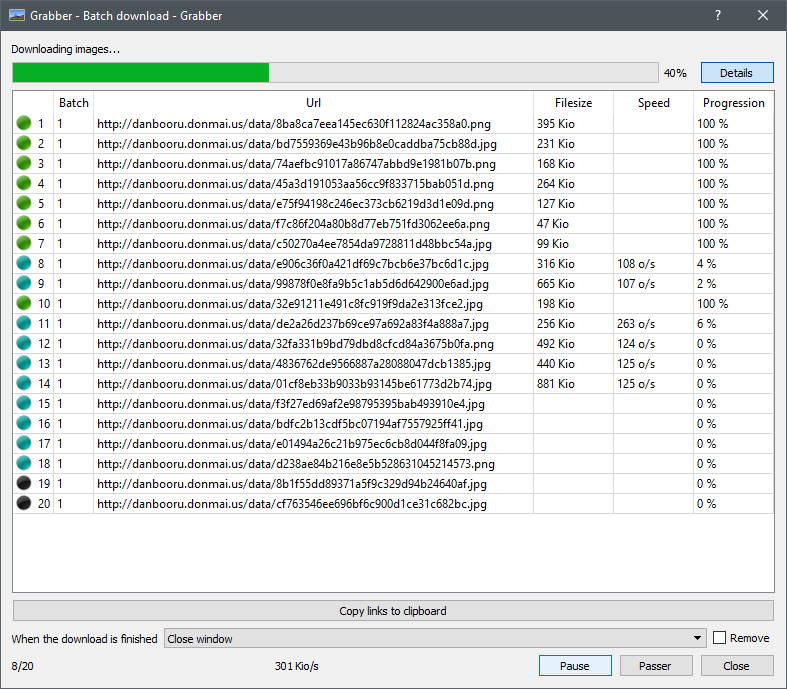
Imageboard/booru downloader which can download thousands of images from multiple boorus very easily.

Thanks to its powerful naming features, you just have to set your filename and save directory using all the tokens available, and the program will generate a filename using the image's information. With this, you can store and manage your pictures in advanced directory structures, and save image with custom filenames!

Grabber works on Windows, Mac, and Linux. It is available in English, French, Russian, simplified Chinese, and Spanish.

Download

You can download the latest release here, or find all previous releases here.

For users interested, a nightly version is built automatically on every commit on the develop branch, and can be downloaded here. Note that it might be less stable than official releases, so use at your own risk.
Features

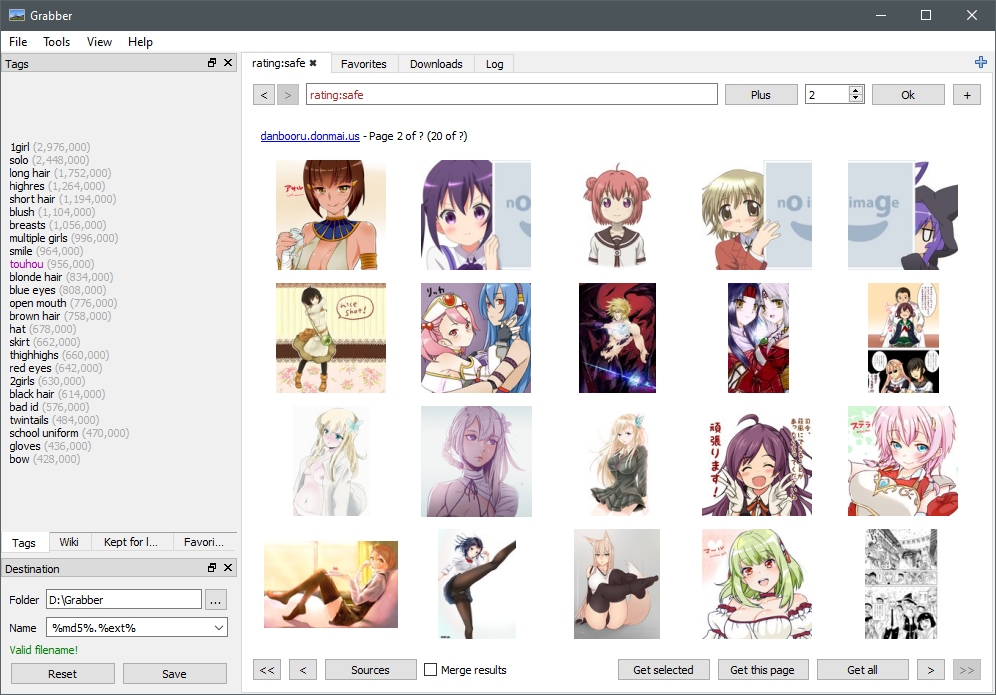
Browse

  • Tabs to make multiple searches at the same time
  • Able to show results from multiple imageboards at the same time in a single tab
  • Remove duplicate results from multiple-imageboard searches
  • Auto-completion of tags in the search field
  • Blacklisting of tags to mark or hide images you don't want to see
  • Proxy support
  • Post-filtering (when the imageboard search is limited)
  • Auto-download images as you search according to a whitelist

Download

  • Download thousands of images at once
  • Download single images using their MD5 or ID
  • Command line interface to download images


Customize

  • Add your own imageboards very easily
  • Authentication for sources behind a login wall
  • Theme support using CSS. See Themes for details.
  • Lots of options to customize the program's behaviour


Organize

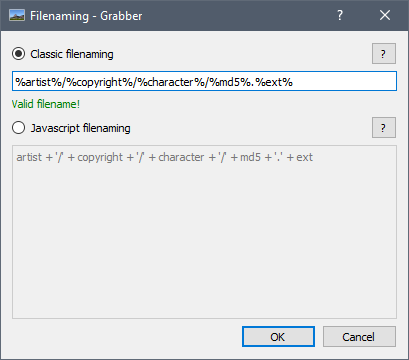
  • Save images using a custom format, for example %artist%/%copyright%/%character%/%md5%.%ext%, or using JavaScript code. See Filename for details.
  • Favorite tags to keep track of new images
  • "View it later" tags to save a search for later
  • Support saving images directly to a local booru, such as Szurubooru, MyImouto, Gelbooru, or Shimmie.
  • Can add entries to a database for each image or tag while downloading. See Commands for details.
  • Conditional filenames triggered by a tag
  • Rename already downloaded images

Default sources

You can add additional sources very easily, but here's a short list of some sources that are included and supported by default:

  • Danbooru
  • Gelbooru
  • E-Hentai
  • Pixiv
  • yande.re
  • Shimmie
  • e621
  • Konachan
  • rule34
  • safebooru
  • Anime-Pictures
  • behoimi
  • Zerochan
  • Twitter

Compilation

See the Compilation documentation to know how to build Grabber.

  • Linux: run ./build.sh at the root of the repository
  • macOS: run ./build-mac.sh at the root of the repository

Contributors

This project follows the all-contributors specification. Contributions of any kind are welcome!

android
booru
danbooru
downloader
gelbooru
grabber
imageboard
linux
macos
windows

Bionus/imgbrd-grabber

Very customizable imageboard/booru downloader with powerful filenaming features.

C++

3,227

5,647 commits

updated Oct 15, 2026

See the code

README

Grabber

Discord chat GitHub release GitHub downloads GitHub downloads GitHub issues Donate with PayPal Donate with Patreon Build Status Code Coverage Codacy Badge Project license

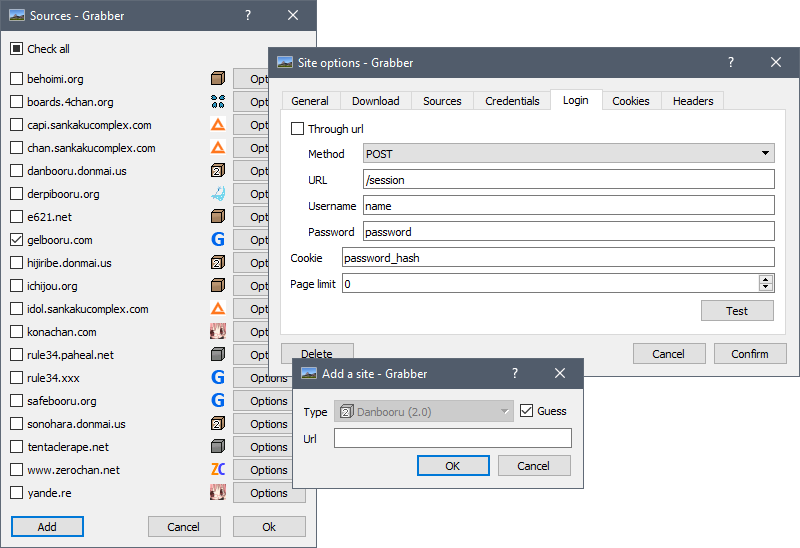
Imageboard/booru downloader which can download thousands of images from multiple boorus very easily.

Thanks to its powerful naming features, you just have to set your filename and save directory using all the tokens available, and the program will generate a filename using the image's information. With this, you can store and manage your pictures in advanced directory structures, and save image with custom filenames!

Grabber works on Windows, Mac, and Linux. It is available in English, French, Russian, simplified Chinese, and Spanish.

Download

You can download the latest release here, or find all previous releases here.

For users interested, a nightly version is built automatically on every commit on the develop branch, and can be downloaded here. Note that it might be less stable than official releases, so use at your own risk.
Features

Browse

  • Tabs to make multiple searches at the same time
  • Able to show results from multiple imageboards at the same time in a single tab
  • Remove duplicate results from multiple-imageboard searches
  • Auto-completion of tags in the search field
  • Blacklisting of tags to mark or hide images you don't want to see
  • Proxy support
  • Post-filtering (when the imageboard search is limited)
  • Auto-download images as you search according to a whitelist

Download

  • Download thousands of images at once
  • Download single images using their MD5 or ID
  • Command line interface to download images


Customize

  • Add your own imageboards very easily
  • Authentication for sources behind a login wall
  • Theme support using CSS. See Themes for details.
  • Lots of options to customize the program's behaviour


Organize

  • Save images using a custom format, for example %artist%/%copyright%/%character%/%md5%.%ext%, or using JavaScript code. See Filename for details.
  • Favorite tags to keep track of new images
  • "View it later" tags to save a search for later
  • Support saving images directly to a local booru, such as Szurubooru, MyImouto, Gelbooru, or Shimmie.
  • Can add entries to a database for each image or tag while downloading. See Commands for details.
  • Conditional filenames triggered by a tag
  • Rename already downloaded images

Default sources

You can add additional sources very easily, but here's a short list of some sources that are included and supported by default:

  • Danbooru
  • Gelbooru
  • E-Hentai
  • Pixiv
  • yande.re
  • Shimmie
  • e621
  • Konachan
  • rule34
  • safebooru
  • Anime-Pictures
  • behoimi
  • Zerochan
  • Twitter

Compilation

See the Compilation documentation to know how to build Grabber.

  • Linux: run ./build.sh at the root of the repository
  • macOS: run ./build-mac.sh at the root of the repository

Contributors

This project follows the all-contributors specification. Contributions of any kind are welcome!

android
booru
danbooru
downloader
gelbooru
grabber
imageboard
linux
macos
windows

Project health

Overall

4.3/10

Maintained

10/10

Code review

1/10
OpenSSF Scorecard

Significant stargazers

FichteFoll

233 followers · starred Aug 2017

Andrew Morgan

283 followers · starred Mar 2024

Naomi Rue Golding

81 followers · starred Jun 2023

Nils Hasenbanck

48 followers · starred Oct 2020