YzPzCode - The Unified Workspace for AI Coding Agents
See the code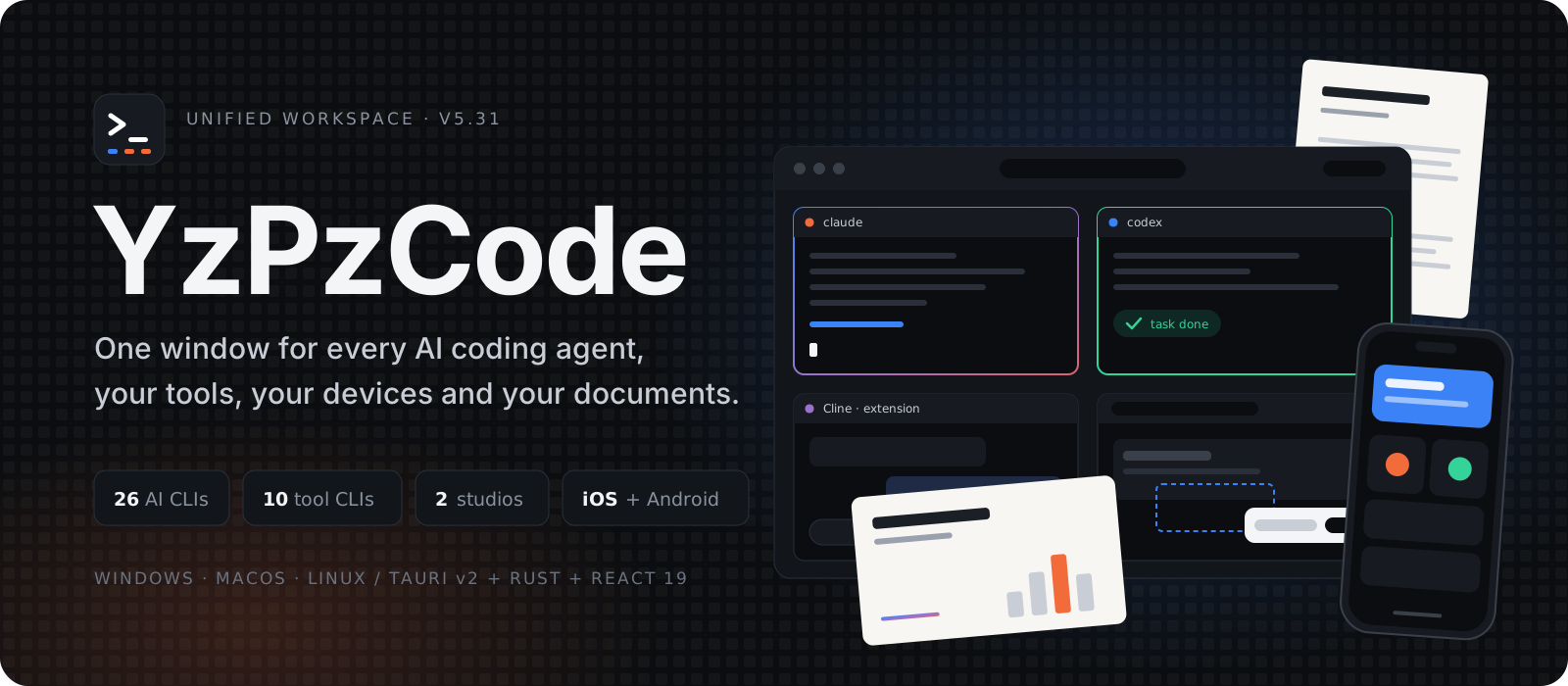





Why • Overview • Agents • Extensions • Studios • Devices • Narration • Run & Build • Download • Contributors
[!NOTE] YzPzCode is under active development. Features may be experimental or evolve between releases. Feedback, bug reports and pull requests are warmly welcomed.
AI-assisted development usually turns into a shuffle between terminal tabs, agents, browsers, IDEs and one-off CLIs. YzPzCode replaces the window juggling with one native command center.
| Traditional workflow | With YzPzCode |
|---|---|
| 🪟 8+ disconnected terminal windows | 🖥️ One native workspace with custom layouts |
🔄 Constant Alt+Tab context switching | 🎛️ Side-by-side terminal grid of real PTY sessions |
| 🔌 Assistant panels locked inside external IDEs | 🧩 Graphical extensions embedded in the grid |
| ⚙️ Manual build scripts and run commands | ⚡ Run & build with 15+ ecosystems auto-detected |
| 🧩 External editor and file viewer | 📝 Embedded editor with a virtualized file tree and Git |
| 🌐 A separate browser for UI checks | 🔍 In-app browser with a visual inspector that prompts agents |
| 📱 A separate emulator window | 📲 Android and iOS device window with Flutter hot reload |
| 📄 Word, PowerPoint and a separate AI chat | ✍️ Writing & Presentation studios on the same AI CLIs |
| 🔑 Repetitive CLI install and auth checks | 🔐 Detection, one-click install and auth tracking |
| 🎨 Photoshop or Figma for quick edits | 🖌️ Layered image editor with blend modes |
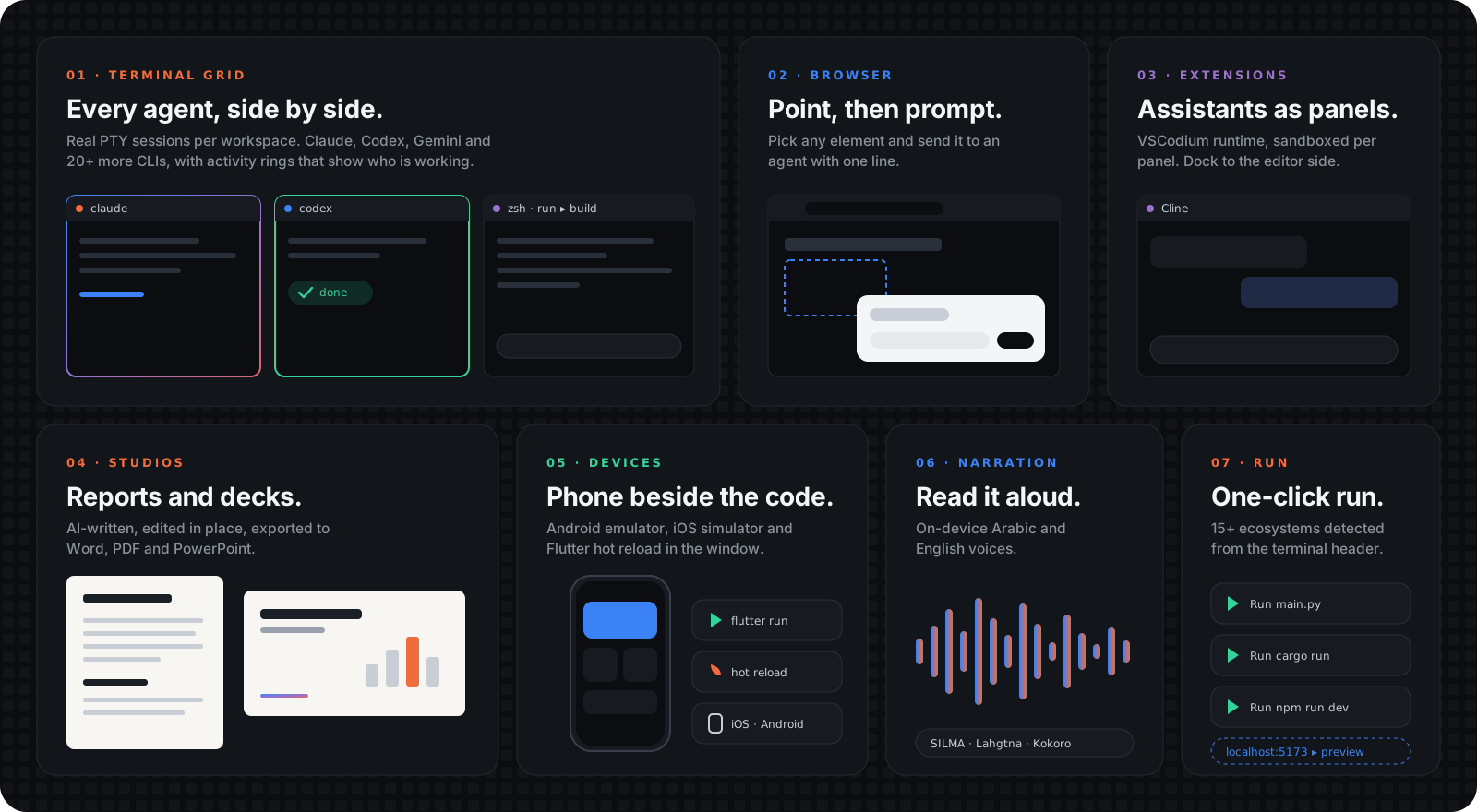
26AI coding CLIs | 10SaaS & tool CLIs | 14graphical extensions | 15+run & build ecosystems | 30report kinds | 3local voices |
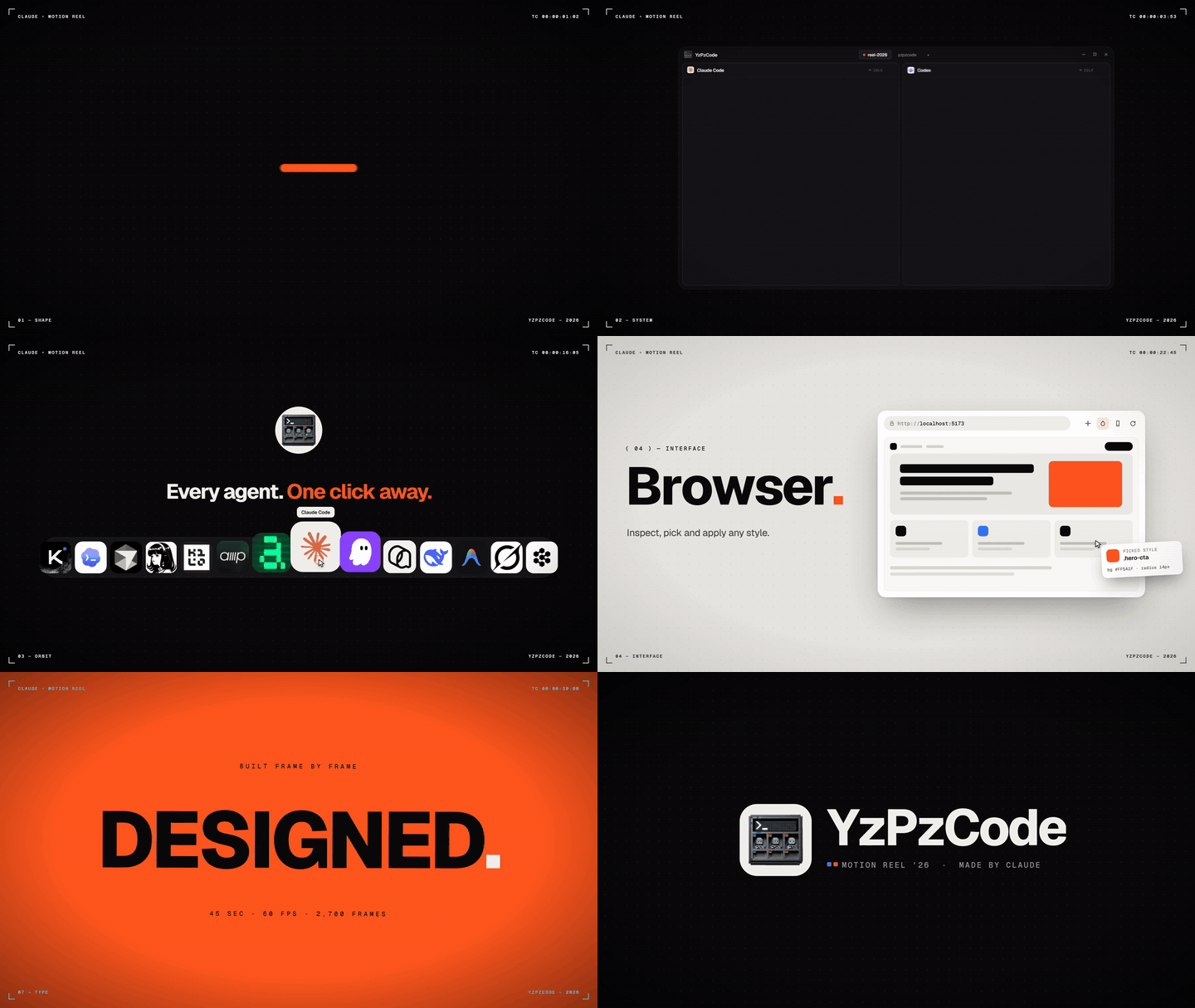
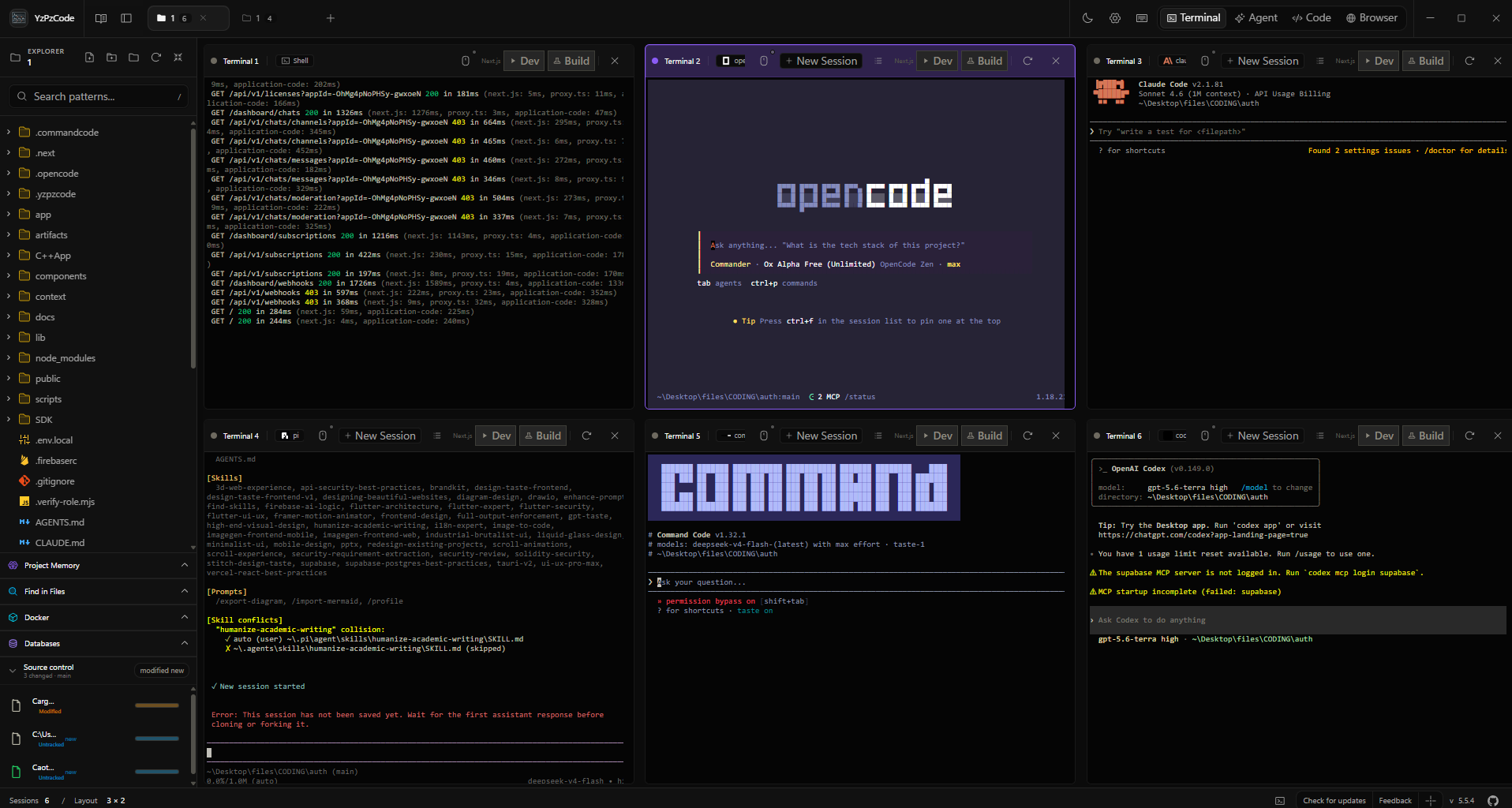
Terminal grid & workspace explorer |
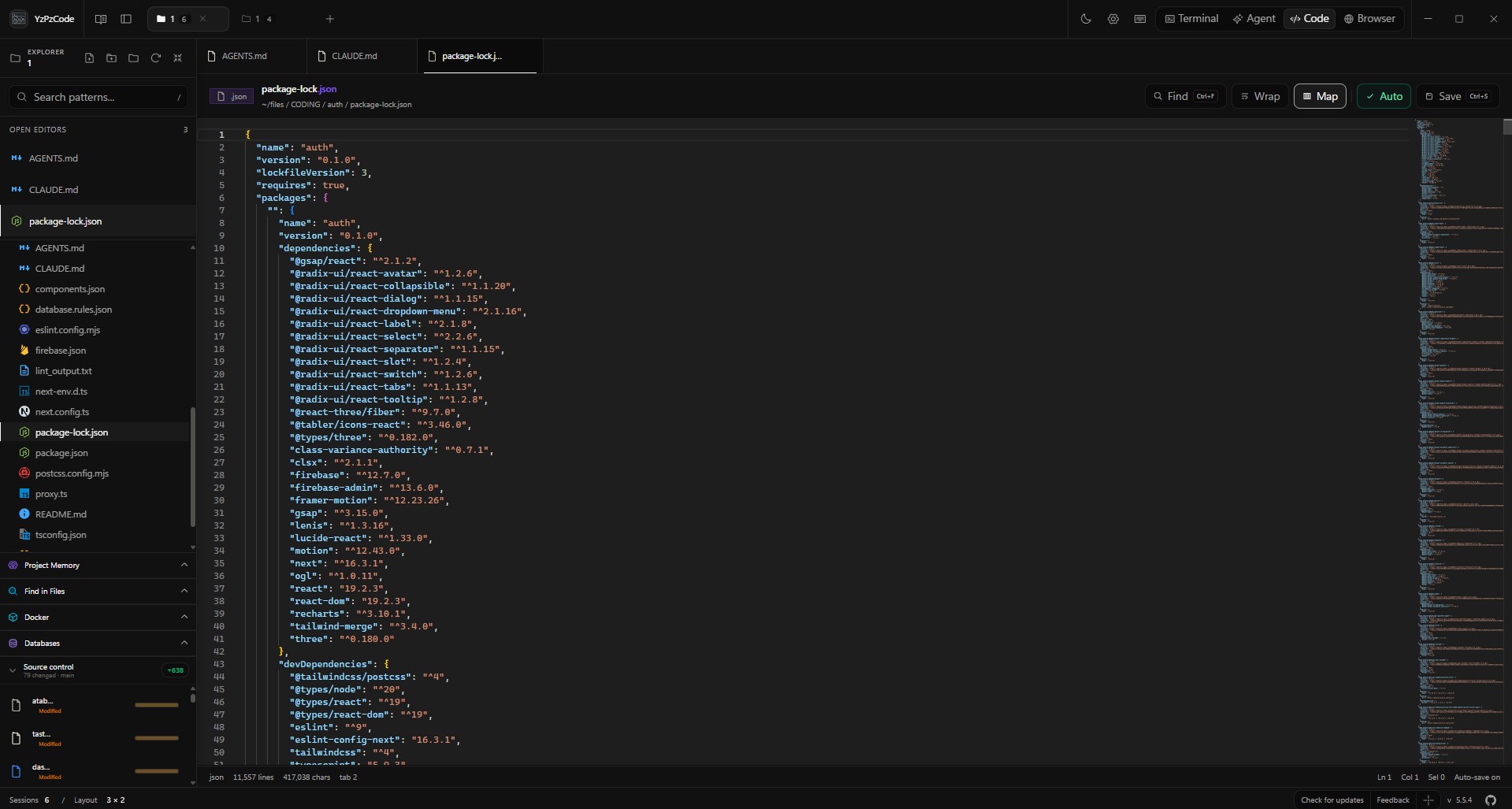
Multi-agent collaborative layout |
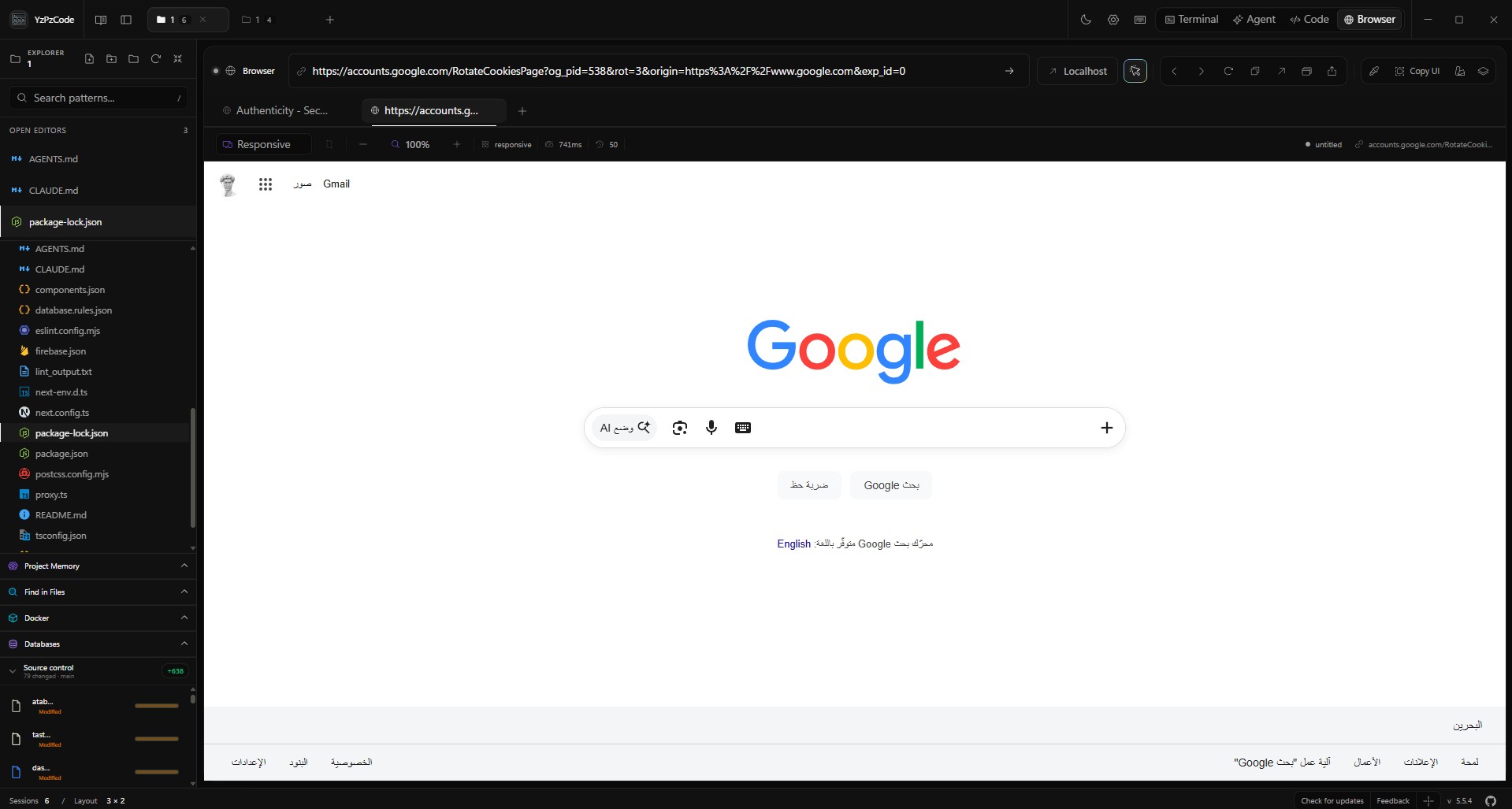
Integrated multi-tab webview browser |
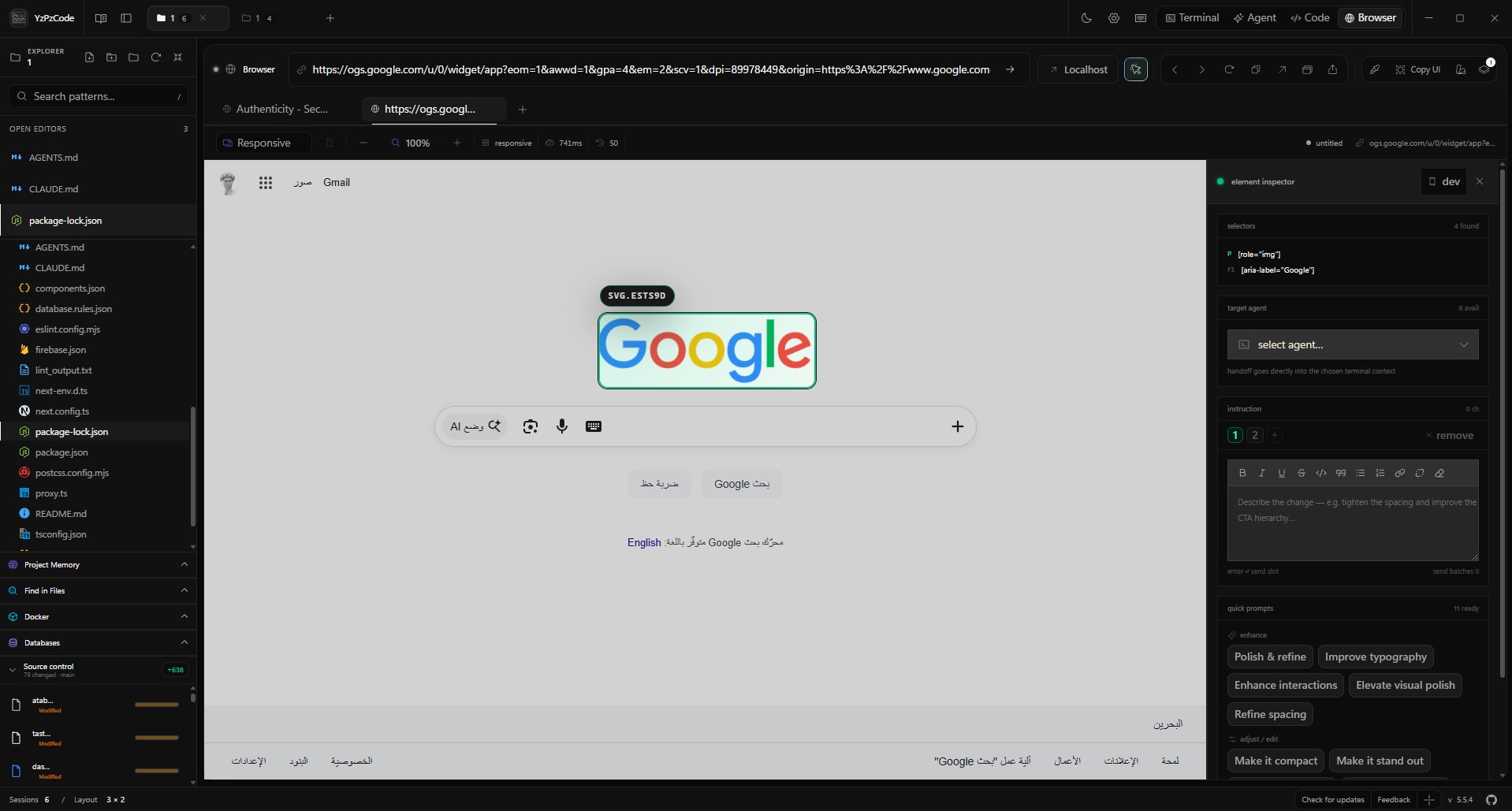
Deep visual element & style inspector |
YzPzCode detects, launches and manages PTY sessions for 26 external AI coding agents. The core integrations:
                     ┌─── Claude (Anthropic)
                     ├─── Antigravity (Google)
                     ├─── Codex (OpenAI)
                     ├─── OpenCode
  YzPzCode Host ─────┼─── Cursor
                     ├─── Kilo
                     ├─── Hermes
                     ├─── Pi (earendil-works)
                     └─── Command Code
| Agent | CLI command | Primary role & strengths |
|---|---|---|
| Claude Code | claude | Deep reasoning, autonomous refactoring, large context |
| Antigravity CLI | agy | Autonomous task execution, agentic workflows, Google AI |
| Codex CLI | codex | Precision code generation and unit test authoring |
| OpenCode | opencode | Open-source agent for customizable local workflows |
| Cursor CLI | cursor | Agentic file editing and codebase indexing |
| Kilo | kilo | Fast, terminal-native agent workflows |
| Hermes | hermes | Compact autonomous terminal assistant |
| Pi | pi | Minimalist coding agent harness with extension hooks |
| Command Code | cmd / cmdc | Interactive command and script orchestration |
| Agent | CLI command | Agent | CLI command |
|---|---|---|---|
| Cline CLI | cline | Grok CLI | grok |
| Devin for Terminal | devin | Trae CLI | traecli |
| Kimi Code CLI | kimi | Qoder CLI | qoder |
| GitHub Copilot CLI | copilot | Kiro CLI | kiro-cli |
| Mistral Vibe | vibe | DeepSeek TUI | deepseek |
| Aider | aider | Amp | amp |
| DeepSeek Reasonix | reasonix | CodeBuddy Code | codebuddy |
| DeepSeek Harness | dsh | AtomCode CLI | atomcode |
| MiMo Code | mimo |
See the CLI integration reference for vendor install instructions, documentation and platform notes.
[!IMPORTANT] YzPzCode integrates with third-party CLIs via PTY bridges and is not affiliated with or endorsed by their respective vendors unless explicitly stated.
Installation status, executable paths and authentication state for popular cloud and developer CLIs are tracked for you:
| Service | Command | Service | Command |
|---|---|---|---|
| GitHub CLI | gh | PostHog | posthog-cli |
| Supabase | supabase | ElevenLabs | elevenlabs |
| Stripe | stripe | Google Workspace | gws |
| Vercel | vercel | AgentMail | agentmail-cli |
| Valyu | valyu-cli | Ramp | ramp |
See the Tool CLIs reference guide for workflows, common commands and authentication details.
Run graphical coding assistants right next to your shells and agents, inside the workspace grid. Press Ctrl+Shift+X or click the Extensions icon in the header to open the catalog.
| Extension | Publisher | Description |
|---|---|---|
| Google Antigravity | Google's official agentic assistant with chat, plans and code edits. | |
| Kilo Code | Kilo | Code, plan and debug with Kilo's visual extension panel. |
| Cline | Cline | Autonomous coding assistant with plan/act modes and tool approval gates. |
| OpenAI Codex | OpenAI | OpenAI's coding extension with ChatGPT sign-in and code assistance. |
| Claude Code | Anthropic | Anthropic's visual coding assistant and conversation panel. |
| Continue | Continue | Open-source agent and code chat with cloud or local model backends. |
| Amazon Q Developer | AWS | Code chat and inline feature development with Amazon Q. |
| Tabby | TabbyML | Self-hosted coding assistant connected to a private Tabby server. |
| Windsurf Plugin | Windsurf | Codeium assistant with AI code chat and codebase index. |
| Mistral Vibe | Mistral AI | Mistral's visual coding agent with context, conversations and tools. |
| Roo Code | Roo Code | Cline-family agent with custom modes, multi-model support and per-step approvals. |
| Qoder CN | Alibaba Cloud | Alibaba Cloud's agentic coding assistant with chat and agent modes; requires sign-in. |
| Augment | Augment Code | Coding agent with a context engine built for large codebases; requires sign-in. |
| Nexrall Code | Nexrall | Autonomous coding agent with per-step approvals, checkpoints and MCP tools; requires an account. |
Ctrl+Alt+B) and move it between grid and dock without restarting it.reh-web runtime is provisioned with pinned SHA-256 digests and Open VSX packages. No VS Code or Node install needed.panel-<uuid>.localhost:<port> origin with persistent storage, and cannot call Tauri host commands.workspace-trust.json) and IndexedDB workbench state (workbench-state.json) are kept per workspace.See the graphical workspace extensions documentation for architecture, runtime specifications and validation details.
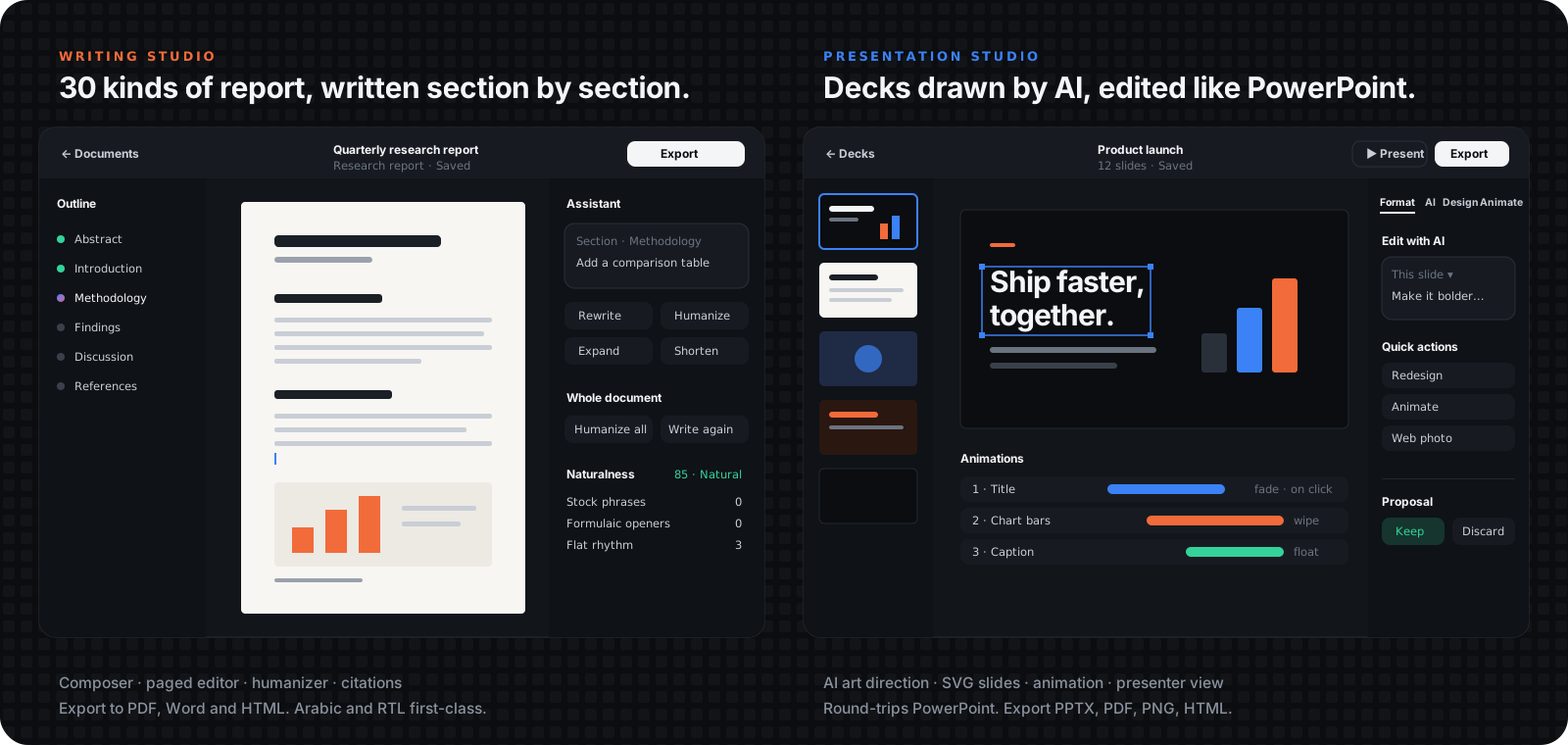
Besides coding, the setup page's mode switch opens three document studios. They need no terminals or IDEs, run the AI through the CLIs you already have installed (Claude Code, Codex, Grok, Antigravity, OpenCode) in a headless runner, and save into one folder, Documents/YzPzCode, so reports, decks and workbooks are found again after a reinstall.
Writing Studio
|
Presentation Studio
|
Arabic, Hebrew, Persian and Urdu work in both studios: paragraph direction follows the text, printed labels (Chapter, Table, Figure, Contents…) follow the document language, Word and PowerPoint exports write real bidirectional paragraphs, and a catalog of about 150 fonts (Latin and Arabic, with bundled @fontsource faces) feeds every font picker.
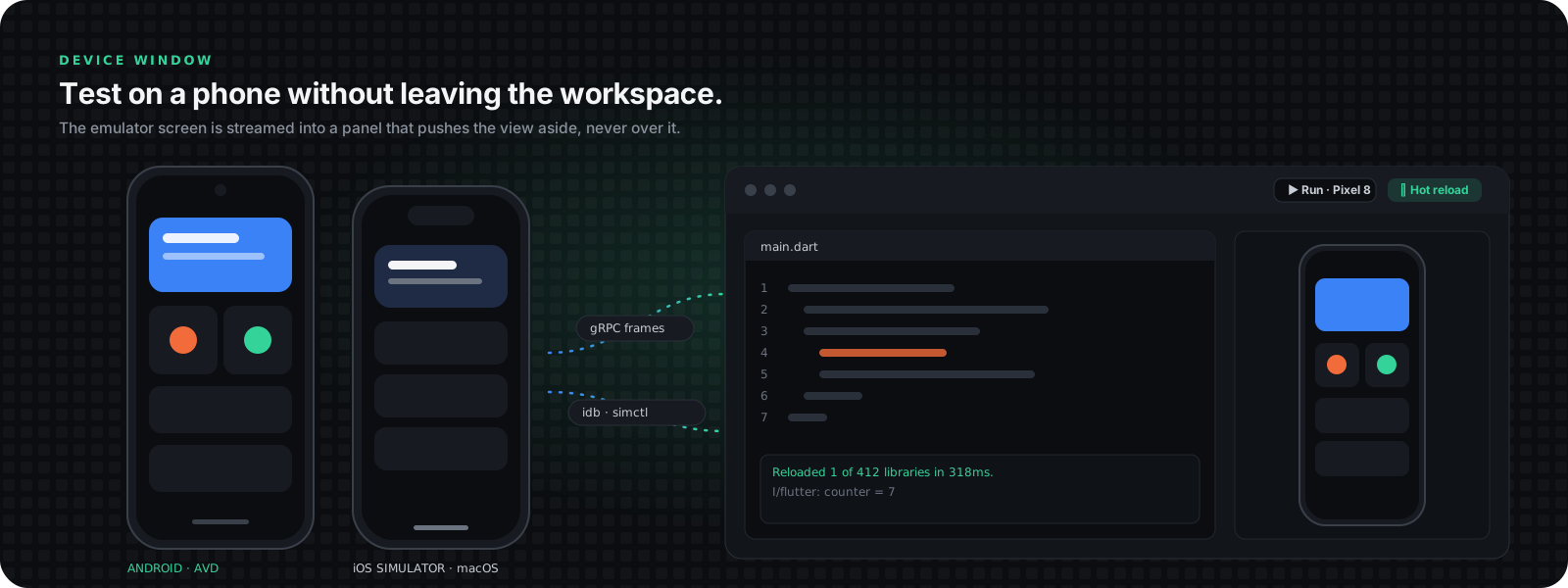
A device window slides in from the right edge of every workspace view (terminal, extensions, editor, browser) and pushes the view aside instead of floating over it, so native webviews are never covered.
frame-codec crate) with touch, multi-touch, keyboard, scroll, rotation, skins and screenshots.simctl, screen and input through idb_companion. Off macOS it is reported as unavailable..dart save), hot restart and a live log.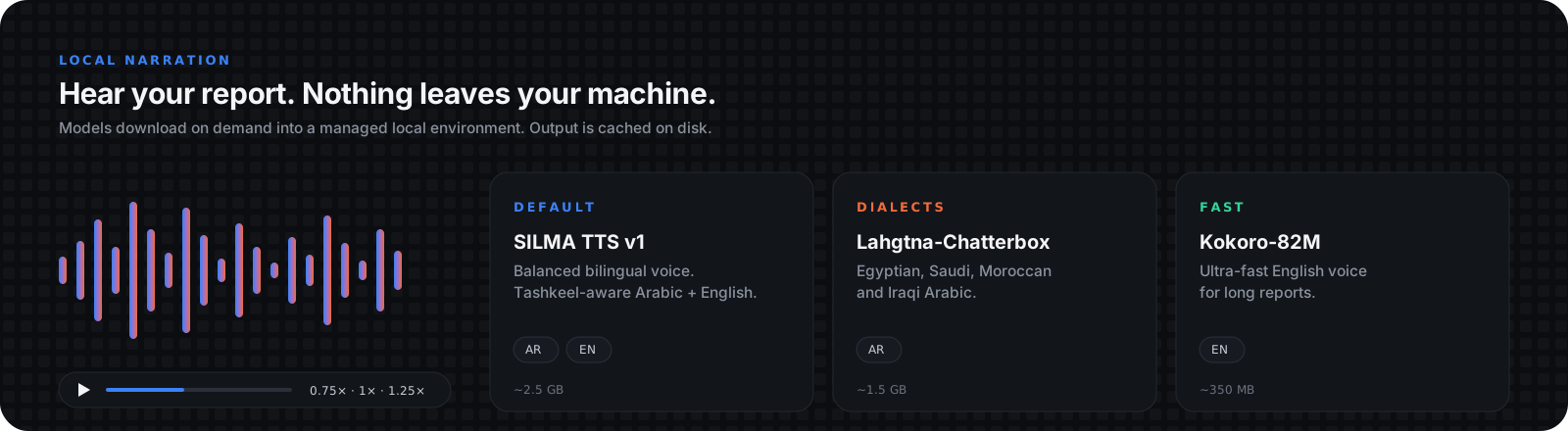
Reports and slides can be read aloud without sending text to a cloud service. Narration runs in a managed local Python environment and downloads models on demand (Settings → Narration).
| Model | Languages | Size | Notes |
|---|---|---|---|
| SILMA TTS v1 (default) | Arabic + English | ~2.5 GB | Balanced bilingual voice, Tashkeel-aware |
| Lahgtna-Chatterbox | Arabic | ~1.5 GB | Egyptian, Saudi, Moroccan and Iraqi dialects |
| Kokoro-82M | English | ~350 MB | Very fast, suited to long reports |
Language is detected from the text, speed is 0.75× / 1× / 1.25×, and synthesized audio is cached on disk (LRU, 500 MB cap). Narrate the selection or a section in the Writing Studio, and slides in the Presentation Studio and presenter mode.
Launch, build and debug your applications with zero configuration. Project manifests and runnable entry points are discovered across 15+ ecosystems, right inside terminal headers.
| Ecosystem | Detection & execution |
|---|---|
| Python | Detects .py scripts, main.py, app.py, Django manage.py, Flask and FastAPI servers. Prefers a local .venv, venv or system Python. |
| JavaScript / TypeScript | Discovers package.json dev, start and build scripts. Invokes npm, pnpm, Yarn or Bun from the lockfile. |
| Rust / Go / Flutter | Cargo (cargo run), Go modules (go run .) and Flutter project manifests (flutter run). |
| C / C++ | Finds sources with main(), compiles via GCC or Clang into .yzpz-run/ and runs the binary. |
| CMake | Reads the CMake File API to locate Debug targets in .yzpz-build/, building before launch. |
| C# (.NET) | Discovers and runs executable .csproj files in projects and solutions with the .NET SDK. |
| Java | Single-file source execution via JDK 11+ and project launch configurations. |
| Ruby, PHP, Dart, Swift, Lua, Perl, R | Runs entry points with installed interpreters; Rails and Laravel manifest commands. |
input(), scanf, Console.ReadLine()) from the terminal input bar.See the application runs guide for configuration schemas, multi-target switching and compiler details.
portable-pty</kbd> toggles, <kbd>Ctrl</kbd>+<kbd>Shift</kbd>+<kbd> opens a new shell) with a shell picker and per-workspace scrollback.xlsx), Word (.docx) and Draw.io diagramsnotify) with debounced sync keeps open tabs in step with external IDEs and agentsflowchart TB
subgraph Frontend["React 19 + TypeScript Frontend (Vite 6)"]
direction LR
UI_Term["Terminal Grid\n(xterm.js 6)"]
UI_Ext["Workspace\nExtensions"]
UI_Editor["Code Editor\n(Monaco)"]
UI_Browser["Browser &\nInspector"]
UI_Image["Image Editor\n(Konva)"]
UI_Studio["Writing &\nPresentation Studios"]
UI_Device["Device Window\n(Android / iOS)"]
end
subgraph TauriHost["Tauri v2 + Rust Core Host"]
IPC["Tauri IPC Command Router"]
PTY["PTY & Run Engine\n(portable-pty)"]
ExtHost["Extension Host\nManager"]
FS["File & Git Watcher\n(notify)"]
DevEnv["IDE / CLI Detector"]
Writing["Headless AI Runner\n(writing)"]
Device["Emulator / Simulator\nManagers + frame-codec"]
TTS["TTS Manager\n(local models)"]
end
subgraph External["External Runtime"]
ExtRuntime["VSCodium reh-web\n(Open VSX Host)"]
CLIs["External AI & Tool CLIs\n(Claude, Antigravity, gh, etc.)"]
IDEs["External IDEs\n(VS Code, Cursor, Zed)"]
Mobile["Android Emulator\niOS Simulator"]
end
Frontend <==>|"Tauri IPC (Async Invokes + Events)"| IPC
IPC --> PTY
IPC --> ExtHost
IPC --> FS
IPC --> DevEnv
IPC --> Writing
IPC --> Device
IPC --> TTS
PTY <==>|"Raw PTY Stream"| CLIs
ExtHost <==>|"Loopback HTTP / Child Webview"| ExtRuntime
DevEnv -.->|"Process Launch"| IDEs
Writing -->|"Headless runs"| CLIs
Device <==>|"gRPC / simctl + idb"| Mobile
| Layer | Technologies |
|---|---|
| Desktop shell | Tauri v2, Rust (2021 Edition) |
| Concurrency & PTY | tokio, portable-pty, notify, which |
| Extension host | VSCodium reh-web (Open VSX), sandboxed child webviews (panel-*.localhost) |
| Frontend | React 19, TypeScript 5.6, Vite 6 |
| Styling & motion | Tailwind CSS v4, Framer Motion |
| Terminal & editor | @xterm/xterm 6, Monaco Editor, CodeMirror 6 |
| Canvas & media | Konva, pdfjs, xlsx, mammoth |
| Documents | TipTap (paged writing editor), docx, pptxgenjs + JSZip, SVG slide pipeline |
| Mobile devices | Android emulator gRPC streaming, simctl + idb_companion (iOS), Flutter CLI, frame-codec crate |
| Speech | Managed local Python environment with SILMA TTS, Lahgtna-Chatterbox and Kokoro models |
| State | Zustand 5 with persistent storage |
yzpzcode/
├── .github/workflows/          # CI/CD release workflows (multi-platform builds)
├── docs/                       # Guides, screenshots and README graphics (docs/readme)
└── app/
    ├── src-tauri/              # Rust backend
    │   ├── crates/
    │   │   └── frame-codec/    # Shared screen-frame codec for device streaming
    │   └── src/
    │       ├── agent/          # Autonomous agent task orchestration & retry logic
    │       ├── agent_cli/      # AI & tool CLI detection, installation & auth
    │       ├── android/        # Android SDK, embedded emulator, Flutter run & setup
    │       ├── ios/            # iOS Simulator (simctl) and idb_companion streaming
    │       ├── writing/        # Headless AI runner for the studios, PDF printing
    │       ├── tts/            # Local narration: managed env, model catalog, bridge, cache
    │       ├── browser/        # Webview management & visual inspector bridge
    │       ├── commands/       # Tauri IPC commands (~100+ endpoints)
    │       ├── extension_host/ # Embedded VSCodium web runtime manager, Open VSX & VSIX sandboxing
    │       ├── terminal/       # PTY sessions, run engine & managed commands
    │       ├── filesystem/     # Recursive watcher, transactional file sync, Git ops & diffs
    │       ├── ide/            # External IDE launcher (VS Code, Cursor, Zed, etc.)
    │       └── discord_presence/ # Discord Rich Presence integration
    │
    └── src/                    # React 19 frontend
        ├── components/
        │   ├── workspace/      # Terminal grid, extension panels, editor terminal, dock, browser, device window
        │   ├── writing/        # Writing Studio (composer, paged editor, assistant, design, references)
        │   ├── presentation/   # Presentation Studio (AI-designed decks, slide editor, presenter mode)
        │   ├── studio/         # Shared studio chrome (top bar, inspector parts, font options)
        │   ├── tts/            # Narration controls and model picker
        │   ├── editor/         # Editor tabs & rich file previews
        │   ├── explorer/       # Virtualized file tree & Git panels
        │   ├── designer/       # AI design generation studio
        │   ├── image/          # Layered canvas image editor
        │   ├── settings/       # Preferences panel
        │   └── setup/          # Interactive onboarding wizard
        ├── hooks/              # Custom React hooks (useTerminal, useBrowser, useFileWatcher, ...)
        ├── stores/             # Zustand stores (appStore, runConfigStore, extensionStore, deviceStore, ...)
        ├── utils/              # Pure, dependency-free modules (writing/, presentation/, tts/, ...) with node --test suites
        └── types/              # TypeScript mirrors of Rust structs
Grab the latest installer from the Releases page:
| Platform | Package format | Architecture |
|---|---|---|
| 🪟 Windows | .msi / .exe installer | x86_64 |
| 🍎 macOS | .dmg installer | Apple Silicon (aarch64) & Intel (x86_64) |
| 🐧 Linux | .deb / .AppImage | x86_64 |
[!TIP] macOS: for an unsigned build, open with Right Click → Open, or allow it under System Settings → Privacy & Security → Open Anyway.
Prerequisites: Node.js 22.x or higher, the latest stable Rust toolchain (rustup update stable), and C++ build tools (Visual Studio Build Tools on Windows, Xcode CLI Tools on macOS, build-essential on Linux).
git clone https://github.com/wolfenazz/YzPzCode.git
cd YzPzCode/app

npm install            # frontend dependencies
npm run tauri dev      # development mode (port 8745)
npm run tauri build    # production installers
The compiled binaries land in app/src-tauri/target/release/bundle/.
YzPzCode is built local-first:
Contributions make open source incredible. Bug reports, improvements and new features are all appreciated. Check open issues or start a discussion before proposing major architectural changes.
# Typecheck the frontend
cd app && npx tsc --noEmit

# Check Rust formatting & lints, then run Rust tests
cd src-tauri
cargo fmt --check
cargo clippy -- -D warnings
cargo test

# Frontend pure-module suites (from app/)
npm run test:writing
npm run test:presentation
npm run test:browser
npm run test:explorer
npm run test:custom-theme
npm run test:workspace-setup
npm run test:workspace-view
npm run test:device
YzPzCode is open-source software licensed under the Apache License 2.0.
YzPzCode - The Unified Workspace for AI Coding Agents
See the code
Why • Overview • Agents • Extensions • Studios • Devices • Narration • Run & Build • Download • Contributors
[!NOTE] YzPzCode is under active development. Features may be experimental or evolve between releases. Feedback, bug reports and pull requests are warmly welcomed.
AI-assisted development usually turns into a shuffle between terminal tabs, agents, browsers, IDEs and one-off CLIs. YzPzCode replaces the window juggling with one native command center.
| Traditional workflow | With YzPzCode |
|---|---|
| 🪟 8+ disconnected terminal windows | 🖥️ One native workspace with custom layouts |
🔄 Constant Alt+Tab context switching | 🎛️ Side-by-side terminal grid of real PTY sessions |
| 🔌 Assistant panels locked inside external IDEs | 🧩 Graphical extensions embedded in the grid |
| ⚙️ Manual build scripts and run commands | ⚡ Run & build with 15+ ecosystems auto-detected |
| 🧩 External editor and file viewer | 📝 Embedded editor with a virtualized file tree and Git |
| 🌐 A separate browser for UI checks | 🔍 In-app browser with a visual inspector that prompts agents |
| 📱 A separate emulator window | 📲 Android and iOS device window with Flutter hot reload |
| 📄 Word, PowerPoint and a separate AI chat | ✍️ Writing & Presentation studios on the same AI CLIs |
| 🔑 Repetitive CLI install and auth checks | 🔐 Detection, one-click install and auth tracking |
| 🎨 Photoshop or Figma for quick edits | 🖌️ Layered image editor with blend modes |
26AI coding CLIs | 10SaaS & tool CLIs | 14graphical extensions | 15+run & build ecosystems | 30report kinds | 3local voices |
|
Terminal grid & workspace explorer |
Multi-agent collaborative layout |
|
Integrated multi-tab webview browser |
Deep visual element & style inspector |
YzPzCode detects, launches and manages PTY sessions for 26 external AI coding agents. The core integrations:
                     ┌─── Claude (Anthropic)
                     ├─── Antigravity (Google)
                     ├─── Codex (OpenAI)
                     ├─── OpenCode
  YzPzCode Host ─────┼─── Cursor
                     ├─── Kilo
                     ├─── Hermes
                     ├─── Pi (earendil-works)
                     └─── Command Code
| Agent | CLI command | Primary role & strengths |
|---|---|---|
| Claude Code | claude | Deep reasoning, autonomous refactoring, large context |
| Antigravity CLI | agy | Autonomous task execution, agentic workflows, Google AI |
| Codex CLI | codex | Precision code generation and unit test authoring |
| OpenCode | opencode | Open-source agent for customizable local workflows |
| Cursor CLI | cursor | Agentic file editing and codebase indexing |
| Kilo | kilo | Fast, terminal-native agent workflows |
| Hermes | hermes | Compact autonomous terminal assistant |
| Pi | pi | Minimalist coding agent harness with extension hooks |
| Command Code | cmd / cmdc | Interactive command and script orchestration |
| Agent | CLI command | Agent | CLI command |
|---|---|---|---|
| Cline CLI | cline | Grok CLI | grok |
| Devin for Terminal | devin | Trae CLI | traecli |
| Kimi Code CLI | kimi | Qoder CLI | qoder |
| GitHub Copilot CLI | copilot | Kiro CLI | kiro-cli |
| Mistral Vibe | vibe | DeepSeek TUI | deepseek |
| Aider | aider | Amp | amp |
| DeepSeek Reasonix | reasonix | CodeBuddy Code | codebuddy |
| DeepSeek Harness | dsh | AtomCode CLI | atomcode |
| MiMo Code | mimo |
See the CLI integration reference for vendor install instructions, documentation and platform notes.
[!IMPORTANT] YzPzCode integrates with third-party CLIs via PTY bridges and is not affiliated with or endorsed by their respective vendors unless explicitly stated.
Installation status, executable paths and authentication state for popular cloud and developer CLIs are tracked for you:
| Service | Command | Service | Command |
|---|---|---|---|
| GitHub CLI | gh | PostHog | posthog-cli |
| Supabase | supabase | ElevenLabs | elevenlabs |
| Stripe | stripe | Google Workspace | gws |
| Vercel | vercel | AgentMail | agentmail-cli |
| Valyu | valyu-cli | Ramp | ramp |
See the Tool CLIs reference guide for workflows, common commands and authentication details.
Run graphical coding assistants right next to your shells and agents, inside the workspace grid. Press Ctrl+Shift+X or click the Extensions icon in the header to open the catalog.
| Extension | Publisher | Description |
|---|---|---|
| Google Antigravity | Google's official agentic assistant with chat, plans and code edits. | |
| Kilo Code | Kilo | Code, plan and debug with Kilo's visual extension panel. |
| Cline | Cline | Autonomous coding assistant with plan/act modes and tool approval gates. |
| OpenAI Codex | OpenAI | OpenAI's coding extension with ChatGPT sign-in and code assistance. |
| Claude Code | Anthropic | Anthropic's visual coding assistant and conversation panel. |
| Continue | Continue | Open-source agent and code chat with cloud or local model backends. |
| Amazon Q Developer | AWS | Code chat and inline feature development with Amazon Q. |
| Tabby | TabbyML | Self-hosted coding assistant connected to a private Tabby server. |
| Windsurf Plugin | Windsurf | Codeium assistant with AI code chat and codebase index. |
| Mistral Vibe | Mistral AI | Mistral's visual coding agent with context, conversations and tools. |
| Roo Code | Roo Code | Cline-family agent with custom modes, multi-model support and per-step approvals. |
| Qoder CN | Alibaba Cloud | Alibaba Cloud's agentic coding assistant with chat and agent modes; requires sign-in. |
| Augment | Augment Code | Coding agent with a context engine built for large codebases; requires sign-in. |
| Nexrall Code | Nexrall | Autonomous coding agent with per-step approvals, checkpoints and MCP tools; requires an account. |
Ctrl+Alt+B) and move it between grid and dock without restarting it.reh-web runtime is provisioned with pinned SHA-256 digests and Open VSX packages. No VS Code or Node install needed.panel-<uuid>.localhost:<port> origin with persistent storage, and cannot call Tauri host commands.workspace-trust.json) and IndexedDB workbench state (workbench-state.json) are kept per workspace.See the graphical workspace extensions documentation for architecture, runtime specifications and validation details.
Besides coding, the setup page's mode switch opens three document studios. They need no terminals or IDEs, run the AI through the CLIs you already have installed (Claude Code, Codex, Grok, Antigravity, OpenCode) in a headless runner, and save into one folder, Documents/YzPzCode, so reports, decks and workbooks are found again after a reinstall.
Writing Studio
|
Presentation Studio
|
Arabic, Hebrew, Persian and Urdu work in both studios: paragraph direction follows the text, printed labels (Chapter, Table, Figure, Contents…) follow the document language, Word and PowerPoint exports write real bidirectional paragraphs, and a catalog of about 150 fonts (Latin and Arabic, with bundled @fontsource faces) feeds every font picker.
A device window slides in from the right edge of every workspace view (terminal, extensions, editor, browser) and pushes the view aside instead of floating over it, so native webviews are never covered.
frame-codec crate) with touch, multi-touch, keyboard, scroll, rotation, skins and screenshots.simctl, screen and input through idb_companion. Off macOS it is reported as unavailable..dart save), hot restart and a live log.
Reports and slides can be read aloud without sending text to a cloud service. Narration runs in a managed local Python environment and downloads models on demand (Settings → Narration).
| Model | Languages | Size | Notes |
|---|---|---|---|
| SILMA TTS v1 (default) | Arabic + English | ~2.5 GB | Balanced bilingual voice, Tashkeel-aware |
| Lahgtna-Chatterbox | Arabic | ~1.5 GB | Egyptian, Saudi, Moroccan and Iraqi dialects |
| Kokoro-82M | English | ~350 MB | Very fast, suited to long reports |
Language is detected from the text, speed is 0.75× / 1× / 1.25×, and synthesized audio is cached on disk (LRU, 500 MB cap). Narrate the selection or a section in the Writing Studio, and slides in the Presentation Studio and presenter mode.
Launch, build and debug your applications with zero configuration. Project manifests and runnable entry points are discovered across 15+ ecosystems, right inside terminal headers.
| Ecosystem | Detection & execution |
|---|---|
| Python | Detects .py scripts, main.py, app.py, Django manage.py, Flask and FastAPI servers. Prefers a local .venv, venv or system Python. |
| JavaScript / TypeScript | Discovers package.json dev, start and build scripts. Invokes npm, pnpm, Yarn or Bun from the lockfile. |
| Rust / Go / Flutter | Cargo (cargo run), Go modules (go run .) and Flutter project manifests (flutter run). |
| C / C++ | Finds sources with main(), compiles via GCC or Clang into .yzpz-run/ and runs the binary. |
| CMake | Reads the CMake File API to locate Debug targets in .yzpz-build/, building before launch. |
| C# (.NET) | Discovers and runs executable .csproj files in projects and solutions with the .NET SDK. |
| Java | Single-file source execution via JDK 11+ and project launch configurations. |
| Ruby, PHP, Dart, Swift, Lua, Perl, R | Runs entry points with installed interpreters; Rails and Laravel manifest commands. |
input(), scanf, Console.ReadLine()) from the terminal input bar.See the application runs guide for configuration schemas, multi-target switching and compiler details.
portable-pty</kbd> toggles, <kbd>Ctrl</kbd>+<kbd>Shift</kbd>+<kbd> opens a new shell) with a shell picker and per-workspace scrollback.xlsx), Word (.docx) and Draw.io diagramsnotify) with debounced sync keeps open tabs in step with external IDEs and agentsflowchart TB
subgraph Frontend["React 19 + TypeScript Frontend (Vite 6)"]
direction LR
UI_Term["Terminal Grid\n(xterm.js 6)"]
UI_Ext["Workspace\nExtensions"]
UI_Editor["Code Editor\n(Monaco)"]
UI_Browser["Browser &\nInspector"]
UI_Image["Image Editor\n(Konva)"]
UI_Studio["Writing &\nPresentation Studios"]
UI_Device["Device Window\n(Android / iOS)"]
end
subgraph TauriHost["Tauri v2 + Rust Core Host"]
IPC["Tauri IPC Command Router"]
PTY["PTY & Run Engine\n(portable-pty)"]
ExtHost["Extension Host\nManager"]
FS["File & Git Watcher\n(notify)"]
DevEnv["IDE / CLI Detector"]
Writing["Headless AI Runner\n(writing)"]
Device["Emulator / Simulator\nManagers + frame-codec"]
TTS["TTS Manager\n(local models)"]
end
subgraph External["External Runtime"]
ExtRuntime["VSCodium reh-web\n(Open VSX Host)"]
CLIs["External AI & Tool CLIs\n(Claude, Antigravity, gh, etc.)"]
IDEs["External IDEs\n(VS Code, Cursor, Zed)"]
Mobile["Android Emulator\niOS Simulator"]
end
Frontend <==>|"Tauri IPC (Async Invokes + Events)"| IPC
IPC --> PTY
IPC --> ExtHost
IPC --> FS
IPC --> DevEnv
IPC --> Writing
IPC --> Device
IPC --> TTS
PTY <==>|"Raw PTY Stream"| CLIs
ExtHost <==>|"Loopback HTTP / Child Webview"| ExtRuntime
DevEnv -.->|"Process Launch"| IDEs
Writing -->|"Headless runs"| CLIs
Device <==>|"gRPC / simctl + idb"| Mobile
| Layer | Technologies |
|---|---|
| Desktop shell | Tauri v2, Rust (2021 Edition) |
| Concurrency & PTY | tokio, portable-pty, notify, which |
| Extension host | VSCodium reh-web (Open VSX), sandboxed child webviews (panel-*.localhost) |
| Frontend | React 19, TypeScript 5.6, Vite 6 |
| Styling & motion | Tailwind CSS v4, Framer Motion |
| Terminal & editor | @xterm/xterm 6, Monaco Editor, CodeMirror 6 |
| Canvas & media | Konva, pdfjs, xlsx, mammoth |
| Documents | TipTap (paged writing editor), docx, pptxgenjs + JSZip, SVG slide pipeline |
| Mobile devices | Android emulator gRPC streaming, simctl + idb_companion (iOS), Flutter CLI, frame-codec crate |
| Speech | Managed local Python environment with SILMA TTS, Lahgtna-Chatterbox and Kokoro models |
| State | Zustand 5 with persistent storage |
yzpzcode/
├── .github/workflows/          # CI/CD release workflows (multi-platform builds)
├── docs/                       # Guides, screenshots and README graphics (docs/readme)
└── app/
    ├── src-tauri/              # Rust backend
    │   ├── crates/
    │   │   └── frame-codec/    # Shared screen-frame codec for device streaming
    │   └── src/
    │       ├── agent/          # Autonomous agent task orchestration & retry logic
    │       ├── agent_cli/      # AI & tool CLI detection, installation & auth
    │       ├── android/        # Android SDK, embedded emulator, Flutter run & setup
    │       ├── ios/            # iOS Simulator (simctl) and idb_companion streaming
    │       ├── writing/        # Headless AI runner for the studios, PDF printing
    │       ├── tts/            # Local narration: managed env, model catalog, bridge, cache
    │       ├── browser/        # Webview management & visual inspector bridge
    │       ├── commands/       # Tauri IPC commands (~100+ endpoints)
    │       ├── extension_host/ # Embedded VSCodium web runtime manager, Open VSX & VSIX sandboxing
    │       ├── terminal/       # PTY sessions, run engine & managed commands
    │       ├── filesystem/     # Recursive watcher, transactional file sync, Git ops & diffs
    │       ├── ide/            # External IDE launcher (VS Code, Cursor, Zed, etc.)
    │       └── discord_presence/ # Discord Rich Presence integration
    │
    └── src/                    # React 19 frontend
        ├── components/
        │   ├── workspace/      # Terminal grid, extension panels, editor terminal, dock, browser, device window
        │   ├── writing/        # Writing Studio (composer, paged editor, assistant, design, references)
        │   ├── presentation/   # Presentation Studio (AI-designed decks, slide editor, presenter mode)
        │   ├── studio/         # Shared studio chrome (top bar, inspector parts, font options)
        │   ├── tts/            # Narration controls and model picker
        │   ├── editor/         # Editor tabs & rich file previews
        │   ├── explorer/       # Virtualized file tree & Git panels
        │   ├── designer/       # AI design generation studio
        │   ├── image/          # Layered canvas image editor
        │   ├── settings/       # Preferences panel
        │   └── setup/          # Interactive onboarding wizard
        ├── hooks/              # Custom React hooks (useTerminal, useBrowser, useFileWatcher, ...)
        ├── stores/             # Zustand stores (appStore, runConfigStore, extensionStore, deviceStore, ...)
        ├── utils/              # Pure, dependency-free modules (writing/, presentation/, tts/, ...) with node --test suites
        └── types/              # TypeScript mirrors of Rust structs
Grab the latest installer from the Releases page:
| Platform | Package format | Architecture |
|---|---|---|
| 🪟 Windows | .msi / .exe installer | x86_64 |
| 🍎 macOS | .dmg installer | Apple Silicon (aarch64) & Intel (x86_64) |
| 🐧 Linux | .deb / .AppImage | x86_64 |
[!TIP] macOS: for an unsigned build, open with Right Click → Open, or allow it under System Settings → Privacy & Security → Open Anyway.
Prerequisites: Node.js 22.x or higher, the latest stable Rust toolchain (rustup update stable), and C++ build tools (Visual Studio Build Tools on Windows, Xcode CLI Tools on macOS, build-essential on Linux).
git clone https://github.com/wolfenazz/YzPzCode.git
cd YzPzCode/app

npm install            # frontend dependencies
npm run tauri dev      # development mode (port 8745)
npm run tauri build    # production installers
The compiled binaries land in app/src-tauri/target/release/bundle/.
YzPzCode is built local-first:
Contributions make open source incredible. Bug reports, improvements and new features are all appreciated. Check open issues or start a discussion before proposing major architectural changes.
# Typecheck the frontend
cd app && npx tsc --noEmit

# Check Rust formatting & lints, then run Rust tests
cd src-tauri
cargo fmt --check
cargo clippy -- -D warnings
cargo test

# Frontend pure-module suites (from app/)
npm run test:writing
npm run test:presentation
npm run test:browser
npm run test:explorer
npm run test:custom-theme
npm run test:workspace-setup
npm run test:workspace-view
npm run test:device
YzPzCode is open-source software licensed under the Apache License 2.0.