
Local-first AWS forensic engine. Finds waste via dependency graph analysis and enables safe remediation with Terraform state restoration.
See the codeSee what people are saying
README
CloudSlash




"Infrastructure that heals itself."
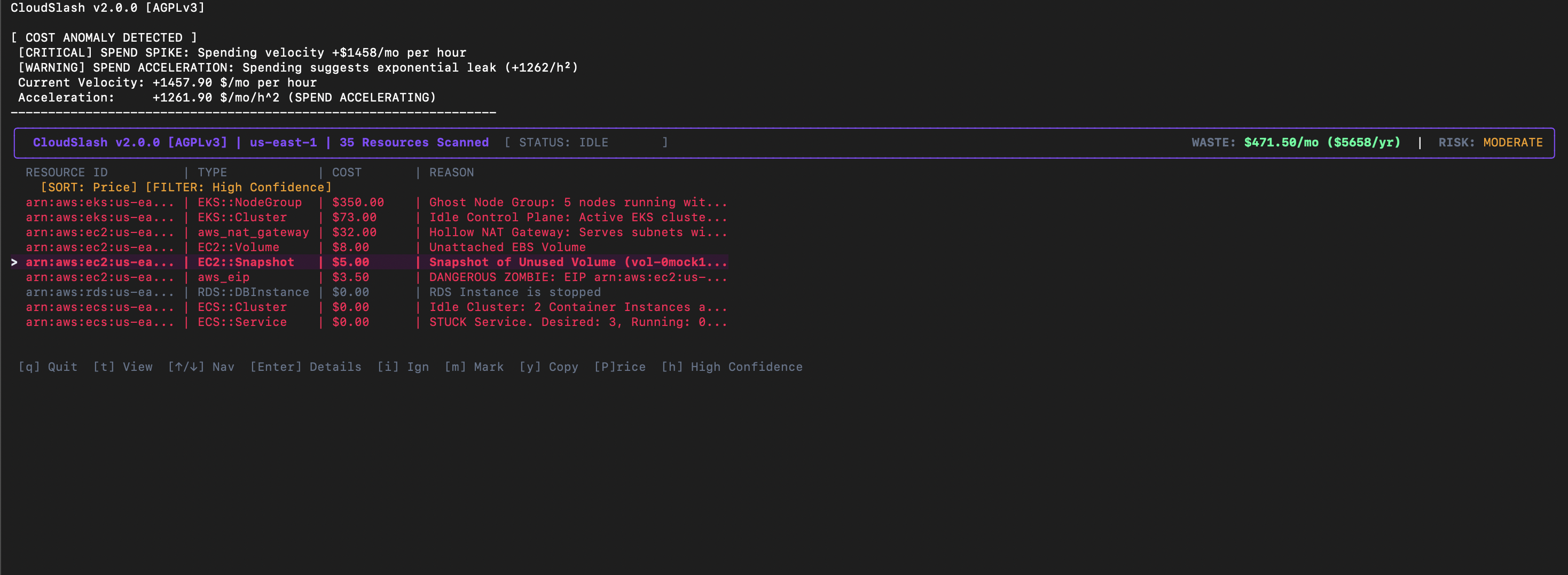
CloudSlash is an autonomous infrastructure optimization platform designed for high-scale, enterprise cloud environments. Unlike passive observability tools that merely report metrics, CloudSlash leverages advanced mathematical modeling, graph topology analysis, and Abstract Syntax Tree (AST) parsing to actively solve resource inefficiency problems at their source.
It functions as a forensic auditor and autonomous agent, correlating disparate data sources—CloudWatch metrics, network traffic logs, infrastructure-as-code (IaC) definitions, and version control history—to identify, attribute, and remediate waste with mathematical certainty.
Installation
Homebrew (macOS/Linux)
brew tap DrSkyle/tap
brew install cloudslash
Go Install
go install github.com/DrSkyle/cloudslash/v2/cmd/cloudslash-cli@latest
From Source
git clone https://github.com/DrSkyle/CloudSlash.git
cd CloudSlash
make build
Quick Start
# Automated Install (Legacy)
curl -sL https://raw.githubusercontent.com/DrSkyle/CloudSlash/main/scripts/install.sh | bash
Prerequisites
- AWS CLI v2: Required for executing generated remediation scripts (
safe_cleanup.sh). CloudSlash will warn you if it's missing. - Terraform: Required for state analysis features.
Windows Users
CloudSlash requires Linux primitives (Bash, SSH, Terraform). Native Windows (PowerShell/CMD) is not supported.
How to run on Windows:
- Install WSL2:
wsl --install - Open Ubuntu/Debian terminal.
- Run the Linux installer inside WSL.
Executive Summary
Modern cloud environments suffer from "Resource Sprawl"—ghost assets that incur significant financial cost but deliver zero business value. Traditional tools (CloudHealth, Vantage, Trusted Advisor) provide visibility but lack actuation. They tell you that you are wasting money, but rarely tell you why, who caused it, or how to fix it safely.
CloudSlash bridges this gap by combining Linear Programming (for fleet optimization) with Code Provenance (for attribution). It delivers a closed-loop system that:
- Detects waste via graph topology analysis.
- Attributes ownership via git blame and Terraform AST parsing.
- Remediates safely via the "Lazarus Protocol" (Snapshot -> Stop -> Detach).
Impact: Organizations utilizing CloudSlash typically see a 15-25% reduction in EC2/EBS spend within the first execution cycle.
Core Architecture
CloudSlash is engineered around four distinct intelligence engines:
---
config:
  theme: dark
---
graph LR
    classDef external fill:#1E293B,color:#fff,stroke:#334155,stroke-width:1px,stroke-dasharray: 5 5;
    classDef ingestion fill:#0F172A,color:#38BDF8,stroke:#38BDF8,stroke-width:2px;
    classDef kernel fill:#1E1B4B,color:#818CF8,stroke:#6366F1,stroke-width:2px;
    classDef graphmem fill:#111827,color:#F9FAFB,stroke:#374151,stroke-width:1px;
    classDef policy fill:#312E81,color:#C7D2FE,stroke:#4F46E5,stroke-width:2px;
    classDef logic fill:#064E3B,color:#34D399,stroke:#059669,stroke-width:2px;
    classDef risk fill:#450A0A,color:#FCA5A5,stroke:#EF4444,stroke-width:2px;
    classDef lazarus fill:#4C1D95,color:#DDD6FE,stroke:#8B5CF6,stroke-width:2px;
    classDef output fill:#171717,color:#A3A3A3,stroke:#525252,stroke-width:2px;

    subgraph SOURCES ["DATA SOURCES"]
        direction TB
        AWS[("AWS Cloud API")]:::external
        TF[("Terraform State")]:::external
        Prom[("Prometheus/Metrics")]:::external
        Git[("Git History")]:::external
    end

    subgraph INGEST ["PARALLEL INGESTION LAYER"]
        direction TB
        Swarm["Resource Scrapers (Swarm)"]:::ingestion
        TagParser["Tag Normalizer"]:::ingestion
    end

    subgraph ENGINE ["OPTIMIZATION KERNEL"]
        direction LR

        subgraph GRAPH_DB ["DEPENDENCY GRAPH (DAG)"]
            direction TB
            NodeEC2((Compute Node)):::graphmem
            NodeVol((Storage Node)):::graphmem
            NodeNet((Network Node)):::graphmem
            NodeIAM((Identity Node)):::graphmem
            Edge1(AttachedTo):::graphmem
            Edge2(SecuredBy):::graphmem

            NodeEC2 --> Edge1 --> Edge2 --> NodeNet
            NodeVol --> Edge1
        end

        CEL["CEL Policy Engine"]:::policy
        MILP["MILP Cost Solver"]:::policy
    end

    subgraph ANALYSIS ["HEURISTIC ANALYSIS SUITE"]
        direction TB
        subgraph STORAGE_CHECKS
            H_Vol["Unattached EBS"]:::logic
            H_Snap["Stale Snapshots"]:::logic
        end
        subgraph COMPUTE_CHECKS
            H_Idle["Idle Utilization"]:::logic
            H_Zombie["Zombie Instances"]:::logic
        end
        subgraph CONTAINER_CHECKS
            H_EKS["Ghost NodeGroups"]:::logic
            H_ECS["Empty Clusters"]:::logic
        end
        Drift["TF State Drift"]:::risk
    end

    subgraph SAFETY ["LAZARUS PROTOCOL"]
        Tombstone[("State Preservation DB")]:::lazarus
        SnapShot["Snapshot Manager"]:::lazarus
        UndoGen["Correctness Verifier"]:::lazarus
    end

    subgraph OUTPUT ["ACTUATION & REPORTING"]
        direction TB
        Dashboard["Audit Dashboard"]:::output
        Script["Remediation Script"]:::output
        CI["CI/CD Decorator"]:::output
        Tele["OpenTelemetry Traces"]:::output
    end
    AWS ==> Swarm
    TF ==> Swarm
    Prom ==> Swarm
    Git ==> Swarm
    Swarm ==> TagParser
    TagParser ==> GRAPH_DB

    GRAPH_DB <--> CEL
    GRAPH_DB --> MILP
    NodeVol -.-> H_Vol
    NodeEC2 -.-> H_Idle
    NodeEC2 -.-> H_Zombie
    NodeNet -.-> H_EKS
    H_Vol --> Drift
    H_Zombie --> Drift
    H_EKS --> Drift
    Drift ==> Tombstone
    Tombstone --> SnapShot
    Tombstone --> UndoGen
    UndoGen ==> Script
    Drift -.-> Dashboard
    Drift -.-> CI
    ENGINE -.-> Tele
1. The Autonomy Engine (Optimization)
Instead of simple "right-sizing" rules, the Autonomy Engine treats infrastructure as a Mixed-Integer Linear Programming (MILP) problem.
- The Solver: Calculates the mathematically perfect mix of EC2 instances to satisfy CPU/RAM requirements while minimizing cost.
- Tetris Engine: Uses 2D Bin Packing (Best Fit Decreasing algorithm) to visualize how workloads are fragmented across Kubernetes clusters, identifying "slack" capacity that metrics miss.
- Bayesian Risk Model: Tracks Spot Instance interruptions per-AZ, assigning a verifiable "Reliability Score" to every potential instance type to balance cost vs. stability.
2. The Provenance Engine (Attribution)
Links every runtime resource ID (e.g., i-012345) back to its Genetic Code.
- IaC Correlation: Uses a full HCL v2 Abstract Syntax Tree (AST) parser (not brittle Regex) to mathematically locate the exact resource block definition.
- Git Blame Integration: Queries the
.gitdirectory to identify the specific commit hash, date, and author who introduced the resource. - Technical Debt Attribution: Automatically flags resources created >1 year ago as "Fossilized Code," prompting review for deprecation.
3. The Accountability Engine (Identity)
Maps abstract IAM ARNs to tangible corporate identities.
- Identity Resolution: Correlates
arn:aws:iam::123:user/jdoe->jdoe@company.com->SlackID: U12345. - Direct Notification: Sends "Waste Reports" directly to the responsible engineer via Slack, bypassing generic "FinOps" channels to ensure action is taken by the context owner.
4. The Performance Architecture (Internals)
CloudSlash is built for speed and scale. We don't just "query APIs"; we model the entire state.
Kubernetes: Persistent Event Streams
Legacy Approach (Iterative List):
- Mechanism: Sequential
List()API calls with pagination. - Latency: High (Network RTT limited).
- Impact: Generates significant load on the API Server and etcd, causing potential 429 throttling on large clusters.
Current Architecture (Shared Informers & Reflectors):
- Mechanism: Uses the
Reflectorpattern to establish a persistentWATCHstream. The client maintains a fully synchronized, local in-memory cache of the cluster state. - Performance: Resource lookups are O(1) (local memory access) with zero network latency during analysis.
- Efficiency: Drastically reduces Control Plane pressure by consuming only delta events after the initial sync.
- Trade-off: Higher client-side memory footprint to store the full object graph (Trade RAM for Speed).
Graph Ingestion: The Actor Model
We migrated from a mutex-heavy design to a Linear Pipeline Actor Model, orchestrated by a precise Scanner Registry ensuring OCP (Open-Closed Principle) compliance.
- Scanner Registry: Decouples detection logic from the core engine, seamlessly orchestrating thousands of concurrent checks.
- Scanning Swarm: 500+ parallel goroutines fetch data.
- The Actor: A single, high-speed goroutine ingests all nodes/edges via a buffered channel, eliminating lock contention entirely.
- Result: Graph build times reduced by 90% on large accounts.
Optimization: Disjoint Set Union (DSU)
We replaced naive BFS connectivity checks with a Disjoint Set Union (DSU) data structure. This reduces graph connectivity queries (e.g., "Is this ENI connected to a running Instance?") from O(V+E) to near O(1) (inverse Ackermann function), enabling sub-second analysis of 100k+ node graphs.
Transactional Remediation (Write-Ahead Log)
Remediation is no longer a simple script generation. The engine now produces a Transaction Manifest (WAL). Every proposed change includes:
- Pre-Conditions: (e.g., "Volume must be in 'available' state").
- Post-Conditions: (e.g., "Volume ID must not exist").
- Rollback Actions: Explicit instructions to reverse the specific operation if a failure occurs mid-flight.
5. The Lazarus Protocol (Zero-Trust Remediation)
CloudSlash moves beyond "Delete & Pray" to "Freeze & Resurrect". We assume every deletion might be a mistake.
Phase 1: The Tombstone Engine
Before touching any resource, we serialize its "Soul" (Configuration, Tags, Relationships, Attachments) into a JSON artifact. This utilizes a Pluggable Storage Backend:
- Local: Default. Writes to
.cloudslash/tombstones/for rapid local feedback loops. - S3 Remote: Configurable via
CLOUDSLASH_S3_BUCKET(for tombstones) or by setting--output-dir s3://...(for reports). Writes to S3 for persistent state in ephemeral CI/CD runners (GitHub Actions/K8s Jobs), ensuring "Undo" capabilities survive container termination.
Phase 2: Purgatory Mode (The Litigation Shield)
Default remediation is now non-destructive.
- Freeze: Resources are tagged with
CloudSlash:Status=Purgatoryand a 30-day specific expiry. - Stop: Instances and databases are stopped.
- Detach: Volumes are safely detached, preserving data integrity.
- Guarantee: "We didn't delete your data. We just turned it off."
Phase 3: The Reanimator (Verified by "Tombstone Recovery" Tests)
A single command restores service to 100% health. This mechanism is mathematically verified by our Lazarus Protocol E2E Test Suite, which simulates a full "Provision -> Purge -> Resurrect" lifecycle in a clean-room environment for every build.
- Soft Resurrection: Starts instances and Re-Attaches volumes to their exact original device paths using Tombstone data.
- Hard Resurrection: If a resource is missing, it automatically hunts for the latest Snapshot, creates a new volume, waits for availability (using a robust Watchdog Loop), and rebuilds the infrastructure.
- Terraform Synchronization: The script automatically heals Terraform state (
state rm->import), preventing "Drift Detected" errors or zombie state after recovery.
Phase 4: Enterprise Safety & Compliance
- Audit Trail: Used Tombstones are archived to
.cloudslash/history/restored/for permanent forensic logs. - Idempotent Wrappers: Scripts detect Terraform State Locks and abort to prevent corruption, distinguishing between harmless "Not Found" errors and critical blockers.
6. Defensive Testing Architecture ("Ironclad QA")
CloudSlash ships with a rigorous End-to-End (E2E) Verification Framework designed for mission-critical infrastructure tools.
-
The "Silent Runner" Protocol (CI/CD Safety): Prior to execution, the binary enters a simulation mode that verifies resilience against hostile environments (e.g., missing credentials, network partitions). If the environment is unsafe, CloudSlash degrades gracefully without panicking, ensuring your CI pipeline never breaks due to tool failure.
-
LocalStack Simulation Harness: Our "Rich & Broke" and "Lazarus" test suites spin up ephemeral, offline AWS environments (via Docker/LocalStack) to validate destructive logic. This ensures that 100% of remediation code is tested without ever touching a real production AWS account.
View Heuristics Catalog (Deep Dive)
Compute & Serverless
| Detection | Logic | Remediation |
|---|---|---|
| Lambda Code Stagnation | 0 Invocations (90d) AND Last Modified > 90d. | Delete function or archive code to S3. |
| ECS Idle Cluster | EC2 instances running for >1h but Cluster has 0 Tasks/Services. | Scale ASG to 0 or delete Cluster. |
| ECS Crash Loop | Service Desired Count > 0 but Running Count == 0. | Check Task Definitions / ECR Image pulls. |
Storage & Database
| Detection | Logic | Remediation |
|---|---|---|
| Zombie EBS | Volume state is available (unattached) for > 14 days. | Snapshot (optional) then Delete. |
| Legacy EBS (gp2) | Volume is gp2. gp3 is 20% cheaper and decoupled. | Modify Volume to gp3 (No downtime). |
| Fossil Snapshots | RDS/EBS Snapshot > 90 days old, not attached to AMI. | Delete old snapshots. |
| RDS Idle | 0 Connections (7d) AND CPU < 5%. | Stop instance or take final snapshot & delete. |
Network & Security
| Detection | Logic | Remediation |
|---|---|---|
| Hollow NAT Gateway | Traffic < 1GB (30d) OR Connected Subnets have 0 Running Instances. | Delete NAT Gateway. |
| Dangling EIP | EIP unattached but matches an A-Record in Route53. | URGENT: Update DNS first, then release EIP. |
| Orphaned ELB | Load Balancer has 0 registered/healthy targets. | Delete ELB. |
Containers
| Detection | Logic | Remediation |
|---|---|---|
| ECR Lifecycle Missing | Repo has images > 90d old but no expiration policy. | Add Lifecycle Policy to expire untagged images. |
| Log Retention Missing | CloudWatch Group set to "Never Expire" (>1GB size). | Set retention to 30d/90d. |
Enterprise Capabilities
1. Governance as Code (Policy Engine)
CloudSlash embeds a Type-Safe Common Expression Language (CEL) engine, enabling custom compliance policies that execute continuously during scans. We enforce strict compile-time type checking against Go structs, preventing runtime errors due to policy typos before any API call is made. These rules operate on the live dependency graph, utilizing an Inverted Index for O(1) performance.
Architecture Note: CloudSlash includes powerful Built-in Heuristics (detailed in the Deep Dive below) for complex algorithmic analysis (e.g., detecting hollow NAT gateways or zombie clusters). The Policy Engine complements this by enabling you to define specific Governance Rules (e.g., "Ban gp2 volumes") without modifying the core codebase.
Example rules.yaml:
rules:
  - id: "enforce_gp3"
    condition: "kind == 'AWS::EC2::Volume' && props.VolumeType == 'gp2'"
    action: "violation"
  - id: "detect_unattached_eip"
    condition: "kind == 'AWS::EC2::EIP' && !has(props.InstanceId)"
    action: "warn"
Flexible Policy Execution:
Operators can maintain multiple distinct policy files (e.g., audit.yaml, strict-security.yaml) and apply them selectively at runtime. This enables different compliance standards for Dev/Test vs. Production environments.
# Execute a specific security policy and output structured JSON for SIEM ingestion
cloudslash scan --rules security-audit-v2.yaml --json > audit_artifact.json
2. Heterogeneous Fleet Optimization
Beyond standard bin-packing, the Heterogeneous Solver implements a sophisticated "Workhorse + Dust" algorithm for Kubernetes rightsizing:
- Workhorse Identification: Mathematically selects the most cost-efficient instance family for the bulk of the cluster's workload.
- Dust Aggregation: Identifies "dust" (small, fragmented pods) that would otherwise force an expensive scale-up.
- Mixed-Instance Packing: Provisions a specific, smaller instance type solely for the dust, creating a mixed fleet that achieves >95% utilization.
3. Enterprise Hardening & Security
- Formal IAM Verification: Uses
iam:SimulatePrincipalPolicy(Control Plane simulation) instead of brittle string matching to verify effective permissions. Catches "Admin" roles hidden behind innocuous names. - Terraform State Locking: Automatically detects
terraform.tfstate.lock.infoand strictly aborts operations to prevent race conditions in CI/CD pipelines. - Input Sanitization: All generated remediation scripts (
safe_cleanup.sh) undergo rigorous Regex validation to prevent shell injection attacks from malicious upstream resource IDs. - Sensitive Data Redaction: Automatic middleware scrubs secrets (API keys, tokens, account IDs) from logs before they leave memory, preventing compliance leaks (SOC2/PCI) in downstream aggregators.
- Strict Sovereignty Checks: S3 Scanner explicitly verifies regional location (
HeadBucket) instead of guessing defaults, ensuring strict adherence to GDPR/Data Residency boundaries. - Structured Observability: Full support for JSON structured logging via the
--jsonflag. All internal components (Pipeline, Heuristics, Remediation Generator) now emit strictly typed JSON events, guaranteeing zero log breakage in Datadog/Splunk pipelines.
4. Observability Integration (OpenTelemetry)
Built on the "Instrument Once, Export Anywhere" philosophy.
-
Privacy-First (Mode A - Default): CloudSlash generates telemetry internally but writes it to
/dev/nullor stdout. Zero network traffic. Your insights stay on your machine. -
Enterprise Integration (Mode B): Configure the endpoint via CLI flag, environment variable, or
cloudslash.yaml. Streams live Traces and Metrics to your internal backend via OTLP/HTTP.# Option 1: CLI Flag cloudslash scan --otel-endpoint "http://localhost:4318" # Option 2: Config File (Recommended) # ~/.cloudslash/cloudslash.yaml otel_endpoint: "http://jaeger:4318"
Golden Signals Instrumented:
- Crash Handler: Panics are caught as "CriticalPanic" spans with full stack traces (no local files written).
- Scanner Swarm: Every worker job is traced with attribution (
provider,region,profile) to identify throttling or latency. - Policy Engine: Violations emit high-cardinality metrics (
policy_violations_total) tagged by Rule ID.
Competitive Analysis
CloudSlash stands apart by focusing on root cause resolution rather than just reporting.
| Feature | CloudSlash | AWS Trusted Advisor | Cloud Custodian | Vantage / CloudHealth |
|---|---|---|---|---|
| Primary Goal | Automated Remediation | Basic Visibility | Policy Enforcement | Financial Reporting |
| Logic Engine | Graph Topology (DAG) | Simple Metrics | Stateless Rules | Aggregated Billing Data |
| Remediation | Interactive TUI & Scripts | None (Manual) | Lambda (Black Box) | None (Manual) |
| Safety | Soft-Delete / Snapshot first | N/A | Hard Delete | N/A |
| Attribution | Git Commit & Author | None | Tag-based | Tag-based |
| IaC Awareness | Terraform AST Parsing | None | None | None |
| Dependency Mapping | Full Graph Visualization | None | None | None |
| Cost | OSS / Self-Hosted | Enterprise Support plan | OSS | $$ SaaS Subscription |
Programmatic SDK Usage
CloudSlash has been re-architected as a modular Go library (pkg/engine). The CLI/TUI is simply a consumer of this core SDK. You can import the engine directly to embed CloudSlash's unique waste detection logic into your own internal tools, IDPs (Backstage), or CI pipelines.
package main

import (
    "context"
    "fmt"
    "log/slog"

    "github.com/DrSkyle/cloudslash/pkg/engine"
)

func main() {
    // 1. Configure the Analysis Engine
    config := engine.Config{
        Region:           "us-east-1",
        Headless:         true,  // Disable TUI
        JsonLogs:         true,  // Structured logging
        DisableCWMetrics: false, // Enable full CloudWatch lookups
    }

    // 2. Execute the Scan (returns the live Dependency Graph)
    success, graph, _, err := engine.Run(context.Background(), config)
    if err != nil {
        slog.Error("Scan failed", "error", err)
        return
    }

    if success {
        // 3. Programmatically access detected waste
        fmt.Printf("Analysis Complete. Found %d total nodes.\n", len(graph.Nodes))
        for _, node := range graph.Nodes {
            if node.IsWaste {
                fmt.Printf(" [WASTE] %s ($%.2f/mo) - %s\n", node.ID, node.Cost, node.WasteReason)
            }
        }
    }
}
Permissions & Security
Data Protection (Local State)
CloudSlash maintains a local history ledger at ~/.cloudslash/ledger.jsonl to calculate cost velocity and burn rates.
[!WARNING] Sensitivity Warning: While this file does not contain AWS credentials or secrets, it stores metadata about your infrastructure (resource IDs, types, and cost data).
Recommendation: Ensure your workstation uses Full Disk Encryption (FileVault/BitLocker) and set restrictive file permissions:
chmod 600 ~/.cloudslash/ledger.jsonl
Least Privilege Setup
Don't want to give CloudSlash full admin? No problem. Run this to generate the exact minimal JSON policy needed:
cloudslash permissions > policy.json
Attach that policy to your IAM Role. It's read-only and scoped tightly.
Configuration
The tool utilizes the standard AWS Credential Chain (~/.aws/credentials or ENV vars). Ensure your environment is configured for the target account:
export AWS_PROFILE=production
export AWS_REGION=us-east-1
# Optional: Target a custom endpoint (compatible with LocalStack or Private Cloud)
export AWS_ENDPOINT_URL="http://localhost:4566"
For persistent configuration, create a cloudslash.yaml in your root directory (~/.cloudslash/cloudslash.yaml or current dir).
# ~/.cloudslash/cloudslash.yaml
region: "us-east-1"
json_logs: true # Machine-readable logs
rules_file: "my_rules.yaml" # Path to policy rules
max_workers: 20 # Speed up scans
CloudSlash respects precedence: CLI Flags > ENV Vars > Config File > Defaults.
Resource Exclusion & Tagging Policy
CloudSlash respects specific resource tags to allow for granular control over waste detection. Organizations can define retention policies or explicitly exclude resources from analysis using the cloudslash:ignore tag key.
Exclusion Logic
To exclude a resource from the waste report, apply the tag cloudslash:ignore with one of the following value formats:
- Boolean: Set to
trueto permanently exclude the resource from all analysis. - Expiration Date: Set a date in
YYYY-MM-DDformat (e.g.,2027-01-01). The resource will be ignored until this date is reached. - Retention Period: Set a duration with a
d(days) orh(hours) suffix (e.g.,120d). The resource will be ignored if its age is less than the specified duration.
Application to AMIs
The logic described above applies to all supported resources, including Amazon Machine Images (AMIs). For example, to enforce a custom retention policy for a specific backup AMI, apply the tag cloudslash:ignore with value 180d. This overrides the default heuristic and ensures the image is only flagged as waste after 180 days have elapsed.
Effect
Resources matching the exclusion criteria are removed from the interactive TUI, the JSON output, and the Executive Dashboard. They will not be counted towards waste totals or financial deficiency metrics.
Slack Integration (Real-Time Alerts)
CloudSlash can notify your team directly when cost velocity anomalies are detected or when a scan completes.
Features:
- Scan Summary: Rich Block Kit summary of total waste and potential savings.
- Velocity Alerts: Real-time notifications if spend acceleration exceeds safe thresholds.
Setup:
-
Create a Webhook:
- Go to Slack API: Incoming Webhooks.
- Create a new App -> "Incoming Webhooks" -> "Activate Incoming Webhooks".
- "Add New Webhook to Workspace" -> Select Channel -> Copy the URL.
-
Configure CloudSlash:
Option A: Environment Variable (Recommended for CI/CD)
export CLOUDSLASH_SLACK_WEBHOOK="https://hooks.slack.com/services/T000.../B000.../XXXX"Option B: Config File (
~/.cloudslash/cloudslash.yaml)slack_webhook: "https://hooks.slack.com/services/T000.../B000.../XXXX"Option C: CLI Flag
cloudslash scan --slack-webhook "https://hooks.slack.com/..."
Usage Guide
1. Analysis Scan
The primary entry point. Orchestrates the graph resolution and waste detection.
cloudslash scan [flags]
Flags:
--headless: Disables the TUI. Recommended for CI/CD pipelines.--region <str>: AWS Region (e.g.,us-east-1).--json: Enable structured JSON logging for observability tools (Datadog, Splunk).--rules <file>: Load custom policy rules (CEL) to flag specific violations.--no-metrics: Skip CloudWatch API calls (faster, but less accurate).--otel-endpoint: Push traces to OpenTelemetry collector (e.g.http://jaeger:4318).--history-url: Sync cost history with S3 bucket (e.g.s3://bucket/key).
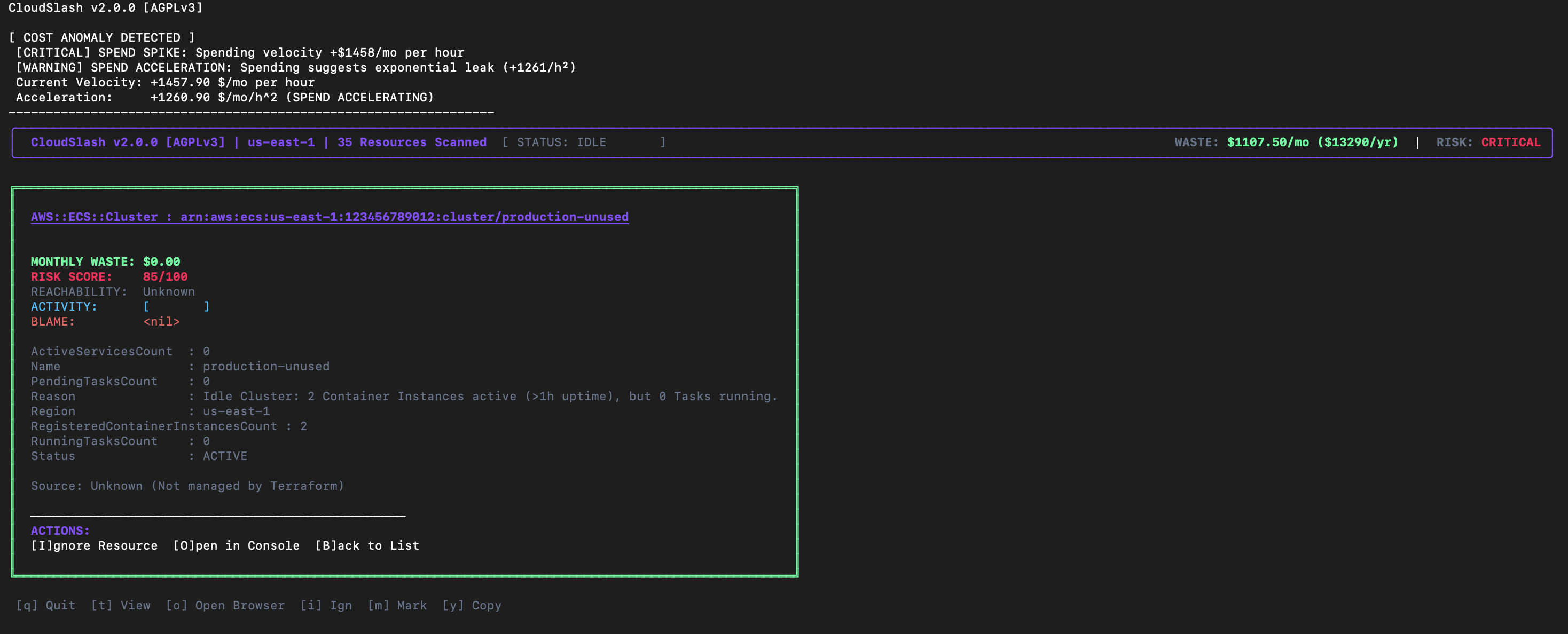
Interactive TUI Controls:
h/l: Navigate hierarchy.t: Toggle Topology Visualization.ENTER/SPACE: View detailed resource inspection (Cost, Tags, Provenance).i(Ignore): Hide resource from view and add to.ignore.yaml(No audit log).m(Mark): Soft-delete marker. Hides resource, adds to.ignore.yaml, and writes aSOFT_DELETEentry to the local audit log for traceability.
2. Remediation Console
The interactive cleanup interface. Reads the graph and prompts for safe deletion.
cloudslash cleanup
Safety: Generates
safe_cleanup.shandundo_cleanup.shartifacts. Does not delete without explicit confirmation.
3. Permissions Generator (Least Privilege)
Generate the exact IAM policy required for CloudSlash to run.
cloudslash permissions > cloudslash-policy.json
4. Forensic Export
Run a headless scan and export all artifacts without launching the TUI.
cloudslash export --output-dir ./artifacts
# Or export directly to S3 (Persistent Storage in Containers)
cloudslash export --output-dir s3://my-audit-bucket/reports/2026-02-01
5. Executive Reporting
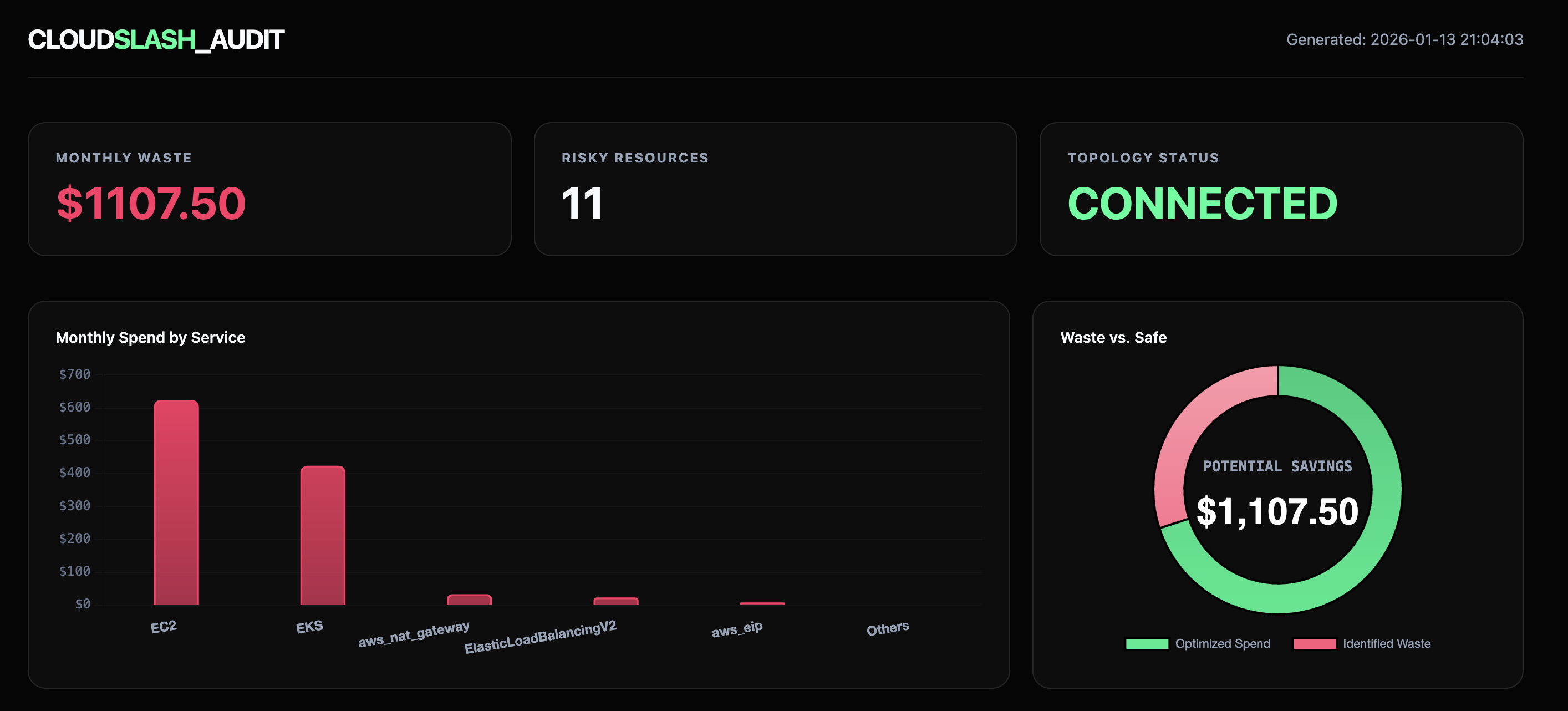
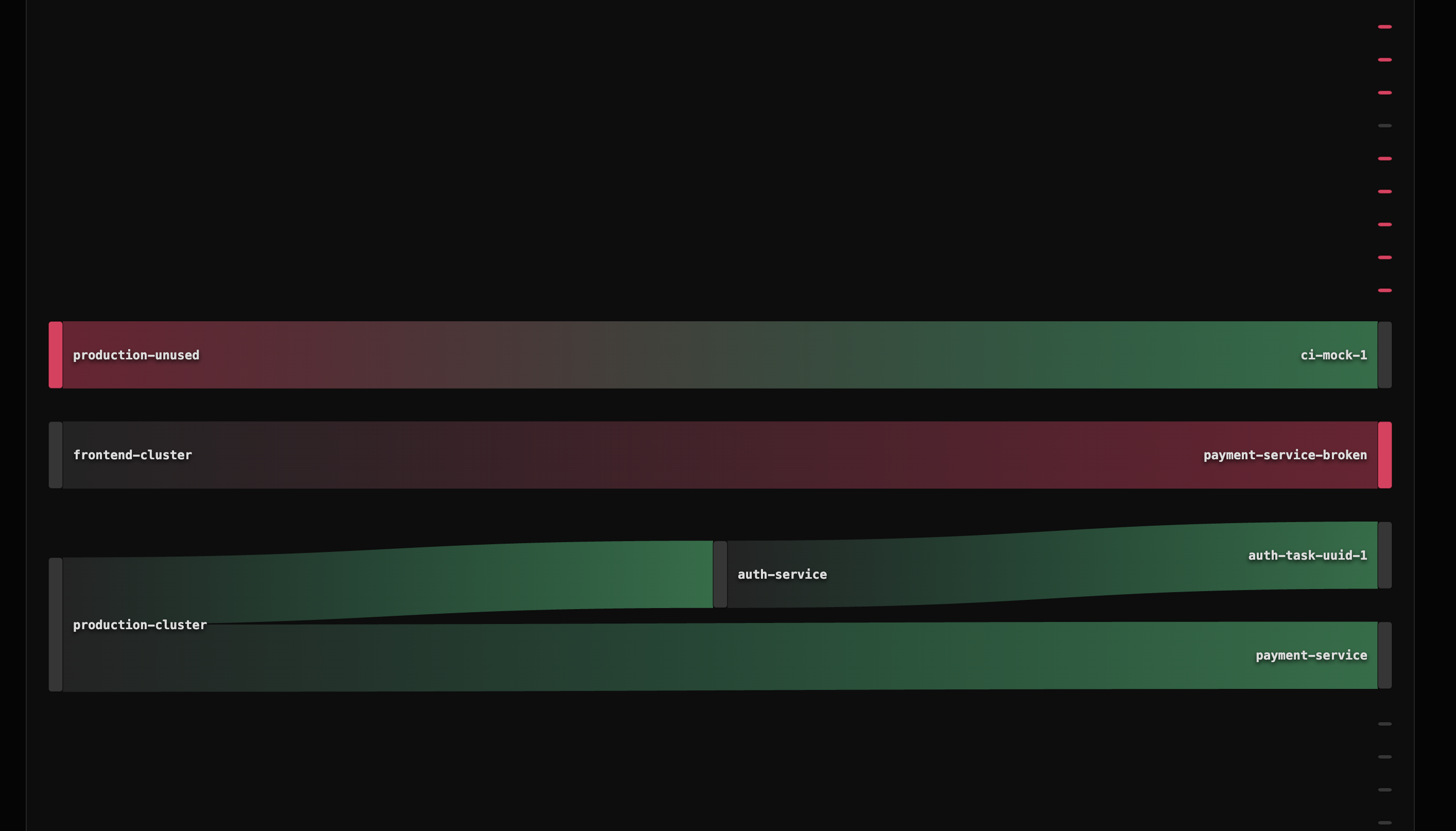
CloudSlash generates a self-contained HTML dashboard for stakeholders, featuring financial projections and Sankey cost flow diagrams.
4. Manifest of Artifacts (Output Reference)
Upon completion of an audit cycle, CloudSlash generates a suite of remediation artifacts within the configured output directory (default: cloudslash-out/). These artifacts serve as the interface for operationalizing the audit findings.
waste_report.json: A machine-readable structural analysis of identified inefficiencies. This file is intended for ingestion by downstream observability platforms or custom automation pipelines.safe_cleanup.sh: The primary remediation executable. This script implements the "Purgatory Protocol," performing non-destructive actions (instance stoppage, volume detachment, snapshot creation) to neutralize cost accumulation while preserving data integrity.fix_terraform.sh: A state reconciliation script designed to remove identified "Zombie Resources" from the Terraform state. Execution of this script prevents state drift errors during subsequent infrastructure modification.undo_cleanup.sh: The recovery executable for the Lazarus Protocol. This script reverses the actions ofsafe_cleanup.sh, restoring resources to their operational state using the preserved metadata.restore.tf: A Terraform configuration file containing generatedimportblocks. This facilitates the re-assimilation of previously deleted or detached resources back into Terraform management.waste.tf&import.sh: Advanced Terraform-native remediation artifacts. These files allow for the importation of unmanaged waste resources into a temporary Terraform state, enabling destruction via standardterraform destroyworkflows rather than direct API calls.
5. Recommended Remediation Workflow (Gold Standard)
For maximum safety and data integrity, we recommend the following execution order when processing audit results:
- Review the Intelligence: Open
dashboard.htmlto visually confirm the graph topology and high-cost centers. - Harmonize State: Run
./cloudslash-out/fix_terraform.shfirst. This ensures your Terraform state is consistent with reality, preventing "Drift Detected" errors during later steps. - Execute Purgatory: Run
./cloudslash-out/safe_cleanup.sh. This stops instances and snapshots volumes without deleting data, immediately stopping the "money burn." - Verify & Wait: Observe the environment for 24-48 hours. If no alarms trigger, the remediation is successful.
- Emergency Rollback: If a service interruption occurs, immediately run
./cloudslash-out/undo_cleanup.shto restore all resources to their exact pre-cleanup state.
Enterprise Support & Licensing
CloudSlash is released under the AGPLv3 license.
- Internal Use: You are free to use CloudSlash internally to audit your own infrastructure.
- Commercial Use: If you modify CloudSlash and provide it as a service or product to external clients, you must open-source your changes.
Commercial Exemption: If your organization requires a commercial license for AGPL compliance (e.g., embedding CloudSlash in proprietary software without releasing source code), exemptions are available.
Contact: drskyle8000@gmail.com
Uninstallation
To remove CloudSlash from your system:
Homebrew Users
brew uninstall cloudslash
brew untap DrSkyle/tap
Manual / Script Users
# 1. Remove binary (choose based on install method)
# If installed via script:
sudo rm /usr/local/bin/cloudslash

# If installed via Go:
rm $(go env GOPATH)/bin/cloudslash-cli

# 2. Remove configuration and state
rm -rf ~/.cloudslash
rm ~/.cloudslash.yaml 2>/dev/null

# 3. Remove local artifacts (from current directory)
rm -rf cloudslash-out/ .cloudslash/
Acknowledgments
CloudSlash v2.0 was developed with a philosophy of "Zero Waste." We acknowledge the open-source community for the robust libraries that make this engine possible.
CloudSlash is a community-supported project by Devi Labs.
Copyright © 2026 DrSkyle.
Contributors

273 commits
Similar repos


Languages
Go
98.8%
Shell
1.2%
Local-first AWS forensic engine. Finds waste via dependency graph analysis and enables safe remediation with Terraform state restoration.
See the codeSee what people are saying
README
CloudSlash
"Infrastructure that heals itself."
CloudSlash is an autonomous infrastructure optimization platform designed for high-scale, enterprise cloud environments. Unlike passive observability tools that merely report metrics, CloudSlash leverages advanced mathematical modeling, graph topology analysis, and Abstract Syntax Tree (AST) parsing to actively solve resource inefficiency problems at their source.
It functions as a forensic auditor and autonomous agent, correlating disparate data sources—CloudWatch metrics, network traffic logs, infrastructure-as-code (IaC) definitions, and version control history—to identify, attribute, and remediate waste with mathematical certainty.
Installation
Homebrew (macOS/Linux)
brew tap DrSkyle/tap
brew install cloudslash
Go Install
go install github.com/DrSkyle/cloudslash/v2/cmd/cloudslash-cli@latest
From Source
git clone https://github.com/DrSkyle/CloudSlash.git
cd CloudSlash
make build
Quick Start
# Automated Install (Legacy)
curl -sL https://raw.githubusercontent.com/DrSkyle/CloudSlash/main/scripts/install.sh | bash
Prerequisites
- AWS CLI v2: Required for executing generated remediation scripts (
safe_cleanup.sh). CloudSlash will warn you if it's missing. - Terraform: Required for state analysis features.
Windows Users
CloudSlash requires Linux primitives (Bash, SSH, Terraform). Native Windows (PowerShell/CMD) is not supported.
How to run on Windows:
- Install WSL2:
wsl --install - Open Ubuntu/Debian terminal.
- Run the Linux installer inside WSL.
Executive Summary
Modern cloud environments suffer from "Resource Sprawl"—ghost assets that incur significant financial cost but deliver zero business value. Traditional tools (CloudHealth, Vantage, Trusted Advisor) provide visibility but lack actuation. They tell you that you are wasting money, but rarely tell you why, who caused it, or how to fix it safely.
CloudSlash bridges this gap by combining Linear Programming (for fleet optimization) with Code Provenance (for attribution). It delivers a closed-loop system that:
- Detects waste via graph topology analysis.
- Attributes ownership via git blame and Terraform AST parsing.
- Remediates safely via the "Lazarus Protocol" (Snapshot -> Stop -> Detach).
Impact: Organizations utilizing CloudSlash typically see a 15-25% reduction in EC2/EBS spend within the first execution cycle.
Core Architecture
CloudSlash is engineered around four distinct intelligence engines:
---
config:
  theme: dark
---
graph LR
    classDef external fill:#1E293B,color:#fff,stroke:#334155,stroke-width:1px,stroke-dasharray: 5 5;
    classDef ingestion fill:#0F172A,color:#38BDF8,stroke:#38BDF8,stroke-width:2px;
    classDef kernel fill:#1E1B4B,color:#818CF8,stroke:#6366F1,stroke-width:2px;
    classDef graphmem fill:#111827,color:#F9FAFB,stroke:#374151,stroke-width:1px;
    classDef policy fill:#312E81,color:#C7D2FE,stroke:#4F46E5,stroke-width:2px;
    classDef logic fill:#064E3B,color:#34D399,stroke:#059669,stroke-width:2px;
    classDef risk fill:#450A0A,color:#FCA5A5,stroke:#EF4444,stroke-width:2px;
    classDef lazarus fill:#4C1D95,color:#DDD6FE,stroke:#8B5CF6,stroke-width:2px;
    classDef output fill:#171717,color:#A3A3A3,stroke:#525252,stroke-width:2px;

    subgraph SOURCES ["DATA SOURCES"]
        direction TB
        AWS[("AWS Cloud API")]:::external
        TF[("Terraform State")]:::external
        Prom[("Prometheus/Metrics")]:::external
        Git[("Git History")]:::external
    end

    subgraph INGEST ["PARALLEL INGESTION LAYER"]
        direction TB
        Swarm["Resource Scrapers (Swarm)"]:::ingestion
        TagParser["Tag Normalizer"]:::ingestion
    end

    subgraph ENGINE ["OPTIMIZATION KERNEL"]
        direction LR

        subgraph GRAPH_DB ["DEPENDENCY GRAPH (DAG)"]
            direction TB
            NodeEC2((Compute Node)):::graphmem
            NodeVol((Storage Node)):::graphmem
            NodeNet((Network Node)):::graphmem
            NodeIAM((Identity Node)):::graphmem
            Edge1(AttachedTo):::graphmem
            Edge2(SecuredBy):::graphmem

            NodeEC2 --> Edge1 --> Edge2 --> NodeNet
            NodeVol --> Edge1
        end

        CEL["CEL Policy Engine"]:::policy
        MILP["MILP Cost Solver"]:::policy
    end

    subgraph ANALYSIS ["HEURISTIC ANALYSIS SUITE"]
        direction TB
        subgraph STORAGE_CHECKS
            H_Vol["Unattached EBS"]:::logic
            H_Snap["Stale Snapshots"]:::logic
        end
        subgraph COMPUTE_CHECKS
            H_Idle["Idle Utilization"]:::logic
            H_Zombie["Zombie Instances"]:::logic
        end
        subgraph CONTAINER_CHECKS
            H_EKS["Ghost NodeGroups"]:::logic
            H_ECS["Empty Clusters"]:::logic
        end
        Drift["TF State Drift"]:::risk
    end

    subgraph SAFETY ["LAZARUS PROTOCOL"]
        Tombstone[("State Preservation DB")]:::lazarus
        SnapShot["Snapshot Manager"]:::lazarus
        UndoGen["Correctness Verifier"]:::lazarus
    end

    subgraph OUTPUT ["ACTUATION & REPORTING"]
        direction TB
        Dashboard["Audit Dashboard"]:::output
        Script["Remediation Script"]:::output
        CI["CI/CD Decorator"]:::output
        Tele["OpenTelemetry Traces"]:::output
    end
    AWS ==> Swarm
    TF ==> Swarm
    Prom ==> Swarm
    Git ==> Swarm
    Swarm ==> TagParser
    TagParser ==> GRAPH_DB

    GRAPH_DB <--> CEL
    GRAPH_DB --> MILP
    NodeVol -.-> H_Vol
    NodeEC2 -.-> H_Idle
    NodeEC2 -.-> H_Zombie
    NodeNet -.-> H_EKS
    H_Vol --> Drift
    H_Zombie --> Drift
    H_EKS --> Drift
    Drift ==> Tombstone
    Tombstone --> SnapShot
    Tombstone --> UndoGen
    UndoGen ==> Script
    Drift -.-> Dashboard
    Drift -.-> CI
    ENGINE -.-> Tele
1. The Autonomy Engine (Optimization)
Instead of simple "right-sizing" rules, the Autonomy Engine treats infrastructure as a Mixed-Integer Linear Programming (MILP) problem.
- The Solver: Calculates the mathematically perfect mix of EC2 instances to satisfy CPU/RAM requirements while minimizing cost.
- Tetris Engine: Uses 2D Bin Packing (Best Fit Decreasing algorithm) to visualize how workloads are fragmented across Kubernetes clusters, identifying "slack" capacity that metrics miss.
- Bayesian Risk Model: Tracks Spot Instance interruptions per-AZ, assigning a verifiable "Reliability Score" to every potential instance type to balance cost vs. stability.
2. The Provenance Engine (Attribution)
Links every runtime resource ID (e.g., i-012345) back to its Genetic Code.
- IaC Correlation: Uses a full HCL v2 Abstract Syntax Tree (AST) parser (not brittle Regex) to mathematically locate the exact resource block definition.
- Git Blame Integration: Queries the
.gitdirectory to identify the specific commit hash, date, and author who introduced the resource. - Technical Debt Attribution: Automatically flags resources created >1 year ago as "Fossilized Code," prompting review for deprecation.
3. The Accountability Engine (Identity)
Maps abstract IAM ARNs to tangible corporate identities.
- Identity Resolution: Correlates
arn:aws:iam::123:user/jdoe->jdoe@company.com->SlackID: U12345. - Direct Notification: Sends "Waste Reports" directly to the responsible engineer via Slack, bypassing generic "FinOps" channels to ensure action is taken by the context owner.
4. The Performance Architecture (Internals)
CloudSlash is built for speed and scale. We don't just "query APIs"; we model the entire state.
Kubernetes: Persistent Event Streams
Legacy Approach (Iterative List):
- Mechanism: Sequential
List()API calls with pagination. - Latency: High (Network RTT limited).
- Impact: Generates significant load on the API Server and etcd, causing potential 429 throttling on large clusters.
Current Architecture (Shared Informers & Reflectors):
- Mechanism: Uses the
Reflectorpattern to establish a persistentWATCHstream. The client maintains a fully synchronized, local in-memory cache of the cluster state. - Performance: Resource lookups are O(1) (local memory access) with zero network latency during analysis.
- Efficiency: Drastically reduces Control Plane pressure by consuming only delta events after the initial sync.
- Trade-off: Higher client-side memory footprint to store the full object graph (Trade RAM for Speed).
Graph Ingestion: The Actor Model
We migrated from a mutex-heavy design to a Linear Pipeline Actor Model, orchestrated by a precise Scanner Registry ensuring OCP (Open-Closed Principle) compliance.
- Scanner Registry: Decouples detection logic from the core engine, seamlessly orchestrating thousands of concurrent checks.
- Scanning Swarm: 500+ parallel goroutines fetch data.
- The Actor: A single, high-speed goroutine ingests all nodes/edges via a buffered channel, eliminating lock contention entirely.
- Result: Graph build times reduced by 90% on large accounts.
Optimization: Disjoint Set Union (DSU)
We replaced naive BFS connectivity checks with a Disjoint Set Union (DSU) data structure. This reduces graph connectivity queries (e.g., "Is this ENI connected to a running Instance?") from O(V+E) to near O(1) (inverse Ackermann function), enabling sub-second analysis of 100k+ node graphs.
Transactional Remediation (Write-Ahead Log)
Remediation is no longer a simple script generation. The engine now produces a Transaction Manifest (WAL). Every proposed change includes:
- Pre-Conditions: (e.g., "Volume must be in 'available' state").
- Post-Conditions: (e.g., "Volume ID must not exist").
- Rollback Actions: Explicit instructions to reverse the specific operation if a failure occurs mid-flight.
5. The Lazarus Protocol (Zero-Trust Remediation)
CloudSlash moves beyond "Delete & Pray" to "Freeze & Resurrect". We assume every deletion might be a mistake.
Phase 1: The Tombstone Engine
Before touching any resource, we serialize its "Soul" (Configuration, Tags, Relationships, Attachments) into a JSON artifact. This utilizes a Pluggable Storage Backend:
- Local: Default. Writes to
.cloudslash/tombstones/for rapid local feedback loops. - S3 Remote: Configurable via
CLOUDSLASH_S3_BUCKET(for tombstones) or by setting--output-dir s3://...(for reports). Writes to S3 for persistent state in ephemeral CI/CD runners (GitHub Actions/K8s Jobs), ensuring "Undo" capabilities survive container termination.
Phase 2: Purgatory Mode (The Litigation Shield)
Default remediation is now non-destructive.
- Freeze: Resources are tagged with
CloudSlash:Status=Purgatoryand a 30-day specific expiry. - Stop: Instances and databases are stopped.
- Detach: Volumes are safely detached, preserving data integrity.
- Guarantee: "We didn't delete your data. We just turned it off."
Phase 3: The Reanimator (Verified by "Tombstone Recovery" Tests)
A single command restores service to 100% health. This mechanism is mathematically verified by our Lazarus Protocol E2E Test Suite, which simulates a full "Provision -> Purge -> Resurrect" lifecycle in a clean-room environment for every build.
- Soft Resurrection: Starts instances and Re-Attaches volumes to their exact original device paths using Tombstone data.
- Hard Resurrection: If a resource is missing, it automatically hunts for the latest Snapshot, creates a new volume, waits for availability (using a robust Watchdog Loop), and rebuilds the infrastructure.
- Terraform Synchronization: The script automatically heals Terraform state (
state rm->import), preventing "Drift Detected" errors or zombie state after recovery.
Phase 4: Enterprise Safety & Compliance
- Audit Trail: Used Tombstones are archived to
.cloudslash/history/restored/for permanent forensic logs. - Idempotent Wrappers: Scripts detect Terraform State Locks and abort to prevent corruption, distinguishing between harmless "Not Found" errors and critical blockers.
6. Defensive Testing Architecture ("Ironclad QA")
CloudSlash ships with a rigorous End-to-End (E2E) Verification Framework designed for mission-critical infrastructure tools.
-
The "Silent Runner" Protocol (CI/CD Safety): Prior to execution, the binary enters a simulation mode that verifies resilience against hostile environments (e.g., missing credentials, network partitions). If the environment is unsafe, CloudSlash degrades gracefully without panicking, ensuring your CI pipeline never breaks due to tool failure.
-
LocalStack Simulation Harness: Our "Rich & Broke" and "Lazarus" test suites spin up ephemeral, offline AWS environments (via Docker/LocalStack) to validate destructive logic. This ensures that 100% of remediation code is tested without ever touching a real production AWS account.
View Heuristics Catalog (Deep Dive)
Compute & Serverless
| Detection | Logic | Remediation |
|---|---|---|
| Lambda Code Stagnation | 0 Invocations (90d) AND Last Modified > 90d. | Delete function or archive code to S3. |
| ECS Idle Cluster | EC2 instances running for >1h but Cluster has 0 Tasks/Services. | Scale ASG to 0 or delete Cluster. |
| ECS Crash Loop | Service Desired Count > 0 but Running Count == 0. | Check Task Definitions / ECR Image pulls. |
Storage & Database
| Detection | Logic | Remediation |
|---|---|---|
| Zombie EBS | Volume state is available (unattached) for > 14 days. | Snapshot (optional) then Delete. |
| Legacy EBS (gp2) | Volume is gp2. gp3 is 20% cheaper and decoupled. | Modify Volume to gp3 (No downtime). |
| Fossil Snapshots | RDS/EBS Snapshot > 90 days old, not attached to AMI. | Delete old snapshots. |
| RDS Idle | 0 Connections (7d) AND CPU < 5%. | Stop instance or take final snapshot & delete. |
Network & Security
| Detection | Logic | Remediation |
|---|---|---|
| Hollow NAT Gateway | Traffic < 1GB (30d) OR Connected Subnets have 0 Running Instances. | Delete NAT Gateway. |
| Dangling EIP | EIP unattached but matches an A-Record in Route53. | URGENT: Update DNS first, then release EIP. |
| Orphaned ELB | Load Balancer has 0 registered/healthy targets. | Delete ELB. |
Containers
| Detection | Logic | Remediation |
|---|---|---|
| ECR Lifecycle Missing | Repo has images > 90d old but no expiration policy. | Add Lifecycle Policy to expire untagged images. |
| Log Retention Missing | CloudWatch Group set to "Never Expire" (>1GB size). | Set retention to 30d/90d. |
Enterprise Capabilities
1. Governance as Code (Policy Engine)
CloudSlash embeds a Type-Safe Common Expression Language (CEL) engine, enabling custom compliance policies that execute continuously during scans. We enforce strict compile-time type checking against Go structs, preventing runtime errors due to policy typos before any API call is made. These rules operate on the live dependency graph, utilizing an Inverted Index for O(1) performance.
Architecture Note: CloudSlash includes powerful Built-in Heuristics (detailed in the Deep Dive below) for complex algorithmic analysis (e.g., detecting hollow NAT gateways or zombie clusters). The Policy Engine complements this by enabling you to define specific Governance Rules (e.g., "Ban gp2 volumes") without modifying the core codebase.
Example rules.yaml:
rules:
  - id: "enforce_gp3"
    condition: "kind == 'AWS::EC2::Volume' && props.VolumeType == 'gp2'"
    action: "violation"
  - id: "detect_unattached_eip"
    condition: "kind == 'AWS::EC2::EIP' && !has(props.InstanceId)"
    action: "warn"
Flexible Policy Execution:
Operators can maintain multiple distinct policy files (e.g., audit.yaml, strict-security.yaml) and apply them selectively at runtime. This enables different compliance standards for Dev/Test vs. Production environments.
# Execute a specific security policy and output structured JSON for SIEM ingestion
cloudslash scan --rules security-audit-v2.yaml --json > audit_artifact.json
2. Heterogeneous Fleet Optimization
Beyond standard bin-packing, the Heterogeneous Solver implements a sophisticated "Workhorse + Dust" algorithm for Kubernetes rightsizing:
- Workhorse Identification: Mathematically selects the most cost-efficient instance family for the bulk of the cluster's workload.
- Dust Aggregation: Identifies "dust" (small, fragmented pods) that would otherwise force an expensive scale-up.
- Mixed-Instance Packing: Provisions a specific, smaller instance type solely for the dust, creating a mixed fleet that achieves >95% utilization.
3. Enterprise Hardening & Security
- Formal IAM Verification: Uses
iam:SimulatePrincipalPolicy(Control Plane simulation) instead of brittle string matching to verify effective permissions. Catches "Admin" roles hidden behind innocuous names. - Terraform State Locking: Automatically detects
terraform.tfstate.lock.infoand strictly aborts operations to prevent race conditions in CI/CD pipelines. - Input Sanitization: All generated remediation scripts (
safe_cleanup.sh) undergo rigorous Regex validation to prevent shell injection attacks from malicious upstream resource IDs. - Sensitive Data Redaction: Automatic middleware scrubs secrets (API keys, tokens, account IDs) from logs before they leave memory, preventing compliance leaks (SOC2/PCI) in downstream aggregators.
- Strict Sovereignty Checks: S3 Scanner explicitly verifies regional location (
HeadBucket) instead of guessing defaults, ensuring strict adherence to GDPR/Data Residency boundaries. - Structured Observability: Full support for JSON structured logging via the
--jsonflag. All internal components (Pipeline, Heuristics, Remediation Generator) now emit strictly typed JSON events, guaranteeing zero log breakage in Datadog/Splunk pipelines.
4. Observability Integration (OpenTelemetry)
Built on the "Instrument Once, Export Anywhere" philosophy.
-
Privacy-First (Mode A - Default): CloudSlash generates telemetry internally but writes it to
/dev/nullor stdout. Zero network traffic. Your insights stay on your machine. -
Enterprise Integration (Mode B): Configure the endpoint via CLI flag, environment variable, or
cloudslash.yaml. Streams live Traces and Metrics to your internal backend via OTLP/HTTP.# Option 1: CLI Flag cloudslash scan --otel-endpoint "http://localhost:4318" # Option 2: Config File (Recommended) # ~/.cloudslash/cloudslash.yaml otel_endpoint: "http://jaeger:4318"
Golden Signals Instrumented:
- Crash Handler: Panics are caught as "CriticalPanic" spans with full stack traces (no local files written).
- Scanner Swarm: Every worker job is traced with attribution (
provider,region,profile) to identify throttling or latency. - Policy Engine: Violations emit high-cardinality metrics (
policy_violations_total) tagged by Rule ID.
Competitive Analysis
CloudSlash stands apart by focusing on root cause resolution rather than just reporting.
| Feature | CloudSlash | AWS Trusted Advisor | Cloud Custodian | Vantage / CloudHealth |
|---|---|---|---|---|
| Primary Goal | Automated Remediation | Basic Visibility | Policy Enforcement | Financial Reporting |
| Logic Engine | Graph Topology (DAG) | Simple Metrics | Stateless Rules | Aggregated Billing Data |
| Remediation | Interactive TUI & Scripts | None (Manual) | Lambda (Black Box) | None (Manual) |
| Safety | Soft-Delete / Snapshot first | N/A | Hard Delete | N/A |
| Attribution | Git Commit & Author | None | Tag-based | Tag-based |
| IaC Awareness | Terraform AST Parsing | None | None | None |
| Dependency Mapping | Full Graph Visualization | None | None | None |
| Cost | OSS / Self-Hosted | Enterprise Support plan | OSS | $$ SaaS Subscription |
Programmatic SDK Usage
CloudSlash has been re-architected as a modular Go library (pkg/engine). The CLI/TUI is simply a consumer of this core SDK. You can import the engine directly to embed CloudSlash's unique waste detection logic into your own internal tools, IDPs (Backstage), or CI pipelines.
package main

import (
    "context"
    "fmt"
    "log/slog"

    "github.com/DrSkyle/cloudslash/pkg/engine"
)

func main() {
    // 1. Configure the Analysis Engine
    config := engine.Config{
        Region:           "us-east-1",
        Headless:         true,  // Disable TUI
        JsonLogs:         true,  // Structured logging
        DisableCWMetrics: false, // Enable full CloudWatch lookups
    }

    // 2. Execute the Scan (returns the live Dependency Graph)
    success, graph, _, err := engine.Run(context.Background(), config)
    if err != nil {
        slog.Error("Scan failed", "error", err)
        return
    }

    if success {
        // 3. Programmatically access detected waste
        fmt.Printf("Analysis Complete. Found %d total nodes.\n", len(graph.Nodes))
        for _, node := range graph.Nodes {
            if node.IsWaste {
                fmt.Printf(" [WASTE] %s ($%.2f/mo) - %s\n", node.ID, node.Cost, node.WasteReason)
            }
        }
    }
}
Permissions & Security
Data Protection (Local State)
CloudSlash maintains a local history ledger at ~/.cloudslash/ledger.jsonl to calculate cost velocity and burn rates.
[!WARNING] Sensitivity Warning: While this file does not contain AWS credentials or secrets, it stores metadata about your infrastructure (resource IDs, types, and cost data).
Recommendation: Ensure your workstation uses Full Disk Encryption (FileVault/BitLocker) and set restrictive file permissions:
chmod 600 ~/.cloudslash/ledger.jsonl
Least Privilege Setup
Don't want to give CloudSlash full admin? No problem. Run this to generate the exact minimal JSON policy needed:
cloudslash permissions > policy.json
Attach that policy to your IAM Role. It's read-only and scoped tightly.
Configuration
The tool utilizes the standard AWS Credential Chain (~/.aws/credentials or ENV vars). Ensure your environment is configured for the target account:
export AWS_PROFILE=production
export AWS_REGION=us-east-1
# Optional: Target a custom endpoint (compatible with LocalStack or Private Cloud)
export AWS_ENDPOINT_URL="http://localhost:4566"
For persistent configuration, create a cloudslash.yaml in your root directory (~/.cloudslash/cloudslash.yaml or current dir).
# ~/.cloudslash/cloudslash.yaml
region: "us-east-1"
json_logs: true # Machine-readable logs
rules_file: "my_rules.yaml" # Path to policy rules
max_workers: 20 # Speed up scans
CloudSlash respects precedence: CLI Flags > ENV Vars > Config File > Defaults.
Resource Exclusion & Tagging Policy
CloudSlash respects specific resource tags to allow for granular control over waste detection. Organizations can define retention policies or explicitly exclude resources from analysis using the cloudslash:ignore tag key.
Exclusion Logic
To exclude a resource from the waste report, apply the tag cloudslash:ignore with one of the following value formats:
- Boolean: Set to
trueto permanently exclude the resource from all analysis. - Expiration Date: Set a date in
YYYY-MM-DDformat (e.g.,2027-01-01). The resource will be ignored until this date is reached. - Retention Period: Set a duration with a
d(days) orh(hours) suffix (e.g.,120d). The resource will be ignored if its age is less than the specified duration.
Application to AMIs
The logic described above applies to all supported resources, including Amazon Machine Images (AMIs). For example, to enforce a custom retention policy for a specific backup AMI, apply the tag cloudslash:ignore with value 180d. This overrides the default heuristic and ensures the image is only flagged as waste after 180 days have elapsed.
Effect
Resources matching the exclusion criteria are removed from the interactive TUI, the JSON output, and the Executive Dashboard. They will not be counted towards waste totals or financial deficiency metrics.
Slack Integration (Real-Time Alerts)
CloudSlash can notify your team directly when cost velocity anomalies are detected or when a scan completes.
Features:
- Scan Summary: Rich Block Kit summary of total waste and potential savings.
- Velocity Alerts: Real-time notifications if spend acceleration exceeds safe thresholds.
Setup:
-
Create a Webhook:
- Go to Slack API: Incoming Webhooks.
- Create a new App -> "Incoming Webhooks" -> "Activate Incoming Webhooks".
- "Add New Webhook to Workspace" -> Select Channel -> Copy the URL.
-
Configure CloudSlash:
Option A: Environment Variable (Recommended for CI/CD)
export CLOUDSLASH_SLACK_WEBHOOK="https://hooks.slack.com/services/T000.../B000.../XXXX"Option B: Config File (
~/.cloudslash/cloudslash.yaml)slack_webhook: "https://hooks.slack.com/services/T000.../B000.../XXXX"Option C: CLI Flag
cloudslash scan --slack-webhook "https://hooks.slack.com/..."
Usage Guide
1. Analysis Scan
The primary entry point. Orchestrates the graph resolution and waste detection.
cloudslash scan [flags]
Flags:
--headless: Disables the TUI. Recommended for CI/CD pipelines.--region <str>: AWS Region (e.g.,us-east-1).--json: Enable structured JSON logging for observability tools (Datadog, Splunk).--rules <file>: Load custom policy rules (CEL) to flag specific violations.--no-metrics: Skip CloudWatch API calls (faster, but less accurate).--otel-endpoint: Push traces to OpenTelemetry collector (e.g.http://jaeger:4318).--history-url: Sync cost history with S3 bucket (e.g.s3://bucket/key).
Interactive TUI Controls:
h/l: Navigate hierarchy.t: Toggle Topology Visualization.ENTER/SPACE: View detailed resource inspection (Cost, Tags, Provenance).i(Ignore): Hide resource from view and add to.ignore.yaml(No audit log).m(Mark): Soft-delete marker. Hides resource, adds to.ignore.yaml, and writes aSOFT_DELETEentry to the local audit log for traceability.
2. Remediation Console
The interactive cleanup interface. Reads the graph and prompts for safe deletion.
cloudslash cleanup
Safety: Generates
safe_cleanup.shandundo_cleanup.shartifacts. Does not delete without explicit confirmation.
3. Permissions Generator (Least Privilege)
Generate the exact IAM policy required for CloudSlash to run.
cloudslash permissions > cloudslash-policy.json
4. Forensic Export
Run a headless scan and export all artifacts without launching the TUI.
cloudslash export --output-dir ./artifacts
# Or export directly to S3 (Persistent Storage in Containers)
cloudslash export --output-dir s3://my-audit-bucket/reports/2026-02-01
5. Executive Reporting
CloudSlash generates a self-contained HTML dashboard for stakeholders, featuring financial projections and Sankey cost flow diagrams.
4. Manifest of Artifacts (Output Reference)
Upon completion of an audit cycle, CloudSlash generates a suite of remediation artifacts within the configured output directory (default: cloudslash-out/). These artifacts serve as the interface for operationalizing the audit findings.
waste_report.json: A machine-readable structural analysis of identified inefficiencies. This file is intended for ingestion by downstream observability platforms or custom automation pipelines.safe_cleanup.sh: The primary remediation executable. This script implements the "Purgatory Protocol," performing non-destructive actions (instance stoppage, volume detachment, snapshot creation) to neutralize cost accumulation while preserving data integrity.fix_terraform.sh: A state reconciliation script designed to remove identified "Zombie Resources" from the Terraform state. Execution of this script prevents state drift errors during subsequent infrastructure modification.undo_cleanup.sh: The recovery executable for the Lazarus Protocol. This script reverses the actions ofsafe_cleanup.sh, restoring resources to their operational state using the preserved metadata.restore.tf: A Terraform configuration file containing generatedimportblocks. This facilitates the re-assimilation of previously deleted or detached resources back into Terraform management.waste.tf&import.sh: Advanced Terraform-native remediation artifacts. These files allow for the importation of unmanaged waste resources into a temporary Terraform state, enabling destruction via standardterraform destroyworkflows rather than direct API calls.
5. Recommended Remediation Workflow (Gold Standard)
For maximum safety and data integrity, we recommend the following execution order when processing audit results:
- Review the Intelligence: Open
dashboard.htmlto visually confirm the graph topology and high-cost centers. - Harmonize State: Run
./cloudslash-out/fix_terraform.shfirst. This ensures your Terraform state is consistent with reality, preventing "Drift Detected" errors during later steps. - Execute Purgatory: Run
./cloudslash-out/safe_cleanup.sh. This stops instances and snapshots volumes without deleting data, immediately stopping the "money burn." - Verify & Wait: Observe the environment for 24-48 hours. If no alarms trigger, the remediation is successful.
- Emergency Rollback: If a service interruption occurs, immediately run
./cloudslash-out/undo_cleanup.shto restore all resources to their exact pre-cleanup state.
Enterprise Support & Licensing
CloudSlash is released under the AGPLv3 license.
- Internal Use: You are free to use CloudSlash internally to audit your own infrastructure.
- Commercial Use: If you modify CloudSlash and provide it as a service or product to external clients, you must open-source your changes.
Commercial Exemption: If your organization requires a commercial license for AGPL compliance (e.g., embedding CloudSlash in proprietary software without releasing source code), exemptions are available.
Contact: drskyle8000@gmail.com
Uninstallation
To remove CloudSlash from your system:
Homebrew Users
brew uninstall cloudslash
brew untap DrSkyle/tap
Manual / Script Users
# 1. Remove binary (choose based on install method)
# If installed via script:
sudo rm /usr/local/bin/cloudslash

# If installed via Go:
rm $(go env GOPATH)/bin/cloudslash-cli

# 2. Remove configuration and state
rm -rf ~/.cloudslash
rm ~/.cloudslash.yaml 2>/dev/null

# 3. Remove local artifacts (from current directory)
rm -rf cloudslash-out/ .cloudslash/
Acknowledgments
CloudSlash v2.0 was developed with a philosophy of "Zero Waste." We acknowledge the open-source community for the robust libraries that make this engine possible.
CloudSlash is a community-supported project by Devi Labs.
Copyright © 2026 DrSkyle.
Similar repos
Contributors
273 commits
Languages
Go
98.8%
Shell
1.2%