Wayland Elements - A compositor agnostic shell with extensive customization
See the code




A Wayland desktop shell with the bar, notifications, OSD, wallpaper, and device controls built in. Written in Rust with GTK4 and Relm4.
Configure it in config.toml, through the wayle-settings GUI, or with the wayle config CLI.
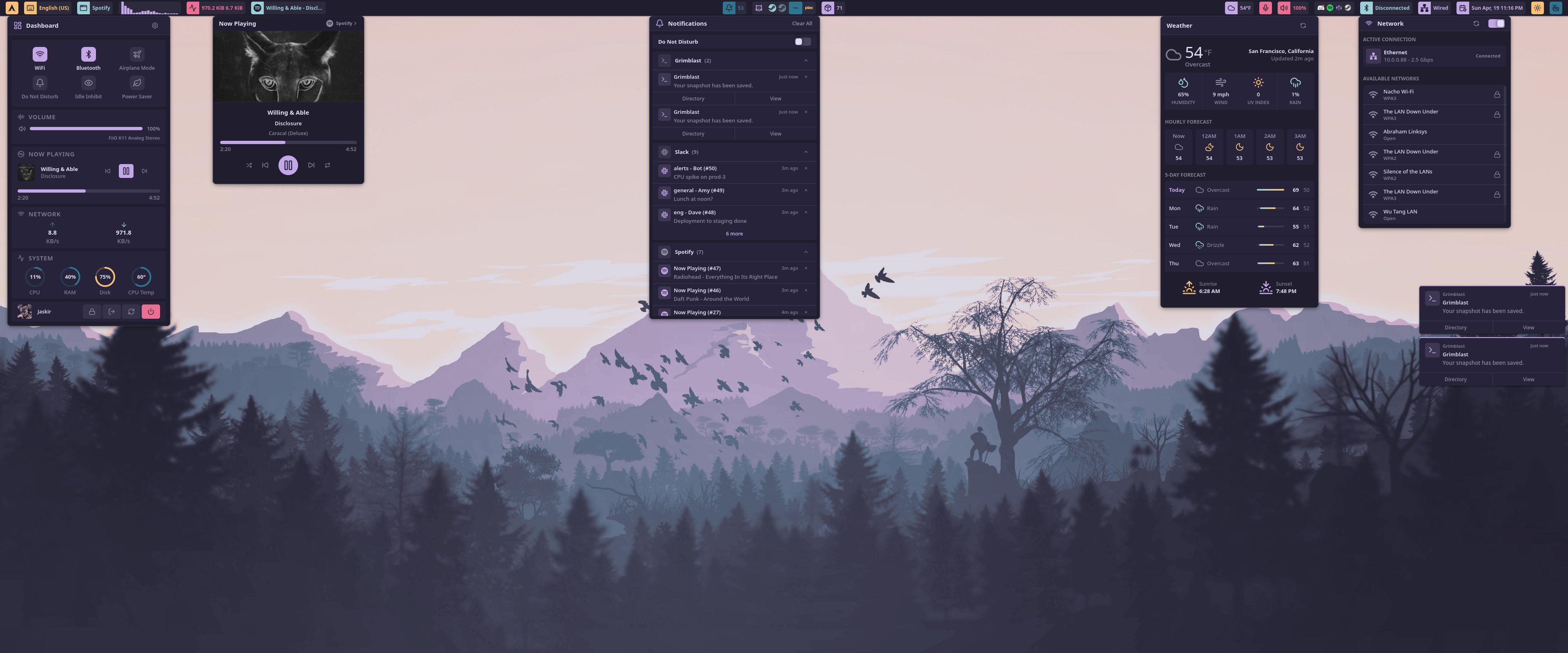
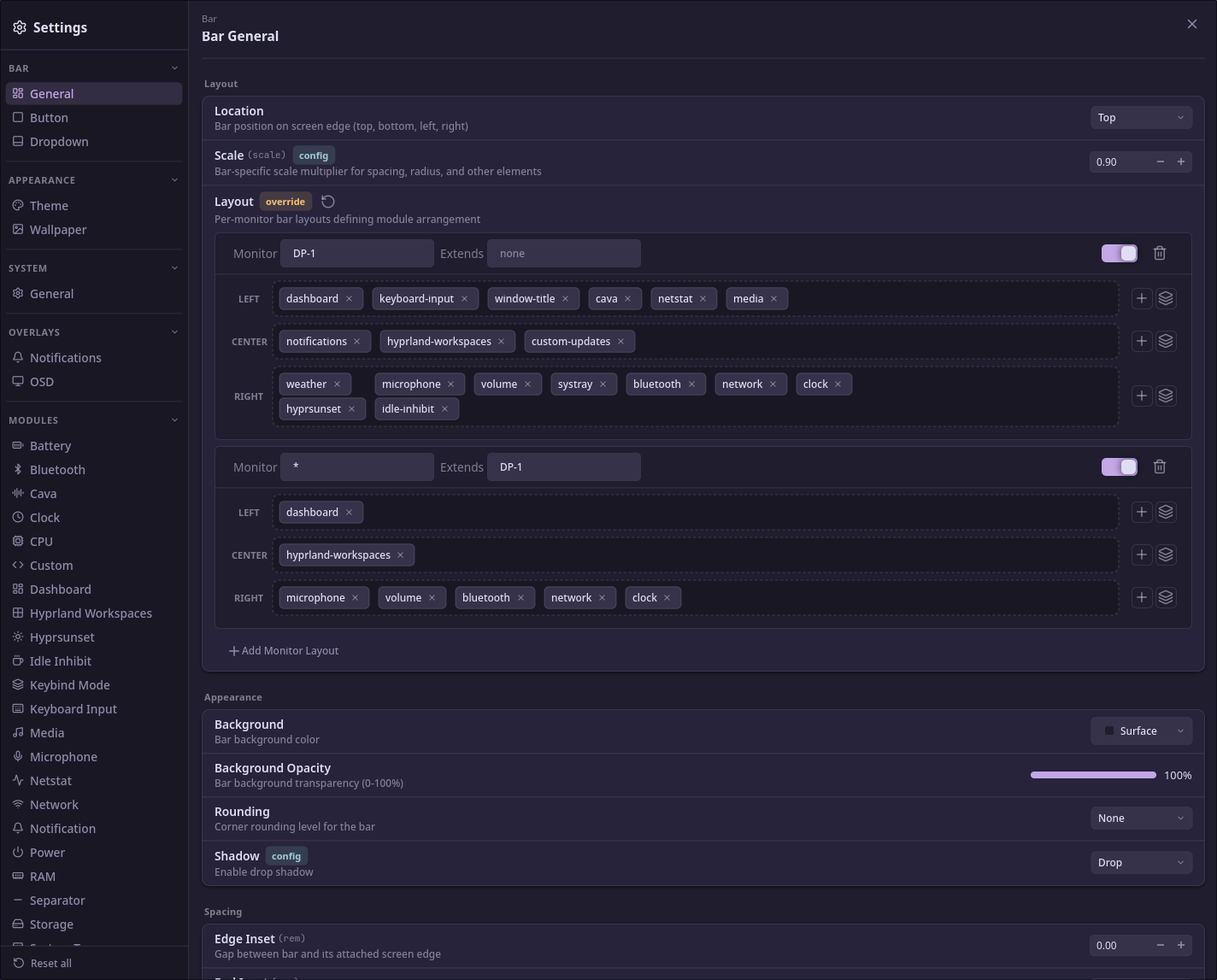
Full guides, reference, and walkthroughs are at wayle.app.
Arch Linux binary:
yay -S wayle-bin
Install Rust via rustup, then the system libraries:
sudo pacman -S --needed git gtk4 gtk4-layer-shell gtksourceview5 \
  libpulse fftw libpipewire systemd-libs clang base-devel
Runtime daemons for the battery, bluetooth, network, power, and audio modules (skip any you don't need):
sudo pacman -S --needed bluez bluez-utils networkmanager upower \
  power-profiles-daemon pipewire wireplumber pipewire-pulse
sudo systemctl enable --now bluetooth NetworkManager upower power-profiles-daemon
Ubuntu 24.04 LTS does not package libgtk4-layer-shell-dev. Use Ubuntu 25.04+ or Debian 13 (trixie).
Install Rust via rustup, then the system libraries:
sudo apt install git pkg-config cmake libgtk-4-dev libgtk4-layer-shell-dev \
  libgtksourceview-5-dev libpulse-dev libfftw3-dev libpipewire-0.3-dev \
  libudev-dev clang build-essential
Runtime daemons:
sudo apt install dbus-user-session bluez network-manager \
  upower power-profiles-daemon pipewire-pulse wireplumber
sudo systemctl enable --now bluetooth NetworkManager upower power-profiles-daemon
Requires Fedora 42 or later.
Install Rust via rustup, then the system libraries:
sudo dnf install git cmake pkgconf-pkg-config gtk4-devel gtk4-layer-shell-devel \
  gtksourceview5-devel pulseaudio-libs-devel fftw-devel pipewire-devel \
  systemd-devel clang gcc
Fedora Workstation already ships the runtime daemons. Minimal and Server installs need:
sudo dnf install pipewire-pulseaudio wireplumber NetworkManager bluez upower \
  power-profiles-daemon
sudo systemctl enable --now bluetooth NetworkManager upower power-profiles-daemon
git clone https://github.com/wayle-rs/wayle
cd wayle
cargo install --path wayle
cargo install --path crates/wayle-settings
wayle icons setup
wayle panel start
On a different distro? See wayle.app/guide/getting-started for the library-version reference.

The config file is at ~/.config/wayle/config.toml. Changes reload on save:
[bar]
location = "top"
scale = 1.25

[[bar.layout]]
monitor = "*"
left = ["dashboard"]
center = ["clock"]
right = ["volume", "network", "bluetooth", "battery"]

[modules.clock]
format = "%H:%M"
Every field is documented at wayle.app/config.
A Wayland compositor that implements the wlr-layer-shell protocol. Compositor-specific modules currently target Hyprland, Niri and Mango; Sway support is in planned soon.
Logo by @M70v.
MIT
(top 24 of 27)
597 followers · starred Dec 2025
1,406 followers · starred Jul 2025
1,093 followers · starred May 2026
481 followers · starred Sep 2026
Wayland Elements - A compositor agnostic shell with extensive customization
See the code
A Wayland desktop shell with the bar, notifications, OSD, wallpaper, and device controls built in. Written in Rust with GTK4 and Relm4.
Configure it in config.toml, through the wayle-settings GUI, or with the wayle config CLI.
Full guides, reference, and walkthroughs are at wayle.app.
Arch Linux binary:
yay -S wayle-bin
Install Rust via rustup, then the system libraries:
sudo pacman -S --needed git gtk4 gtk4-layer-shell gtksourceview5 \
  libpulse fftw libpipewire systemd-libs clang base-devel
Runtime daemons for the battery, bluetooth, network, power, and audio modules (skip any you don't need):
sudo pacman -S --needed bluez bluez-utils networkmanager upower \
  power-profiles-daemon pipewire wireplumber pipewire-pulse
sudo systemctl enable --now bluetooth NetworkManager upower power-profiles-daemon
Ubuntu 24.04 LTS does not package libgtk4-layer-shell-dev. Use Ubuntu 25.04+ or Debian 13 (trixie).
Install Rust via rustup, then the system libraries:
sudo apt install git pkg-config cmake libgtk-4-dev libgtk4-layer-shell-dev \
  libgtksourceview-5-dev libpulse-dev libfftw3-dev libpipewire-0.3-dev \
  libudev-dev clang build-essential
Runtime daemons:
sudo apt install dbus-user-session bluez network-manager \
  upower power-profiles-daemon pipewire-pulse wireplumber
sudo systemctl enable --now bluetooth NetworkManager upower power-profiles-daemon
Requires Fedora 42 or later.
Install Rust via rustup, then the system libraries:
sudo dnf install git cmake pkgconf-pkg-config gtk4-devel gtk4-layer-shell-devel \
  gtksourceview5-devel pulseaudio-libs-devel fftw-devel pipewire-devel \
  systemd-devel clang gcc
Fedora Workstation already ships the runtime daemons. Minimal and Server installs need:
sudo dnf install pipewire-pulseaudio wireplumber NetworkManager bluez upower \
  power-profiles-daemon
sudo systemctl enable --now bluetooth NetworkManager upower power-profiles-daemon
git clone https://github.com/wayle-rs/wayle
cd wayle
cargo install --path wayle
cargo install --path crates/wayle-settings
wayle icons setup
wayle panel start
On a different distro? See wayle.app/guide/getting-started for the library-version reference.
The config file is at ~/.config/wayle/config.toml. Changes reload on save:
[bar]
location = "top"
scale = 1.25

[[bar.layout]]
monitor = "*"
left = ["dashboard"]
center = ["clock"]
right = ["volume", "network", "bluetooth", "battery"]

[modules.clock]
format = "%H:%M"
Every field is documented at wayle.app/config.
A Wayland compositor that implements the wlr-layer-shell protocol. Compositor-specific modules currently target Hyprland, Niri and Mango; Sway support is in planned soon.
Logo by @M70v.
MIT
(top 24 of 27)
597 followers · starred Dec 2025
1,406 followers · starred Jul 2025
1,093 followers · starred May 2026
481 followers · starred Sep 2026