A cross-platform command line input library that provides syntax highlighting, autocompletion, history and multi-line input.
C#
207
558 commits
updated Aug 16, 2026



A cross-platform command line prompt that provides syntax highlighting, autocompletion, history and more! It's Console.ReadLine() on steroids.
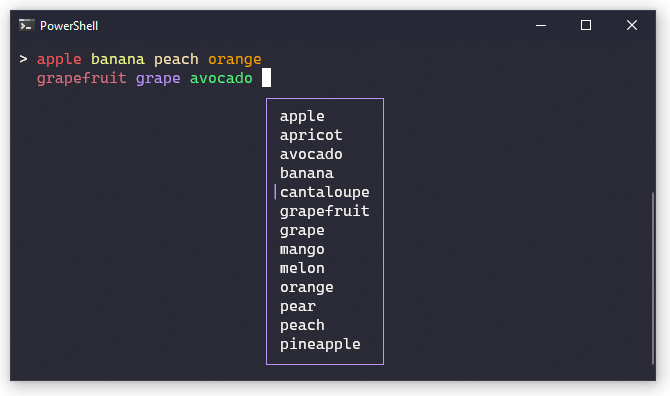
HistorySearchBackward).IPromptCallbacks).CancellationToken for each prompt result, so the end-user of your application can cancel long running tasks via Ctrl-C.PrettyPrompt can be installed from nuget by running the following command:
dotnet add package PrettyPrompt
A simple read-eval-print-loop looks like this:
var prompt = new Prompt(
    configuration: new PromptConfiguration(prompt: "> "));

while (true)
{
    var response = await prompt.ReadLineAsync();
    if (response.IsSuccess) // false if user cancels, i.e. ctrl-c
    {
        if (response.Text == "exit") break;

        Console.WriteLine("You wrote " + response.Text);
    }
}
The Prompt constructor takes optional configuration options for enabling syntax highlighting, autocompletion, and soft-newline configuration.
For a more complete example, see the project in the examples directory.
If you have the dotnet example global tool installed, run the following command in the repository root:
dotnet example FruitPrompt
This application targets .NET 10, and can be built with either Visual Studio or the normal dotnet build command line tool.
116 followers · starred Jan 2026
1,319 followers · starred Jul 2025
113 followers · starred Oct 2025
161 followers · starred Jan 2023
A cross-platform command line input library that provides syntax highlighting, autocompletion, history and multi-line input.
C#
207
558 commits
updated Aug 16, 2026
A cross-platform command line prompt that provides syntax highlighting, autocompletion, history and more! It's Console.ReadLine() on steroids.
HistorySearchBackward).IPromptCallbacks).CancellationToken for each prompt result, so the end-user of your application can cancel long running tasks via Ctrl-C.PrettyPrompt can be installed from nuget by running the following command:
dotnet add package PrettyPrompt
A simple read-eval-print-loop looks like this:
var prompt = new Prompt(
    configuration: new PromptConfiguration(prompt: "> "));

while (true)
{
    var response = await prompt.ReadLineAsync();
    if (response.IsSuccess) // false if user cancels, i.e. ctrl-c
    {
        if (response.Text == "exit") break;

        Console.WriteLine("You wrote " + response.Text);
    }
}
The Prompt constructor takes optional configuration options for enabling syntax highlighting, autocompletion, and soft-newline configuration.
For a more complete example, see the project in the examples directory.
If you have the dotnet example global tool installed, run the following command in the repository root:
dotnet example FruitPrompt
This application targets .NET 10, and can be built with either Visual Studio or the normal dotnet build command line tool.
116 followers · starred Jan 2026
1,319 followers · starred Jul 2025
113 followers · starred Oct 2025
161 followers · starred Jan 2023