
prx (Pull Request eXaminer) has the coding agent you already run review your pull requests,
and leaves the approving to you. It watches the GitHub repositories you choose, has a local agent
CLI (pi, claude, codex, or your own) or an LLM API review each open pull request, posts the
findings to GitHub itself, notifies you, and keeps a history of every review.
It runs on your machine as one Rust binary: a CLI, a background daemon, and a localhost API. On
macOS there is also PRX.app, a menu bar client. The only services it talks to are GitHub, through
the gh CLI you are already signed in to, and an LLM endpoint if you configure one.
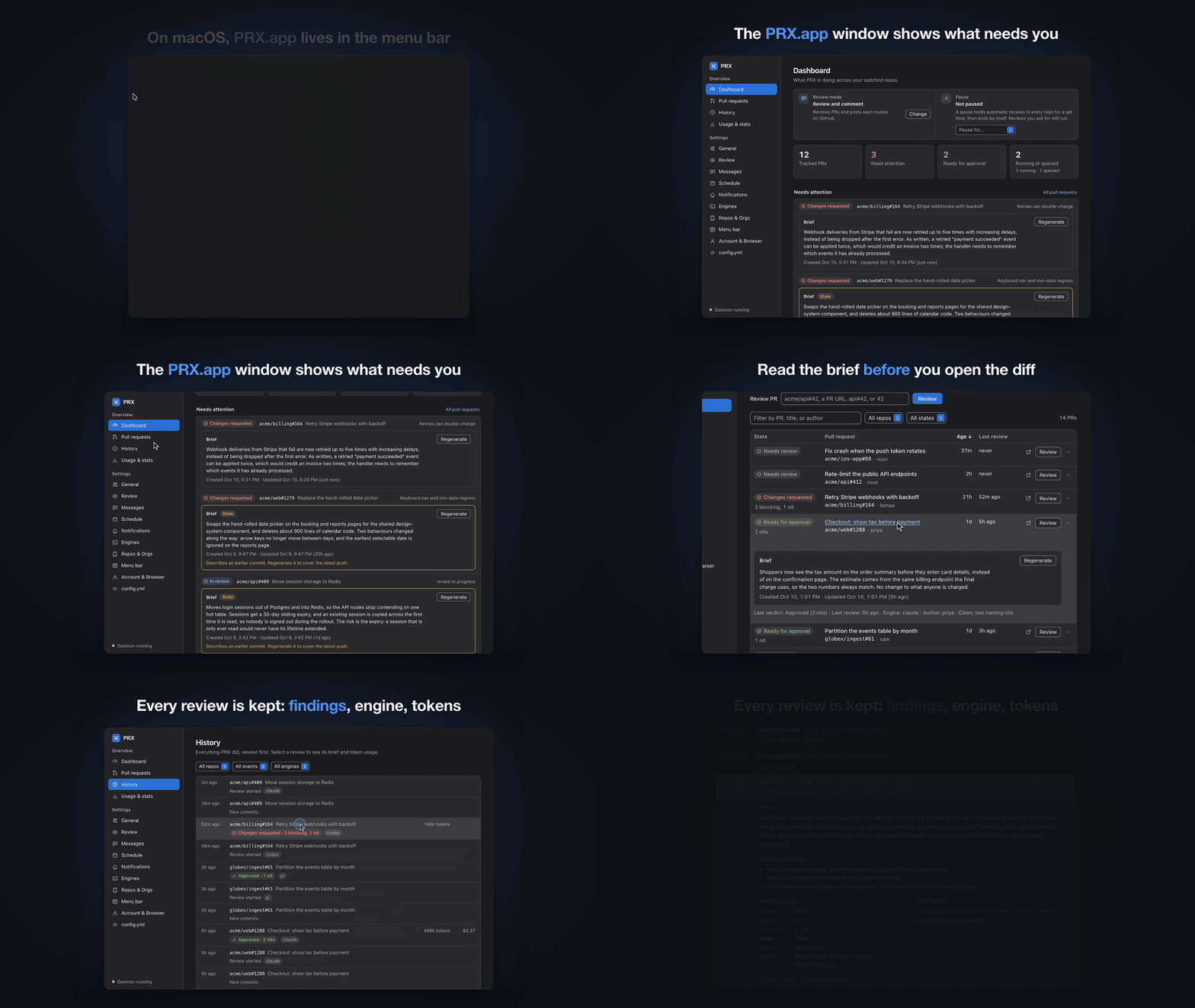
23 seconds of prx: the menu bar menu, then the app window. The full demo runs 109 seconds (MP4, 1080p) and also shows a pull request's actions and an approval from the menu.
An agent that can post to GitHub can also approve a pull request, merge it, or follow instructions hidden in a diff. prx is built so the reviewing agent never needs to write anything to GitHub, by splitting the work in three:
gh. prx itself never executes anything from the PR.prx approve or clicking
Approve… in the app.One limit to know about: an agent CLI runs as you, so its read-only rule is an instruction in the prompt, not a sandbox. An LLM API engine has no tools at all; it only receives the prompt and the diff. The security model has the details.
prx daemon ──poll──> gh pr list ──> lifecycle state machine ──> desktop notifications
    │                                                     │
    │ render prompt + run agent                           state.json / history.jsonl
    v                                                     │
read-only agent ──writes──> review manifest (JSON)        └──> localhost IPC API
                             │                                  ^           ^
                    prx validates & posts                        │           │
                             v                                   │           │
              gh api (inline) + gh pr review (body)        CLI commands   menu bar client
                             ^                                           (separate GUI)
                    prx approve (human only)
More in Architecture.
Everything shown here is a made-up team (acme, globex), not real repositories.
PRX.app lives in the macOS menu bar, and its menu is where you will use it most: your pull requests grouped by state, with review and approve actions one click away.
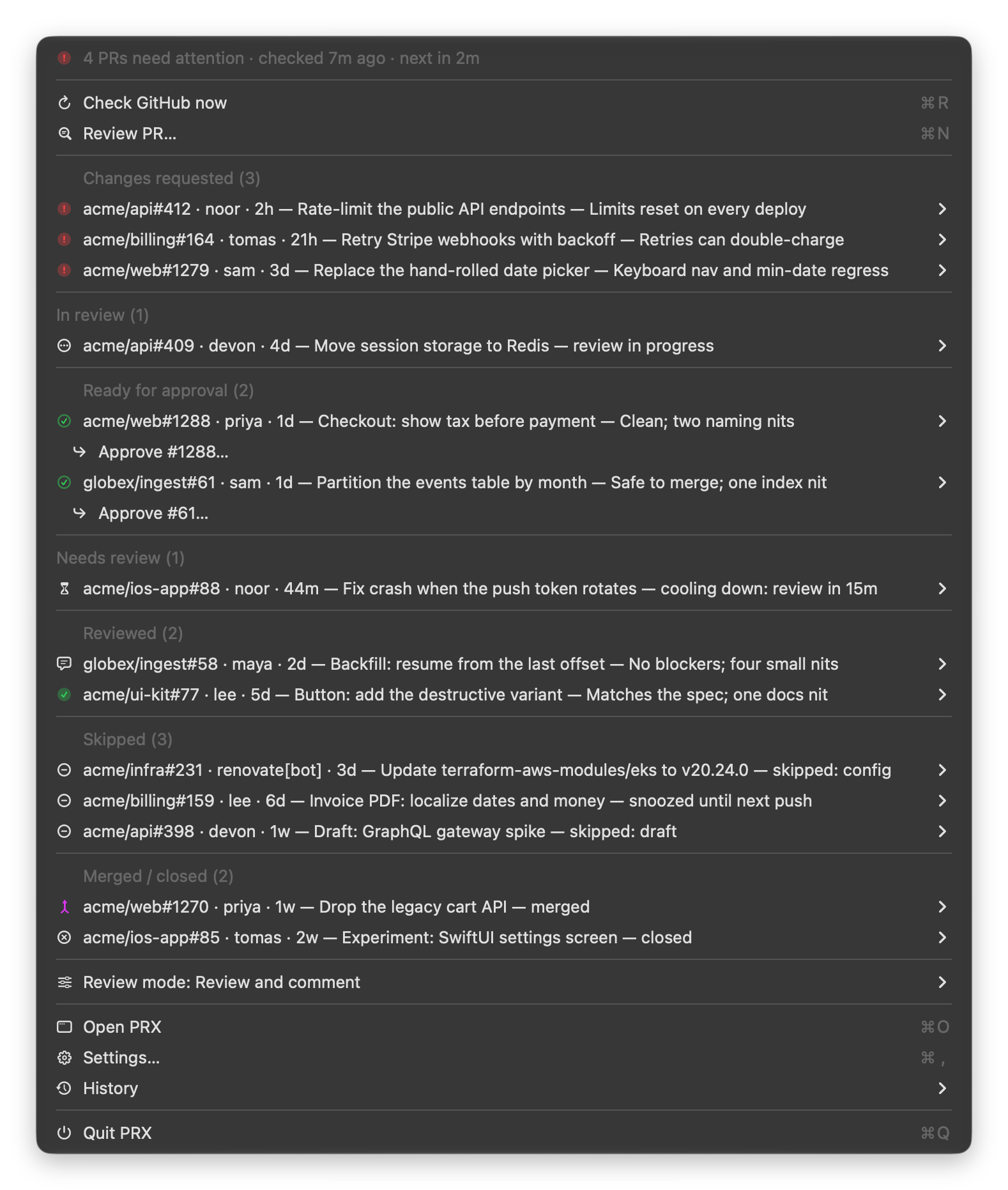
Each pull request opens a submenu with the verdict, a one-line brief, and every action: Review, Approve…, Block (request changes)…, Snooze, Ignore (screenshot). Approving always asks first. The PRX.app guide walks through the menu.
The Dashboard in PRX.app: what needs you, with a plain-language brief of each pull request.


|

|
| Every pull request with the agent's verdict, and its brief one click away. | Tokens and reported cost per day, engine, repository, or pull request. |
The same data from the command line:
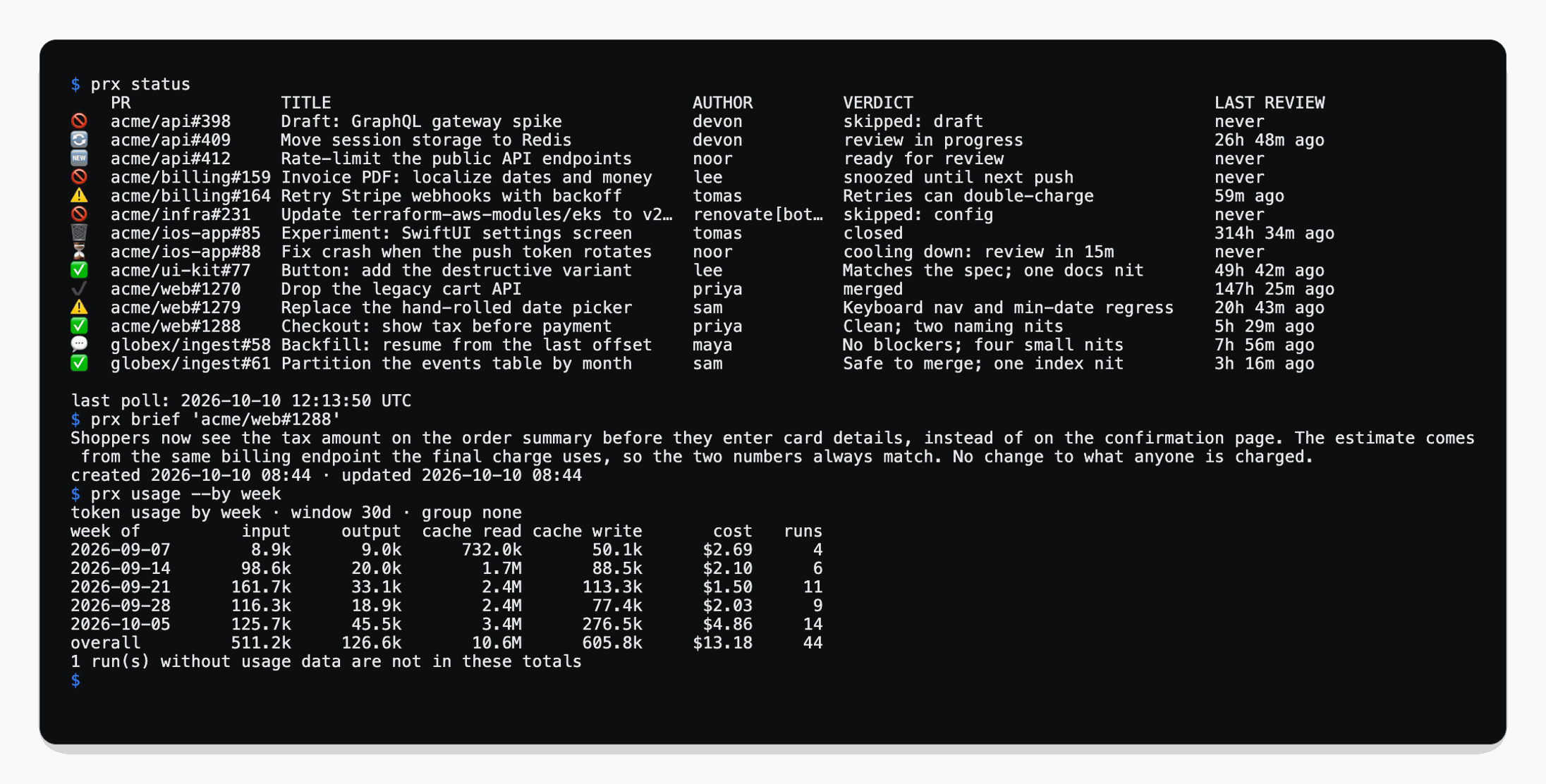
More screenshots are in the guides, starting with PRX.app.
prx is a download from the latest release;
there is nothing to compile. You need the GitHub CLI signed in
(gh auth status), and either a coding-agent CLI (pi, claude, codex) or an API key for an
LLM API.
The menu bar app, with the CLI and the daemon inside. Three steps.
1. Get PRX.app, whichever way you prefer:
Option 1: download it from the Releases page. Open the
latest release in your browser and download
PRX-<version>-macos-arm64.zip. Double-click the zip in Finder (Safari may already have
unpacked it), then drag PRX into your Applications folder.
Option 2: use the command line.
cd ~/Downloads
gh release download --repo vs4vijay/prx --pattern 'PRX-*-macos-arm64.zip'
ditto -x -k PRX-*-macos-arm64.zip /Applications    # unpacks PRX.app into Applications
2. Allow it to open. The same for both options, once, before you open PRX:
[!IMPORTANT] Run this in Terminal before the first open:
xattr -dr com.apple.quarantine /Applications/PRX.appPRX.app is not yet notarized by Apple, so macOS blocks a downloaded copy, saying that Apple could not verify "PRX" or that "PRX" is damaged (the wording varies by macOS version). The app is not damaged; this command clears the download flag macOS objects to. Without a terminal: try to open PRX once, then choose Open Anyway under System Settings → Privacy & Security. More about this step.
3. Open it. Double-click PRX in Applications, or run open /Applications/PRX.app. A PRX icon
appears in the menu bar and the PRX window opens on the Dashboard, where Add a repo gets you
started. There is nothing to set up first: PRX writes its default config
(~/.config/prx/config.yml) and starts its daemon by itself.
For a prx command in your terminal, open Settings → General in PRX and choose Install
command-line tool….
On an Intel Mac, on Linux, or without the app. The release has one tarball per platform,
prx-<version>-<target>.tar.gz, where <target> is aarch64-apple-darwin (macOS, Apple
silicon), x86_64-apple-darwin (macOS, Intel), x86_64-unknown-linux-gnu (Linux, x86_64) or
aarch64-unknown-linux-gnu (Linux, arm64).
1. Get the tarball and unpack it, whichever way you prefer:
Option 1: download it from the Releases page. Download the tarball for your machine from
the latest release and unpack it:
double-click it on macOS, or tar -xzf prx-*.tar.gz.
Option 2: use the command line, in the folder you want the download in:
target=aarch64-apple-darwin    # or one of the other three targets above
gh release download --repo vs4vijay/prx --pattern "prx-*-$target.tar.gz"
tar -xzf prx-*-"$target".tar.gz
Either way you now have a folder named prx-<version>-<target>, with prx inside.
2. On macOS, allow it to run. The same for both options, in the folder that holds the unpacked folder:
[!IMPORTANT]
xattr -dr com.apple.quarantine prx-v*/
prxis not yet notarized by Apple either. A quarantined copy is stopped the moment it starts: the shell printskilledand nothing else. Not needed on Linux.
3. Put prx on your PATH and create the config:
mkdir -p ~/.local/bin
install -m 755 prx-v*/prx ~/.local/bin/prx    # or any directory on your PATH
prx --version
prx init                                      # writes ~/.config/prx/config.yml
Install has the details: system requirements, checksums, updating, and uninstalling. To build prx yourself, see Building from source.
If you installed PRX.app, skip prx init and prx daemon start: the app creates the config and
starts the daemon itself. Watching a repository, reviewing, and approving can also be done from
the app.
prx init                            # write ~/.config/prx/config.yml
prx repos add acme/api              # watch a repository
prx doctor                          # check config, gh auth, engines, data directory
prx status                          # list open PRs and their state
prx review acme/api#42 --dry-run    # run the whole pipeline and print it; posts nothing
prx review acme/api#42              # review one PR now and post the result
prx daemon start                    # keep going in the background: polling, queue, notifications
Then act on what the review found:
prx approve acme/api#42             # post your own GitHub approval
prx snooze acme/api#42 --hours 2    # or: prx ignore, prx pause --hours 2
prx history                         # what was reviewed, merged, or failed
prx insights                        # throughput, recurring blockers, effectiveness
The Quickstart and Your first review go through this step by step.
monitor), or off.
Set globally, per organization, or per repository.pi, claude, and codex CLIs, any other
agent CLI through config, or the Anthropic, OpenAI, and OpenAI-compatible APIs (including local
servers such as Ollama). Agents that support it resume the same session on re-reviews.Everything is under docs/.
| Section | Start with |
|---|---|
| Getting started | Install, Quickstart, Your first review |
| Guides | Review modes, Schedule, Pausing, Prompts, Commentary, Briefs, Engines, Token usage, Insights, Notifications, Autostart, PRX.app |
| Reference | Configuration, CLI, Environment variables, IPC API, Review manifest, Data files |
| Concepts | Architecture, Security model, Scope |
| Help | Troubleshooting |
gh session. LLM API keys and
alternate GitHub tokens are referenced by environment-variable name and never written to disk.127.0.0.1 behind a per-start bearer token. State and history
stay on your disk. There is no telemetry. The one optional outbound connection is to an LLM API
you configure, which then receives the review prompt and the PR diff.See the security model. To report a vulnerability, follow SECURITY.md.
prx is a review manager for one person's machine. It does not merge pull requests, approve them, or run in CI, and it has no team or hosted features. Priority ordering beyond oldest-due-first, delta reviews, file-path filters, and exports are also out of scope for now. See Scope and non-goals.
GitHub is the only supported forge. PRX.app is macOS only; the CLI and daemon run on macOS and Linux.
Bug reports and pull requests are welcome. CONTRIBUTING.md has the setup and the checks to run before you push; AGENTS.md has the project's invariants and conventions, for people and coding agents alike; Development covers building from source, the test tiers, the release process, and how the screenshots and the demo video are regenerated.
prx (Pull Request eXaminer) has the coding agent you already run review your pull requests,
and leaves the approving to you. It watches the GitHub repositories you choose, has a local agent
CLI (pi, claude, codex, or your own) or an LLM API review each open pull request, posts the
findings to GitHub itself, notifies you, and keeps a history of every review.
It runs on your machine as one Rust binary: a CLI, a background daemon, and a localhost API. On
macOS there is also PRX.app, a menu bar client. The only services it talks to are GitHub, through
the gh CLI you are already signed in to, and an LLM endpoint if you configure one.
23 seconds of prx: the menu bar menu, then the app window. The full demo runs 109 seconds (MP4, 1080p) and also shows a pull request's actions and an approval from the menu.
An agent that can post to GitHub can also approve a pull request, merge it, or follow instructions hidden in a diff. prx is built so the reviewing agent never needs to write anything to GitHub, by splitting the work in three:
gh. prx itself never executes anything from the PR.prx approve or clicking
Approve… in the app.One limit to know about: an agent CLI runs as you, so its read-only rule is an instruction in the prompt, not a sandbox. An LLM API engine has no tools at all; it only receives the prompt and the diff. The security model has the details.
prx daemon ──poll──> gh pr list ──> lifecycle state machine ──> desktop notifications
    │                                                     │
    │ render prompt + run agent                           state.json / history.jsonl
    v                                                     │
read-only agent ──writes──> review manifest (JSON)        └──> localhost IPC API
                             │                                  ^           ^
                    prx validates & posts                        │           │
                             v                                   │           │
              gh api (inline) + gh pr review (body)        CLI commands   menu bar client
                             ^                                           (separate GUI)
                    prx approve (human only)
More in Architecture.
Everything shown here is a made-up team (acme, globex), not real repositories.
PRX.app lives in the macOS menu bar, and its menu is where you will use it most: your pull requests grouped by state, with review and approve actions one click away.
Each pull request opens a submenu with the verdict, a one-line brief, and every action: Review, Approve…, Block (request changes)…, Snooze, Ignore (screenshot). Approving always asks first. The PRX.app guide walks through the menu.
The Dashboard in PRX.app: what needs you, with a plain-language brief of each pull request.
|
|
|
| Every pull request with the agent's verdict, and its brief one click away. | Tokens and reported cost per day, engine, repository, or pull request. |
The same data from the command line:
More screenshots are in the guides, starting with PRX.app.
prx is a download from the latest release;
there is nothing to compile. You need the GitHub CLI signed in
(gh auth status), and either a coding-agent CLI (pi, claude, codex) or an API key for an
LLM API.
The menu bar app, with the CLI and the daemon inside. Three steps.
1. Get PRX.app, whichever way you prefer:
Option 1: download it from the Releases page. Open the
latest release in your browser and download
PRX-<version>-macos-arm64.zip. Double-click the zip in Finder (Safari may already have
unpacked it), then drag PRX into your Applications folder.
Option 2: use the command line.
cd ~/Downloads
gh release download --repo vs4vijay/prx --pattern 'PRX-*-macos-arm64.zip'
ditto -x -k PRX-*-macos-arm64.zip /Applications    # unpacks PRX.app into Applications
2. Allow it to open. The same for both options, once, before you open PRX:
[!IMPORTANT] Run this in Terminal before the first open:
xattr -dr com.apple.quarantine /Applications/PRX.appPRX.app is not yet notarized by Apple, so macOS blocks a downloaded copy, saying that Apple could not verify "PRX" or that "PRX" is damaged (the wording varies by macOS version). The app is not damaged; this command clears the download flag macOS objects to. Without a terminal: try to open PRX once, then choose Open Anyway under System Settings → Privacy & Security. More about this step.
3. Open it. Double-click PRX in Applications, or run open /Applications/PRX.app. A PRX icon
appears in the menu bar and the PRX window opens on the Dashboard, where Add a repo gets you
started. There is nothing to set up first: PRX writes its default config
(~/.config/prx/config.yml) and starts its daemon by itself.
For a prx command in your terminal, open Settings → General in PRX and choose Install
command-line tool….
On an Intel Mac, on Linux, or without the app. The release has one tarball per platform,
prx-<version>-<target>.tar.gz, where <target> is aarch64-apple-darwin (macOS, Apple
silicon), x86_64-apple-darwin (macOS, Intel), x86_64-unknown-linux-gnu (Linux, x86_64) or
aarch64-unknown-linux-gnu (Linux, arm64).
1. Get the tarball and unpack it, whichever way you prefer:
Option 1: download it from the Releases page. Download the tarball for your machine from
the latest release and unpack it:
double-click it on macOS, or tar -xzf prx-*.tar.gz.
Option 2: use the command line, in the folder you want the download in:
target=aarch64-apple-darwin    # or one of the other three targets above
gh release download --repo vs4vijay/prx --pattern "prx-*-$target.tar.gz"
tar -xzf prx-*-"$target".tar.gz
Either way you now have a folder named prx-<version>-<target>, with prx inside.
2. On macOS, allow it to run. The same for both options, in the folder that holds the unpacked folder:
[!IMPORTANT]
xattr -dr com.apple.quarantine prx-v*/
prxis not yet notarized by Apple either. A quarantined copy is stopped the moment it starts: the shell printskilledand nothing else. Not needed on Linux.
3. Put prx on your PATH and create the config:
mkdir -p ~/.local/bin
install -m 755 prx-v*/prx ~/.local/bin/prx    # or any directory on your PATH
prx --version
prx init                                      # writes ~/.config/prx/config.yml
Install has the details: system requirements, checksums, updating, and uninstalling. To build prx yourself, see Building from source.
If you installed PRX.app, skip prx init and prx daemon start: the app creates the config and
starts the daemon itself. Watching a repository, reviewing, and approving can also be done from
the app.
prx init                            # write ~/.config/prx/config.yml
prx repos add acme/api              # watch a repository
prx doctor                          # check config, gh auth, engines, data directory
prx status                          # list open PRs and their state
prx review acme/api#42 --dry-run    # run the whole pipeline and print it; posts nothing
prx review acme/api#42              # review one PR now and post the result
prx daemon start                    # keep going in the background: polling, queue, notifications
Then act on what the review found:
prx approve acme/api#42             # post your own GitHub approval
prx snooze acme/api#42 --hours 2    # or: prx ignore, prx pause --hours 2
prx history                         # what was reviewed, merged, or failed
prx insights                        # throughput, recurring blockers, effectiveness
The Quickstart and Your first review go through this step by step.
monitor), or off.
Set globally, per organization, or per repository.pi, claude, and codex CLIs, any other
agent CLI through config, or the Anthropic, OpenAI, and OpenAI-compatible APIs (including local
servers such as Ollama). Agents that support it resume the same session on re-reviews.Everything is under docs/.
| Section | Start with |
|---|---|
| Getting started | Install, Quickstart, Your first review |
| Guides | Review modes, Schedule, Pausing, Prompts, Commentary, Briefs, Engines, Token usage, Insights, Notifications, Autostart, PRX.app |
| Reference | Configuration, CLI, Environment variables, IPC API, Review manifest, Data files |
| Concepts | Architecture, Security model, Scope |
| Help | Troubleshooting |
gh session. LLM API keys and
alternate GitHub tokens are referenced by environment-variable name and never written to disk.127.0.0.1 behind a per-start bearer token. State and history
stay on your disk. There is no telemetry. The one optional outbound connection is to an LLM API
you configure, which then receives the review prompt and the PR diff.See the security model. To report a vulnerability, follow SECURITY.md.
prx is a review manager for one person's machine. It does not merge pull requests, approve them, or run in CI, and it has no team or hosted features. Priority ordering beyond oldest-due-first, delta reviews, file-path filters, and exports are also out of scope for now. See Scope and non-goals.
GitHub is the only supported forge. PRX.app is macOS only; the CLI and daemon run on macOS and Linux.
Bug reports and pull requests are welcome. CONTRIBUTING.md has the setup and the checks to run before you push; AGENTS.md has the project's invariants and conventions, for people and coding agents alike; Development covers building from source, the test tiers, the release process, and how the screenshots and the demo video are regenerated.



