
PRsona — an AI pull-request reviewer trained on YOUR review history. Local-first Electron app: backfill your GitHub comments, calibrate to your style, draft PR reviews in your voice. You approve every comment. Bring your own keys: Claude, GPT, Ollama.
JavaScript
1
0 commits
updated Sep 24, 2026
See what people are saying
README
PRsona
Your AI code reviewer that actually reviews like you
PRsona learns a specific person's review style from their own GitHub comment history and drafts pull-request comments in that voice — running locally, with your own API keys, posting nothing you haven't approved.
Features · How it works · Quick start · Contributing


Why another AI reviewer?
CodeRabbit, Copilot, and friends review like nobody in particular — generic comments from a generic model, tuned to nobody's standards, with your code sent to someone else's cloud.
PRsona inverts the model: your review history is the training data.
| Hosted review bots | PRsona | |
|---|---|---|
| Style | Generic, one-size-fits-all | Learned from your past reviews |
| Data | Sent to the vendor | Stays on your machine |
| Model | Locked to their choice | Any: Claude, GPT, local Ollama, OpenAI-compatible |
| Posting | Auto-comments on PRs | Human approves every comment |
| Calibration | None | Filters by your per-category history |
| Cost | Per-seat SaaS | Free, MIT, bring your own keys |
How it works
flowchart LR
  A["<b>Backfill</b><br/>your past GitHub<br/>review comments"] --> B["<b>Embed + categorize</b><br/>fixed vocabulary,<br/>vector search in SQLite"]
  B --> C["<b>Calibrate</b><br/>your per-category<br/>comment rates"]
  C --> D["<b>Review a PR</b><br/>analysis pass,<br/>then style pass"]
  D --> E{"You: accept /<br/>edit / reject"}
  E -->|corrections| F["<b>Consolidate</b><br/>profile + rubric<br/>update (you approve)"]
  F -.->|better profile| D
- Backfill — pulls the reviewer's past PR comments from GitHub into a local SQLite database, categorizes them from a fixed vocabulary, and embeds them for retrieval.
- Review pipeline (per PR) — two separate LLM calls on purpose, with
plain-code calibration between them:
- Analysis pass — style-agnostic: finds candidate issues in the diff, scored against the reviewer's learned rubric.
- Calibration — plain code, not an LLM call: filters issues down to roughly match how often this reviewer actually comments on each category historically. Findings in categories you rarely comment on get dropped instead of nagging you; blocking issues and categories your history doesn't cover yet always survive. Full write-up: docs/CALIBRATION.md.
- Style pass — rephrases the surviving issues in the reviewer's real voice, grounded in retrieved examples of their actual past comments (few-shot), not just an abstract description.
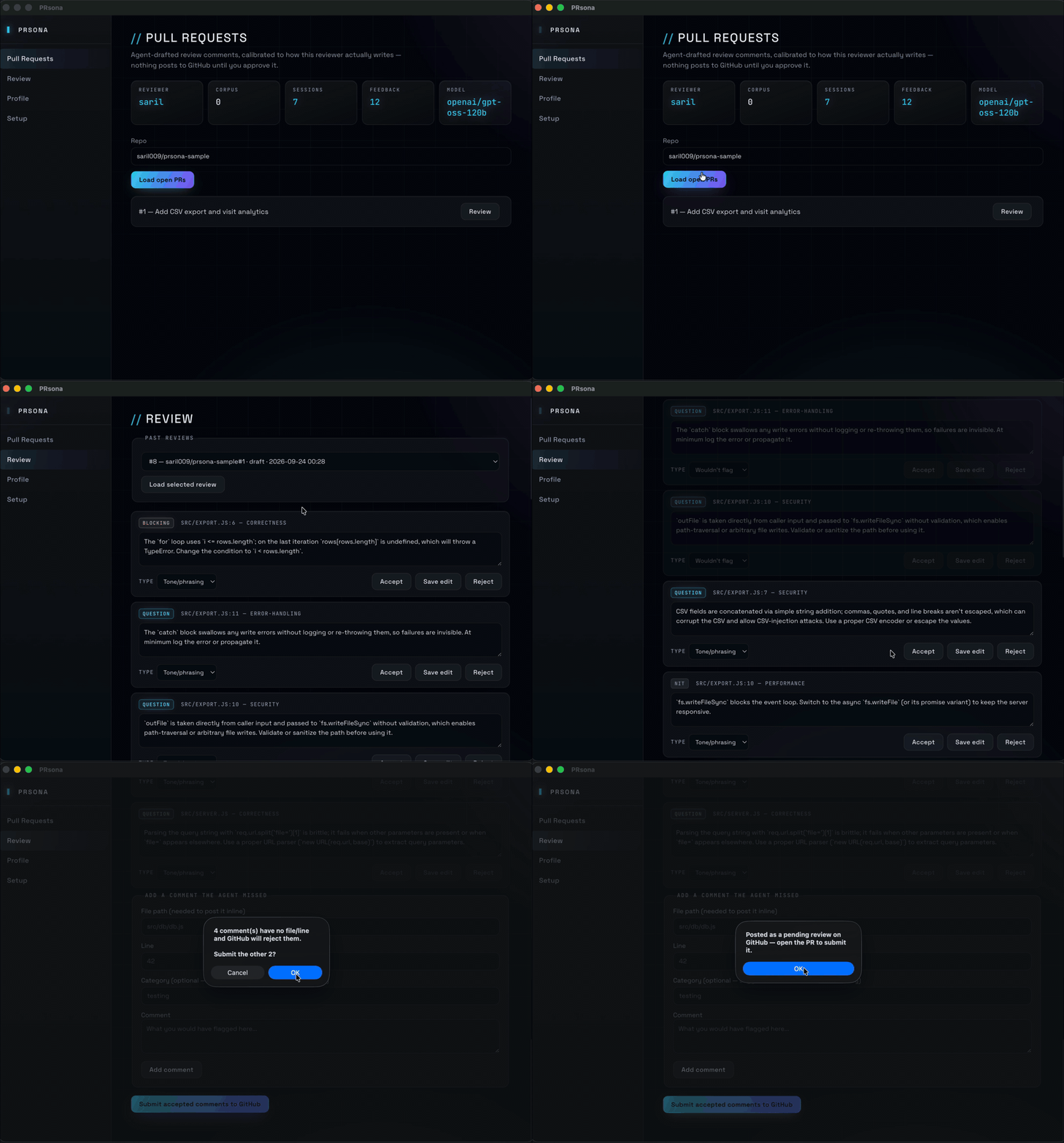
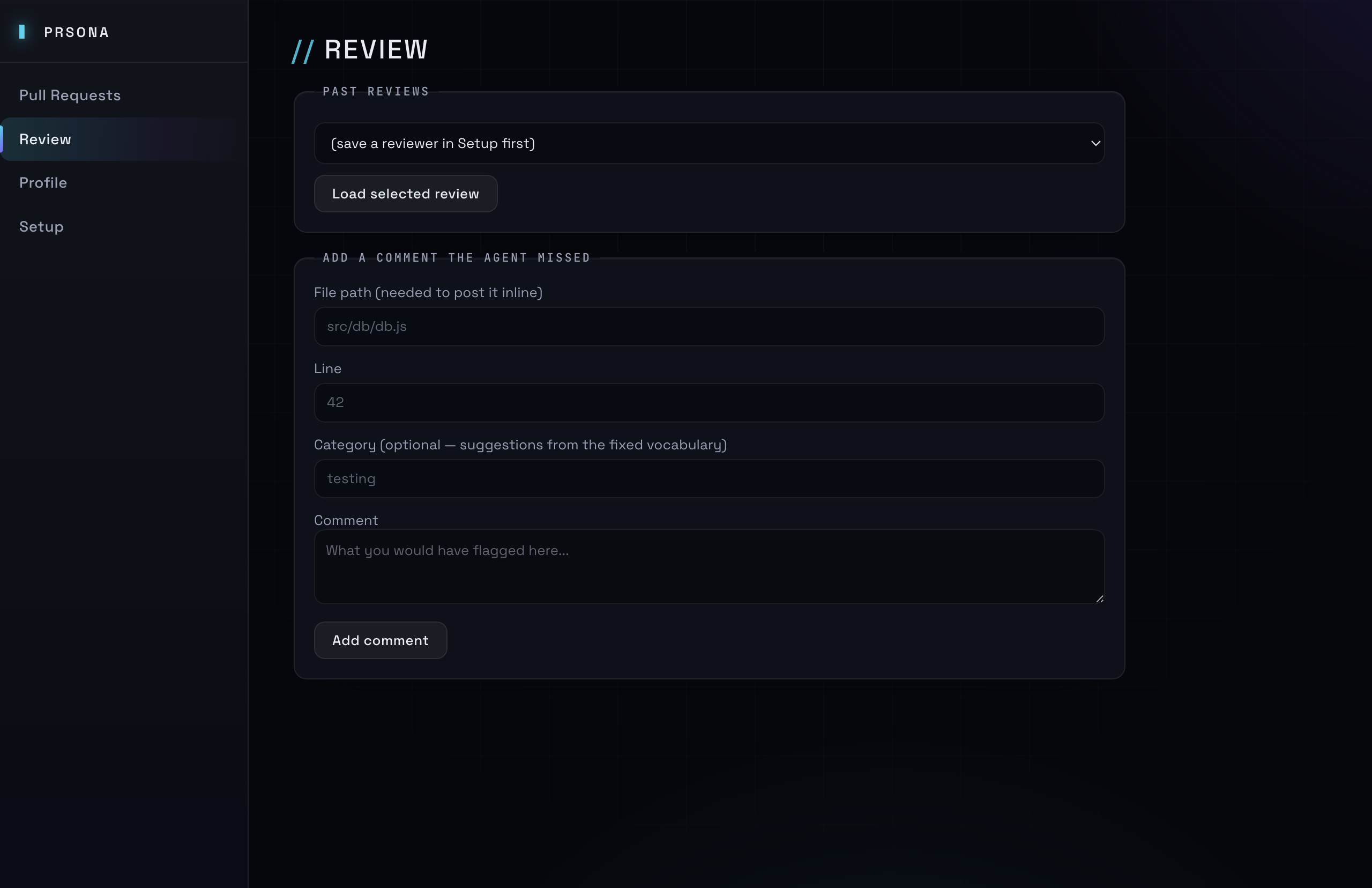
- Human review — drafts are shown in-app; accept / edit / reject each one. Every resolution is logged as a "correction." A comment the agent missed can be added by hand and is logged too.
- Consolidation (on demand, from the Profile tab) — a separate LLM call reads the accumulated corrections and proposes an updated profile (rubric + style). You see the diff and approve it before it's written — nothing updates silently.
Everything lives in one local SQLite file + one JSON profile file per reviewer under the app's userData directory. No server, no external database, no inbound network exposure — the app polls GitHub, GitHub never calls it.
Features
- Learns from real history — your corpus of past GitHub review comments becomes the rubric, the calibration baseline, and few-shot style examples.
- Provider-agnostic — Anthropic, OpenAI, Ollama (local), or any OpenAI-compatible endpoint (LM Studio, vLLM, llama.cpp server, OpenRouter…). Embeddings can use a different provider than the LLM.
- Human-in-the-loop by construction — drafts are editable, rejectable, and posted as a pending GitHub review; nothing notifies anyone until you submit from the GitHub UI.
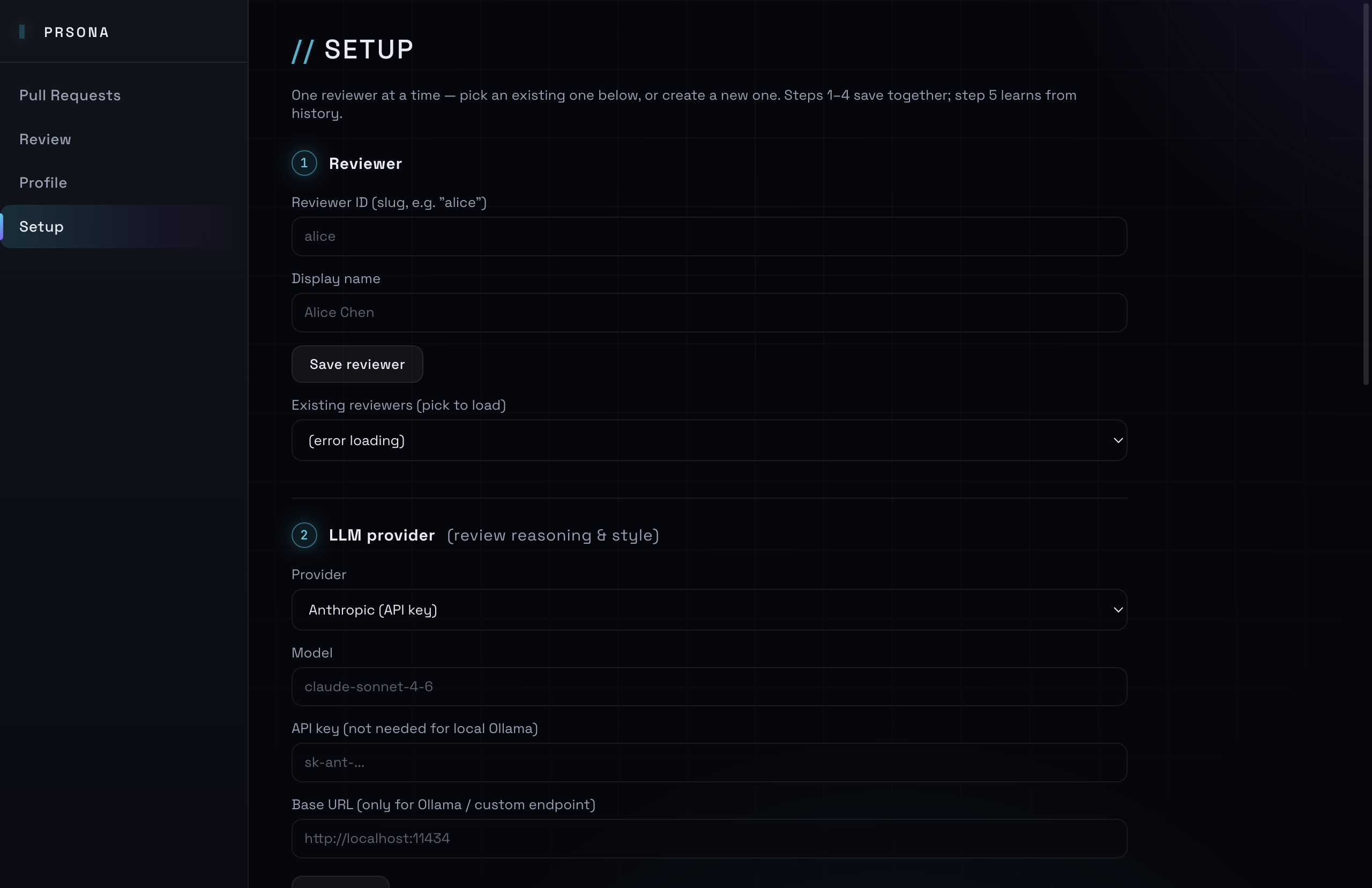
- Per-step self-tests — Setup validates the LLM, embeddings, and GitHub token at the field. Verifying the token also auto-fills your backfill username.
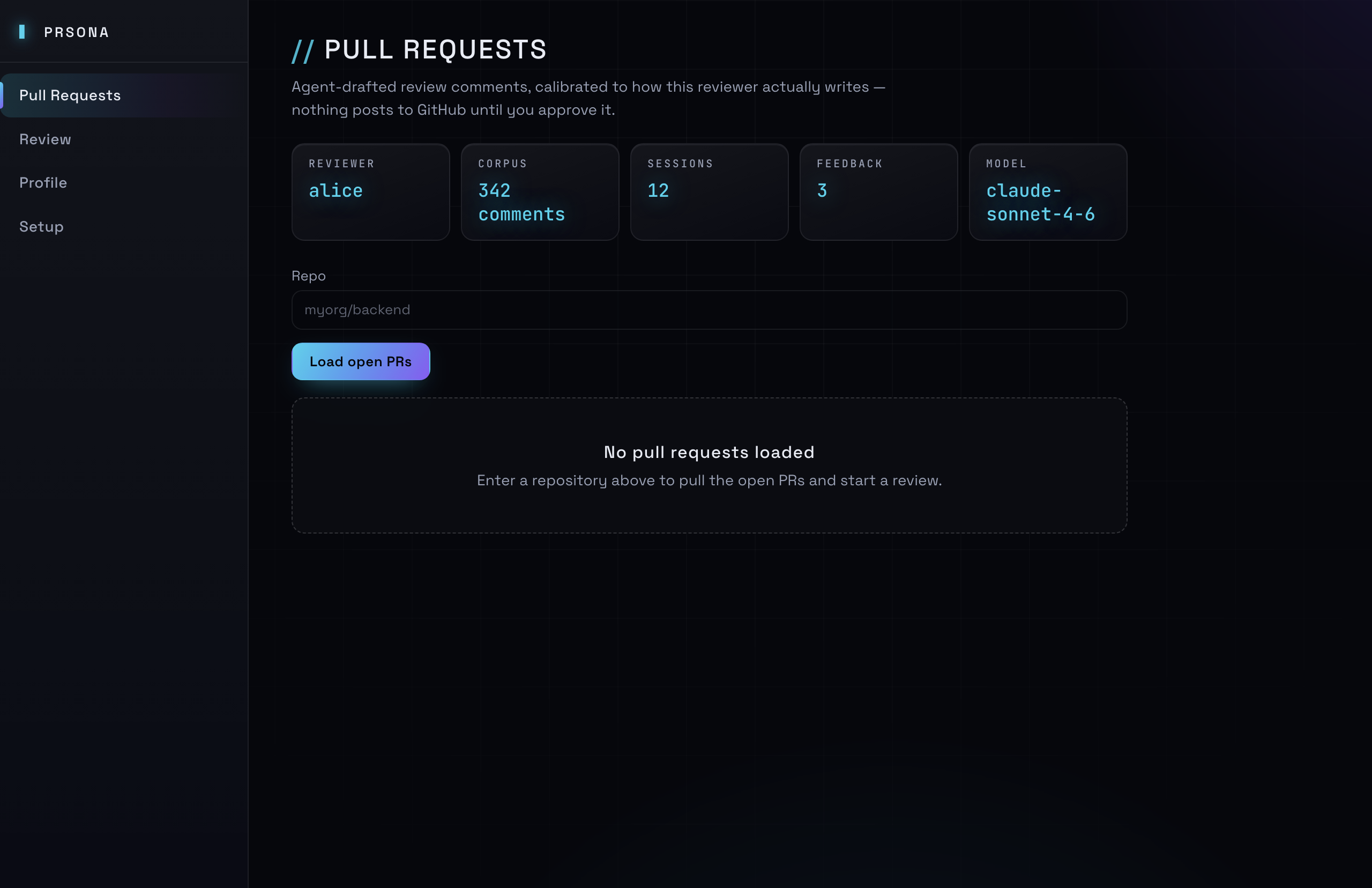
- Live dashboard — the default screen shows reviewer, corpus size, sessions, pending feedback, and model at a glance.
- Offline test suite — 122 assertions across the pipeline and static wiring audit; no network, no API keys needed to test.
- Honest about limits — see Design notes.
Screenshots
| Dashboard | Setup |
|---|---|
|  |
| Review |
|---|
 |
Requirements
- Node.js 22+ (for built-in
fetch;enginesrequires>=22.0.0—.nvmrcpins 24) - An LLM you can reach: an Anthropic/OpenAI API key, or a local runtime
like Ollama with a model pulled
(
ollama pull qwen2.5-coder:32b, or similar). - A GitHub personal access token — classic:
reposcope (public-repo reads need no scope at all), or fine-grained: Contents + Pull requests, read and write. The write permission is only needed to post pending reviews.
Quick start
git clone <this repo>
cd PRsona
npm install
npm start
Hit an install error (node-gyp, rimraf, better-sqlite3)? See
Troubleshooting.
On first launch, go to the Setup tab:
- Create a reviewer (a slug like
alice). - Choose an LLM provider and fill in its API key or local base URL.
- Anthropic and OpenAI don't need a base URL.
- Ollama defaults to
http://localhost:11434. - "Custom OpenAI-compatible endpoint" covers LM Studio, vLLM,
llama.cpp's server, OpenRouter, etc. — anything exposing a
/v1/chat/completionsroute.
- Optionally set a separate embeddings provider — useful if you want a frontier model for review reasoning but a free/local model for retrieval embeddings. Note: Anthropic doesn't expose an embeddings endpoint, so pick OpenAI, Ollama, or a compatible local model for this.
- Add your GitHub token and the repos to watch.
- Save settings, then use the per-step Test LLM / Test embeddings
/ Test GitHub buttons. Each tests the values currently on screen — not
the saved config — so a mistake surfaces at the field, not later. Verifying
the GitHub token also auto-fills your backfill username, since backfill
matches your exact login (
you≠Your Name). - Run Backfill with the reviewer's GitHub username to ingest, embed, and categorize their past review comments. (Categorization makes one LLM call per 25 uncategorized comments — only new ones, ever.)
Then use the Pull Requests tab to load open PRs and trigger a review — it's the screen the app opens on, with a live status strip (reviewer, corpus size, sessions, pending feedback, model) so you can tell at a glance whether backfill has actually run. The Review tab accepts/edits/rejects drafts, and the Profile tab inspects the learned rubric/style and runs consolidation once you've accumulated some feedback.
Testing & packaging
npm test                        # offline: pipeline suite + wiring audit
npm run dist -- --dir           # unpacked app in build/mac-arm64/
npm run dist                    # platform installers (dmg/zip on macOS)
The build is unsigned without a Developer ID, so macOS Gatekeeper will warn on first launch — right-click the app → Open to bypass.
Privacy & your data
- Nothing leaves the machine except its intended destination. API keys
and your GitHub token live in one local config file
(
~/Library/Application Support/pr-review-agent/config.jsonon macOS); comments, embeddings, sessions, and corrections live in a local SQLite database in the same directory; profiles are plain JSON files underprofiles/. - No telemetry, no analytics, no update pings. The only outbound calls are to your chosen LLM provider and to the GitHub API.
- You approve what GitHub sees. Accepted drafts are assembled into a pending review — GitHub's unsubmitted state — and a human submits it from the GitHub UI as the final check.
A note on "Claude subscription"
A claude.ai Pro/Max/Team subscription does not include programmatic API
access — this app talks to the Anthropic Console API, which is billed
separately per token. If cost matters more than model quality, a local
model via Ollama has no per-token cost at all, at the expense of needing
decent hardware and generally weaker instruction-following than frontier
models (the analysis/style prompts include a strictness knob that helps
compensate for this — see src/pipeline/prompts.js).
Project layout
electron/           main process (window, IPC handlers) + preload bridge
src/db/              SQLite schema + query helpers (better-sqlite3)
src/llm/             provider abstraction: anthropic / openai / ollama / openai_compat
src/github/          GitHub REST client (backfill, PR diff, posting reviews)
src/pipeline/        analysis → calibrate → style → consolidate + prompts
src/profile/         reviewer profile JSON store + diffing for approval UI
src/config/          local settings store (electron-store)
renderer/            plain HTML/CSS/JS UI — no framework, no build step
test/                offline test suites (npm test)
docs/                screenshots + troubleshooting guide
Design notes / known simplifications
- Similarity search is brute-force cosine in JS, not a vector DB. Fine for the corpus sizes this tool deals with (hundreds to low thousands of comments per reviewer) and keeps the whole app to a single SQLite file.
- Categorization of backfilled comments is a separate pass — after
ingest + embed,
src/pipeline/categorize.jslabels each new comment from the fixed vocabulary insrc/pipeline/categories.js. The analysis pass uses the same vocabulary, so calibration can join the two sides on category name. It only ever selects rows wherecategory IS NULL, so re-running backfill never re-processes already-labeled comments, and a batch the model answers with unparseable JSON is left NULL for the next run instead of being stampeduncategorized. You can also hand-edit a reviewer's profile JSON directly (<userData>/profiles/<reviewer>.json) to seed it faster. - PR diffs aren't chunked — very large PRs may exceed context limits, especially on local models with smaller windows. A straightforward follow-up is to split by file and run the analysis pass per file.
- GitHub posting uses a pending review —
createPendingReviewdeliberately omits theeventfield, which is the only way to get a PENDING (unsubmitted) review: sendingevent: "COMMENT"would submit it immediately (and additionally requires a top-levelbody). Nothing is posted or notified until a human opens the PR and submits the review from the GitHub UI as a final check. Comments are authored by whichever account owns your token, not by the reviewer being modeled, and each one needs a file path plus a line present in the diff — GitHub 422s otherwise, so the submit button filters those out first.
Contributing
PRs welcome — see CONTRIBUTING.md for the dev setup,
the three-layer IPC contract the wiring test enforces, and the PR
checklist. npm test must be green (it's fully offline).
License
MIT © 2026 saril
If PRsona saves you review time, give it a ⭐ — it helps others find it.
Similar repos


Languages
JavaScript
82.6%
CSS
11.4%
HTML
6.0%
PRsona — an AI pull-request reviewer trained on YOUR review history. Local-first Electron app: backfill your GitHub comments, calibrate to your style, draft PR reviews in your voice. You approve every comment. Bring your own keys: Claude, GPT, Ollama.
JavaScript
1
0 commits
updated Sep 24, 2026
See what people are saying
README
PRsona
Your AI code reviewer that actually reviews like you
PRsona learns a specific person's review style from their own GitHub comment history and drafts pull-request comments in that voice — running locally, with your own API keys, posting nothing you haven't approved.
Features · How it works · Quick start · Contributing
Why another AI reviewer?
CodeRabbit, Copilot, and friends review like nobody in particular — generic comments from a generic model, tuned to nobody's standards, with your code sent to someone else's cloud.
PRsona inverts the model: your review history is the training data.
| Hosted review bots | PRsona | |
|---|---|---|
| Style | Generic, one-size-fits-all | Learned from your past reviews |
| Data | Sent to the vendor | Stays on your machine |
| Model | Locked to their choice | Any: Claude, GPT, local Ollama, OpenAI-compatible |
| Posting | Auto-comments on PRs | Human approves every comment |
| Calibration | None | Filters by your per-category history |
| Cost | Per-seat SaaS | Free, MIT, bring your own keys |
How it works
flowchart LR
  A["<b>Backfill</b><br/>your past GitHub<br/>review comments"] --> B["<b>Embed + categorize</b><br/>fixed vocabulary,<br/>vector search in SQLite"]
  B --> C["<b>Calibrate</b><br/>your per-category<br/>comment rates"]
  C --> D["<b>Review a PR</b><br/>analysis pass,<br/>then style pass"]
  D --> E{"You: accept /<br/>edit / reject"}
  E -->|corrections| F["<b>Consolidate</b><br/>profile + rubric<br/>update (you approve)"]
  F -.->|better profile| D
- Backfill — pulls the reviewer's past PR comments from GitHub into a local SQLite database, categorizes them from a fixed vocabulary, and embeds them for retrieval.
- Review pipeline (per PR) — two separate LLM calls on purpose, with
plain-code calibration between them:
- Analysis pass — style-agnostic: finds candidate issues in the diff, scored against the reviewer's learned rubric.
- Calibration — plain code, not an LLM call: filters issues down to roughly match how often this reviewer actually comments on each category historically. Findings in categories you rarely comment on get dropped instead of nagging you; blocking issues and categories your history doesn't cover yet always survive. Full write-up: docs/CALIBRATION.md.
- Style pass — rephrases the surviving issues in the reviewer's real voice, grounded in retrieved examples of their actual past comments (few-shot), not just an abstract description.
- Human review — drafts are shown in-app; accept / edit / reject each one. Every resolution is logged as a "correction." A comment the agent missed can be added by hand and is logged too.
- Consolidation (on demand, from the Profile tab) — a separate LLM call reads the accumulated corrections and proposes an updated profile (rubric + style). You see the diff and approve it before it's written — nothing updates silently.
Everything lives in one local SQLite file + one JSON profile file per reviewer under the app's userData directory. No server, no external database, no inbound network exposure — the app polls GitHub, GitHub never calls it.
Features
- Learns from real history — your corpus of past GitHub review comments becomes the rubric, the calibration baseline, and few-shot style examples.
- Provider-agnostic — Anthropic, OpenAI, Ollama (local), or any OpenAI-compatible endpoint (LM Studio, vLLM, llama.cpp server, OpenRouter…). Embeddings can use a different provider than the LLM.
- Human-in-the-loop by construction — drafts are editable, rejectable, and posted as a pending GitHub review; nothing notifies anyone until you submit from the GitHub UI.
- Per-step self-tests — Setup validates the LLM, embeddings, and GitHub token at the field. Verifying the token also auto-fills your backfill username.
- Live dashboard — the default screen shows reviewer, corpus size, sessions, pending feedback, and model at a glance.
- Offline test suite — 122 assertions across the pipeline and static wiring audit; no network, no API keys needed to test.
- Honest about limits — see Design notes.
Screenshots
| Dashboard | Setup |
|---|---|
| |
| Review |
|---|
|
Requirements
- Node.js 22+ (for built-in
fetch;enginesrequires>=22.0.0—.nvmrcpins 24) - An LLM you can reach: an Anthropic/OpenAI API key, or a local runtime
like Ollama with a model pulled
(
ollama pull qwen2.5-coder:32b, or similar). - A GitHub personal access token — classic:
reposcope (public-repo reads need no scope at all), or fine-grained: Contents + Pull requests, read and write. The write permission is only needed to post pending reviews.
Quick start
git clone <this repo>
cd PRsona
npm install
npm start
Hit an install error (node-gyp, rimraf, better-sqlite3)? See
Troubleshooting.
On first launch, go to the Setup tab:
- Create a reviewer (a slug like
alice). - Choose an LLM provider and fill in its API key or local base URL.
- Anthropic and OpenAI don't need a base URL.
- Ollama defaults to
http://localhost:11434. - "Custom OpenAI-compatible endpoint" covers LM Studio, vLLM,
llama.cpp's server, OpenRouter, etc. — anything exposing a
/v1/chat/completionsroute.
- Optionally set a separate embeddings provider — useful if you want a frontier model for review reasoning but a free/local model for retrieval embeddings. Note: Anthropic doesn't expose an embeddings endpoint, so pick OpenAI, Ollama, or a compatible local model for this.
- Add your GitHub token and the repos to watch.
- Save settings, then use the per-step Test LLM / Test embeddings
/ Test GitHub buttons. Each tests the values currently on screen — not
the saved config — so a mistake surfaces at the field, not later. Verifying
the GitHub token also auto-fills your backfill username, since backfill
matches your exact login (
you≠Your Name). - Run Backfill with the reviewer's GitHub username to ingest, embed, and categorize their past review comments. (Categorization makes one LLM call per 25 uncategorized comments — only new ones, ever.)
Then use the Pull Requests tab to load open PRs and trigger a review — it's the screen the app opens on, with a live status strip (reviewer, corpus size, sessions, pending feedback, model) so you can tell at a glance whether backfill has actually run. The Review tab accepts/edits/rejects drafts, and the Profile tab inspects the learned rubric/style and runs consolidation once you've accumulated some feedback.
Testing & packaging
npm test                        # offline: pipeline suite + wiring audit
npm run dist -- --dir           # unpacked app in build/mac-arm64/
npm run dist                    # platform installers (dmg/zip on macOS)
The build is unsigned without a Developer ID, so macOS Gatekeeper will warn on first launch — right-click the app → Open to bypass.
Privacy & your data
- Nothing leaves the machine except its intended destination. API keys
and your GitHub token live in one local config file
(
~/Library/Application Support/pr-review-agent/config.jsonon macOS); comments, embeddings, sessions, and corrections live in a local SQLite database in the same directory; profiles are plain JSON files underprofiles/. - No telemetry, no analytics, no update pings. The only outbound calls are to your chosen LLM provider and to the GitHub API.
- You approve what GitHub sees. Accepted drafts are assembled into a pending review — GitHub's unsubmitted state — and a human submits it from the GitHub UI as the final check.
A note on "Claude subscription"
A claude.ai Pro/Max/Team subscription does not include programmatic API
access — this app talks to the Anthropic Console API, which is billed
separately per token. If cost matters more than model quality, a local
model via Ollama has no per-token cost at all, at the expense of needing
decent hardware and generally weaker instruction-following than frontier
models (the analysis/style prompts include a strictness knob that helps
compensate for this — see src/pipeline/prompts.js).
Project layout
electron/           main process (window, IPC handlers) + preload bridge
src/db/              SQLite schema + query helpers (better-sqlite3)
src/llm/             provider abstraction: anthropic / openai / ollama / openai_compat
src/github/          GitHub REST client (backfill, PR diff, posting reviews)
src/pipeline/        analysis → calibrate → style → consolidate + prompts
src/profile/         reviewer profile JSON store + diffing for approval UI
src/config/          local settings store (electron-store)
renderer/            plain HTML/CSS/JS UI — no framework, no build step
test/                offline test suites (npm test)
docs/                screenshots + troubleshooting guide
Design notes / known simplifications
- Similarity search is brute-force cosine in JS, not a vector DB. Fine for the corpus sizes this tool deals with (hundreds to low thousands of comments per reviewer) and keeps the whole app to a single SQLite file.
- Categorization of backfilled comments is a separate pass — after
ingest + embed,
src/pipeline/categorize.jslabels each new comment from the fixed vocabulary insrc/pipeline/categories.js. The analysis pass uses the same vocabulary, so calibration can join the two sides on category name. It only ever selects rows wherecategory IS NULL, so re-running backfill never re-processes already-labeled comments, and a batch the model answers with unparseable JSON is left NULL for the next run instead of being stampeduncategorized. You can also hand-edit a reviewer's profile JSON directly (<userData>/profiles/<reviewer>.json) to seed it faster. - PR diffs aren't chunked — very large PRs may exceed context limits, especially on local models with smaller windows. A straightforward follow-up is to split by file and run the analysis pass per file.
- GitHub posting uses a pending review —
createPendingReviewdeliberately omits theeventfield, which is the only way to get a PENDING (unsubmitted) review: sendingevent: "COMMENT"would submit it immediately (and additionally requires a top-levelbody). Nothing is posted or notified until a human opens the PR and submits the review from the GitHub UI as a final check. Comments are authored by whichever account owns your token, not by the reviewer being modeled, and each one needs a file path plus a line present in the diff — GitHub 422s otherwise, so the submit button filters those out first.
Contributing
PRs welcome — see CONTRIBUTING.md for the dev setup,
the three-layer IPC contract the wiring test enforces, and the PR
checklist. npm test must be green (it's fully offline).
License
MIT © 2026 saril
If PRsona saves you review time, give it a ⭐ — it helps others find it.
Similar repos
Languages
JavaScript
82.6%
CSS
11.4%
HTML
6.0%