EPDiy is a driver board for affordable e-Paper (or E-ink) displays.
See the code


EPDiy is a driver board which talks to affordable E-Paper (or E-Ink) screens, which are usually sold as replacement screens for E-Book readers. Why are they interesting?
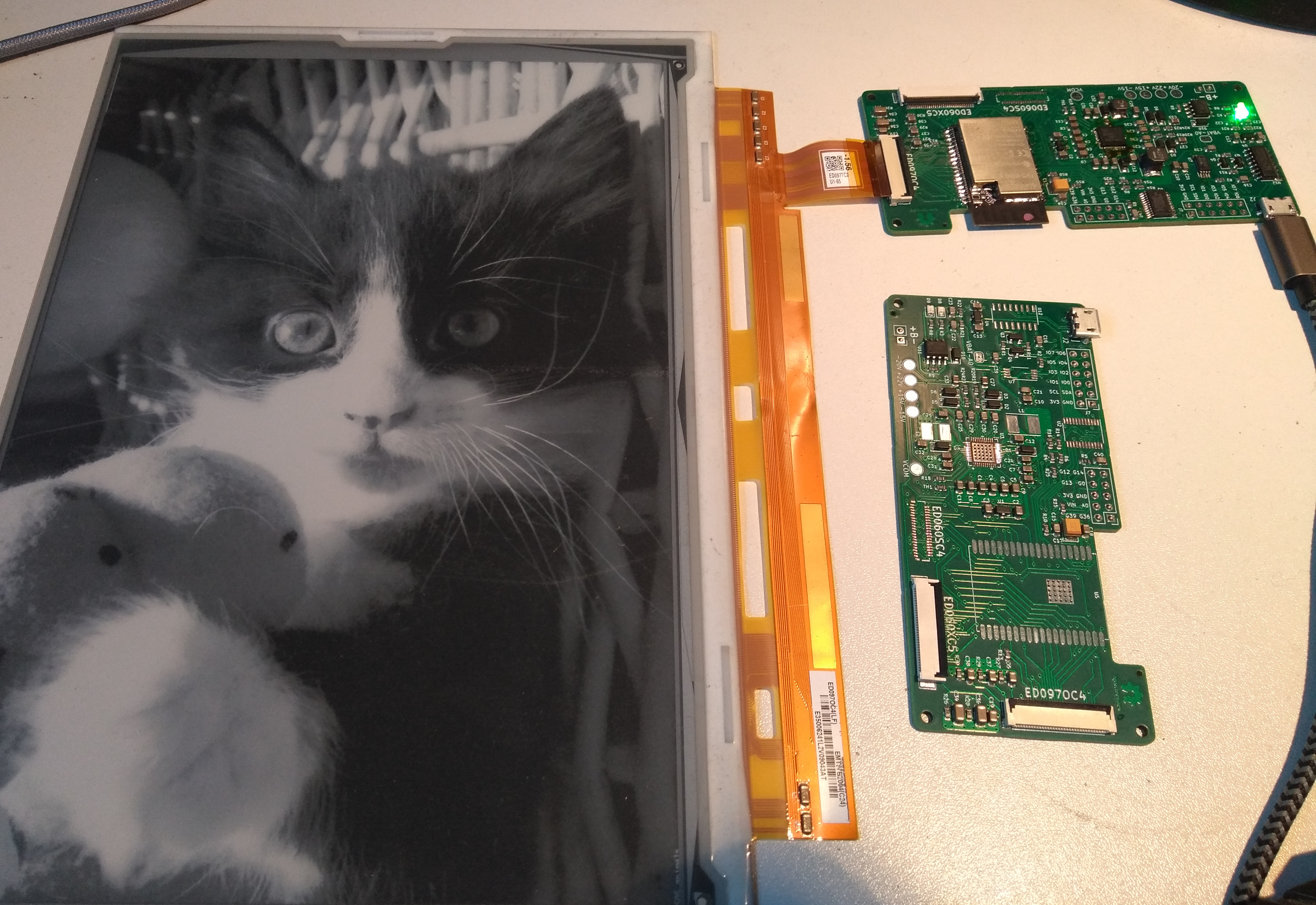
Ready-made DIY modules for this size and with 4bpp (16 Grayscale) color support are currently quite expensive and / or slow. The EPDiy controller can drive the bare display modules, e.g. from old e-Readers, which are available for 20$ (small) / 30$ (large) on ebay! Additionally, since it is based on the ESP32S3 (V7) / ESP32 (V2-V6) microcontroller, it features WiFi and Bluetooth connectivity.
The EPDiy driver board targets a range of E-Paper displays, as shown in the table below. As the driving method for all matrix-based E-ink displays is more or less the same, only the right connector and timings are needed. The current V7 board has three different display connectors, other display will require an adapter board.
The controller is optimized for the use with LiPo batteries, featuring a LiPo charger and ultra-low deep sleep current.
This project supports a driver for the ESP-IDF and Arduino. For installation instructions, please refer to the documentation. Note that for epdiy V7, update speeds are significantly lower when using the Arduino IDE, because it does not allow to change the sub-optimal cache configuration.
The examples directory contains some example applications like a weather station or a screen diagnostic test.
If you want to build something more useful though, how about:
On the EPDiy Hardware Page, you'll find a list of all boards and variants, adapters, and helpers. Next to each board, there are manufacturing files (gerbers), Bill of Materials (BoM), part placement files, and 3D models ready to use!
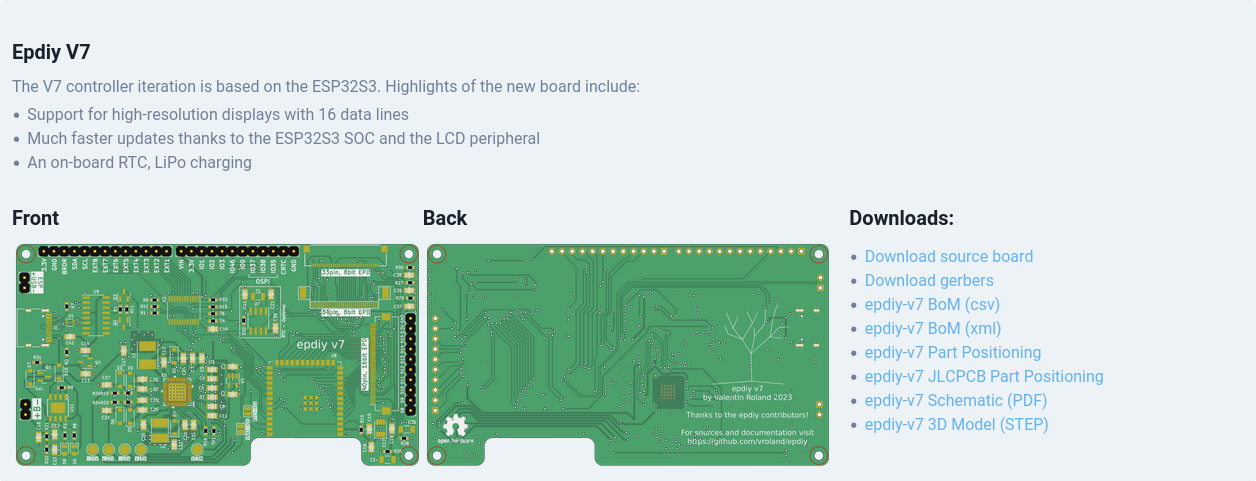
For ordering from JLCPCB for example, ordering is as easy as downloading the zipped gerbers, BoM, and placement file and uploading them. The process is very similar for other manufacturers, check your vendor's documentation for details. Don't forget to oder adapters if the board doesn't have connectors for your specific display.
The current latest version is epdiy V7, beased on the ESP32S3. Older versions are also available on the hardware page.
Want to contribute your own board variant or adapter? Check out the epdiy-hardware repository for instructions.
For instructions and more information visit the documentation!
 Matrix Community: +epdiy:matrix.vroland.de
| Name | Size | Resolution | Compatible | Connector | Pin count | Compatible since pcb version | Notes |
|---|---|---|---|---|---|---|---|
| ED060SC4 | 6" | 800 x 600 167 PPI | yes, tested | FH26W-39S-0.3SHW(60) | 39 | v2 | |
| ED097OC4 | 9.7" | 1200 x 825 150 PPI | yes, tested | XF2M-3315-1A | 33 | v2 | Cheap, inferior contrast |
| ED097TC2 | 9.7" | 1200 x 825 150 PPI | yes, tested | XF2M-3315-1A | 33 | v2 | Slightly higher price, better contrast |
| ED097OC1 | 9.7" | 1200 x 825 150 PPI | yes (should work) | XF2M-3315-1A | 33 | v2 | Cheap, inferior performance |
| ED047TC1 | 4.7" | 960 x 540 234 PPI | yes, tested | 40-pin | 40 | LILYGO 4.7" EPD | Supported only by 4.7" e-paper board by LILYGO |
| ED050SC5 | 5" | 600 x 800 200 PPI | yes, tested | THD0510-33CL-GF | 33 | v5 | |
| ED050SC3 | 5" | 600 x 800 200 PPI | yes (should work) | THD0510-33CL-GF | 33 | v5 | |
| ED052TC4 | 5.2" | 1280 x 720 284 PPI | yes (should work) | WP27D-P050VA3 | 50 | v5 | |
| ED133UT2 | 13.3" | 1600 x 1200 150 PPI | yes, tested | adapter board | 39 | v2 | Adapter Board required, also PENG133D |
| ED060XC3 | 6" | 758 x 1024 212 PPI | yes, tested | THD0515-34CL-SN | 34 | v5 | Cheapest, good contrast and resolution |
| ED060XD4 | 6" | 758 x 1024 212 PPI | yes, tested | THD0515-34CL-SN | 34 | v5 | |
| ED060XC5 | 6" | 758 x 1024 212 PPI | yes (should work as ED060XC3) | THD0515-34CL-SN | 34 | v5 | |
| ED060XD6 | 6" | 758 x 1024 212 PPI | yes (should work as ED060XC3) | THD0515-34CL-SN | 34 | v5 | |
| ED060XH2 | 6" | 758 x 1024 212 PPI | yes (should work as ED060XC3) | THD0515-34CL-SN | 34 | v5 | |
| ED060XC9 | 6" | 758 x 1024 212 PPI | yes (should work as ED060XC3) | THD0515-34CL-SN | 34 | v5 | |
| ED060KD1 | 6" | 1072 x 1448 300 PPI | yes (should work as ED060XC3) | THD0515-34CL-SN | 34 | v5 | |
| ED060KC1 | 6" | 1072 x 1448 300 PPI | yes (should work as ED060XC3) | THD0515-34CL-SN | 34 | v5 | |
| ED060SCF | 6" | 600 x 800 167 PPI | yes, tested | THD0515-34CL-SN | 34 | v5 | Different flex cable shape |
| ED060SCN | 6" | 600 x 800 167 PPI | yes (should work as ED060XC3) | THD0515-34CL-SN | 34 | v5 | Different flex cable shape |
| ED060SCP | 6" | 600 x 800 167 PPI | yes (should work as ED060XC3) | THD0515-34CL-SN | 34 | v5 | Different flex cable shape |
| ED060SC7 | 6" | 600 x 800 167 PPI | yes (should work) | AXT334124 | 34 | v5 | connector dropped in v6 |
| ED060SCG | 6" | 600 x 800 167 PPI | yes (should work) | AXT334124 | 34 | v5 | connector dropped in v6 |
| ED060SCE | 6" | 600 x 800 167 PPI | yes (should work) | AXT334124 | 34 | v5 | connector dropped in v6 |
| ED060SCM | 6" | 600 x 800 167 PPI | yes (should work) | AXT334124 | 34 | v5 | connector dropped in v6 |
| ED060SCT | 6" | 600 x 800 167 PPI | yes, tested | AXT334124 | 34 | v5 | connector dropped in v6 |
| ED078KC1 | 7.8" | 1872 x 1404 300 PPI | yes, tested | FH12-40S-0.5SH | 40 | v7 | 16 data lines |
The following list is compiled from past experiences and GitHub issues:
rtc_gpio_isolate(GPIO_NUM_12); to your solution. See also Configuring IOs (Deep-sleep Only).| Board | Display | Board Definition | Notes |
|---|---|---|---|
| LilyGo T5 4.7" | ED047TC1 | epd_board_lilygo_t5_47 | Original T5 4.7" |
| LilyGo T5 S3 E-Paper Pro | ED047TC1 | epd_board_v7 | ESP32-S3 based, includes GT911 touch, PCF8563 RTC, BQ25896/BQ27220 battery management |
There are several differences with these boards.
One particular one is the way the LilyGo handles power to the display the official lilygo code has two states.
This is now handled in epdiy in a different way to the lilygo code.
epd_poweroff() completely turns the power off to the display and the other peripherals of the lilygo.
The new function epd_powerdown() keeps the peripherals on (this allows the touch functions to continue to work).
epd_poweroff() should always be called before sleeping the system
You can still use touch to wake the screen with the following.
In Arduino it works like this.
epd_poweroff();
epd_deinit();
esp_sleep_enable_ext1_wakeup(GPIO_SEL_13, ESP_EXT1_WAKEUP_ANY_HIGH);
esp_deep_sleep_start();
EPDIY now uses the ESP-IDF master bus/device I2C driver on IDF 5.x and newer.
Existing programs can keep calling epd_init(...) and EPDIY will create and own the board's default I2C bus.
If your application already owns an ESP-IDF I2C master bus, pass it in during initialization:
i2c_master_bus_handle_t bus = ...;
EpdI2cConfig i2c_config = {
    .bus_handle = bus,
};
EpdInitConfig init_config = {
    .i2c = &i2c_config,
};

epd_init_with_config(&epd_board_v7, &ED047TC1, EPD_LUT_64K, &init_config);
When a bus handle is provided, EPDIY will attach its TPS65185/PCA9555 devices to that bus and leave bus ownership to the caller.
If you know any other useful resources or have suggestions, please comment on #31!
For more details, see the project page on Hackaday: https://hackaday.io/project/168193-epdiy-976-e-paper-controller
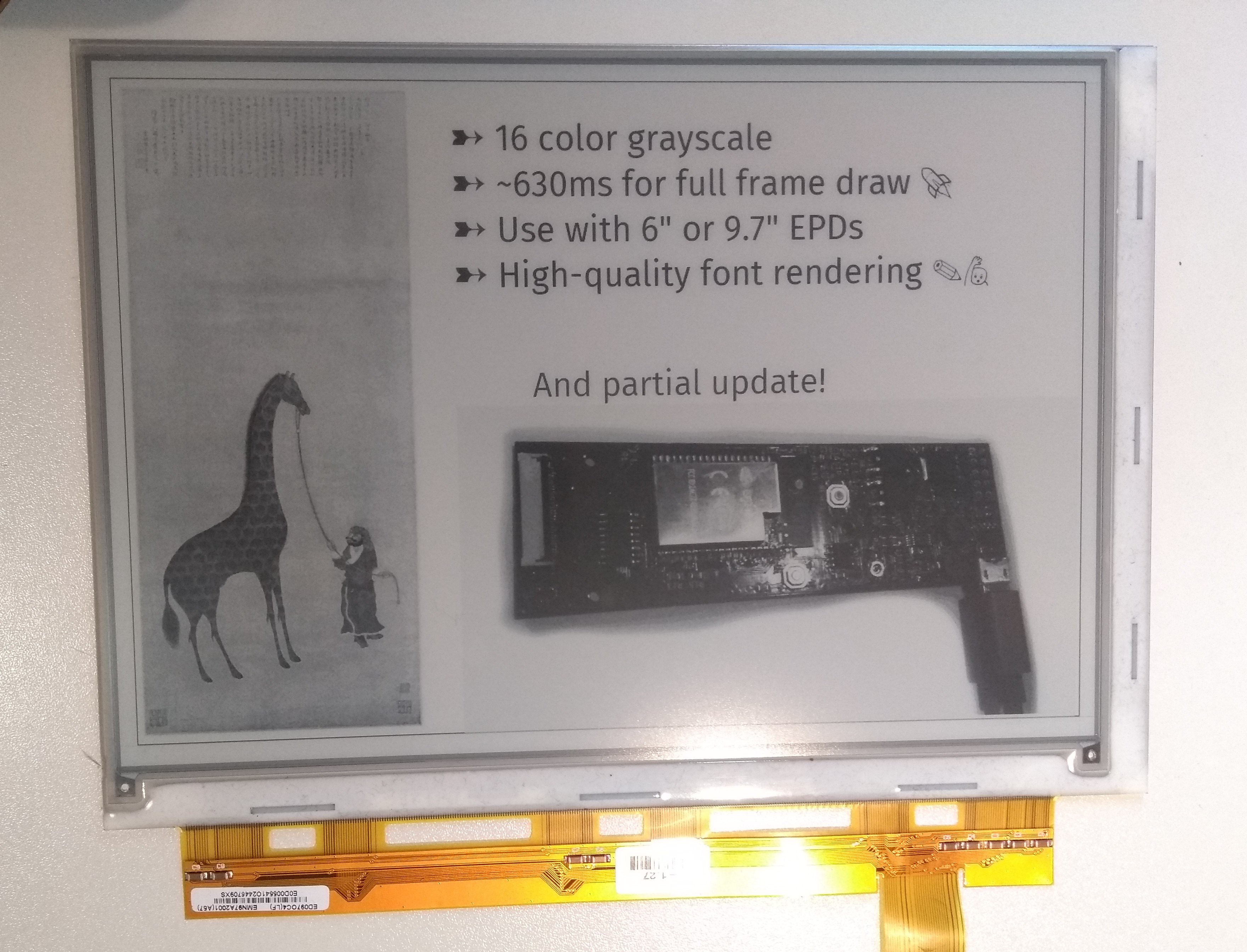
The weather example is Copyright (c) David Bird 2018 (except for minor modifications). Please refer to examples/weather/README.md for details.
The board and schematic are licensed under a  Creative Commons Attribution-ShareAlike 4.0 International License.
Firmware and remaining examples are licensed under the terms of the GNU Lesser GPL version 3. Utilities are licensed under the terms of the MIT license.
406 followers · starred Oct 2021
118 followers · starred Feb 2025
156 followers · starred Sep 2022
1,334 followers · starred May 2023
EPDiy is a driver board for affordable e-Paper (or E-ink) displays.
See the code
EPDiy is a driver board which talks to affordable E-Paper (or E-Ink) screens, which are usually sold as replacement screens for E-Book readers. Why are they interesting?
Ready-made DIY modules for this size and with 4bpp (16 Grayscale) color support are currently quite expensive and / or slow. The EPDiy controller can drive the bare display modules, e.g. from old e-Readers, which are available for 20$ (small) / 30$ (large) on ebay! Additionally, since it is based on the ESP32S3 (V7) / ESP32 (V2-V6) microcontroller, it features WiFi and Bluetooth connectivity.
The EPDiy driver board targets a range of E-Paper displays, as shown in the table below. As the driving method for all matrix-based E-ink displays is more or less the same, only the right connector and timings are needed. The current V7 board has three different display connectors, other display will require an adapter board.
The controller is optimized for the use with LiPo batteries, featuring a LiPo charger and ultra-low deep sleep current.
This project supports a driver for the ESP-IDF and Arduino. For installation instructions, please refer to the documentation. Note that for epdiy V7, update speeds are significantly lower when using the Arduino IDE, because it does not allow to change the sub-optimal cache configuration.
The examples directory contains some example applications like a weather station or a screen diagnostic test.
If you want to build something more useful though, how about:
On the EPDiy Hardware Page, you'll find a list of all boards and variants, adapters, and helpers. Next to each board, there are manufacturing files (gerbers), Bill of Materials (BoM), part placement files, and 3D models ready to use!
For ordering from JLCPCB for example, ordering is as easy as downloading the zipped gerbers, BoM, and placement file and uploading them. The process is very similar for other manufacturers, check your vendor's documentation for details. Don't forget to oder adapters if the board doesn't have connectors for your specific display.
The current latest version is epdiy V7, beased on the ESP32S3. Older versions are also available on the hardware page.
Want to contribute your own board variant or adapter? Check out the epdiy-hardware repository for instructions.
For instructions and more information visit the documentation!
Matrix Community: +epdiy:matrix.vroland.de| Name | Size | Resolution | Compatible | Connector | Pin count | Compatible since pcb version | Notes |
|---|---|---|---|---|---|---|---|
| ED060SC4 | 6" | 800 x 600 167 PPI | yes, tested | FH26W-39S-0.3SHW(60) | 39 | v2 | |
| ED097OC4 | 9.7" | 1200 x 825 150 PPI | yes, tested | XF2M-3315-1A | 33 | v2 | Cheap, inferior contrast |
| ED097TC2 | 9.7" | 1200 x 825 150 PPI | yes, tested | XF2M-3315-1A | 33 | v2 | Slightly higher price, better contrast |
| ED097OC1 | 9.7" | 1200 x 825 150 PPI | yes (should work) | XF2M-3315-1A | 33 | v2 | Cheap, inferior performance |
| ED047TC1 | 4.7" | 960 x 540 234 PPI | yes, tested | 40-pin | 40 | LILYGO 4.7" EPD | Supported only by 4.7" e-paper board by LILYGO |
| ED050SC5 | 5" | 600 x 800 200 PPI | yes, tested | THD0510-33CL-GF | 33 | v5 | |
| ED050SC3 | 5" | 600 x 800 200 PPI | yes (should work) | THD0510-33CL-GF | 33 | v5 | |
| ED052TC4 | 5.2" | 1280 x 720 284 PPI | yes (should work) | WP27D-P050VA3 | 50 | v5 | |
| ED133UT2 | 13.3" | 1600 x 1200 150 PPI | yes, tested | adapter board | 39 | v2 | Adapter Board required, also PENG133D |
| ED060XC3 | 6" | 758 x 1024 212 PPI | yes, tested | THD0515-34CL-SN | 34 | v5 | Cheapest, good contrast and resolution |
| ED060XD4 | 6" | 758 x 1024 212 PPI | yes, tested | THD0515-34CL-SN | 34 | v5 | |
| ED060XC5 | 6" | 758 x 1024 212 PPI | yes (should work as ED060XC3) | THD0515-34CL-SN | 34 | v5 | |
| ED060XD6 | 6" | 758 x 1024 212 PPI | yes (should work as ED060XC3) | THD0515-34CL-SN | 34 | v5 | |
| ED060XH2 | 6" | 758 x 1024 212 PPI | yes (should work as ED060XC3) | THD0515-34CL-SN | 34 | v5 | |
| ED060XC9 | 6" | 758 x 1024 212 PPI | yes (should work as ED060XC3) | THD0515-34CL-SN | 34 | v5 | |
| ED060KD1 | 6" | 1072 x 1448 300 PPI | yes (should work as ED060XC3) | THD0515-34CL-SN | 34 | v5 | |
| ED060KC1 | 6" | 1072 x 1448 300 PPI | yes (should work as ED060XC3) | THD0515-34CL-SN | 34 | v5 | |
| ED060SCF | 6" | 600 x 800 167 PPI | yes, tested | THD0515-34CL-SN | 34 | v5 | Different flex cable shape |
| ED060SCN | 6" | 600 x 800 167 PPI | yes (should work as ED060XC3) | THD0515-34CL-SN | 34 | v5 | Different flex cable shape |
| ED060SCP | 6" | 600 x 800 167 PPI | yes (should work as ED060XC3) | THD0515-34CL-SN | 34 | v5 | Different flex cable shape |
| ED060SC7 | 6" | 600 x 800 167 PPI | yes (should work) | AXT334124 | 34 | v5 | connector dropped in v6 |
| ED060SCG | 6" | 600 x 800 167 PPI | yes (should work) | AXT334124 | 34 | v5 | connector dropped in v6 |
| ED060SCE | 6" | 600 x 800 167 PPI | yes (should work) | AXT334124 | 34 | v5 | connector dropped in v6 |
| ED060SCM | 6" | 600 x 800 167 PPI | yes (should work) | AXT334124 | 34 | v5 | connector dropped in v6 |
| ED060SCT | 6" | 600 x 800 167 PPI | yes, tested | AXT334124 | 34 | v5 | connector dropped in v6 |
| ED078KC1 | 7.8" | 1872 x 1404 300 PPI | yes, tested | FH12-40S-0.5SH | 40 | v7 | 16 data lines |
The following list is compiled from past experiences and GitHub issues:
rtc_gpio_isolate(GPIO_NUM_12); to your solution. See also Configuring IOs (Deep-sleep Only).| Board | Display | Board Definition | Notes |
|---|---|---|---|
| LilyGo T5 4.7" | ED047TC1 | epd_board_lilygo_t5_47 | Original T5 4.7" |
| LilyGo T5 S3 E-Paper Pro | ED047TC1 | epd_board_v7 | ESP32-S3 based, includes GT911 touch, PCF8563 RTC, BQ25896/BQ27220 battery management |
There are several differences with these boards.
One particular one is the way the LilyGo handles power to the display the official lilygo code has two states.
This is now handled in epdiy in a different way to the lilygo code.
epd_poweroff() completely turns the power off to the display and the other peripherals of the lilygo.
The new function epd_powerdown() keeps the peripherals on (this allows the touch functions to continue to work).
epd_poweroff() should always be called before sleeping the system
You can still use touch to wake the screen with the following.
In Arduino it works like this.
epd_poweroff();
epd_deinit();
esp_sleep_enable_ext1_wakeup(GPIO_SEL_13, ESP_EXT1_WAKEUP_ANY_HIGH);
esp_deep_sleep_start();
EPDIY now uses the ESP-IDF master bus/device I2C driver on IDF 5.x and newer.
Existing programs can keep calling epd_init(...) and EPDIY will create and own the board's default I2C bus.
If your application already owns an ESP-IDF I2C master bus, pass it in during initialization:
i2c_master_bus_handle_t bus = ...;
EpdI2cConfig i2c_config = {
    .bus_handle = bus,
};
EpdInitConfig init_config = {
    .i2c = &i2c_config,
};

epd_init_with_config(&epd_board_v7, &ED047TC1, EPD_LUT_64K, &init_config);
When a bus handle is provided, EPDIY will attach its TPS65185/PCA9555 devices to that bus and leave bus ownership to the caller.
If you know any other useful resources or have suggestions, please comment on #31!
For more details, see the project page on Hackaday: https://hackaday.io/project/168193-epdiy-976-e-paper-controller
The weather example is Copyright (c) David Bird 2018 (except for minor modifications). Please refer to examples/weather/README.md for details.
The board and schematic are licensed under a Creative Commons Attribution-ShareAlike 4.0 International License.
Firmware and remaining examples are licensed under the terms of the GNU Lesser GPL version 3. Utilities are licensed under the terms of the MIT license.
406 followers · starred Oct 2021
118 followers · starred Feb 2025
156 followers · starred Sep 2022
1,334 followers · starred May 2023



