
Minimal per-app window switcher for macOS (hold option, tap tab)
Swift
0
13 commits
updated Sep 30, 2026
See what people are saying
README
Riffle
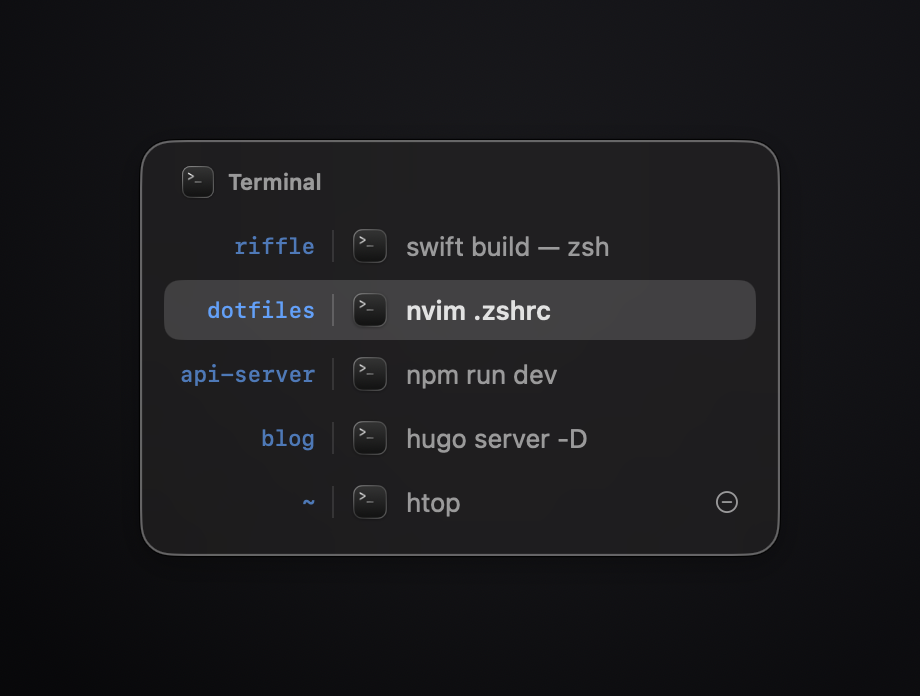
A minimal keyboard window switcher for the windows of the current app. Menu-bar-only, no Dock icon, ~500 lines of Swift, zero dependencies.
Features
- Hold ⌥, tap ⇥ — cycle through every window of the frontmost app as a title list
- Includes minimized windows and windows on other Spaces (via the Accessibility API)
- Windows ordered front-to-back (most recently used first)
- Panel auto-sizes to the longest title and centers on the screen under your mouse
- Mouse support: hover to select, click to focus
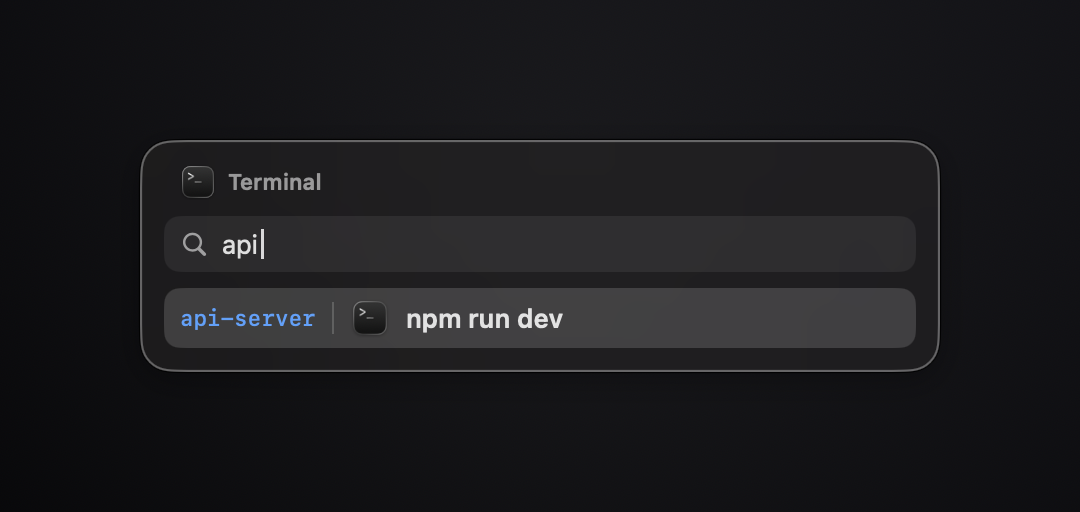
- Optional Stay Open to Search (menu bar toggle): a quick ⌥⇥ tap leaves the panel up so you can type to filter the list
Keys
| Keys | Action |
|---|---|
| ⌥ ⇥ / ⌥ ↓ / ⌥ → | open switcher / next window |
| ⌥ ⇧ ⇥ / ⌥ ↑ / ⌥ ← | previous window |
| release ⌥ / ⏎ | focus selected window |
| ⎋ | cancel |
Search mode
With Stay Open to Search enabled (menu bar → toggle), tapping ⌥⇥ and letting ⌥ go within 250 ms leaves the panel up with a search field instead of committing. Keep ⌥ held down past that and the switcher stays classic: cycle with ⇥, release ⌥ to focus the highlighted window.
| Keys | Action |
|---|---|
| any letters | filter by folder, title or app name (all terms must match, order-free) |
| ⇥ / ⇧⇥ / ↑↓ | move the selection |
| ⌫ | delete a character |
| ⏎ / click | focus selected window |
| ⎋ | clear the query, then cancel |
The panel still never takes key focus — keystrokes are read from the event tap and swallowed, so nothing leaks into the app underneath. A click anywhere else, or any ⌘/⌃ shortcut, dismisses it.
Build & install
Requires macOS 13+ and Xcode command line tools.
./build.sh              # builds build/Riffle.app
open build/Riffle.app   # or copy to /Applications first
build.sh signs with the first available codesigning identity. This matters:
macOS ties the Accessibility grant to the code signature, and ad-hoc signatures
change on every build — a certificate keeps the grant stable across rebuilds.
Permissions
Accessibility (required) — global ⌥⇥ capture, window enumeration, and window raising. Prompted on first launch; grant in System Settings → Privacy & Security → Accessibility. No Screen Recording permission needed.
Architecture
main.swift ─▶ AppDelegate ─▶ KeyboardHook (CGEventTap: ⌥⇥ intercept)
                   │               │
                   ▼               ▼
             status item       Switcher (session state, frontmost-app scope)
                                ├─▶ WindowDiscovery (AX windows + CG z-order)
                                ├─▶ SwitcherPanel (non-activating NSPanel)
                                │      └─▶ SwitcherView (SwiftUI title list)
                                └─▶ WindowFocus (AX unminimize/raise + activate)
Notable implementation details:
- A
CGEventTapswallows ⌥⇥ before it reaches the focused app. - Window ↔ AX matching uses the private
_AXUIElementGetWindow; z-order comes fromCGWindowListCopyWindowInfo. - The panel is a borderless
.nonactivatingPanel— it never steals focus.
Limitations
- Switches within the current app only (that's the point); no across-app mode
- Shortcuts are not configurable; no thumbnails
License
Similar repos


Languages
Swift
96.6%
Shell
3.4%
Minimal per-app window switcher for macOS (hold option, tap tab)
Swift
0
13 commits
updated Sep 30, 2026
See what people are saying
README
Riffle
A minimal keyboard window switcher for the windows of the current app. Menu-bar-only, no Dock icon, ~500 lines of Swift, zero dependencies.
Features
- Hold ⌥, tap ⇥ — cycle through every window of the frontmost app as a title list
- Includes minimized windows and windows on other Spaces (via the Accessibility API)
- Windows ordered front-to-back (most recently used first)
- Panel auto-sizes to the longest title and centers on the screen under your mouse
- Mouse support: hover to select, click to focus
- Optional Stay Open to Search (menu bar toggle): a quick ⌥⇥ tap leaves the panel up so you can type to filter the list
Keys
| Keys | Action |
|---|---|
| ⌥ ⇥ / ⌥ ↓ / ⌥ → | open switcher / next window |
| ⌥ ⇧ ⇥ / ⌥ ↑ / ⌥ ← | previous window |
| release ⌥ / ⏎ | focus selected window |
| ⎋ | cancel |
Search mode
With Stay Open to Search enabled (menu bar → toggle), tapping ⌥⇥ and letting ⌥ go within 250 ms leaves the panel up with a search field instead of committing. Keep ⌥ held down past that and the switcher stays classic: cycle with ⇥, release ⌥ to focus the highlighted window.
| Keys | Action |
|---|---|
| any letters | filter by folder, title or app name (all terms must match, order-free) |
| ⇥ / ⇧⇥ / ↑↓ | move the selection |
| ⌫ | delete a character |
| ⏎ / click | focus selected window |
| ⎋ | clear the query, then cancel |
The panel still never takes key focus — keystrokes are read from the event tap and swallowed, so nothing leaks into the app underneath. A click anywhere else, or any ⌘/⌃ shortcut, dismisses it.
Build & install
Requires macOS 13+ and Xcode command line tools.
./build.sh              # builds build/Riffle.app
open build/Riffle.app   # or copy to /Applications first
build.sh signs with the first available codesigning identity. This matters:
macOS ties the Accessibility grant to the code signature, and ad-hoc signatures
change on every build — a certificate keeps the grant stable across rebuilds.
Permissions
Accessibility (required) — global ⌥⇥ capture, window enumeration, and window raising. Prompted on first launch; grant in System Settings → Privacy & Security → Accessibility. No Screen Recording permission needed.
Architecture
main.swift ─▶ AppDelegate ─▶ KeyboardHook (CGEventTap: ⌥⇥ intercept)
                   │               │
                   ▼               ▼
             status item       Switcher (session state, frontmost-app scope)
                                ├─▶ WindowDiscovery (AX windows + CG z-order)
                                ├─▶ SwitcherPanel (non-activating NSPanel)
                                │      └─▶ SwitcherView (SwiftUI title list)
                                └─▶ WindowFocus (AX unminimize/raise + activate)
Notable implementation details:
- A
CGEventTapswallows ⌥⇥ before it reaches the focused app. - Window ↔ AX matching uses the private
_AXUIElementGetWindow; z-order comes fromCGWindowListCopyWindowInfo. - The panel is a borderless
.nonactivatingPanel— it never steals focus.
Limitations
- Switches within the current app only (that's the point); no across-app mode
- Shortcuts are not configurable; no thumbnails
License
Similar repos
Languages
Swift
96.6%
Shell
3.4%