Evaluate and Enhance Your LLM Deployments for Real-World Inference Needs
See the code






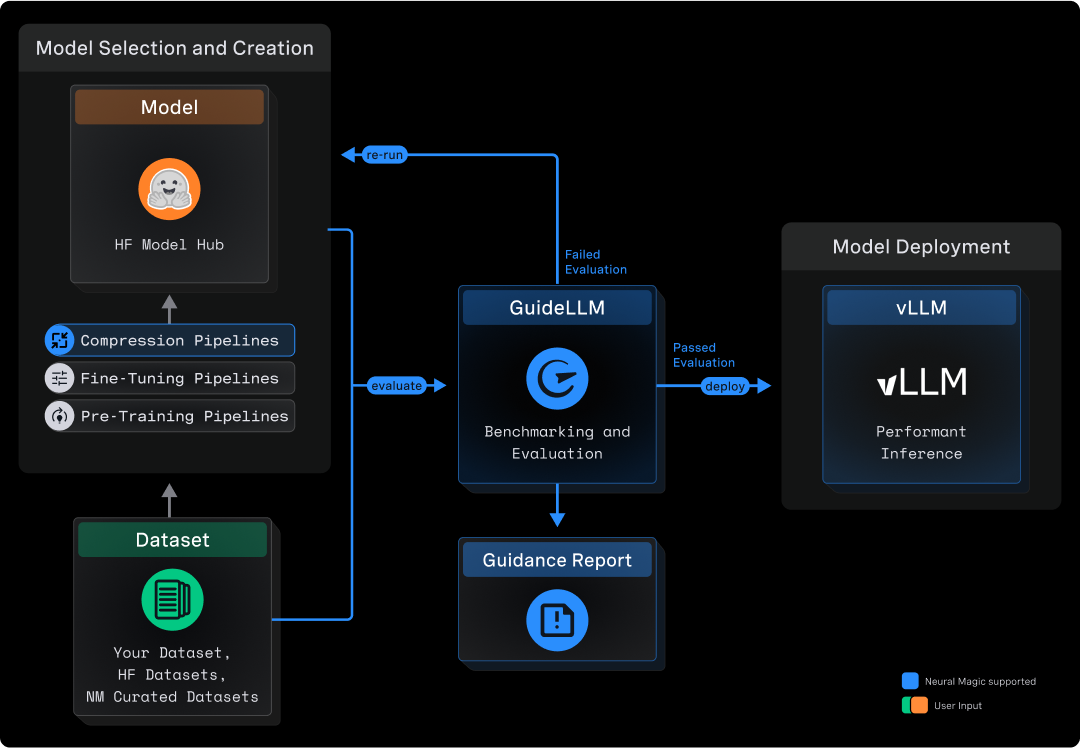
GuideLLM is a platform for evaluating how language models perform under real workloads and configurations. It simulates end-to-end interactions with OpenAI-compatible and vLLM-native servers, generates workload patterns that reflect production usage, and produces detailed reports that help teams understand system behavior, resource needs, and operational limits. GuideLLM supports real and synthetic datasets, multimodal inputs, and flexible execution profiles, giving engineering and ML teams a consistent framework for assessing model behavior, tuning deployments, and planning capacity as their systems evolve.
GuideLLM gives teams a clear picture of performance, efficiency, and reliability when deploying LLMs in production-like environments.
Many tools benchmark endpoints, not models, and miss the details that matter for LLMs. GuideLLM focuses exclusively on LLM-specific workloads, measuring TTFT, ITL, output distributions, and dataset-driven variation. It fits into everyday engineering tasks by using standard Python interfaces and HuggingFace datasets instead of custom formats or research-only pipelines. It is also built for performance, supporting high-rate load generation and accurate scheduling far beyond simple scripts or example benchmarks. The table below highlights how this approach compares to other options.
| Tool | CLI | API | High Perf | Full Metrics | Data Modalities | Data Sources | Profiles | Backends | Endpoints | Output Types |
|---|---|---|---|---|---|---|---|---|---|---|
| GuideLLM | ✅ | ✅ | ✅ | ✅ | Text, Image, Audio, Video | HuggingFace, Files, Synthetic, Custom | Synchronous, Concurrent, Throughput, Constant, Poisson, Sweep | OpenAI-compatible | /completions, /chat/completions, /audio/translation, /audio/transcription | console, json, csv, html |
| inference-perf | ✅ | ❌ | ✅ | ❌ | Text | Synthetic, Specific Datasets | Concurrent, Constant, Poisson, Sweep | OpenAI-compatible | /completions, /chat/completions | json, png |
| genai-bench | ✅ | ❌ | ❌ | ❌ | Text, Image, Embedding, ReRank | Synthetic, File | Concurrent | OpenAI-compatible, Hosted Cloud | /chat/completions, /embeddings | console, xlsx, png |
| llm-perf | ❌ | ❌ | ✅ | ❌ | Text | Synthetic | Concurrent | OpenAI-compatible, Hosted Cloud | /chat/completions | json |
| ollama-benchmark | ✅ | ❌ | ❌ | ❌ | Text | Synthetic | Synchronous | Ollama | /completions | console, json |
| vllm/benchmarks | ✅ | ❌ | ❌ | ❌ | Text | Synthetic, Specific Datasets | Synchronous, Throughput, Constant, Sweep | OpenAI-compatible, vLLM API | /completions, /chat/completions | console, png |
This section summarizes the newest capabilities available to users and outlines the current areas of development. It helps readers understand how the platform is evolving and what to expect next.
Recent Additions
Active Development
The Quick Start shows how to install GuideLLM, launch a server, and run your first benchmark in a few minutes.
Before installing, ensure you have the following prerequisites:
Install the latest GuideLLM release from PyPi using pip :
pip install guidellm[recommended]
Or install from source:
pip install git+https://github.com/vllm-project/guidellm.git
Or run the latest container from ghcr.io/vllm-project/guidellm:
podman run \
  --rm -it \
  -v "./results:/results:rw" \
  -e GUIDELLM__SPEC__BACKEND='{"kind": "openai_http", "target": "http://localhost:8000"}' \
  -e GUIDELLM__SPEC__PROFILE='{"kind": "sweep"}' \
  -e GUIDELLM__SPEC__CONSTRAINTS='[{"kind": "max_duration", "seconds": 30}]' \
  -e GUIDELLM__SPEC__DATA='[{"kind": "synthetic_text", "prompt_tokens": 256, "output_tokens": 128}]' \
  ghcr.io/vllm-project/guidellm:latest
Published images are multi-arch (linux/amd64 and linux/arm64) for Docker, Podman, Kubernetes, and OpenShift. Prefer pinning a release tag in production:
| Tag | Meaning |
|---|---|
vX.Y.Z | Immutable release (multi-arch from v0.7.0+) |
stable | Newest full release (vX.Y.Z) |
latest | Newest release tag (may include pre-releases) |
nightly | Tip of main |
Architecture-specific tags such as vX.Y.Z-amd64 / vX.Y.Z-arm64 are build artifacts — do not use them as the image reference.
Start any OpenAI-compatible endpoint. For vLLM:
vllm serve "neuralmagic/Meta-Llama-3.1-8B-Instruct-quantized.w4a16"
Verify the server is running at http://localhost:8000.
Run a sweep that identifies the maximum performance and maximum rates for the model:
guidellm run \
  --backend kind=openai_http,target=http://localhost:8000 \
  --profile kind=sweep \
  --constraint kind=max_duration,seconds=30 \
  --data kind=synthetic_text,prompt_tokens=256,output_tokens=128
You will see progress updates and per-benchmark summaries during the run, as given below:
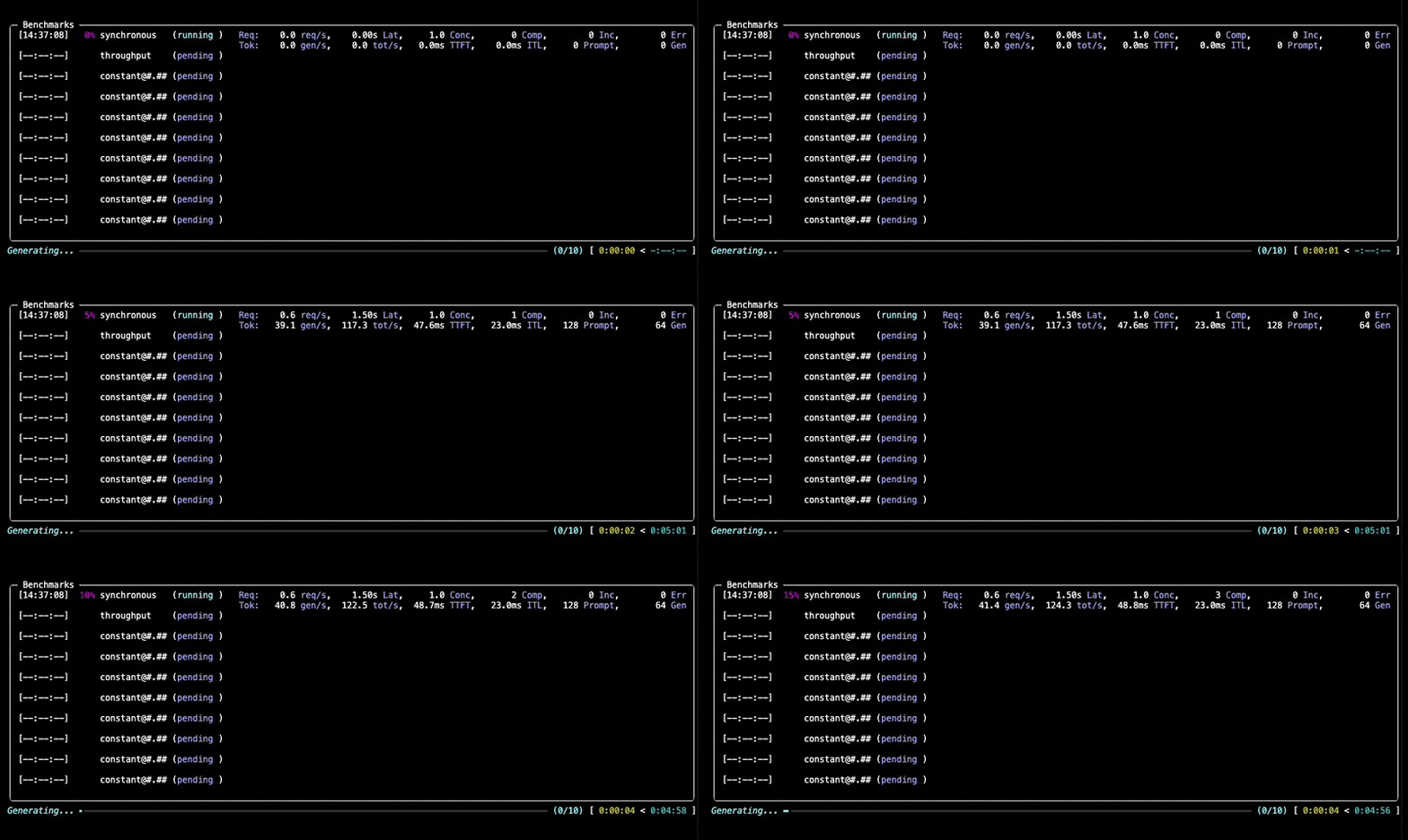
After the benchmark completes, GuideLLM writes benchmarks.json and benchmarks.csv by default. The files are saved in the directory configured by GUIDELLM__DEFAULT_RESULTS_DIR, or in the current directory when the variable is not set. GuideLLM also prints a summary and the generated file locations to the console.
Specifying --output replaces the default JSON and CSV outputs. See output configuration for examples of selecting formats, including generating HTML alongside JSON and CSV.
Use JSON or YAML for detailed analysis, CSV for spreadsheet comparisons, HTML for self-contained visual reports, and PLOT for static performance graphs. See supported file formats for their contents and default filenames, and configuring file outputs to choose output paths.
The console provides a summary of each benchmark. Its tables can be copied into spreadsheet software using | as the delimiter. See console output for progress and display controls.
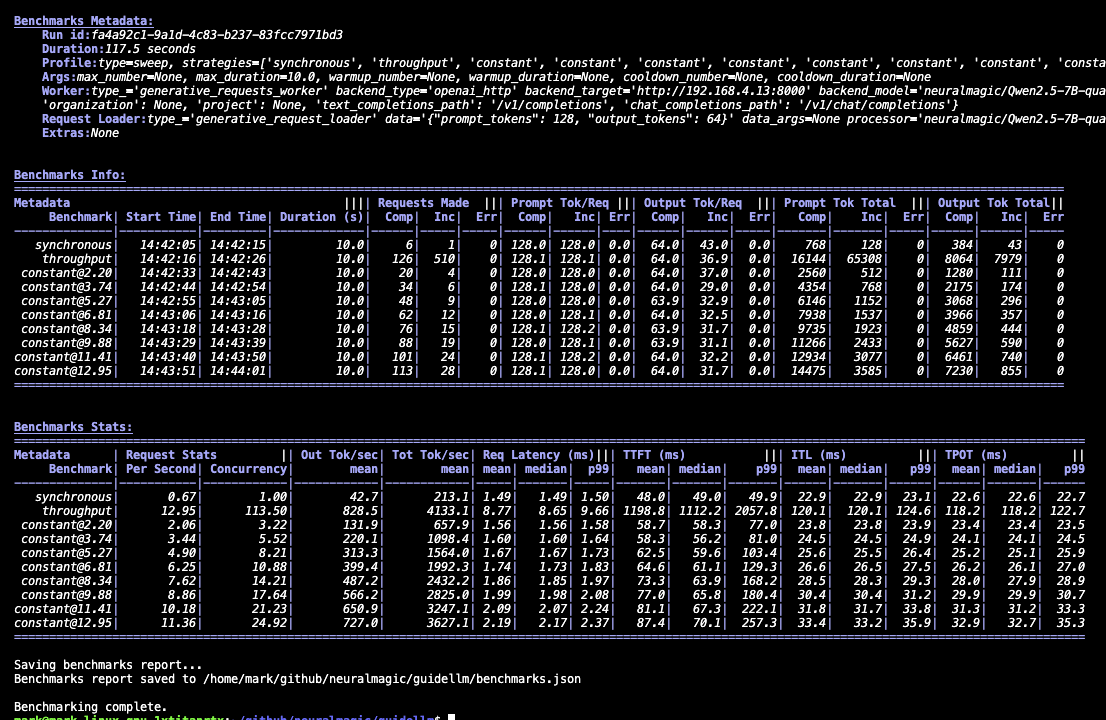
GuideLLM supports a wide range of LLM benchmarking workflows. The examples below show how to run typical scenarios and highlight the parameters that matter most. For a complete list of arguments, details, and options, run guidellm run --help.
Each registry-backed option uses the form --<option> kind=<TYPE>,<CONFIG>..., where CONFIG is key=value pairs. For more complex configurations, use JSON or YAML, e.g. --data '{"kind":"huggingface","source":"abisee/cnn_dailymail","load_kwargs":{"name":"3.0.0"}}'.
Simulating different applications requires different traffic shapes. This example demonstrates rate-based load testing using a constant profile at 10 requests per second, running for 20 seconds with synthetic data of 128 prompt tokens and 256 output tokens.
guidellm run \
  --backend kind=openai_http,target=http://localhost:8000 \
  --profile kind=constant,rate=10 \
  --constraint kind=max_duration,seconds=20 \
  --data kind=synthetic_text,prompt_tokens=128,output_tokens=256
Key parameters:
--profile kind=<type>: Defines the traffic pattern — synchronous, concurrent, throughput, constant, poisson, or sweep--profile kind=constant,rate=10: For constant/poisson, set requests per second in the profile config; for concurrent, use streams=; for throughput, use max_concurrency=--constraint kind=max_duration,seconds=<seconds> or --constraint kind=max_requests,count=<count>: Limit each strategy by time or request countGuideLLM supports HuggingFace datasets, local files, and synthetic data. This example loads the CNN DailyMail dataset from HuggingFace and maps the article column to prompts while using the summary token count column to determine output lengths.
guidellm run \
  --backend kind=openai_http,target=http://localhost:8000 \
  --data kind=huggingface,source=abisee/cnn_dailymail,load_kwargs.name=3.0.0 \
  --data-column-mapper kind=generative_column_mapper,column_mappings.text_column=article
Key parameters:
--data: Data type plus config — synthetic_text, huggingface, json_file, csv_file, text_file, trace_synthetic, and others. Repeat for multiple sources.--data-column-mapper: Column mapping preprocessor and JSON config for fields such as text_column or output_tokens_count_column--data-loader type=pytorch,samples=1000: Limit how many rows are loaded (-1 for all)--tokenizer huggingface_auto "model=gpt2": Tokenizer for synthetic data or local token countingGuideLLM can synthesize images and short videos on the fly so you can benchmark Vision-Language Model (VLM) serving configurations without bringing your own dataset. Two --data kinds — synthetic_image and synthetic_video — compose with synthetic_text for multimodal prompts. See Synthetic Visual Data for example commands and the full list of configuration options.
You can benchmark chat completions, text completions, or other supported request types. This example configures the benchmark to test the chat completions API using a custom dataset file, with GuideLLM automatically formatting requests to match the chat completions schema.
guidellm run \
  --backend kind=openai_http,target=http://localhost:8000,request_format=/v1/chat/completions \
  --data kind=json_file,path=path/to/data.json
Key parameters:
--backend: Backend type and connection settings, including the target OpenAI-compatible endpoint URL and request_format for the API endpoint (/v1/chat/completions, /v1/completions, /v1/embeddings, /v1/audio/transcriptions, and others)Built-in scenarios bundle schedules, dataset settings, and request formatting to standardize common testing patterns. This example uses the pre-configured chat scenario which includes appropriate defaults for chat model evaluation, with any additional CLI arguments overriding the scenario's settings.
guidellm run \
  --config chat \
  --backend kind=openai_http,target=http://localhost:8000
Key parameters:
--config (alias --scenario, -c): Built-in scenario name or path to a custom scenario file. CLI options override scenario defaults.Warmup, cooldown, and maximum limits help ensure stable, repeatable measurements. This example runs a concurrent benchmark with 16 parallel requests, using 10% warmup and cooldown periods to exclude initialization and shutdown effects, while limiting the test to stop if more than 5 errors occur.
guidellm run \
  --backend kind=openai_http,target=http://localhost:8000 \
  --profile kind=concurrent,streams=16,warmup=0.1,cooldown=0.1 \
  --constraint kind=max_errors,count=5 \
  --constraint kind=over_saturation \
  --data kind=synthetic_text,prompt_tokens=256,output_tokens=128
Key parameters:
--profile kind=<type>: Profile config supports warmup and cooldown (percentage or absolute units)--constraint kind=max_duration,seconds=<seconds> / --constraint kind=max_requests,count=<count>: Stop each strategy by time or request count--constraint kind=max_errors,count=<count>: Stop when total errors exceed the threshold--constraint kind=over_saturation: Enable over-saturation detection (empty config uses defaults)Developers interested in extending GuideLLM can use the project's established development workflow. Local setup, environment activation, and testing instructions are outlined in DEVELOPING.md. This guide explains how to run the benchmark suite, validate changes, and work with the CLI or API during development. Contribution standards are documented in CONTRIBUTING.md, including coding conventions, commit structure, and review guidelines. These standards help maintain stability as the platform evolves. The CODE_OF_CONDUCT.md outlines expectations for respectful and constructive participation across all project spaces. For contributors who want deeper reference material, the documentation covers installation, backends, datasets, metrics, output types, and architecture. Reviewing these topics is useful when adding new backends, request types, or data integrations. Release notes and changelogs are linked from the GitHub Releases page and provide historical context for ongoing work.
The complete documentation provides the details that do not fit in this README. It includes installation steps, backend configuration, dataset handling, metrics definitions, output formats, tutorials, and an architecture overview. These references help you explore the platform more deeply or integrate it into existing workflows.
Notable docs are given below:
GuideLLM is licensed under the Apache License 2.0.
If you find GuideLLM helpful in your research or projects, please consider citing it:
@misc{guidellm2024,
  title={GuideLLM: Scalable Inference and Optimization for Large Language Models},
  author={Neural Magic, Inc.},
  year={2024},
  howpublished={\url{https://github.com/vllm-project/guidellm}},
}
(top 24 of 39)
244 followers · starred Jul 2026
79 followers · starred Sep 2026
601 followers · starred Feb 2026
209 followers · starred Aug 2025
Evaluate and Enhance Your LLM Deployments for Real-World Inference Needs
See the code
GuideLLM is a platform for evaluating how language models perform under real workloads and configurations. It simulates end-to-end interactions with OpenAI-compatible and vLLM-native servers, generates workload patterns that reflect production usage, and produces detailed reports that help teams understand system behavior, resource needs, and operational limits. GuideLLM supports real and synthetic datasets, multimodal inputs, and flexible execution profiles, giving engineering and ML teams a consistent framework for assessing model behavior, tuning deployments, and planning capacity as their systems evolve.
GuideLLM gives teams a clear picture of performance, efficiency, and reliability when deploying LLMs in production-like environments.
Many tools benchmark endpoints, not models, and miss the details that matter for LLMs. GuideLLM focuses exclusively on LLM-specific workloads, measuring TTFT, ITL, output distributions, and dataset-driven variation. It fits into everyday engineering tasks by using standard Python interfaces and HuggingFace datasets instead of custom formats or research-only pipelines. It is also built for performance, supporting high-rate load generation and accurate scheduling far beyond simple scripts or example benchmarks. The table below highlights how this approach compares to other options.
| Tool | CLI | API | High Perf | Full Metrics | Data Modalities | Data Sources | Profiles | Backends | Endpoints | Output Types |
|---|---|---|---|---|---|---|---|---|---|---|
| GuideLLM | ✅ | ✅ | ✅ | ✅ | Text, Image, Audio, Video | HuggingFace, Files, Synthetic, Custom | Synchronous, Concurrent, Throughput, Constant, Poisson, Sweep | OpenAI-compatible | /completions, /chat/completions, /audio/translation, /audio/transcription | console, json, csv, html |
| inference-perf | ✅ | ❌ | ✅ | ❌ | Text | Synthetic, Specific Datasets | Concurrent, Constant, Poisson, Sweep | OpenAI-compatible | /completions, /chat/completions | json, png |
| genai-bench | ✅ | ❌ | ❌ | ❌ | Text, Image, Embedding, ReRank | Synthetic, File | Concurrent | OpenAI-compatible, Hosted Cloud | /chat/completions, /embeddings | console, xlsx, png |
| llm-perf | ❌ | ❌ | ✅ | ❌ | Text | Synthetic | Concurrent | OpenAI-compatible, Hosted Cloud | /chat/completions | json |
| ollama-benchmark | ✅ | ❌ | ❌ | ❌ | Text | Synthetic | Synchronous | Ollama | /completions | console, json |
| vllm/benchmarks | ✅ | ❌ | ❌ | ❌ | Text | Synthetic, Specific Datasets | Synchronous, Throughput, Constant, Sweep | OpenAI-compatible, vLLM API | /completions, /chat/completions | console, png |
This section summarizes the newest capabilities available to users and outlines the current areas of development. It helps readers understand how the platform is evolving and what to expect next.
Recent Additions
Active Development
The Quick Start shows how to install GuideLLM, launch a server, and run your first benchmark in a few minutes.
Before installing, ensure you have the following prerequisites:
Install the latest GuideLLM release from PyPi using pip :
pip install guidellm[recommended]
Or install from source:
pip install git+https://github.com/vllm-project/guidellm.git
Or run the latest container from ghcr.io/vllm-project/guidellm:
podman run \
  --rm -it \
  -v "./results:/results:rw" \
  -e GUIDELLM__SPEC__BACKEND='{"kind": "openai_http", "target": "http://localhost:8000"}' \
  -e GUIDELLM__SPEC__PROFILE='{"kind": "sweep"}' \
  -e GUIDELLM__SPEC__CONSTRAINTS='[{"kind": "max_duration", "seconds": 30}]' \
  -e GUIDELLM__SPEC__DATA='[{"kind": "synthetic_text", "prompt_tokens": 256, "output_tokens": 128}]' \
  ghcr.io/vllm-project/guidellm:latest
Published images are multi-arch (linux/amd64 and linux/arm64) for Docker, Podman, Kubernetes, and OpenShift. Prefer pinning a release tag in production:
| Tag | Meaning |
|---|---|
vX.Y.Z | Immutable release (multi-arch from v0.7.0+) |
stable | Newest full release (vX.Y.Z) |
latest | Newest release tag (may include pre-releases) |
nightly | Tip of main |
Architecture-specific tags such as vX.Y.Z-amd64 / vX.Y.Z-arm64 are build artifacts — do not use them as the image reference.
Start any OpenAI-compatible endpoint. For vLLM:
vllm serve "neuralmagic/Meta-Llama-3.1-8B-Instruct-quantized.w4a16"
Verify the server is running at http://localhost:8000.
Run a sweep that identifies the maximum performance and maximum rates for the model:
guidellm run \
  --backend kind=openai_http,target=http://localhost:8000 \
  --profile kind=sweep \
  --constraint kind=max_duration,seconds=30 \
  --data kind=synthetic_text,prompt_tokens=256,output_tokens=128
You will see progress updates and per-benchmark summaries during the run, as given below:
After the benchmark completes, GuideLLM writes benchmarks.json and benchmarks.csv by default. The files are saved in the directory configured by GUIDELLM__DEFAULT_RESULTS_DIR, or in the current directory when the variable is not set. GuideLLM also prints a summary and the generated file locations to the console.
Specifying --output replaces the default JSON and CSV outputs. See output configuration for examples of selecting formats, including generating HTML alongside JSON and CSV.
Use JSON or YAML for detailed analysis, CSV for spreadsheet comparisons, HTML for self-contained visual reports, and PLOT for static performance graphs. See supported file formats for their contents and default filenames, and configuring file outputs to choose output paths.
The console provides a summary of each benchmark. Its tables can be copied into spreadsheet software using | as the delimiter. See console output for progress and display controls.
GuideLLM supports a wide range of LLM benchmarking workflows. The examples below show how to run typical scenarios and highlight the parameters that matter most. For a complete list of arguments, details, and options, run guidellm run --help.
Each registry-backed option uses the form --<option> kind=<TYPE>,<CONFIG>..., where CONFIG is key=value pairs. For more complex configurations, use JSON or YAML, e.g. --data '{"kind":"huggingface","source":"abisee/cnn_dailymail","load_kwargs":{"name":"3.0.0"}}'.
Simulating different applications requires different traffic shapes. This example demonstrates rate-based load testing using a constant profile at 10 requests per second, running for 20 seconds with synthetic data of 128 prompt tokens and 256 output tokens.
guidellm run \
  --backend kind=openai_http,target=http://localhost:8000 \
  --profile kind=constant,rate=10 \
  --constraint kind=max_duration,seconds=20 \
  --data kind=synthetic_text,prompt_tokens=128,output_tokens=256
Key parameters:
--profile kind=<type>: Defines the traffic pattern — synchronous, concurrent, throughput, constant, poisson, or sweep--profile kind=constant,rate=10: For constant/poisson, set requests per second in the profile config; for concurrent, use streams=; for throughput, use max_concurrency=--constraint kind=max_duration,seconds=<seconds> or --constraint kind=max_requests,count=<count>: Limit each strategy by time or request countGuideLLM supports HuggingFace datasets, local files, and synthetic data. This example loads the CNN DailyMail dataset from HuggingFace and maps the article column to prompts while using the summary token count column to determine output lengths.
guidellm run \
  --backend kind=openai_http,target=http://localhost:8000 \
  --data kind=huggingface,source=abisee/cnn_dailymail,load_kwargs.name=3.0.0 \
  --data-column-mapper kind=generative_column_mapper,column_mappings.text_column=article
Key parameters:
--data: Data type plus config — synthetic_text, huggingface, json_file, csv_file, text_file, trace_synthetic, and others. Repeat for multiple sources.--data-column-mapper: Column mapping preprocessor and JSON config for fields such as text_column or output_tokens_count_column--data-loader type=pytorch,samples=1000: Limit how many rows are loaded (-1 for all)--tokenizer huggingface_auto "model=gpt2": Tokenizer for synthetic data or local token countingGuideLLM can synthesize images and short videos on the fly so you can benchmark Vision-Language Model (VLM) serving configurations without bringing your own dataset. Two --data kinds — synthetic_image and synthetic_video — compose with synthetic_text for multimodal prompts. See Synthetic Visual Data for example commands and the full list of configuration options.
You can benchmark chat completions, text completions, or other supported request types. This example configures the benchmark to test the chat completions API using a custom dataset file, with GuideLLM automatically formatting requests to match the chat completions schema.
guidellm run \
  --backend kind=openai_http,target=http://localhost:8000,request_format=/v1/chat/completions \
  --data kind=json_file,path=path/to/data.json
Key parameters:
--backend: Backend type and connection settings, including the target OpenAI-compatible endpoint URL and request_format for the API endpoint (/v1/chat/completions, /v1/completions, /v1/embeddings, /v1/audio/transcriptions, and others)Built-in scenarios bundle schedules, dataset settings, and request formatting to standardize common testing patterns. This example uses the pre-configured chat scenario which includes appropriate defaults for chat model evaluation, with any additional CLI arguments overriding the scenario's settings.
guidellm run \
  --config chat \
  --backend kind=openai_http,target=http://localhost:8000
Key parameters:
--config (alias --scenario, -c): Built-in scenario name or path to a custom scenario file. CLI options override scenario defaults.Warmup, cooldown, and maximum limits help ensure stable, repeatable measurements. This example runs a concurrent benchmark with 16 parallel requests, using 10% warmup and cooldown periods to exclude initialization and shutdown effects, while limiting the test to stop if more than 5 errors occur.
guidellm run \
  --backend kind=openai_http,target=http://localhost:8000 \
  --profile kind=concurrent,streams=16,warmup=0.1,cooldown=0.1 \
  --constraint kind=max_errors,count=5 \
  --constraint kind=over_saturation \
  --data kind=synthetic_text,prompt_tokens=256,output_tokens=128
Key parameters:
--profile kind=<type>: Profile config supports warmup and cooldown (percentage or absolute units)--constraint kind=max_duration,seconds=<seconds> / --constraint kind=max_requests,count=<count>: Stop each strategy by time or request count--constraint kind=max_errors,count=<count>: Stop when total errors exceed the threshold--constraint kind=over_saturation: Enable over-saturation detection (empty config uses defaults)Developers interested in extending GuideLLM can use the project's established development workflow. Local setup, environment activation, and testing instructions are outlined in DEVELOPING.md. This guide explains how to run the benchmark suite, validate changes, and work with the CLI or API during development. Contribution standards are documented in CONTRIBUTING.md, including coding conventions, commit structure, and review guidelines. These standards help maintain stability as the platform evolves. The CODE_OF_CONDUCT.md outlines expectations for respectful and constructive participation across all project spaces. For contributors who want deeper reference material, the documentation covers installation, backends, datasets, metrics, output types, and architecture. Reviewing these topics is useful when adding new backends, request types, or data integrations. Release notes and changelogs are linked from the GitHub Releases page and provide historical context for ongoing work.
The complete documentation provides the details that do not fit in this README. It includes installation steps, backend configuration, dataset handling, metrics definitions, output formats, tutorials, and an architecture overview. These references help you explore the platform more deeply or integrate it into existing workflows.
Notable docs are given below:
GuideLLM is licensed under the Apache License 2.0.
If you find GuideLLM helpful in your research or projects, please consider citing it:
@misc{guidellm2024,
  title={GuideLLM: Scalable Inference and Optimization for Large Language Models},
  author={Neural Magic, Inc.},
  year={2024},
  howpublished={\url{https://github.com/vllm-project/guidellm}},
}
(top 24 of 39)
244 followers · starred Jul 2026
79 followers · starred Sep 2026
601 followers · starred Feb 2026
209 followers · starred Aug 2025