Open-source AI music composer app. Describe a song to Claude, get chords, melody, bass and drums in a piano roll you can edit, hear and export. Optional CLAP/VST3 plugin for DAWs.
See the code
An AI music composer app. Chat with Claude, get a whole song you can edit and hear, and take it anywhere: a DAW, MIDI or WAV.
Website · Download · Tutorial · Docs




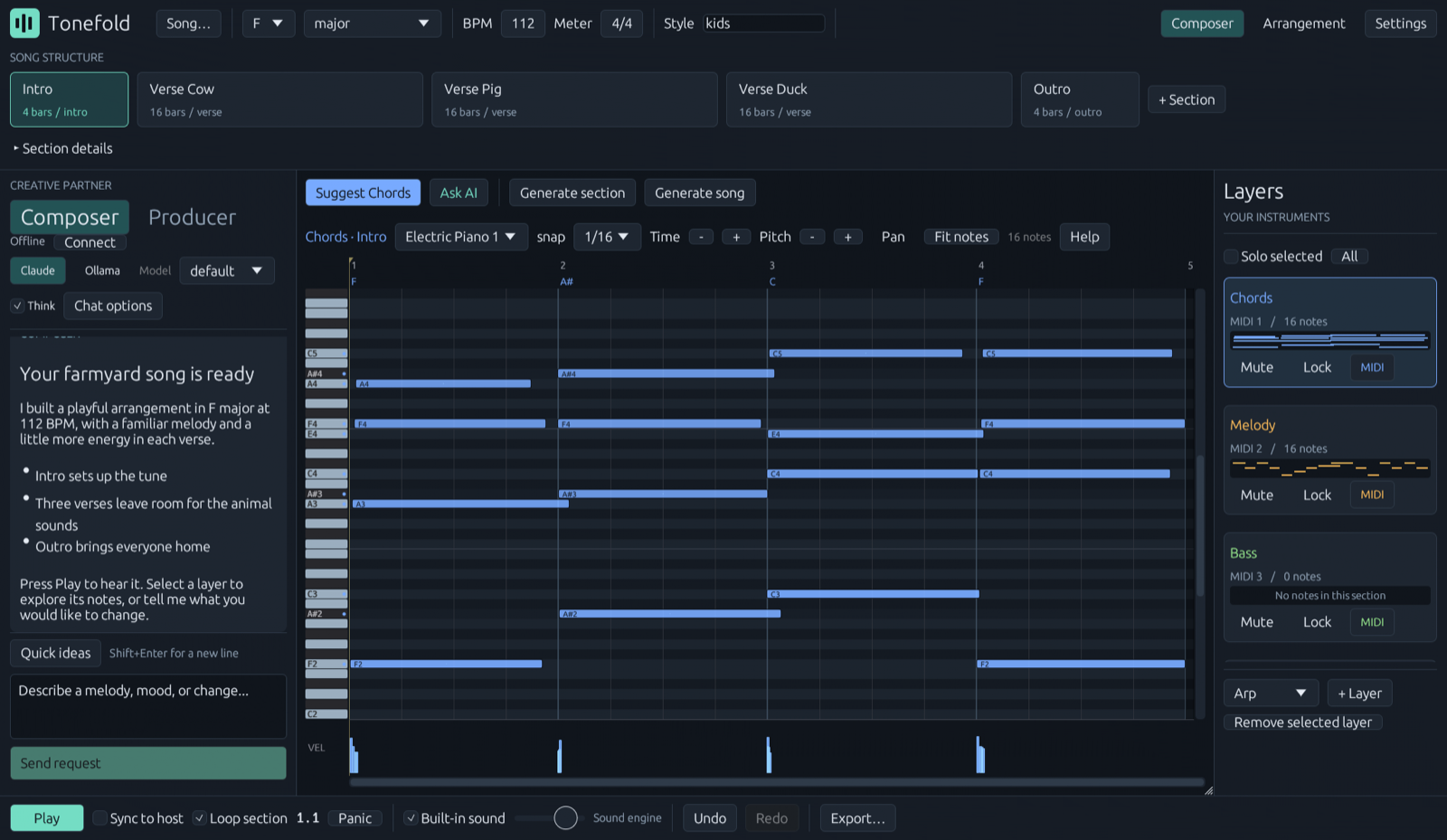
Tonefold is a standalone app. It writes chords, melody, bass, drums and seven more layer kinds into a piano roll you can edit, plays them through built-in sounds, and exports MIDI, a mix and one WAV per layer. You don't need a DAW. If you use one, an optional CLAP/VST3 plugin puts the same composer inside it.
Platforms: macOS 11+ (Apple Silicon and Intel) and Windows 10+. The app is the main download; the CLAP and VST3 plugins are optional.
layer@section each one touches — and changes nothing
until you approve it. Then it hands each step to a specialist: harmony and form, melody and
topline, rhythm section, arrangement and mix. Nobody writes outside their own layers, and the
whole run can be reverted in one step. Composer mode is still there for a quick change.Download the latest release for your system:
Open the .dmg and drag Tonefold into Applications. This build is not notarized by Apple
yet, so the first time you open it macOS says it can't check the app: on macOS 15 and later go to
System Settings → Privacy & Security and click Open Anyway; on earlier versions
right-click the app, choose Open, then Open again.
Your songs, exports and logs live in ~/Library/Application Support/Tonefold.
Unzip the release anywhere and run:
scripts\install.ps1
That installs the app under %LOCALAPPDATA%\Tonefold with no administrator prompt. Start
Tonefold from the Start Menu.
Node.js 20+ and either Claude Code signed in on your computer or an Ollama server. Everything else, including generation, playback and export, works without them. On macOS the first chat message installs the composer's dependencies, which takes about a minute.
The same composer runs as a CLAP or VST3 plugin, follows the host's transport and can send live MIDI to your instruments.
Tonefold.clap and Tonefold.vst3 from the DAW plugins folder in the .dmg
to ~/Library/Audio/Plug-Ins/CLAP and ~/Library/Audio/Plug-Ins/VST3.scripts\install.ps1 -Plugins (one UAC prompt); the plugins go to
C:\Program Files\Common Files\CLAP and VST3.Then rescan plugins in your DAW. FL Studio is the tested host; prefer the CLAP build there. On Windows the installer also adds a piano-roll import script when FL Studio is present. Other CLAP/VST3 hosts should work but are not yet tested; reports are welcome.
docs/tutorial-twinkle.md — a complete song, start to finish, assuming nothing (uses FL Studio for the final step).docs/usage.md — the reference: workflow, layers, arrangement, export, the humanization knobs.skill/tonefold-song/SKILL.md — compose from an external AI (Claude Code, Claude Desktop, Codex)
through the command line.Rust stable and (for the composer) Node 20+. On macOS, scripts/package-macos.sh builds the
universal app, the plugins and the .dmg in one go. On Windows:
cargo build --release -p tonefold-plugin --features standalone --bin tonefold-standalone   # the app
cargo build --release -p tonefold-cli
cd agent; npm ci; npm run build; cd ..
cargo xtask bundle tonefold-plugin --release          # optional: the CLAP and VST3
scripts\install.ps1                                 # installs what you built (-Plugins for the CLAP/VST3)
scripts\package.ps1                                 # or make a release zip
Layout: crates/tonefold-core is the engine (theory, generators, humanization, MIDI, rendering) with
no plugin dependencies; crates/tonefold-plugin is the app and its egui editor, built as the
standalone app and, through nih-plug, as the optional CLAP/VST3; crates/tonefold-cli is the command line; agent/ is the Claude Agent SDK sidecar (which can
also run on an Ollama model, local or remote — see docs/usage.md).
Ideas and votes are welcome in Discussions.
Bug reports, fixes, genre knowledge and new generators are all welcome. Start with CONTRIBUTING.md. Security issues go through SECURITY.md.
GPL-3.0-or-later (see LICENSE) — nih-plug's VST3 bindings require it.
The composer's reference library in agent/reference/ is based on "Music Composition Agent Skill"
by SJY051, licensed under CC BY 4.0; see agent/reference/NOTICE.md. The built-in sounds come from
the GeneralUser GS soundfont by S. Christian Collins, downloaded at install time under its own
licence.
Tonefold was called FLVSTX before 1.4.0.
FL Studio is a trademark of Image-Line Software. Claude is a trademark of Anthropic. Tonefold is an independent project, not affiliated with or endorsed by either.
Open-source AI music composer app. Describe a song to Claude, get chords, melody, bass and drums in a piano roll you can edit, hear and export. Optional CLAP/VST3 plugin for DAWs.
See the code
An AI music composer app. Chat with Claude, get a whole song you can edit and hear, and take it anywhere: a DAW, MIDI or WAV.
Website · Download · Tutorial · Docs
Tonefold is a standalone app. It writes chords, melody, bass, drums and seven more layer kinds into a piano roll you can edit, plays them through built-in sounds, and exports MIDI, a mix and one WAV per layer. You don't need a DAW. If you use one, an optional CLAP/VST3 plugin puts the same composer inside it.
Platforms: macOS 11+ (Apple Silicon and Intel) and Windows 10+. The app is the main download; the CLAP and VST3 plugins are optional.
layer@section each one touches — and changes nothing
until you approve it. Then it hands each step to a specialist: harmony and form, melody and
topline, rhythm section, arrangement and mix. Nobody writes outside their own layers, and the
whole run can be reverted in one step. Composer mode is still there for a quick change.Download the latest release for your system:
Open the .dmg and drag Tonefold into Applications. This build is not notarized by Apple
yet, so the first time you open it macOS says it can't check the app: on macOS 15 and later go to
System Settings → Privacy & Security and click Open Anyway; on earlier versions
right-click the app, choose Open, then Open again.
Your songs, exports and logs live in ~/Library/Application Support/Tonefold.
Unzip the release anywhere and run:
scripts\install.ps1
That installs the app under %LOCALAPPDATA%\Tonefold with no administrator prompt. Start
Tonefold from the Start Menu.
Node.js 20+ and either Claude Code signed in on your computer or an Ollama server. Everything else, including generation, playback and export, works without them. On macOS the first chat message installs the composer's dependencies, which takes about a minute.
The same composer runs as a CLAP or VST3 plugin, follows the host's transport and can send live MIDI to your instruments.
Tonefold.clap and Tonefold.vst3 from the DAW plugins folder in the .dmg
to ~/Library/Audio/Plug-Ins/CLAP and ~/Library/Audio/Plug-Ins/VST3.scripts\install.ps1 -Plugins (one UAC prompt); the plugins go to
C:\Program Files\Common Files\CLAP and VST3.Then rescan plugins in your DAW. FL Studio is the tested host; prefer the CLAP build there. On Windows the installer also adds a piano-roll import script when FL Studio is present. Other CLAP/VST3 hosts should work but are not yet tested; reports are welcome.
docs/tutorial-twinkle.md — a complete song, start to finish, assuming nothing (uses FL Studio for the final step).docs/usage.md — the reference: workflow, layers, arrangement, export, the humanization knobs.skill/tonefold-song/SKILL.md — compose from an external AI (Claude Code, Claude Desktop, Codex)
through the command line.Rust stable and (for the composer) Node 20+. On macOS, scripts/package-macos.sh builds the
universal app, the plugins and the .dmg in one go. On Windows:
cargo build --release -p tonefold-plugin --features standalone --bin tonefold-standalone   # the app
cargo build --release -p tonefold-cli
cd agent; npm ci; npm run build; cd ..
cargo xtask bundle tonefold-plugin --release          # optional: the CLAP and VST3
scripts\install.ps1                                 # installs what you built (-Plugins for the CLAP/VST3)
scripts\package.ps1                                 # or make a release zip
Layout: crates/tonefold-core is the engine (theory, generators, humanization, MIDI, rendering) with
no plugin dependencies; crates/tonefold-plugin is the app and its egui editor, built as the
standalone app and, through nih-plug, as the optional CLAP/VST3; crates/tonefold-cli is the command line; agent/ is the Claude Agent SDK sidecar (which can
also run on an Ollama model, local or remote — see docs/usage.md).
Ideas and votes are welcome in Discussions.
Bug reports, fixes, genre knowledge and new generators are all welcome. Start with CONTRIBUTING.md. Security issues go through SECURITY.md.
GPL-3.0-or-later (see LICENSE) — nih-plug's VST3 bindings require it.
The composer's reference library in agent/reference/ is based on "Music Composition Agent Skill"
by SJY051, licensed under CC BY 4.0; see agent/reference/NOTICE.md. The built-in sounds come from
the GeneralUser GS soundfont by S. Christian Collins, downloaded at install time under its own
licence.
Tonefold was called FLVSTX before 1.4.0.
FL Studio is a trademark of Image-Line Software. Claude is a trademark of Anthropic. Tonefold is an independent project, not affiliated with or endorsed by either.



