
Usage: sudo ./install.sh [OPTIONS...]
  -t, --theme                 theme variant(s)          [tela|vimix|stylish|whitesur]       (default is tela)
  -i, --icon                  icon variant(s)           [color|white|whitesur]              (default is color)
  -s, --screen                screen display variant(s) [1080p|2k|4k|ultrawide|ultrawide2k] (default is 1080p)
  -c, --custom-resolution     set custom resolution     (e.g., 1600x900)                    (disabled in default)
  -r, --remove                remove theme              [tela|vimix|stylish|whitesur]       (must add theme name option, default is tela)

  -b, --boot                  install theme into '/boot/grub' or '/boot/grub2'
  -g, --generate              do not install but generate theme into chosen directory       (must add your directory)

  -h, --help                  show this help
If no options are used, a user interface dialog will show up instead
sudo ./install.sh -t tela -s 2k
sudo ./install.sh -t tela -c 1600x900
sudo ./install.sh -b -t tela
sudo ./install.sh -r -t tela
To use this theme with NixOS you will have to enable flakes. Before you do this, please inform yourself if you really want to, because flakes are still an unstable feature.
First you will have to add grub2 to your flake.nix file as a new input.
# flake.nix
{
  description = "NixOS configuration";
  inputs = {
    nixpkgs.url = "github:nixos/nixpkgs/nixos-unstable";
    # Add grub2 themes to your inputs ...
    grub2-themes = {
      url = "github:vinceliuice/grub2-themes";
    };
  };
  outputs = inputs@{ nixpkgs,  grub2-themes, ... }: {
    nixosConfigurations = {
      my_host = nixpkgs.lib.nixosSystem {
        system = "x86_64-linux";
        specialArgs = { inherit inputs; };
        # ... and then to your modules
        modules = [
          ./configuration.nix
          grub2-themes.nixosModules.default
        ];
      };
    };
  };
}
After that, you can configure the theme as shown below. In this example it is inside the configuration.nix file but it can be any file you choose.
# configuration.nix
{ inputs, config, pkgs, lib, ... }:
{
  boot.loader.grub = { ... };
  boot.loader.grub2-theme = {
    enable = true;
    theme = "stylish";
    footer = true;
    customResolution = "1600x900";  # Optional: Set a custom resolution
  };
}
c to enter the command linevbeinfo or videoinfo to check available resolutions/etc/default/grub, and edit GRUB_GFXMODE=[height]x[width]x32 to match your resolutiongrub-mkconfig -o /boot/grub/grub.cfg to update your grub configimagemagick installed, or at least something that provides convert or magickbackground.jpg[YOUR_RESOLUTION] and -t [THEME] and -i [ICON]
[YOUR_RESOLUTION] with your resolution and [THEME] with the theme-c option to set a custom resolutionGRUB themes use the PF2 font format. GRUB rasterizes a TrueType or OpenType
font when grub-mkfont creates a PF2 file, so the source font must be converted
for each size used by the theme. The bundled themes use the DejaVu Sans files
from common/DejaVuSans.ttf; Unifont is also included for broad Unicode
coverage.
To regenerate the bundled fonts, run:
cd common
./makefont.sh
The script supports both command names used by Linux distributions:
grub-mkfont (including NixOS) and grub2-mkfont (including Fedora and
openSUSE). To convert another font, pass its path, an output prefix, and
optional sizes:
./makefont.sh /path/to/MyFont.ttf my-font 16 24 32
cd assets; ./render-all.sh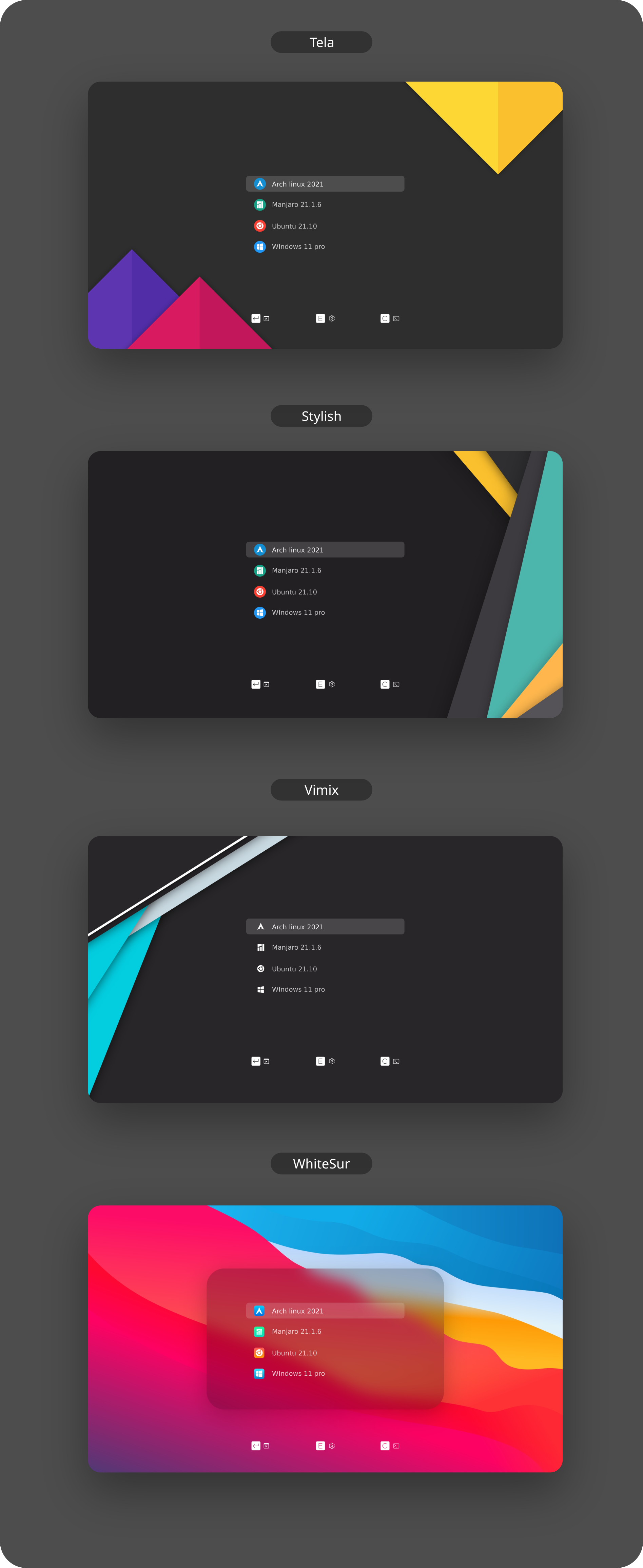
62 followers · starred Feb 2020
44 followers · starred Jan 2020
1,075 followers · starred Sep 2026
70 followers · starred Apr 2026
Usage: sudo ./install.sh [OPTIONS...]
  -t, --theme                 theme variant(s)          [tela|vimix|stylish|whitesur]       (default is tela)
  -i, --icon                  icon variant(s)           [color|white|whitesur]              (default is color)
  -s, --screen                screen display variant(s) [1080p|2k|4k|ultrawide|ultrawide2k] (default is 1080p)
  -c, --custom-resolution     set custom resolution     (e.g., 1600x900)                    (disabled in default)
  -r, --remove                remove theme              [tela|vimix|stylish|whitesur]       (must add theme name option, default is tela)

  -b, --boot                  install theme into '/boot/grub' or '/boot/grub2'
  -g, --generate              do not install but generate theme into chosen directory       (must add your directory)

  -h, --help                  show this help
If no options are used, a user interface dialog will show up instead
sudo ./install.sh -t tela -s 2k
sudo ./install.sh -t tela -c 1600x900
sudo ./install.sh -b -t tela
sudo ./install.sh -r -t tela
To use this theme with NixOS you will have to enable flakes. Before you do this, please inform yourself if you really want to, because flakes are still an unstable feature.
First you will have to add grub2 to your flake.nix file as a new input.
# flake.nix
{
  description = "NixOS configuration";
  inputs = {
    nixpkgs.url = "github:nixos/nixpkgs/nixos-unstable";
    # Add grub2 themes to your inputs ...
    grub2-themes = {
      url = "github:vinceliuice/grub2-themes";
    };
  };
  outputs = inputs@{ nixpkgs,  grub2-themes, ... }: {
    nixosConfigurations = {
      my_host = nixpkgs.lib.nixosSystem {
        system = "x86_64-linux";
        specialArgs = { inherit inputs; };
        # ... and then to your modules
        modules = [
          ./configuration.nix
          grub2-themes.nixosModules.default
        ];
      };
    };
  };
}
After that, you can configure the theme as shown below. In this example it is inside the configuration.nix file but it can be any file you choose.
# configuration.nix
{ inputs, config, pkgs, lib, ... }:
{
  boot.loader.grub = { ... };
  boot.loader.grub2-theme = {
    enable = true;
    theme = "stylish";
    footer = true;
    customResolution = "1600x900";  # Optional: Set a custom resolution
  };
}
c to enter the command linevbeinfo or videoinfo to check available resolutions/etc/default/grub, and edit GRUB_GFXMODE=[height]x[width]x32 to match your resolutiongrub-mkconfig -o /boot/grub/grub.cfg to update your grub configimagemagick installed, or at least something that provides convert or magickbackground.jpg[YOUR_RESOLUTION] and -t [THEME] and -i [ICON]
[YOUR_RESOLUTION] with your resolution and [THEME] with the theme-c option to set a custom resolutionGRUB themes use the PF2 font format. GRUB rasterizes a TrueType or OpenType
font when grub-mkfont creates a PF2 file, so the source font must be converted
for each size used by the theme. The bundled themes use the DejaVu Sans files
from common/DejaVuSans.ttf; Unifont is also included for broad Unicode
coverage.
To regenerate the bundled fonts, run:
cd common
./makefont.sh
The script supports both command names used by Linux distributions:
grub-mkfont (including NixOS) and grub2-mkfont (including Fedora and
openSUSE). To convert another font, pass its path, an output prefix, and
optional sizes:
./makefont.sh /path/to/MyFont.ttf my-font 16 24 32
cd assets; ./render-all.sh
62 followers · starred Feb 2020
44 followers · starred Jan 2020
1,075 followers · starred Sep 2026
70 followers · starred Apr 2026



