E-reader firmware for ESP32 devices. Personal fork of Crosspoint Reader.
See the codeThis is a personal fork of CrossPoint Reader with a focus on improved fonts and minimal reading stats.
My goal with this fork was to maintain the core Crosspoint firmware while integrating my preferred typography and some lightweight reading statistics. I’ve focused on keeping the underlying system stable while layering in a few "nice-to-have" features and UI refinements along the way.
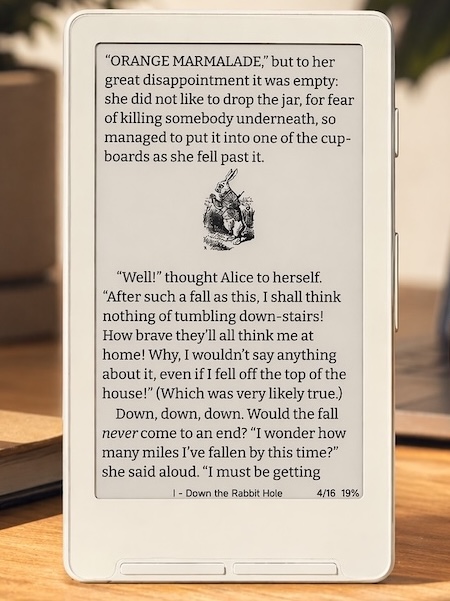 Font: Bitter, Size: 12 pt, Margin: 15 |
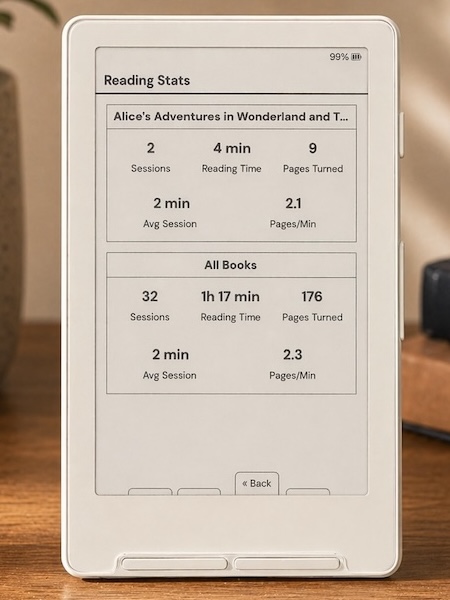 Reading Stats with custom front button mapping shown |
Minimal theme and sleep screen option for the minimalists out there.Dashboard theme and sleep screen option for reading stats enthusiasts.<hr> section breaks.Custom or Cover + Custom (when no cover is available).The default fonts have been replaced with Lexend Deca and Bitter. These fonts have been chosen specifically to improve reading fluency and e-ink performance. These 'sturdier' typefaces feature uniform stroke weights and open geometries, allowing the X4/X3 to render crisp, high-contrast text with font-aliasing on while significantly reducing ghosting and artifacts.
The UI now uses Inter as the display font which has improved readability at smaller sizes.
CrossInk includes 10 pt, 12 pt, 14 pt, and 16 pt built-in reader font sizes.
See SD Card Fonts for installing additional font families and size ranges.
Reader Options, Focus Reading, Guide Dots, Force Paragraph Indents, reading stats, and finished-book behavior are documented in Reader Features.
CrossInk adds configurable button shortcuts.
See Controls for the full action list and defaults.
CrossInk runs on an ESP32-C3 with limited RAM, so very large folders or complex EPUBs can be slower than they would be on a phone, tablet, or desktop app.
The fastest way to install Crossink is by using Inky, Crossink's web companion app: https://inky.crossink.dev/#flash-tools
Download a firmware-*.bin from the releases page, then flash it with the web installer or command line.
See Installation for step-by-step flashing and revert instructions.
Visit https://www.crossink.dev for more user guides and additional documentation.
CrossInk uses PlatformIO for building and flashing firmware. See Getting Started for prerequisites, clone setup, and validation commands.
Nix/NixOS users can enter the development shell with either nix develop (flakes) or nix-shell:
nix develop -f nix
# or
nix-shell nix
To flash a connected ESP32-C3 device, enable PlatformIO's udev rules in your NixOS configuration:
services.udev.packages = with pkgs; [ platformio-core.udev ];
After rebuilding the system configuration, reconnect the device or reload udev rules.
Connect your device to your computer via a USB cable. Before the first build, initialize the repository's submodules (including freeink-sdk):
git submodule update --init --recursive
Then flash the firmware using the correct environment for the device. The default environment is for the X3/X4 devices. ESP32-S3 devices have their own named environments.
pio run -e default --target upload
If PlatformIO reports PackageException: Can not create a symbolic link for freeink-sdk/libs/hardware/BatteryMonitor, not a directory, the freeink-sdk submodule is not initialized. Run the submodule command above and retry.
See Testing and Debugging for serial logging, simulator checks, static analysis, and bug-report guidance.
This repository does not accept pull requests. Feature requests may be opened in discussions, but major features requiring ongoing support should be directed upstream to CrossPoint.
If you'd like to show some love and support ongoing development, please consider supporting me on Ko-fi.

720 followers · starred Jun 2026
21,184 followers · starred Jul 2026
522 followers · starred May 2026
946 followers · starred Aug 2026
E-reader firmware for ESP32 devices. Personal fork of Crosspoint Reader.
See the codeThis is a personal fork of CrossPoint Reader with a focus on improved fonts and minimal reading stats.
My goal with this fork was to maintain the core Crosspoint firmware while integrating my preferred typography and some lightweight reading statistics. I’ve focused on keeping the underlying system stable while layering in a few "nice-to-have" features and UI refinements along the way.
|
Font: Bitter, Size: 12 pt, Margin: 15 |
Reading Stats with custom front button mapping shown |
Minimal theme and sleep screen option for the minimalists out there.Dashboard theme and sleep screen option for reading stats enthusiasts.<hr> section breaks.Custom or Cover + Custom (when no cover is available).The default fonts have been replaced with Lexend Deca and Bitter. These fonts have been chosen specifically to improve reading fluency and e-ink performance. These 'sturdier' typefaces feature uniform stroke weights and open geometries, allowing the X4/X3 to render crisp, high-contrast text with font-aliasing on while significantly reducing ghosting and artifacts.
The UI now uses Inter as the display font which has improved readability at smaller sizes.
CrossInk includes 10 pt, 12 pt, 14 pt, and 16 pt built-in reader font sizes.
See SD Card Fonts for installing additional font families and size ranges.
Reader Options, Focus Reading, Guide Dots, Force Paragraph Indents, reading stats, and finished-book behavior are documented in Reader Features.
CrossInk adds configurable button shortcuts.
See Controls for the full action list and defaults.
CrossInk runs on an ESP32-C3 with limited RAM, so very large folders or complex EPUBs can be slower than they would be on a phone, tablet, or desktop app.
The fastest way to install Crossink is by using Inky, Crossink's web companion app: https://inky.crossink.dev/#flash-tools
Download a firmware-*.bin from the releases page, then flash it with the web installer or command line.
See Installation for step-by-step flashing and revert instructions.
Visit https://www.crossink.dev for more user guides and additional documentation.
CrossInk uses PlatformIO for building and flashing firmware. See Getting Started for prerequisites, clone setup, and validation commands.
Nix/NixOS users can enter the development shell with either nix develop (flakes) or nix-shell:
nix develop -f nix
# or
nix-shell nix
To flash a connected ESP32-C3 device, enable PlatformIO's udev rules in your NixOS configuration:
services.udev.packages = with pkgs; [ platformio-core.udev ];
After rebuilding the system configuration, reconnect the device or reload udev rules.
Connect your device to your computer via a USB cable. Before the first build, initialize the repository's submodules (including freeink-sdk):
git submodule update --init --recursive
Then flash the firmware using the correct environment for the device. The default environment is for the X3/X4 devices. ESP32-S3 devices have their own named environments.
pio run -e default --target upload
If PlatformIO reports PackageException: Can not create a symbolic link for freeink-sdk/libs/hardware/BatteryMonitor, not a directory, the freeink-sdk submodule is not initialized. Run the submodule command above and retry.
See Testing and Debugging for serial logging, simulator checks, static analysis, and bug-report guidance.
This repository does not accept pull requests. Feature requests may be opened in discussions, but major features requiring ongoing support should be directed upstream to CrossPoint.
If you'd like to show some love and support ongoing development, please consider supporting me on Ko-fi.
720 followers · starred Jun 2026
21,184 followers · starred Jul 2026
522 followers · starred May 2026
946 followers · starred Aug 2026