
README
TinyVC : Towards AI voice conversion on CPU
 (This repository is experimental. Contents are subject to change without notice.)
(This file was generated by machine translation. may contain mistakes.)
Other languages
Download pretrained model
Pretrained models are available here!
Model structure
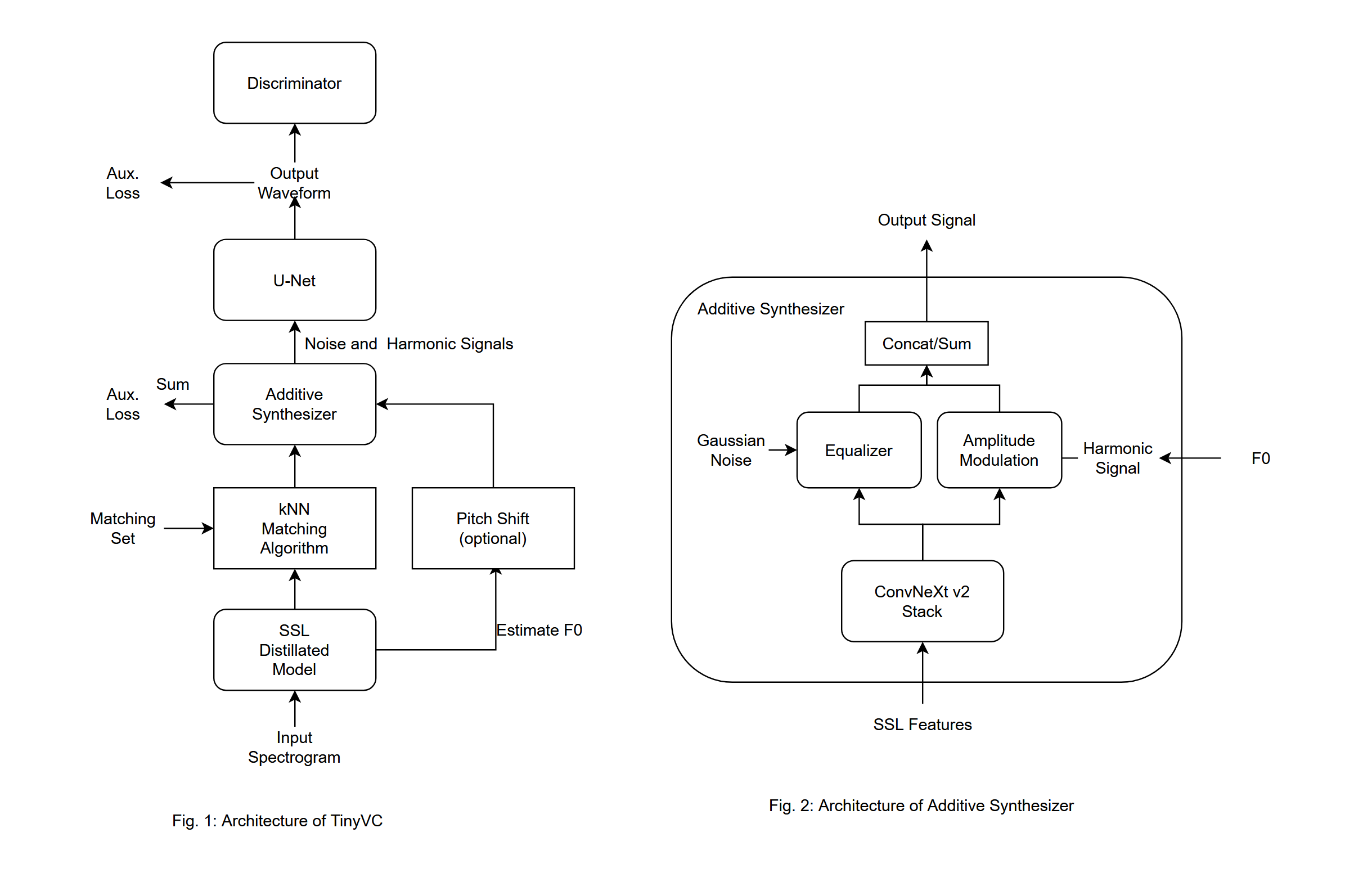
Features
- Real-time conversion
- Phase and pitch are stable (based on source filter model)
- Speaker style conversion using k-nearest neighbor method
- Fully F0 controllable speech synthesis with additive synthesizer
Things necessary
- Python 3.10 or later
- PyTorch 2.0 or later and GPU environment
- When training with full scratch, prepare a large amount of human voice data. (LJ Speech, JVS Corpus, etc.)
install
- Clone this repository
git clone https://github.com/uthree/tinyvc.git
- Install dependencies
pip3 install -r requirements.txt
Preliminary learning
Learn a model that performs basic speech conversion. At this stage, the model is not specialized for a specific speaker, but by preparing a model that can perform basic speech synthesis in advance, you can create a model that is specialized for a specific speaker with just a few adjustments. can be learned.
- Pretreatment Prepare a directory containing many audio files and run the following command
python3 preprocess.py <dataset directory>
- Learn the encoder. HuBERT, distilling pitch estimation.
python3 train_encoder.py
- Learn decoder The decoder's goal is to reconstruct the original waveform from the pitch and content.
python3 train_decoder.py
Fine tuning
By adjusting the pre-trained model to a model specialized for conversion to a specific speaker, it is possible to create a more accurate model. This process takes much less time than pre-learning.
- Combine only the audio files of a specific speaker into one folder and preprocess them.
python3 preprocess.py
- Fine tune the decoder.
python3 train_decoder.py
- Create a dictionary for vector search. This eliminates the need to encode audio files each time.
python3 extract_index.py -o <Dictionary output destination (optional)>
- When inferring, you can load arbitrary dictionary data by adding the
-idx <dictionary file>option. The default dictionary file output destination ismodels/index.pt.
Learning options
- Adding
-fp16 Trueallows learning using 16-bit floating point numbers. Possible only for RTX series GPUs. - Change batch size with
-b <number>. Default is16. - Change epoch number with
-e <number>. Default is60. - Change the computing device with
-d <device name>. Default iscuda.
Reasoning
- Create an
inputsfolder. - Put the audio file you want to convert into the
inputsfolder - Run the inference script
python3 infer.py -t <target audio file>
Also, if you use a dictionary file,
python3 infer.py -idx <dictionary file>
Additional options
- You can change the calculation device with
-d <device name>. Although it may not make much sense since it is originally high speed. - Pitch shift can be performed with
-p <scale>. Useful for voice conversion between men and women. 12 raises it one octave. - add
--no-chunking Trueto incerease quality, but this mode requires more RAM.
Real-time inference with pyaudio (feature in testing stage)
- Check the ID of your audio device
python3 audio_device_list.py
- Execution
python3 infer_streaming.py -i <input device ID> -o <output device ID> -l <loopback device ID> -t <target audio file>
(It works even without the loopback option.)
References
Similar repos


README
TinyVC : Towards AI voice conversion on CPU
(This repository is experimental. Contents are subject to change without notice.)
(This file was generated by machine translation. may contain mistakes.)
Other languages
Download pretrained model
Pretrained models are available here!
Model structure
Features
- Real-time conversion
- Phase and pitch are stable (based on source filter model)
- Speaker style conversion using k-nearest neighbor method
- Fully F0 controllable speech synthesis with additive synthesizer
Things necessary
- Python 3.10 or later
- PyTorch 2.0 or later and GPU environment
- When training with full scratch, prepare a large amount of human voice data. (LJ Speech, JVS Corpus, etc.)
install
- Clone this repository
git clone https://github.com/uthree/tinyvc.git
- Install dependencies
pip3 install -r requirements.txt
Preliminary learning
Learn a model that performs basic speech conversion. At this stage, the model is not specialized for a specific speaker, but by preparing a model that can perform basic speech synthesis in advance, you can create a model that is specialized for a specific speaker with just a few adjustments. can be learned.
- Pretreatment Prepare a directory containing many audio files and run the following command
python3 preprocess.py <dataset directory>
- Learn the encoder. HuBERT, distilling pitch estimation.
python3 train_encoder.py
- Learn decoder The decoder's goal is to reconstruct the original waveform from the pitch and content.
python3 train_decoder.py
Fine tuning
By adjusting the pre-trained model to a model specialized for conversion to a specific speaker, it is possible to create a more accurate model. This process takes much less time than pre-learning.
- Combine only the audio files of a specific speaker into one folder and preprocess them.
python3 preprocess.py
- Fine tune the decoder.
python3 train_decoder.py
- Create a dictionary for vector search. This eliminates the need to encode audio files each time.
python3 extract_index.py -o <Dictionary output destination (optional)>
- When inferring, you can load arbitrary dictionary data by adding the
-idx <dictionary file>option. The default dictionary file output destination ismodels/index.pt.
Learning options
- Adding
-fp16 Trueallows learning using 16-bit floating point numbers. Possible only for RTX series GPUs. - Change batch size with
-b <number>. Default is16. - Change epoch number with
-e <number>. Default is60. - Change the computing device with
-d <device name>. Default iscuda.
Reasoning
- Create an
inputsfolder. - Put the audio file you want to convert into the
inputsfolder - Run the inference script
python3 infer.py -t <target audio file>
Also, if you use a dictionary file,
python3 infer.py -idx <dictionary file>
Additional options
- You can change the calculation device with
-d <device name>. Although it may not make much sense since it is originally high speed. - Pitch shift can be performed with
-p <scale>. Useful for voice conversion between men and women. 12 raises it one octave. - add
--no-chunking Trueto incerease quality, but this mode requires more RAM.
Real-time inference with pyaudio (feature in testing stage)
- Check the ID of your audio device
python3 audio_device_list.py
- Execution
python3 infer_streaming.py -i <input device ID> -o <output device ID> -l <loopback device ID> -t <target audio file>
(It works even without the loopback option.)