
README
FasterSVC: Fast voice conversion based distillated models and kNN method
(This repository is in the experimental stage. The content may change without notice.)
Other languages
Model architecture
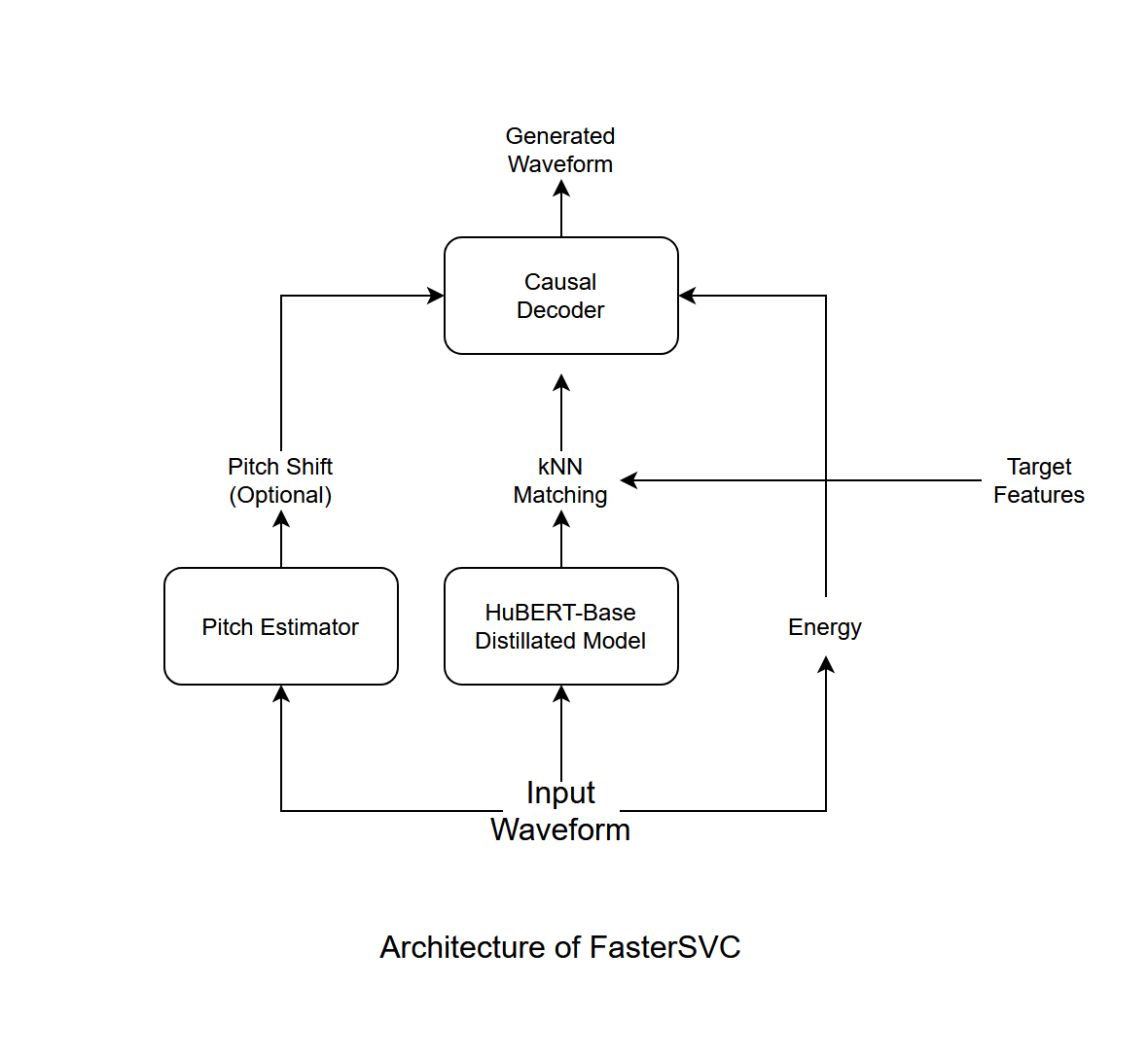 The structure of the decoder is designed with reference to FastSVC, StreamVC, Hifi-GAN, etc.
Low latency is achieved by using a "causal" convolution layer that does not refer to future information.
The structure of the decoder is designed with reference to FastSVC, StreamVC, Hifi-GAN, etc.
Low latency is achieved by using a "causal" convolution layer that does not refer to future information.
Features
- Realtime conversion
- Low latency (approximately 0.2 seconds, subject to change based on the environment and optimizations)
- Stable phase and pitch (based on the source-filter model)
- Speaker style conversion using k-nearest neighbors (kNN) method
Requirements
- Python 3.10 or later
- PyTorch 2.0 or later with GPU environment
- When training from scratch, prepare a large amount of human speech data (e.g., LJ Speech, JVS Corpus)
Installation
- clone this repository.
git clone https://github.com/uthree/fastersvc.git
- install requirements
pip3 install -r requirements.txt
Download pretrained model
The model pretrained with the JVS corpus is published here.
Pre-training
Train a model for basic voice conversion. At this stage, the model is not specialized for a specific speaker, but having a model that can perform basic voice synthesis allows for easy adaptation to a specific speaker with minimal adjustments.
Here are the steps:
- Preprocess.
python3 preprocess.py <Dataset directory>
- Train pitch estimator. Distill pitch estimation using a fast and parallelizable 1D CNN with the harvest algorithm from WORLD.
python3 train_pe.py
- Train content encoder Distill HuBERT-base.
python3 train_ce.py
- Train decoder The goal of the decoder is to reconstruct the original waveform from pitch and content.
sh
python3 train_dec.py
Fine-tuning
By adjusting the pre-trained model to a model specialized for conversion to a specific speaker, it is possible to create a more accurate model. This process takes much less time than pre-learning.
- Combine only the audio files of a specific speaker into one folder, and preprocess.
python3 preorpcess.py <Dataset directory>
- Fine tune the decoder.
python3 train_dec.py
- Create a dictionary for vector search. This eliminates the need to encode audio files each time.
python3 extract_index.py -o <Dictionary output destination (optional)>
- When inferring, you can load arbitrary dictionary data by adding the
-idx <dictionary file>option.
Training Options
- add
-fp16 Trueto accelerate training with float16 if you have RTX series GPU. - add
-b <number>to set batch size. default is16. - add
-e <number>to set epoch. default is60. - add
-d <device name>to set training device, default iscuda.
Inference
- Create an directory
inputs - Put audio files in
inputs - Run inference script
python3 infer.py -t <target audio file>
Additional options
- You can set the transparency of the original audio information with
-a <number from 0.0 to 1.0>. - You can normalize the volume with
--normalize True. - You can change the calculation device with
=d <device name>. Although it may not make much sense since it is originally high speed. - Pitch shift can be performed with
-p <scale>. Useful for voice conversion between men and women.
Realtime Inference with PyAudio (This is a feature in the testing stage)
- Confirm the ID of the audio device
python3 audio_device_list.py
- Run inference
python3 infer_streaming.py -i <input device id> -o <output device id> -l <loopback device id> -t <target audio file>
(The loopback option is optional.)
References
This document is translated from Japanese using ChatGPT.
Similar repos


README
FasterSVC: Fast voice conversion based distillated models and kNN method
(This repository is in the experimental stage. The content may change without notice.)
Other languages
Model architecture
The structure of the decoder is designed with reference to FastSVC, StreamVC, Hifi-GAN, etc.
Low latency is achieved by using a "causal" convolution layer that does not refer to future information.
Features
- Realtime conversion
- Low latency (approximately 0.2 seconds, subject to change based on the environment and optimizations)
- Stable phase and pitch (based on the source-filter model)
- Speaker style conversion using k-nearest neighbors (kNN) method
Requirements
- Python 3.10 or later
- PyTorch 2.0 or later with GPU environment
- When training from scratch, prepare a large amount of human speech data (e.g., LJ Speech, JVS Corpus)
Installation
- clone this repository.
git clone https://github.com/uthree/fastersvc.git
- install requirements
pip3 install -r requirements.txt
Download pretrained model
The model pretrained with the JVS corpus is published here.
Pre-training
Train a model for basic voice conversion. At this stage, the model is not specialized for a specific speaker, but having a model that can perform basic voice synthesis allows for easy adaptation to a specific speaker with minimal adjustments.
Here are the steps:
- Preprocess.
python3 preprocess.py <Dataset directory>
- Train pitch estimator. Distill pitch estimation using a fast and parallelizable 1D CNN with the harvest algorithm from WORLD.
python3 train_pe.py
- Train content encoder Distill HuBERT-base.
python3 train_ce.py
- Train decoder The goal of the decoder is to reconstruct the original waveform from pitch and content.
sh
python3 train_dec.py
Fine-tuning
By adjusting the pre-trained model to a model specialized for conversion to a specific speaker, it is possible to create a more accurate model. This process takes much less time than pre-learning.
- Combine only the audio files of a specific speaker into one folder, and preprocess.
python3 preorpcess.py <Dataset directory>
- Fine tune the decoder.
python3 train_dec.py
- Create a dictionary for vector search. This eliminates the need to encode audio files each time.
python3 extract_index.py -o <Dictionary output destination (optional)>
- When inferring, you can load arbitrary dictionary data by adding the
-idx <dictionary file>option.
Training Options
- add
-fp16 Trueto accelerate training with float16 if you have RTX series GPU. - add
-b <number>to set batch size. default is16. - add
-e <number>to set epoch. default is60. - add
-d <device name>to set training device, default iscuda.
Inference
- Create an directory
inputs - Put audio files in
inputs - Run inference script
python3 infer.py -t <target audio file>
Additional options
- You can set the transparency of the original audio information with
-a <number from 0.0 to 1.0>. - You can normalize the volume with
--normalize True. - You can change the calculation device with
=d <device name>. Although it may not make much sense since it is originally high speed. - Pitch shift can be performed with
-p <scale>. Useful for voice conversion between men and women.
Realtime Inference with PyAudio (This is a feature in the testing stage)
- Confirm the ID of the audio device
python3 audio_device_list.py
- Run inference
python3 infer_streaming.py -i <input device id> -o <output device id> -l <loopback device id> -t <target audio file>
(The loopback option is optional.)
References
This document is translated from Japanese using ChatGPT.