A slightly opinionated Nix flake for ComfyUI with curated custom nodes. Supports macOS (Apple Silicon) and Linux with CUDA.
See the code


A slightly opinionated, pure Nix flake for ComfyUI with Python 3.12 and curated custom nodes. Supports macOS (Apple Silicon) and Linux.
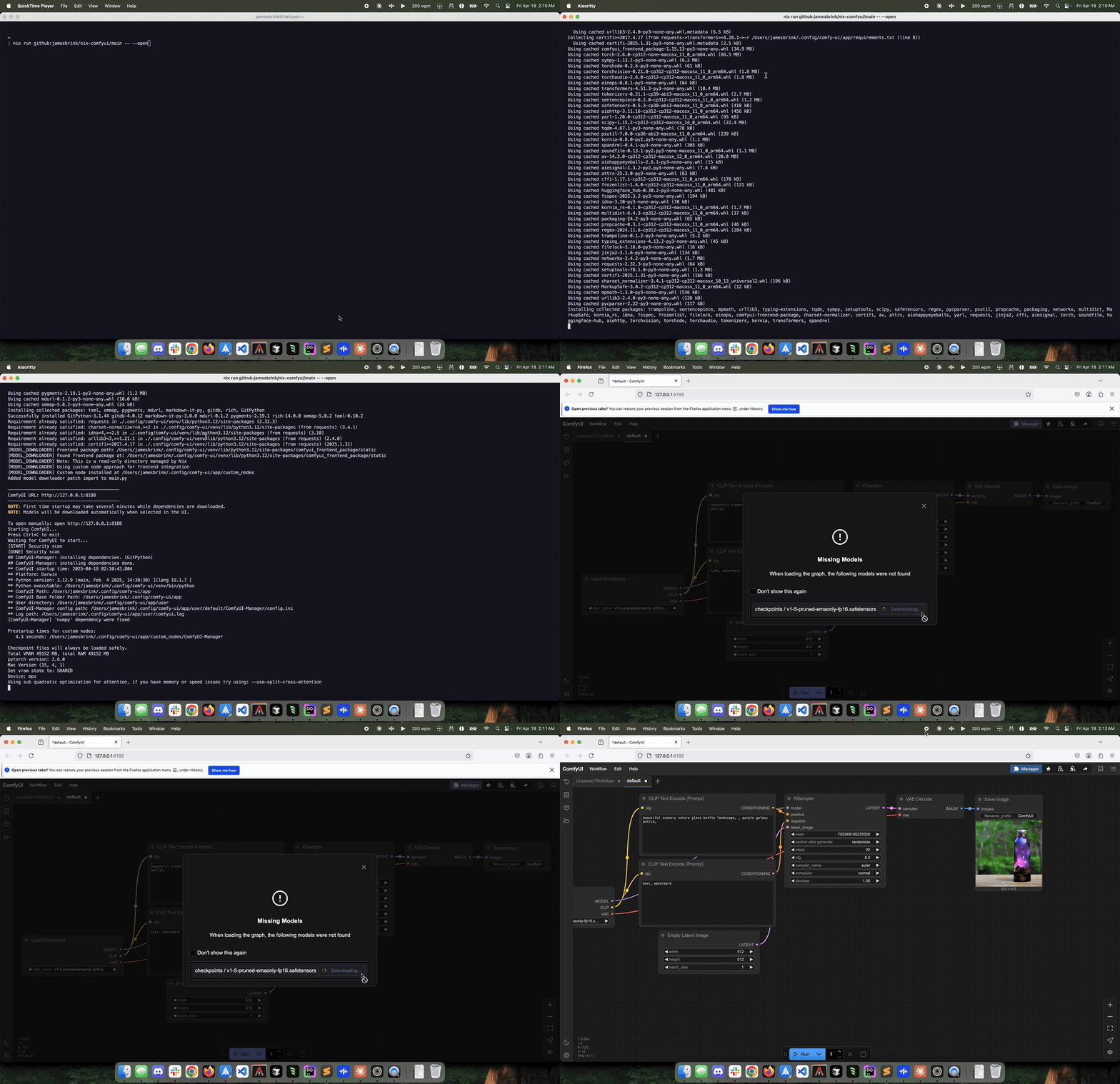
nix run github:utensils/comfyui-nix -- --open
For CUDA (Linux/NVIDIA):
nix run github:utensils/comfyui-nix#cuda
CUDA builds use pre-built PyTorch wheels from pytorch.org, so builds are fast (~2GB download) and support NVIDIA GPU architectures from Turing (RTX 20 series) through Blackwell (RTX 50 series) in a single package.
For ROCm (Linux/AMD):
nix run github:utensils/comfyui-nix#rocm
ROCm builds use pre-built PyTorch wheels from pytorch.org, so builds are fast (~2GB download); so far, GPU support has only been validated on gfx1100.
For Intel XPU (Linux/Intel GPU):
nix run github:utensils/comfyui-nix#xpu
XPU builds use pre-built PyTorch wheels from pytorch.org's XPU channel (oneAPI / SYCL, no IPEX required). Officially supports Intel Arc A/B series and Core Ultra iGPUs (Meteor Lake+). Older Xe-LP iGPUs (UHD 770) are not officially supported.
All ComfyUI CLI options are supported. Common examples:
| Flag | Description |
|---|---|
--open | Open browser when ready |
--port=XXXX | Custom port (default: 8188) |
--base-directory PATH | Data directory for models, outputs, custom nodes |
--listen 0.0.0.0 | Allow network access |
--enable-manager | Enable built-in ComfyUI Manager |
--lowvram | Reduce VRAM usage for limited GPUs |
--disable-api-nodes | Disable built-in API nodes |
Default data locations:
~/.config/comfy-ui~/Library/Application Support/comfy-uiCUDA builds are available for Linux with NVIDIA GPUs. The #cuda package uses pre-built PyTorch wheels from pytorch.org which:
nix run github:utensils/comfyui-nix#cuda
CUDA 13 no longer supports pre-Turing GPUs. Pascal and Volta users must use an older comfyui-nix release; earlier architectures were already unsupported.
ROCm builds are available for Linux with AMD GPUs. The #rocm package uses pre-built PyTorch wheels from pytorch.org which:
gfx1100 (7900XTX) has been testednix run github:utensils/comfyui-nix#rocm
ROCm support contributed by @pyqlsa — thank you!
Intel XPU builds are available for Linux x86_64 with Intel GPUs. The #xpu package uses pre-built PyTorch wheels from pytorch.org's XPU channel which:
torch.xpu backend is sufficient; ComfyUI auto-detects XPUOlder Xe-LP iGPUs (UHD 770 on Alder/Raptor Lake) are not officially supported by Intel/PyTorch and may not work even if detected.
The XPU wheels bundle the SYCL runtime, but the host must provide:
i915 (Arc Alchemist) or xe (Battlemage, newer iGPUs)On NixOS (recommended — keeps userland ICD in sync with the kernel DRM driver):
hardware.graphics = {
  enable = true;
  extraPackages = [
    pkgs.intel-compute-runtime
    pkgs.level-zero
  ];
};
The launcher prefers /run/opengl-driver/lib when present. On non-NixOS Linux (Ubuntu, Arch, etc.), the package bundles level-zero and intel-compute-runtime as a fallback, so nix run .#xpu works without additional system setup — but keep kernel drivers up to date for your GPU generation.
nix run github:utensils/comfyui-nix#xpu
iGPUs (UHD 770, older Xe-LP) lack native FP64 hardware. If you hit "double precision not supported" errors, enable emulation:
COMFY_ENABLE_XPU_FP64_EMULATION=1 nix run github:utensils/comfyui-nix#xpu
This sets OverrideDefaultFP64Settings=1 + IGC_EnableDPEmulation=1. Off by default so discrete Arc users surface real errors rather than silently emulating.
JIT-compiled SYCL kernels are cached under <data-directory>/.cache/libsycl_cache/ via SYCL_CACHE_PERSISTENT=1. First generation is slower while kernels compile; subsequent runs reuse the cache.
XPU support has not been tested on real Intel hardware by the project maintainers. Feedback, bug reports, and benchmarks from Intel GPU users are very welcome — please open an issue describing your hardware, kernel version, and what works / doesn't work.
ComfyUI's standard installation relies on pip and manual dependency management, which doesn't integrate well with NixOS's declarative approach. This flake provides:

ComfyUI Manager is now officially part of ComfyUI (integrated into Comfy-Org in March 2025). We include the manager package and it can be enabled with --enable-manager:
nix run github:utensils/comfyui-nix#cuda -- --enable-manager
How it stays pure: The Nix store remains read-only. When custom nodes require additional Python dependencies, they install into a PEP 405 venv at <data-directory>/.venv/ instead of the Nix store. By default Nix-provided packages take precedence; set COMFY_VENV_PRECEDENCE=prefer-venv to let venv packages override.
Nix packages (read-only):     torch, pillow, numpy, transformers, etc.
Runtime packages (mutable):   <data-directory>/.venv/
A default manager config is created on first run with sensible defaults for personal use (security_level=normal, network_mode=personal_cloud).
Some custom nodes have hardcoded paths that don't exist on NixOS. We automatically patch these at startup, but a full service restart is required after installing them via Manager.
| Node Pack | Issue | Fix |
|---|---|---|
Comfyroll Studio (ComfyUI_Comfyroll_CustomNodes) | Hardcoded /usr/share/fonts/truetype | Patched to use bundled fonts |
After installing these nodes: Stop ComfyUI completely (Ctrl+C) and restart with nix run or systemctl restart comfyui. Manager's internal restart does not trigger the patching.
The following custom nodes are bundled and automatically linked on first run:
To manage custom_nodes/ yourself instead — through ComfyUI-Manager, git
clones, or services.comfyui.customNodes — set COMFY_SKIP_BUNDLED_NODES=1
(services.comfyui.bundledCustomNodes = false on NixOS). The third-party nodes
below are then left unlinked, and links from a previous run are removed.
Model Downloader stays linked either way: it is this project's own node and
provides the API endpoints below. Note that with the bundled set enabled the
launcher deletes any real directory in custom_nodes/ whose name matches one
of these nodes.
A non-blocking async download node with WebSocket progress updates. Download models directly within ComfyUI without blocking the UI.
API Endpoints:
POST /api/download_model - Start a downloadGET /api/download_progress/{id} - Check progressGET /api/list_downloads - List all downloadsImpact Pack (v8.28) - Detection, segmentation, and more. License: GPL-3.0
rgthree-comfy (v1.0.2607232129) - Quality of life nodes. License: MIT
KJNodes - Utility nodes for advanced workflows. License: GPL-3.0
ComfyUI-GGUF - GGUF quantization support for native ComfyUI models. License: Apache-2.0
ComfyUI-LTXVideo - LTX-Video support for ComfyUI. License: Apache-2.0
ComfyUI-Florence2 - Microsoft Florence2 vision-language model. License: MIT
ComfyUI_bitsandbytes_NF4 - NF4 quantization for Flux models. License: AGPL-3.0
x-flux-comfyui - XLabs Flux LoRA and ControlNet. License: Apache-2.0
ComfyUI-MMAudio - Synchronized audio generation from video. License: MIT
PuLID_ComfyUI - PuLID face ID for identity preservation. License: Apache-2.0 | Setup Guide
ComfyUI-WanVideoWrapper - WanVideo and related video models. License: Apache-2.0
All Python dependencies (segment-anything, sam2, scikit-image, opencv, color-matcher, gguf, diffusers, librosa, bitsandbytes, etc.) are pre-built and included in the Nix environment.
Add ComfyUI as a package in your system configuration:
# flake.nix
{
  inputs = {
    nixpkgs.url = "github:NixOS/nixpkgs/nixos-unstable";
    comfyui-nix.url = "github:utensils/comfyui-nix";
  };

  outputs = { nixpkgs, comfyui-nix, ... }: {
    # NixOS
    nixosConfigurations.myhost = nixpkgs.lib.nixosSystem {
      system = "x86_64-linux";
      modules = [{
        nixpkgs.overlays = [ comfyui-nix.overlays.default ];
        environment.systemPackages = [ pkgs.comfy-ui ];
        # Or for CUDA: pkgs.comfy-ui-cuda
        # Or for ROCm: pkgs.comfy-ui-rocm
        # Or for Intel XPU: pkgs.comfy-ui-xpu
      }];
    };

    # nix-darwin (macOS)
    darwinConfigurations.myhost = darwin.lib.darwinSystem {
      system = "aarch64-darwin";
      modules = [{
        nixpkgs.overlays = [ comfyui-nix.overlays.default ];
        environment.systemPackages = [ pkgs.comfy-ui ];
      }];
    };
  };
}
Without overlay (reference the package directly):
{ pkgs, inputs, ... }: {
  environment.systemPackages = [
    inputs.comfyui-nix.packages.${pkgs.stdenv.hostPlatform.system}.default  # CPU
    # inputs.comfyui-nix.packages.${pkgs.stdenv.hostPlatform.system}.cuda   # CUDA (Linux)
    # inputs.comfyui-nix.packages.${pkgs.stdenv.hostPlatform.system}.rocm   # ROCm (Linux)
    # inputs.comfyui-nix.packages.${pkgs.stdenv.hostPlatform.system}.xpu    # Intel XPU (Linux)
  ];
}
The overlay provides these packages:
| Package | Description |
|---|---|
pkgs.comfy-ui | CPU + Apple Silicon (Metal) - use this for macOS |
pkgs.comfy-ui-cuda | NVIDIA GPUs (Linux x86_64 only, all architectures) |
pkgs.comfy-ui-rocm | AMD GPUs (Linux x86_64 only, gfx1100) |
pkgs.comfy-ui-xpu | Intel GPUs (Linux x86_64 only, Arc + Core Ultra iGPU) |
Note: On macOS with Apple Silicon, the base
comfy-uipackage automatically uses Metal for GPU acceleration. No separate CUDA package is needed.
For quick testing without modifying your system configuration:
# CPU / Apple Silicon
nix profile add github:utensils/comfyui-nix

# CUDA (Linux/NVIDIA only)
nix profile add github:utensils/comfyui-nix#cuda

# ROCm (Linux/AMD only)
nix profile add github:utensils/comfyui-nix#rocm

# Intel XPU (Linux, Intel Arc / Core Ultra iGPU only)
nix profile add github:utensils/comfyui-nix#xpu
Note: Profile installation is convenient for trying ComfyUI but isn't declarative. For reproducible setups, add the package to your NixOS/nix-darwin configuration instead.
{
  imports = [ comfyui-nix.nixosModules.default ];

  services.comfyui = {
    enable = true;
    gpuSupport = "cuda";  # Enable NVIDIA GPU acceleration (recommended for most users)
    # gpuSupport = "rocm";  # Enable AMD GPU acceleration
    # cudaCapabilities = [ "8.9" ];  # Optional: optimize system CUDA packages for RTX 40xx
    #   Note: Pre-built PyTorch wheels already include every supported GPU architecture
    enableManager = true;  # Enable the built-in ComfyUI Manager
    port = 8188;
    listenAddress = "127.0.0.1";  # Use "0.0.0.0" for network access
    dataDir = "/var/lib/comfyui";
    openFirewall = false;
    # extraArgs = [ "--lowvram" ];
    # environment = { };
  };
}
Note: The module brings its own packages, so
nixpkgs.overlaysdoes not needcomfyui-nix.overlays.defaultfor the service to work. Add the overlay only if you also wantpkgs.comfy-ui*available elsewhere in your configuration. Because the module never definesnixpkgs.overlaysitself, it composes withnixpkgs.nixosModules.readOnlyPkgs(the one exception isservices.comfyui.cudaCapabilities, which writes tonixpkgs.config; leave it unset underreadOnlyPkgs).
Note: nixpkgs ships its own
services.comfyuimodule (nixos/modules/services/misc/comfyui.nix). Importing this module automatically disables the nixpkgs one, so the two no longer collide witherror: The option 'services.comfyui.enable' ... is already declared. Allservices.comfyui.*options come from this flake. To use the nixpkgs service instead, simply do not importcomfyui-nix.nixosModules.default.
| Option | Default | Description |
|---|---|---|
enable | false | Enable the ComfyUI service |
gpuSupport | "none" | Enable NVIDIA or AMD GPU acceleration |
cudaCapabilities | null | Optional CUDA compute capability list |
enableManager | false | Enable the built-in ComfyUI Manager |
port | 8188 | Port for the web interface |
listenAddress | "127.0.0.1" | Listen address ("0.0.0.0" for network access) |
dataDir | "/var/lib/comfyui" | Data directory for models, outputs, custom nodes |
user | "comfyui" | User account to run ComfyUI under |
group | "comfyui" | Group to run ComfyUI under |
createUser | true | Create the comfyui system user/group |
openFirewall | false | Open the port in the firewall |
extraArgs | [] | Additional CLI arguments |
environment | {} | Environment variables for the service |
extraPythonPackages | null | Extra declarative Python dependencies |
customNodes | {} | Declarative custom nodes (see below) |
bundledCustomNodes | true | Link the bundled custom nodes into custom_nodes/ |
requiresMounts | [] | Mount units to wait for before starting |
cudaCapabilities maps to nixpkgs.config.cudaCapabilities, so setting it will
apply to other CUDA packages in the system configuration as well.
Note: When dataDir is under /home/, ProtectHome is automatically disabled to allow access.
To run ComfyUI with data in a user's home directory:
services.comfyui = {
  enable = true;
  gpuSupport = "cuda";
  dataDir = "/home/myuser/comfyui-data";
  user = "myuser";
  group = "users";
  createUser = false;  # Use existing user
  # If dataDir is on a separate mount (NFS, ZFS dataset, etc.):
  # requiresMounts = [ "home-myuser-comfyui\\x2ddata.mount" ];
};
Install custom nodes reproducibly using customNodes:
services.comfyui = {
  enable = true;
  customNodes = {
    # Fetch from GitHub (pinned version)
    comfyui_controlnet_aux = pkgs.fetchFromGitHub {
      owner = "Fannovel16";
      repo = "comfyui_controlnet_aux";
      rev = "v1.0.0";
      hash = "sha256-...";  # nix-prefetch-github Fannovel16 comfyui_controlnet_aux --rev v1.0.0
    };
    # Local path (for development)
    my-node = /path/to/node;
  };
};
Nodes are symlinked at service start. This is the pure Nix approach - fully reproducible and version-pinned.
Pick names that do not collide with the bundled nodes.
The launcher relinks those on every start, so an entry named after one of them
(ComfyUI-Impact-Pack, ComfyUI-KJNodes, ...) is overwritten before ComfyUI
reads it. To override a bundled node with your own pin, also set
bundledCustomNodes = false.
Custom nodes with additional Python dependencies can extend the selected CPU/CUDA/ROCm/XPU runtime declaratively:
services.comfyui = {
  customNodes.ComfyUI-Usgromana = pkgs.fetchFromGitHub {
    owner = "DayMan84";
    repo = "ComfyUI-Usgromana";
    rev = "2.0.0";
    hash = "sha256-vzb0GX3hYpER4Xqmc7bkbx5AiMDgWRyIcLapJefD71Q=";
  };

  extraPythonPackages = ps: with ps; [
    bcrypt
    pyjwt
    bleach
  ];
};
extraPythonPackages uses the same overridden Python package set as ComfyUI,
so GPU-specific packages such as Torch are not replaced by dependencies from a
separate environment. Requirements files are not installed automatically: list
each required nixpkgs package explicitly so the result remains reproducible.
The option cannot be combined with a custom services.comfyui.package; include
the dependencies directly when supplying a fully custom package.
Declarative node sources are read-only. Nodes that write databases, logs, or configuration beneath their own source directory must support a separate writable data directory or be patched accordingly. Usgromana 2.0.0 writes state beneath its extension directory, so its Python dependencies can be declared as above, but the node still needs writable-state handling before it is suitable for a fully declarative deployment.
Pre-built images on GitHub Container Registry:
Docker:
# CPU (multi-arch: amd64 + arm64)
docker run -p 8188:8188 -v "$PWD/data:/data" ghcr.io/utensils/comfyui-nix:latest

# CUDA (x86_64 only, requires nvidia-container-toolkit)
# Supports Turing, Ampere, Ada, Hopper, and Blackwell
docker run --gpus all -p 8188:8188 -v "$PWD/data:/data" ghcr.io/utensils/comfyui-nix:latest-cuda

# ROCm (x86_64 only)
# Supports `gfx1100` (and possibly others)
docker run --gpus all -p 8188:8188 -v "$PWD/data:/data" ghcr.io/utensils/comfyui-nix:latest-rocm

# Intel XPU (x86_64 only)
# Arc A/B + Core Ultra iGPUs (Meteor Lake+). Host needs i915 or xe kernel driver.
docker run --device /dev/dri -p 8188:8188 -v "$PWD/data:/data" ghcr.io/utensils/comfyui-nix:latest-xpu
Podman:
# CPU
podman run -p 8188:8188 -v "$PWD/data:/data:Z" ghcr.io/utensils/comfyui-nix:latest

# CUDA (requires nvidia-container-toolkit and CDI configured)
podman run --device nvidia.com/gpu=all -p 8188:8188 -v "$PWD/data:/data:Z" ghcr.io/utensils/comfyui-nix:latest-cuda

# ROCm
podman run --device /dev/kfd --device /dev/dri -p 8188:8188 -v "$PWD/data:/data:rw" -v "/etc/passwd:/etc/passwd:ro" ghcr.io/utensils/comfyui-nix:latest-rocm

# Intel XPU (host must have i915 or xe kernel driver + firmware)
podman run --device /dev/dri -p 8188:8188 -v "$PWD/data:/data:Z" ghcr.io/utensils/comfyui-nix:latest-xpu
Passing additional arguments:
When passing custom arguments, include --listen 0.0.0.0 to maintain network access:
# Docker with manager enabled
docker run --gpus all -p 8188:8188 -v "$PWD/data:/data" \
  ghcr.io/utensils/comfyui-nix:latest-cuda --listen 0.0.0.0 --enable-manager

# Podman with manager enabled
podman run --device nvidia.com/gpu=all -p 8188:8188 -v "$PWD/data:/data:Z" \
  ghcr.io/utensils/comfyui-nix:latest-cuda --listen 0.0.0.0 --enable-manager

# Podman and ROCm with manager enabled and some recommended settings
podman run \
  --device /dev/kfd \
  --device /dev/dri \
  -p 8188:8188 \
  -v "$PWD/data:/data:rw" \
  -v "/etc/passwd:/etc/passwd:ro" \
  ghcr.io/utensils/comfyui-nix:latest-rocm \
  --listen 0.0.0.0 \
  --enable-manager \
  --disable-xformers \
  --use-pytorch-cross-attention
Build locally:
nix build .#dockerImage      # CPU
nix build .#dockerImageCuda  # CUDA
nix build .#dockerImageRocm  # ROCm
nix build .#dockerImageXpu   # Intel XPU

# Load into Docker/Podman
docker load < result
podman load < result
Build locally and load in a single step:
# builds image and loads into docker
nix run .#buildDocker      # CPU
nix run .#buildDockerCuda  # CUDA
nix run .#buildDockerRocm  # ROCm
nix run .#buildDockerXpu   # Intel XPU
Note: Docker/Podman on macOS runs CPU-only. For GPU acceleration on Apple Silicon, use nix run directly.
nix develop              # Dev shell with Python 3.12, ruff, pyright
nix flake check          # Run all checks (build, lint, type-check, nixfmt)
nix run .#update         # Check for ComfyUI updates
<data-directory>/
├── models/        # checkpoints, loras, vae, controlnet, etc.
├── output/        # Generated images
├── input/         # Input files
├── user/          # Workflows, settings, manager config
├── custom_nodes/  # Extensions (bundled nodes auto-linked)
├── fonts/         # Bundled fonts for nodes requiring system fonts
├── .venv/         # PEP 405 venv for Manager package installs
├── .cache/        # Redirected caches (torch hub, HuggingFace, facexlib)
└── temp/
ComfyUI runs from the Nix store; only user data lives in your data directory.
The binary cache speeds up builds by downloading pre-built packages instead of compiling from source.
Quick setup (recommended):
# Install cachix if you don't have it
nix-env -iA cachix -f https://cachix.org/api/v1/install

# Add the ComfyUI cache
cachix use comfyui

# For CUDA builds, add the nix-community cache (has CUDA packages)
cachix use nix-community
Manual NixOS configuration:
{
  nix.settings = {
    substituters = [
      "https://cache.nixos.org"
      "https://comfyui.cachix.org"
      "https://nix-community.cachix.org"
    ];
    trusted-public-keys = [
      "cache.nixos.org-1:6NCHdD59X431o0gWypbMrAURkbJ16ZPMQFGspcDShjY="
      "comfyui.cachix.org-1:33mf9VzoIjzVbp0zwj+fT51HG0y31ZTK3nzYZAX0rec="
      "nix-community.cachix.org-1:mB9FSh9qf2dCimDSUo8Zy7bkq5CX+/rkCWyvRCYg3Fs="
    ];
  };
}
Non-NixOS systems (~/.config/nix/nix.conf):
substituters = https://cache.nixos.org https://comfyui.cachix.org https://nix-community.cachix.org
trusted-public-keys = cache.nixos.org-1:6NCHdD59X431o0gWypbMrAURkbJ16ZPMQFGspcDShjY= comfyui.cachix.org-1:33mf9VzoIjzVbp0zwj+fT51HG0y31ZTK3nzYZAX0rec= nix-community.cachix.org-1:mB9FSh9qf2dCimDSUo8Zy7bkq5CX+/rkCWyvRCYg3Fs=
The flake automatically configures these caches, but your Nix daemon must trust them. If you see packages building from source instead of downloading, check that your keys match exactly.
MIT (this flake). ComfyUI is GPL-3.0.
287 followers · starred Aug 2026
59 followers · starred Aug 2026
363 followers · starred Dec 2025
139 followers · starred Aug 2026
A slightly opinionated Nix flake for ComfyUI with curated custom nodes. Supports macOS (Apple Silicon) and Linux with CUDA.
See the code
A slightly opinionated, pure Nix flake for ComfyUI with Python 3.12 and curated custom nodes. Supports macOS (Apple Silicon) and Linux.
nix run github:utensils/comfyui-nix -- --open
For CUDA (Linux/NVIDIA):
nix run github:utensils/comfyui-nix#cuda
CUDA builds use pre-built PyTorch wheels from pytorch.org, so builds are fast (~2GB download) and support NVIDIA GPU architectures from Turing (RTX 20 series) through Blackwell (RTX 50 series) in a single package.
For ROCm (Linux/AMD):
nix run github:utensils/comfyui-nix#rocm
ROCm builds use pre-built PyTorch wheels from pytorch.org, so builds are fast (~2GB download); so far, GPU support has only been validated on gfx1100.
For Intel XPU (Linux/Intel GPU):
nix run github:utensils/comfyui-nix#xpu
XPU builds use pre-built PyTorch wheels from pytorch.org's XPU channel (oneAPI / SYCL, no IPEX required). Officially supports Intel Arc A/B series and Core Ultra iGPUs (Meteor Lake+). Older Xe-LP iGPUs (UHD 770) are not officially supported.
All ComfyUI CLI options are supported. Common examples:
| Flag | Description |
|---|---|
--open | Open browser when ready |
--port=XXXX | Custom port (default: 8188) |
--base-directory PATH | Data directory for models, outputs, custom nodes |
--listen 0.0.0.0 | Allow network access |
--enable-manager | Enable built-in ComfyUI Manager |
--lowvram | Reduce VRAM usage for limited GPUs |
--disable-api-nodes | Disable built-in API nodes |
Default data locations:
~/.config/comfy-ui~/Library/Application Support/comfy-uiCUDA builds are available for Linux with NVIDIA GPUs. The #cuda package uses pre-built PyTorch wheels from pytorch.org which:
nix run github:utensils/comfyui-nix#cuda
CUDA 13 no longer supports pre-Turing GPUs. Pascal and Volta users must use an older comfyui-nix release; earlier architectures were already unsupported.
ROCm builds are available for Linux with AMD GPUs. The #rocm package uses pre-built PyTorch wheels from pytorch.org which:
gfx1100 (7900XTX) has been testednix run github:utensils/comfyui-nix#rocm
ROCm support contributed by @pyqlsa — thank you!
Intel XPU builds are available for Linux x86_64 with Intel GPUs. The #xpu package uses pre-built PyTorch wheels from pytorch.org's XPU channel which:
torch.xpu backend is sufficient; ComfyUI auto-detects XPUOlder Xe-LP iGPUs (UHD 770 on Alder/Raptor Lake) are not officially supported by Intel/PyTorch and may not work even if detected.
The XPU wheels bundle the SYCL runtime, but the host must provide:
i915 (Arc Alchemist) or xe (Battlemage, newer iGPUs)On NixOS (recommended — keeps userland ICD in sync with the kernel DRM driver):
hardware.graphics = {
  enable = true;
  extraPackages = [
    pkgs.intel-compute-runtime
    pkgs.level-zero
  ];
};
The launcher prefers /run/opengl-driver/lib when present. On non-NixOS Linux (Ubuntu, Arch, etc.), the package bundles level-zero and intel-compute-runtime as a fallback, so nix run .#xpu works without additional system setup — but keep kernel drivers up to date for your GPU generation.
nix run github:utensils/comfyui-nix#xpu
iGPUs (UHD 770, older Xe-LP) lack native FP64 hardware. If you hit "double precision not supported" errors, enable emulation:
COMFY_ENABLE_XPU_FP64_EMULATION=1 nix run github:utensils/comfyui-nix#xpu
This sets OverrideDefaultFP64Settings=1 + IGC_EnableDPEmulation=1. Off by default so discrete Arc users surface real errors rather than silently emulating.
JIT-compiled SYCL kernels are cached under <data-directory>/.cache/libsycl_cache/ via SYCL_CACHE_PERSISTENT=1. First generation is slower while kernels compile; subsequent runs reuse the cache.
XPU support has not been tested on real Intel hardware by the project maintainers. Feedback, bug reports, and benchmarks from Intel GPU users are very welcome — please open an issue describing your hardware, kernel version, and what works / doesn't work.
ComfyUI's standard installation relies on pip and manual dependency management, which doesn't integrate well with NixOS's declarative approach. This flake provides:
ComfyUI Manager is now officially part of ComfyUI (integrated into Comfy-Org in March 2025). We include the manager package and it can be enabled with --enable-manager:
nix run github:utensils/comfyui-nix#cuda -- --enable-manager
How it stays pure: The Nix store remains read-only. When custom nodes require additional Python dependencies, they install into a PEP 405 venv at <data-directory>/.venv/ instead of the Nix store. By default Nix-provided packages take precedence; set COMFY_VENV_PRECEDENCE=prefer-venv to let venv packages override.
Nix packages (read-only):     torch, pillow, numpy, transformers, etc.
Runtime packages (mutable):   <data-directory>/.venv/
A default manager config is created on first run with sensible defaults for personal use (security_level=normal, network_mode=personal_cloud).
Some custom nodes have hardcoded paths that don't exist on NixOS. We automatically patch these at startup, but a full service restart is required after installing them via Manager.
| Node Pack | Issue | Fix |
|---|---|---|
Comfyroll Studio (ComfyUI_Comfyroll_CustomNodes) | Hardcoded /usr/share/fonts/truetype | Patched to use bundled fonts |
After installing these nodes: Stop ComfyUI completely (Ctrl+C) and restart with nix run or systemctl restart comfyui. Manager's internal restart does not trigger the patching.
The following custom nodes are bundled and automatically linked on first run:
To manage custom_nodes/ yourself instead — through ComfyUI-Manager, git
clones, or services.comfyui.customNodes — set COMFY_SKIP_BUNDLED_NODES=1
(services.comfyui.bundledCustomNodes = false on NixOS). The third-party nodes
below are then left unlinked, and links from a previous run are removed.
Model Downloader stays linked either way: it is this project's own node and
provides the API endpoints below. Note that with the bundled set enabled the
launcher deletes any real directory in custom_nodes/ whose name matches one
of these nodes.
A non-blocking async download node with WebSocket progress updates. Download models directly within ComfyUI without blocking the UI.
API Endpoints:
POST /api/download_model - Start a downloadGET /api/download_progress/{id} - Check progressGET /api/list_downloads - List all downloadsImpact Pack (v8.28) - Detection, segmentation, and more. License: GPL-3.0
rgthree-comfy (v1.0.2607232129) - Quality of life nodes. License: MIT
KJNodes - Utility nodes for advanced workflows. License: GPL-3.0
ComfyUI-GGUF - GGUF quantization support for native ComfyUI models. License: Apache-2.0
ComfyUI-LTXVideo - LTX-Video support for ComfyUI. License: Apache-2.0
ComfyUI-Florence2 - Microsoft Florence2 vision-language model. License: MIT
ComfyUI_bitsandbytes_NF4 - NF4 quantization for Flux models. License: AGPL-3.0
x-flux-comfyui - XLabs Flux LoRA and ControlNet. License: Apache-2.0
ComfyUI-MMAudio - Synchronized audio generation from video. License: MIT
PuLID_ComfyUI - PuLID face ID for identity preservation. License: Apache-2.0 | Setup Guide
ComfyUI-WanVideoWrapper - WanVideo and related video models. License: Apache-2.0
All Python dependencies (segment-anything, sam2, scikit-image, opencv, color-matcher, gguf, diffusers, librosa, bitsandbytes, etc.) are pre-built and included in the Nix environment.
Add ComfyUI as a package in your system configuration:
# flake.nix
{
  inputs = {
    nixpkgs.url = "github:NixOS/nixpkgs/nixos-unstable";
    comfyui-nix.url = "github:utensils/comfyui-nix";
  };

  outputs = { nixpkgs, comfyui-nix, ... }: {
    # NixOS
    nixosConfigurations.myhost = nixpkgs.lib.nixosSystem {
      system = "x86_64-linux";
      modules = [{
        nixpkgs.overlays = [ comfyui-nix.overlays.default ];
        environment.systemPackages = [ pkgs.comfy-ui ];
        # Or for CUDA: pkgs.comfy-ui-cuda
        # Or for ROCm: pkgs.comfy-ui-rocm
        # Or for Intel XPU: pkgs.comfy-ui-xpu
      }];
    };

    # nix-darwin (macOS)
    darwinConfigurations.myhost = darwin.lib.darwinSystem {
      system = "aarch64-darwin";
      modules = [{
        nixpkgs.overlays = [ comfyui-nix.overlays.default ];
        environment.systemPackages = [ pkgs.comfy-ui ];
      }];
    };
  };
}
Without overlay (reference the package directly):
{ pkgs, inputs, ... }: {
  environment.systemPackages = [
    inputs.comfyui-nix.packages.${pkgs.stdenv.hostPlatform.system}.default  # CPU
    # inputs.comfyui-nix.packages.${pkgs.stdenv.hostPlatform.system}.cuda   # CUDA (Linux)
    # inputs.comfyui-nix.packages.${pkgs.stdenv.hostPlatform.system}.rocm   # ROCm (Linux)
    # inputs.comfyui-nix.packages.${pkgs.stdenv.hostPlatform.system}.xpu    # Intel XPU (Linux)
  ];
}
The overlay provides these packages:
| Package | Description |
|---|---|
pkgs.comfy-ui | CPU + Apple Silicon (Metal) - use this for macOS |
pkgs.comfy-ui-cuda | NVIDIA GPUs (Linux x86_64 only, all architectures) |
pkgs.comfy-ui-rocm | AMD GPUs (Linux x86_64 only, gfx1100) |
pkgs.comfy-ui-xpu | Intel GPUs (Linux x86_64 only, Arc + Core Ultra iGPU) |
Note: On macOS with Apple Silicon, the base
comfy-uipackage automatically uses Metal for GPU acceleration. No separate CUDA package is needed.
For quick testing without modifying your system configuration:
# CPU / Apple Silicon
nix profile add github:utensils/comfyui-nix

# CUDA (Linux/NVIDIA only)
nix profile add github:utensils/comfyui-nix#cuda

# ROCm (Linux/AMD only)
nix profile add github:utensils/comfyui-nix#rocm

# Intel XPU (Linux, Intel Arc / Core Ultra iGPU only)
nix profile add github:utensils/comfyui-nix#xpu
Note: Profile installation is convenient for trying ComfyUI but isn't declarative. For reproducible setups, add the package to your NixOS/nix-darwin configuration instead.
{
  imports = [ comfyui-nix.nixosModules.default ];

  services.comfyui = {
    enable = true;
    gpuSupport = "cuda";  # Enable NVIDIA GPU acceleration (recommended for most users)
    # gpuSupport = "rocm";  # Enable AMD GPU acceleration
    # cudaCapabilities = [ "8.9" ];  # Optional: optimize system CUDA packages for RTX 40xx
    #   Note: Pre-built PyTorch wheels already include every supported GPU architecture
    enableManager = true;  # Enable the built-in ComfyUI Manager
    port = 8188;
    listenAddress = "127.0.0.1";  # Use "0.0.0.0" for network access
    dataDir = "/var/lib/comfyui";
    openFirewall = false;
    # extraArgs = [ "--lowvram" ];
    # environment = { };
  };
}
Note: The module brings its own packages, so
nixpkgs.overlaysdoes not needcomfyui-nix.overlays.defaultfor the service to work. Add the overlay only if you also wantpkgs.comfy-ui*available elsewhere in your configuration. Because the module never definesnixpkgs.overlaysitself, it composes withnixpkgs.nixosModules.readOnlyPkgs(the one exception isservices.comfyui.cudaCapabilities, which writes tonixpkgs.config; leave it unset underreadOnlyPkgs).
Note: nixpkgs ships its own
services.comfyuimodule (nixos/modules/services/misc/comfyui.nix). Importing this module automatically disables the nixpkgs one, so the two no longer collide witherror: The option 'services.comfyui.enable' ... is already declared. Allservices.comfyui.*options come from this flake. To use the nixpkgs service instead, simply do not importcomfyui-nix.nixosModules.default.
| Option | Default | Description |
|---|---|---|
enable | false | Enable the ComfyUI service |
gpuSupport | "none" | Enable NVIDIA or AMD GPU acceleration |
cudaCapabilities | null | Optional CUDA compute capability list |
enableManager | false | Enable the built-in ComfyUI Manager |
port | 8188 | Port for the web interface |
listenAddress | "127.0.0.1" | Listen address ("0.0.0.0" for network access) |
dataDir | "/var/lib/comfyui" | Data directory for models, outputs, custom nodes |
user | "comfyui" | User account to run ComfyUI under |
group | "comfyui" | Group to run ComfyUI under |
createUser | true | Create the comfyui system user/group |
openFirewall | false | Open the port in the firewall |
extraArgs | [] | Additional CLI arguments |
environment | {} | Environment variables for the service |
extraPythonPackages | null | Extra declarative Python dependencies |
customNodes | {} | Declarative custom nodes (see below) |
bundledCustomNodes | true | Link the bundled custom nodes into custom_nodes/ |
requiresMounts | [] | Mount units to wait for before starting |
cudaCapabilities maps to nixpkgs.config.cudaCapabilities, so setting it will
apply to other CUDA packages in the system configuration as well.
Note: When dataDir is under /home/, ProtectHome is automatically disabled to allow access.
To run ComfyUI with data in a user's home directory:
services.comfyui = {
  enable = true;
  gpuSupport = "cuda";
  dataDir = "/home/myuser/comfyui-data";
  user = "myuser";
  group = "users";
  createUser = false;  # Use existing user
  # If dataDir is on a separate mount (NFS, ZFS dataset, etc.):
  # requiresMounts = [ "home-myuser-comfyui\\x2ddata.mount" ];
};
Install custom nodes reproducibly using customNodes:
services.comfyui = {
  enable = true;
  customNodes = {
    # Fetch from GitHub (pinned version)
    comfyui_controlnet_aux = pkgs.fetchFromGitHub {
      owner = "Fannovel16";
      repo = "comfyui_controlnet_aux";
      rev = "v1.0.0";
      hash = "sha256-...";  # nix-prefetch-github Fannovel16 comfyui_controlnet_aux --rev v1.0.0
    };
    # Local path (for development)
    my-node = /path/to/node;
  };
};
Nodes are symlinked at service start. This is the pure Nix approach - fully reproducible and version-pinned.
Pick names that do not collide with the bundled nodes.
The launcher relinks those on every start, so an entry named after one of them
(ComfyUI-Impact-Pack, ComfyUI-KJNodes, ...) is overwritten before ComfyUI
reads it. To override a bundled node with your own pin, also set
bundledCustomNodes = false.
Custom nodes with additional Python dependencies can extend the selected CPU/CUDA/ROCm/XPU runtime declaratively:
services.comfyui = {
  customNodes.ComfyUI-Usgromana = pkgs.fetchFromGitHub {
    owner = "DayMan84";
    repo = "ComfyUI-Usgromana";
    rev = "2.0.0";
    hash = "sha256-vzb0GX3hYpER4Xqmc7bkbx5AiMDgWRyIcLapJefD71Q=";
  };

  extraPythonPackages = ps: with ps; [
    bcrypt
    pyjwt
    bleach
  ];
};
extraPythonPackages uses the same overridden Python package set as ComfyUI,
so GPU-specific packages such as Torch are not replaced by dependencies from a
separate environment. Requirements files are not installed automatically: list
each required nixpkgs package explicitly so the result remains reproducible.
The option cannot be combined with a custom services.comfyui.package; include
the dependencies directly when supplying a fully custom package.
Declarative node sources are read-only. Nodes that write databases, logs, or configuration beneath their own source directory must support a separate writable data directory or be patched accordingly. Usgromana 2.0.0 writes state beneath its extension directory, so its Python dependencies can be declared as above, but the node still needs writable-state handling before it is suitable for a fully declarative deployment.
Pre-built images on GitHub Container Registry:
Docker:
# CPU (multi-arch: amd64 + arm64)
docker run -p 8188:8188 -v "$PWD/data:/data" ghcr.io/utensils/comfyui-nix:latest

# CUDA (x86_64 only, requires nvidia-container-toolkit)
# Supports Turing, Ampere, Ada, Hopper, and Blackwell
docker run --gpus all -p 8188:8188 -v "$PWD/data:/data" ghcr.io/utensils/comfyui-nix:latest-cuda

# ROCm (x86_64 only)
# Supports `gfx1100` (and possibly others)
docker run --gpus all -p 8188:8188 -v "$PWD/data:/data" ghcr.io/utensils/comfyui-nix:latest-rocm

# Intel XPU (x86_64 only)
# Arc A/B + Core Ultra iGPUs (Meteor Lake+). Host needs i915 or xe kernel driver.
docker run --device /dev/dri -p 8188:8188 -v "$PWD/data:/data" ghcr.io/utensils/comfyui-nix:latest-xpu
Podman:
# CPU
podman run -p 8188:8188 -v "$PWD/data:/data:Z" ghcr.io/utensils/comfyui-nix:latest

# CUDA (requires nvidia-container-toolkit and CDI configured)
podman run --device nvidia.com/gpu=all -p 8188:8188 -v "$PWD/data:/data:Z" ghcr.io/utensils/comfyui-nix:latest-cuda

# ROCm
podman run --device /dev/kfd --device /dev/dri -p 8188:8188 -v "$PWD/data:/data:rw" -v "/etc/passwd:/etc/passwd:ro" ghcr.io/utensils/comfyui-nix:latest-rocm

# Intel XPU (host must have i915 or xe kernel driver + firmware)
podman run --device /dev/dri -p 8188:8188 -v "$PWD/data:/data:Z" ghcr.io/utensils/comfyui-nix:latest-xpu
Passing additional arguments:
When passing custom arguments, include --listen 0.0.0.0 to maintain network access:
# Docker with manager enabled
docker run --gpus all -p 8188:8188 -v "$PWD/data:/data" \
  ghcr.io/utensils/comfyui-nix:latest-cuda --listen 0.0.0.0 --enable-manager

# Podman with manager enabled
podman run --device nvidia.com/gpu=all -p 8188:8188 -v "$PWD/data:/data:Z" \
  ghcr.io/utensils/comfyui-nix:latest-cuda --listen 0.0.0.0 --enable-manager

# Podman and ROCm with manager enabled and some recommended settings
podman run \
  --device /dev/kfd \
  --device /dev/dri \
  -p 8188:8188 \
  -v "$PWD/data:/data:rw" \
  -v "/etc/passwd:/etc/passwd:ro" \
  ghcr.io/utensils/comfyui-nix:latest-rocm \
  --listen 0.0.0.0 \
  --enable-manager \
  --disable-xformers \
  --use-pytorch-cross-attention
Build locally:
nix build .#dockerImage      # CPU
nix build .#dockerImageCuda  # CUDA
nix build .#dockerImageRocm  # ROCm
nix build .#dockerImageXpu   # Intel XPU

# Load into Docker/Podman
docker load < result
podman load < result
Build locally and load in a single step:
# builds image and loads into docker
nix run .#buildDocker      # CPU
nix run .#buildDockerCuda  # CUDA
nix run .#buildDockerRocm  # ROCm
nix run .#buildDockerXpu   # Intel XPU
Note: Docker/Podman on macOS runs CPU-only. For GPU acceleration on Apple Silicon, use nix run directly.
nix develop              # Dev shell with Python 3.12, ruff, pyright
nix flake check          # Run all checks (build, lint, type-check, nixfmt)
nix run .#update         # Check for ComfyUI updates
<data-directory>/
├── models/        # checkpoints, loras, vae, controlnet, etc.
├── output/        # Generated images
├── input/         # Input files
├── user/          # Workflows, settings, manager config
├── custom_nodes/  # Extensions (bundled nodes auto-linked)
├── fonts/         # Bundled fonts for nodes requiring system fonts
├── .venv/         # PEP 405 venv for Manager package installs
├── .cache/        # Redirected caches (torch hub, HuggingFace, facexlib)
└── temp/
ComfyUI runs from the Nix store; only user data lives in your data directory.
The binary cache speeds up builds by downloading pre-built packages instead of compiling from source.
Quick setup (recommended):
# Install cachix if you don't have it
nix-env -iA cachix -f https://cachix.org/api/v1/install

# Add the ComfyUI cache
cachix use comfyui

# For CUDA builds, add the nix-community cache (has CUDA packages)
cachix use nix-community
Manual NixOS configuration:
{
  nix.settings = {
    substituters = [
      "https://cache.nixos.org"
      "https://comfyui.cachix.org"
      "https://nix-community.cachix.org"
    ];
    trusted-public-keys = [
      "cache.nixos.org-1:6NCHdD59X431o0gWypbMrAURkbJ16ZPMQFGspcDShjY="
      "comfyui.cachix.org-1:33mf9VzoIjzVbp0zwj+fT51HG0y31ZTK3nzYZAX0rec="
      "nix-community.cachix.org-1:mB9FSh9qf2dCimDSUo8Zy7bkq5CX+/rkCWyvRCYg3Fs="
    ];
  };
}
Non-NixOS systems (~/.config/nix/nix.conf):
substituters = https://cache.nixos.org https://comfyui.cachix.org https://nix-community.cachix.org
trusted-public-keys = cache.nixos.org-1:6NCHdD59X431o0gWypbMrAURkbJ16ZPMQFGspcDShjY= comfyui.cachix.org-1:33mf9VzoIjzVbp0zwj+fT51HG0y31ZTK3nzYZAX0rec= nix-community.cachix.org-1:mB9FSh9qf2dCimDSUo8Zy7bkq5CX+/rkCWyvRCYg3Fs=
The flake automatically configures these caches, but your Nix daemon must trust them. If you see packages building from source instead of downloading, check that your keys match exactly.
MIT (this flake). ComfyUI is GPL-3.0.
287 followers · starred Aug 2026
59 followers · starred Aug 2026
363 followers · starred Dec 2025
139 followers · starred Aug 2026