A beautiful, native Kubernetes desktop client. Every cluster and cloud account in one place. Free and open source, no account, no telemetry.
See the code
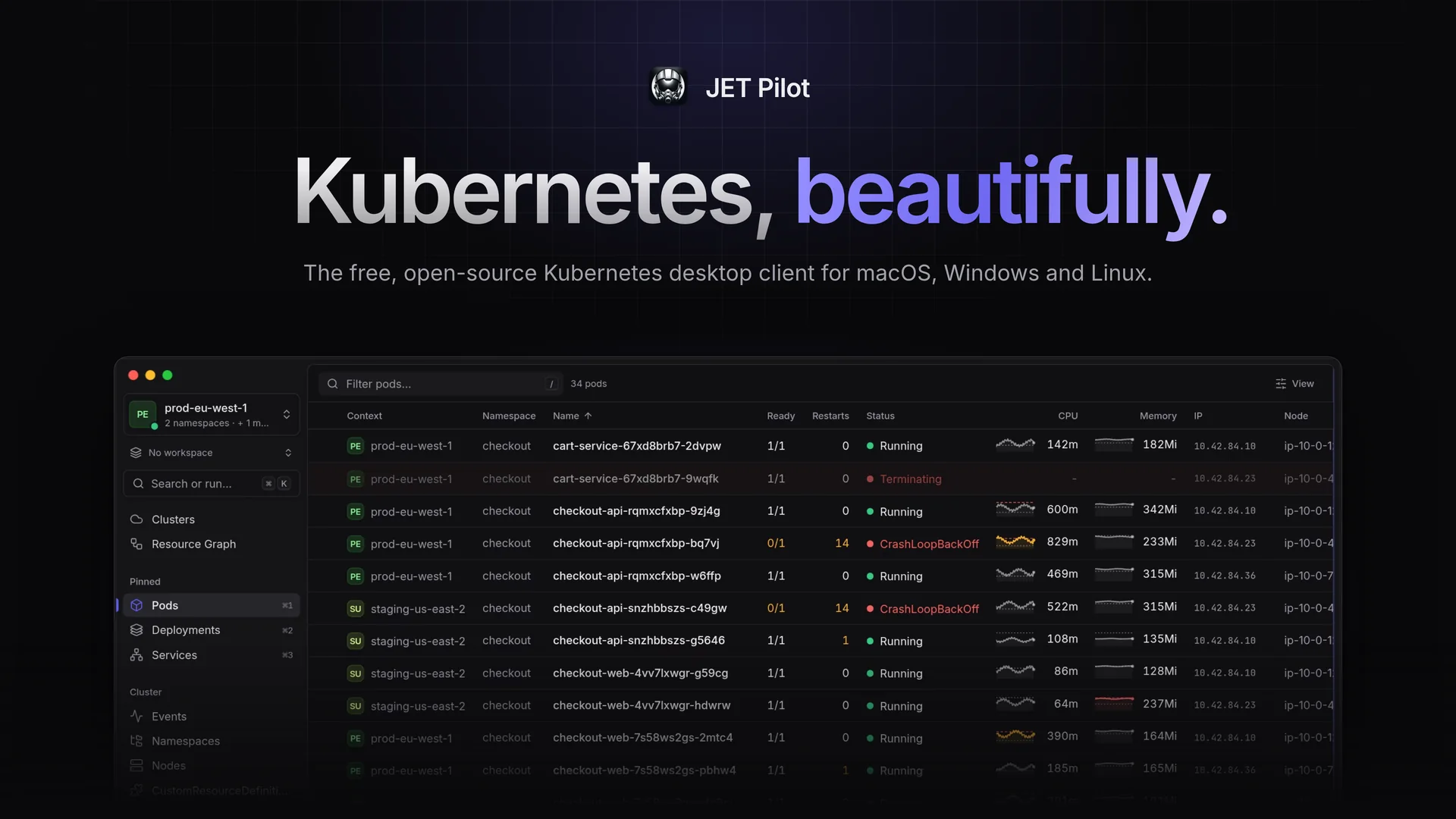
The open-source Kubernetes IDE that focuses on less clutter, speed and good looks.
Free · MIT licensed · macOS (Apple Silicon and Intel), Windows (x64) and Linux (x64 and ARM64) · jet-pilot.app
JET Pilot is an open-source K8s IDE. It was created out of frustration, as all "good-looking" K8s IDEs went commercial. Power-users nowadays resort to tools like k9s, which works great, but heavily relies on keyboard input. JET Pilot combines a keyboard-first workflow with a polished, mouse-friendly desktop UI — built with Rust and Tauri, so it stays small and fast.
No account, no telemetry: JET Pilot uses your existing kubeconfig files and kubectl, and connects your cloud accounts when you want it to.
</kbd>) with kubectl` preconfigured for the current context — your own kubeconfig is never modified. Shell into any container with one click, on macOS, Linux and Windows.What changed in each release is in the changelog, also at jet-pilot.app/changelog.
Download the latest release for your platform from the releases page or from jet-pilot.app. JET Pilot updates itself automatically.
JET Pilot uses kubectl for some tasks, and helm to install, upgrade and roll back charts (browsing releases doesn't need it). When they aren't on your PATH, it can download them for you, verified against their official checksums (Settings › Advanced).
Install with Homebrew from the JET Pilot tap:
brew install --cask unxsist/tap/jet-pilot
The tap's cask clears macOS's quarantine flag after installing, so the app opens right away and keeps itself up to date.
[!NOTE] JET Pilot is no longer in Homebrew's main cask repository: since October 2026 Homebrew only accepts apps notarized by Apple there. If you installed it with
brew install --cask jet-pilotbefore, switch once withbrew uninstall --cask jet-pilot && brew install --cask unxsist/tap/jet-pilot(your settings are kept).
…or download the .dmg for Apple Silicon (aarch64) or Intel (x64), open it and drag JET Pilot into your Applications folder.
[!IMPORTANT] JET Pilot is not notarized by Apple. It's free and open source, and we'd rather not pay Apple's yearly developer fee. When you install the
.dmgyourself, macOS will say the app "is damaged and can't be opened" or "cannot be verified". Remove the quarantine flag once after installing:xattr -dr com.apple.quarantine "/Applications/JET Pilot.app"That's it — automatic updates keep working afterwards. (The Homebrew tap does this for you.)
Packages are available for x64 (amd64 / x86_64) and ARM64 (aarch64):
sudo apt install ./JET.Pilot_<version>_<arch>.debsudo rpm -i JET.Pilot-<version>-1.<arch>.rpmchmod +x JET.Pilot_<version>_<arch>.AppImage and run it.Download the .exe (or .msi) installer and run it. The installer isn't code-signed, so Windows SmartScreen may warn you — click More info → Run anyway.
Issues and pull requests are very welcome! JET Pilot is built with Tauri v2 (Rust) and Vue 3.
npm ci
npm run dev             # run the app
npx vitest run          # unit tests
npm run harness         # UI in the browser with mocked cluster data (no cluster needed)
Commits follow Conventional Commits; releases are created with semantic-release.
306 followers · starred Aug 2024
168 followers · starred Feb 2024
155 followers · starred Mar 2025
1,557 followers · starred Mar 2025
A beautiful, native Kubernetes desktop client. Every cluster and cloud account in one place. Free and open source, no account, no telemetry.
See the code
The open-source Kubernetes IDE that focuses on less clutter, speed and good looks.
Free · MIT licensed · macOS (Apple Silicon and Intel), Windows (x64) and Linux (x64 and ARM64) · jet-pilot.app
JET Pilot is an open-source K8s IDE. It was created out of frustration, as all "good-looking" K8s IDEs went commercial. Power-users nowadays resort to tools like k9s, which works great, but heavily relies on keyboard input. JET Pilot combines a keyboard-first workflow with a polished, mouse-friendly desktop UI — built with Rust and Tauri, so it stays small and fast.
No account, no telemetry: JET Pilot uses your existing kubeconfig files and kubectl, and connects your cloud accounts when you want it to.
</kbd>) with kubectl` preconfigured for the current context — your own kubeconfig is never modified. Shell into any container with one click, on macOS, Linux and Windows.What changed in each release is in the changelog, also at jet-pilot.app/changelog.
Download the latest release for your platform from the releases page or from jet-pilot.app. JET Pilot updates itself automatically.
JET Pilot uses kubectl for some tasks, and helm to install, upgrade and roll back charts (browsing releases doesn't need it). When they aren't on your PATH, it can download them for you, verified against their official checksums (Settings › Advanced).
Install with Homebrew from the JET Pilot tap:
brew install --cask unxsist/tap/jet-pilot
The tap's cask clears macOS's quarantine flag after installing, so the app opens right away and keeps itself up to date.
[!NOTE] JET Pilot is no longer in Homebrew's main cask repository: since October 2026 Homebrew only accepts apps notarized by Apple there. If you installed it with
brew install --cask jet-pilotbefore, switch once withbrew uninstall --cask jet-pilot && brew install --cask unxsist/tap/jet-pilot(your settings are kept).
…or download the .dmg for Apple Silicon (aarch64) or Intel (x64), open it and drag JET Pilot into your Applications folder.
[!IMPORTANT] JET Pilot is not notarized by Apple. It's free and open source, and we'd rather not pay Apple's yearly developer fee. When you install the
.dmgyourself, macOS will say the app "is damaged and can't be opened" or "cannot be verified". Remove the quarantine flag once after installing:xattr -dr com.apple.quarantine "/Applications/JET Pilot.app"That's it — automatic updates keep working afterwards. (The Homebrew tap does this for you.)
Packages are available for x64 (amd64 / x86_64) and ARM64 (aarch64):
sudo apt install ./JET.Pilot_<version>_<arch>.debsudo rpm -i JET.Pilot-<version>-1.<arch>.rpmchmod +x JET.Pilot_<version>_<arch>.AppImage and run it.Download the .exe (or .msi) installer and run it. The installer isn't code-signed, so Windows SmartScreen may warn you — click More info → Run anyway.
Issues and pull requests are very welcome! JET Pilot is built with Tauri v2 (Rust) and Vue 3.
npm ci
npm run dev             # run the app
npx vitest run          # unit tests
npm run harness         # UI in the browser with mocked cluster data (no cluster needed)
Commits follow Conventional Commits; releases are created with semantic-release.
306 followers · starred Aug 2024
168 followers · starred Feb 2024
155 followers · starred Mar 2025
1,557 followers · starred Mar 2025