⚡ LFK is a lightning-fast, keyboard-focused, yazi-inspired terminal user interface for navigating and managing Kubernetes clusters. Built for speed and efficiency, it brings a three-column Miller columns layout with an owner-based resource hierarchy to your terminal.
Go
918
1,159 commits
updated Oct 19, 2026



LFK is a keyboard-focused, yazi-inspired terminal user interface for navigating and managing Kubernetes clusters. It brings a three-column Miller columns layout with an owner-based resource hierarchy to your terminal.
Pick your platform:
# Homebrew (macOS / Linux)
brew install janosmiko/tap/lfk

# Scoop (Windows)
scoop bucket add janosmiko https://github.com/janosmiko/scoop-bucket && scoop install lfk

# Winget (Windows)
winget install janosmiko.lfk

# Chocolatey (Windows)
choco install lfk

# AUR (Arch)
yay -S lfk-bin

# APT (Debian / Ubuntu)
curl -1sLf 'https://dl.cloudsmith.io/public/janosmiko/lfk/setup.deb.sh' | sudo -E bash && sudo apt update && sudo apt install lfk

# DNF (Fedora / RHEL)
curl -1sLf 'https://dl.cloudsmith.io/public/janosmiko/lfk/setup.rpm.sh' | sudo -E bash && sudo dnf install lfk

# Go
go install github.com/janosmiko/lfk@latest

# Nix
nix run github:janosmiko/lfk
Then run it:
lfk
lfk --demo
lfk uses ~/.kube/config and ~/.kube/config.d/*. lfk --demo runs against a built-in fake cluster, so no kubeconfig is needed.
kubectl is required and must be configured. helm and trivy are optional, for Helm management and image vulnerability scanning.
docs/installation.md covers Docker, NixOS and home-manager, binary releases, building from source, and the full list of optional CLI dependencies.
# Start in a specific context / namespace
lfk --context my-cluster -n kube-system

# Use a specific kubeconfig
lfk --kubeconfig /path/to/kubeconfig
KUBECONFIG=/path/to/config1:/path/to/config2 lfk

# Use a custom directory for kubeconfigs (repeat the flag for multiple)
lfk --kubeconfig-dir /path/to/configs/
lfk --kubeconfig-dir /team-a/configs --kubeconfig-dir /team-b/configs
KUBECONFIG_DIR=/path/to/configs/ lfk
KUBECONFIG_DIR=/team-a/configs:/team-b/configs lfk
docs/usage.md has the full CLI reference and the runtime tuning options: mouse capture, no-color mode, read-only mode, watch-mode interval, discovery cache, and Secret lazy loading.
LFK is Apache-2.0 and stays free. I build it in my free time, and the tools it takes to build it are not free.
Do you use LFK at work? Ask your team to sponsor it. A company expenses this without noticing, and an individual feels it. Most clusters LFK gets pointed at are company clusters.
Sponsorship pays for the IDE licenses and AI assistants that go into development. More of it buys more hours for LFK.
Money is not the only way to help. Star the repo, file a good bug report, or tell one colleague who lives in kubectl.
Package repository hosting is graciously provided by Cloudsmith. Cloudsmith is a hosted package management service that stores and serves packages in many formats.


| Feature | |
|---|---|
| Pods | 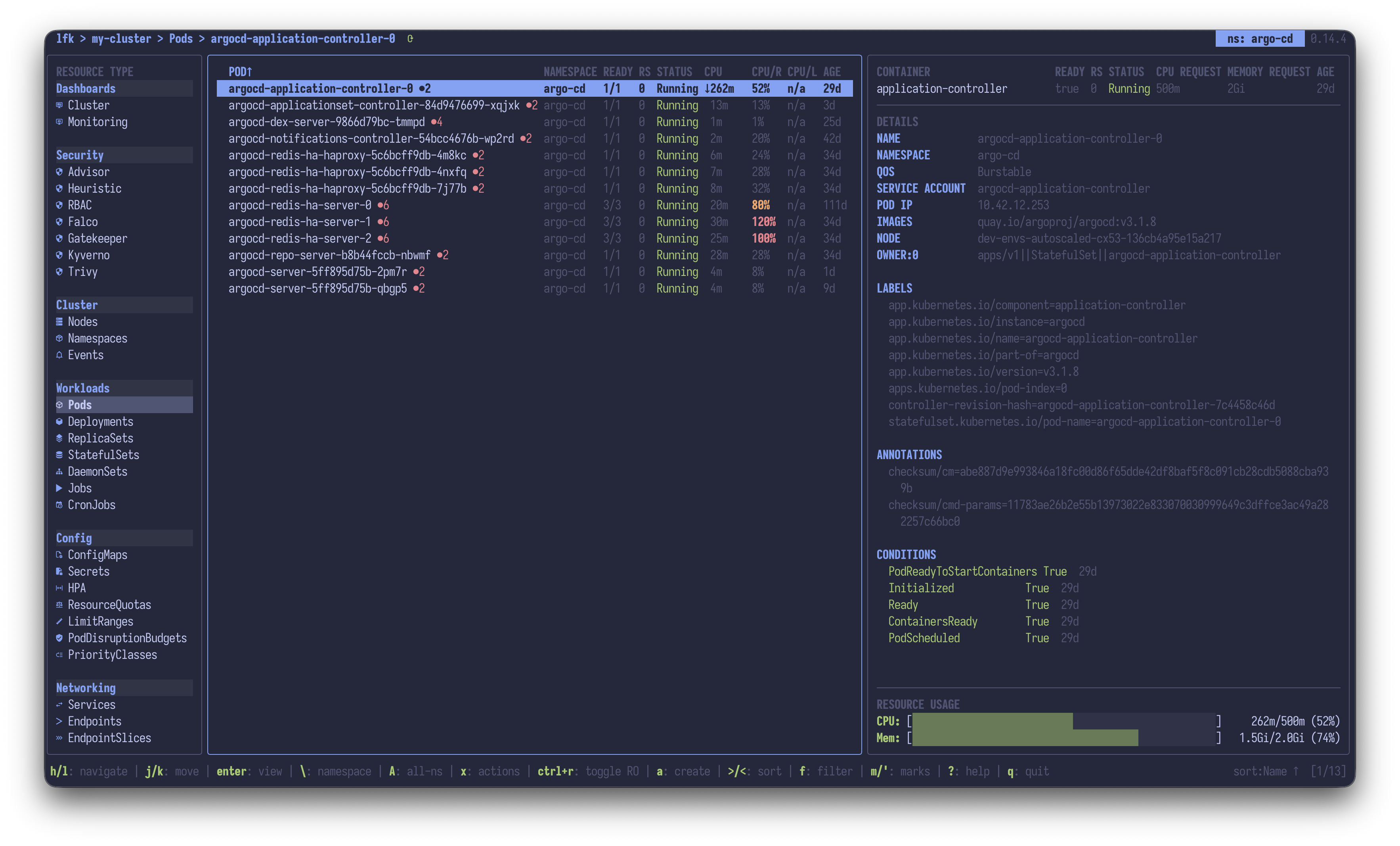 |
| Pods fullscreen | 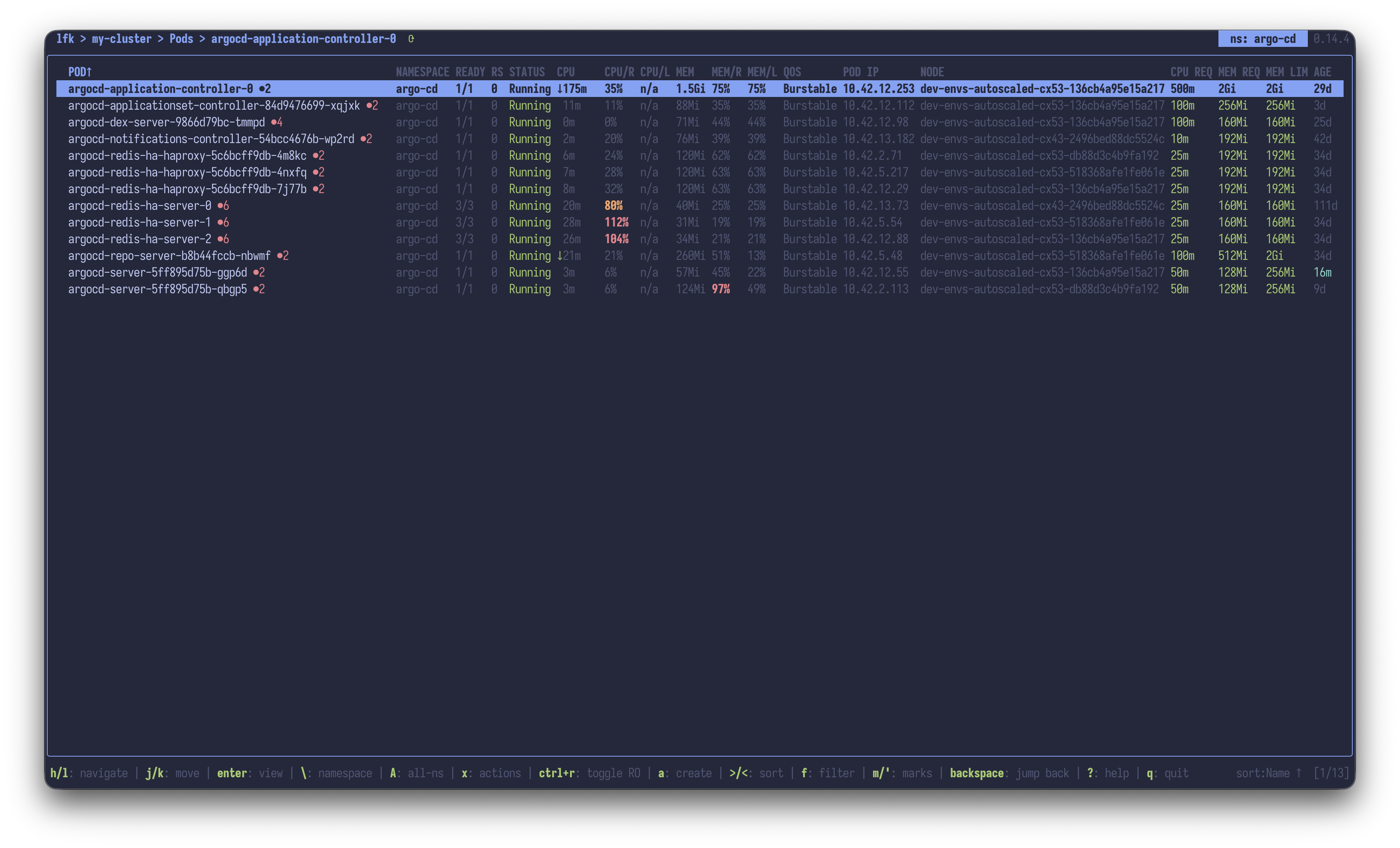 |
| Pod action menu | 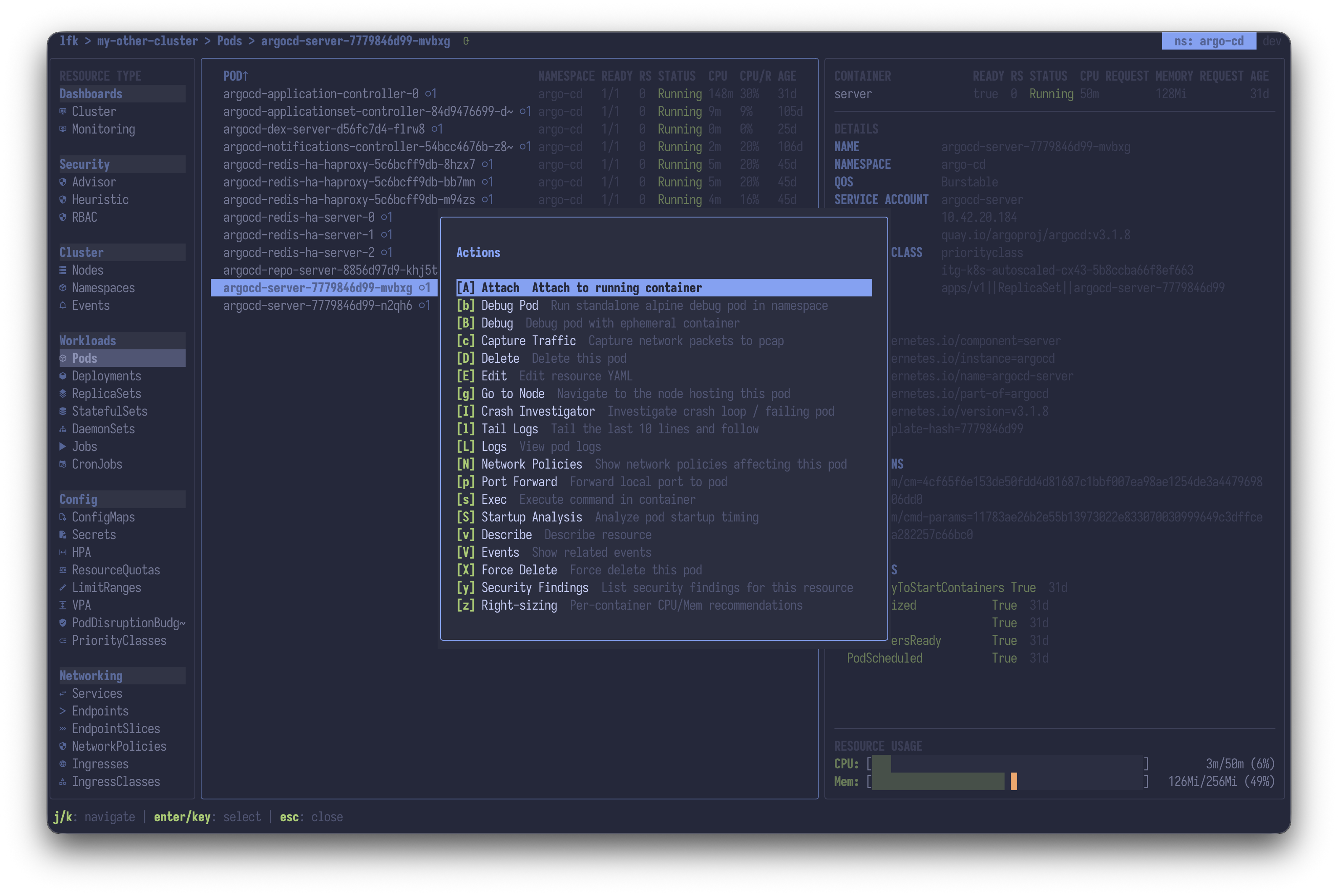 |
| Cluster Dashboard | 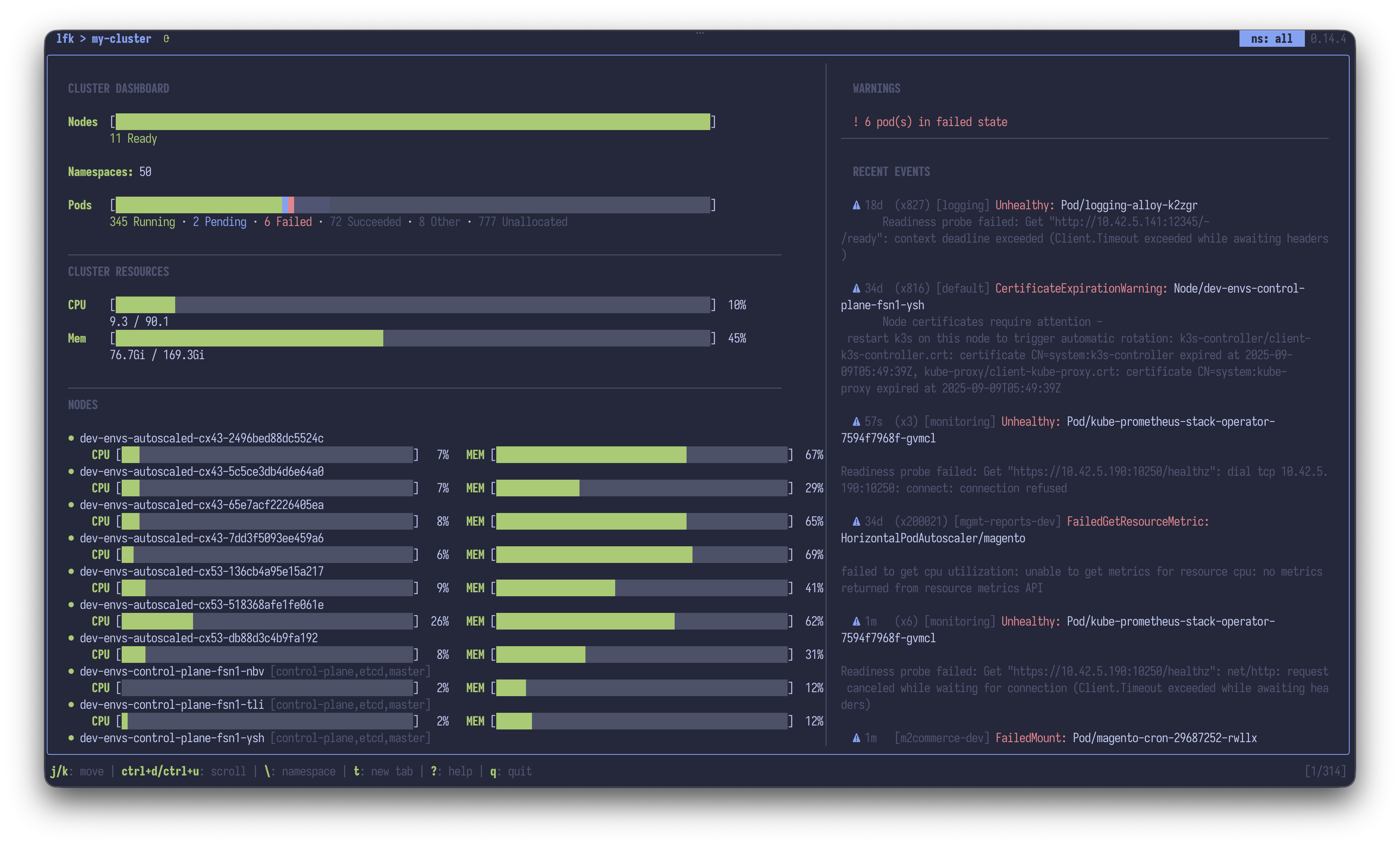 |
| Object Explorer | 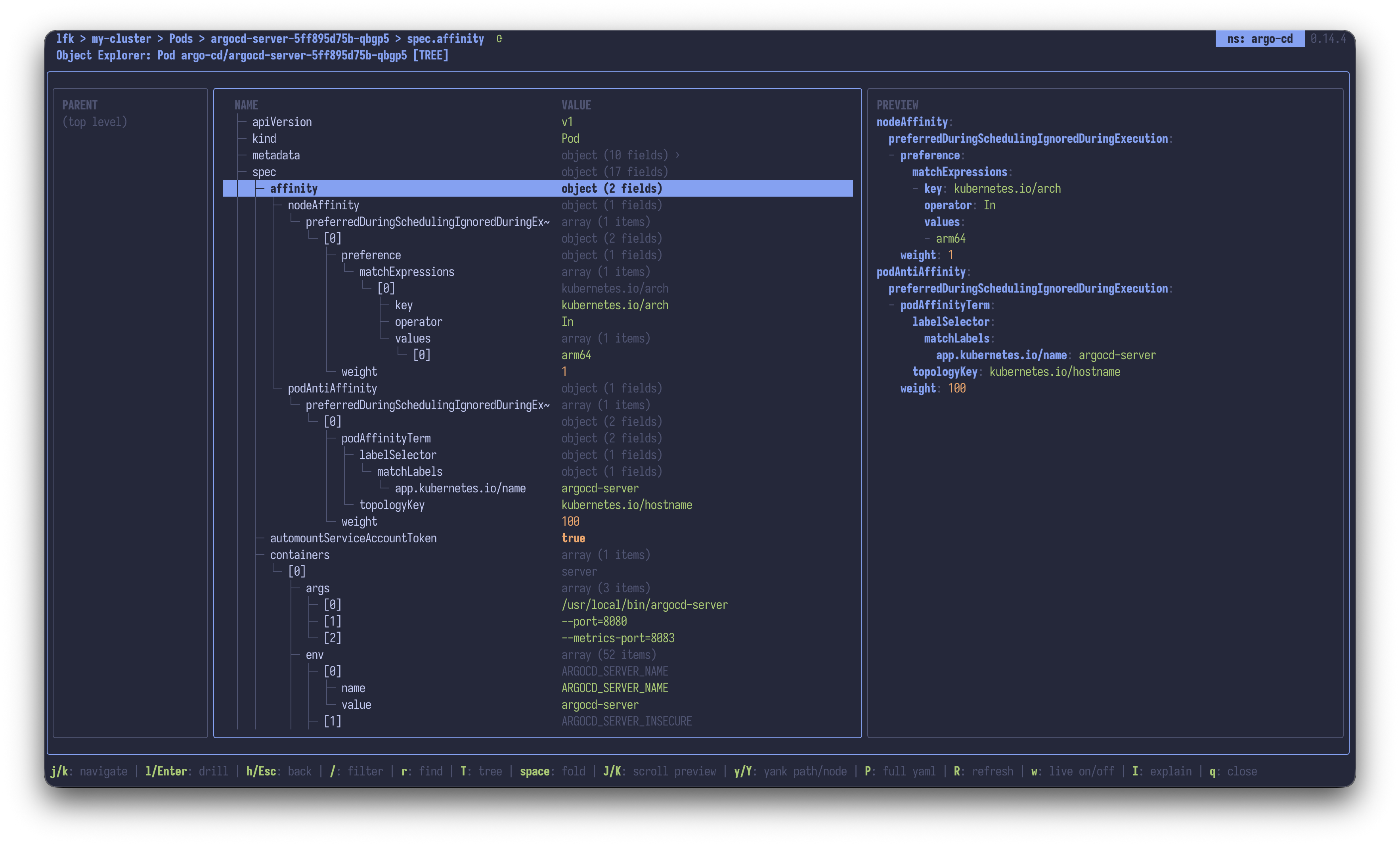 |
| API Explorer | 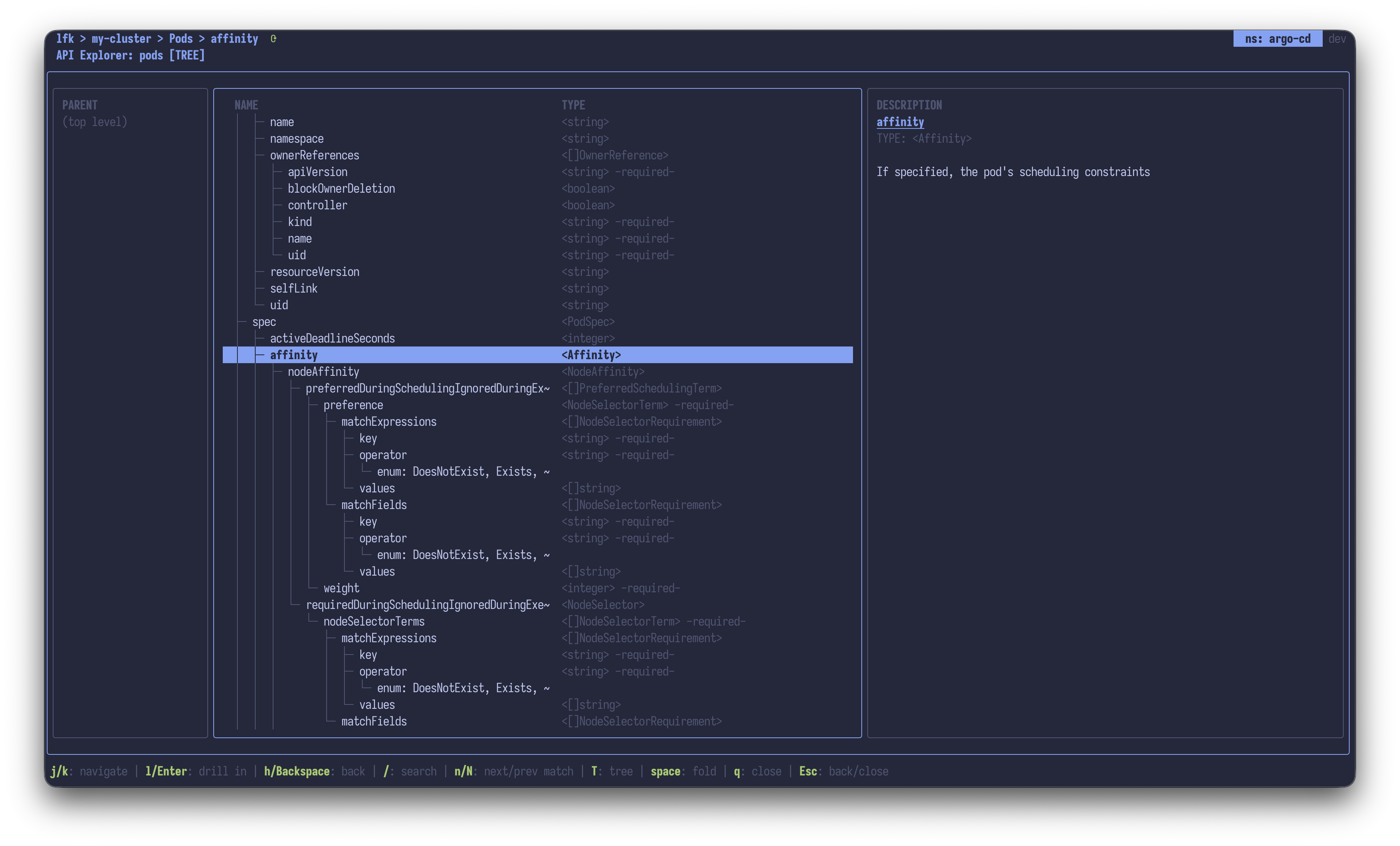 |
| Feature | |
|---|---|
| YAML Viewer | 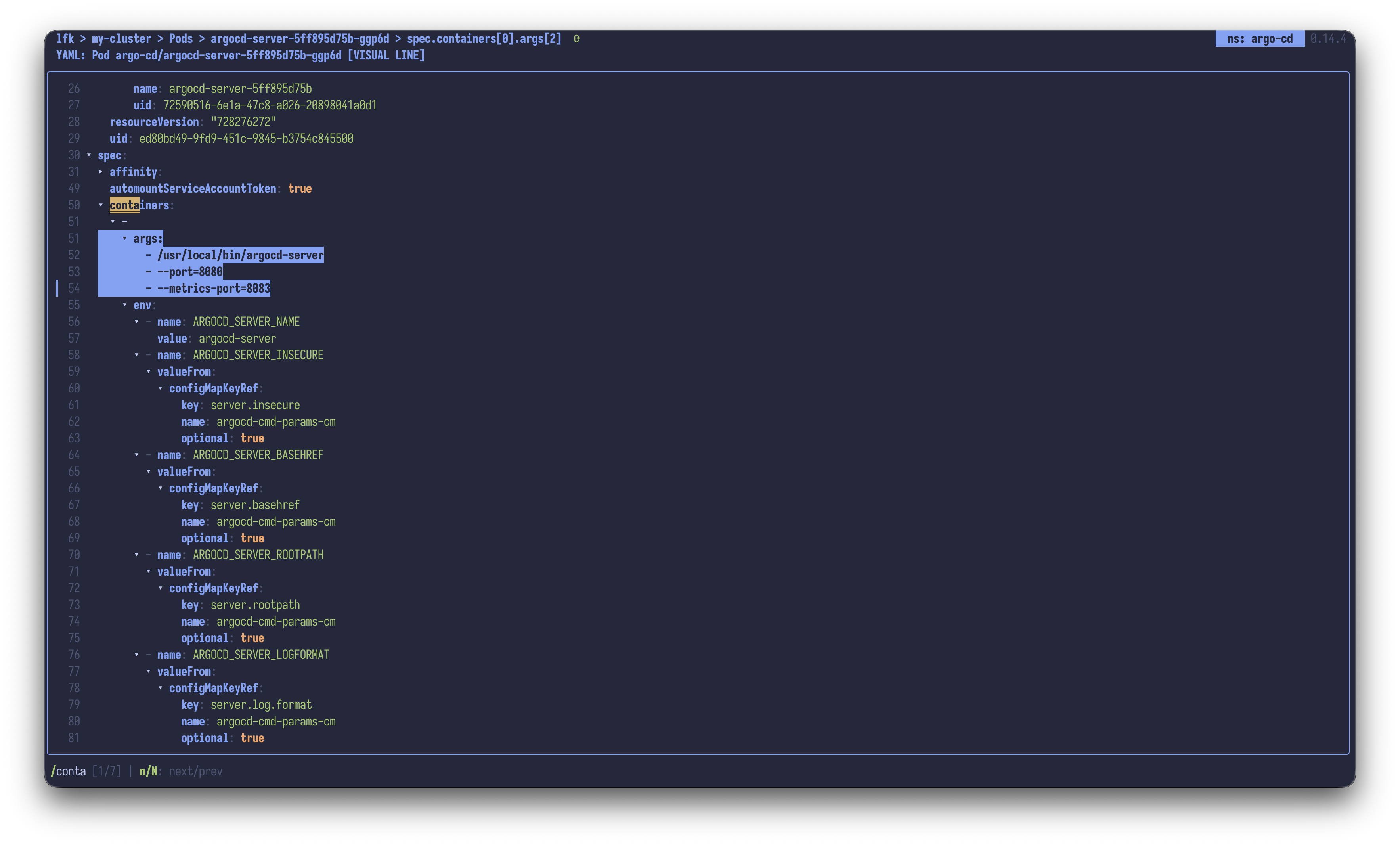 |
| Log Viewer | 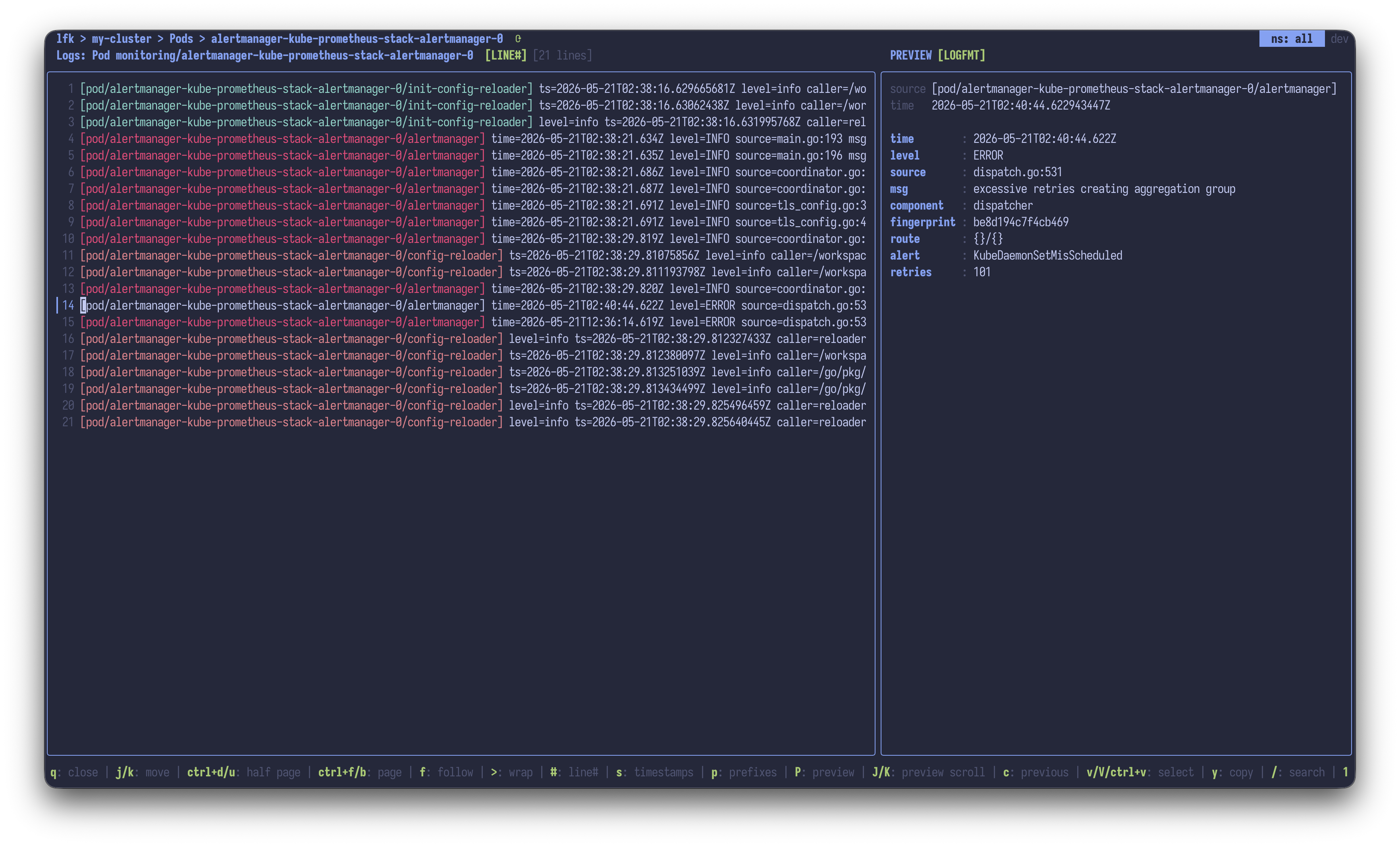 |
| Log Top | 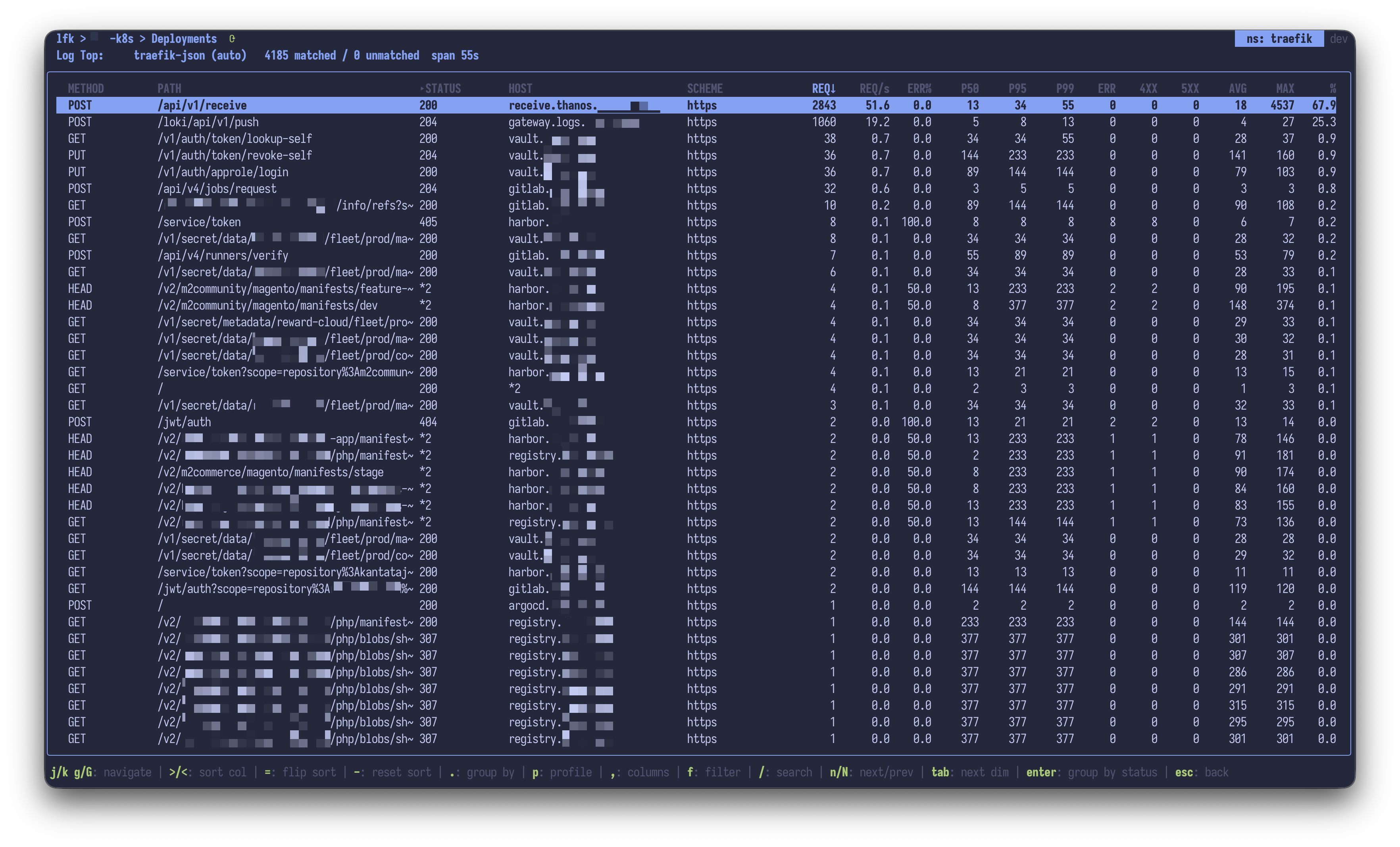 |
| Feature | |
|---|---|
| Helm integration | 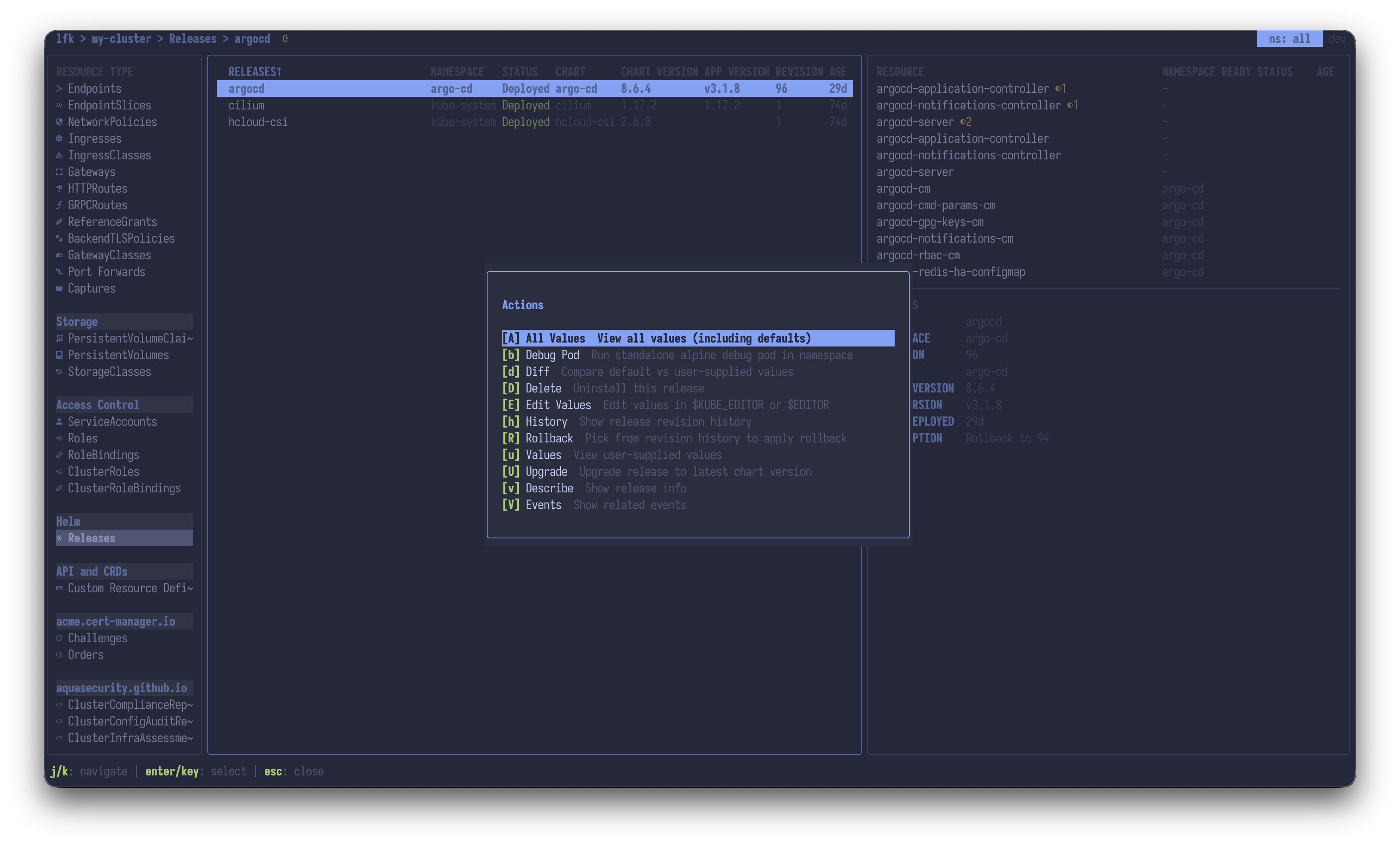 |
| ArgoCD integration | 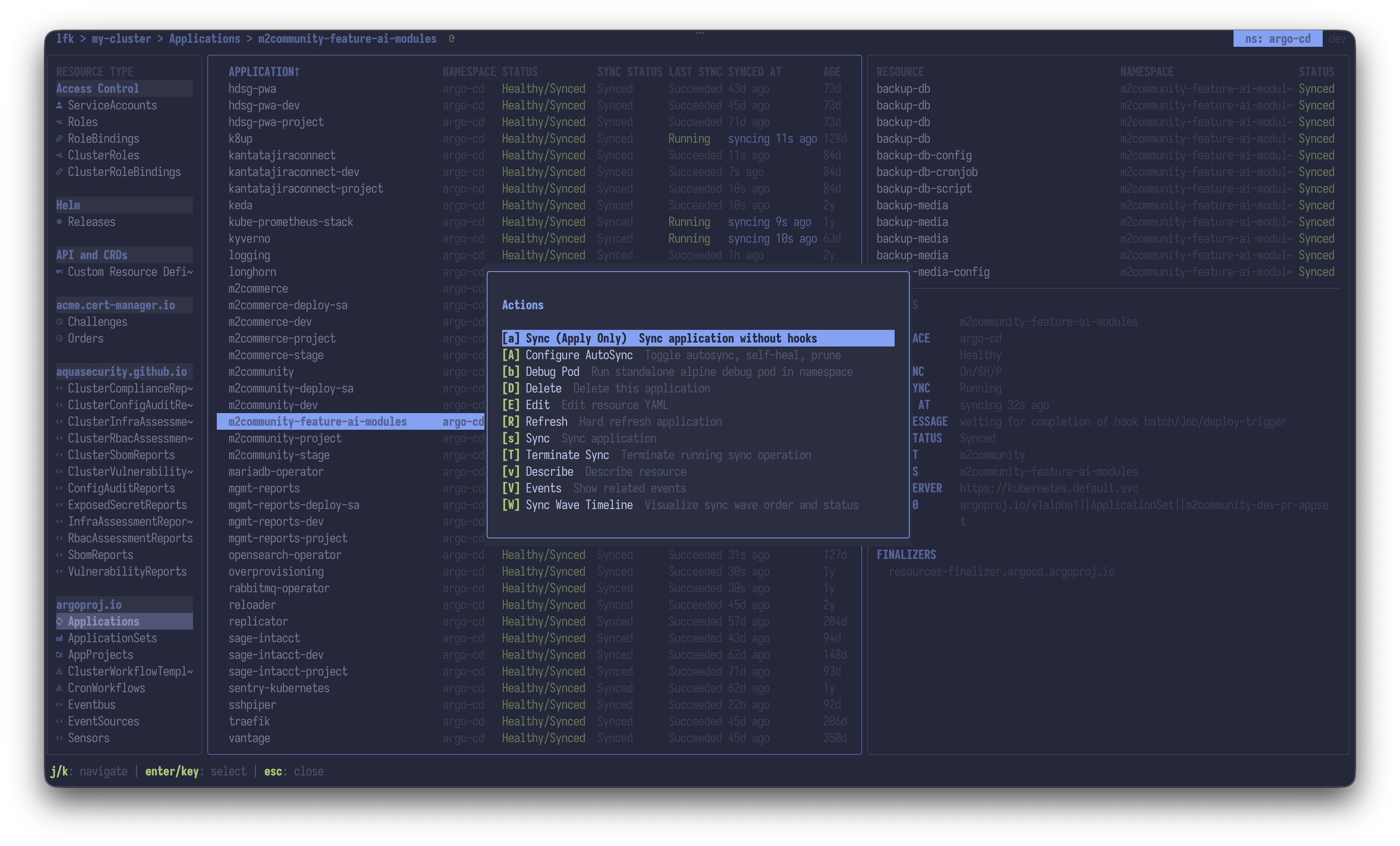 |
| ArgoCD AutoSync config | 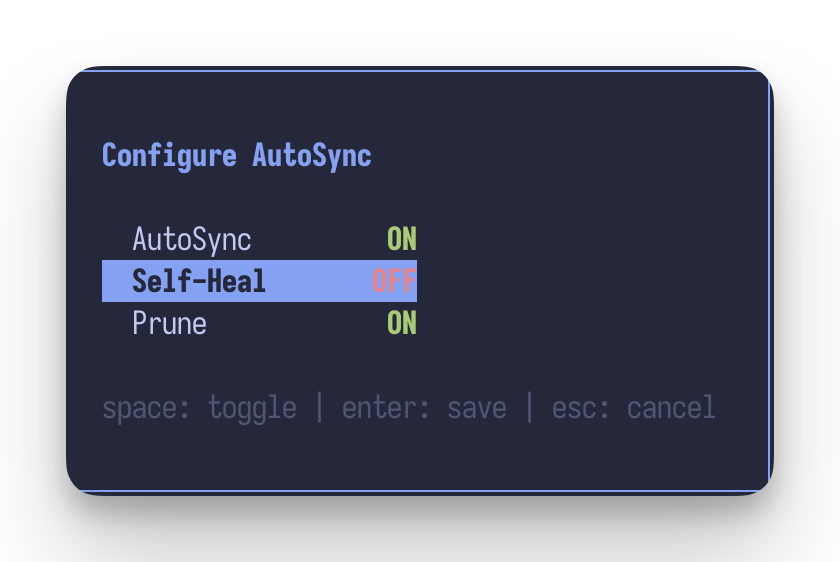 |
| Trivy integration | 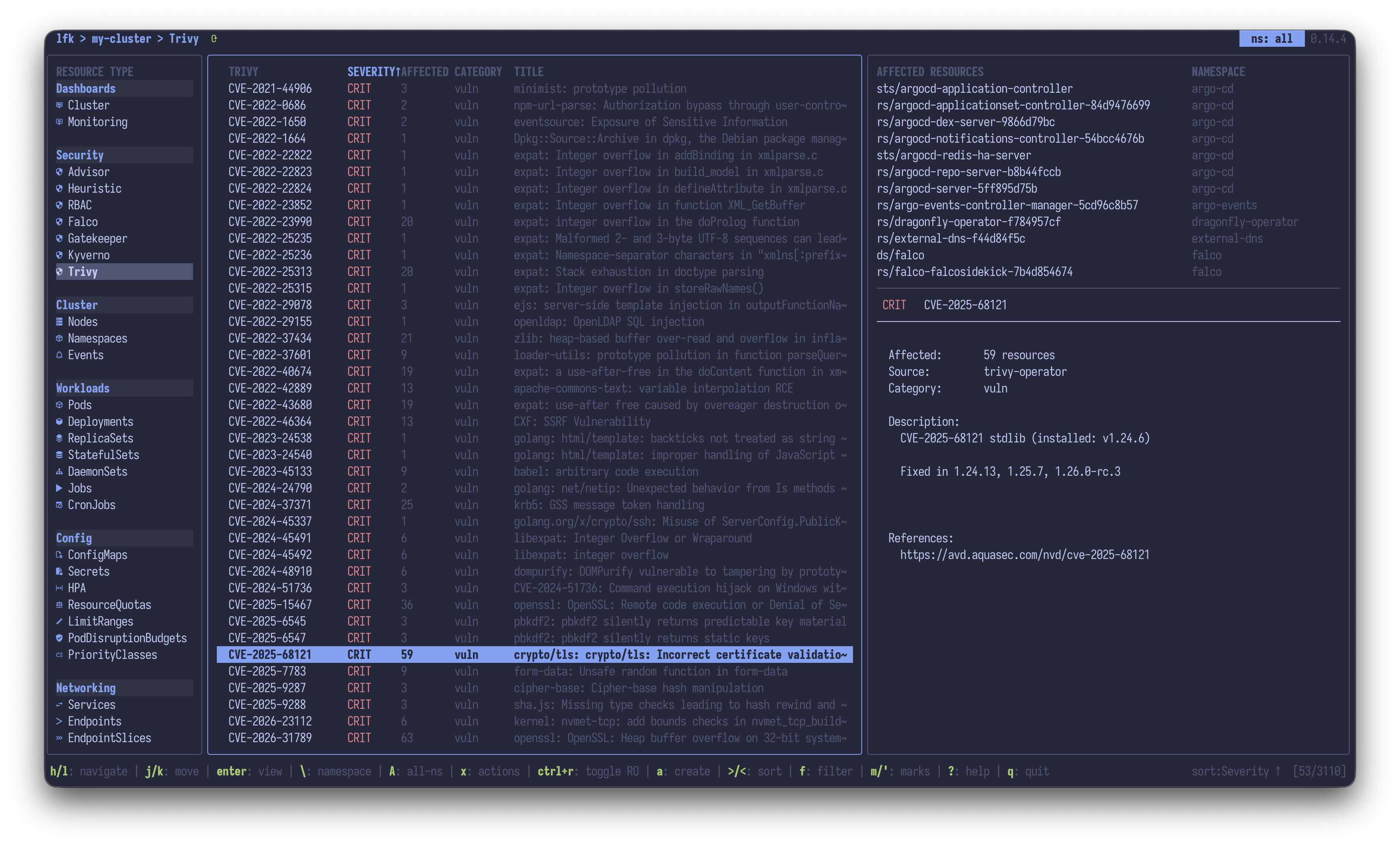 |
| Feature | |
|---|---|
| Security Dashboard | 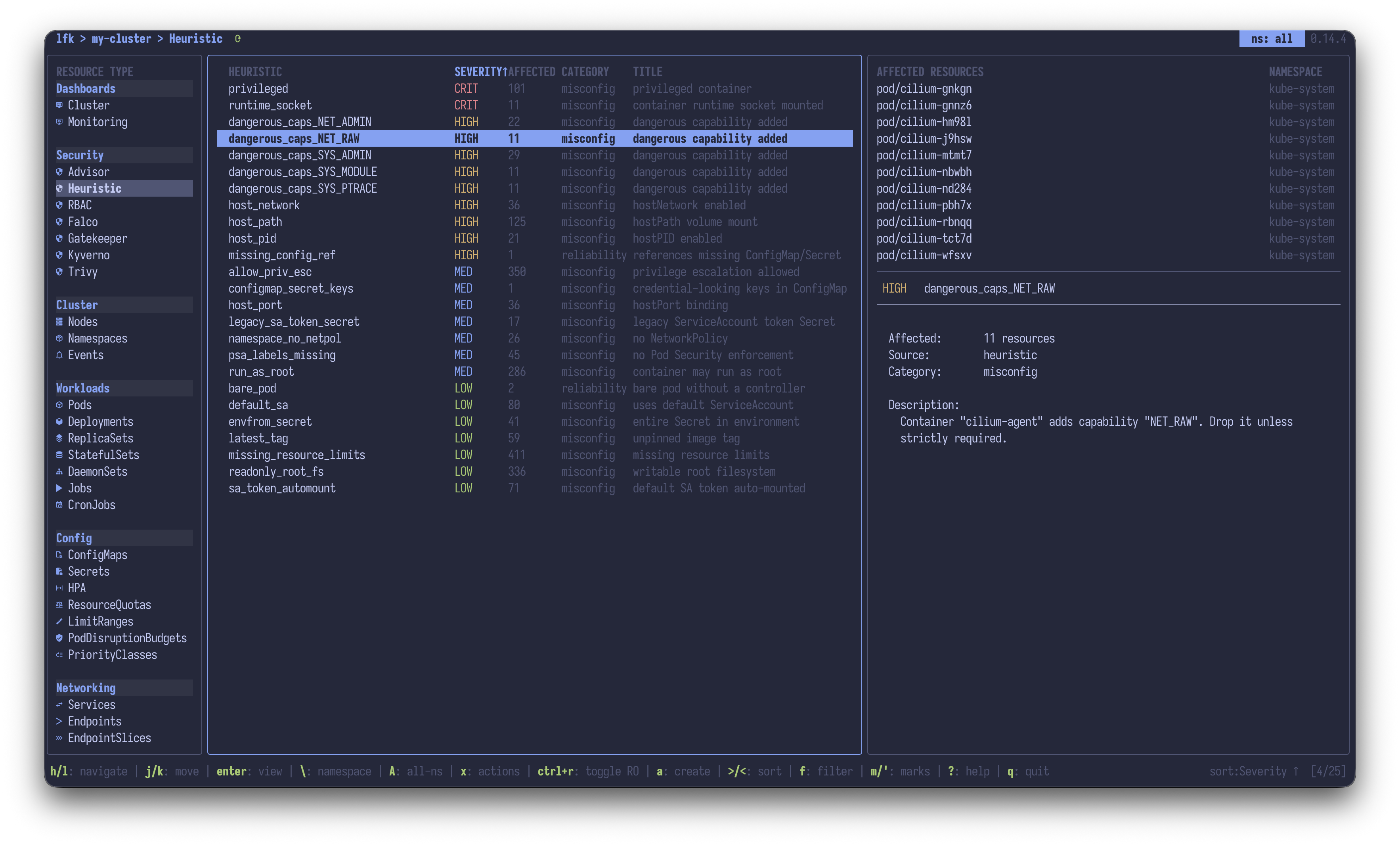 |
| Crash Investigator | 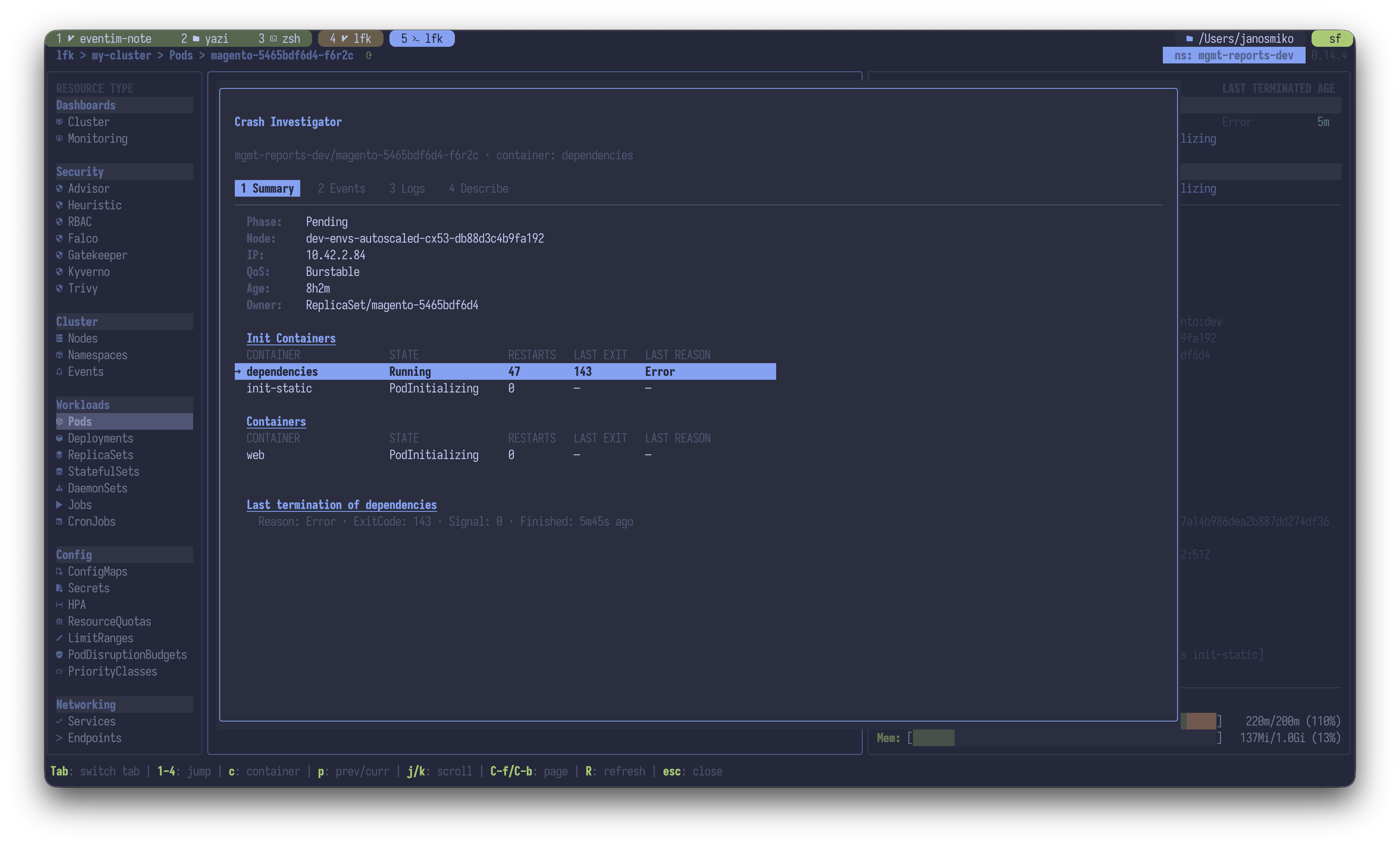 |
| Pod Startup Analysis | 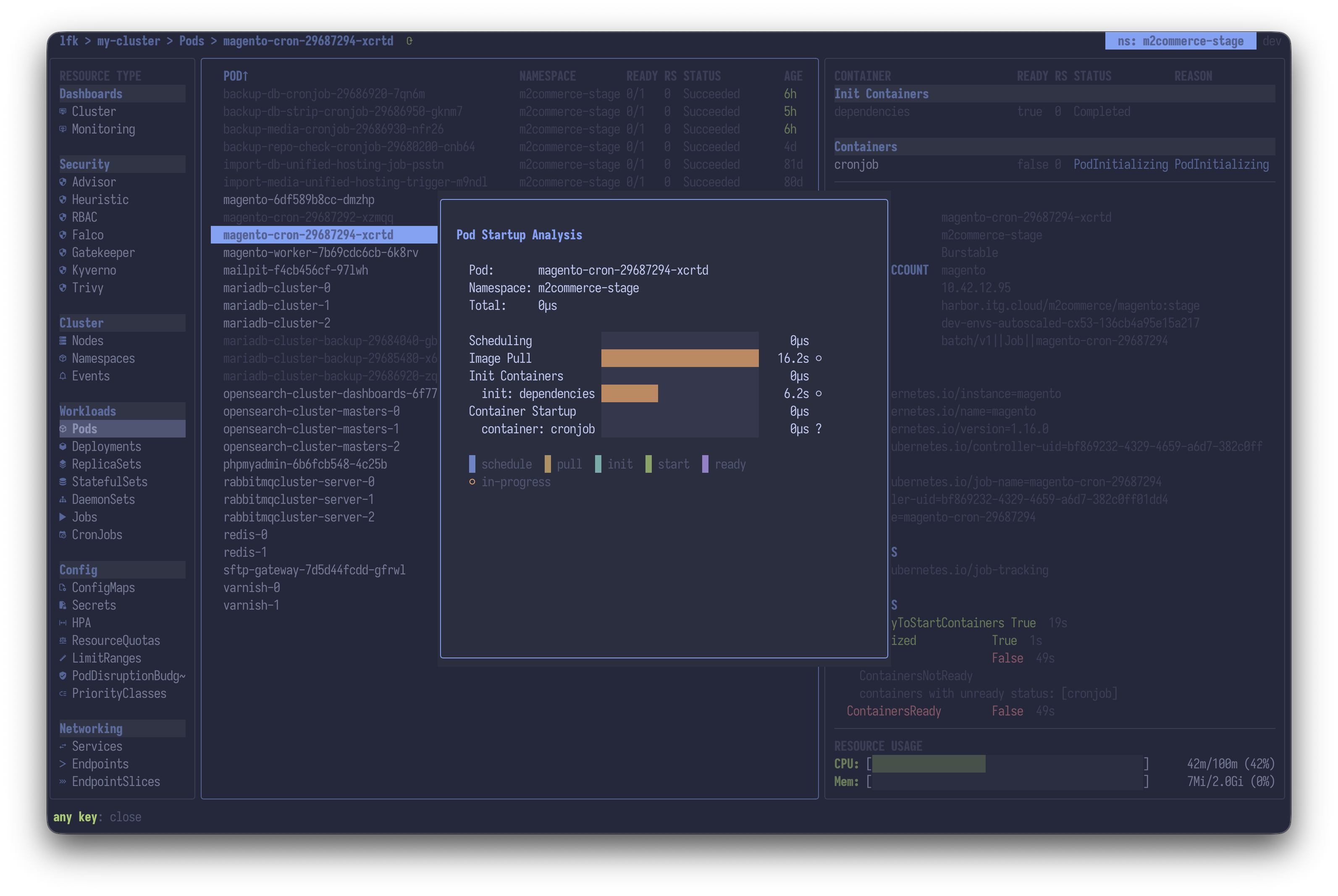 |
| Can-I RBAC permissions browser | 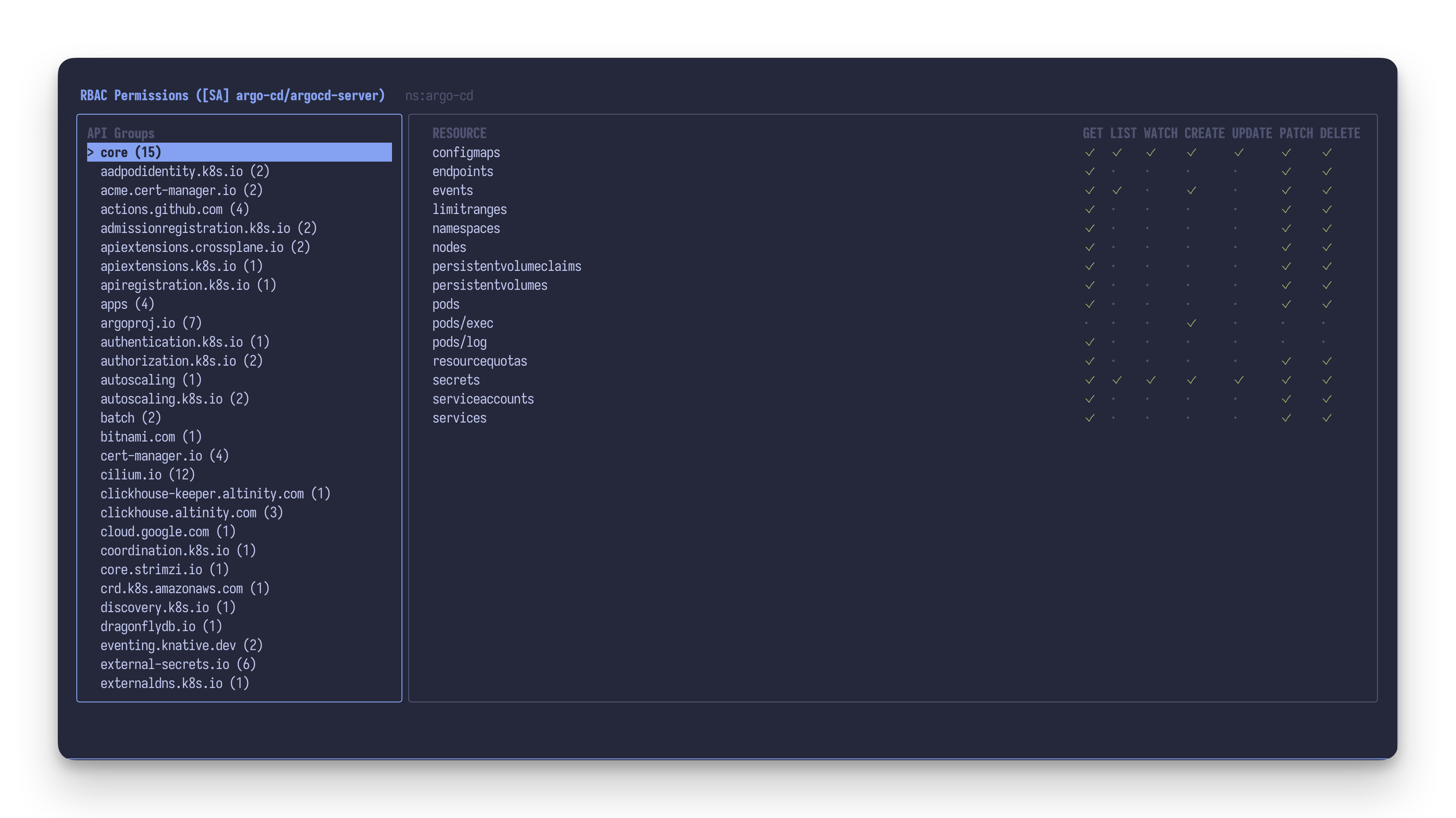 |
| Feature | |
|---|---|
| Label and annotation editor | 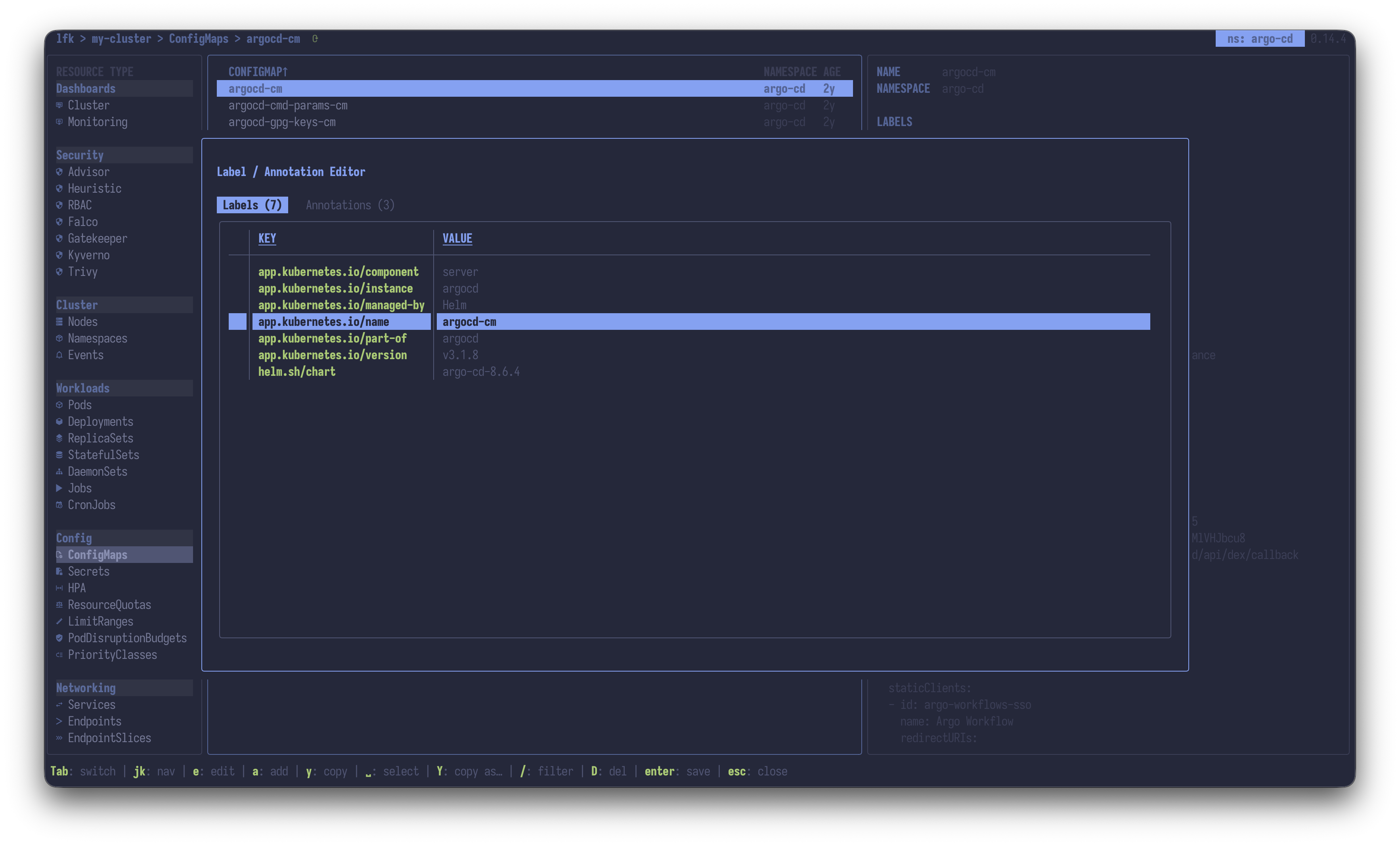 |
| Quick filters | 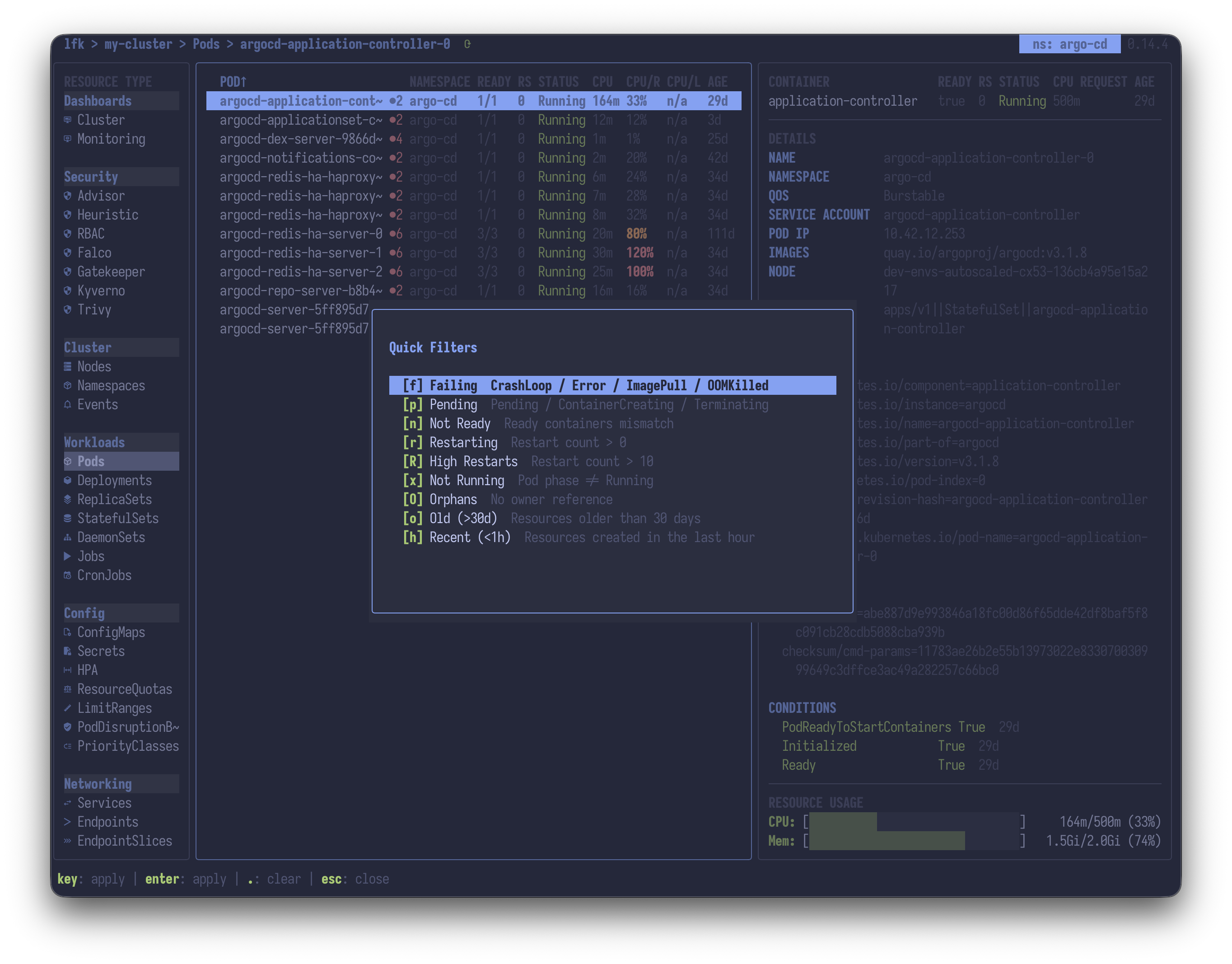 |
| Column visibility and reordering | 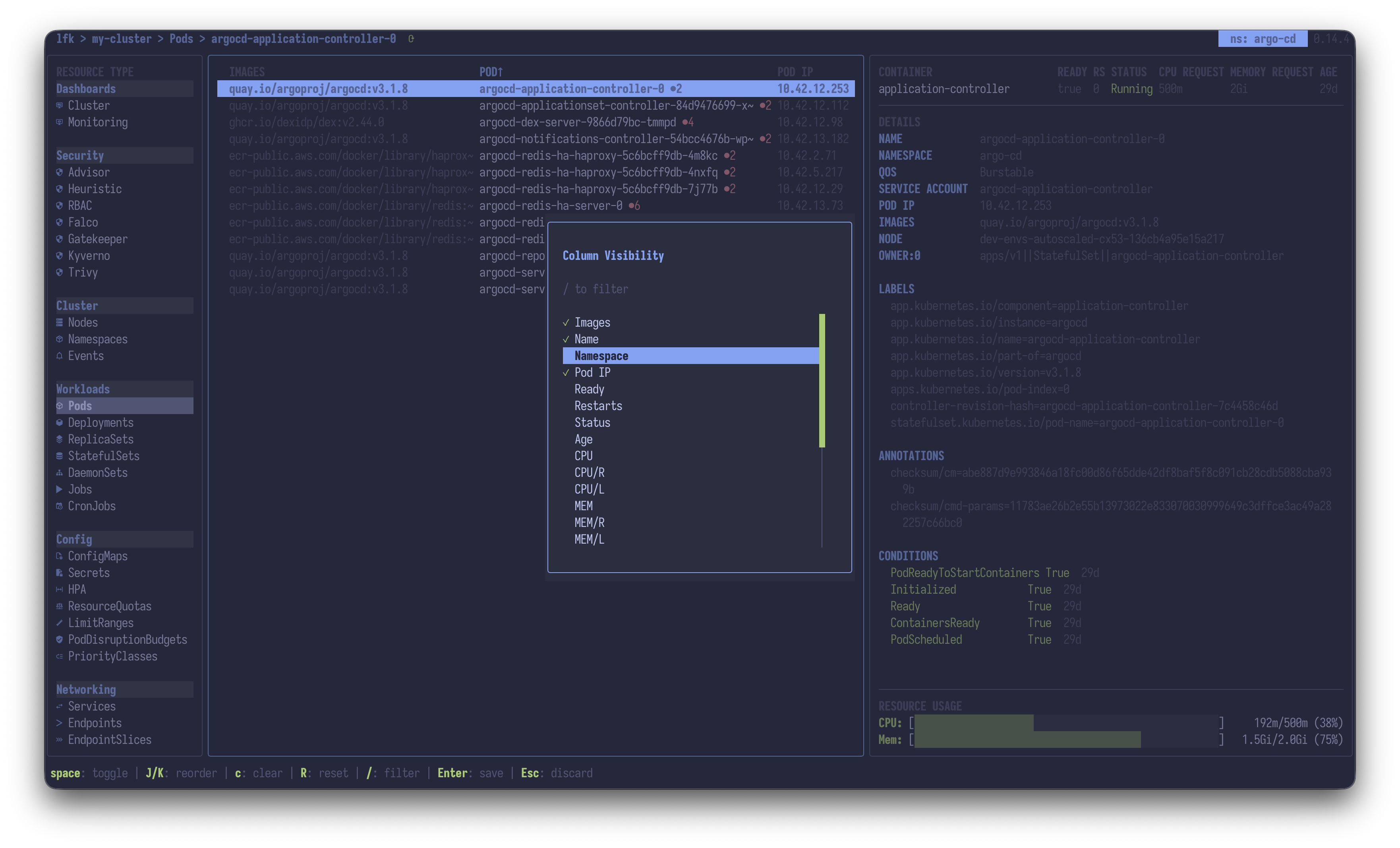 |
| Bookmarks | 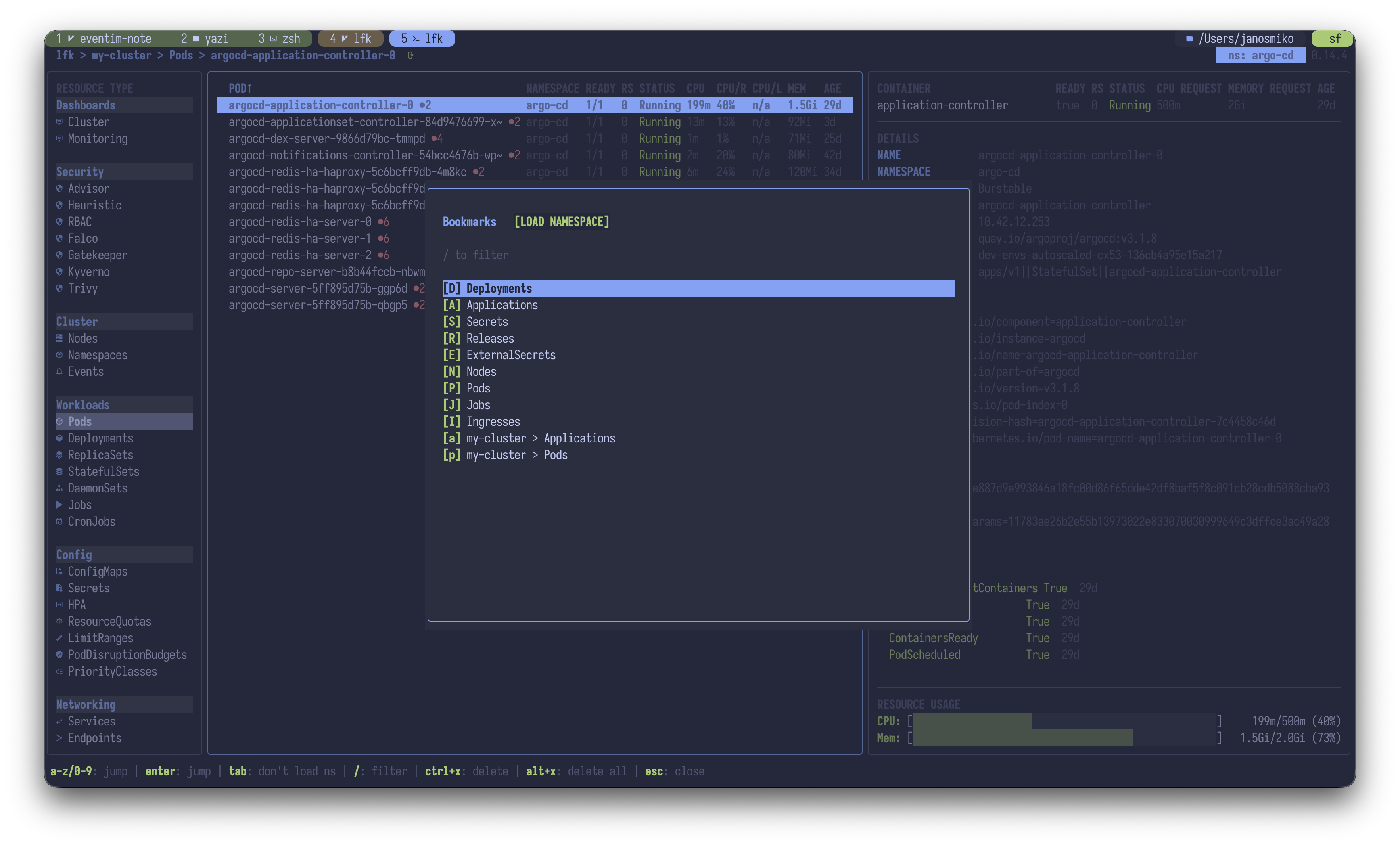 |
| Multi-tab support | 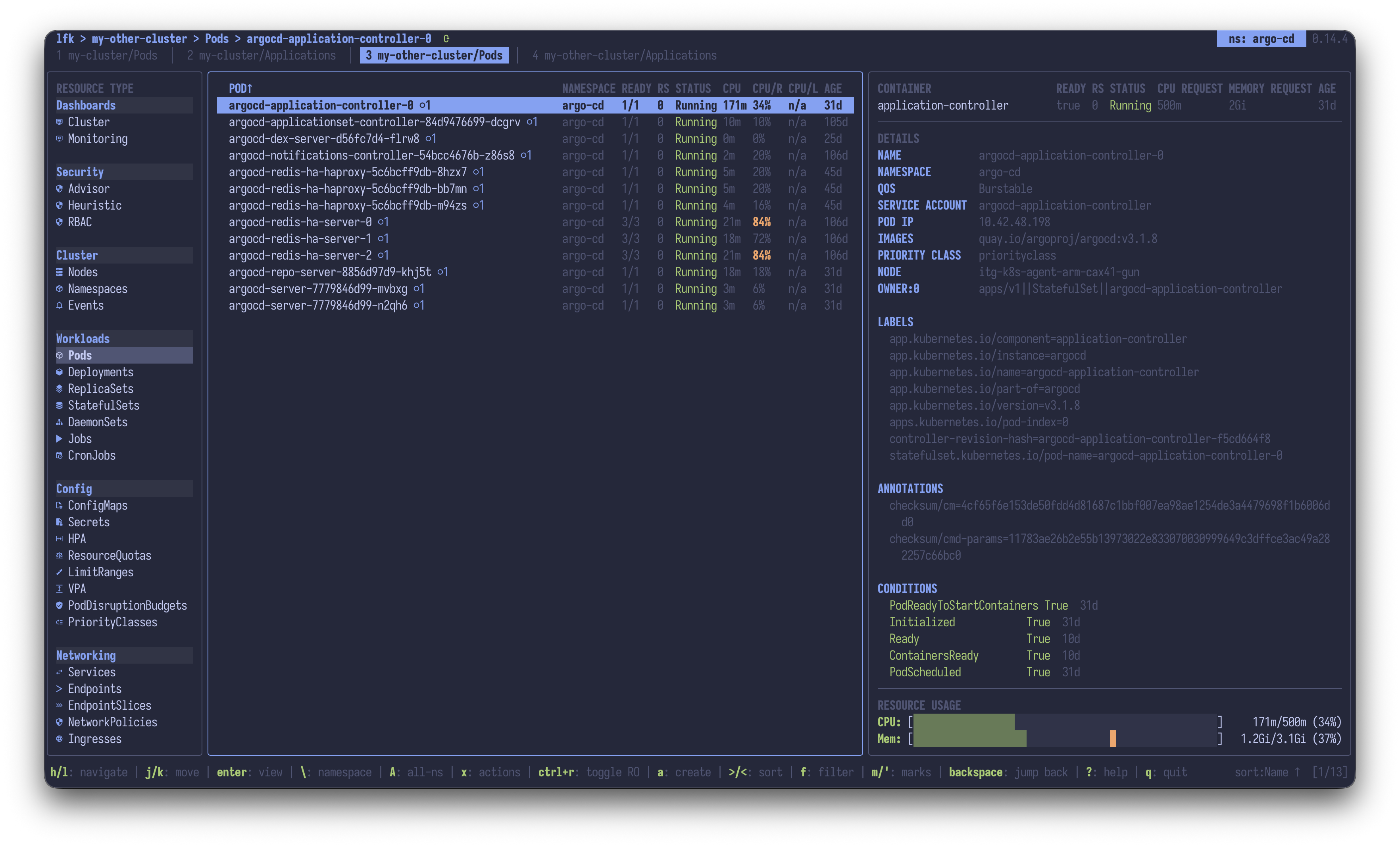 |
| Union view | 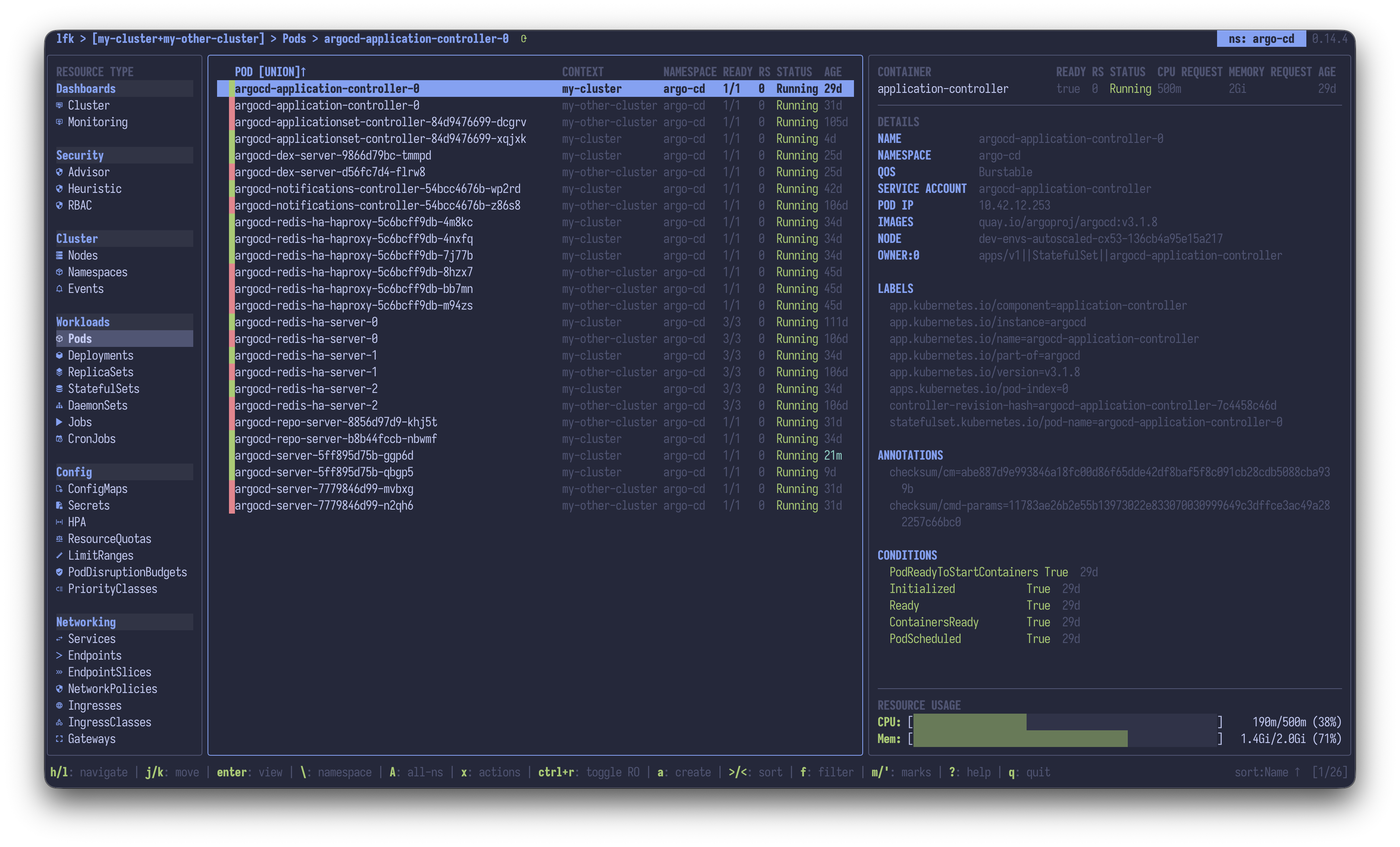 |
| Local cluster management | 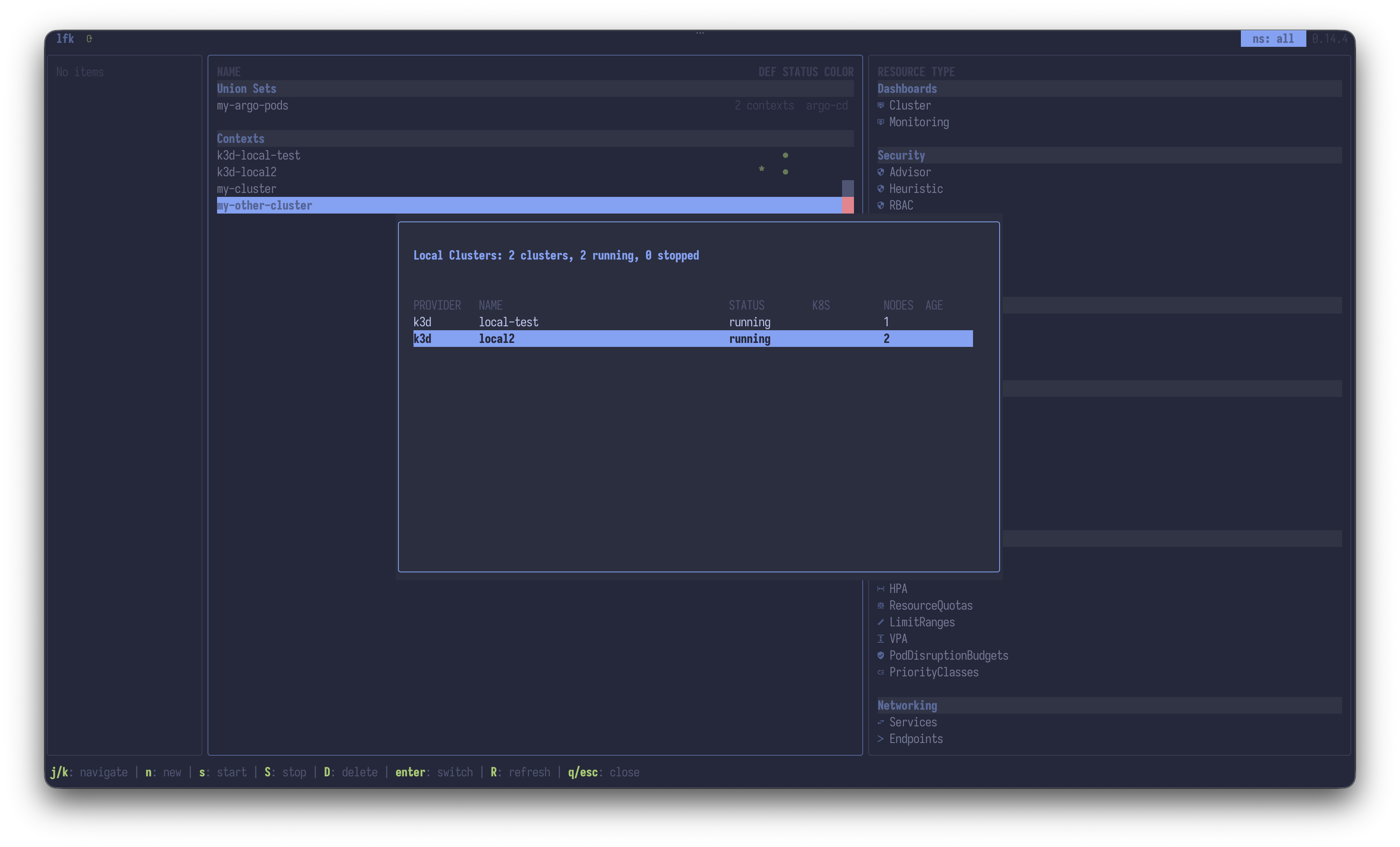 |
o, back with Backspace0 / 1 / 2F, expand or collapse groups with zCtrl+Shift chords: keybindings.mdCtrl+Option+Y to release capture: usage.mdargoproj.io, longhorn.iop: keybindings.mdx: config-reference.mdx, reveal hidden ones with H: config-reference.mdH: config-reference.mdt / ] / [: keybindings.md~/.kube/config, ~/.kube/config.d/*, and KUBECONFIG_DIR: usage.md@: config-reference.mdCtrl+N: keybindings.mdC: keybindings.md--read-only or Ctrl+R: usage.mdTab cycles Background / Foreground / Orphan / None: keybindings.mdU, reverse lookup with Tab: keybindings.mdx: logs, exec, attach, debug, scale, restart, delete, describe, edit, events, port-forward, vuln scan, PVC resize, Pod resize, PV delete with volume: keybindings.mdSpace, range with Ctrl+Space, then bulk delete, scale, or restart: keybindings.mdx -> z: features.md, keys in keybindings.mdx -> N, Cilium aware: keybindings.mdc on a Pod or Service: usage.mdf, search with /, in substring, regex, fuzzy, or literal modepvc, hpa, deploy: config-reference.md: for resource jumps, built-ins, kubectl, and shell: commands.md, autocomplete in features.md.: config-reference.md> / < / = / -, remembered per kind: keybindings.mdm<slot> and '<slot>: keybindings.mdShift+Z across 11 kinds: usage.mdShift+Pm, writes stamped lfk:<os-user>: config-reference.mdCtrl+K: features.mdO for the live object: keybindings.mdI for the resource schema: keybindings.mdv, relationship map with M, events with V plus warnings-only and grouping toggles: keybindings.mdb: quotas, PDBs, priority, node placement, and webhooks that would block or admit the resource: keybindings.mdL, fullscreen viewer with Ctrl+L: keybindings.mdf, severity filter i / o, structured preview P: keybindings.mdT: keybindings.mdx -> I: keybindings.mdCtrl+T cycles the mode: features.mdx -> s: usage.mda, built-ins plus your own: features.mdx -> T: features.mdy, copy-as picker Y, single field Ctrl+Y: keybindings.mdCtrl+P: keybindings.mdWCtrl+S, edit them decoded with e: keybindings.mdCtrl+GS: keybindings.mdT switches live: config-reference.md,, remembered per kind: keybindings.mdQw: usage.md~: keybindings.mdClusters (kubeconfig contexts)
+-- Resource Types (grouped: Workloads, Networking, Config, Storage, ArgoCD, Helm, ...)
+-- Resources (e.g., individual Deployments)
+-- Owned Resources (Pods via ownerReferences, Jobs for CronJobs, etc.)
+-- Containers (for Pods)
Namespaces are not a navigation level. The top-right corner shows the current namespace. Press \ to open the selector, which filters as you type. All-namespaces mode is on by default, and A toggles it.
Inside the namespace selector:
| Key | Action |
|---|---|
Space | Include a namespace |
Tab | Exclude a namespace (shows all except the marked ones, each prefixed with !) |
A | Reset to all-namespaces mode |
R | Refresh the list from the cluster |
. | Quick-filter to the namespace of the resource behind the overlay |
app.kubernetes.io/instance label)docs/keybindings.md is the complete reference, including the YAML view, Log Viewer, describe, diff, exec mode, and every sub-mode. Press F1 in-app for the help screen, ? to search keymaps.
| Key | Action |
|---|---|
h / l | Parent level / into the selected item |
j / k | Cursor down / up |
gg / G | Top / bottom of list |
Ctrl+D / Ctrl+U | Half-page scroll down / up |
Ctrl+F / Ctrl+B | Full-page scroll down / up |
J / K | Scroll the preview pane down / up |
Enter | Fullscreen YAML view, or navigate into |
| Key | Action |
|---|---|
0 / 1 / 2 | Clusters / resource types / resources level, both ways |
o | Owner or controller of the selected resource |
Backspace | Back through teleport history |
g + key | Goto resource type (press g to open the goto menu) |
m<slot> / '<slot> | Set / jump to bookmark (lowercase context-aware, uppercase context-free) |
\ / A | Namespace selector / toggle all-namespaces |
g\ | Previous namespace |
| Key | Action |
|---|---|
z | Expand or collapse all groups (Events view: toggle grouping) |
p | Pin or unpin the selected type |
x | Pin, hide, or show the selected type |
H | Reveal rarely used and hidden types |
| Key | Action |
|---|---|
f | Filter items in the current view |
/ | Search and jump to a match |
n / N | Next / previous match |
. | Quick filter presets |
, | Column visibility and order |
> / < / = / - | Sort by next / previous column, flip direction, reset |
| Key | Action |
|---|---|
F1 / ? | Help screen / Search keymaps |
P | Details summary or YAML preview |
M | Resource relationship map |
F | Cycle layout: hide sidebar, fullscreen, restore |
I / O | API Explorer / Object Explorer |
Ctrl+K | Schema side pane for the field under the cursor |
U | RBAC permissions browser (can-i) |
| Key | Action |
|---|---|
x | Action menu (logs, exec, describe, edit, delete, scale, port-forward) |
v / L / Ctrl+L | Describe / live-log preview / fullscreen Log Viewer |
D / X | Delete / force delete |
y / Y / Ctrl+Y | Copy name / copy-as picker / copy a single field |
Ctrl+P / W | Apply from clipboard / save the manifest to a file |
Space | Toggle multi-selection (bulk actions via x) |
Ctrl+S / Ctrl+G | Secret value visibility / finalizer search and remove |
| Key | Action |
|---|---|
: | Command bar (resource jumps, built-ins, kubectl, shell) |
T | Theme selector |
@ / Q | Cluster or monitoring dashboard / namespace quotas |
w | Watch mode (auto-refresh) |
Ctrl+T | Cycle terminal mode (pty / exec / mux) |
Ctrl+R | Read-only mode |
! | Error log |
t / ] / [ / } / { | New tab / next / previous / move right / move left |
All views (YAML, logs, describe, diff, exec) use vim-style navigation: j/k, gg/G, Ctrl+D/Ctrl+U, / search, v/V visual selection.
docs/commands.md is the command bar reference: built-in commands, shell and kubectl execution, resource jumps.
~/.config/lfk/config.yaml.T in-app to browse themes, then put the name you picked in colorscheme.# Color scheme. "dark:X,light:Y" switches with the OS appearance.
colorscheme: "dark:catppuccin-mocha,light:catppuccin-latte"
# Use the terminal's own background
transparent_background: true
# auto, unicode, nerdfont, simple, emoji, or none. LFK_ICONS overrides it.
icons: auto
# Disable mouse capture (allows native terminal text selection)
mouse: false
# Keybinding overrides
keybindings:
logs: "ctrl+l"
toggle_preview_logs: "L"
describe: "v"
delete: "D"
# Search abbreviations
abbreviations:
myapp: myapplications
docs/config-reference.md is the full reference, docs/config-example.yaml a commented example of every field.
Every search and filter input auto-detects the mode from the query string:
| Mode | Syntax | Example |
|---|---|---|
| Substring | plain text | nginx |
| Regex | auto-detected | err[0-9]+ |
| Fuzzy | ~ prefix | ~deplymnt |
| Literal | \ prefix | \err.* |
This is the auto default of the search_mode config setting. Set it to literal, fuzzy or regex to use that mode for plain text. The ~ and \ prefixes still override per query. The prompt shows the active mode, for example [fuzzy] in place of /.
All of them accept pasted text (Cmd+V on macOS, Ctrl+Shift+V on Linux). A multiline paste shows a confirmation dialog.
Up / Down recall previous queries. / and f share one history, the Log Viewer's / and the : command bar keep their own. All three survive restarts under $XDG_STATE_HOME/lfk/: keybindings.md.
o on a resource to jump to its owner (Pod -> Deployment), then Backspace to jump back0 / 1 / 2 (clusters / resource types / resources). 1 and 2 bring you back to the view you left, per cluster:pod, :dep, :pvcm<letter>, jump back with '<letter>, the saved namespace and filter come with itp and hide noisy ones via x, both remembered per cluster\ selector, Tab excludes namespaces instead of selecting themM (relationship map)/~deplymnt fuzzy-matches deploymentsTab inside / or f to broaden matching to labels, annotations, finalizers, and other column valuesUp / Down inside /, f, and the : command bar. for quick filter presets, for example only failing PodsShift+Z (orphan detection)> / <, flip direction with =, reset with -@, and namespace quotas with QL, open the fullscreen viewer with Ctrl+LP: the structured preview parses JSON, logfmt, klog, zap, nginx, envoy, Java, and postgres linesS (loaded lines) or Ctrl+S (full history), the path lands on your clipboard\x -> I: restart history, events, previous logs, and describe in one tabbed viewO: r finds keys recursively, T expands an ASCII tree, y copies the field pathkubectl explain, I opens the API Explorer and n / N auto-drill into nested fieldsO on a line to open the Object Explorer at that attribute, or I to see its schemaCtrl+K opens a side pane with the schema description of the field under the cursor, and keeps it in step as you movez (Z folds all), edit the resource in your $EDITOR with Ctrl+EK, the explicit brace-and-quote form kubectl 1.34 emits for -o kyamlV100j, 42G, 5n), visual selections (v / V / Ctrl+V), and text objects (viw)Space (range-select with Ctrl+Space), then bulk delete, scale, or restart via xCtrl+S, or edit them decoded with ey, press Y to copy as YAML, JSON, KYAML, or TableCtrl+PWCtrl+G searches its finalizers and removes themCtrl+O. On a Service it starts a port forward and opens it:k get pods -o wide) or any shell command (:! curl ...)Ctrl+R (read-only mode)Ctrl+N at the cluster listc: live decode plus pcap exportU), Tab opens Who-Can, every subject allowed to run a verb on a resourcex -> z (Right-sizing Advisor, from a VPA or Prometheus when available, see features.md)x -> W opens the Sync Wave TimelineT live-previews 460+ themes:nyan and :kubetris are real commandsSee CONTRIBUTING.md for prerequisites, development setup, build and test commands, project layout, and the PR flow.
Apache License 2.0, see LICENSE.
Overall
Maintained
Code review
Contributors
Go module
Latest release
Releases this year
517 followers · starred May 2026
1,040 followers · starred Jun 2026
1,337 followers · starred Apr 2026
71 followers · starred Jun 2026
⚡ LFK is a lightning-fast, keyboard-focused, yazi-inspired terminal user interface for navigating and managing Kubernetes clusters. Built for speed and efficiency, it brings a three-column Miller columns layout with an owner-based resource hierarchy to your terminal.
Go
918
1,159 commits
updated Oct 19, 2026
LFK is a keyboard-focused, yazi-inspired terminal user interface for navigating and managing Kubernetes clusters. It brings a three-column Miller columns layout with an owner-based resource hierarchy to your terminal.
Pick your platform:
# Homebrew (macOS / Linux)
brew install janosmiko/tap/lfk

# Scoop (Windows)
scoop bucket add janosmiko https://github.com/janosmiko/scoop-bucket && scoop install lfk

# Winget (Windows)
winget install janosmiko.lfk

# Chocolatey (Windows)
choco install lfk

# AUR (Arch)
yay -S lfk-bin

# APT (Debian / Ubuntu)
curl -1sLf 'https://dl.cloudsmith.io/public/janosmiko/lfk/setup.deb.sh' | sudo -E bash && sudo apt update && sudo apt install lfk

# DNF (Fedora / RHEL)
curl -1sLf 'https://dl.cloudsmith.io/public/janosmiko/lfk/setup.rpm.sh' | sudo -E bash && sudo dnf install lfk

# Go
go install github.com/janosmiko/lfk@latest

# Nix
nix run github:janosmiko/lfk
Then run it:
lfk
lfk --demo
lfk uses ~/.kube/config and ~/.kube/config.d/*. lfk --demo runs against a built-in fake cluster, so no kubeconfig is needed.
kubectl is required and must be configured. helm and trivy are optional, for Helm management and image vulnerability scanning.
docs/installation.md covers Docker, NixOS and home-manager, binary releases, building from source, and the full list of optional CLI dependencies.
# Start in a specific context / namespace
lfk --context my-cluster -n kube-system

# Use a specific kubeconfig
lfk --kubeconfig /path/to/kubeconfig
KUBECONFIG=/path/to/config1:/path/to/config2 lfk

# Use a custom directory for kubeconfigs (repeat the flag for multiple)
lfk --kubeconfig-dir /path/to/configs/
lfk --kubeconfig-dir /team-a/configs --kubeconfig-dir /team-b/configs
KUBECONFIG_DIR=/path/to/configs/ lfk
KUBECONFIG_DIR=/team-a/configs:/team-b/configs lfk
docs/usage.md has the full CLI reference and the runtime tuning options: mouse capture, no-color mode, read-only mode, watch-mode interval, discovery cache, and Secret lazy loading.
LFK is Apache-2.0 and stays free. I build it in my free time, and the tools it takes to build it are not free.
Do you use LFK at work? Ask your team to sponsor it. A company expenses this without noticing, and an individual feels it. Most clusters LFK gets pointed at are company clusters.
Sponsorship pays for the IDE licenses and AI assistants that go into development. More of it buys more hours for LFK.
Money is not the only way to help. Star the repo, file a good bug report, or tell one colleague who lives in kubectl.
Package repository hosting is graciously provided by Cloudsmith. Cloudsmith is a hosted package management service that stores and serves packages in many formats.
| Feature | |
|---|---|
| Pods | |
| Pods fullscreen | |
| Pod action menu | |
| Cluster Dashboard | |
| Object Explorer | |
| API Explorer | |
| Feature | |
|---|---|
| YAML Viewer | |
| Log Viewer | |
| Log Top | |
| Feature | |
|---|---|
| Helm integration | |
| ArgoCD integration | |
| ArgoCD AutoSync config | |
| Trivy integration | |
| Feature | |
|---|---|
| Security Dashboard | |
| Crash Investigator | |
| Pod Startup Analysis | |
| Can-I RBAC permissions browser | |
| Feature | |
|---|---|
| Label and annotation editor | |
| Quick filters | |
| Column visibility and reordering | |
| Bookmarks | |
| Multi-tab support | |
| Union view | |
| Local cluster management | |
o, back with Backspace0 / 1 / 2F, expand or collapse groups with zCtrl+Shift chords: keybindings.mdCtrl+Option+Y to release capture: usage.mdargoproj.io, longhorn.iop: keybindings.mdx: config-reference.mdx, reveal hidden ones with H: config-reference.mdH: config-reference.mdt / ] / [: keybindings.md~/.kube/config, ~/.kube/config.d/*, and KUBECONFIG_DIR: usage.md@: config-reference.mdCtrl+N: keybindings.mdC: keybindings.md--read-only or Ctrl+R: usage.mdTab cycles Background / Foreground / Orphan / None: keybindings.mdU, reverse lookup with Tab: keybindings.mdx: logs, exec, attach, debug, scale, restart, delete, describe, edit, events, port-forward, vuln scan, PVC resize, Pod resize, PV delete with volume: keybindings.mdSpace, range with Ctrl+Space, then bulk delete, scale, or restart: keybindings.mdx -> z: features.md, keys in keybindings.mdx -> N, Cilium aware: keybindings.mdc on a Pod or Service: usage.mdf, search with /, in substring, regex, fuzzy, or literal modepvc, hpa, deploy: config-reference.md: for resource jumps, built-ins, kubectl, and shell: commands.md, autocomplete in features.md.: config-reference.md> / < / = / -, remembered per kind: keybindings.mdm<slot> and '<slot>: keybindings.mdShift+Z across 11 kinds: usage.mdShift+Pm, writes stamped lfk:<os-user>: config-reference.mdCtrl+K: features.mdO for the live object: keybindings.mdI for the resource schema: keybindings.mdv, relationship map with M, events with V plus warnings-only and grouping toggles: keybindings.mdb: quotas, PDBs, priority, node placement, and webhooks that would block or admit the resource: keybindings.mdL, fullscreen viewer with Ctrl+L: keybindings.mdf, severity filter i / o, structured preview P: keybindings.mdT: keybindings.mdx -> I: keybindings.mdCtrl+T cycles the mode: features.mdx -> s: usage.mda, built-ins plus your own: features.mdx -> T: features.mdy, copy-as picker Y, single field Ctrl+Y: keybindings.mdCtrl+P: keybindings.mdWCtrl+S, edit them decoded with e: keybindings.mdCtrl+GS: keybindings.mdT switches live: config-reference.md,, remembered per kind: keybindings.mdQw: usage.md~: keybindings.mdClusters (kubeconfig contexts)
+-- Resource Types (grouped: Workloads, Networking, Config, Storage, ArgoCD, Helm, ...)
+-- Resources (e.g., individual Deployments)
+-- Owned Resources (Pods via ownerReferences, Jobs for CronJobs, etc.)
+-- Containers (for Pods)
Namespaces are not a navigation level. The top-right corner shows the current namespace. Press \ to open the selector, which filters as you type. All-namespaces mode is on by default, and A toggles it.
Inside the namespace selector:
| Key | Action |
|---|---|
Space | Include a namespace |
Tab | Exclude a namespace (shows all except the marked ones, each prefixed with !) |
A | Reset to all-namespaces mode |
R | Refresh the list from the cluster |
. | Quick-filter to the namespace of the resource behind the overlay |
app.kubernetes.io/instance label)docs/keybindings.md is the complete reference, including the YAML view, Log Viewer, describe, diff, exec mode, and every sub-mode. Press F1 in-app for the help screen, ? to search keymaps.
| Key | Action |
|---|---|
h / l | Parent level / into the selected item |
j / k | Cursor down / up |
gg / G | Top / bottom of list |
Ctrl+D / Ctrl+U | Half-page scroll down / up |
Ctrl+F / Ctrl+B | Full-page scroll down / up |
J / K | Scroll the preview pane down / up |
Enter | Fullscreen YAML view, or navigate into |
| Key | Action |
|---|---|
0 / 1 / 2 | Clusters / resource types / resources level, both ways |
o | Owner or controller of the selected resource |
Backspace | Back through teleport history |
g + key | Goto resource type (press g to open the goto menu) |
m<slot> / '<slot> | Set / jump to bookmark (lowercase context-aware, uppercase context-free) |
\ / A | Namespace selector / toggle all-namespaces |
g\ | Previous namespace |
| Key | Action |
|---|---|
z | Expand or collapse all groups (Events view: toggle grouping) |
p | Pin or unpin the selected type |
x | Pin, hide, or show the selected type |
H | Reveal rarely used and hidden types |
| Key | Action |
|---|---|
f | Filter items in the current view |
/ | Search and jump to a match |
n / N | Next / previous match |
. | Quick filter presets |
, | Column visibility and order |
> / < / = / - | Sort by next / previous column, flip direction, reset |
| Key | Action |
|---|---|
F1 / ? | Help screen / Search keymaps |
P | Details summary or YAML preview |
M | Resource relationship map |
F | Cycle layout: hide sidebar, fullscreen, restore |
I / O | API Explorer / Object Explorer |
Ctrl+K | Schema side pane for the field under the cursor |
U | RBAC permissions browser (can-i) |
| Key | Action |
|---|---|
x | Action menu (logs, exec, describe, edit, delete, scale, port-forward) |
v / L / Ctrl+L | Describe / live-log preview / fullscreen Log Viewer |
D / X | Delete / force delete |
y / Y / Ctrl+Y | Copy name / copy-as picker / copy a single field |
Ctrl+P / W | Apply from clipboard / save the manifest to a file |
Space | Toggle multi-selection (bulk actions via x) |
Ctrl+S / Ctrl+G | Secret value visibility / finalizer search and remove |
| Key | Action |
|---|---|
: | Command bar (resource jumps, built-ins, kubectl, shell) |
T | Theme selector |
@ / Q | Cluster or monitoring dashboard / namespace quotas |
w | Watch mode (auto-refresh) |
Ctrl+T | Cycle terminal mode (pty / exec / mux) |
Ctrl+R | Read-only mode |
! | Error log |
t / ] / [ / } / { | New tab / next / previous / move right / move left |
All views (YAML, logs, describe, diff, exec) use vim-style navigation: j/k, gg/G, Ctrl+D/Ctrl+U, / search, v/V visual selection.
docs/commands.md is the command bar reference: built-in commands, shell and kubectl execution, resource jumps.
~/.config/lfk/config.yaml.T in-app to browse themes, then put the name you picked in colorscheme.# Color scheme. "dark:X,light:Y" switches with the OS appearance.
colorscheme: "dark:catppuccin-mocha,light:catppuccin-latte"
# Use the terminal's own background
transparent_background: true
# auto, unicode, nerdfont, simple, emoji, or none. LFK_ICONS overrides it.
icons: auto
# Disable mouse capture (allows native terminal text selection)
mouse: false
# Keybinding overrides
keybindings:
logs: "ctrl+l"
toggle_preview_logs: "L"
describe: "v"
delete: "D"
# Search abbreviations
abbreviations:
myapp: myapplications
docs/config-reference.md is the full reference, docs/config-example.yaml a commented example of every field.
Every search and filter input auto-detects the mode from the query string:
| Mode | Syntax | Example |
|---|---|---|
| Substring | plain text | nginx |
| Regex | auto-detected | err[0-9]+ |
| Fuzzy | ~ prefix | ~deplymnt |
| Literal | \ prefix | \err.* |
This is the auto default of the search_mode config setting. Set it to literal, fuzzy or regex to use that mode for plain text. The ~ and \ prefixes still override per query. The prompt shows the active mode, for example [fuzzy] in place of /.
All of them accept pasted text (Cmd+V on macOS, Ctrl+Shift+V on Linux). A multiline paste shows a confirmation dialog.
Up / Down recall previous queries. / and f share one history, the Log Viewer's / and the : command bar keep their own. All three survive restarts under $XDG_STATE_HOME/lfk/: keybindings.md.
o on a resource to jump to its owner (Pod -> Deployment), then Backspace to jump back0 / 1 / 2 (clusters / resource types / resources). 1 and 2 bring you back to the view you left, per cluster:pod, :dep, :pvcm<letter>, jump back with '<letter>, the saved namespace and filter come with itp and hide noisy ones via x, both remembered per cluster\ selector, Tab excludes namespaces instead of selecting themM (relationship map)/~deplymnt fuzzy-matches deploymentsTab inside / or f to broaden matching to labels, annotations, finalizers, and other column valuesUp / Down inside /, f, and the : command bar. for quick filter presets, for example only failing PodsShift+Z (orphan detection)> / <, flip direction with =, reset with -@, and namespace quotas with QL, open the fullscreen viewer with Ctrl+LP: the structured preview parses JSON, logfmt, klog, zap, nginx, envoy, Java, and postgres linesS (loaded lines) or Ctrl+S (full history), the path lands on your clipboard\x -> I: restart history, events, previous logs, and describe in one tabbed viewO: r finds keys recursively, T expands an ASCII tree, y copies the field pathkubectl explain, I opens the API Explorer and n / N auto-drill into nested fieldsO on a line to open the Object Explorer at that attribute, or I to see its schemaCtrl+K opens a side pane with the schema description of the field under the cursor, and keeps it in step as you movez (Z folds all), edit the resource in your $EDITOR with Ctrl+EK, the explicit brace-and-quote form kubectl 1.34 emits for -o kyamlV100j, 42G, 5n), visual selections (v / V / Ctrl+V), and text objects (viw)Space (range-select with Ctrl+Space), then bulk delete, scale, or restart via xCtrl+S, or edit them decoded with ey, press Y to copy as YAML, JSON, KYAML, or TableCtrl+PWCtrl+G searches its finalizers and removes themCtrl+O. On a Service it starts a port forward and opens it:k get pods -o wide) or any shell command (:! curl ...)Ctrl+R (read-only mode)Ctrl+N at the cluster listc: live decode plus pcap exportU), Tab opens Who-Can, every subject allowed to run a verb on a resourcex -> z (Right-sizing Advisor, from a VPA or Prometheus when available, see features.md)x -> W opens the Sync Wave TimelineT live-previews 460+ themes:nyan and :kubetris are real commandsSee CONTRIBUTING.md for prerequisites, development setup, build and test commands, project layout, and the PR flow.
Apache License 2.0, see LICENSE.
Overall
Maintained
Code review
Contributors
Go module
Latest release
Releases this year
517 followers · starred May 2026
1,040 followers · starred Jun 2026
1,337 followers · starred Apr 2026
71 followers · starred Jun 2026