
Self-hosted bot challenge for stock nginx, or a gateway container in front of any HTTP server. Proof-of-work first, behavioral CAPTCHA when suspicious; search and AI crawlers pass, verified by IP range. RPM/DEB/APK + Docker.
See the codeSee what people are saying
README
unmask
The bot challenge that respects search engines. Proof-of-work first, a CAPTCHA only when it looks automated.
Website: https://unmask.sh/





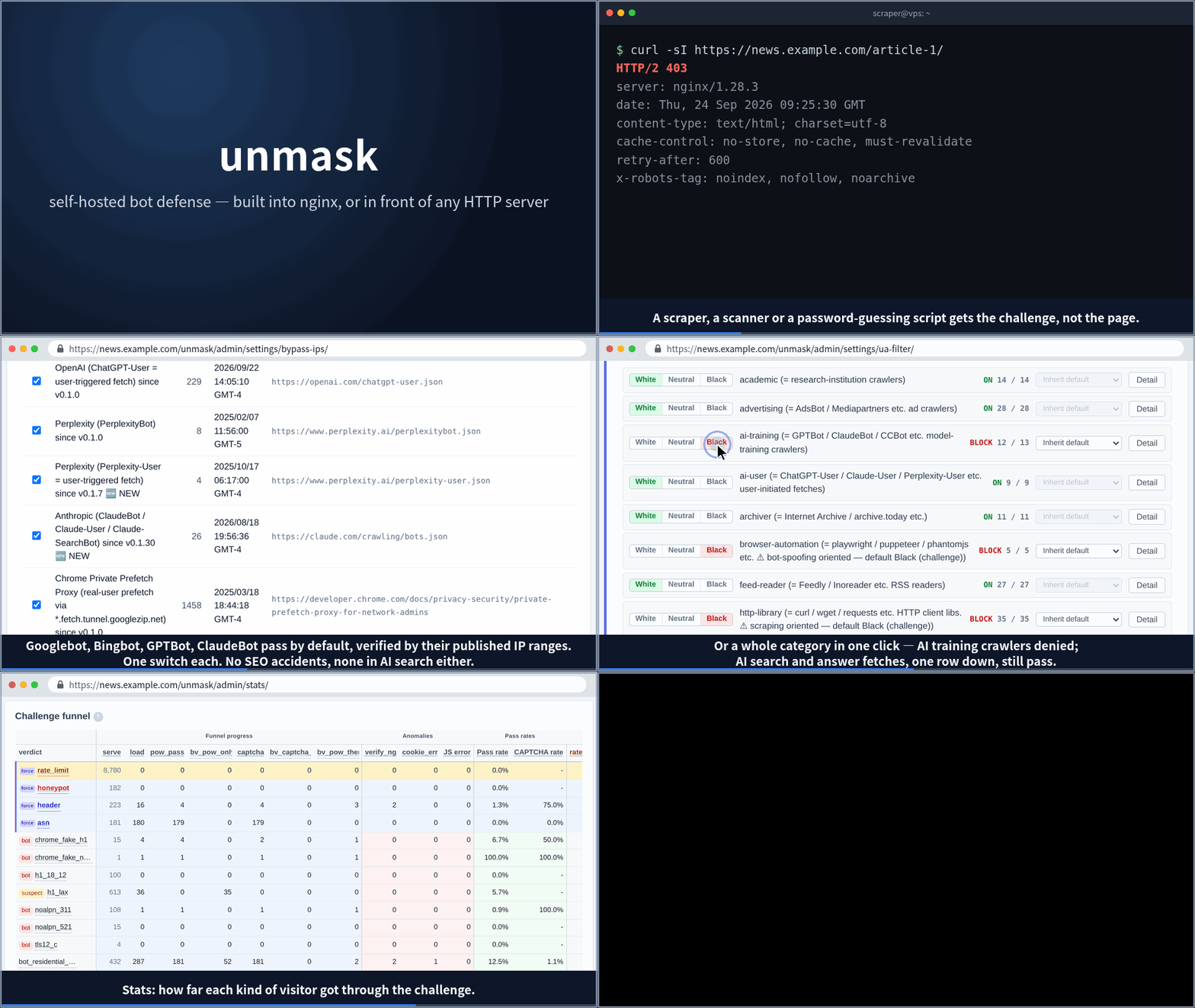
unmask is a self-hosted bot management gateway for nginx and Apache. It layers signals (the TLS fingerprint (JA4), network (ASN), country, request rate, honeypot paths and a shared ban list) and answers with a challenge that grows with suspicion: a proof-of-work that runs by itself for ordinary visitors, its own behavioral CAPTCHA when a visit looks automated or matches a rule you set, and a block only where you choose one. Search and AI crawlers pass by default, verified by their published IP ranges wherever the vendor publishes them.
Features
- Challenges that grow with suspicion — Ordinary visitors clear a proof-of-work in the background, with no click. A visit that looks automated, or matches a rule you set, goes on to a built-in behavioral CAPTCHA (a 5-axis score from mouse trail / scroll / keyboard / window size / click position; no third-party service, no site key). Blocking is opt-in. The challenge page carries your logo and speaks 18 languages.
- Two-stage search-bot rescue — UA list + official IP range double-check. Designed not to break Googlebot / GPTBot / ClaudeBot. One click refuses AI training crawlers while AI search fetches still pass.
- Layered signals — The JA4 TLS fingerprint (ban a tool, not just an address), network (ASN), country, request rate, honeypot paths and User-Agent rules.
- Community Bans — Anonymous BAN feed shared across installs. 5-tier confidence score combines heuristic + AI judge. Pulling the shared list is ON by default and enforced as a challenge (proof-of-work, then CAPTCHA; a block only if you choose one), so a mismatched human still passes; set
subscribe_mode: offto disconnect. Submitting your own reports is opt-in (country is tagged by default — opt out in settings). GDPR by design: the hub keeps reporting installs' addresses only as per-day salted hashes, scrubbed after 30 days. - Built-in admin UI — dashboard / hunt / abuse signals / settings. argon2id password hashes + cookie session + CSRF + per-IP login rate-limit.
- Two ways to deploy — the native nginx dynamic module (~0.05 ms post-cookie), or the gateway container, which puts nginx with the module in front of any HTTP server (Apache, Node, anything).
- Web Bot Auth + Privacy Pass (opt-in) — RFC 9421 HTTP Message Signatures (ed25519 / RSA-PSS) and Privacy Pass / Apple PAT (RFC 9577/9578). Signed AI agents (Anthropic / OpenAI / etc.) and attested clients pass through without a challenge. Off by default behind an Advanced switch, since the ecosystem is still small.
Install
The install guide takes you through either way, step by step: https://unmask.sh/install/
- Running nginx? Use the native module — the recommended setup. Signed rpm / deb / apk packages for x86_64 and arm64 put it into the nginx you already run, and an install wizard does the rest. → https://unmask.sh/install/
- Apache, Node or anything else — or you would rather run a container? The gateway image,
unmask.sh/unmask, is the official nginx image with the module plus the daemon in one container, placed in front of your server (served from unmask.sh, mirrored on GHCR). → https://unmask.sh/install/#gateway
Package signing
Every package (rpm / deb / apk) is signed; unmask-release installs the public
keys, and the package manager verifies everything from then on. Fingerprints
for bootstrapping trust by hand (cross-check with https://unmask.sh/keys/):
- OpenPGP, rpm / deb (
RPM-GPG-KEY-unmask):C03D D45E 28C4 446F DDC4 8EFC 34A3 20B5 44B2 8158 - Alpine RSA, apk (
unmask.rsa.pub), SHA-256 of the DER public key:63:77:6a:f3:57:b7:be:aa:db:2a:83:67:9d:ae:46:42:ac:78:6d:ad:49:95:9b:7c:1f:cb:3d:16:5c:c9:a5:dc
Docs
Official docs: https://unmask.sh/docs/
Choosing a deployment (native module or gateway container), JA4 behind a load balancer, per-server config examples, FAQ.
Contributing
See CONTRIBUTING.md.
Status
Released. Signed rpm / deb / apk for x86_64 + arm64, the gateway container image, an install wizard, and both ways to deploy (the native nginx module and the gateway container) are shipping. It runs in production on the author's own sites.
Still 0.x: configuration may change between minor versions.
Security reports (see SECURITY.md) get priority response. Bug reports, documentation fixes, and PRs are reviewed regularly.
License
Similar repos


Self-hosted bot challenge for stock nginx, or a gateway container in front of any HTTP server. Proof-of-work first, behavioral CAPTCHA when suspicious; search and AI crawlers pass, verified by IP range. RPM/DEB/APK + Docker.
See the codeSee what people are saying
README
unmask
The bot challenge that respects search engines. Proof-of-work first, a CAPTCHA only when it looks automated.
Website: https://unmask.sh/
unmask is a self-hosted bot management gateway for nginx and Apache. It layers signals (the TLS fingerprint (JA4), network (ASN), country, request rate, honeypot paths and a shared ban list) and answers with a challenge that grows with suspicion: a proof-of-work that runs by itself for ordinary visitors, its own behavioral CAPTCHA when a visit looks automated or matches a rule you set, and a block only where you choose one. Search and AI crawlers pass by default, verified by their published IP ranges wherever the vendor publishes them.
Features
- Challenges that grow with suspicion — Ordinary visitors clear a proof-of-work in the background, with no click. A visit that looks automated, or matches a rule you set, goes on to a built-in behavioral CAPTCHA (a 5-axis score from mouse trail / scroll / keyboard / window size / click position; no third-party service, no site key). Blocking is opt-in. The challenge page carries your logo and speaks 18 languages.
- Two-stage search-bot rescue — UA list + official IP range double-check. Designed not to break Googlebot / GPTBot / ClaudeBot. One click refuses AI training crawlers while AI search fetches still pass.
- Layered signals — The JA4 TLS fingerprint (ban a tool, not just an address), network (ASN), country, request rate, honeypot paths and User-Agent rules.
- Community Bans — Anonymous BAN feed shared across installs. 5-tier confidence score combines heuristic + AI judge. Pulling the shared list is ON by default and enforced as a challenge (proof-of-work, then CAPTCHA; a block only if you choose one), so a mismatched human still passes; set
subscribe_mode: offto disconnect. Submitting your own reports is opt-in (country is tagged by default — opt out in settings). GDPR by design: the hub keeps reporting installs' addresses only as per-day salted hashes, scrubbed after 30 days. - Built-in admin UI — dashboard / hunt / abuse signals / settings. argon2id password hashes + cookie session + CSRF + per-IP login rate-limit.
- Two ways to deploy — the native nginx dynamic module (~0.05 ms post-cookie), or the gateway container, which puts nginx with the module in front of any HTTP server (Apache, Node, anything).
- Web Bot Auth + Privacy Pass (opt-in) — RFC 9421 HTTP Message Signatures (ed25519 / RSA-PSS) and Privacy Pass / Apple PAT (RFC 9577/9578). Signed AI agents (Anthropic / OpenAI / etc.) and attested clients pass through without a challenge. Off by default behind an Advanced switch, since the ecosystem is still small.
Install
The install guide takes you through either way, step by step: https://unmask.sh/install/
- Running nginx? Use the native module — the recommended setup. Signed rpm / deb / apk packages for x86_64 and arm64 put it into the nginx you already run, and an install wizard does the rest. → https://unmask.sh/install/
- Apache, Node or anything else — or you would rather run a container? The gateway image,
unmask.sh/unmask, is the official nginx image with the module plus the daemon in one container, placed in front of your server (served from unmask.sh, mirrored on GHCR). → https://unmask.sh/install/#gateway
Package signing
Every package (rpm / deb / apk) is signed; unmask-release installs the public
keys, and the package manager verifies everything from then on. Fingerprints
for bootstrapping trust by hand (cross-check with https://unmask.sh/keys/):
- OpenPGP, rpm / deb (
RPM-GPG-KEY-unmask):C03D D45E 28C4 446F DDC4 8EFC 34A3 20B5 44B2 8158 - Alpine RSA, apk (
unmask.rsa.pub), SHA-256 of the DER public key:63:77:6a:f3:57:b7:be:aa:db:2a:83:67:9d:ae:46:42:ac:78:6d:ad:49:95:9b:7c:1f:cb:3d:16:5c:c9:a5:dc
Docs
Official docs: https://unmask.sh/docs/
Choosing a deployment (native module or gateway container), JA4 behind a load balancer, per-server config examples, FAQ.
Contributing
See CONTRIBUTING.md.
Status
Released. Signed rpm / deb / apk for x86_64 + arm64, the gateway container image, an install wizard, and both ways to deploy (the native nginx module and the gateway container) are shipping. It runs in production on the author's own sites.
Still 0.x: configuration may change between minor versions.
Security reports (see SECURITY.md) get priority response. Bug reports, documentation fixes, and PRs are reviewed regularly.