Double Pi-hole is a simple frontend for managing two Pi-hole instances on the same network. View and manage allowed and blocked domains, local DNS records, clients and adlists, and update Gravity on both instances. Available in Danish and English.
HTML
39
5 commits
updated Oct 16, 2026
English | Dansk
A lightweight dashboard for managing two, three or four Pi-hole v6 instances from one
interface. The solution consists of a single self-contained index.html with
no backend, database or build process. The browser communicates directly with
the active Pi-hole REST APIs through an nginx reverse proxy.
The dashboard includes:
The Pi-hole instances remain independent DNS servers. This project does not provide failover, a virtual IP address, a primary or secondary server, or automatic background replication. Its purpose is to make it easy to maintain the relevant settings consistently from a single dashboard.
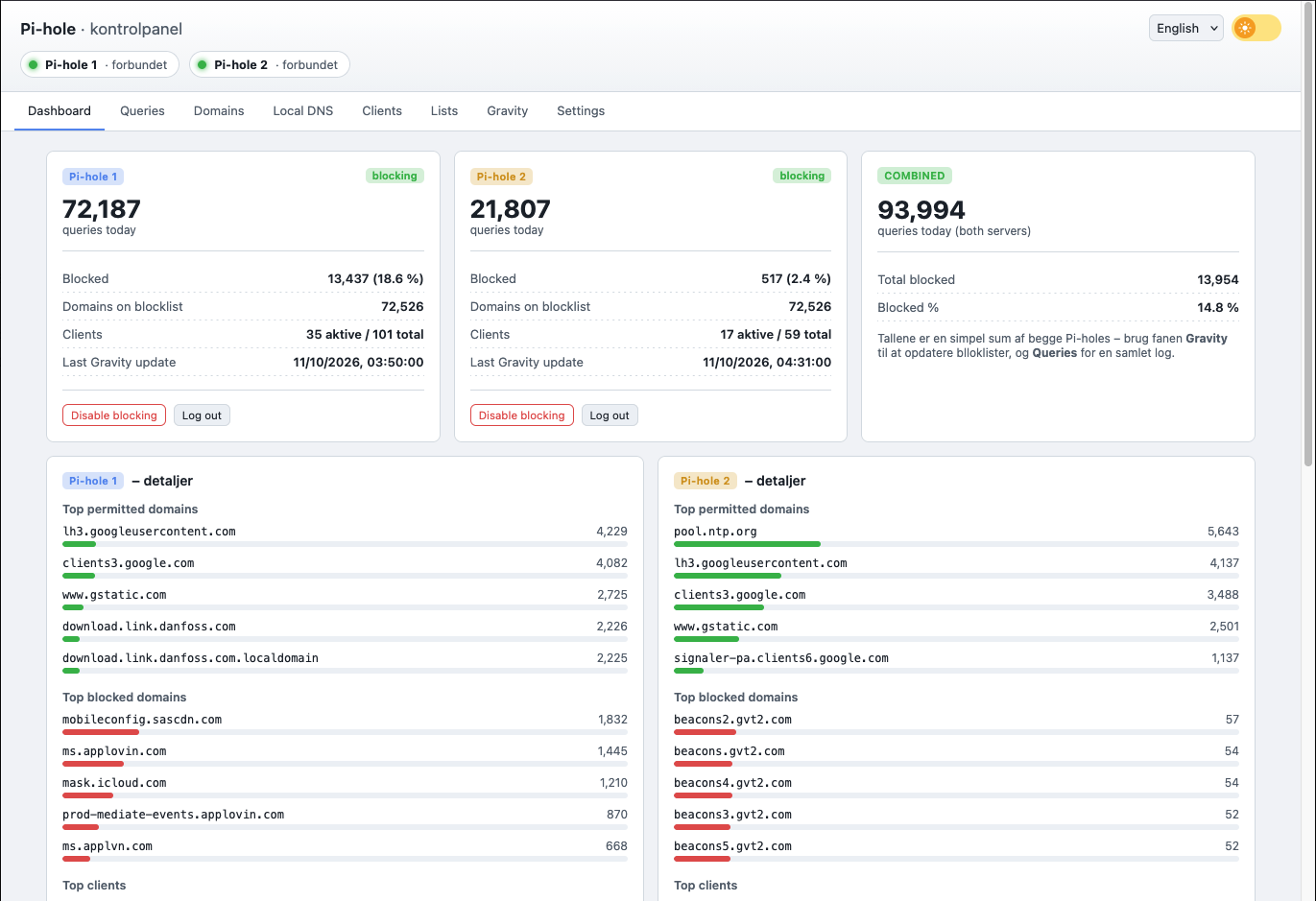
The dashboard is deliberately simple:
Chart.js is loaded as a separate local file and is only used for charts.
/api1/... and /api2/..., plus /api3/... and /api4/... when used,
must be forwarded to their corresponding Pi-hole instances. This avoids CORS issues.Copy index.html to the directory served by nginx, for example
/srv/web/pihole-dashboard/index.html.
Download Chart.js to the same directory:
cd /srv/web/pihole-dashboard
curl -o chart.umd.min.js https://cdnjs.cloudflare.com/ajax/libs/Chart.js/4.4.1/chart.umd.min.js
Copy nginx.conf.example to your nginx configuration.
Adjust the domain, Pi-hole addresses, certificate paths and web root.
Set DEFAULT_SERVER_COUNT in index.html to 2, 3 or 4. The nginx
example enables /api1/ and /api2/ by default. Uncomment and adjust the
/api3/ block for three instances, and both /api3/ and /api4/ for four.
Test and reload nginx:
nginx -t && systemctl reload nginx
Open the dashboard URL and log in to each active Pi-hole instance with their app passwords.
The number of active Pi-hole instances is set only in index.html:
const DEFAULT_SERVER_COUNT = 2; // 2, 3 or 4
The first two, three or four entries in DEFAULT_SERVERS are used. The API
paths are /api1, /api2, /api3 and /api4; configure nginx for each active
instance. Actual Pi-hole host names or IP addresses belong in nginx, not in
the browser settings.
Default display names for all clients are set using label in DEFAULT_SERVERS:
const DEFAULT_SERVERS = [
    { id: "1", label: "Pi-hole 1", base: "/api1", color: "c-1", chip: "s1" },
    { id: "2", label: "Pi-hole 2", base: "/api2", color: "c-2", chip: "s2" },
    { id: "3", label: "Pi-hole 3", base: "/api3", color: "c-3", chip: "s3" },
    { id: "4", label: "Pi-hole 4", base: "/api4", color: "c-4", chip: "s4" },
];
Server colours are blue, yellow, purple and orange, respectively. The layout adapts to the configured number and the screen width, up to a maximum page width of 1900 px.
Names can also be changed under Settings for the active instances. These
names are saved in the browser's localStorage and override the file's default
names in that browser. The server count and API paths cannot be changed under
Settings. Changing the defaults in the file does not overwrite locally saved
names.
The user interface is available in Danish and English. On first use, the language is selected automatically from the browser language. It can then be changed at the top of the dashboard, and the selection is stored locally in the browser.
sessionStorage and disappear
when the tab is closed. Passwords are not stored.nginx.conf.example.The dashboard should not be exposed directly to the internet without suitable access control in front of it.
The dashboard supports two to four active instances. Additional instances
require both the matching server count in index.html and a proxy route in nginx.
Issues and pull requests are welcome. Contributions may include bug fixes, suggestions and, in future versions, translations into additional languages.
Copyright © 2023–2026 Christian Kragh Jessen
https://christiankragh.dk
The project was originally developed for Pi-hole v5 in 2023 and updated for Pi-hole v6 in 2026.
The project is released under the MIT License and may be used, copied, modified
and redistributed in accordance with the terms of the license. See LICENSE.
Chart.js is not included and must be downloaded separately as described in the setup instructions. Chart.js is an independent third-party project with its own license.
Double Pi-hole is a simple frontend for managing two Pi-hole instances on the same network. View and manage allowed and blocked domains, local DNS records, clients and adlists, and update Gravity on both instances. Available in Danish and English.
HTML
39
5 commits
updated Oct 16, 2026
English | Dansk
A lightweight dashboard for managing two, three or four Pi-hole v6 instances from one
interface. The solution consists of a single self-contained index.html with
no backend, database or build process. The browser communicates directly with
the active Pi-hole REST APIs through an nginx reverse proxy.
The dashboard includes:
The Pi-hole instances remain independent DNS servers. This project does not provide failover, a virtual IP address, a primary or secondary server, or automatic background replication. Its purpose is to make it easy to maintain the relevant settings consistently from a single dashboard.
The dashboard is deliberately simple:
Chart.js is loaded as a separate local file and is only used for charts.
/api1/... and /api2/..., plus /api3/... and /api4/... when used,
must be forwarded to their corresponding Pi-hole instances. This avoids CORS issues.Copy index.html to the directory served by nginx, for example
/srv/web/pihole-dashboard/index.html.
Download Chart.js to the same directory:
cd /srv/web/pihole-dashboard
curl -o chart.umd.min.js https://cdnjs.cloudflare.com/ajax/libs/Chart.js/4.4.1/chart.umd.min.js
Copy nginx.conf.example to your nginx configuration.
Adjust the domain, Pi-hole addresses, certificate paths and web root.
Set DEFAULT_SERVER_COUNT in index.html to 2, 3 or 4. The nginx
example enables /api1/ and /api2/ by default. Uncomment and adjust the
/api3/ block for three instances, and both /api3/ and /api4/ for four.
Test and reload nginx:
nginx -t && systemctl reload nginx
Open the dashboard URL and log in to each active Pi-hole instance with their app passwords.
The number of active Pi-hole instances is set only in index.html:
const DEFAULT_SERVER_COUNT = 2; // 2, 3 or 4
The first two, three or four entries in DEFAULT_SERVERS are used. The API
paths are /api1, /api2, /api3 and /api4; configure nginx for each active
instance. Actual Pi-hole host names or IP addresses belong in nginx, not in
the browser settings.
Default display names for all clients are set using label in DEFAULT_SERVERS:
const DEFAULT_SERVERS = [
    { id: "1", label: "Pi-hole 1", base: "/api1", color: "c-1", chip: "s1" },
    { id: "2", label: "Pi-hole 2", base: "/api2", color: "c-2", chip: "s2" },
    { id: "3", label: "Pi-hole 3", base: "/api3", color: "c-3", chip: "s3" },
    { id: "4", label: "Pi-hole 4", base: "/api4", color: "c-4", chip: "s4" },
];
Server colours are blue, yellow, purple and orange, respectively. The layout adapts to the configured number and the screen width, up to a maximum page width of 1900 px.
Names can also be changed under Settings for the active instances. These
names are saved in the browser's localStorage and override the file's default
names in that browser. The server count and API paths cannot be changed under
Settings. Changing the defaults in the file does not overwrite locally saved
names.
The user interface is available in Danish and English. On first use, the language is selected automatically from the browser language. It can then be changed at the top of the dashboard, and the selection is stored locally in the browser.
sessionStorage and disappear
when the tab is closed. Passwords are not stored.nginx.conf.example.The dashboard should not be exposed directly to the internet without suitable access control in front of it.
The dashboard supports two to four active instances. Additional instances
require both the matching server count in index.html and a proxy route in nginx.
Issues and pull requests are welcome. Contributions may include bug fixes, suggestions and, in future versions, translations into additional languages.
Copyright © 2023–2026 Christian Kragh Jessen
https://christiankragh.dk
The project was originally developed for Pi-hole v5 in 2023 and updated for Pi-hole v6 in 2026.
The project is released under the MIT License and may be used, copied, modified
and redistributed in accordance with the terms of the license. See LICENSE.
Chart.js is not included and must be downloaded separately as described in the setup instructions. Chart.js is an independent third-party project with its own license.



