
A modern web interface for managing and controlling your Blocky DNS server.
See the codeREADME
BlockyUI
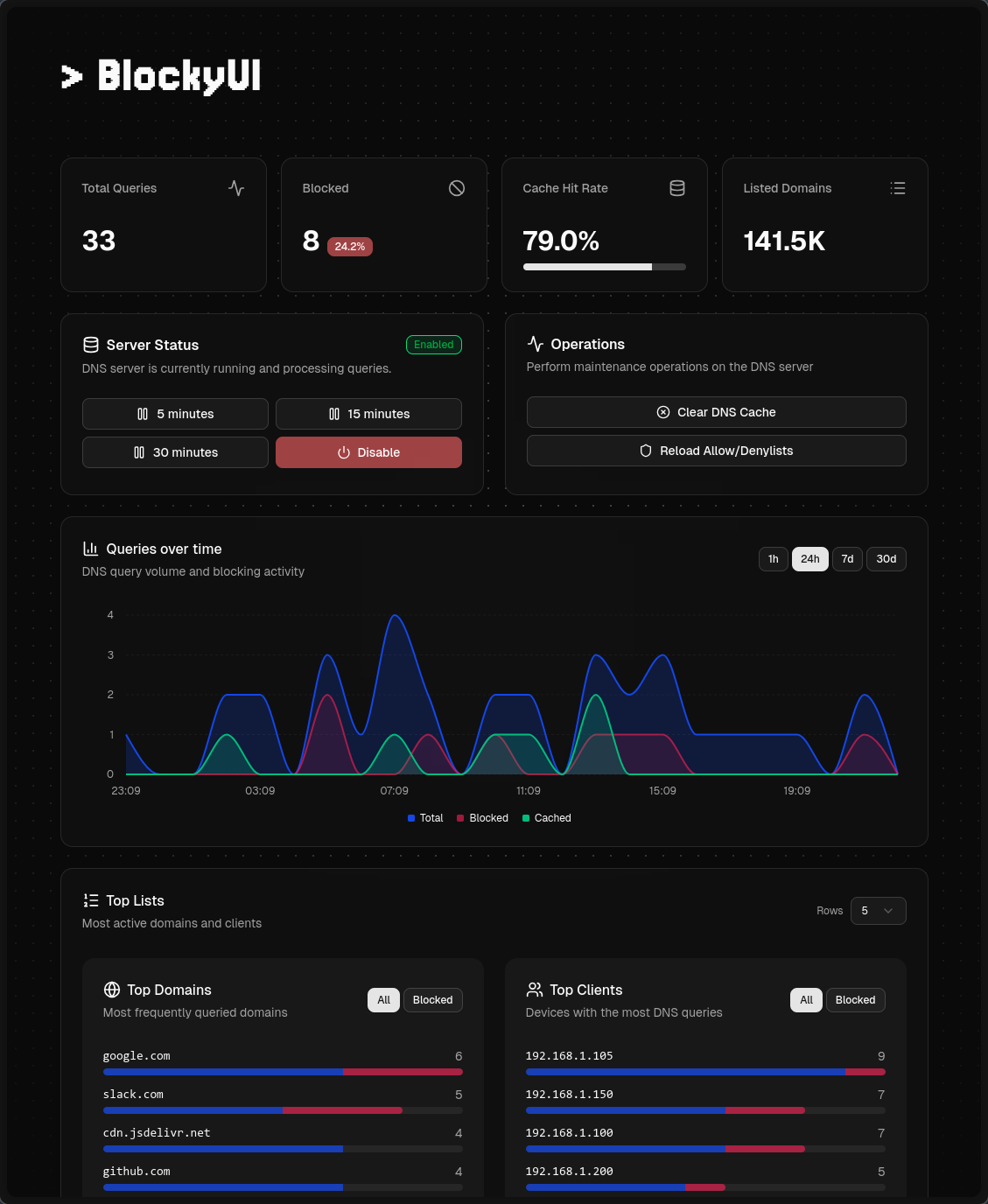
BlockyUI is a modern companion dashboard for your Blocky DNS server. It connects to an existing Blocky instance to display statistics, query DNS records, and much more.
✨ Key Features
- DNS blocking controls with optional timed disable presets
- DNS query tool to test domain blocking and filtering rules
- One-click cache clearing and list refresh
- Search through query logs and filter them (requires query logging configured on Blocky)
- Supports MySQL, PostgreSQL (including Timescale), CSV, SQLite, CSV-Client, and console through VictoriaLogs logging types from Blocky
- Statistics sections
- Overview cards: total queries, blocked requests, cache hit rate, listed domains, average response time (requires statistics enabled on Blocky)
- Top domains, blocked domains, and clients use Blocky's rolling 24-hour statistics when query logging is not configured
- Queries over time falls back to hourly total and blocked counts for the last 24 hours when no query logs are configured
- Longer chart ranges, domain/client filters, and richer top lists with pagination require query logging configured on Blocky
🏁 Getting Started
Prerequisites
- A running Blocky server reachable by BlockyUI
See blocky-ui.example.yml for configuration options and examples.
Using Docker Compose
Create a docker-compose.yml file alongside blocky-ui.yml:
services:
  blocky-ui:
    image: ghcr.io/gabeduartem/blocky-ui:latest # or for example `blocky-ui:1.5.0` if you prefer pinned versions
    container_name: blocky-ui
    restart: unless-stopped
    depends_on:
      - blocky
    ports:
      - 3000:3000
    environment:
      BLOCKY_UI_CONFIG: /config/blocky-ui.yml
    volumes:
      - ./blocky-ui.yml:/config/blocky-ui.yml

  blocky:
    image: spx01/blocky
    container_name: blocky
    hostname: blocky
    restart: unless-stopped
    volumes:
      - ./blocky/config.yml:/app/config.yml
      - /etc/localtime:/etc/localtime:ro
    ports:
      - 4000:4000
      - 53:53/udp
Then visit http://localhost:3000 to access BlockyUI.
Using Docker
docker run -d \
  -p 3000:3000 \
  -e BLOCKY_UI_CONFIG=/config/blocky-ui.yml \
  -v "$(pwd)/blocky-ui.yml:/config/blocky-ui.yml" \
  ghcr.io/gabeduartem/blocky-ui:latest
Statistics and query logs
BlockyUI offers analytics for statistics and historical query logs, also allowing you to go through blocked queries and search specific ones. These features are optional, and the dashboard adapts to what your Blocky instance supports.
See Blocky's statistics and query logging documentation to enable these features, and blocky-ui.yml for connection settings.
Local Development
- Clone the repository:
git clone https://github.com/gabeduartem/blocky-ui.git
cd blocky-ui
- Install dependencies:
bun install
- Copy the configuration files and edit
blocky-ui.ymlfor your setup:
cp blocky-ui.example.yml blocky-ui.yml
cp .env.example .env
- Start the development server:
bun dev
Visit http://localhost:3000 to access BlockyUI.
Test providers with real query logs
Use bun run log-data --help to export a read-only MySQL snapshot and copy it into disposable MySQL, PostgreSQL, Timescale, SQLite, CSV or VictoriaLogs stores. See the data transfer guide for setup, timezone handling and format differences.
⭐ Star History
🤝 Contributing
We welcome contributions! Whether it's bug fixes, new features, or documentation improvements, your input helps make BlockyUI better. Check out our Contributing Guide to get started.
Contributors


Similar repos


Languages
TypeScript
98.6%
A modern web interface for managing and controlling your Blocky DNS server.
See the codeREADME
BlockyUI
BlockyUI is a modern companion dashboard for your Blocky DNS server. It connects to an existing Blocky instance to display statistics, query DNS records, and much more.
✨ Key Features
- DNS blocking controls with optional timed disable presets
- DNS query tool to test domain blocking and filtering rules
- One-click cache clearing and list refresh
- Search through query logs and filter them (requires query logging configured on Blocky)
- Supports MySQL, PostgreSQL (including Timescale), CSV, SQLite, CSV-Client, and console through VictoriaLogs logging types from Blocky
- Statistics sections
- Overview cards: total queries, blocked requests, cache hit rate, listed domains, average response time (requires statistics enabled on Blocky)
- Top domains, blocked domains, and clients use Blocky's rolling 24-hour statistics when query logging is not configured
- Queries over time falls back to hourly total and blocked counts for the last 24 hours when no query logs are configured
- Longer chart ranges, domain/client filters, and richer top lists with pagination require query logging configured on Blocky
🏁 Getting Started
Prerequisites
- A running Blocky server reachable by BlockyUI
See blocky-ui.example.yml for configuration options and examples.
Using Docker Compose
Create a docker-compose.yml file alongside blocky-ui.yml:
services:
  blocky-ui:
    image: ghcr.io/gabeduartem/blocky-ui:latest # or for example `blocky-ui:1.5.0` if you prefer pinned versions
    container_name: blocky-ui
    restart: unless-stopped
    depends_on:
      - blocky
    ports:
      - 3000:3000
    environment:
      BLOCKY_UI_CONFIG: /config/blocky-ui.yml
    volumes:
      - ./blocky-ui.yml:/config/blocky-ui.yml

  blocky:
    image: spx01/blocky
    container_name: blocky
    hostname: blocky
    restart: unless-stopped
    volumes:
      - ./blocky/config.yml:/app/config.yml
      - /etc/localtime:/etc/localtime:ro
    ports:
      - 4000:4000
      - 53:53/udp
Then visit http://localhost:3000 to access BlockyUI.
Using Docker
docker run -d \
  -p 3000:3000 \
  -e BLOCKY_UI_CONFIG=/config/blocky-ui.yml \
  -v "$(pwd)/blocky-ui.yml:/config/blocky-ui.yml" \
  ghcr.io/gabeduartem/blocky-ui:latest
Statistics and query logs
BlockyUI offers analytics for statistics and historical query logs, also allowing you to go through blocked queries and search specific ones. These features are optional, and the dashboard adapts to what your Blocky instance supports.
See Blocky's statistics and query logging documentation to enable these features, and blocky-ui.yml for connection settings.
Local Development
- Clone the repository:
git clone https://github.com/gabeduartem/blocky-ui.git
cd blocky-ui
- Install dependencies:
bun install
- Copy the configuration files and edit
blocky-ui.ymlfor your setup:
cp blocky-ui.example.yml blocky-ui.yml
cp .env.example .env
- Start the development server:
bun dev
Visit http://localhost:3000 to access BlockyUI.
Test providers with real query logs
Use bun run log-data --help to export a read-only MySQL snapshot and copy it into disposable MySQL, PostgreSQL, Timescale, SQLite, CSV or VictoriaLogs stores. See the data transfer guide for setup, timezone handling and format differences.
⭐ Star History
🤝 Contributing
We welcome contributions! Whether it's bug fixes, new features, or documentation improvements, your input helps make BlockyUI better. Check out our Contributing Guide to get started.
Similar repos
Contributors
Languages
TypeScript
98.6%