Plugin for PiBoSo Racing Simulators
See the code
A free, open-source plugin for MX Bikes, GP Bikes, and Kart Racing Pro with customizable on-screen displays, immersion features, social tools, and streaming/broadcasting overlays.
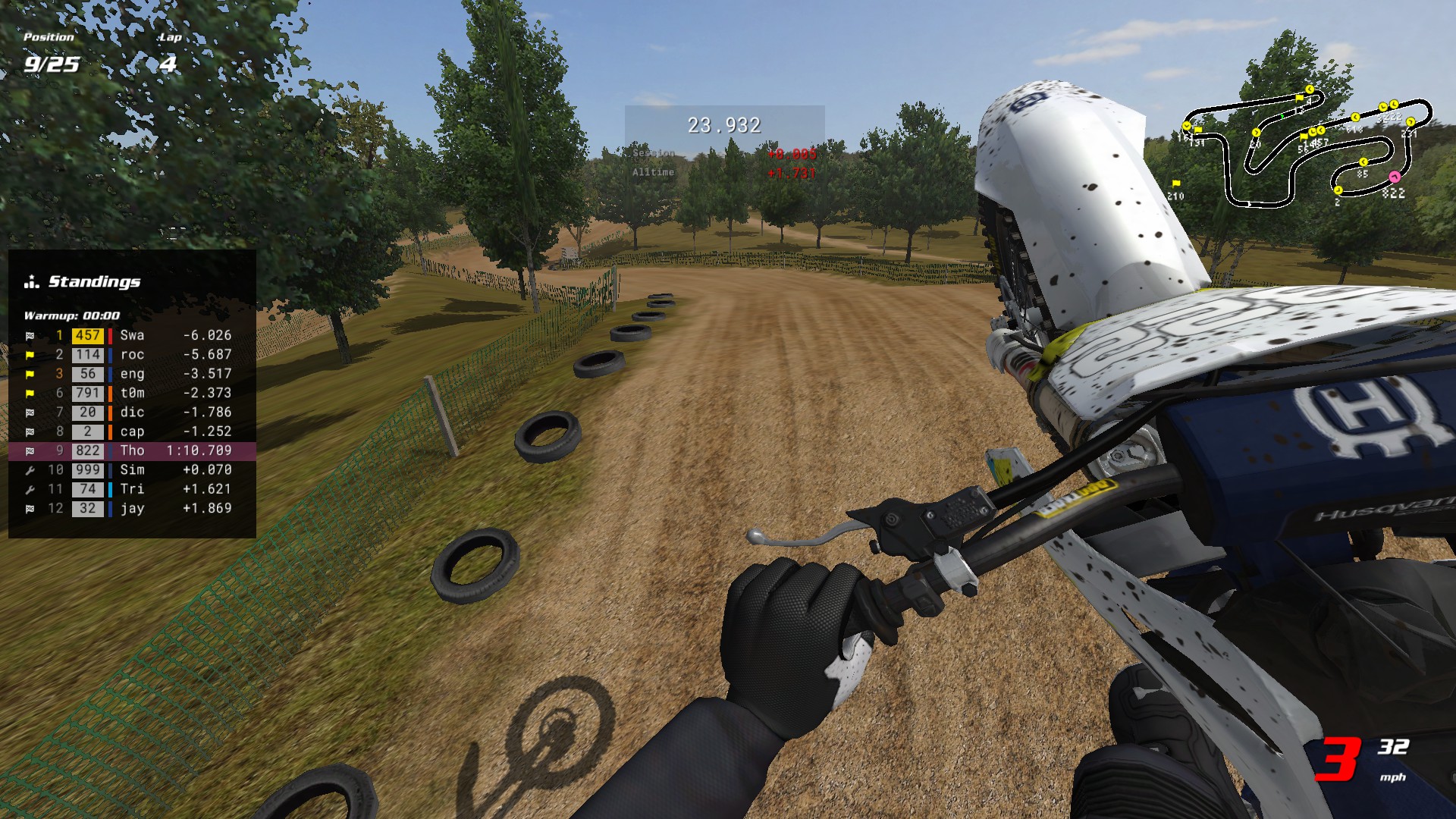 Default HUD layout. All elements are fully customizable - see Tips & Tricks for setup ideas.

Quick Start
- Download the installer above and run it
- Launch the game and load a track
- Move the mouse to bring up the pointer, then right-click and drag to reposition elements
- Press Tilde (~) or click the settings button to toggle elements, adjust opacity, and more
The installer isn't signed yet, so Windows will warn about an "unknown publisher" - why & how to proceed.
Requirements:
mxbmrp3-Setup.exeplugins\ folder, and keeps your settings on an upgradeDownload the latest release archive mxbmrp3.zip
Find your game's plugins folder:
pluginsC:\Program Files\[Game]\) > open pluginsExtract the plugin files:
plugins\ folder:
mxbmrp3.dlo for MX Bikesmxbmrp3_gpb.dlo for GP Bikesmxbmrp3_krp.dlo for Kart Racing Promxbmrp3_data\ folder to the plugins\ folderproxy64.dlo, proxy_udp64.dlo, xinput64.dli, or telemetry64.dlo for GP Bikes) - they are native game files, not old plugin versionsYour directory should look like this after installation (files vary slightly by game):
[Game]/
│   mxbikes.exe / gpbikes.exe / kart.exe
│   ...
│
└───plugins/
    ├── mxbmrp3_data/        ← Add this folder (from release)
    ├── mxbmrp3.dlo          ← Add this (MX Bikes only)
    ├── mxbmrp3_gpb.dlo      ← Add this (GP Bikes only)
    ├── mxbmrp3_krp.dlo      ← Add this (Kart Racing Pro only)
    ├── proxy_udp64.dlo      ← Keep (native game file)
    ├── proxy64.dlo          ← Keep (native game file)
    ├── xinput64.dli         ← Keep (native game file)
    └── telemetry64.dlo      ← Keep (GP Bikes only)
Launch the game and load a track - a few elements are on by default, so the HUD appears right away. If nothing does, see Troubleshooting.
Keyboard and controller hotkeys can be customized in Settings > Hotkeys. By default, only the settings menu hotkey is configured:
The plugin is active in-game only - it does nothing in the main menus, so all configuration happens on track.
Hover over any setting for a tooltip explaining what it does.
Auto-save (Settings > General) writes your changes when you leave the track. To save sooner, use the Save button at the bottom of the menu - it lights up whenever you have unsaved changes.
The settings menu provides global settings that apply to all profiles, followed by per-element tabs for the individual HUDs and widgets. The per-element tabs list the most-used first; the rest open from the More row at the bottom:
| Icon | Tab | Description |
|---|---|---|
 | General | Preferences with reference and freeze defaults, presence integrations, usage survey, web overlay, profiles |
 | Appearance | Panel theme, units, motion, messages, UI scale, fonts, colors, and which display the HUD draws on |
 | Hotkeys | Keyboard and controller bindings |
 | Riders | Track specific riders with custom colors and icons |
 | Rumble | Controller vibration feedback effects |
 | Helmet | First-person helmet overlay configuration |
 | Director | Auto-director for spectating and replays - follows the most interesting rider |
 | Stream Chat | Your Twitch and YouTube chat in game, with name colors, role icons and filters |
 | Spotter | Spoken race callouts and subtitles - voice, categories and proximity distances |
 | Achievements | Tiered achievements for riding, racing and the plugin itself (MX Bikes only) |
 | Updates | Check for new versions and install updates in-game |
Plus a tab for each individual HUD, and one shared Widgets tab covering every widget.
Four separate profiles store complete HUD layout configurations:
Auto-switch (Settings > General) changes profiles for you as the session type changes.
HUDs are the larger data displays - each gets its own settings tab with options like column/row toggles, gap modes, and textures. Widgets are simpler, single-purpose readouts (one number, gauge, or dial); rather than a tab each, they're configured together under the shared Widgets tab, a row apiece for visibility, title, texture, opacity and scale (the two that belong to a feature - the Director's status button and the Spotter's subtitles - sit on that feature's own tab instead).
| Widget | Description |
|---|---|
| Speed | Current speed |
| Gear | Current gear |
| Lap | Current lap number |
| Position | Race position |
| Time | Session time/countdown |
| Crashes | Resettable crash tally |
| Fuel | Fuel calculator with consumption tracking |
| Bars | Vertical telemetry bars (throttle, brake, suspension, etc.) |
| Tacho | Analog tachometer |
| RPM | Shift lights that turn red at the shift point, the red ones flashing on the limiter |
| Lean | Bike lean angle with arc gauge |
| Speedo | Analog speedometer with odometer and trip meter |
| G-Force | Lateral/longitudinal G-force gauge with peak marker |
| Compass | Heading dial (classic needle or modern rotating card) |
| Tyre Temp | Front and rear tyre temperatures (GP Bikes only) |
| ECU | Engine map, traction control, engine braking and anti-wheeling (GP Bikes only) |
| Settings | The button that opens this menu. Hide it if you prefer the Tilde hotkey |
| Version | The plugin's version number |
| Gamepad | Controller visualization |
| Clock | Real-time clock |
| Pointer | The mouse cursor. Off = settings menu only, which helps if a pad reads as a mouse |
| Prestige | A badge earned by trading in a completed achievement ladder (MX Bikes only) |
| Icon | HUD | Description |
|---|---|---|
 | Map | Top-down track map with rider positions (click to spectate), a zoomed Follow view you can tilt and that can show more track the faster you go, and lap delta colours |
 | Notices | Race status notices (wrong way, blue flag, PB alerts, last lap, finished) |
 | Standings | Live race positions with gaps, status, and tracked rider indicators |
 | Friends | Steam friends in-game: their server/track and who's joined your session |
 | Timing | Split and lap times, a live gap and gap comparisons |
 | Lap Log | Historical lap times with PB indicators |
 | Gap Bar | Live gap to your all-time or session PB or last lap, with ghost and markers |
 | Delta Trace | Your gap to your all-time or session PB or last lap across the whole lap |
 | Pitboard | Pitboard-style lap information display |
 | Radar | Proximity radar with approach alerts and distance arrows |
 | Ideal Lap | Best sector times and theoretical ideal lap |
 | Session | Session info (type, track, format, server, weather) |
 | Performance | FPS and the plugin's own per-frame time |
 | Stats | Riding stats with columns for last lap, session, and all-time totals |
 | Telemetry | Throttle, brake, suspension graphs |
 | Records | Online lap records (CBR or MXB-Ranked) with personal bests (MX Bikes only) |
 | FMX | Freestyle trick detection, scoring and chain combos (MX Bikes and GP Bikes only) |
 | Event Log | Timestamped feed of race events (laps, penalties, finishes, pit activity) |
 | Charts | Session-progression charts: position, race trace, gap to leader, pace |
Each of these has its own switch in the settings menu.
Turn on Web server (Settings > General) and the plugin serves a live browser overlay: a standings tower, event log, rider focus card, and periodic broadcast panels (fastest-lap boards, a "down the order" rundown, and on-track battles). Point an OBS Browser Source at http://localhost:8080 (the address is in the row below the setting, a clickable link while it is serving), or just open it in a browser. Colors and fonts follow your in-game settings, and a gear icon on the overlay sets tower size, filters and the rest per browser. Full guide: Web overlay.
Settings > Achievements: a hundred-odd milestones, Bronze to Platinum, for riding, racing, freestyle, jumping and for trying out the plugin itself. A toast marks each tier earned, and a halfway card the long steps to Gold and Platinum (Toasts > Visible turns the cards off; tracking continues either way). They read your existing stats, so an install starts with whatever its numbers already earn. A few are hidden until you stumble on them, and the ones about things going wrong have their own page, outside the completion figures.
Take every counted one to Platinum and a Prestige button appears, trading the whole ladder back - achievements and their counters to zero - for a level and the Prestige badge widget, which you then turn on under Widgets. Personal bests are untouched; there is no way back, so it asks twice. Full list: Achievements.
Turn on Spoken audio (Settings > Spotter, or the checkbox beside the tab) and the plugin talks to you while you ride: riders behind or alongside you, blue flags, a rider down, and - each time you cross the line - your position and the gaps ahead and behind. Windows text-to-speech reads it out of the box, with TTS voice, Speed and Volume to choose how; recorded voice packs are a separate download. Five Callouts switches decide what gets announced, and Subtitles puts every call on screen so you can run it silent. It follows whoever you're watching, so it works while spectating and in replays. Full guide: Spotter voice.
Turn on the Director (Settings > Director, or its camera-icon status button) and it automatically cuts the spectate camera to the most interesting rider or battle, broadcast-style, so you don't have to switch riders by hand. It works while spectating live and in replays - a great way to re-watch or record a session and let it direct the action for you. It also drives the Web Overlay's battle panel.
Set HUD display (Settings > Appearance > Companion window) to Companion or Both to open a standalone window you can drag and maximize on a second monitor. Each HUD keeps its own on/off state and position there (drag or toggle it while your mouse is over that window), so you can run a minimal in-game layout and a full dashboard on the second screen at once.
Companion bg sets what is behind the HUD in that window. Set it to Green, Blue or Magenta to put just the HUD over your game in OBS: add a Window Capture of [mxbikes.exe]: MXBMRP3 and give it a Chroma Key filter with the same Key Color Type. Pick a colour your HUD does not use, since the filter removes it from the HUD too.
The Records HUD fetches online lap records from CBR or MXB-Ranked. Turn on Auto-fetch (Settings > Records) to load them when you enter a track. Records also work while spectating.
Bind the Segment + and Segment - hotkeys (Settings > Hotkeys) to drop timing points on the track as you ride. Drop two and the Timing HUD times the section between them - live, with a delta to your best for it - so you can drill a single corner or rhythm section without completing a full lap. Remove the points to return to normal split/lap timing.
Steam (Settings > General) is on by default on the Steam build. It broadcasts your session to friends and populates the Friends HUD: which of your Steam friends are in-game, the server and track they're on, and who's joined your session.
@handle, press Enter, and switch each Status on. Read-only, no login.More options are available by editing the INI file directly. It is organized by HUD section, and each section takes per-element color and font overrides. Colors use ABGR hex values; fonts use the font filename (without .fnt) of any file in the fonts/ folder. For example:
[StandingsHud]
classicLayout=1            ; remove number plates and brand color strips

[SpeedWidget]
color_primary=0xff00ff00   ; green text (ABGR format)
font_title=RobotoMono-Bold ; Roboto Mono Bold font
Use the Color Override Picker to convert RGB colors to ABGR format. See Advanced Settings for how to edit and hot-reload the INI file.
Biggest wins first:
Beyond the plugin: every other plugin in your plugins folder works every frame whether you use it or not, so removing ones you don't need is often the biggest win of all.
By default the plugin does its work during the game's frame. Set pluginThread=1 in the [Advanced] section of the INI file to move the plugin's HUD building and event handling onto a separate thread, so a heavy HUD rebuild can't cost you frames. It's experimental - try it if you're chasing the smoothest possible frame times. Toggle it live with the Reload hotkey.
These three are the game's own settings, not the plugin's.
Create an empty file called pitboard.cfg in [Game]\misc\hud\ (create the directories if needed). This removes the default 2D pitboard while keeping the small 3D pitboard in the game world. Delete the file to restore it.
Turn on Show Rider Stand (Simulation). To customize the icon or its position, extract rider.cfg and riderstand.tga from misc.pkz\misc\helpers\ to [Game]\misc\helpers\ and edit them there.
Turn off Show HUD (Simulation) if you'd rather use the plugin's Gear widget instead. To customize the graphics or position, extract gear.tga, hud.cfg, LCD.fnt, and switch.tga from misc.pkz\misc\hud\ to [Game]\misc\hud\ and edit them there.
All plugin settings are stored in mxbmrp3_settings.ini in your user data folder.
Most settings are in the in-game menu; the power-user ones are INI-only, and carry inline comments there.
INI structure:
[HudName] - Base/default settings for a HUD[HudName:Practice], [HudName:Qualify], [HudName:Race], [HudName:Spectate] - Profile-specific overrides (only values that differ from base)Editing the INI file: the simple way is with the game closed - edit mxbmrp3_settings.ini, then launch. To hot-reload while the game is running:
Put your files in Documents\PiBoSo\[Game]\mxbmrp3\, never in the install folder ([Game]\plugins\mxbmrp3_data\): bundled files there are overwritten on update, while anything in Documents survives it. The web overlay's custom.css goes there too - you create that one yourself.
Fonts, textures and icons are loose files in their own subfolders. Themes, gamepad packs, pit boards, gauges and spotter voices are packs - a folder holding that pack's art or audio plus a <type>.ini describing it (theme.ini, gamepad.ini, pitboard.ini, gauge.ini, spotter.ini - a fixed name, so copying a pack and renaming the folder is the whole job). Every pack's ini opens with the same [pack] section, and base = <pack> layers yours over a shipped one so a reskin is one or two files. Both kinds sync to the plugin on startup, and your choice is stored by folder name, so adding or removing other packs never reassigns it.
| File | Description |
|---|---|
mxbmrp3_settings.ini | All HUD settings (positions, visibility, options) |
mxbmrp3_tracked_riders.json | Tracked riders with colors and icons |
mxbmrp3_rumble_profiles.json | Per-bike rumble effect profiles |
mxbmrp3_stats.json | Unified stats, personal bests, odometer data, and earned achievements |
mxbmrp3_pb_traces.json | Your all-time PB lap per track and bike, used by the Gap Bar and Lap Log's All-time PB gap reference |
mxbmrp3_analytics.json | Anonymous random install ID for the usage survey (see Privacy) |
mxbmrp3_log.txt | The plugin's log for the current session - worth attaching to a bug report |
The installer isn't code-signed yet, so Windows may show one or more "unknown publisher" / "not commonly downloaded" warnings. These are reputation warnings about the unsigned installer and its low download count, not a malware detection. Depending on your browser you may see up to three, in this order:
... next to the file, then Keep > Show more > Keep anyway (Chrome is similar).plugins\ folder under Program Files.Installing manually from the ZIP archive avoids most of these, since there's no installer to run. If you'd like to check the download anyway, you can scan it on VirusTotal.
mxbmrp3_data\ are in the correct plugins\ folder. Games have two directories - the game installation (contains the game .exe) and user data (Documents\PiBoSo\[Game]\). Plugins go in the game installation, not Documents.mxbmrp3.dlo (MX Bikes), mxbmrp3_gpb.dlo (GP Bikes) or mxbmrp3_krp.dlo (Kart Racing Pro) - see manual installationplugins\ folder next to the game .exe you actually launch. If not, run the installer again and select the correct path, or install manually.mxbmrp3_data\ holds the fonts, textures and icons, and must sit in plugins\ beside the DLO (see directory structure)xinput64.dli from the plugins folder, controller input may stop workinghttp://localhost:<port> linkmxbmrp3.dlo as the faulting module, see Feedback & IssuesThe plugin sends a small anonymous ping per game launch, so the developer can see how many people use it, which features are worth keeping, and what needs fixing. It is on by default. The installer asks before anything is sent: untick Participate in the anonymous usage survey on its Privacy page and the plugin starts with it off. You can change it at any time with the Usage survey toggle (Settings > General). Turning it off sends one final anonymous opt-out ping, then nothing more.
Turning it off doesn't disable anything else; the plugin works exactly the same. The one difference: the plugin catches crashes in the game itself, which is what the known-crash list is built from, and with the usage survey off yours stop being reported automatically. The crash files are still written to Documents\PiBoSo\[Game]\mxbmrp3\crashes\, so you can still attach them to a bug report.
What it sends:
| Data | Details |
|---|---|
| Install ID | A random UUID made on your machine (stored in mxbmrp3_analytics.json), not tied to your name, account, hardware, or IP. Delete the file to reset it. |
| Version & game | The plugin version and game, and whether this launch is a fresh install or an upgrade |
| Enabled features | HUDs, widgets, web overlay, Discord, Steam, rumble, update channel, and so on, as anonymous on/off flags |
| Panel theme | Which of the plugin's own themes you use, or that you run with none. A theme you installed or made yourself counts only as "custom" - its name never leaves your machine |
| Spotter voice | Which of the plugin's own voice packs you use, that you use Windows text-to-speech instead, or that the spotter is off. A pack you installed or made yourself counts only as "custom" - its name never leaves your machine |
| Environment | Operating system and version/build (e.g., Windows 11 22631, or Wine/Proton on Linux), language, and whether it's the Steam or standalone build |
| Usage counters | How many times this install has launched, and how many days since it was first installed |
| Achievement progress | Which achievements are unlocked and at what tier, plus two totals: the share of tiers earned, and how many are unlocked |
| Session length | How long a play session lasted (start to clean exit), so the developer can gauge typical usage |
| Crashes | If the game crashed last session: which module faulted and where, the error code, the access type (read/write/execute) and the memory address it tried to access (different every launch, so it identifies nothing), the plugin and game versions at the time, and a short backtrace of the faulting call stack (the top several module-and-offset frames, so a plugin fault can be told apart from a bystander to a game or driver crash) - enough to group similar crashes, but never the memory dump or its contents. Reported on the next launch |
| Link clicks | Which in-plugin link you click (documentation, community, or the thank-you link) - nothing else |
| Prestige | That you traded a finished achievement ladder for a prestige level, and which level it reached |
What it does not send: no names, no in-game/online activity, no telemetry, no lap times, no server or rider data, and no crash dump or log (those stay on your machine) - nothing identifying. The pings are fire-and-forget and never affect performance.
Usage-survey data is processed by two open-source services: Aptabase handles the detailed events above, and GoatCounter receives a single per-launch hit as an aggregate headcount. Both are covered by the one Usage survey toggle.
When the usage survey is on, the plugin may also fetch a small config file from this repository that can only ever reduce what's sent, never add to it. Turning the Usage survey toggle off stops this too.
What the data actually adds up to: the aggregate results are published as an interactive page (also usage_survey/REPORT.md in the repo) - installs, activity over time per game, version adoption, geography, feature/HUD popularity, and crash trends (grouped by which module faulted). It's generated straight from the anonymous pings described above, so you can see exactly what they amount to.
Bug reports, feature requests, and questions are all welcome. Open an issue on GitHub or leave a comment on MXB-Mods.
A short description of what you were doing when the issue happened (track, session type, bike, and any reproduction steps) helps a lot.
For crashes, attach the matching pair - same timestamp and pid - written to Documents\PiBoSo\[Game]\mxbmrp3\crashes\ whenever the plugin catches an unhandled fault:
mxbmrp3_crash_<timestamp>_<pid>.dmp - the minidump (state at the moment of crash)mxbmrp3_crash_<timestamp>_<pid>.log - a snapshot of the plugin log captured at crash timeThe plugin catches any crash in the game, so these are usually faults in the game itself rather than plugin bugs. Check Known MX Bikes Crashes first - it lists the game-engine crashes the handler has caught, with Event Viewer fault offsets you can match against yours. A crash listed there is a known game bug with no plugin fix possible.
If you used the installer, remove the plugin like any other Windows app: open Settings > Apps > Installed apps (or Control Panel > Programs and Features), find MXBMRP3, and choose Uninstall. You can also run mxbmrp3_uninstall.exe directly from any game's plugins\ folder. The uninstaller lets you pick which games to remove from, then deletes the plugin DLO, the mxbmrp3_data\ folder, and the registry entry.
If you installed from the ZIP, delete the files you added from each game's plugins\ folder:
mxbmrp3.dlo, mxbmrp3_gpb.dlo, or mxbmrp3_krp.dlo)mxbmrp3_data\ folderLeave the game's own files in place - proxy64.dlo, proxy_udp64.dlo, xinput64.dli, and telemetry64.dlo (GP Bikes). They are not part of the plugin.
Both methods leave your settings, profiles, and stats untouched, so an upgrade or reinstall keeps them. To remove them as well, delete the per-game folder:
Documents\PiBoSo\[Game]\mxbmrp3\
Built with C++17, Visual Studio 2022, the PiBoSo Plugin API, and Claude Code.
DEVELOPMENT.md - building (Windows shipping build + Linux cross-build) and running the test suitesCONTRIBUTING.md - how to report bugs and contribute changes (and how the public mirror works)TESTING.md - the layered test suite (unit / integration / specialized) and how to add a testARCHITECTURE.md - full technical documentation with diagramsCLAUDE.md - quick-start context for developers and AI assistantsQuick start: clone, run cmake --preset msvc, then open the generated build/msvc/mxbmrp3.sln in Visual Studio 2022 and build.
Licensed under the MIT License. See THIRD_PARTY_LICENSES.md for bundled asset attributions.
Thanks to everyone in the MX Bikes community who tested, reported bugs, and shared ideas.
MXBMRP3 is a community project: one person's spare-time work, and much of what it has become comes from the people who use it - the riders who report problems, suggest features, test new ideas and find new ways to use it.
It started in 2024, after development of MaxHUD, the community's long-standing HUD, came to an end. The first version, MXBMRP - MX Bikes Memory Reader Project, was a small experiment I built before I really knew what I was doing. That grew through several versions into MXBMRP3, a full plugin built on the game's plugin API.
Keeping MXBMRP3 open source is deliberate: it can be studied, changed and built on, and does not depend on me. It is free, with no paid tier, no locked features and no ads, and every release is built from the public source.
If MXBMRP3 makes the game a little better for you, or inspires something new, it has done what I hoped it would.
A comment or rating on mxb-mods, a star on GitHub or a coffee on Ko-fi helps. All optional.
Plugin for PiBoSo Racing Simulators
See the code
A free, open-source plugin for MX Bikes, GP Bikes, and Kart Racing Pro with customizable on-screen displays, immersion features, social tools, and streaming/broadcasting overlays.
Default HUD layout. All elements are fully customizable - see Tips & Tricks for setup ideas.
Quick Start
- Download the installer above and run it
- Launch the game and load a track
- Move the mouse to bring up the pointer, then right-click and drag to reposition elements
- Press Tilde (~) or click the settings button to toggle elements, adjust opacity, and more
The installer isn't signed yet, so Windows will warn about an "unknown publisher" - why & how to proceed.
Requirements:
mxbmrp3-Setup.exeplugins\ folder, and keeps your settings on an upgradeDownload the latest release archive mxbmrp3.zip
Find your game's plugins folder:
pluginsC:\Program Files\[Game]\) > open pluginsExtract the plugin files:
plugins\ folder:
mxbmrp3.dlo for MX Bikesmxbmrp3_gpb.dlo for GP Bikesmxbmrp3_krp.dlo for Kart Racing Promxbmrp3_data\ folder to the plugins\ folderproxy64.dlo, proxy_udp64.dlo, xinput64.dli, or telemetry64.dlo for GP Bikes) - they are native game files, not old plugin versionsYour directory should look like this after installation (files vary slightly by game):
[Game]/
│   mxbikes.exe / gpbikes.exe / kart.exe
│   ...
│
└───plugins/
    ├── mxbmrp3_data/        ← Add this folder (from release)
    ├── mxbmrp3.dlo          ← Add this (MX Bikes only)
    ├── mxbmrp3_gpb.dlo      ← Add this (GP Bikes only)
    ├── mxbmrp3_krp.dlo      ← Add this (Kart Racing Pro only)
    ├── proxy_udp64.dlo      ← Keep (native game file)
    ├── proxy64.dlo          ← Keep (native game file)
    ├── xinput64.dli         ← Keep (native game file)
    └── telemetry64.dlo      ← Keep (GP Bikes only)
Launch the game and load a track - a few elements are on by default, so the HUD appears right away. If nothing does, see Troubleshooting.
Keyboard and controller hotkeys can be customized in Settings > Hotkeys. By default, only the settings menu hotkey is configured:
The plugin is active in-game only - it does nothing in the main menus, so all configuration happens on track.
Hover over any setting for a tooltip explaining what it does.
Auto-save (Settings > General) writes your changes when you leave the track. To save sooner, use the Save button at the bottom of the menu - it lights up whenever you have unsaved changes.
The settings menu provides global settings that apply to all profiles, followed by per-element tabs for the individual HUDs and widgets. The per-element tabs list the most-used first; the rest open from the More row at the bottom:
| Icon | Tab | Description |
|---|---|---|
| General | Preferences with reference and freeze defaults, presence integrations, usage survey, web overlay, profiles |
| Appearance | Panel theme, units, motion, messages, UI scale, fonts, colors, and which display the HUD draws on |
| Hotkeys | Keyboard and controller bindings |
| Riders | Track specific riders with custom colors and icons |
| Rumble | Controller vibration feedback effects |
| Helmet | First-person helmet overlay configuration |
| Director | Auto-director for spectating and replays - follows the most interesting rider |
| Stream Chat | Your Twitch and YouTube chat in game, with name colors, role icons and filters |
| Spotter | Spoken race callouts and subtitles - voice, categories and proximity distances |
| Achievements | Tiered achievements for riding, racing and the plugin itself (MX Bikes only) |
| Updates | Check for new versions and install updates in-game |
Plus a tab for each individual HUD, and one shared Widgets tab covering every widget.
Four separate profiles store complete HUD layout configurations:
Auto-switch (Settings > General) changes profiles for you as the session type changes.
HUDs are the larger data displays - each gets its own settings tab with options like column/row toggles, gap modes, and textures. Widgets are simpler, single-purpose readouts (one number, gauge, or dial); rather than a tab each, they're configured together under the shared Widgets tab, a row apiece for visibility, title, texture, opacity and scale (the two that belong to a feature - the Director's status button and the Spotter's subtitles - sit on that feature's own tab instead).
| Widget | Description |
|---|---|
| Speed | Current speed |
| Gear | Current gear |
| Lap | Current lap number |
| Position | Race position |
| Time | Session time/countdown |
| Crashes | Resettable crash tally |
| Fuel | Fuel calculator with consumption tracking |
| Bars | Vertical telemetry bars (throttle, brake, suspension, etc.) |
| Tacho | Analog tachometer |
| RPM | Shift lights that turn red at the shift point, the red ones flashing on the limiter |
| Lean | Bike lean angle with arc gauge |
| Speedo | Analog speedometer with odometer and trip meter |
| G-Force | Lateral/longitudinal G-force gauge with peak marker |
| Compass | Heading dial (classic needle or modern rotating card) |
| Tyre Temp | Front and rear tyre temperatures (GP Bikes only) |
| ECU | Engine map, traction control, engine braking and anti-wheeling (GP Bikes only) |
| Settings | The button that opens this menu. Hide it if you prefer the Tilde hotkey |
| Version | The plugin's version number |
| Gamepad | Controller visualization |
| Clock | Real-time clock |
| Pointer | The mouse cursor. Off = settings menu only, which helps if a pad reads as a mouse |
| Prestige | A badge earned by trading in a completed achievement ladder (MX Bikes only) |
| Icon | HUD | Description |
|---|---|---|
| Map | Top-down track map with rider positions (click to spectate), a zoomed Follow view you can tilt and that can show more track the faster you go, and lap delta colours |
| Notices | Race status notices (wrong way, blue flag, PB alerts, last lap, finished) |
| Standings | Live race positions with gaps, status, and tracked rider indicators |
| Friends | Steam friends in-game: their server/track and who's joined your session |
| Timing | Split and lap times, a live gap and gap comparisons |
| Lap Log | Historical lap times with PB indicators |
| Gap Bar | Live gap to your all-time or session PB or last lap, with ghost and markers |
| Delta Trace | Your gap to your all-time or session PB or last lap across the whole lap |
| Pitboard | Pitboard-style lap information display |
| Radar | Proximity radar with approach alerts and distance arrows |
| Ideal Lap | Best sector times and theoretical ideal lap |
| Session | Session info (type, track, format, server, weather) |
| Performance | FPS and the plugin's own per-frame time |
| Stats | Riding stats with columns for last lap, session, and all-time totals |
| Telemetry | Throttle, brake, suspension graphs |
| Records | Online lap records (CBR or MXB-Ranked) with personal bests (MX Bikes only) |
| FMX | Freestyle trick detection, scoring and chain combos (MX Bikes and GP Bikes only) |
| Event Log | Timestamped feed of race events (laps, penalties, finishes, pit activity) |
| Charts | Session-progression charts: position, race trace, gap to leader, pace |
Each of these has its own switch in the settings menu.
Turn on Web server (Settings > General) and the plugin serves a live browser overlay: a standings tower, event log, rider focus card, and periodic broadcast panels (fastest-lap boards, a "down the order" rundown, and on-track battles). Point an OBS Browser Source at http://localhost:8080 (the address is in the row below the setting, a clickable link while it is serving), or just open it in a browser. Colors and fonts follow your in-game settings, and a gear icon on the overlay sets tower size, filters and the rest per browser. Full guide: Web overlay.
Settings > Achievements: a hundred-odd milestones, Bronze to Platinum, for riding, racing, freestyle, jumping and for trying out the plugin itself. A toast marks each tier earned, and a halfway card the long steps to Gold and Platinum (Toasts > Visible turns the cards off; tracking continues either way). They read your existing stats, so an install starts with whatever its numbers already earn. A few are hidden until you stumble on them, and the ones about things going wrong have their own page, outside the completion figures.
Take every counted one to Platinum and a Prestige button appears, trading the whole ladder back - achievements and their counters to zero - for a level and the Prestige badge widget, which you then turn on under Widgets. Personal bests are untouched; there is no way back, so it asks twice. Full list: Achievements.
Turn on Spoken audio (Settings > Spotter, or the checkbox beside the tab) and the plugin talks to you while you ride: riders behind or alongside you, blue flags, a rider down, and - each time you cross the line - your position and the gaps ahead and behind. Windows text-to-speech reads it out of the box, with TTS voice, Speed and Volume to choose how; recorded voice packs are a separate download. Five Callouts switches decide what gets announced, and Subtitles puts every call on screen so you can run it silent. It follows whoever you're watching, so it works while spectating and in replays. Full guide: Spotter voice.
Turn on the Director (Settings > Director, or its camera-icon status button) and it automatically cuts the spectate camera to the most interesting rider or battle, broadcast-style, so you don't have to switch riders by hand. It works while spectating live and in replays - a great way to re-watch or record a session and let it direct the action for you. It also drives the Web Overlay's battle panel.
Set HUD display (Settings > Appearance > Companion window) to Companion or Both to open a standalone window you can drag and maximize on a second monitor. Each HUD keeps its own on/off state and position there (drag or toggle it while your mouse is over that window), so you can run a minimal in-game layout and a full dashboard on the second screen at once.
Companion bg sets what is behind the HUD in that window. Set it to Green, Blue or Magenta to put just the HUD over your game in OBS: add a Window Capture of [mxbikes.exe]: MXBMRP3 and give it a Chroma Key filter with the same Key Color Type. Pick a colour your HUD does not use, since the filter removes it from the HUD too.
The Records HUD fetches online lap records from CBR or MXB-Ranked. Turn on Auto-fetch (Settings > Records) to load them when you enter a track. Records also work while spectating.
Bind the Segment + and Segment - hotkeys (Settings > Hotkeys) to drop timing points on the track as you ride. Drop two and the Timing HUD times the section between them - live, with a delta to your best for it - so you can drill a single corner or rhythm section without completing a full lap. Remove the points to return to normal split/lap timing.
Steam (Settings > General) is on by default on the Steam build. It broadcasts your session to friends and populates the Friends HUD: which of your Steam friends are in-game, the server and track they're on, and who's joined your session.
@handle, press Enter, and switch each Status on. Read-only, no login.More options are available by editing the INI file directly. It is organized by HUD section, and each section takes per-element color and font overrides. Colors use ABGR hex values; fonts use the font filename (without .fnt) of any file in the fonts/ folder. For example:
[StandingsHud]
classicLayout=1            ; remove number plates and brand color strips

[SpeedWidget]
color_primary=0xff00ff00   ; green text (ABGR format)
font_title=RobotoMono-Bold ; Roboto Mono Bold font
Use the Color Override Picker to convert RGB colors to ABGR format. See Advanced Settings for how to edit and hot-reload the INI file.
Biggest wins first:
Beyond the plugin: every other plugin in your plugins folder works every frame whether you use it or not, so removing ones you don't need is often the biggest win of all.
By default the plugin does its work during the game's frame. Set pluginThread=1 in the [Advanced] section of the INI file to move the plugin's HUD building and event handling onto a separate thread, so a heavy HUD rebuild can't cost you frames. It's experimental - try it if you're chasing the smoothest possible frame times. Toggle it live with the Reload hotkey.
These three are the game's own settings, not the plugin's.
Create an empty file called pitboard.cfg in [Game]\misc\hud\ (create the directories if needed). This removes the default 2D pitboard while keeping the small 3D pitboard in the game world. Delete the file to restore it.
Turn on Show Rider Stand (Simulation). To customize the icon or its position, extract rider.cfg and riderstand.tga from misc.pkz\misc\helpers\ to [Game]\misc\helpers\ and edit them there.
Turn off Show HUD (Simulation) if you'd rather use the plugin's Gear widget instead. To customize the graphics or position, extract gear.tga, hud.cfg, LCD.fnt, and switch.tga from misc.pkz\misc\hud\ to [Game]\misc\hud\ and edit them there.
All plugin settings are stored in mxbmrp3_settings.ini in your user data folder.
Most settings are in the in-game menu; the power-user ones are INI-only, and carry inline comments there.
INI structure:
[HudName] - Base/default settings for a HUD[HudName:Practice], [HudName:Qualify], [HudName:Race], [HudName:Spectate] - Profile-specific overrides (only values that differ from base)Editing the INI file: the simple way is with the game closed - edit mxbmrp3_settings.ini, then launch. To hot-reload while the game is running:
Put your files in Documents\PiBoSo\[Game]\mxbmrp3\, never in the install folder ([Game]\plugins\mxbmrp3_data\): bundled files there are overwritten on update, while anything in Documents survives it. The web overlay's custom.css goes there too - you create that one yourself.
Fonts, textures and icons are loose files in their own subfolders. Themes, gamepad packs, pit boards, gauges and spotter voices are packs - a folder holding that pack's art or audio plus a <type>.ini describing it (theme.ini, gamepad.ini, pitboard.ini, gauge.ini, spotter.ini - a fixed name, so copying a pack and renaming the folder is the whole job). Every pack's ini opens with the same [pack] section, and base = <pack> layers yours over a shipped one so a reskin is one or two files. Both kinds sync to the plugin on startup, and your choice is stored by folder name, so adding or removing other packs never reassigns it.
| File | Description |
|---|---|
mxbmrp3_settings.ini | All HUD settings (positions, visibility, options) |
mxbmrp3_tracked_riders.json | Tracked riders with colors and icons |
mxbmrp3_rumble_profiles.json | Per-bike rumble effect profiles |
mxbmrp3_stats.json | Unified stats, personal bests, odometer data, and earned achievements |
mxbmrp3_pb_traces.json | Your all-time PB lap per track and bike, used by the Gap Bar and Lap Log's All-time PB gap reference |
mxbmrp3_analytics.json | Anonymous random install ID for the usage survey (see Privacy) |
mxbmrp3_log.txt | The plugin's log for the current session - worth attaching to a bug report |
The installer isn't code-signed yet, so Windows may show one or more "unknown publisher" / "not commonly downloaded" warnings. These are reputation warnings about the unsigned installer and its low download count, not a malware detection. Depending on your browser you may see up to three, in this order:
... next to the file, then Keep > Show more > Keep anyway (Chrome is similar).plugins\ folder under Program Files.Installing manually from the ZIP archive avoids most of these, since there's no installer to run. If you'd like to check the download anyway, you can scan it on VirusTotal.
mxbmrp3_data\ are in the correct plugins\ folder. Games have two directories - the game installation (contains the game .exe) and user data (Documents\PiBoSo\[Game]\). Plugins go in the game installation, not Documents.mxbmrp3.dlo (MX Bikes), mxbmrp3_gpb.dlo (GP Bikes) or mxbmrp3_krp.dlo (Kart Racing Pro) - see manual installationplugins\ folder next to the game .exe you actually launch. If not, run the installer again and select the correct path, or install manually.mxbmrp3_data\ holds the fonts, textures and icons, and must sit in plugins\ beside the DLO (see directory structure)xinput64.dli from the plugins folder, controller input may stop workinghttp://localhost:<port> linkmxbmrp3.dlo as the faulting module, see Feedback & IssuesThe plugin sends a small anonymous ping per game launch, so the developer can see how many people use it, which features are worth keeping, and what needs fixing. It is on by default. The installer asks before anything is sent: untick Participate in the anonymous usage survey on its Privacy page and the plugin starts with it off. You can change it at any time with the Usage survey toggle (Settings > General). Turning it off sends one final anonymous opt-out ping, then nothing more.
Turning it off doesn't disable anything else; the plugin works exactly the same. The one difference: the plugin catches crashes in the game itself, which is what the known-crash list is built from, and with the usage survey off yours stop being reported automatically. The crash files are still written to Documents\PiBoSo\[Game]\mxbmrp3\crashes\, so you can still attach them to a bug report.
What it sends:
| Data | Details |
|---|---|
| Install ID | A random UUID made on your machine (stored in mxbmrp3_analytics.json), not tied to your name, account, hardware, or IP. Delete the file to reset it. |
| Version & game | The plugin version and game, and whether this launch is a fresh install or an upgrade |
| Enabled features | HUDs, widgets, web overlay, Discord, Steam, rumble, update channel, and so on, as anonymous on/off flags |
| Panel theme | Which of the plugin's own themes you use, or that you run with none. A theme you installed or made yourself counts only as "custom" - its name never leaves your machine |
| Spotter voice | Which of the plugin's own voice packs you use, that you use Windows text-to-speech instead, or that the spotter is off. A pack you installed or made yourself counts only as "custom" - its name never leaves your machine |
| Environment | Operating system and version/build (e.g., Windows 11 22631, or Wine/Proton on Linux), language, and whether it's the Steam or standalone build |
| Usage counters | How many times this install has launched, and how many days since it was first installed |
| Achievement progress | Which achievements are unlocked and at what tier, plus two totals: the share of tiers earned, and how many are unlocked |
| Session length | How long a play session lasted (start to clean exit), so the developer can gauge typical usage |
| Crashes | If the game crashed last session: which module faulted and where, the error code, the access type (read/write/execute) and the memory address it tried to access (different every launch, so it identifies nothing), the plugin and game versions at the time, and a short backtrace of the faulting call stack (the top several module-and-offset frames, so a plugin fault can be told apart from a bystander to a game or driver crash) - enough to group similar crashes, but never the memory dump or its contents. Reported on the next launch |
| Link clicks | Which in-plugin link you click (documentation, community, or the thank-you link) - nothing else |
| Prestige | That you traded a finished achievement ladder for a prestige level, and which level it reached |
What it does not send: no names, no in-game/online activity, no telemetry, no lap times, no server or rider data, and no crash dump or log (those stay on your machine) - nothing identifying. The pings are fire-and-forget and never affect performance.
Usage-survey data is processed by two open-source services: Aptabase handles the detailed events above, and GoatCounter receives a single per-launch hit as an aggregate headcount. Both are covered by the one Usage survey toggle.
When the usage survey is on, the plugin may also fetch a small config file from this repository that can only ever reduce what's sent, never add to it. Turning the Usage survey toggle off stops this too.
What the data actually adds up to: the aggregate results are published as an interactive page (also usage_survey/REPORT.md in the repo) - installs, activity over time per game, version adoption, geography, feature/HUD popularity, and crash trends (grouped by which module faulted). It's generated straight from the anonymous pings described above, so you can see exactly what they amount to.
Bug reports, feature requests, and questions are all welcome. Open an issue on GitHub or leave a comment on MXB-Mods.
A short description of what you were doing when the issue happened (track, session type, bike, and any reproduction steps) helps a lot.
For crashes, attach the matching pair - same timestamp and pid - written to Documents\PiBoSo\[Game]\mxbmrp3\crashes\ whenever the plugin catches an unhandled fault:
mxbmrp3_crash_<timestamp>_<pid>.dmp - the minidump (state at the moment of crash)mxbmrp3_crash_<timestamp>_<pid>.log - a snapshot of the plugin log captured at crash timeThe plugin catches any crash in the game, so these are usually faults in the game itself rather than plugin bugs. Check Known MX Bikes Crashes first - it lists the game-engine crashes the handler has caught, with Event Viewer fault offsets you can match against yours. A crash listed there is a known game bug with no plugin fix possible.
If you used the installer, remove the plugin like any other Windows app: open Settings > Apps > Installed apps (or Control Panel > Programs and Features), find MXBMRP3, and choose Uninstall. You can also run mxbmrp3_uninstall.exe directly from any game's plugins\ folder. The uninstaller lets you pick which games to remove from, then deletes the plugin DLO, the mxbmrp3_data\ folder, and the registry entry.
If you installed from the ZIP, delete the files you added from each game's plugins\ folder:
mxbmrp3.dlo, mxbmrp3_gpb.dlo, or mxbmrp3_krp.dlo)mxbmrp3_data\ folderLeave the game's own files in place - proxy64.dlo, proxy_udp64.dlo, xinput64.dli, and telemetry64.dlo (GP Bikes). They are not part of the plugin.
Both methods leave your settings, profiles, and stats untouched, so an upgrade or reinstall keeps them. To remove them as well, delete the per-game folder:
Documents\PiBoSo\[Game]\mxbmrp3\
Built with C++17, Visual Studio 2022, the PiBoSo Plugin API, and Claude Code.
DEVELOPMENT.md - building (Windows shipping build + Linux cross-build) and running the test suitesCONTRIBUTING.md - how to report bugs and contribute changes (and how the public mirror works)TESTING.md - the layered test suite (unit / integration / specialized) and how to add a testARCHITECTURE.md - full technical documentation with diagramsCLAUDE.md - quick-start context for developers and AI assistantsQuick start: clone, run cmake --preset msvc, then open the generated build/msvc/mxbmrp3.sln in Visual Studio 2022 and build.
Licensed under the MIT License. See THIRD_PARTY_LICENSES.md for bundled asset attributions.
Thanks to everyone in the MX Bikes community who tested, reported bugs, and shared ideas.
MXBMRP3 is a community project: one person's spare-time work, and much of what it has become comes from the people who use it - the riders who report problems, suggest features, test new ideas and find new ways to use it.
It started in 2024, after development of MaxHUD, the community's long-standing HUD, came to an end. The first version, MXBMRP - MX Bikes Memory Reader Project, was a small experiment I built before I really knew what I was doing. That grew through several versions into MXBMRP3, a full plugin built on the game's plugin API.
Keeping MXBMRP3 open source is deliberate: it can be studied, changed and built on, and does not depend on me. It is free, with no paid tier, no locked features and no ads, and every release is built from the public source.
If MXBMRP3 makes the game a little better for you, or inspires something new, it has done what I hoped it would.
A comment or rating on mxb-mods, a star on GitHub or a coffee on Ko-fi helps. All optional.






