
1 part Phoenix Livereload, 1 part Livebook. All for .exs scripts
Elixir
147
29 commits
updated Dec 11, 2024
README
Livescript
Love Livebook, but want to write .exs files? Livescript runs your .exs files in an iex shell, and reruns them on change. The key is that it doesn't rerun the whole file, only the parts that changed. Just like Livebook stale tracking, though admittedly simplified.
Why?
This is incredibly useful for a fast feedback loop when your scripts have heavy setup. For instance, I use this while writing light webscrapers with Wallaby. It takes a few seconds to load the browser, but with Livescript not only is the browser window left open for fast feedback when you make a change to the code, but the browser open so you can debug and poke around in the developer console.
Sure, but why not?
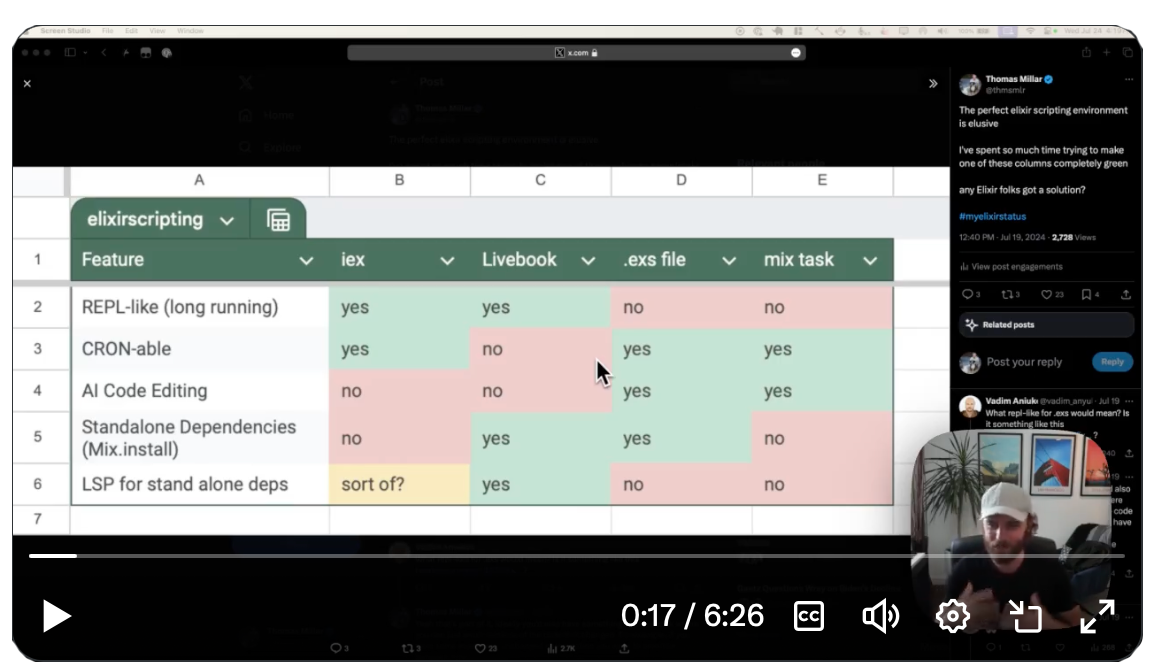
The gensis for this project came from this tweet. There is a certain feature set that I want for developing quick and dirty scripts:
- Bring your own Editor
- for AI Coding features like in Cursor
- and custom keybindings and editor integrations
- REPL like fast feedback loop
- Runnable via CRON
- Full LSP
- Standalone dependencies
Whether it's a Mix Task, an .exs file, or a Livebook, none meet all of the requirements above. After some research, for my usecase Livescript was the easiest path. Another viable solution to these requirements would be to build a Jupyter like integration with VSCode and make .livemd files runnable from the command line. In fact I'd probably like that solution better because Livescript doesn't give you Kino notebook features. But alas, I only wanted to spend a weekend on this project, and so Livescript is the way.
Enjoy!
Installation
mix archive.install github thmsmlr/livescript
Usage
iex -S mix livescript my_script.exs
There are special variables that get set in the environment when running through Livescript.
__LIVESCRIPT__- Set to "1" when running through Livescript.__LIVESCRIPT_FILE__- The path of the file being executed, equivalent to__ENV__.filewhich isn't set when running through IEX.
You can check for the existence of these variables to customize what your script does when running through livescript, versus just regular. For instance, a somewhat common thing you'll want to do is to do file base operations relative to the directory of the script, not the current working directory.
:ok =
  System.get_env("__LIVESCRIPT_FILE__", __ENV__.file)
    |> Path.dirname()
    |> File.cd()

is_livescript = !!System.get_env("__LIVESCRIPT__")
Someday maybe?
- elixir-ls support for Mix.install
- does Mix.install require special handling?
- inconvenient that you cannot import top-level a module defined in the same file, would be nice to find a fix.
-
iex -S mix livescript run my_script.exswhich runs line by line via IEX, then exits.- This gets around the aforementioned issue with importing modules defined in the same file.
- Do the fancy diff tracking from Livebook instead of just rerunning all exprs after first change
- FWIW, given the lightweight nature of the scripts i've been writing, this hasn't been a big issue
TODO
- Mix archive local install
- iex -S mix livescript demo.exs
- Find the iex process
- setup file watcher
- on change do expr diff
- send exprs one by one to iex evaluator
- checkpoint up to the last expr that succeeded, and future diffs from there
- Last expr should print inspect of the result
- Gracefully handle compilation / syntax errors
- Print a spinner or something in IEx to denote that it's running
- Stacktraces should have correct line numbers (this may be trickier than I'd like...)
- checkpoint bindings, rewind to bindings to diff point
- code.purge any module definitions that were changed so we can avoid the redefinition warning
- Verify that it handles that weird edge case when there's only one expr in the file , or zero
Contributors

29 commits
Similar repos


Languages
Elixir
64.7%
JavaScript
35.3%
1 part Phoenix Livereload, 1 part Livebook. All for .exs scripts
Elixir
147
29 commits
updated Dec 11, 2024
README
Livescript
Love Livebook, but want to write .exs files? Livescript runs your .exs files in an iex shell, and reruns them on change. The key is that it doesn't rerun the whole file, only the parts that changed. Just like Livebook stale tracking, though admittedly simplified.
Why?
This is incredibly useful for a fast feedback loop when your scripts have heavy setup. For instance, I use this while writing light webscrapers with Wallaby. It takes a few seconds to load the browser, but with Livescript not only is the browser window left open for fast feedback when you make a change to the code, but the browser open so you can debug and poke around in the developer console.
Sure, but why not?
The gensis for this project came from this tweet. There is a certain feature set that I want for developing quick and dirty scripts:
- Bring your own Editor
- for AI Coding features like in Cursor
- and custom keybindings and editor integrations
- REPL like fast feedback loop
- Runnable via CRON
- Full LSP
- Standalone dependencies
Whether it's a Mix Task, an .exs file, or a Livebook, none meet all of the requirements above. After some research, for my usecase Livescript was the easiest path. Another viable solution to these requirements would be to build a Jupyter like integration with VSCode and make .livemd files runnable from the command line. In fact I'd probably like that solution better because Livescript doesn't give you Kino notebook features. But alas, I only wanted to spend a weekend on this project, and so Livescript is the way.
Enjoy!
Installation
mix archive.install github thmsmlr/livescript
Usage
iex -S mix livescript my_script.exs
There are special variables that get set in the environment when running through Livescript.
__LIVESCRIPT__- Set to "1" when running through Livescript.__LIVESCRIPT_FILE__- The path of the file being executed, equivalent to__ENV__.filewhich isn't set when running through IEX.
You can check for the existence of these variables to customize what your script does when running through livescript, versus just regular. For instance, a somewhat common thing you'll want to do is to do file base operations relative to the directory of the script, not the current working directory.
:ok =
  System.get_env("__LIVESCRIPT_FILE__", __ENV__.file)
    |> Path.dirname()
    |> File.cd()

is_livescript = !!System.get_env("__LIVESCRIPT__")
Someday maybe?
- elixir-ls support for Mix.install
- does Mix.install require special handling?
- inconvenient that you cannot import top-level a module defined in the same file, would be nice to find a fix.
-
iex -S mix livescript run my_script.exswhich runs line by line via IEX, then exits.- This gets around the aforementioned issue with importing modules defined in the same file.
- Do the fancy diff tracking from Livebook instead of just rerunning all exprs after first change
- FWIW, given the lightweight nature of the scripts i've been writing, this hasn't been a big issue
TODO
- Mix archive local install
- iex -S mix livescript demo.exs
- Find the iex process
- setup file watcher
- on change do expr diff
- send exprs one by one to iex evaluator
- checkpoint up to the last expr that succeeded, and future diffs from there
- Last expr should print inspect of the result
- Gracefully handle compilation / syntax errors
- Print a spinner or something in IEx to denote that it's running
- Stacktraces should have correct line numbers (this may be trickier than I'd like...)
- checkpoint bindings, rewind to bindings to diff point
- code.purge any module definitions that were changed so we can avoid the redefinition warning
- Verify that it handles that weird edge case when there's only one expr in the file , or zero
Similar repos
Contributors
29 commits
Languages
Elixir
64.7%
JavaScript
35.3%