Turn 3D models and images into voxel art in the browser
See the code
Live: instantvoxel.thitichotk.com (desktop first, runs in your browser)
Instant-Voxel turns 3D models and images into voxel art in the browser. A C++ kernel compiled to WebAssembly does the voxelising and three.js reads the model files and draws the result. You can touch the voxels up one by one before exporting them for MagicaVoxel, Minecraft, a game engine or a 3D printer. Your files stay on your computer; only the optional model server receives anything, and you choose where it runs.
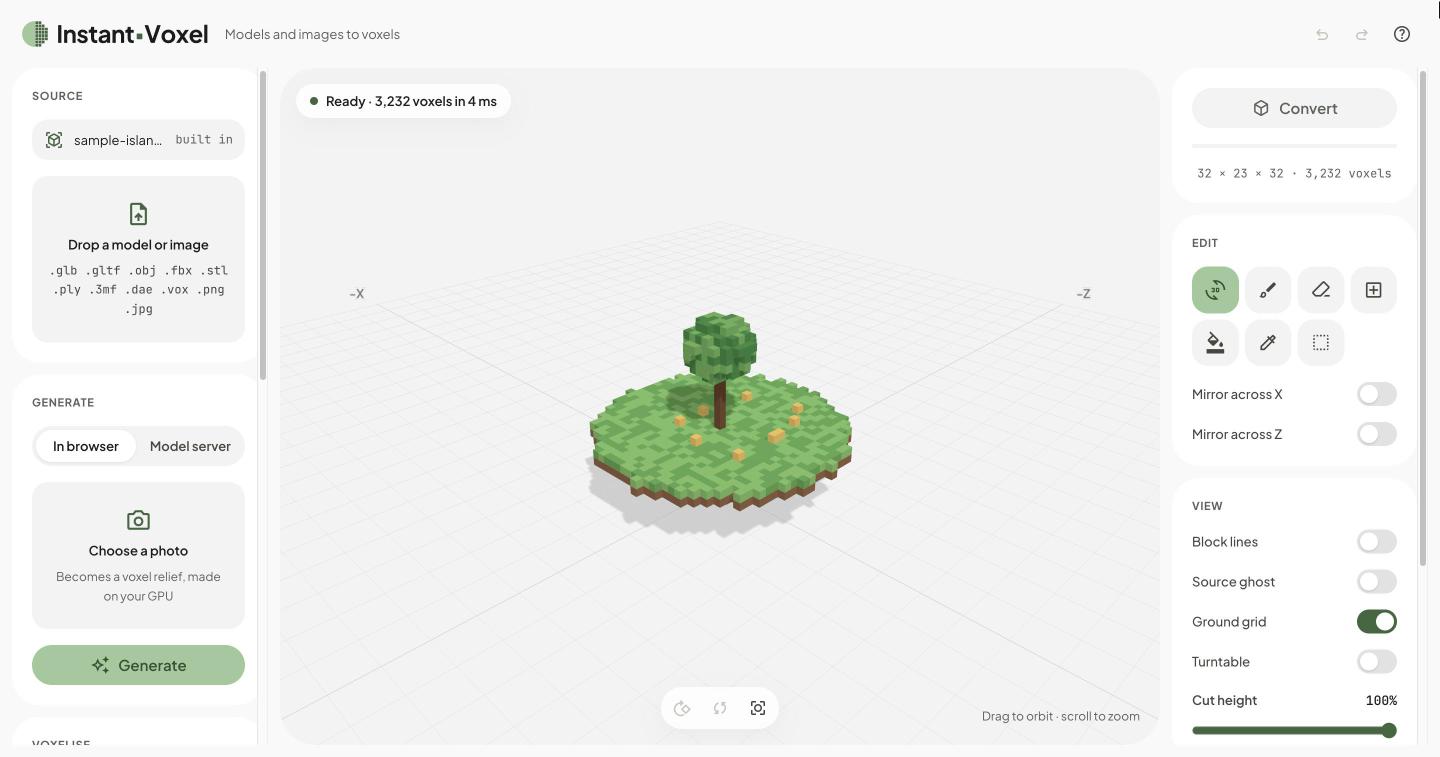
.vox file onto the page, or pick files under Source. For a model in several
files, drop them together (.gltf with its .bin and textures, .obj with its .mtl).The page opens on a small sample island, so the editor and the exports can be tried straight away.
server/)..hex palette, with optional dithering.| Export | For | Notes |
|---|---|---|
.vox | MagicaVoxel | Grids over 256 on a side become a scene of several models |
.glb | Game engines | One mesh per 32³ chunk, the palette as a 256 × 1 texture, sized in metres |
.obj | Blender | Vertex colours, sized in metres |
.stl | 3D printing | Millimetres and Z up, one quad per face so there are no T-junctions |
.schem | Minecraft (WorldEdit, FAWE, Litematica) | Sponge Schematic v2; each colour becomes the nearest of 93 full blocks |
The voxel size in millimetres applies to .glb, .obj and .stl.
Needs Python 3 (or any static file server) and Node 22 for the tests. Rebuilding the kernel also needs Emscripten.
git clone https://github.com/thitichotk/instant-voxel.git
cd instant-voxel
python3 -m http.server -b 127.0.0.1 -d web 3000   # http://127.0.0.1:3000
node tests/run.mjs                                # the kernel and the pure modules
./build.sh                                        # rebuild web/voxelizer.js and .wasm from src/voxelizer.cpp
Python's server lets the browser cache files, so while editing keep DevTools open with Disable cache ticked. The
optional model server has its own setup in server/README.md.
Cloudflare Pages deploys web/ from main as it is (there is no build step), and each pull request gets a preview
link. The compiled kernel is committed, so rebuild and commit it whenever src/voxelizer.cpp changes.
loaders.js flattens the scene into one triangle mesh
with positions, UVs, vertex colours and materials, in world space.| Path | Role |
|---|---|
web/index.html, web/styles.css | The page and its layout |
web/tokens.css, web/components.css | The Instant-Voxel design system: moss on white, pill controls, Plus Jakarta Sans |
web/main.js | Sources, settings, editing and export |
web/preview.js | The three.js viewport: chunk meshes, picking, the ghost, the turntable |
web/loaders.js | Model files to three.js, then to the kernel's triangle mesh |
web/worker.js | Runs the kernel, image conversion, the AI depth model and meshing off the main thread |
src/voxelizer.cpp | The voxel kernel; build.sh compiles it to web/voxelizer.js and web/voxelizer.wasm |
web/mesher.js, web/editor.js, web/image.js | Greedy meshing; brush, box, fill and undo; images to voxels |
web/vox.js, web/schem.js, web/export.js | .vox in and out; .schem; .glb, .obj and .stl |
web/palettes.js, web/mc-blocks.js | Palettes, .hex files, and the Minecraft block colours |
web/ai.js | The in-browser depth and mask models, and the model-server client |
web/sample.vox | The sample island the page opens on |
server/ | The optional model server (FastAPI) |
tests/run.mjs | Self-checks for the kernel and the pure modules |
Built with plain HTML, CSS and ES modules, three.js 0.169, Emscripten (C++17 to WebAssembly) and transformers.js 4.3. There are no npm dependencies.
.vox files open with their models placed but not rotated; scene rotations are ignored.server/README.md.MIT © 2026 Thitichot K.
Not affiliated with Mojang, Microsoft, MagicaVoxel or Stability AI.
Turn 3D models and images into voxel art in the browser
See the code
Live: instantvoxel.thitichotk.com (desktop first, runs in your browser)
Instant-Voxel turns 3D models and images into voxel art in the browser. A C++ kernel compiled to WebAssembly does the voxelising and three.js reads the model files and draws the result. You can touch the voxels up one by one before exporting them for MagicaVoxel, Minecraft, a game engine or a 3D printer. Your files stay on your computer; only the optional model server receives anything, and you choose where it runs.
.vox file onto the page, or pick files under Source. For a model in several
files, drop them together (.gltf with its .bin and textures, .obj with its .mtl).The page opens on a small sample island, so the editor and the exports can be tried straight away.
server/)..hex palette, with optional dithering.| Export | For | Notes |
|---|---|---|
.vox | MagicaVoxel | Grids over 256 on a side become a scene of several models |
.glb | Game engines | One mesh per 32³ chunk, the palette as a 256 × 1 texture, sized in metres |
.obj | Blender | Vertex colours, sized in metres |
.stl | 3D printing | Millimetres and Z up, one quad per face so there are no T-junctions |
.schem | Minecraft (WorldEdit, FAWE, Litematica) | Sponge Schematic v2; each colour becomes the nearest of 93 full blocks |
The voxel size in millimetres applies to .glb, .obj and .stl.
Needs Python 3 (or any static file server) and Node 22 for the tests. Rebuilding the kernel also needs Emscripten.
git clone https://github.com/thitichotk/instant-voxel.git
cd instant-voxel
python3 -m http.server -b 127.0.0.1 -d web 3000   # http://127.0.0.1:3000
node tests/run.mjs                                # the kernel and the pure modules
./build.sh                                        # rebuild web/voxelizer.js and .wasm from src/voxelizer.cpp
Python's server lets the browser cache files, so while editing keep DevTools open with Disable cache ticked. The
optional model server has its own setup in server/README.md.
Cloudflare Pages deploys web/ from main as it is (there is no build step), and each pull request gets a preview
link. The compiled kernel is committed, so rebuild and commit it whenever src/voxelizer.cpp changes.
loaders.js flattens the scene into one triangle mesh
with positions, UVs, vertex colours and materials, in world space.| Path | Role |
|---|---|
web/index.html, web/styles.css | The page and its layout |
web/tokens.css, web/components.css | The Instant-Voxel design system: moss on white, pill controls, Plus Jakarta Sans |
web/main.js | Sources, settings, editing and export |
web/preview.js | The three.js viewport: chunk meshes, picking, the ghost, the turntable |
web/loaders.js | Model files to three.js, then to the kernel's triangle mesh |
web/worker.js | Runs the kernel, image conversion, the AI depth model and meshing off the main thread |
src/voxelizer.cpp | The voxel kernel; build.sh compiles it to web/voxelizer.js and web/voxelizer.wasm |
web/mesher.js, web/editor.js, web/image.js | Greedy meshing; brush, box, fill and undo; images to voxels |
web/vox.js, web/schem.js, web/export.js | .vox in and out; .schem; .glb, .obj and .stl |
web/palettes.js, web/mc-blocks.js | Palettes, .hex files, and the Minecraft block colours |
web/ai.js | The in-browser depth and mask models, and the model-server client |
web/sample.vox | The sample island the page opens on |
server/ | The optional model server (FastAPI) |
tests/run.mjs | Self-checks for the kernel and the pure modules |
Built with plain HTML, CSS and ES modules, three.js 0.169, Emscripten (C++17 to WebAssembly) and transformers.js 4.3. There are no npm dependencies.
.vox files open with their models placed but not rotated; scene rotations are ignored.server/README.md.MIT © 2026 Thitichot K.
Not affiliated with Mojang, Microsoft, MagicaVoxel or Stability AI.



