
AI LEGO Builder: Turn images into 3D buildable LEGO sets with instructions.
See the codeSee what people are saying
README
BrickBuilder
Use AI to design LEGO® models.
Turn any image or text prompt into a buildable LEGO®-compatible brick model.





What it does
Upload a photo or type a prompt, and BrickBuilder turns it into a real brick build:
- Image or text in — start from any picture, or describe what you want.
- 3D reconstruction — a Trellis or SAM-3D model converts the subject into a solid shape.
- Voxelization - 3D model is voxelized if using Trellis, or gotten directly from the SAM3D stream.
- Brick optimization — an optimizer packs the voxels into real LEGO®-compatible parts.
- Build it — explore the model in 3D, follow the instructions, download the LDR/MPD, or order the parts.
Generation time is typically under 30 seconds when SAM3D is used.
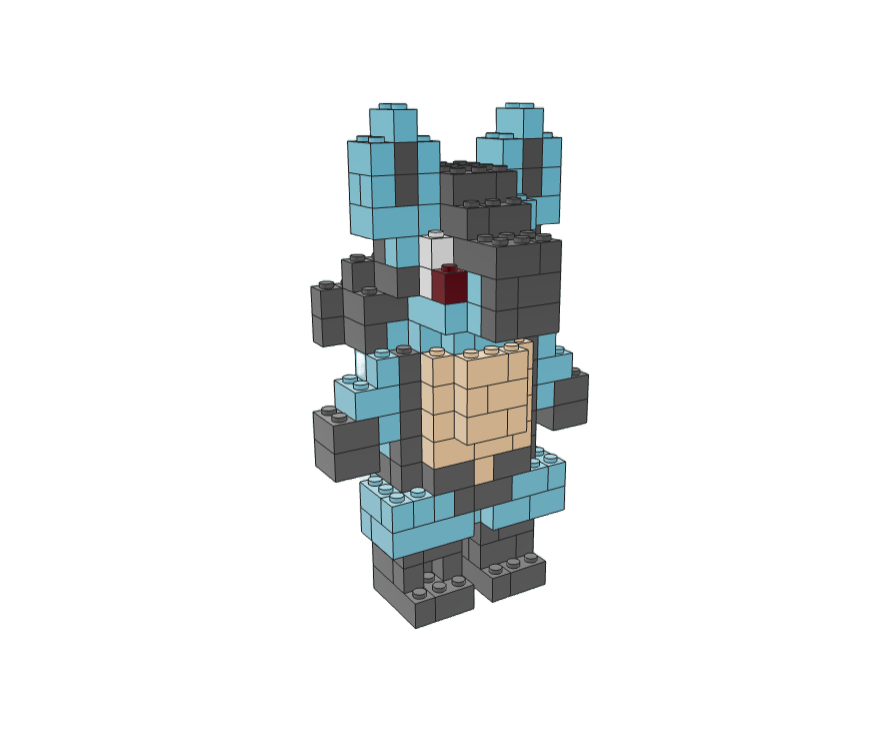
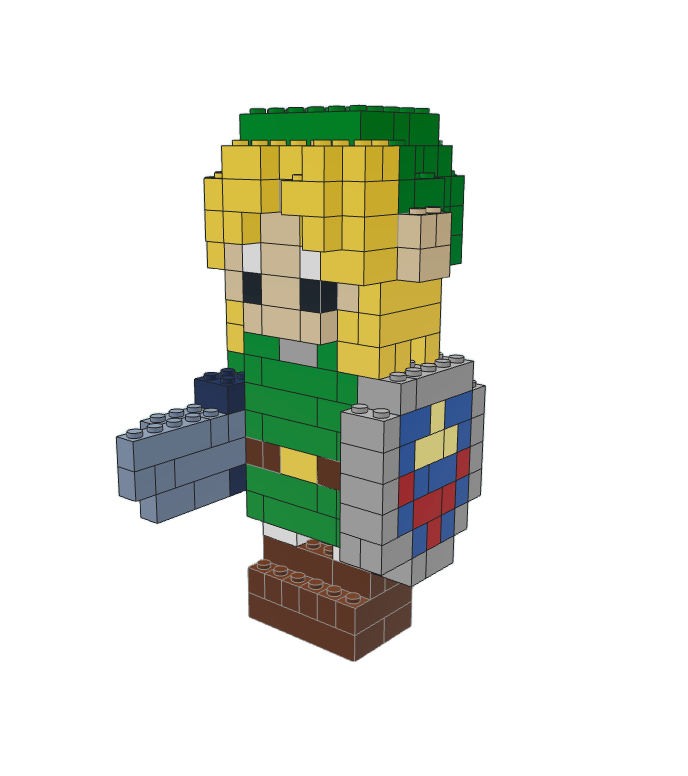
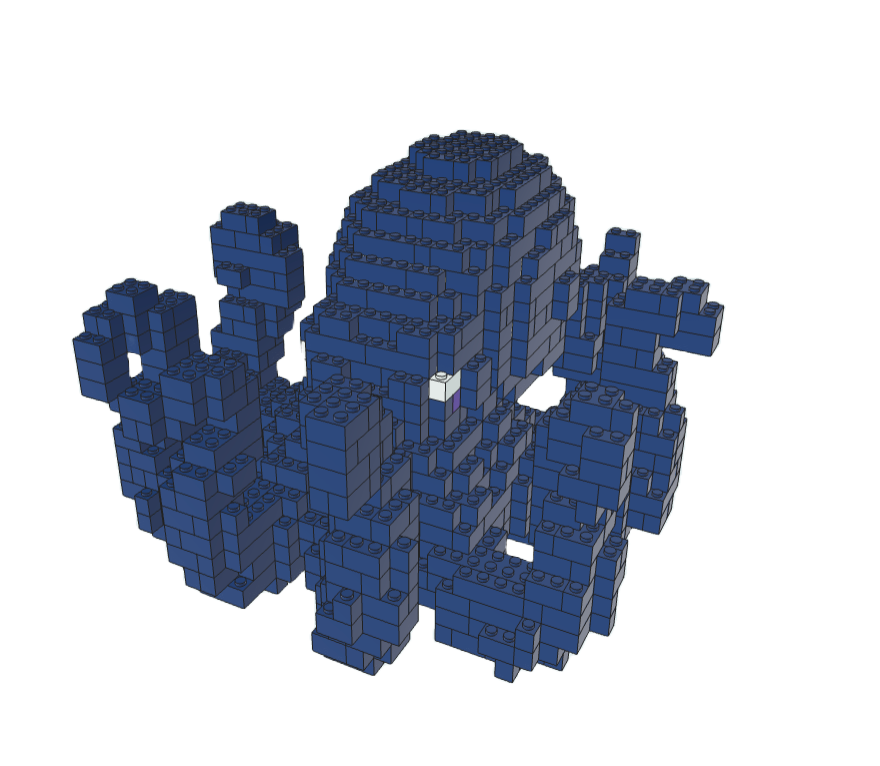
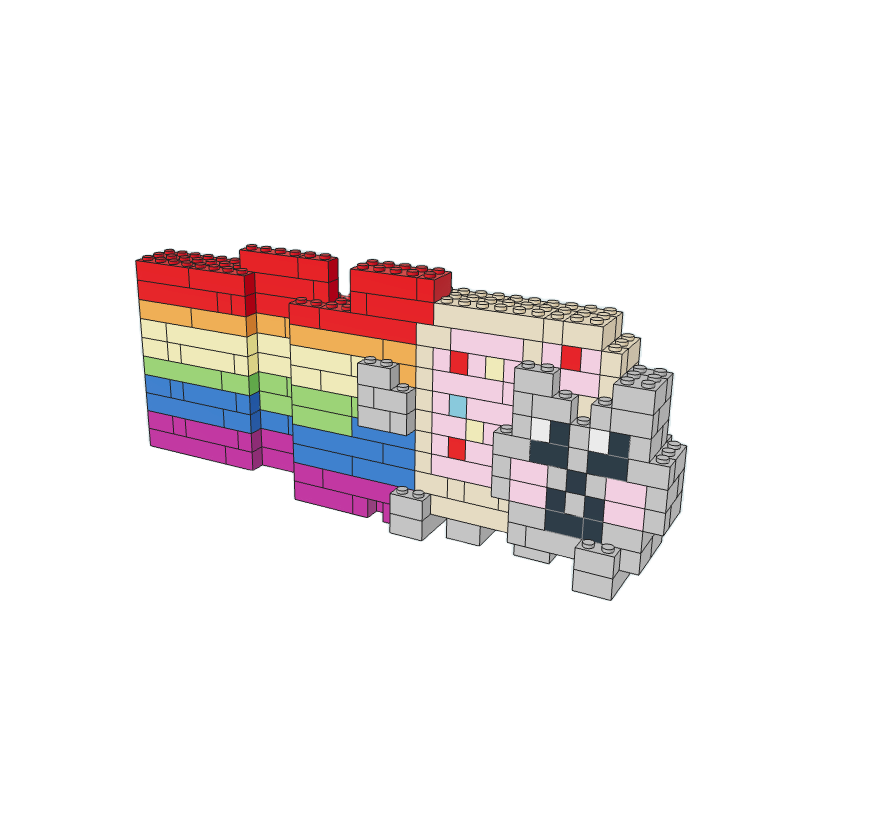
Examples
Project layout
| Folder | What it is | Stack |
|---|---|---|
frontend/ | Web app: upload, 3D viewer, instructions, checkout | React, Vite, TypeScript, Three.js, Tailwind, Supabase, Stripe |
mobile/ | iOS-first native shell reusing every web-app feature | Expo, React Native, EAS, WebView |
backend/ | API that converts images/text into brick models | fal.ai Python, FastAPI, Open3D, Trimesh |
serverless/ | Image-to-3D voxel generation worker | SAM-3D, Docker, RunPod |
Running locally
🤖 AI Setup Prompt — Copy this prompt to your AI assistant to set up the project automatically
Help me set up and run the BrickBuilder project locally.

Prerequisites I need installed:
- Python 3.10+
- Node.js 18+

Steps:
1. Copy backend/.env-example to backend/.env and frontend/.env-example to frontend/.env
2. Ask me for my fal.ai API key and set FAL_KEY in backend/.env
3. Run `npm install` to install dependencies (uses Python venv/pip for backend, npm for frontend)
4. Run `npm start` to start both the backend API (port 8002) and frontend dev server. The backend server will take a minute to start the first run as it builds c++ executables.

The backend is a FastAPI server, frontend is React+Vite. Let me know if any dependencies are missing.
Prerequisites
| Requirement | Notes |
|---|---|
| Python 3.10+ | python.org/downloads |
| Node.js 18+ | nodejs.org |
| fal.ai account | Sign up at fal.ai and get an API key |
Environment setup
-
Copy the example env files:
cp backend/.env-example backend/.env cp frontend/.env-example frontend/.env -
Set your fal API key in
backend/.env:FAL_KEY=your_fal_api_key_here -
(Optional) Configure Supabase, Stripe, and other integrations in the
.envfiles as needed. A local postgres database will be spun up if supabase is not connected.
Install & run
npm install
npm start
Run these commands from the repository root. npm install creates backend/.venv and installs the pinned Python dependencies with pip, then installs the frontend dependencies. npm start launches both dev servers; Ctrl+C stops both, and if either server exits the other is stopped too. Python 3.10+ must be installed; if needed, set PYTHON to the path of your Python executable. uv is not required for local setup. You can also run just one server with npm run start:backend or npm run start:frontend.
Voxelization with SAM-3D produces better results than Trellis, but it runs as a separate worker that you host on RunPod. To enable it, deploy the SAM-3D image on RunPod
Since the LEGO pipeline only needs voxels, BrickBuilder streams SAM3D's geometry/appearance callbacks and stops after the final colored voxel output. This avoids the extra mesh decoding and GLB export step, reducing end-to-end generation time.
The SAM3D worker image is published publicly on Docker Hub as jjohnson5253/manifold-sam3d:latest, so you can deploy it on RunPod without building it yourself:
- In the RunPod Serverless console, create a new endpoint.
- Set the container image to
jjohnson5253/manifold-sam3d:latest(leave container registry auth blank — the image is public). - Pick a GPU with enough VRAM (an H100 is recommended for SAM-3D).
- Attach a network volume to the endpoint and mount it where the model weights are cached. The weights are large, so the volume keeps them warm across workers and avoids re-downloading them on every cold start, which makes the endpoint load much faster.
- Deploy, then copy the endpoint ID and your RunPod API key into
RUNPOD_ENDPOINT_IDandRUNPOD_API_KEYinbackend/.env.
See serverless/README.md if you want to build and push your own image instead.
Mobile app (iOS-first)
The Expo app in mobile/ wraps the deployed web app so generation,
the dashboard, generated-model view, ordering, and the block editor continue to
use the same frontend and backend business logic. It adds a small native
navigation shell, safe-area handling, upload permissions, and EAS build/submit
profiles. See mobile/README.md for local development and
TestFlight/App Store steps.
Testing
Pull requests run isolated backend and frontend test jobs in GitHub Actions. The tests mock external APIs and storage, so no production credentials are needed.
# Setup and startup scripts
npm test

# Backend
npm run install:backend
cd backend
.venv/bin/python -m pytest

# Frontend (unit tests and coverage gate)
cd ../frontend
npm ci
npm run test:coverage
Feedback agent flow
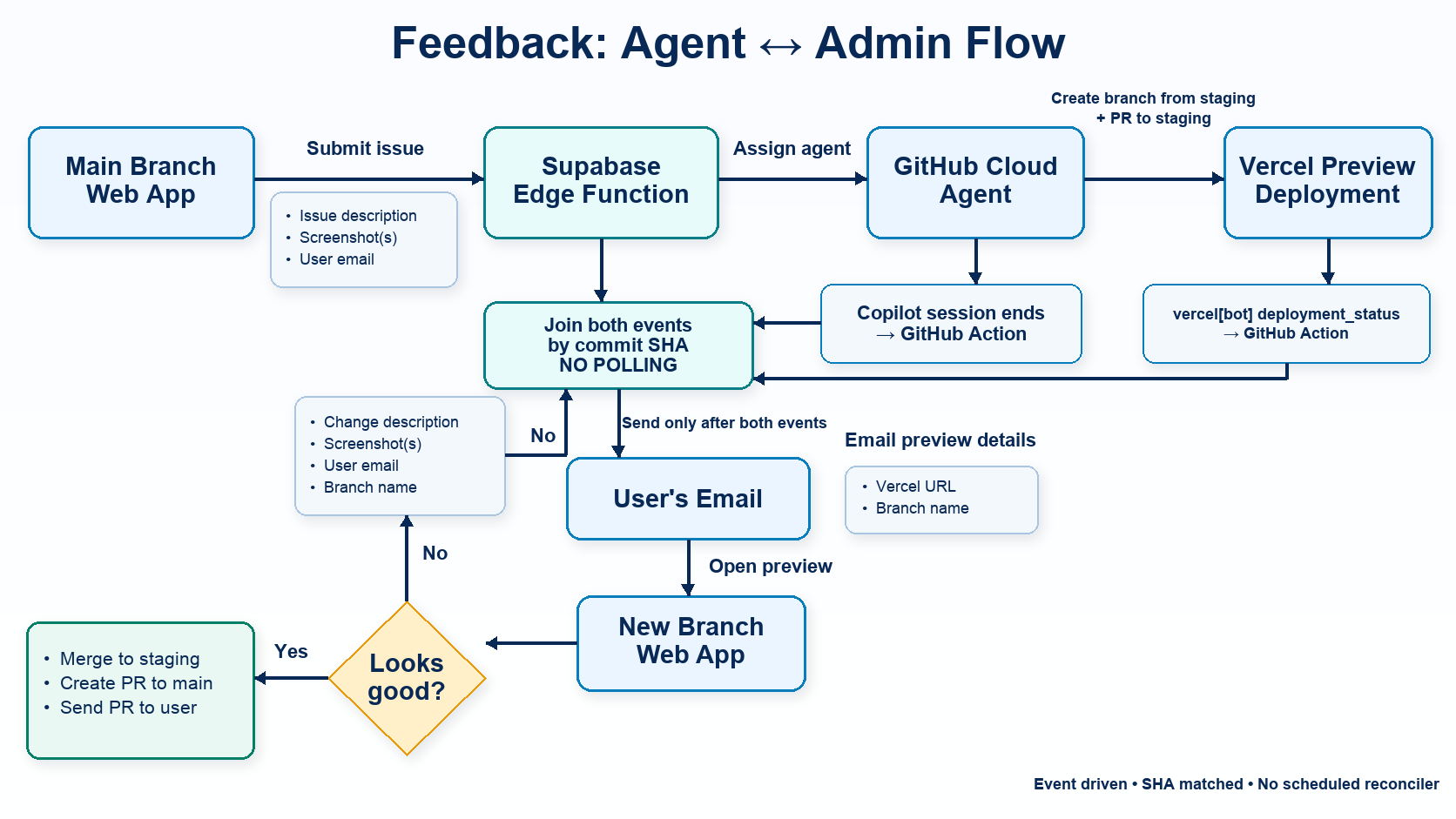
Authorized admins can submit a product change and screenshots in the app. A
Supabase Edge Function starts a Copilot task from staging; GitHub's
copilot_work_finished event and Vercel's successful Preview deployment are
joined by commit SHA before the requester receives an authenticated preview
link. Requests made in the iOS shell reuse the same flow, then create an
exact-commit EAS build, deliver it through TestFlight, and email the requester
when Apple marks it ready. Approval merges the feature PR into staging and
leaves a staging to main PR for human review. See
the setup and architecture guide.
Attributes
- Legolization: https://github.com/AvaLovelace1/BrickGPT/
- Image-to-3D Streaming: https://github.com/rehan-remade/Manifold
License
This project is licensed under the MIT License.
LEGO® is a trademark of the LEGO Group, which does not sponsor, authorize, or endorse this project
Similar repos


Languages
Python
49.6%
TypeScript
47.3%
CSS
1.1%
AI LEGO Builder: Turn images into 3D buildable LEGO sets with instructions.
See the codeSee what people are saying
README
BrickBuilder
Use AI to design LEGO® models.
Turn any image or text prompt into a buildable LEGO®-compatible brick model.
What it does
Upload a photo or type a prompt, and BrickBuilder turns it into a real brick build:
- Image or text in — start from any picture, or describe what you want.
- 3D reconstruction — a Trellis or SAM-3D model converts the subject into a solid shape.
- Voxelization - 3D model is voxelized if using Trellis, or gotten directly from the SAM3D stream.
- Brick optimization — an optimizer packs the voxels into real LEGO®-compatible parts.
- Build it — explore the model in 3D, follow the instructions, download the LDR/MPD, or order the parts.
Generation time is typically under 30 seconds when SAM3D is used.
Examples
Project layout
| Folder | What it is | Stack |
|---|---|---|
frontend/ | Web app: upload, 3D viewer, instructions, checkout | React, Vite, TypeScript, Three.js, Tailwind, Supabase, Stripe |
mobile/ | iOS-first native shell reusing every web-app feature | Expo, React Native, EAS, WebView |
backend/ | API that converts images/text into brick models | fal.ai Python, FastAPI, Open3D, Trimesh |
serverless/ | Image-to-3D voxel generation worker | SAM-3D, Docker, RunPod |
Running locally
🤖 AI Setup Prompt — Copy this prompt to your AI assistant to set up the project automatically
Help me set up and run the BrickBuilder project locally.

Prerequisites I need installed:
- Python 3.10+
- Node.js 18+

Steps:
1. Copy backend/.env-example to backend/.env and frontend/.env-example to frontend/.env
2. Ask me for my fal.ai API key and set FAL_KEY in backend/.env
3. Run `npm install` to install dependencies (uses Python venv/pip for backend, npm for frontend)
4. Run `npm start` to start both the backend API (port 8002) and frontend dev server. The backend server will take a minute to start the first run as it builds c++ executables.

The backend is a FastAPI server, frontend is React+Vite. Let me know if any dependencies are missing.
Prerequisites
| Requirement | Notes |
|---|---|
| Python 3.10+ | python.org/downloads |
| Node.js 18+ | nodejs.org |
| fal.ai account | Sign up at fal.ai and get an API key |
Environment setup
-
Copy the example env files:
cp backend/.env-example backend/.env cp frontend/.env-example frontend/.env -
Set your fal API key in
backend/.env:FAL_KEY=your_fal_api_key_here -
(Optional) Configure Supabase, Stripe, and other integrations in the
.envfiles as needed. A local postgres database will be spun up if supabase is not connected.
Install & run
npm install
npm start
Run these commands from the repository root. npm install creates backend/.venv and installs the pinned Python dependencies with pip, then installs the frontend dependencies. npm start launches both dev servers; Ctrl+C stops both, and if either server exits the other is stopped too. Python 3.10+ must be installed; if needed, set PYTHON to the path of your Python executable. uv is not required for local setup. You can also run just one server with npm run start:backend or npm run start:frontend.
Voxelization with SAM-3D produces better results than Trellis, but it runs as a separate worker that you host on RunPod. To enable it, deploy the SAM-3D image on RunPod
Since the LEGO pipeline only needs voxels, BrickBuilder streams SAM3D's geometry/appearance callbacks and stops after the final colored voxel output. This avoids the extra mesh decoding and GLB export step, reducing end-to-end generation time.
The SAM3D worker image is published publicly on Docker Hub as jjohnson5253/manifold-sam3d:latest, so you can deploy it on RunPod without building it yourself:
- In the RunPod Serverless console, create a new endpoint.
- Set the container image to
jjohnson5253/manifold-sam3d:latest(leave container registry auth blank — the image is public). - Pick a GPU with enough VRAM (an H100 is recommended for SAM-3D).
- Attach a network volume to the endpoint and mount it where the model weights are cached. The weights are large, so the volume keeps them warm across workers and avoids re-downloading them on every cold start, which makes the endpoint load much faster.
- Deploy, then copy the endpoint ID and your RunPod API key into
RUNPOD_ENDPOINT_IDandRUNPOD_API_KEYinbackend/.env.
See serverless/README.md if you want to build and push your own image instead.
Mobile app (iOS-first)
The Expo app in mobile/ wraps the deployed web app so generation,
the dashboard, generated-model view, ordering, and the block editor continue to
use the same frontend and backend business logic. It adds a small native
navigation shell, safe-area handling, upload permissions, and EAS build/submit
profiles. See mobile/README.md for local development and
TestFlight/App Store steps.
Testing
Pull requests run isolated backend and frontend test jobs in GitHub Actions. The tests mock external APIs and storage, so no production credentials are needed.
# Setup and startup scripts
npm test

# Backend
npm run install:backend
cd backend
.venv/bin/python -m pytest

# Frontend (unit tests and coverage gate)
cd ../frontend
npm ci
npm run test:coverage
Feedback agent flow
Authorized admins can submit a product change and screenshots in the app. A
Supabase Edge Function starts a Copilot task from staging; GitHub's
copilot_work_finished event and Vercel's successful Preview deployment are
joined by commit SHA before the requester receives an authenticated preview
link. Requests made in the iOS shell reuse the same flow, then create an
exact-commit EAS build, deliver it through TestFlight, and email the requester
when Apple marks it ready. Approval merges the feature PR into staging and
leaves a staging to main PR for human review. See
the setup and architecture guide.
Attributes
- Legolization: https://github.com/AvaLovelace1/BrickGPT/
- Image-to-3D Streaming: https://github.com/rehan-remade/Manifold
License
This project is licensed under the MIT License.
LEGO® is a trademark of the LEGO Group, which does not sponsor, authorize, or endorse this project
Similar repos
Languages
Python
49.6%
TypeScript
47.3%
CSS
1.1%