
The ideal project to supervise your Beam application (Elixir/Erlang/Gleam)
See the codeREADME
DeployEx
Who supervises the supervisor (of your application)?


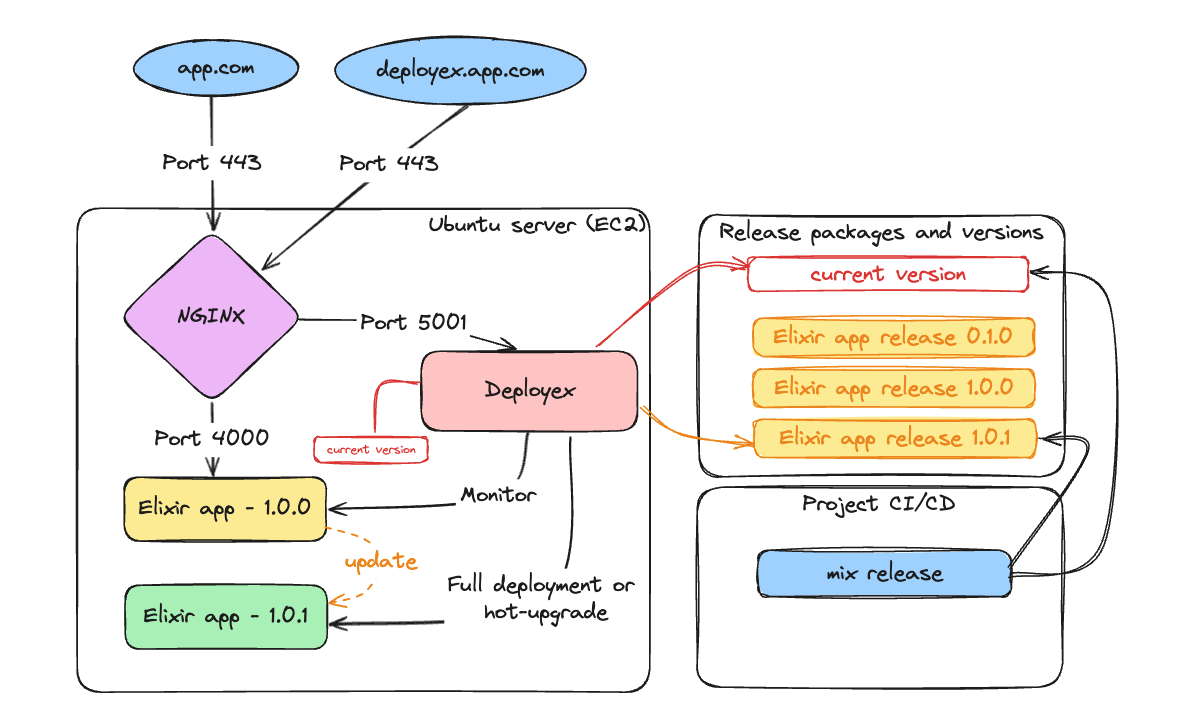
DeployEx is a lightweight tool designed for managing deployments for Beam applications (Elixir, Gleam and Erlang) without relying on additional deployment tools like Docker or Kubernetes. Its primary goal is to utilize the release package for executing full deployments or hot-upgrades, depending on the package's content, while leveraging OTP distribution for monitoring and data extraction.
DeployEx acts as a central deployment runner, gathering crucial deployment data such as the current version and release package contents. The content of the release package enables it to run for a full deployment or a hot-upgrade. Meanwhile, on the development front, your CI/CD pipeline takes charge of crafting and updating packages for the target release. This integration ensures that DeployEx is always equipped with the latest packages, ready to facilitate deployments.
To learn more about DeployEx and the advantages of removing containerized abstractions from your deployment process, check out the talk Bring back the power of Beam deployments with DeployEx at CODE BEAM America 2025.
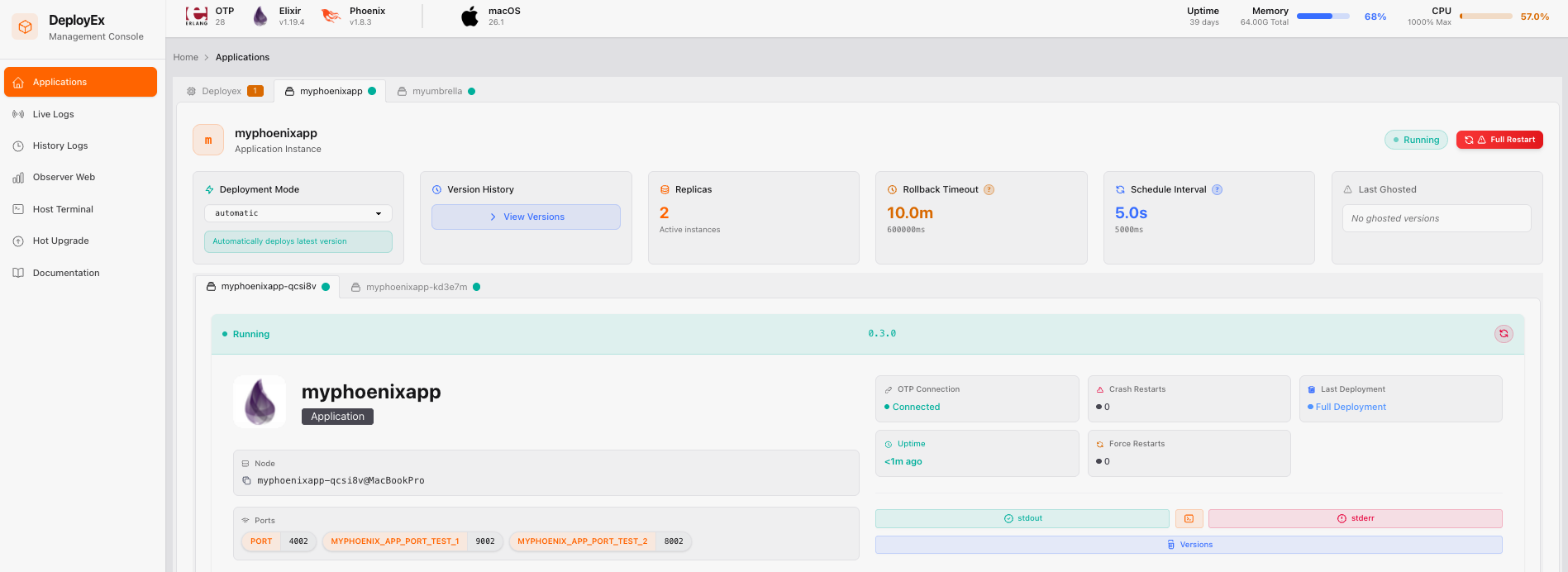
Upon deployment, the following dashboard becomes available, providing easy access to logs, the terminal, process observability, and much more for both DeployEx and the monitored applications.
🔉 Features
- Monitors multiple Beam application nodes (Elixir/Erlang/Gleam) and automatically restarts them if they crash for any reason.
- Includes a backoff delay restart mechanism to prevent excessive restarts.
- Performs full deployments based solely on the release files generated by:
mix releasefor Elixir.gleam exportfor Gleam.rebar3 as prod tarfor Erlang.
- Supports hot code reloading for:
- Elixir application (and libraries) using the Jellyfish library.
- Elixir umbrella applications (and libraries) using the Jellyfish library.
- Erlang application using the rebar3_appup_plugin plugin.
- DeployEx (and libraries) itself (Isn't that awesome?)
- Supports the following cloud providers (with terraform files):
- Amazon Web Services (AWS)
- Google Cloud Platform (GCP)
- Supports automatic TLS certificate provisioning, deployment, and renewal:
- Supports Let's Encrypt ACME v2 with DNS-01 challenge validation.
- Supports fully automated per-application certificate lifecycle management directly from the YAML configuration.
- Supports wildcard domain certificates (e.g.
*.example.com) through configurable DNS providers (rout353 and cloudflare). - Supports automatic certificate import/export workflows for cloud providers such as AWS ACM/Route53.
- Automatically renews certificates before expiration with configurable renewal thresholds and validation intervals.
- Supports external alerting for deployment lifecycle events via configurable notification channels:
- Webhook — generic HTTP POST to any endpoint (n8n, Zapier, custom scripts, etc.)
- Slack — formatted Incoming Webhook messages with per-event emoji and mrkdwn.
- PagerDuty — Events API v2 incidents with automatic severity mapping.
- Supports local environments for non-cloud deployments
- Provides rollback functionality if a monitored app version remains unstable for 10 minutes (time configurable).
- Rolled-back monitored app versions are ghosted, preventing their redeployment.
- Ensures all nodes remain connected to the OTP distribution, including DeployEx itself.
- Supports OTP distribution with mutual TLS (mTLS) for secure monitoring of apps and DeployEx.
- Provides the ability to run pre-commands prior deployments for Database migrations or any other eval command.
- Provides a friendly UI that only authenticated users can access.
- Allows setting a previously configured version in the UI, enabling DeployEx to enforce deployment of a specific version.
- Supports individual application restarts via the UI, including DeployEx itself.
- Shows the URLs each connected application is serving on, read from the application itself.
- Provides easy access to the application shell:
- IEx shell for monitored Elixir apps and DeployEx.
- Erlang shell for monitored Gleam/Erlang apps.
- Provides monitoring and restart mechanisms for host memory thresholds and beam statistics, including port, atom, and process metrics, for monitored applications and for DeployEx itself.
- Supports access to live log files (stdout and stderr) for both monitored apps and DeployEx.
- Supports observability for all connected applications via Observer Web.
- Supports safe tracing for all connected applications.
- Provides visualization of Host System memory and CPU usage.
- Provides easy access to the host shell (tmux).
- Provides script to be used with ubuntu/debian hosts to install/update and hotupgrade DeployEx.
- Provides status information per node:
- OTP connectivity
- Version history
- Last deployment status
- Number of crash restarts
- Number of forced restarts
- And much more ...
[!NOTE] All examples and deployments in this project use NGINX as a reverse proxy and load balancer. However, DeployEx does not depend on NGINX; it is used here purely for convenience.
⚠️ What is coming next?
📁 Getting Started
Since OTP distribution is heavily used between the DeployEx and Monitored Applications, users must ensure that both applications are running the same OTP Major version to prevent compatibility issues and system malfunctions. DeployEx releases will contain binaries for the following OTP versions:
| DeployEx version |  |  |
|---|---|---|
| 0.10.0 | 28.5.0.6 | 29.0.6 |
Running the application
[!TIP] Common dev tasks are wrapped in a
Makefile— runmake helpto list them (make start,make test, andmake dev-appto build and publish a local sample app for monitoring/log testing).
You can kickstart the setup with the following commands, the default number of replicas is 3:
mix deps.get
iex --sname deployex --cookie cookie -S mix phx.server
Erlang/OTP 29 [erts-17.0.6] [source] [64-bit] [smp:10:10] [ds:10:10:10] [async-threads:1] [jit]

[info] Initializing Host Memory Server
[info] Initializing HotUpgrade server
[info] Initializing Engine Server for myphoenixapp
[info] Initializing ConfigWatcher for YAML configuration
[info] Initializing Watchdog Server
[info] Running DeployexWeb.Endpoint with Bandit 1.12.5 at 127.0.0.1:5001 (http)
[info] Access DeployexWeb.Endpoint at http://localhost:5001
Interactive Elixir (1.20.4) - press Ctrl+C to exit (type h() ENTER for help)
[watch] build finished, watching for changes...

Rebuilding...

Done in 993ms.
[error] Error downloading release version for myphoenixapp, reason: {:error, :enoent}
[warning] No versions set yet for myphoenixapp
Now you can visit localhost:5001 from your browser and enter the credentials for the admin user, username: admin password: deployex. You should expect the following dashboard:
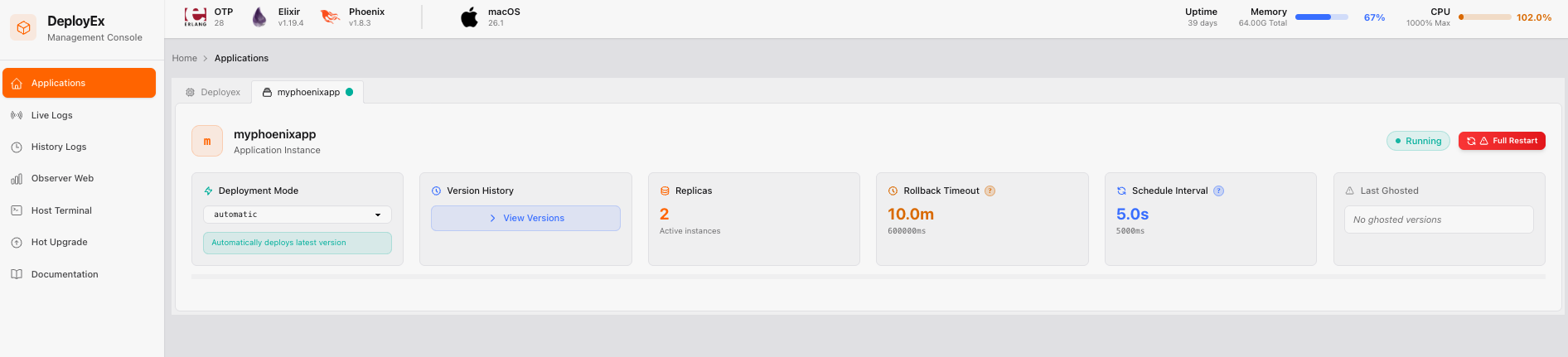
[!NOTE] The error message in the CLI is due to no monitored app is available to be deployed. If you want to proceed for a local test, follow the steps at Running DeployEx and Monitored app locally. Also, it is important to note that the distribution will be required so this is the reason to add
-sname deployexin the command
How DeployEx handles monitored application Version/Release
The DeployEx app expects a current.json file to be available, which contains version, hash information and any pre-command. This file is mandatory for full deployment and hot upgrades.
Version file (current.json)
Expected location in the release folder:
# production path
./{bucket}/versions/{monitored_app}/{env}/current.json
# local test path
/tmp/deployex/bucket/versions/{monitored_app}/{env}/current.json
Expected JSON format for current.json:
{
  "version": "1.0.0",
  "pre_commands": ["eval MyApp.Migrator.create", "eval MyApp.Migrator.migrate"], // optional field
  "hash": "local"
}
Once the file is captured, the deployment will start if no app is running or if the current app is running with a version that differs from the current.json file.
Release package
Expected location in the release folder:
# production path
./{bucket}/dist/{monitored_app}/{monitored_app}-{version}.tar.gz
# local test path
/tmp/deployex/bucket/dist/{monitored_app}/{monitored_app}-{version}.tar.gz
🛠️ Production Information
Environment Variables
DeployEx application typically requires a few environment variables to be defined for proper operation. Ensure that you have the following environment variables set when running in production:
| ENV NAME | EXAMPLE | SOURCE | DESCRIPTION |
|---|---|---|---|
| DEPLOYEX_SECRET_KEY_BASE | 42otsNl...Fpq3dIJ02 | aws, gcp or env secrets | secret key used for encryption |
| DEPLOYEX_ERLANG_COOKIE | cookie | aws, gcp or env secrets | erlang cookie |
| DEPLOYEX_ADMIN_HASHED_PASSWORD | 2b1...42ASi | aws, gcp or env secrets | Hashed admin password for authentication |
| DEPLOYEX_CONFIG_YAML_PATH | /home/ubuntu/deployex.yaml | system ENV | Yaml configuration for Deployex and Monitored application |
| DEPLOYEX_OTP_TLS_CERT_PATH | /usr/local/share/ca-certificates | system ENV | If using mTLS, the certificate PATH is needed |
Once DeployEx runs, it fetches the configuration from the YAML file described in the session YAML Management.
[!NOTE] For local testing, these variables are not expected or set to default values.
☁️ Cloud Providers
DeployEx offers a comprehensive set of Terraform examples for programmatically deploying in AWS and GCP, including detailed step-by-step setup instructions:
- AWS deployment for Elixir (without ecto)
- AWS deployment for Elixir (with ecto and certificate manager)
- GCP deployment for Elixir
- AWS deployment for Gleam
Installation
If you intend to install DeployEx directly on an Ubuntu/Debian server, you can utilize the deployex script provided in the release package. This script is able to install, update and hot-upgrade DeployEx. However, you have the option to manually compile and install DeployEx on your target system.
For more information, please check YAML Management details.
🔥 Hot-Upgrades
For more information, please check Hot-Upgrades details.
Pre-commands (Elixir only)
Your application will likely require database commands, such as migrations. DeployEx handles these through pre-commands specified in current.json under the pre_commands field. These commands will be executed in the order they are listed, before the application starts. If a pre-command is needed and does not require changes to the application itself, using pre-commands in conjunction with hotupgrade is ideal to avoid unnecessary downtime.
🔐 Secrets Requirements
DeployEx retrieves its secrets from a Secret Manager (AWS, GCP, or local) through the config provider. The configuration requires specifying the adapter and the secret path. These information is set via the YAML File, For example:
# Secrets Management
secrets_adapter: "aws"                                   # Secrets adapter: aws, gcp or env
secrets_path: "deployex-myphoenixapp-prod-secrets"       # Secret path to retrieve from
Within the secrets, the following key-value pairs are required:
| ENV NAME | EXAMPLE | DESCRIPTION |
|---|---|---|
| DEPLOYEX_SECRET_KEY_BASE | 42otsNl...Fpq3dIJ02 | mix phx.gen.secret |
| DEPLOYEX_ERLANG_COOKIE | my-cookie | erlang cookie |
| DEPLOYEX_ADMIN_HASHED_PASSWORD | $2b$1...5PAYTZjNQ42ASi | Bcrypt.hash_pwd_salt("my-pass") |
🏠 Local Development & Application Setup
Learn how to run DeployEx locally and configure your application for mTLS, hot upgrades, and metrics:
- Elixir Application - No Ecto
- Elixir Application - With Ecto
- Elixir Umbrella Application - No Ecto
- Gleam Application
- Erlang Application
Recommended Supporting Repositories
For local testing and development, check out these complementary repositories:
🔨 Throubleshooting
Accessing DeployEx logs
# production
tail -f /var/log/deployex/deployex-stdout.log
tail -f /var/log/deployex/deployex-stderr.log
# local test
# not available when running as dev env
Connecting to the DeployEx IEX CLI
export RELEASE_COOKIE=cookie
# production
/opt/deployex/bin/deployex remote
# local test
# not available when running as dev env
Accessing monitored app logs
export monitored_app_name=myphoenixapp
export sname="${monitored_app_name}-2l0rkp"

# production
tail -f /var/log/monitored-apps/${monitored_app_name}/${sname}-stdout.log
tail -f /var/log/monitored-apps/${monitored_app_name}/${sname}-stderr.log
# local test
tail -f /tmp/deployex/varlog/${monitored_app_name}/${sname}-stdout.log
tail -f /tmp/deployex/varlog/${monitored_app_name}/${sname}-stderr.log
Connecting to the monitored app manually
Elixir
export monitored_app_name=myphoenixapp
export sname="${monitored_app_name}-v636fq"
export RELEASE_NODE=${sname}
export RELEASE_COOKIE=cookie
# production
/var/lib/deployex/service/${monitored_app_name}/${sname}/current/bin/${monitored_app_name} remote
# local test
/tmp/deployex/varlib/service/${monitored_app_name}/${sname}/current/bin/${monitored_app_name} remote
Gleam
export monitored_app_name=mygleamapp
export sname="${monitored_app_name}-v636fq"
export hostname=???? # From the local machine
export ssl_options="-proto_dist inet_tls -ssl_dist_optfile /tmp/inet_tls.conf" # If enabled
# production
erl -remsh ${sname}@${hostname} -setcookie cookie ${ssl_options}
# local test
erl -remsh ${sname}@${hostname} -setcookie cookie ${ssl_options}
Erlang
export monitored_app_name=myerlangapp
export sname="${monitored_app_name}-ly8tmo"
export RELX_REPLACE_OS_VARS=true
export RELEASE_NODE=${sname}
export RELEASE_COOKIE=cookie
export RELEASE_SSL_OPTIONS="-proto_dist inet_tls -ssl_dist_optfile /tmp/inet_tls.conf" # If enabled
# production
/var/lib/deployex/service/${monitored_app_name}/${sname}/current/bin/${monitored_app_name} remote_console
# local test
/tmp/deployex/varlib/service/${monitored_app_name}/${sname}/current/bin/${monitored_app_name} remote_console
❓How DeployEx handles services
DeployEx operates by monitoring applications and versions using folders and files, treating the monitored app as a service:
# test environment
/tmp/deployex/varlib/service/${monitored_app}/${sname}/previous/${monitored_app}
/tmp/deployex/varlib/service/${monitored_app}/${sname}/new/${monitored_app}
/tmp/deployex/varlib/service/${monitored_app}/${sname}/current/${monitored_app}
# production environment
/var/lib/deployex/service/${monitored_app}/${sname}/previous/${monitored_app}
/var/lib/deployex/service/${monitored_app}/${sname}/new/${monitored_app}
/var/lib/deployex/service/${monitored_app}/${sname}/current/${monitored_app}
🗨️ Getting involved
We'd love to have you contribute to the project! Follow @deployex on social media to stay updated:






You can also follow the creator/mantainer Thiago Esteves:
☕ Support the project
DeployEx is free and open source. If it's useful to you, consider supporting its development:
- GitHub Sponsors: github.com/sponsors/thiagoesteves
- BTC Wallet Address:
bc1q3f5eyg2qlun6dc4l597yuyygmkh2qvklwecw8r - ETH Wallet Address:
0x151C3A7AE305b3fF385c7EEce72C6c4E23dE05Fa
©️ Copyright and License
Copyright (c) 2024-2026, Thiago Esteves.
DeployEx source code is licensed under the MIT License.
Contributors


Similar repos


Languages
Elixir
89.1%
HCL
4.9%
Smarty
3.4%
Shell
1.2%
The ideal project to supervise your Beam application (Elixir/Erlang/Gleam)
See the codeREADME
DeployEx
Who supervises the supervisor (of your application)?
DeployEx is a lightweight tool designed for managing deployments for Beam applications (Elixir, Gleam and Erlang) without relying on additional deployment tools like Docker or Kubernetes. Its primary goal is to utilize the release package for executing full deployments or hot-upgrades, depending on the package's content, while leveraging OTP distribution for monitoring and data extraction.
DeployEx acts as a central deployment runner, gathering crucial deployment data such as the current version and release package contents. The content of the release package enables it to run for a full deployment or a hot-upgrade. Meanwhile, on the development front, your CI/CD pipeline takes charge of crafting and updating packages for the target release. This integration ensures that DeployEx is always equipped with the latest packages, ready to facilitate deployments.
To learn more about DeployEx and the advantages of removing containerized abstractions from your deployment process, check out the talk Bring back the power of Beam deployments with DeployEx at CODE BEAM America 2025.
Upon deployment, the following dashboard becomes available, providing easy access to logs, the terminal, process observability, and much more for both DeployEx and the monitored applications.
🔉 Features
- Monitors multiple Beam application nodes (Elixir/Erlang/Gleam) and automatically restarts them if they crash for any reason.
- Includes a backoff delay restart mechanism to prevent excessive restarts.
- Performs full deployments based solely on the release files generated by:
mix releasefor Elixir.gleam exportfor Gleam.rebar3 as prod tarfor Erlang.
- Supports hot code reloading for:
- Elixir application (and libraries) using the Jellyfish library.
- Elixir umbrella applications (and libraries) using the Jellyfish library.
- Erlang application using the rebar3_appup_plugin plugin.
- DeployEx (and libraries) itself (Isn't that awesome?)
- Supports the following cloud providers (with terraform files):
- Amazon Web Services (AWS)
- Google Cloud Platform (GCP)
- Supports automatic TLS certificate provisioning, deployment, and renewal:
- Supports Let's Encrypt ACME v2 with DNS-01 challenge validation.
- Supports fully automated per-application certificate lifecycle management directly from the YAML configuration.
- Supports wildcard domain certificates (e.g.
*.example.com) through configurable DNS providers (rout353 and cloudflare). - Supports automatic certificate import/export workflows for cloud providers such as AWS ACM/Route53.
- Automatically renews certificates before expiration with configurable renewal thresholds and validation intervals.
- Supports external alerting for deployment lifecycle events via configurable notification channels:
- Webhook — generic HTTP POST to any endpoint (n8n, Zapier, custom scripts, etc.)
- Slack — formatted Incoming Webhook messages with per-event emoji and mrkdwn.
- PagerDuty — Events API v2 incidents with automatic severity mapping.
- Supports local environments for non-cloud deployments
- Provides rollback functionality if a monitored app version remains unstable for 10 minutes (time configurable).
- Rolled-back monitored app versions are ghosted, preventing their redeployment.
- Ensures all nodes remain connected to the OTP distribution, including DeployEx itself.
- Supports OTP distribution with mutual TLS (mTLS) for secure monitoring of apps and DeployEx.
- Provides the ability to run pre-commands prior deployments for Database migrations or any other eval command.
- Provides a friendly UI that only authenticated users can access.
- Allows setting a previously configured version in the UI, enabling DeployEx to enforce deployment of a specific version.
- Supports individual application restarts via the UI, including DeployEx itself.
- Shows the URLs each connected application is serving on, read from the application itself.
- Provides easy access to the application shell:
- IEx shell for monitored Elixir apps and DeployEx.
- Erlang shell for monitored Gleam/Erlang apps.
- Provides monitoring and restart mechanisms for host memory thresholds and beam statistics, including port, atom, and process metrics, for monitored applications and for DeployEx itself.
- Supports access to live log files (stdout and stderr) for both monitored apps and DeployEx.
- Supports observability for all connected applications via Observer Web.
- Supports safe tracing for all connected applications.
- Provides visualization of Host System memory and CPU usage.
- Provides easy access to the host shell (tmux).
- Provides script to be used with ubuntu/debian hosts to install/update and hotupgrade DeployEx.
- Provides status information per node:
- OTP connectivity
- Version history
- Last deployment status
- Number of crash restarts
- Number of forced restarts
- And much more ...
[!NOTE] All examples and deployments in this project use NGINX as a reverse proxy and load balancer. However, DeployEx does not depend on NGINX; it is used here purely for convenience.
⚠️ What is coming next?
📁 Getting Started
Since OTP distribution is heavily used between the DeployEx and Monitored Applications, users must ensure that both applications are running the same OTP Major version to prevent compatibility issues and system malfunctions. DeployEx releases will contain binaries for the following OTP versions:
| DeployEx version | | |
|---|---|---|
| 0.10.0 | 28.5.0.6 | 29.0.6 |
Running the application
[!TIP] Common dev tasks are wrapped in a
Makefile— runmake helpto list them (make start,make test, andmake dev-appto build and publish a local sample app for monitoring/log testing).
You can kickstart the setup with the following commands, the default number of replicas is 3:
mix deps.get
iex --sname deployex --cookie cookie -S mix phx.server
Erlang/OTP 29 [erts-17.0.6] [source] [64-bit] [smp:10:10] [ds:10:10:10] [async-threads:1] [jit]

[info] Initializing Host Memory Server
[info] Initializing HotUpgrade server
[info] Initializing Engine Server for myphoenixapp
[info] Initializing ConfigWatcher for YAML configuration
[info] Initializing Watchdog Server
[info] Running DeployexWeb.Endpoint with Bandit 1.12.5 at 127.0.0.1:5001 (http)
[info] Access DeployexWeb.Endpoint at http://localhost:5001
Interactive Elixir (1.20.4) - press Ctrl+C to exit (type h() ENTER for help)
[watch] build finished, watching for changes...

Rebuilding...

Done in 993ms.
[error] Error downloading release version for myphoenixapp, reason: {:error, :enoent}
[warning] No versions set yet for myphoenixapp
Now you can visit localhost:5001 from your browser and enter the credentials for the admin user, username: admin password: deployex. You should expect the following dashboard:
[!NOTE] The error message in the CLI is due to no monitored app is available to be deployed. If you want to proceed for a local test, follow the steps at Running DeployEx and Monitored app locally. Also, it is important to note that the distribution will be required so this is the reason to add
-sname deployexin the command
How DeployEx handles monitored application Version/Release
The DeployEx app expects a current.json file to be available, which contains version, hash information and any pre-command. This file is mandatory for full deployment and hot upgrades.
Version file (current.json)
Expected location in the release folder:
# production path
./{bucket}/versions/{monitored_app}/{env}/current.json
# local test path
/tmp/deployex/bucket/versions/{monitored_app}/{env}/current.json
Expected JSON format for current.json:
{
  "version": "1.0.0",
  "pre_commands": ["eval MyApp.Migrator.create", "eval MyApp.Migrator.migrate"], // optional field
  "hash": "local"
}
Once the file is captured, the deployment will start if no app is running or if the current app is running with a version that differs from the current.json file.
Release package
Expected location in the release folder:
# production path
./{bucket}/dist/{monitored_app}/{monitored_app}-{version}.tar.gz
# local test path
/tmp/deployex/bucket/dist/{monitored_app}/{monitored_app}-{version}.tar.gz
🛠️ Production Information
Environment Variables
DeployEx application typically requires a few environment variables to be defined for proper operation. Ensure that you have the following environment variables set when running in production:
| ENV NAME | EXAMPLE | SOURCE | DESCRIPTION |
|---|---|---|---|
| DEPLOYEX_SECRET_KEY_BASE | 42otsNl...Fpq3dIJ02 | aws, gcp or env secrets | secret key used for encryption |
| DEPLOYEX_ERLANG_COOKIE | cookie | aws, gcp or env secrets | erlang cookie |
| DEPLOYEX_ADMIN_HASHED_PASSWORD | 2b1...42ASi | aws, gcp or env secrets | Hashed admin password for authentication |
| DEPLOYEX_CONFIG_YAML_PATH | /home/ubuntu/deployex.yaml | system ENV | Yaml configuration for Deployex and Monitored application |
| DEPLOYEX_OTP_TLS_CERT_PATH | /usr/local/share/ca-certificates | system ENV | If using mTLS, the certificate PATH is needed |
Once DeployEx runs, it fetches the configuration from the YAML file described in the session YAML Management.
[!NOTE] For local testing, these variables are not expected or set to default values.
☁️ Cloud Providers
DeployEx offers a comprehensive set of Terraform examples for programmatically deploying in AWS and GCP, including detailed step-by-step setup instructions:
- AWS deployment for Elixir (without ecto)
- AWS deployment for Elixir (with ecto and certificate manager)
- GCP deployment for Elixir
- AWS deployment for Gleam
Installation
If you intend to install DeployEx directly on an Ubuntu/Debian server, you can utilize the deployex script provided in the release package. This script is able to install, update and hot-upgrade DeployEx. However, you have the option to manually compile and install DeployEx on your target system.
For more information, please check YAML Management details.
🔥 Hot-Upgrades
For more information, please check Hot-Upgrades details.
Pre-commands (Elixir only)
Your application will likely require database commands, such as migrations. DeployEx handles these through pre-commands specified in current.json under the pre_commands field. These commands will be executed in the order they are listed, before the application starts. If a pre-command is needed and does not require changes to the application itself, using pre-commands in conjunction with hotupgrade is ideal to avoid unnecessary downtime.
🔐 Secrets Requirements
DeployEx retrieves its secrets from a Secret Manager (AWS, GCP, or local) through the config provider. The configuration requires specifying the adapter and the secret path. These information is set via the YAML File, For example:
# Secrets Management
secrets_adapter: "aws"                                   # Secrets adapter: aws, gcp or env
secrets_path: "deployex-myphoenixapp-prod-secrets"       # Secret path to retrieve from
Within the secrets, the following key-value pairs are required:
| ENV NAME | EXAMPLE | DESCRIPTION |
|---|---|---|
| DEPLOYEX_SECRET_KEY_BASE | 42otsNl...Fpq3dIJ02 | mix phx.gen.secret |
| DEPLOYEX_ERLANG_COOKIE | my-cookie | erlang cookie |
| DEPLOYEX_ADMIN_HASHED_PASSWORD | $2b$1...5PAYTZjNQ42ASi | Bcrypt.hash_pwd_salt("my-pass") |
🏠 Local Development & Application Setup
Learn how to run DeployEx locally and configure your application for mTLS, hot upgrades, and metrics:
- Elixir Application - No Ecto
- Elixir Application - With Ecto
- Elixir Umbrella Application - No Ecto
- Gleam Application
- Erlang Application
Recommended Supporting Repositories
For local testing and development, check out these complementary repositories:
🔨 Throubleshooting
Accessing DeployEx logs
# production
tail -f /var/log/deployex/deployex-stdout.log
tail -f /var/log/deployex/deployex-stderr.log
# local test
# not available when running as dev env
Connecting to the DeployEx IEX CLI
export RELEASE_COOKIE=cookie
# production
/opt/deployex/bin/deployex remote
# local test
# not available when running as dev env
Accessing monitored app logs
export monitored_app_name=myphoenixapp
export sname="${monitored_app_name}-2l0rkp"

# production
tail -f /var/log/monitored-apps/${monitored_app_name}/${sname}-stdout.log
tail -f /var/log/monitored-apps/${monitored_app_name}/${sname}-stderr.log
# local test
tail -f /tmp/deployex/varlog/${monitored_app_name}/${sname}-stdout.log
tail -f /tmp/deployex/varlog/${monitored_app_name}/${sname}-stderr.log
Connecting to the monitored app manually
Elixir
export monitored_app_name=myphoenixapp
export sname="${monitored_app_name}-v636fq"
export RELEASE_NODE=${sname}
export RELEASE_COOKIE=cookie
# production
/var/lib/deployex/service/${monitored_app_name}/${sname}/current/bin/${monitored_app_name} remote
# local test
/tmp/deployex/varlib/service/${monitored_app_name}/${sname}/current/bin/${monitored_app_name} remote
Gleam
export monitored_app_name=mygleamapp
export sname="${monitored_app_name}-v636fq"
export hostname=???? # From the local machine
export ssl_options="-proto_dist inet_tls -ssl_dist_optfile /tmp/inet_tls.conf" # If enabled
# production
erl -remsh ${sname}@${hostname} -setcookie cookie ${ssl_options}
# local test
erl -remsh ${sname}@${hostname} -setcookie cookie ${ssl_options}
Erlang
export monitored_app_name=myerlangapp
export sname="${monitored_app_name}-ly8tmo"
export RELX_REPLACE_OS_VARS=true
export RELEASE_NODE=${sname}
export RELEASE_COOKIE=cookie
export RELEASE_SSL_OPTIONS="-proto_dist inet_tls -ssl_dist_optfile /tmp/inet_tls.conf" # If enabled
# production
/var/lib/deployex/service/${monitored_app_name}/${sname}/current/bin/${monitored_app_name} remote_console
# local test
/tmp/deployex/varlib/service/${monitored_app_name}/${sname}/current/bin/${monitored_app_name} remote_console
❓How DeployEx handles services
DeployEx operates by monitoring applications and versions using folders and files, treating the monitored app as a service:
# test environment
/tmp/deployex/varlib/service/${monitored_app}/${sname}/previous/${monitored_app}
/tmp/deployex/varlib/service/${monitored_app}/${sname}/new/${monitored_app}
/tmp/deployex/varlib/service/${monitored_app}/${sname}/current/${monitored_app}
# production environment
/var/lib/deployex/service/${monitored_app}/${sname}/previous/${monitored_app}
/var/lib/deployex/service/${monitored_app}/${sname}/new/${monitored_app}
/var/lib/deployex/service/${monitored_app}/${sname}/current/${monitored_app}
🗨️ Getting involved
We'd love to have you contribute to the project! Follow @deployex on social media to stay updated:
You can also follow the creator/mantainer Thiago Esteves:
☕ Support the project
DeployEx is free and open source. If it's useful to you, consider supporting its development:
- GitHub Sponsors: github.com/sponsors/thiagoesteves
- BTC Wallet Address:
bc1q3f5eyg2qlun6dc4l597yuyygmkh2qvklwecw8r - ETH Wallet Address:
0x151C3A7AE305b3fF385c7EEce72C6c4E23dE05Fa
©️ Copyright and License
Copyright (c) 2024-2026, Thiago Esteves.
DeployEx source code is licensed under the MIT License.
Similar repos
Contributors
Languages
Elixir
89.1%
HCL
4.9%
Smarty
3.4%
Shell
1.2%