
Find and remove secrets your AI coding agents left on disk
Swift
0
2 commits
updated Oct 2, 2026
See what people are saying
README

Agent Scrub
Find and remove secrets stored in AI coding-agent history files.
AI coding tools such as Claude Code, Codex, Cursor, and others store local conversation history, including prompts, transcripts, and tool output. These files can sometimes contain API keys, tokens, and other secrets in plaintext.
Agent Scrub scans these local history files, identifies potential secrets, and can redact them in place. All scanning and redaction happens locally. No data is uploaded.
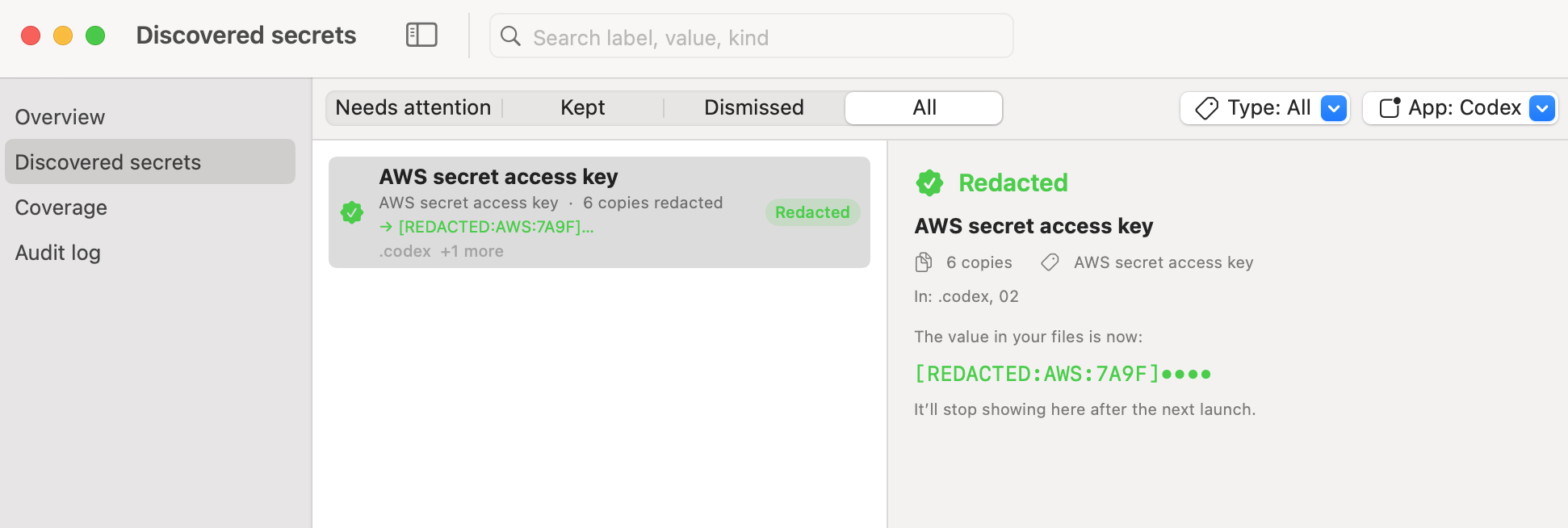
Agent Scrub can detect and redact multiple copies of the same secret across an agent's history.
Supported tools
- Claude Code
- Codex
- Gemini CLI
- Cursor
- GitHub Copilot
- Windsurf
- Cody
- Cline
- Aider
- Continue
- Pi
- VS Code forks that use the same chat storage format
What it scans
Agent Scrub only scans conversation-related files, including:
- Prompts
- Transcripts
- Tool output
- Saved memory
It does not scan or modify configuration or credential files. Examples of files it will not touch:
- Codex
auth.json - Continue
config.yaml - Project
.envfiles - Editor secret storage
- Other files used by tools to store active credentials
This separation is intentional. A secret stored in a transcript is an additional copy of that secret. Removing the transcript copy does not affect the credential the tool uses for authentication. Agent Scrub only redacts copies found in conversation history — it does not modify active credentials.
If you want to inspect the potential impact of a leaked credential, you can also use geiger, a read-only tool for checking what a credential may have access to.
Install
Requires macOS 14 or later.
Download
Download the latest AgentScrub-*.zip from GitHub Releases, unzip it, then run:
xattr -dr com.apple.quarantine AgentScrub.app
open AgentScrub.app
Agent Scrub is currently unsigned, so macOS may quarantine the downloaded app. The xattr command removes
that quarantine flag. You can also right-click the app and choose Open → Open.
Release builds are universal and support both Apple Silicon and Intel Macs.
Build from source
Requires Xcode 16 and Swift 6.
./tools/app/bundle.sh
open .build/AgentScrub.app
Permissions
On first launch, Agent Scrub may request access to Keychain and local files.
Keychain
Agent Scrub creates a random per-install key and stores it in your login Keychain. This key is used to fingerprint detected secrets so Agent Scrub's own database does not need to store secret values in plaintext. It only accesses its own Keychain item. Choosing Always Allow prevents repeated Keychain prompts.
Files
Agent Scrub needs permission to read the local history files created by supported coding agents. macOS may show permission prompts for locations such as Documents, Desktop, or Downloads; these are required if agent history is stored there. All processing remains local.
Use
Agent Scrub runs from the macOS menu bar. It scans on launch and continues monitoring supported history locations for changes.
Overview — detected secrets grouped by type, project, and application, along with lifetime totals.
Discovered secrets — each detected secret and the files where copies were found. Available actions:
- Reveal — show the detected value.
- Decode JWT — inspect the contents of a detected JWT.
- Redact now — replace detected copies with a
[REDACTED:…]marker. - Always redact — automatically redact the secret if it appears again.
- Not a secret / Keep — dismiss the finding or leave it unchanged.
Coverage — files or locations that could not be scanned and the reason they were skipped. You can also exclude folders that you do not want Agent Scrub to scan.
Redaction behavior
Redaction modifies the original history files and cannot be undone automatically. Before and after writing a change, Agent Scrub re-checks and re-parses the affected file. Files that appear to be actively written by an agent are skipped temporarily and retried after the session ends.
Agent Scrub can only remove local copies that still exist on your Mac. It cannot remove data that has already been sent to a provider or copied into backups.
Command line
hgctl provides command-line access to the same operations — scanning, redaction, verification, policies,
and enforcement. Write operations are dry runs by default unless --yes is provided.
swift run hgctl scan
Your data
Agent Scrub does not make network connections. All scanning, state, and redaction remain on your Mac.
Application state is stored in ~/Library/Application Support/History Guard (detected findings and your
keep/redact decisions), the fingerprinting key in your login Keychain, and excluded folders in application
preferences. To remove Agent Scrub completely, delete:
- The Agent Scrub application
~/Library/Application Support/History Guard- The
io.adversis.history-guardKeychain item
Development
Build and test:
swift build && swift test
To publish a release:
git tag v1.0.0
git push --tags
Pushing a version tag triggers CI to build the universal .app and publish it to GitHub Releases.
Similar repos


Languages
Swift
94.3%
Python
5.4%
Find and remove secrets your AI coding agents left on disk
Swift
0
2 commits
updated Oct 2, 2026
See what people are saying
README
Agent Scrub
Find and remove secrets stored in AI coding-agent history files.
AI coding tools such as Claude Code, Codex, Cursor, and others store local conversation history, including prompts, transcripts, and tool output. These files can sometimes contain API keys, tokens, and other secrets in plaintext.
Agent Scrub scans these local history files, identifies potential secrets, and can redact them in place. All scanning and redaction happens locally. No data is uploaded.
Agent Scrub can detect and redact multiple copies of the same secret across an agent's history.
Supported tools
- Claude Code
- Codex
- Gemini CLI
- Cursor
- GitHub Copilot
- Windsurf
- Cody
- Cline
- Aider
- Continue
- Pi
- VS Code forks that use the same chat storage format
What it scans
Agent Scrub only scans conversation-related files, including:
- Prompts
- Transcripts
- Tool output
- Saved memory
It does not scan or modify configuration or credential files. Examples of files it will not touch:
- Codex
auth.json - Continue
config.yaml - Project
.envfiles - Editor secret storage
- Other files used by tools to store active credentials
This separation is intentional. A secret stored in a transcript is an additional copy of that secret. Removing the transcript copy does not affect the credential the tool uses for authentication. Agent Scrub only redacts copies found in conversation history — it does not modify active credentials.
If you want to inspect the potential impact of a leaked credential, you can also use geiger, a read-only tool for checking what a credential may have access to.
Install
Requires macOS 14 or later.
Download
Download the latest AgentScrub-*.zip from GitHub Releases, unzip it, then run:
xattr -dr com.apple.quarantine AgentScrub.app
open AgentScrub.app
Agent Scrub is currently unsigned, so macOS may quarantine the downloaded app. The xattr command removes
that quarantine flag. You can also right-click the app and choose Open → Open.
Release builds are universal and support both Apple Silicon and Intel Macs.
Build from source
Requires Xcode 16 and Swift 6.
./tools/app/bundle.sh
open .build/AgentScrub.app
Permissions
On first launch, Agent Scrub may request access to Keychain and local files.
Keychain
Agent Scrub creates a random per-install key and stores it in your login Keychain. This key is used to fingerprint detected secrets so Agent Scrub's own database does not need to store secret values in plaintext. It only accesses its own Keychain item. Choosing Always Allow prevents repeated Keychain prompts.
Files
Agent Scrub needs permission to read the local history files created by supported coding agents. macOS may show permission prompts for locations such as Documents, Desktop, or Downloads; these are required if agent history is stored there. All processing remains local.
Use
Agent Scrub runs from the macOS menu bar. It scans on launch and continues monitoring supported history locations for changes.
Overview — detected secrets grouped by type, project, and application, along with lifetime totals.
Discovered secrets — each detected secret and the files where copies were found. Available actions:
- Reveal — show the detected value.
- Decode JWT — inspect the contents of a detected JWT.
- Redact now — replace detected copies with a
[REDACTED:…]marker. - Always redact — automatically redact the secret if it appears again.
- Not a secret / Keep — dismiss the finding or leave it unchanged.
Coverage — files or locations that could not be scanned and the reason they were skipped. You can also exclude folders that you do not want Agent Scrub to scan.
Redaction behavior
Redaction modifies the original history files and cannot be undone automatically. Before and after writing a change, Agent Scrub re-checks and re-parses the affected file. Files that appear to be actively written by an agent are skipped temporarily and retried after the session ends.
Agent Scrub can only remove local copies that still exist on your Mac. It cannot remove data that has already been sent to a provider or copied into backups.
Command line
hgctl provides command-line access to the same operations — scanning, redaction, verification, policies,
and enforcement. Write operations are dry runs by default unless --yes is provided.
swift run hgctl scan
Your data
Agent Scrub does not make network connections. All scanning, state, and redaction remain on your Mac.
Application state is stored in ~/Library/Application Support/History Guard (detected findings and your
keep/redact decisions), the fingerprinting key in your login Keychain, and excluded folders in application
preferences. To remove Agent Scrub completely, delete:
- The Agent Scrub application
~/Library/Application Support/History Guard- The
io.adversis.history-guardKeychain item
Development
Build and test:
swift build && swift test
To publish a release:
git tag v1.0.0
git push --tags
Pushing a version tag triggers CI to build the universal .app and publish it to GitHub Releases.
Similar repos
Languages
Swift
94.3%
Python
5.4%