srp: slop rust port — a dare: read the Proof.
Play it: https://quake-srp.pages.dev (id's shareware episode, in the browser)
Browsers: tested on Linux in Chromium and Firefox, and played in Chrome on macOS and on an Android phone. Not yet tested: Safari, iPhone, iPad. Firefox has no Keyboard Lock, so there one Esc in fullscreen also leaves it. The game needs shared memory and worker threads; if the browser won't give them, the page says so.
| Classic | slop (the default) |
|---|---|
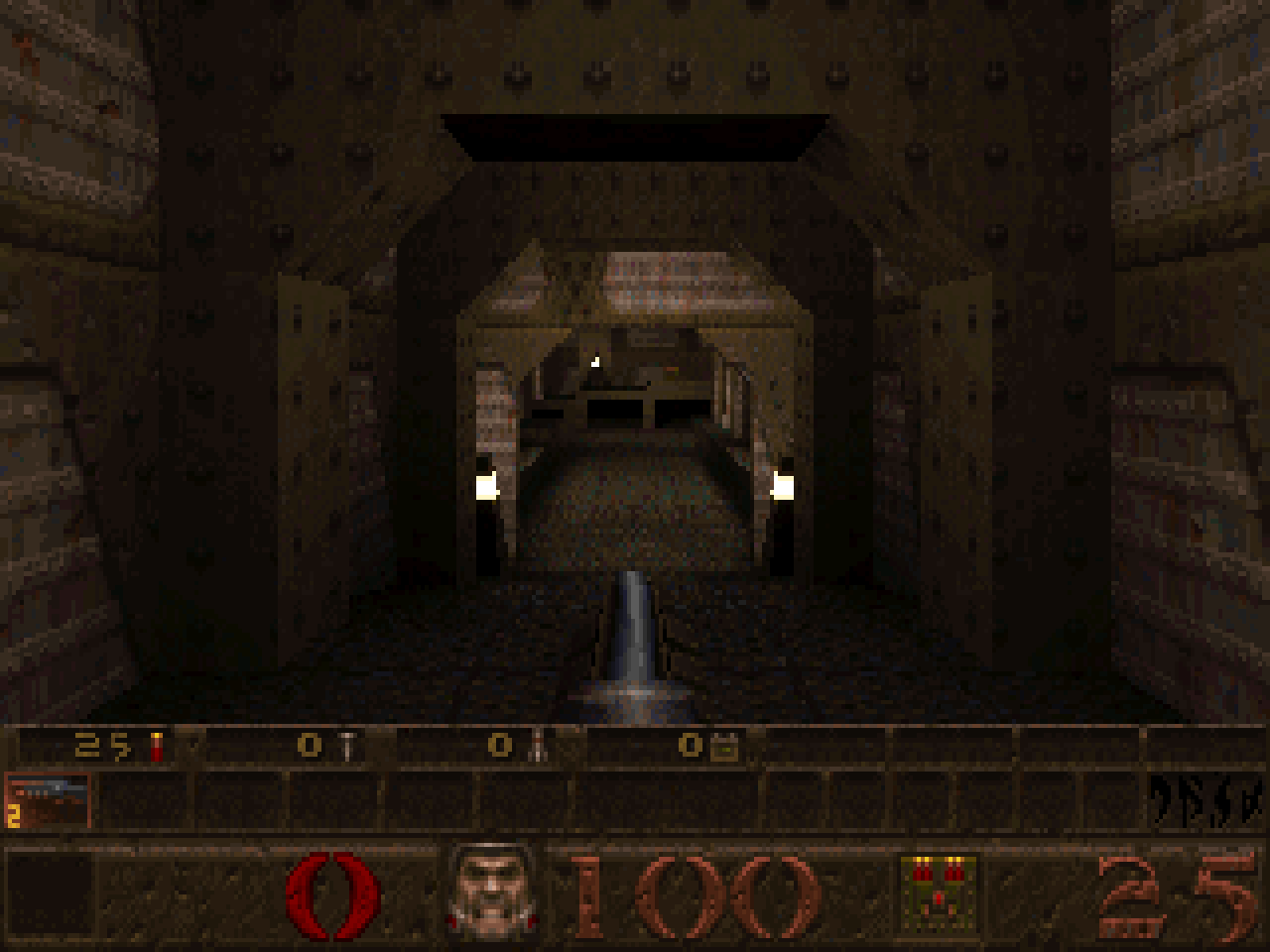 | 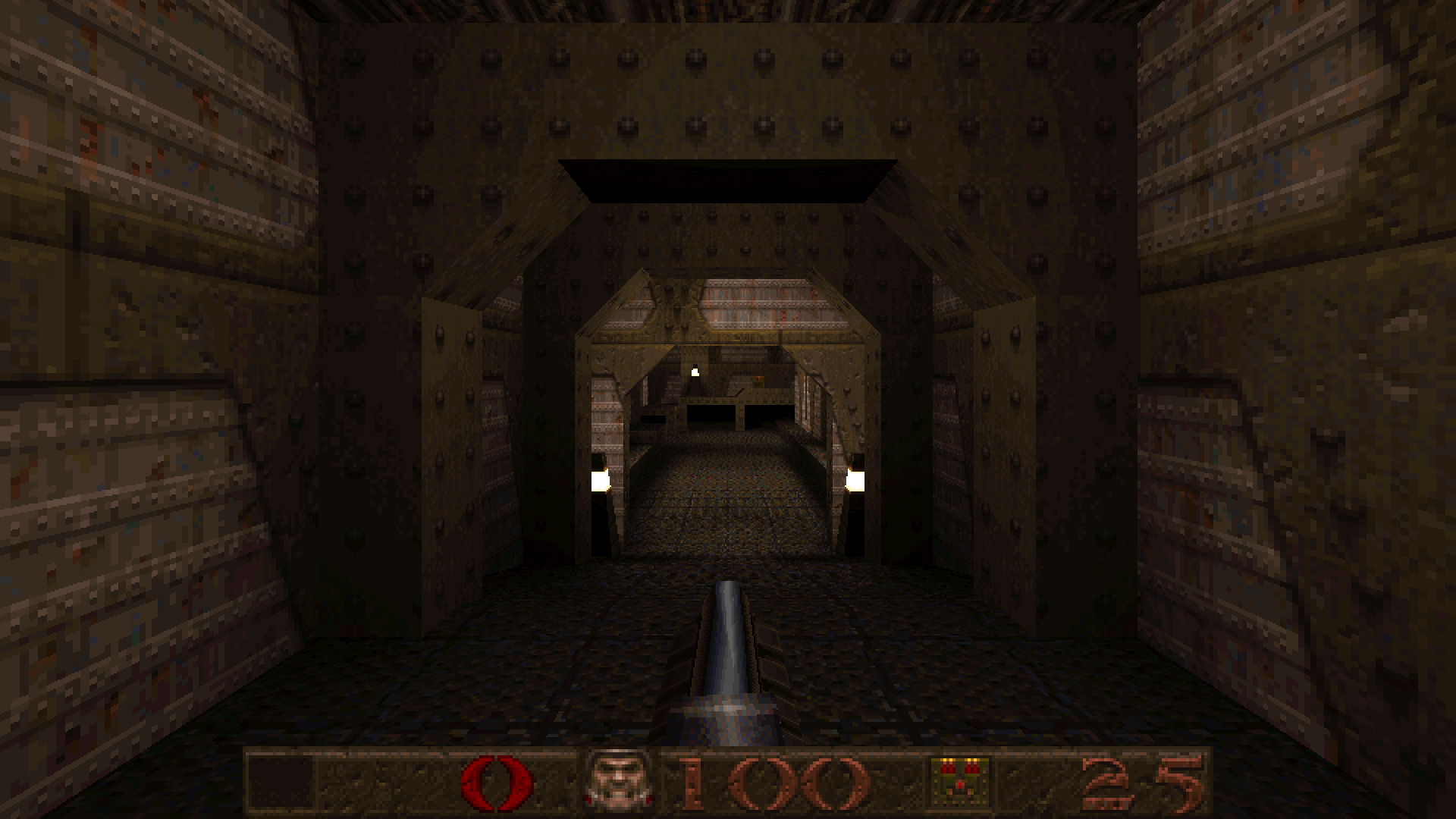 |
| 320x200 in a 4:3 frame, id's status bar, id's 72 fps cap | the window's shape and size in whole pixels (here 960x540 shown at 2x), no frame-rate cap |
Both are stills from quaketool shot, so the slop crosshair isn't drawn. The slop one is
quaketool shot quake-data/ID1/PAK0.PAK maps/e1m1.bsp out.ppm --res 960x540 --zoom 2 --video modern --scaled2d 1 --sbaroverlay 1,
which draws the preset's values: Screen size 110 (no inventory bar) and perspective every 8 pixels.
id Software's Quake (1996), ported to Rust from the WinQuake C source, with only the
standard library and no unsafe code. With every extra switched off it is id's game,
checked against id's own C: every pixel of the 3-D view in every view tried, monsters awake
among them, the sound mixer sample for sample, and in demo playback the camera, every entity
and every dynamic light, frame by frame. What is known to differ still is a list
(AUDIT.md, "Open"). Classic's checks run with one command (Proof). By default it is the same software renderer given a 2026 machine. It plays
in a browser; natively, quaketool runs the same engine without a window.
How it was built. Claude, Anthropic's model, wrote the code and the docs in Claude
Code; the user set the rules, played it and reported what was wrong. Most of the work ran
as fleets of agents, each on its own git branch with a written brief, and a chair agent
that merged a branch only after the full check passed. The reference is id's own C,
compiled headless from the WinQuake source (the "oracle"), so a claim that the port
matches id is a comparison that anyone can re-run. The user's rules, in order: zero
dependencies, no unsafe, and Classic is id's game, proven for anything touched.
STATUS.md keeps the history, round by round.
A port of WinQuake's single-player game, file by file:
There is no multiplayer.
Checked against id's code. id's C, built headless (the "oracle", in oracle/), is the
reference. With every extra switched off, the port and id's C agree on:
One command re-runs the shareware part of it; see Proof.
The slop options, and their preset. They show what software-rendered Quake looks like when the hardware is no longer the limit:
Plain Rust. #![forbid(unsafe_code)] is on every crate and binary. That includes the
browser build: an ordinary fn main() program (WASI) in a Web Worker, with no exports of
its own, no bindings and no JavaScript toolchain.
The commands are for a POSIX shell (sh, bash, zsh), run from the repository's root.
You need:
wasm32-wasip1-threads target;uv;curl, unzip and bsdtar (Debian's libarchive-tools);miniserve.1. The data. The repo has none. Fetch id's freely redistributable shareware (Quake 1.06) from a public mirror of id's original archive:
ci/fetch_shareware.sh
It needs curl, unzip and bsdtar (the zip holds an LZH archive), checks the hashes, and leaves
quake-data/ID1/PAK0.PAK, id's licence quake-data/SLICNSE.TXT and the archive itself,
quake-data/quake106.zip.
2. Build and assemble a directory with the page, the program and the pak:
rustup target add wasm32-wasip1-threads
(cd quake-wasm && cargo build --release --target wasm32-wasip1-threads)
D=$HOME/quake-web
(cd web && uv run python -c "import isolated; isolated.copy_page('$D')")
cp quake-wasm/target/wasm32-wasip1-threads/release/quake.wasm "$D/"
mkdir -p "$D/id1" && cp quake-data/ID1/PAK0.PAK "$D/id1/pak0.pak"
The target wasm32-wasip1 builds a single-threaded program instead. It runs in the same
page and needs less memory: add that target and copy its quake.wasm from
target/wasm32-wasip1/release/.
3. Serve it with two headers, and open http://localhost:8080/:
miniserve -p 8080 --index index.html \
  --header "Cross-Origin-Opener-Policy:same-origin" \
  --header "Cross-Origin-Embedder-Policy:require-corp" "$D"
The game uses shared memory, which browsers allow only on a cross-origin isolated page.
That needs those two headers and a secure context: https://, or localhost. To play from
another device, put the server behind anything that serves https. If a host can't send the
headers, the page's service worker adds them after one reload.
A public demo: web/publish.sh DIR builds the threads program and assembles DIR with the
page, the program, the shareware pak with id's licence beside it (id1/slicnse.txt), id's
original quake106.zip, and a _headers file that Cloudflare Pages and Netlify read for the
two headers and the caching. Upload DIR as it is.
You play with WASD and the mouse (click the game to capture the mouse), in either preset:
| key or input | does |
|---|---|
| Space | jump, or swim up |
| C | swim down |
| click | fire |
| 1–8 | choose a weapon |
| Esc | the menu |
~ | the console |
| Alt+Enter | fullscreen (and the bar's button, or the browser's F11); in fullscreen Esc is the menu, hold Esc to leave |
| F6 / F9 | quicksave / quickload (id's F-keys: F1 help, F2/F3 save/load, F4 options, F10 quit) |
A gamepad or a touch screen also works (a phone plays sideways only: held upright, a "turn your
phone sideways" screen covers the page and the game waits behind it). The mouse wheel switches weapons in slop only (id's
default.cfg leaves it unbound). The page's keys button lists them all. For id's own
1996 controls (the arrows, no mouse look, no gamepad, Always Run off) type idcontrols in
the console.
If the mouse turns too slowly on a Mac: recent macOS merges a fast gaming mouse's
movements and some are lost. Raise Options > Mouse Speed (sensitivity 20 in the console
goes past the slider), or set the mouse to a lower polling rate. Details:
web/PLATFORM.md.
Every difference from id's game is a named setting, one of the port's "slop options" (its name: quake-srp, the slop rust port). Two fixed presets set them: slop, the default, turns most of them on; Classic turns them off. The controls are the same in both.
| Classic | slop | |
|---|---|---|
| frame rate | id's 72 fps cap | a frame every display refresh (Frame rate cap: none, or 60 to 240 frames drawn a second, the game still every refresh); jumps, lifts, flashes and trails are stepped to match 72 Hz, within the tolerances FRAMERATE.md states |
| picture | a fixed mode (960x600 by default) in a 4:3 frame, id's 90° field of view | the window's own size and shape in whole pixels (1x, 2x on a touch screen; Video Options lists 1x to 4x with the size each gives), a wider view on wide screens |
| status bar, menus, console | 1:1, as id drew them; Screen size 100: the status bar with the inventory bar above it | scaled up by a whole number; Screen size starts one step larger, 110: the status bar without the inventory bar, so the HUD takes less of the screen |
| monsters | move in id's 0.1 s steps, and change pose ten times a second | glide between the steps, and blend between poses (the gun too) |
| lights | the flickering ones snap ten times a second; most torches and flames steady, as the map baked them | the flickering ones glide; the steady torches and flames flicker gently about their light (r_torchflicker, a strength) |
| controls | WASD, mouse look, Always Run, a twin-stick gamepad with rumble, touch controls (the same in both; idcontrols is id's default.cfg) | the same, plus the mouse wheel for weapons and a crosshair |
| sound | id's mixer at 11025 Hz | id's mixer at the device's rate, with four of id's bugs fixed |
| perspective | id's spans: exact every 16 pixels, affine in between | exact every 8 pixels along walls and liquids, id's own portable-C loop (Perspective span, r_perspspan: 64, 32, 16, 8, 4 or exact at every pixel; 32 on a phone and 64 at 1080p are about what 1996 looked like) |
The numbers the machine decides are picked once, at start, and shown as numbers, never
"auto": on a touch screen the game starts at 2x on four threads; elsewhere at 1x on every
thread. Neither caps the frame rate. A frame never gets bigger than the
browser build's memory holds: past it, the next pixel size (5K and 8K screens draw at 2x).
In both presets the renderer splits each frame across the CPU cores (r_threads), and the
picture is the same on any number of them.
Options (id's screen; the port's three rows last, after Video Options, where id's
"Reset to defaults" row is gone): Slop Options opens the settings, one page each for
Picture and sound, Motion and light (the torches' flicker is there) and Controls,
where every setting can be changed alone; the picture's size is chosen in Video Options.
Reset to Classic and Reset to slop set everything to that preset — keys, Options
(Screen size, Brightness, the volumes, the mouse), the video mode, every setting — after
asking; your saved games stay. The menus do not say where your settings stand or mark what
differs from a preset; the console's preset does, by name. The console's preset slop or
preset classic is the gentler switch: it sets the port's settings to the preset's and
keeps your keys and Options; the address's ?classic or ?slop does the same at a load,
when your settings were last set to the other one, so a bookmarked ?classic keeps what you
change on top of it. config.cfg, in the browser's storage, keeps the preset and only what
you changed from it.
AUDIT.md ("The slop options and the presets") lists every setting and why it
exists. The oracle compares Classic with id's 1996 keys too (idcontrols).
In either preset the page can be installed as an app, and it works offline. It also plays the registered game and the mission packs from your own copies (PLATFORM.md, "Your files").
 the page (web/)                          the program (quake.wasm, in a Web Worker)
 ───────────────                          ─────────────────────────────────────────
 keys, mouse, pad, touch  ── stdin ───▶   fn main(): wait for a tick, run one frame
 WebGL2 canvas            ◀── shared ──   8-bit pixels and a 256-colour palette
 AudioWorklet             ◀── shared ──   16-bit PCM from id's mixer, in a ring
 pak via HTTP, IndexedDB  ◀── WASI ───▶   std::fs: pak0.pak, s0.sav, config.cfg
Events go in on stdin. Frames and sound come back through memory that the page and the worker share.
quake-rs holds the game's systems.
Each frame it takes the player's input and returns three things: an 8-bit image, the
frame's colour shifts for its palette, and sound calls. A host adds the frame loop,
input routing, the files, the screen and the speakers. quake-wasm is the browser's
host; quaketool drives the same frames natively.quake-wasm has a main loop that reads
events from stdin and writes records to stdout. web/wasi.js is a small WASI host. It
lets the worker block between frames on Atomics.wait, and it serves the program's
files: the pak it fetched, plus the saves and config.cfg that the page keeps in
IndexedDB. Saves and the config are real files, written the way the C wrote them.snd_mix.c's code into a
ring it shares with an AudioWorklet.web/PLATFORM.md covers the protocol, shared memory, threads, sound, input, touch and offline play in detail.
uv run oracle/classic_check.py # prints ALL PASS
This runs the Classic preset through ten checks. Four compare the port with values recorded from a tree known to be right. Six run id's C next to the port:
| check | compares | against |
|---|---|---|
goldens | three reference renders (by hash) | recorded |
play | the browser's client run natively on id's demos and scripted walks (frame hashes) | recorded |
timedemo | id's benchmark: the frame counts | recorded |
census | a headless playthrough of all nine maps | recorded |
edicts | the entities' fields against id's server on all nine maps (the known differences, such as the player's edict number and random numbers, are recorded) | id's C |
oracle | the 3-D view, pixel by pixel, in four maps' first frames, with and without the entities | id's C |
exact | the 3-D view in hundreds of frames: each of the nine maps' first frames, turned, tilted and rolled, at two sizes; and the player moved among each map's monsters, awake, with every view once found differing, at id's 16- and 8-pixel spans; not one pixel may differ | id's C |
screen2d | the status bar, menus and console | id's C |
demolerp | demo playback, frame by frame | id's C |
sound | the mixer, sample by sample | id's C |
Which C. The oracle is id's WinQuake source built headless with gcc, in two builds. The
pixel checks (oracle, exact) run the build with SSE2 floats, where every float operation is
rounded to the type the C declares: that is what the source says, and what any conforming
compiler gives. Classic matches it on every pixel of every view tried. The default build, with
x87 floats, is not the target: gcc keeps some float variables in the FPU's 80-bit registers,
and which ones is its register allocation, not the C, so that build differs on scattered
single pixels. Nor is it what players saw in 1996: id's own binaries drew with the FPU set
to 24-bit precision, rounding toward zero: a third arithmetic again. The other four id's-C
checks (the game state, the 2-D layer, demos, sound) run the x87 build; where its arithmetic
and the SSE build's part in that code, the port follows the x87's
(oracle/README.md, "Bit for bit").
The id's-C checks need id's WinQuake source (id-Software/Quake)
and docker to build the oracles once. Put the source at quake-c/ (so that
quake-c/WinQuake exists), or point QUAKE_C_SRC at its WinQuake directory.
oracle/README.md has every result and explains each remaining
difference.
Beyond Classic:
cargo test passes in both crates, and clippy shows zero warnings on the toolchain CI
pins (Rust 1.93.1). CI runs both, and
both browser builds, on every push (.github/workflows/check.yml; ci/local.sh runs
the same commands on a checkout).quake-rs/target/release/quaketool framerate quake-data/ID1/PAK0.PAK --check runs
gameplay scenarios at high frame rates and compares them with id's 72 Hz, each within a
stated tolerance (FRAMERATE.md).web/verify_*.py) cover everything from walking and the
menus to the gamepad, touch, quitting, sound through late frames, how a refresh waits
for its frame, and reading back the canvas. All pass in headless Chromium; most also ran in
Firefox (QUAKE_BROWSER=firefox; Firefox's touch
check runs on taps, and the Keyboard Lock checks are skipped there: web/PLATFORM.md,
"Build, serve, deploy").| path | what |
|---|---|
quake-rs/ | the engine, its tests, and quaketool |
quake-wasm/ | the browser program: the WASI main loop, its protocol, and end-to-end tests against the real pak |
web/ | the page, the WASI host (wasi.js), touch controls, the service worker, the browser checks |
oracle/ | id's WinQuake built headless from the C, and the scripts that compare it with the port |
census/ | helpers for the gameplay census (CENSUS.md) |
film/ | how the port's explainer film is made: its narration, its game footage as shot files for quaketool film (a camera inside the engine, with x-rays of the renderer's machinery), the edit's decisions, and the pipeline that renders and cuts it |
screenshots/ | the two renders at the top of this README |
ci/, .github/workflows/ | the checks CI runs (ci/local.sh runs them here), and the shareware pak's fetch |
Further reading:
| file | what it covers |
|---|---|
| STATUS.md | where things stand, what isn't verified, what's next, and the history |
| AUDIT.md | every difference from id's game found so far, with evidence |
| CODE_PLAN.md | the code-quality plan: done, and next |
| PERF_PLAN.md | performance work, measured |
GPL-2.0-or-later; the text is in LICENSE. The port is derived from the Quake source that id Software released under the GPL (© 1996–1997 id Software, Inc.); the port's own code is © 2026 its authors, under the same licence.
Quake is a trademark of id Software. quake-srp is not affiliated with or endorsed by id Software.
No game data is in this repository. The shareware data that a demo serves (id1/pak0.pak)
is id's, unmodified, under id's own terms: the shareware licence (SLICNSE.TXT in
quake106.zip), whose section 6, "Permitted Distribution", grants "the limited right to
distribute, free of charge only, the Software as a whole"; so the demo also serves id's
archive itself, quake106.zip, unmodified, beside the page. The registered game and the
mission packs are not redistributable; the port plays them only from a player's own
copies.
Contact (including legal notices): terrapapagalli1516@gmail.com
srp: slop rust port — a dare: read the Proof.
Play it: https://quake-srp.pages.dev (id's shareware episode, in the browser)
Browsers: tested on Linux in Chromium and Firefox, and played in Chrome on macOS and on an Android phone. Not yet tested: Safari, iPhone, iPad. Firefox has no Keyboard Lock, so there one Esc in fullscreen also leaves it. The game needs shared memory and worker threads; if the browser won't give them, the page says so.
| Classic | slop (the default) |
|---|---|
| |
| 320x200 in a 4:3 frame, id's status bar, id's 72 fps cap | the window's shape and size in whole pixels (here 960x540 shown at 2x), no frame-rate cap |
Both are stills from quaketool shot, so the slop crosshair isn't drawn. The slop one is
quaketool shot quake-data/ID1/PAK0.PAK maps/e1m1.bsp out.ppm --res 960x540 --zoom 2 --video modern --scaled2d 1 --sbaroverlay 1,
which draws the preset's values: Screen size 110 (no inventory bar) and perspective every 8 pixels.
id Software's Quake (1996), ported to Rust from the WinQuake C source, with only the
standard library and no unsafe code. With every extra switched off it is id's game,
checked against id's own C: every pixel of the 3-D view in every view tried, monsters awake
among them, the sound mixer sample for sample, and in demo playback the camera, every entity
and every dynamic light, frame by frame. What is known to differ still is a list
(AUDIT.md, "Open"). Classic's checks run with one command (Proof). By default it is the same software renderer given a 2026 machine. It plays
in a browser; natively, quaketool runs the same engine without a window.
How it was built. Claude, Anthropic's model, wrote the code and the docs in Claude
Code; the user set the rules, played it and reported what was wrong. Most of the work ran
as fleets of agents, each on its own git branch with a written brief, and a chair agent
that merged a branch only after the full check passed. The reference is id's own C,
compiled headless from the WinQuake source (the "oracle"), so a claim that the port
matches id is a comparison that anyone can re-run. The user's rules, in order: zero
dependencies, no unsafe, and Classic is id's game, proven for anything touched.
STATUS.md keeps the history, round by round.
A port of WinQuake's single-player game, file by file:
There is no multiplayer.
Checked against id's code. id's C, built headless (the "oracle", in oracle/), is the
reference. With every extra switched off, the port and id's C agree on:
One command re-runs the shareware part of it; see Proof.
The slop options, and their preset. They show what software-rendered Quake looks like when the hardware is no longer the limit:
Plain Rust. #![forbid(unsafe_code)] is on every crate and binary. That includes the
browser build: an ordinary fn main() program (WASI) in a Web Worker, with no exports of
its own, no bindings and no JavaScript toolchain.
The commands are for a POSIX shell (sh, bash, zsh), run from the repository's root.
You need:
wasm32-wasip1-threads target;uv;curl, unzip and bsdtar (Debian's libarchive-tools);miniserve.1. The data. The repo has none. Fetch id's freely redistributable shareware (Quake 1.06) from a public mirror of id's original archive:
ci/fetch_shareware.sh
It needs curl, unzip and bsdtar (the zip holds an LZH archive), checks the hashes, and leaves
quake-data/ID1/PAK0.PAK, id's licence quake-data/SLICNSE.TXT and the archive itself,
quake-data/quake106.zip.
2. Build and assemble a directory with the page, the program and the pak:
rustup target add wasm32-wasip1-threads
(cd quake-wasm && cargo build --release --target wasm32-wasip1-threads)
D=$HOME/quake-web
(cd web && uv run python -c "import isolated; isolated.copy_page('$D')")
cp quake-wasm/target/wasm32-wasip1-threads/release/quake.wasm "$D/"
mkdir -p "$D/id1" && cp quake-data/ID1/PAK0.PAK "$D/id1/pak0.pak"
The target wasm32-wasip1 builds a single-threaded program instead. It runs in the same
page and needs less memory: add that target and copy its quake.wasm from
target/wasm32-wasip1/release/.
3. Serve it with two headers, and open http://localhost:8080/:
miniserve -p 8080 --index index.html \
  --header "Cross-Origin-Opener-Policy:same-origin" \
  --header "Cross-Origin-Embedder-Policy:require-corp" "$D"
The game uses shared memory, which browsers allow only on a cross-origin isolated page.
That needs those two headers and a secure context: https://, or localhost. To play from
another device, put the server behind anything that serves https. If a host can't send the
headers, the page's service worker adds them after one reload.
A public demo: web/publish.sh DIR builds the threads program and assembles DIR with the
page, the program, the shareware pak with id's licence beside it (id1/slicnse.txt), id's
original quake106.zip, and a _headers file that Cloudflare Pages and Netlify read for the
two headers and the caching. Upload DIR as it is.
You play with WASD and the mouse (click the game to capture the mouse), in either preset:
| key or input | does |
|---|---|
| Space | jump, or swim up |
| C | swim down |
| click | fire |
| 1–8 | choose a weapon |
| Esc | the menu |
~ | the console |
| Alt+Enter | fullscreen (and the bar's button, or the browser's F11); in fullscreen Esc is the menu, hold Esc to leave |
| F6 / F9 | quicksave / quickload (id's F-keys: F1 help, F2/F3 save/load, F4 options, F10 quit) |
A gamepad or a touch screen also works (a phone plays sideways only: held upright, a "turn your
phone sideways" screen covers the page and the game waits behind it). The mouse wheel switches weapons in slop only (id's
default.cfg leaves it unbound). The page's keys button lists them all. For id's own
1996 controls (the arrows, no mouse look, no gamepad, Always Run off) type idcontrols in
the console.
If the mouse turns too slowly on a Mac: recent macOS merges a fast gaming mouse's
movements and some are lost. Raise Options > Mouse Speed (sensitivity 20 in the console
goes past the slider), or set the mouse to a lower polling rate. Details:
web/PLATFORM.md.
Every difference from id's game is a named setting, one of the port's "slop options" (its name: quake-srp, the slop rust port). Two fixed presets set them: slop, the default, turns most of them on; Classic turns them off. The controls are the same in both.
| Classic | slop | |
|---|---|---|
| frame rate | id's 72 fps cap | a frame every display refresh (Frame rate cap: none, or 60 to 240 frames drawn a second, the game still every refresh); jumps, lifts, flashes and trails are stepped to match 72 Hz, within the tolerances FRAMERATE.md states |
| picture | a fixed mode (960x600 by default) in a 4:3 frame, id's 90° field of view | the window's own size and shape in whole pixels (1x, 2x on a touch screen; Video Options lists 1x to 4x with the size each gives), a wider view on wide screens |
| status bar, menus, console | 1:1, as id drew them; Screen size 100: the status bar with the inventory bar above it | scaled up by a whole number; Screen size starts one step larger, 110: the status bar without the inventory bar, so the HUD takes less of the screen |
| monsters | move in id's 0.1 s steps, and change pose ten times a second | glide between the steps, and blend between poses (the gun too) |
| lights | the flickering ones snap ten times a second; most torches and flames steady, as the map baked them | the flickering ones glide; the steady torches and flames flicker gently about their light (r_torchflicker, a strength) |
| controls | WASD, mouse look, Always Run, a twin-stick gamepad with rumble, touch controls (the same in both; idcontrols is id's default.cfg) | the same, plus the mouse wheel for weapons and a crosshair |
| sound | id's mixer at 11025 Hz | id's mixer at the device's rate, with four of id's bugs fixed |
| perspective | id's spans: exact every 16 pixels, affine in between | exact every 8 pixels along walls and liquids, id's own portable-C loop (Perspective span, r_perspspan: 64, 32, 16, 8, 4 or exact at every pixel; 32 on a phone and 64 at 1080p are about what 1996 looked like) |
The numbers the machine decides are picked once, at start, and shown as numbers, never
"auto": on a touch screen the game starts at 2x on four threads; elsewhere at 1x on every
thread. Neither caps the frame rate. A frame never gets bigger than the
browser build's memory holds: past it, the next pixel size (5K and 8K screens draw at 2x).
In both presets the renderer splits each frame across the CPU cores (r_threads), and the
picture is the same on any number of them.
Options (id's screen; the port's three rows last, after Video Options, where id's
"Reset to defaults" row is gone): Slop Options opens the settings, one page each for
Picture and sound, Motion and light (the torches' flicker is there) and Controls,
where every setting can be changed alone; the picture's size is chosen in Video Options.
Reset to Classic and Reset to slop set everything to that preset — keys, Options
(Screen size, Brightness, the volumes, the mouse), the video mode, every setting — after
asking; your saved games stay. The menus do not say where your settings stand or mark what
differs from a preset; the console's preset does, by name. The console's preset slop or
preset classic is the gentler switch: it sets the port's settings to the preset's and
keeps your keys and Options; the address's ?classic or ?slop does the same at a load,
when your settings were last set to the other one, so a bookmarked ?classic keeps what you
change on top of it. config.cfg, in the browser's storage, keeps the preset and only what
you changed from it.
AUDIT.md ("The slop options and the presets") lists every setting and why it
exists. The oracle compares Classic with id's 1996 keys too (idcontrols).
In either preset the page can be installed as an app, and it works offline. It also plays the registered game and the mission packs from your own copies (PLATFORM.md, "Your files").
 the page (web/)                          the program (quake.wasm, in a Web Worker)
 ───────────────                          ─────────────────────────────────────────
 keys, mouse, pad, touch  ── stdin ───▶   fn main(): wait for a tick, run one frame
 WebGL2 canvas            ◀── shared ──   8-bit pixels and a 256-colour palette
 AudioWorklet             ◀── shared ──   16-bit PCM from id's mixer, in a ring
 pak via HTTP, IndexedDB  ◀── WASI ───▶   std::fs: pak0.pak, s0.sav, config.cfg
Events go in on stdin. Frames and sound come back through memory that the page and the worker share.
quake-rs holds the game's systems.
Each frame it takes the player's input and returns three things: an 8-bit image, the
frame's colour shifts for its palette, and sound calls. A host adds the frame loop,
input routing, the files, the screen and the speakers. quake-wasm is the browser's
host; quaketool drives the same frames natively.quake-wasm has a main loop that reads
events from stdin and writes records to stdout. web/wasi.js is a small WASI host. It
lets the worker block between frames on Atomics.wait, and it serves the program's
files: the pak it fetched, plus the saves and config.cfg that the page keeps in
IndexedDB. Saves and the config are real files, written the way the C wrote them.snd_mix.c's code into a
ring it shares with an AudioWorklet.web/PLATFORM.md covers the protocol, shared memory, threads, sound, input, touch and offline play in detail.
uv run oracle/classic_check.py # prints ALL PASS
This runs the Classic preset through ten checks. Four compare the port with values recorded from a tree known to be right. Six run id's C next to the port:
| check | compares | against |
|---|---|---|
goldens | three reference renders (by hash) | recorded |
play | the browser's client run natively on id's demos and scripted walks (frame hashes) | recorded |
timedemo | id's benchmark: the frame counts | recorded |
census | a headless playthrough of all nine maps | recorded |
edicts | the entities' fields against id's server on all nine maps (the known differences, such as the player's edict number and random numbers, are recorded) | id's C |
oracle | the 3-D view, pixel by pixel, in four maps' first frames, with and without the entities | id's C |
exact | the 3-D view in hundreds of frames: each of the nine maps' first frames, turned, tilted and rolled, at two sizes; and the player moved among each map's monsters, awake, with every view once found differing, at id's 16- and 8-pixel spans; not one pixel may differ | id's C |
screen2d | the status bar, menus and console | id's C |
demolerp | demo playback, frame by frame | id's C |
sound | the mixer, sample by sample | id's C |
Which C. The oracle is id's WinQuake source built headless with gcc, in two builds. The
pixel checks (oracle, exact) run the build with SSE2 floats, where every float operation is
rounded to the type the C declares: that is what the source says, and what any conforming
compiler gives. Classic matches it on every pixel of every view tried. The default build, with
x87 floats, is not the target: gcc keeps some float variables in the FPU's 80-bit registers,
and which ones is its register allocation, not the C, so that build differs on scattered
single pixels. Nor is it what players saw in 1996: id's own binaries drew with the FPU set
to 24-bit precision, rounding toward zero: a third arithmetic again. The other four id's-C
checks (the game state, the 2-D layer, demos, sound) run the x87 build; where its arithmetic
and the SSE build's part in that code, the port follows the x87's
(oracle/README.md, "Bit for bit").
The id's-C checks need id's WinQuake source (id-Software/Quake)
and docker to build the oracles once. Put the source at quake-c/ (so that
quake-c/WinQuake exists), or point QUAKE_C_SRC at its WinQuake directory.
oracle/README.md has every result and explains each remaining
difference.
Beyond Classic:
cargo test passes in both crates, and clippy shows zero warnings on the toolchain CI
pins (Rust 1.93.1). CI runs both, and
both browser builds, on every push (.github/workflows/check.yml; ci/local.sh runs
the same commands on a checkout).quake-rs/target/release/quaketool framerate quake-data/ID1/PAK0.PAK --check runs
gameplay scenarios at high frame rates and compares them with id's 72 Hz, each within a
stated tolerance (FRAMERATE.md).web/verify_*.py) cover everything from walking and the
menus to the gamepad, touch, quitting, sound through late frames, how a refresh waits
for its frame, and reading back the canvas. All pass in headless Chromium; most also ran in
Firefox (QUAKE_BROWSER=firefox; Firefox's touch
check runs on taps, and the Keyboard Lock checks are skipped there: web/PLATFORM.md,
"Build, serve, deploy").| path | what |
|---|---|
quake-rs/ | the engine, its tests, and quaketool |
quake-wasm/ | the browser program: the WASI main loop, its protocol, and end-to-end tests against the real pak |
web/ | the page, the WASI host (wasi.js), touch controls, the service worker, the browser checks |
oracle/ | id's WinQuake built headless from the C, and the scripts that compare it with the port |
census/ | helpers for the gameplay census (CENSUS.md) |
film/ | how the port's explainer film is made: its narration, its game footage as shot files for quaketool film (a camera inside the engine, with x-rays of the renderer's machinery), the edit's decisions, and the pipeline that renders and cuts it |
screenshots/ | the two renders at the top of this README |
ci/, .github/workflows/ | the checks CI runs (ci/local.sh runs them here), and the shareware pak's fetch |
Further reading:
| file | what it covers |
|---|---|
| STATUS.md | where things stand, what isn't verified, what's next, and the history |
| AUDIT.md | every difference from id's game found so far, with evidence |
| CODE_PLAN.md | the code-quality plan: done, and next |
| PERF_PLAN.md | performance work, measured |
GPL-2.0-or-later; the text is in LICENSE. The port is derived from the Quake source that id Software released under the GPL (© 1996–1997 id Software, Inc.); the port's own code is © 2026 its authors, under the same licence.
Quake is a trademark of id Software. quake-srp is not affiliated with or endorsed by id Software.
No game data is in this repository. The shareware data that a demo serves (id1/pak0.pak)
is id's, unmodified, under id's own terms: the shareware licence (SLICNSE.TXT in
quake106.zip), whose section 6, "Permitted Distribution", grants "the limited right to
distribute, free of charge only, the Software as a whole"; so the demo also serves id's
archive itself, quake106.zip, unmodified, beside the page. The registered game and the
mission packs are not redistributable; the port plays them only from a player's own
copies.
Contact (including legal notices): terrapapagalli1516@gmail.com



