
A local-first AI newsroom that turns your daily screen logs into a private news chronicle.
See the codeREADME
Project 362
Project 362 is a professional, local-first developer utility that records and indexes your desktop activity 24/7. It provides a complete, searchable history of everything you see and hear on your computer, powered entirely by local AI models.
100% local. 100% secure. Dev-friendly.
The Concept
Your computer screen contains your entire digital life: code, docs, meetings, chats, and ideas. Yet, finding a specific snippet of code or recalling a decision made in a Zoom meeting last week is still hard.
Project 362 continuously captures your screen and audio, processes the feeds locally using OCR (Optical Recognition) and ASR (Speech Recognition), and organizes them into a fast, local database. You can search your digital memory via keywords or chat with an AI assistant that knows your context.
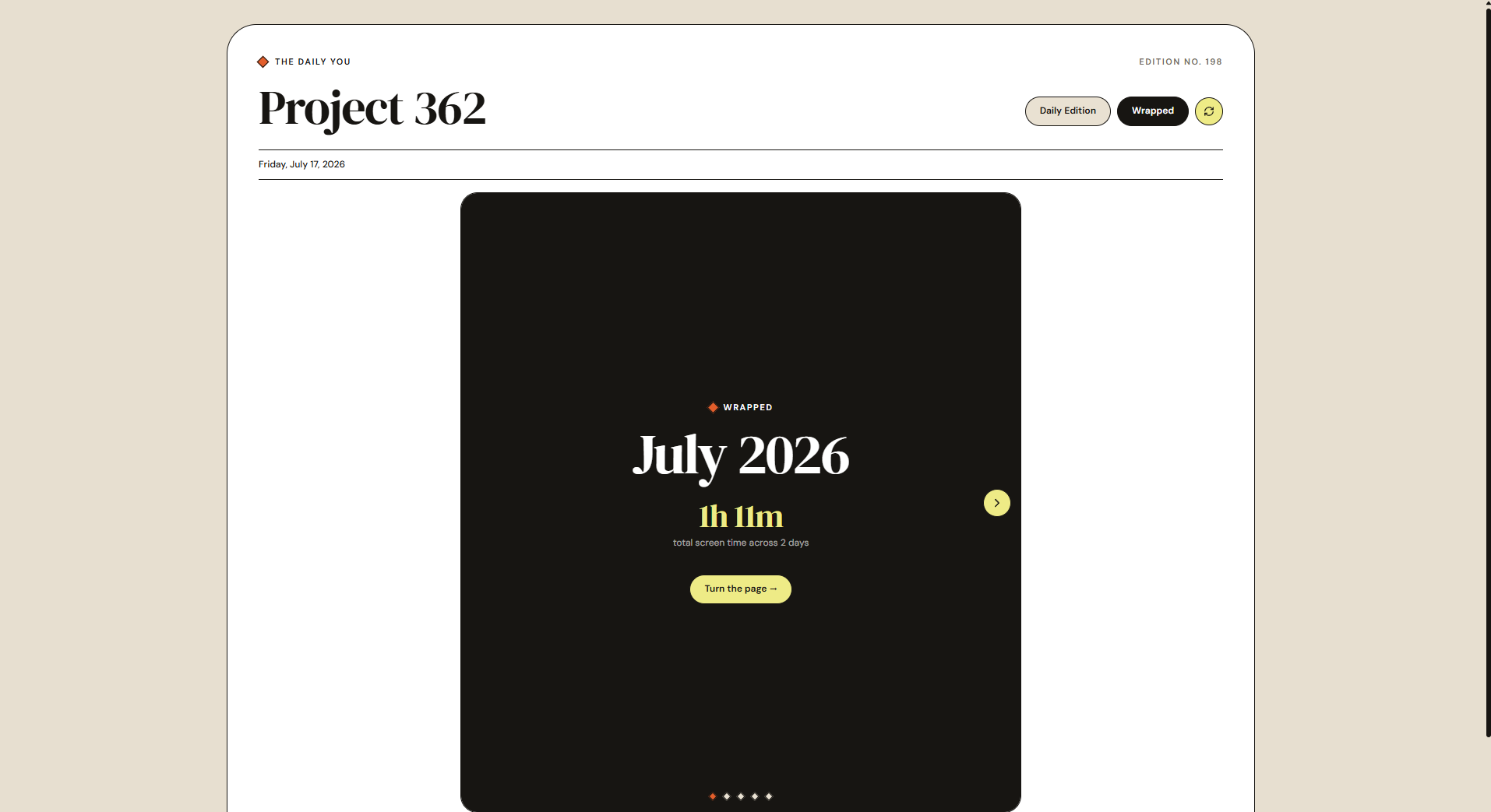
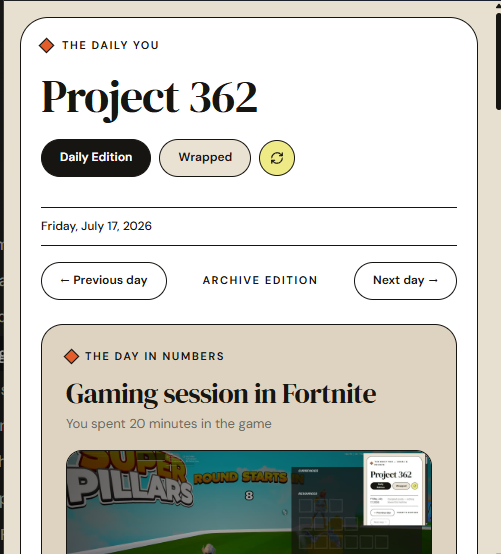
App Interface
Key Features
- Continuous Screen Capture: High-performance screen grabber extracts text (OCR) from open windows without lagging your system.
- Audio Transcription: Captures both microphone input and system output, running local speech-to-text models to transcribe conversations and meetings.
- Local-First Architecture: Your database, screen recordings, and audio files never leave your machine. No cloud subscriptions, no tracking, and no external APIs required.
- Semantic Search: Find exact moments using plain English. Search by window titles, specific text captured on screen, or spoken words.
- Interactive Daily Chronicle: Converts your daily screens and transcription logs into an elegant news layout. Features game achievement extraction, focus streak summaries, and meeting timelines, with all highlights strictly capped to the calendar date.
- Monthly Wrapped Recap: Beautiful, story-style monthly summaries showing your top applications, total active minutes, late-night personas, and productivity charts.
- Unified Settings Panel: Full settings console to customize AI providers (OpenAI, Ollama, or OpenAI-compatible endpoints), active models, credentials, and custom prompt overrides to configure your chronicle reporter.
- OS-Native Notification System: Real-time push notifications on Windows and macOS whenever a new milestone, gaming win, or productivity highlight is parsed.
- Desktop Widget Mode: Instantly switch the app into a compact, undecorated widget pinned to the corner of your screen, keeping key metrics and achievements always in view.
- Developer Pipes: Custom scripts can hook into the local event database to automate actions, create weekly reports, or sync with note-taking tools.
System Architecture
The core of Project 362 consists of:
- The Capture Engine: Low-level Rust agents for screen visual monitoring and audio stream capture.
- Local AI Pipeline: Uses Whisper for transcriptions and Tesseract or specialized local engines for OCR.
- Vault Storage: SQLite database storing encrypted indices of text, audio transcripts, and application metadata.
- Tauri Desktop UI: A lightweight, modern developer interface built with Vite, TypeScript, Tailwind, and React.
Getting Started
Prerequisites
Make sure you have the following installed on your system:
- Node.js and Bun
- Rust and Cargo
- LLVM/Clang compiler tools (for bindgen dependencies)
- Visual Studio Build Tools (C++ environment)
Launching the Application
To compile the native Rust engine and launch the developer desktop application, simply run the launcher script:
.\run_project-362.bat
This batch script initializes the visual studio compiler tools, configures environment variables, builds the application, and starts the Tauri developer environment.
License
This project is licensed under the MIT License. Feel free to use, modify, and distribute it.
Made by M. Tarif | www.mtarif.com
Contributors

1 commits
Similar repos


Languages
Rust
74.9%
TypeScript
11.6%
C
5.5%
C++
4.1%
JavaScript
2.0%
A local-first AI newsroom that turns your daily screen logs into a private news chronicle.
See the codeREADME
Project 362
Project 362 is a professional, local-first developer utility that records and indexes your desktop activity 24/7. It provides a complete, searchable history of everything you see and hear on your computer, powered entirely by local AI models.
100% local. 100% secure. Dev-friendly.
The Concept
Your computer screen contains your entire digital life: code, docs, meetings, chats, and ideas. Yet, finding a specific snippet of code or recalling a decision made in a Zoom meeting last week is still hard.
Project 362 continuously captures your screen and audio, processes the feeds locally using OCR (Optical Recognition) and ASR (Speech Recognition), and organizes them into a fast, local database. You can search your digital memory via keywords or chat with an AI assistant that knows your context.
App Interface
Key Features
- Continuous Screen Capture: High-performance screen grabber extracts text (OCR) from open windows without lagging your system.
- Audio Transcription: Captures both microphone input and system output, running local speech-to-text models to transcribe conversations and meetings.
- Local-First Architecture: Your database, screen recordings, and audio files never leave your machine. No cloud subscriptions, no tracking, and no external APIs required.
- Semantic Search: Find exact moments using plain English. Search by window titles, specific text captured on screen, or spoken words.
- Interactive Daily Chronicle: Converts your daily screens and transcription logs into an elegant news layout. Features game achievement extraction, focus streak summaries, and meeting timelines, with all highlights strictly capped to the calendar date.
- Monthly Wrapped Recap: Beautiful, story-style monthly summaries showing your top applications, total active minutes, late-night personas, and productivity charts.
- Unified Settings Panel: Full settings console to customize AI providers (OpenAI, Ollama, or OpenAI-compatible endpoints), active models, credentials, and custom prompt overrides to configure your chronicle reporter.
- OS-Native Notification System: Real-time push notifications on Windows and macOS whenever a new milestone, gaming win, or productivity highlight is parsed.
- Desktop Widget Mode: Instantly switch the app into a compact, undecorated widget pinned to the corner of your screen, keeping key metrics and achievements always in view.
- Developer Pipes: Custom scripts can hook into the local event database to automate actions, create weekly reports, or sync with note-taking tools.
System Architecture
The core of Project 362 consists of:
- The Capture Engine: Low-level Rust agents for screen visual monitoring and audio stream capture.
- Local AI Pipeline: Uses Whisper for transcriptions and Tesseract or specialized local engines for OCR.
- Vault Storage: SQLite database storing encrypted indices of text, audio transcripts, and application metadata.
- Tauri Desktop UI: A lightweight, modern developer interface built with Vite, TypeScript, Tailwind, and React.
Getting Started
Prerequisites
Make sure you have the following installed on your system:
- Node.js and Bun
- Rust and Cargo
- LLVM/Clang compiler tools (for bindgen dependencies)
- Visual Studio Build Tools (C++ environment)
Launching the Application
To compile the native Rust engine and launch the developer desktop application, simply run the launcher script:
.\run_project-362.bat
This batch script initializes the visual studio compiler tools, configures environment variables, builds the application, and starts the Tauri developer environment.
License
This project is licensed under the MIT License. Feel free to use, modify, and distribute it.
Made by M. Tarif | www.mtarif.com
Similar repos
Contributors
1 commits
Languages
Rust
74.9%
TypeScript
11.6%
C
5.5%
C++
4.1%
JavaScript
2.0%