
See what people are saying
README
Porter - Port Monitor



A sleek, fast, and secure desktop port monitoring application built with Tauri, React, and TypeScript.
Download Latest Release | An Opensource Project of t21.dev
🚀 Features
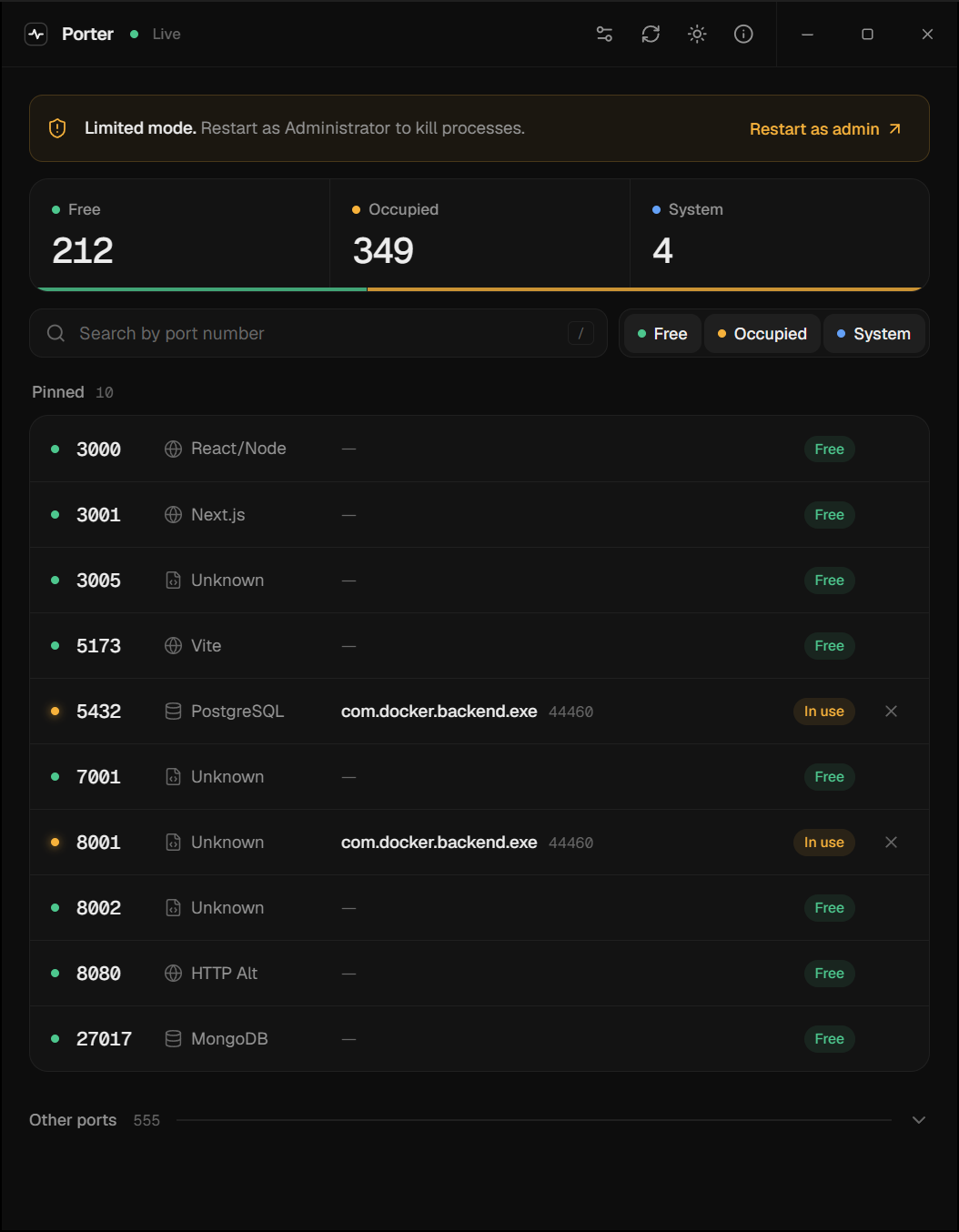
- Real-time Port Monitoring - Monitor common developer ports and all system ports in real-time
- Customizable Port List - Configure which ports to scan at startup via settings
- Process Management - Kill processes occupying ports (requires admin privileges)
- Smart Filtering - Filter ports by status (Free, Occupied, System) and search by port number or process name
- Show All Ports - Toggle between common ports and all running ports
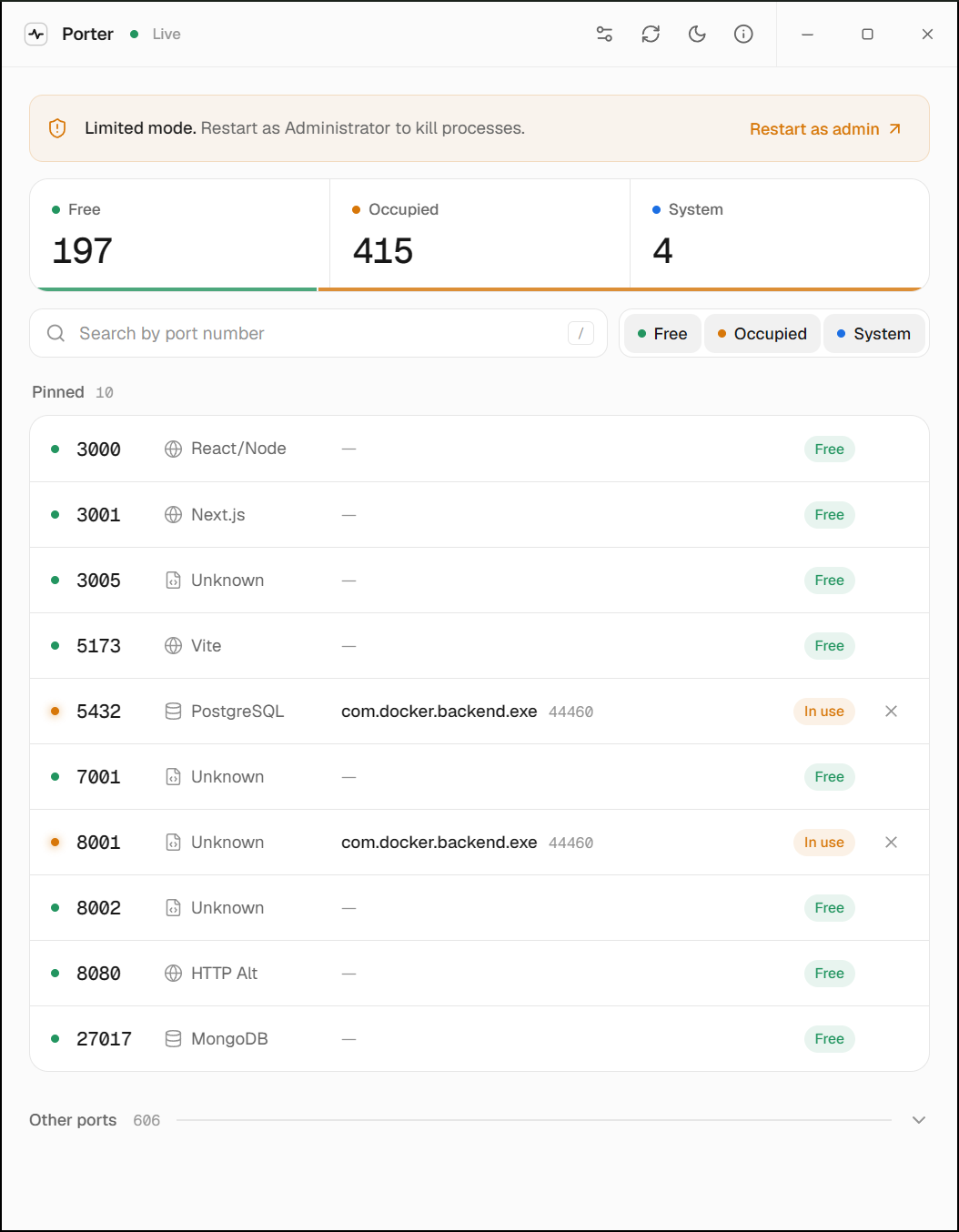
- Dark/Light Mode - Minimal near-black and light themes with a smooth crossfade between them
- Custom Title Bar - Frameless window with integrated controls (native traffic lights on macOS)
- Admin Privilege Detection - Automatically detects and warns when running without admin rights
- Cross-Platform - Works on Windows, macOS, and Linux
- Fast & Lightweight - Built with Tauri for minimal resource usage
📸 Screenshots
🛠️ Tech Stack
Frontend
- React 19 - UI framework
- TypeScript - Type safety
- Tailwind CSS v3 - Styling
- shadcn/ui - UI components
- TanStack Query - Data fetching and caching
- Zustand - State management
- Lucide React - Icons
Backend
- Rust - System-level operations
- Tauri 2.0 - Desktop framework
- sysinfo - Process monitoring
- Platform-specific APIs
- Windows: IPHLPAPI
- Linux: /proc filesystem
- macOS: lsof
📦 Installation
Download Pre-built Release
Download the latest release for your platform from the Releases page.
| Platform | File |
|---|---|
| Windows | Porter_x.x.x_x64-setup.exe or .msi |
| macOS | Porter_x.x.x_aarch64.dmg (Apple Silicon) or Porter_x.x.x_x64.dmg (Intel) |
| Linux | .deb or .AppImage |
macOS Installation Note
macOS may show an error saying "Porter is damaged and can't be opened". This happens because the app is not notarized with Apple (requires a paid developer account).
To fix this, open Terminal and run:
xattr -cr /Applications/Porter.app
Then open the app normally. Alternatively, right-click the app and select "Open" instead of double-clicking.
Building from Source
Prerequisites
- Node.js 18+
- Rust 1.70+
- npm or yarn
Development Setup
- Clone the repository
git clone https://github.com/yourusername/porter-app.git
cd porter-app
- Install dependencies
npm install
- Run in development mode
npm run tauri:dev
Building for Production
npm run tauri:build
The built application will be available in src-tauri/target/release/bundle/
🎮 Usage
Running Porter
-
Launch the application
- For full functionality, run as Administrator (Windows) or with sudo (Linux/macOS)
-
View Ports
- Common developer ports are displayed automatically on startup
- Green = Free, Amber = In use, Blue = System
-
Search Ports
- Use the search bar to find a port by number (press
/to focus it,Escto clear)
- Use the search bar to find a port by number (press
-
Filter by Status
- Toggle the Free, Occupied, and System chips next to the search bar
-
Kill Processes
- Click the ✕ on any in-use port and confirm to terminate the process
- Requires administrator privileges
-
Customize Ports
- Click the settings icon in the title bar
- Add or remove ports to scan at startup
- Changes are saved automatically
-
Toggle Views
- Expand "Other ports" below your pinned list to see every running port on the system
🔧 Configuration
Porter monitors the following common developer ports by default:
- 3000-3001 - React, Next.js
- 4200 - Angular
- 5000 - Flask
- 5173 - Vite
- 8000 - Django, HTTP servers
- 8080 - Alternative HTTP
- 9000 - PHP-FPM
- 80, 443 - HTTP/HTTPS
- 5432 - PostgreSQL
- 3306 - MySQL
- 6379 - Redis
- 27017 - MongoDB
You can customize the port list via the settings icon in the app header. Your custom configuration is saved in browser localStorage.
🏗️ Project Structure
porter-app/
├── src/                      # React frontend
│   ├── components/           # React components
│   │   ├── dashboard/        # Dashboard-specific components
│   │   └── ui/              # shadcn/ui components
│   ├── hooks/               # Custom React hooks
│   ├── lib/                 # Utility functions
│   ├── store/               # Zustand stores
│   ├── types/               # TypeScript types
│   └── App.tsx              # Main app component
├── src-tauri/               # Tauri backend
│   ├── src/
│   │   ├── commands/        # Tauri IPC commands
│   │   ├── models/          # Data models
│   │   ├── platform/        # Platform-specific code
│   │   └── services/        # Business logic
│   ├── Cargo.toml          # Rust dependencies
│   └── tauri.conf.json     # Tauri configuration
└── docs/                    # Documentation
🤝 Contributing
Contributions are welcome! Please follow these steps:
- Fork the repository
- Create a feature branch (
git checkout -b feature/amazing-feature) - Commit your changes (
git commit -m 'Add amazing feature') - Push to the branch (
git push origin feature/amazing-feature) - Open a Pull Request
📝 License
This project is licensed under the MIT License - see the LICENSE file for details.
🙏 Acknowledgments
📧 Support
For support, please open an issue on GitHub or contact us at support@t21.dev
Made with ❤️ by the t21.dev team
Similar repos


Languages
TypeScript
63.2%
PowerShell
17.6%
Rust
13.4%
CSS
3.3%
JavaScript
1.2%
Shell
1.0%
See what people are saying
README
Porter - Port Monitor
A sleek, fast, and secure desktop port monitoring application built with Tauri, React, and TypeScript.
Download Latest Release | An Opensource Project of t21.dev
🚀 Features
- Real-time Port Monitoring - Monitor common developer ports and all system ports in real-time
- Customizable Port List - Configure which ports to scan at startup via settings
- Process Management - Kill processes occupying ports (requires admin privileges)
- Smart Filtering - Filter ports by status (Free, Occupied, System) and search by port number or process name
- Show All Ports - Toggle between common ports and all running ports
- Dark/Light Mode - Minimal near-black and light themes with a smooth crossfade between them
- Custom Title Bar - Frameless window with integrated controls (native traffic lights on macOS)
- Admin Privilege Detection - Automatically detects and warns when running without admin rights
- Cross-Platform - Works on Windows, macOS, and Linux
- Fast & Lightweight - Built with Tauri for minimal resource usage
📸 Screenshots
🛠️ Tech Stack
Frontend
- React 19 - UI framework
- TypeScript - Type safety
- Tailwind CSS v3 - Styling
- shadcn/ui - UI components
- TanStack Query - Data fetching and caching
- Zustand - State management
- Lucide React - Icons
Backend
- Rust - System-level operations
- Tauri 2.0 - Desktop framework
- sysinfo - Process monitoring
- Platform-specific APIs
- Windows: IPHLPAPI
- Linux: /proc filesystem
- macOS: lsof
📦 Installation
Download Pre-built Release
Download the latest release for your platform from the Releases page.
| Platform | File |
|---|---|
| Windows | Porter_x.x.x_x64-setup.exe or .msi |
| macOS | Porter_x.x.x_aarch64.dmg (Apple Silicon) or Porter_x.x.x_x64.dmg (Intel) |
| Linux | .deb or .AppImage |
macOS Installation Note
macOS may show an error saying "Porter is damaged and can't be opened". This happens because the app is not notarized with Apple (requires a paid developer account).
To fix this, open Terminal and run:
xattr -cr /Applications/Porter.app
Then open the app normally. Alternatively, right-click the app and select "Open" instead of double-clicking.
Building from Source
Prerequisites
- Node.js 18+
- Rust 1.70+
- npm or yarn
Development Setup
- Clone the repository
git clone https://github.com/yourusername/porter-app.git
cd porter-app
- Install dependencies
npm install
- Run in development mode
npm run tauri:dev
Building for Production
npm run tauri:build
The built application will be available in src-tauri/target/release/bundle/
🎮 Usage
Running Porter
-
Launch the application
- For full functionality, run as Administrator (Windows) or with sudo (Linux/macOS)
-
View Ports
- Common developer ports are displayed automatically on startup
- Green = Free, Amber = In use, Blue = System
-
Search Ports
- Use the search bar to find a port by number (press
/to focus it,Escto clear)
- Use the search bar to find a port by number (press
-
Filter by Status
- Toggle the Free, Occupied, and System chips next to the search bar
-
Kill Processes
- Click the ✕ on any in-use port and confirm to terminate the process
- Requires administrator privileges
-
Customize Ports
- Click the settings icon in the title bar
- Add or remove ports to scan at startup
- Changes are saved automatically
-
Toggle Views
- Expand "Other ports" below your pinned list to see every running port on the system
🔧 Configuration
Porter monitors the following common developer ports by default:
- 3000-3001 - React, Next.js
- 4200 - Angular
- 5000 - Flask
- 5173 - Vite
- 8000 - Django, HTTP servers
- 8080 - Alternative HTTP
- 9000 - PHP-FPM
- 80, 443 - HTTP/HTTPS
- 5432 - PostgreSQL
- 3306 - MySQL
- 6379 - Redis
- 27017 - MongoDB
You can customize the port list via the settings icon in the app header. Your custom configuration is saved in browser localStorage.
🏗️ Project Structure
porter-app/
├── src/                      # React frontend
│   ├── components/           # React components
│   │   ├── dashboard/        # Dashboard-specific components
│   │   └── ui/              # shadcn/ui components
│   ├── hooks/               # Custom React hooks
│   ├── lib/                 # Utility functions
│   ├── store/               # Zustand stores
│   ├── types/               # TypeScript types
│   └── App.tsx              # Main app component
├── src-tauri/               # Tauri backend
│   ├── src/
│   │   ├── commands/        # Tauri IPC commands
│   │   ├── models/          # Data models
│   │   ├── platform/        # Platform-specific code
│   │   └── services/        # Business logic
│   ├── Cargo.toml          # Rust dependencies
│   └── tauri.conf.json     # Tauri configuration
└── docs/                    # Documentation
🤝 Contributing
Contributions are welcome! Please follow these steps:
- Fork the repository
- Create a feature branch (
git checkout -b feature/amazing-feature) - Commit your changes (
git commit -m 'Add amazing feature') - Push to the branch (
git push origin feature/amazing-feature) - Open a Pull Request
📝 License
This project is licensed under the MIT License - see the LICENSE file for details.
🙏 Acknowledgments
📧 Support
For support, please open an issue on GitHub or contact us at support@t21.dev
Made with ❤️ by the t21.dev team
Similar repos
Languages
TypeScript
63.2%
PowerShell
17.6%
Rust
13.4%
CSS
3.3%
JavaScript
1.2%
Shell
1.0%