
🔌 What's really using your ports? htop-style TUI, one keypress to kill it.
See the codeSee what people are saying
README
 portop





An htop-style terminal UI (TUI) that answers the question ss, netstat
and lsof only half-answer: not just what's bound to a port, but which
process, which systemd unit, which Docker container — and a one-key way to
open, inspect or kill it, live.
| Get started | Day to day | Beyond the terminal |
|---|---|---|
| ✨ Features | ⌨️ Usage | 🌐 Web dashboard |
🆚 Why not just ss? | 🎹 Keybindings | 🔐 Dashboard sign-in |
| 📥 Installation | ⚙️ Configuration | 🖥️ Cockpit add-on |
| ✅ Requirements | 🔧 How it works | 🤝 Contributing |
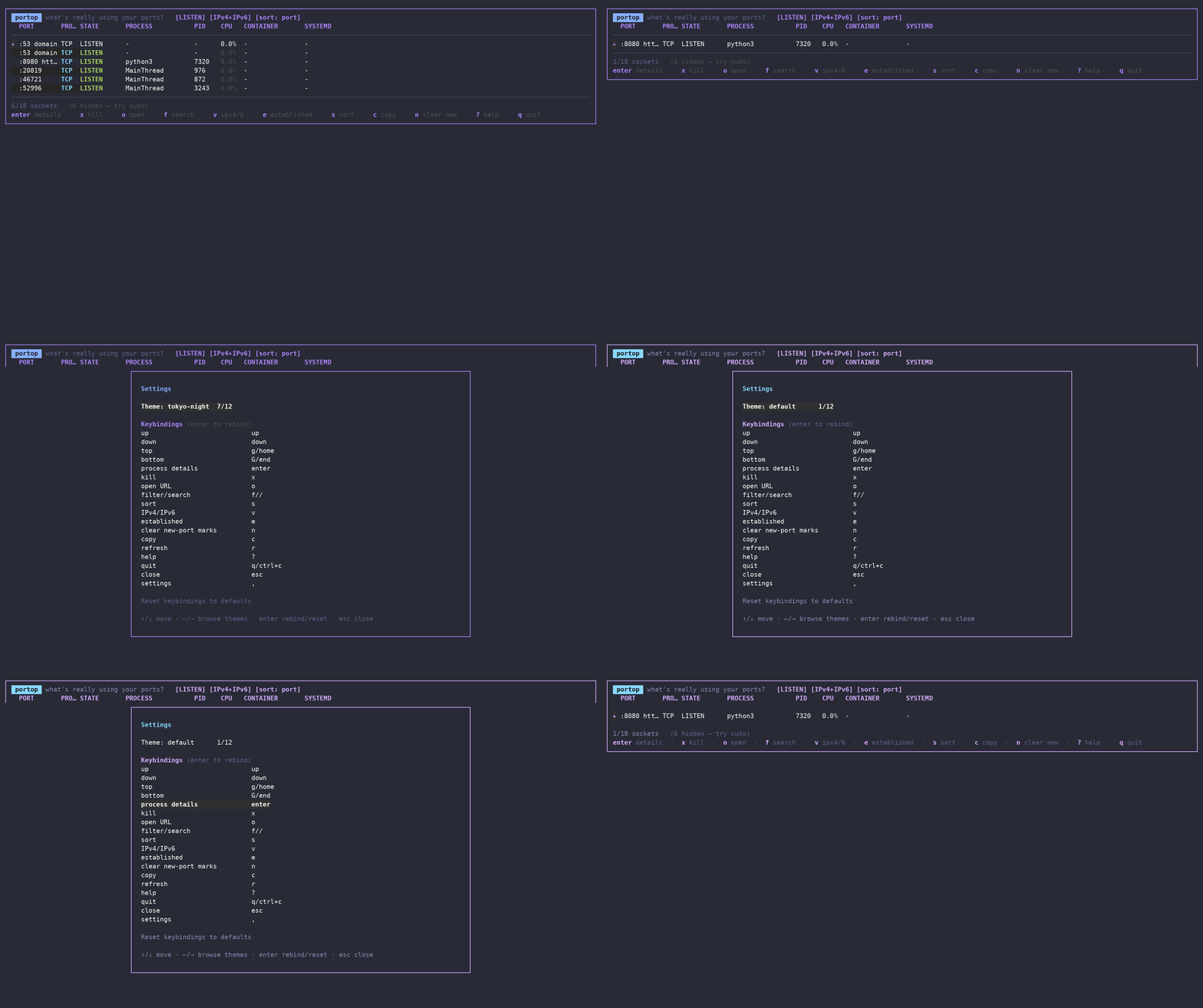 Filtering to a port, checking who owns it, and the confirm-before-kill flow — all in real time.
✨ Features
👀 See what's using your ports
- Live, color-coded table:
LISTEN/ESTABLISHED/transient states, protocol and per-process CPU% (sampled liketop) are all colored at a glance. - Well-known port names:
:22shows asssh,:443ashttps, parsed straight from/etc/services. - systemd & Docker aware: every row shows the owning
.serviceunit and Docker container, resolved from cgroups — no D-Bus, no Docker SDK, no extra daemon. - Process detail view: cmdline, executable, cwd, user, RSS, thread count, start time.
- Adapts to your terminal width: drops the least useful columns first so rows never wrap, down to 80 columns.
⚡ Act on it
- Kill, with confirmation:
ktheny(SIGTERM) orf(SIGKILL) — never a stray keypress away from killing the wrong thing. - Open in the browser:
olauncheshttp(s)://localhost:PORTfor the selected row. - Instant filter/search:
f, then start typing — matches port, process name or PID as you type. - Copy to clipboard:
con the selected row.
🛎️ Stay ahead of surprises
- New-port alerts: a freshly opened listening port is highlighted the
moment it appears, with an optional desktop notification
(
--watch-new). - Baseline drift detection:
--save-baselinenow,--difflater (e.g. from a cron job or systemd timer) — exits non-zero the instant a port that wasn't in your baseline starts listening. Nothing else in this space does this as a first-class feature. - Docker Compose port audit:
--compose /path/to/projectreads the folder's Compose file(s), then reports which configured published ports are listening, unused, or already taken by another process/container. - Scriptable:
--jsonprints a clean snapshot for piping intojq, dashboards, or your own tooling. - Web dashboard:
--webshows live ports in a browser, with search, process details and confirmed SIGTERM/SIGKILL actions. Add--web-authfor a sign-in page, and serve it to other machines over HTTPS. - Cockpit add-on: the same view under Tools → Ports (portop), using Cockpit's own login and your user's permissions.
🎨 Make it yours
- Live settings screen (
,): cycle through 13 built-in themes (default, Dracula, Nord, Solarized, Gruvbox, Catppuccin, Tokyo Night, Monokai, Darcula, VS Code Dark+, Ubuntu, Rosé Pine, mono) with←/→— the whole UI re-skins as you move — and rebind any of 20 actions on the spot. Saved automatically; you never touch a file. config.ymlis there too if you'd rather hand-edit it —portop --init-configwrites a fully-commented template.
🆚 Why not just ss -tlnp?
You can. But you'll be doing all of this by hand, every time:
| ss / netstat | lsof | bandwhich | portop | |
|---|---|---|---|---|
| Live, refreshing view | ❌ | ❌ | ✅ | ✅ |
| Kill from the UI | ❌ | ❌ | ❌ | ✅ |
| Open port in browser | ❌ | ❌ | ❌ | ✅ |
| systemd unit shown | ❌ | ❌ | ❌ | ✅ |
| Docker container shown | ❌ | ❌ | ❌ | ✅ |
| New-port alerts | ❌ | ❌ | ❌ | ✅ |
| Baseline drift / audit mode | ❌ | ❌ | ❌ | ✅ |
| Docker Compose port audit | ❌ | ❌ | ❌ | ✅ |
| Fuzzy filter/search | ❌ | ❌ | ❌ | ✅ |
| Themeable / remappable | ❌ | ❌ | ❌ | ✅ |
| Browser & Cockpit views | ❌ | ❌ | ❌ | ✅ |
📥 Installation
Below, <version> means the release number without a leading v (a
v0.1.0 tag produces portop_0.1.0_linux_amd64.tar.gz, not
portop_v0.1.0_...) — check the exact asset names on the latest
release rather than
guessing.
One-line installer
curl -fsSL https://raw.githubusercontent.com/padovanl/portop/main/install.sh | sh
Detects Linux or macOS and your architecture, verifies the release checksum,
and installs to
/usr/local/bin (or ~/.local/bin if that's not writable).
All supported architectures
Every archive is named portop_<version>_<target>.tar.gz. These are the complete
release targets; Linux also gets .deb and .rpm files with the same target suffix.
| System | Architecture | Target | Packages | Requirements |
|---|---|---|---|---|
| Linux | Intel/AMD 64-bit | linux_amd64 | .tar.gz, .deb, .rpm | 64-bit x86 OS; amd64 baseline (v1). |
| Linux | ARM64 / AArch64 (64-bit) | linux_arm64 | .tar.gz, .deb, .rpm | 64-bit ARM OS; ARMv8.0 baseline. |
| Linux | ARMv7 (32-bit) | linux_armv7 | .tar.gz, .deb, .rpm | 32-bit ARM Linux with hardware floating point (VFPv3). |
| Linux | ARMv6 (32-bit) | linux_armv6 | .tar.gz, .deb, .rpm | 32-bit ARM Linux with hardware floating point (VFP); includes the CPU target used by original Pi 1 / Zero. |
| macOS | Intel (64-bit) | darwin_amd64 | .tar.gz | 64-bit Intel Mac; no 32-bit macOS build. |
| macOS | Apple Silicon (64-bit) | darwin_arm64 | .tar.gz | Native ARM64 Mac; no Rosetta required. |
ARM selection and package limitations
-
Choose for the installed OS, not just the CPU: a 64-bit board running a 32-bit OS needs
armv7(orarmv6on older CPUs), notarm64. -
The installer maps
armv6ltoarmv6,armv7l/armv8ltoarmv7, andaarch64/arm64toarm64. On Linux it checksgetconf LONG_BITto detect a 32-bit userland on an ARM64 kernel. Ifgetconfis unavailable, it uses the kernel architecture; override detection for unusual containers or OS setups:curl -fsSL https://raw.githubusercontent.com/padovanl/portop/main/install.sh -o install.sh PORTOP_ARCH=armv7 sh install.shValid overrides:
amd64,arm64,armv6,armv7; macOS accepts only the first two. -
ARMv6 and ARMv7 releases require hardware floating point. ARMv5, ARM soft-float (
armel), big-endian ARM, 32-bit x86, Windows and other unlisted targets are not supported by these releases. ARM64 requires a 64-bit OS; a 32-bit compatibility layer on a 64-bit kernel is not guaranteed. -
Both ARM32 DEBs have
armhfmetadata, but their filenames distinguisharmv6andarmv7. Pick the variant your CPU supports; install only one. Distribution support for ARMv6 varies. RPM architecture labels may be rejected by a particular distribution: use its matching package or the.tar.gz, not a forced installation. RPM labels arex86_64,aarch64,armv6hlandarmv7hl, respectively. -
Prebuilt binaries do not require Go or a C runtime installation (
CGO_ENABLED=0). Old board images may still have kernels too old for the Go runtime; see Go's OS requirements. CPU compatibility does not imply support for every historical Linux image or macOS version. -
Linux requires readable
/proc/nettables. Containers show their own network namespace; root may be needed for process ownership, and systemd/Docker enrichment is available only when those services and their metadata are accessible. -
macOS requires the system
lsofandps, can omit other users' sockets withoutsudo, and does not expose systemd, Docker Desktop VM process metadata or thread counts. Its scans may be slower; see the first-launch Gatekeeper instructions below. -
Build and emulation checks do not replace testing on physical ARM hardware or a native Mac. See validation status for what has been run.
.deb package (Debian/Ubuntu and derivatives)
Replace linux_amd64 with the target from the table above for ARM systems.
curl -fLO https://github.com/padovanl/portop/releases/latest/download/portop_<version>_linux_amd64.deb
sudo dpkg -i portop_<version>_linux_amd64.deb
Fedora / RHEL / openSUSE (RPM)
Download the .rpm for your target from Releases.
In the examples below, replace linux_amd64 with linux_arm64, linux_armv7 or
linux_armv6 as appropriate:
sudo dnf install ./portop_<version>_linux_amd64.rpm
# openSUSE: sudo zypper install ./portop_<version>_linux_amd64.rpm
macOS (Apple Silicon and Intel)
The one-line installer detects your Mac's architecture, downloads the matching archive and verifies its checksum:
curl -fsSL https://raw.githubusercontent.com/padovanl/portop/main/install.sh | sh
portop
For a manual installation, choose darwin_arm64 for Apple Silicon or
darwin_amd64 for Intel. Replace <version> with the release number:
archive="portop_<version>_darwin_arm64.tar.gz" # Intel: use darwin_amd64
curl -fLO "https://github.com/padovanl/portop/releases/latest/download/$archive"
tar -xzf "$archive"
sudo mkdir -p /usr/local/bin
sudo install -m 755 portop /usr/local/bin/portop
portop
First launch: if macOS blocks portop
The release binaries are not notarized by Apple. If you downloaded the archive with a browser, macOS may block its first launch. After checking that the binary comes from this repository's release, use the approval flow for this app:
- Try running
portop. If a “portop” Not Opened dialog appears, click Done. - Open System Settings → Privacy & Security. Find the message about portop and click Open Anyway (or Allow Anyway, depending on macOS).
- Run
portopagain if prompted, confirm Open Anyway, and authenticate when macOS asks.
This follows the first-launch guidance used by pkgtui. See also Apple's instructions for opening an app from an unidentified developer.
Visibility and platform differences
The scanner uses /usr/sbin/lsof; process details and CPU sampling use /bin/ps.
Run sudo portop to include processes belonging to other users. Without it,
some sockets can be omitted entirely. Systemd and Docker Desktop VM process
metadata are unavailable; the process detail thread count is shown as -.
Binary tarball (Linux and macOS)
Replace linux_amd64 with any target in the architecture table above.
curl -fLO https://github.com/padovanl/portop/releases/latest/download/portop_<version>_linux_amd64.tar.gz
tar -xzf portop_<version>_linux_amd64.tar.gz
sudo install -m 755 portop /usr/local/bin/portop
From source
go install github.com/padovanl/portop/cmd/portop@latest
⌨️ Usage
portop                 # launch the TUI (LISTEN + ESTABLISHED)
portop 8080             # launch the TUI pre-filtered on port 8080
portop redis            # launch the TUI pre-filtered on a process name
portop --listen          # show only listening (LISTEN) sockets
portop --json            # print one JSON snapshot and exit
portop --watch-new       # desktop-notify when a new port starts listening

portop --save-baseline   # remember which ports are currently listening
portop --diff            # compare live ports against the saved baseline
                          # (exit code 3 if something changed — great for cron)

portop --compose ./stack  # audit Compose published ports in a project folder
portop --compose ./stack --json

portop --web              # local dashboard on port 8088
portop --web --web-port 9090  # choose the web server port
portop --web --web-auth   # require sign-in; prints a generated password
Run portop --help for the full flag list.
Rows with no process/PID are owned by another user (root's
docker-proxy,systemd-resolved, ...) — the same limitationlsof/ss -phave withoutsudo. portop tells you when that's happening instead of leaving you to guess.
Docker Compose port audit
Point portop at a folder containing compose.yml, compose.yaml,
docker-compose.yml or docker-compose.yaml:
portop --compose ~/selfhosted/crawl-stack
It parses each service's ports: entries and checks fixed published ports
against the host's current listeners. Status values are:
| Status | Meaning |
|---|---|
expected | Docker reports the port on the matching Compose service/container, or the listener's container name matches. |
conflict | Something is listening, but it is not identified as the expected Compose service. |
unused | The Compose file configures the port, but nothing is listening on it. |
dynamic | Compose will choose the host port at runtime, so there is no fixed port to check. |
--compose exits 3 when it finds conflict or unused, and 0 when every
fixed port is accounted for. Add --json for scripts.
When Docker is accessible, the audit also reads Docker's published-port table
and Compose labels. That means it can identify the expected service even when
the local socket row belongs to docker-proxy. Without Docker access, it still
checks whether the port is listening, but may report a conflict because the
expected container/service cannot be confirmed. Supported ports: forms include
short syntax ("8080:80", "127.0.0.1:8080:80/udp", simple ranges) and long
syntax (published, target, host_ip, protocol). Compose profiles,
environment interpolation and complex multi-file merge semantics are not
expanded by portop itself; use the generated JSON output if you need to compare
against a custom docker compose config workflow.
Keybindings
These are the defaults — every one can be remapped, see
Configuration below. The in-app ? help always
reflects whatever's actually bound, including your overrides.
| Key | Action |
|---|---|
↑ ↓ | move the cursor |
PgUp PgDn | move one visible page at a time |
g G | jump to top / bottom |
enter | process details |
k | kill process (then y=SIGTERM, f=SIGKILL) |
o | open http(s)://localhost:PORT in the browser |
f / | filter/search by port, process or PID |
v | toggle IPv4 / IPv6 / both |
e | show/hide ESTABLISHED connections |
s | cycle sort column |
c | copy selected row to clipboard |
n | clear the new-port highlight |
r | refresh now |
, | settings — live theme picker, remap any key |
? | help |
q | quit |
Mouse support is enabled in compatible terminals: hover highlights rows, click selects, drag moves the selection, double-click opens process details, right-click opens the kill confirmation, middle-click opens the local URL, and the wheel moves through the table. Click any column heading to sort by it; click it again to reverse the order.
⚙️ Configuration
Everything below is optional — portop works with no config file at all.
Settings screen (recommended)
Press , inside portop:
- Theme:
←/→cycles through it live — the whole UI re-skins as you move, no restart, no confirmation needed. - Keybindings: pick any of the 20 actions, hit
enter, then press whatever you want it bound to.esccancels instead of capturing. - Reset keybindings to defaults at the bottom of the list, one keypress.
Every change is written to config.yml immediately — you never have to
open the file yourself.
Or hand-edit config.yml
portop --init-config # writes a fully-commented template and exits
That writes to ~/.config/portop/config.yml (pass --config /path to use a
different one). Example:
theme: tokyo-night        # default | dracula | nord | solarized | gruvbox
                          # | catppuccin | tokyo-night | monokai | darcula
                          # | vscode | ubuntu | rose-pine | mono
show_established: false   # same as always passing --listen
refresh_interval: 1s

keybindings:
  kill: ["x"]
  quit: ["q", "ctrl+c"]
Command-line flags always win over config.yml when both set the same
thing. An unknown theme name or keybinding action fails fast with a message
telling you what's valid, instead of silently doing nothing. Fields the
settings screen doesn't touch (like refresh_interval above) are left
exactly as you wrote them.
🔧 How it works
On Linux, portop reads /proc/net/{tcp,tcp6,udp,udp6} for the socket table and walks
/proc/<pid>/fd to match socket inodes to owning processes — the same
technique lsof/ss use, no root required beyond what's needed to see
other users' processes. systemd unit and Docker container association are
derived from each process's cgroup path, so no D-Bus or Docker SDK
dependency is needed; Docker container names are resolved via a couple of
read-only calls to the Docker Engine API over its unix socket when
available.
portop --compose DIR adds one Docker-specific read-only call to
/containers/json?all=1 when Docker enrichment is enabled. That gives the audit
the daemon's published-port view and Compose labels, so it can map a host port
back to the Compose service even if the listener process is docker-proxy.
On macOS, portop parses the machine-readable output of lsof for TCP/UDP
sockets and their owning processes. ps supplies cumulative CPU time and
process details; CPU usage is calculated between successive samples, once
per PID per scan. System commands run with a timeout and a fixed locale.
On both platforms, well-known port names come from /etc/services, and
baseline diffing snapshots the LISTEN set to a small JSON file under your
OS's config directory.
✅ Requirements
- Linux and macOS. Linux uses
/proc/net; macOS useslsofandps. Windows is not supported. macOS scans and CPU sampling invoke system tools and may be slower on machines with many processes. sudo/root only if you want to see sockets owned by other users (e.g. root'sdocker-proxy) — portop runs fine without it, it just can't resolve those specific rows on Linux. On macOS, sockets belonging to other users can be omitted entirely without sufficient permissions.- Go 1.24+ only if building from source.
- A terminal that reports 256-color or truecolor support. A bare
TERM=xterm(no-256colorsuffix) gets detected as a 16-color terminal, which downsamples every theme's colors and can make some hard to tell apart —export TERM=xterm-256color(orCOLORTERM=truecolor) fixes it. This is common in minimal Docker/SSH sessions.
🌐 Web dashboard
portop --web
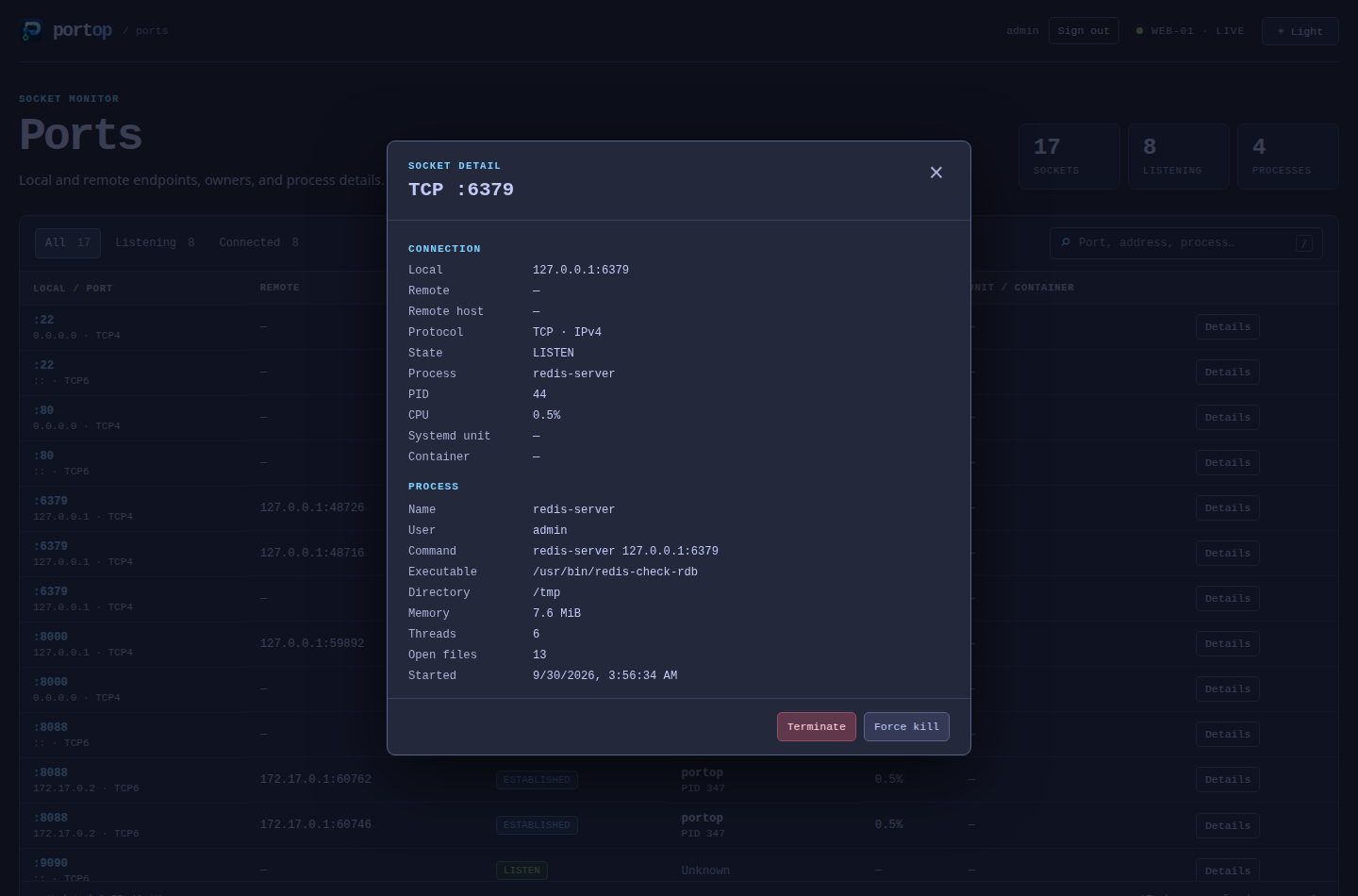
Open the URL it prints. The dashboard refreshes every two seconds and shows local and remote endpoints, process, CPU, systemd unit and container. Details adds command line, user, memory, threads and open files. Terminate (SIGTERM) and Force kill (SIGKILL) require confirmation, and the process must still have the same start time as when you opened it.
By default the server binds to 127.0.0.1:8088 and needs no password. The
printed URL carries a per-run token in its fragment: without it, the table
is readable but process details and signals are refused. Choose another
port with --web-port 9090, or a loopback address with --web-addr.
--listen, --no-dns, --no-systemd, --no-docker and a positional
filter apply here too. Ctrl-C stops the server.
Sign-in
--web-auth puts the dashboard behind a username and password:
| Flag | Meaning |
|---|---|
--web-auth | Require sign-in. With no password set, portop generates one and prints it. |
--web-user NAME | Username (default portop). Implies --web-auth. |
--web-password PASS | Password. Implies --web-auth. Visible to other local users in ps, so prefer the variable below on shared machines. |
PORTOP_WEB_PASSWORD | Password from the environment, used when --web-password is not given. |
--web-tls-cert FILE, --web-tls-key FILE | Serve HTTPS with a PEM certificate and key. |
portop --web --web-auth
# portop web: http://127.0.0.1:8088/
# portop web: sign in as "portop"
# portop web: password: 7XK2... (generated for this run; ...)

PORTOP_WEB_PASSWORD='choose-one' portop --web --web-user admin
Sessions use an HttpOnly, SameSite=Strict cookie, last 12 hours and end
when portop stops. After five failed attempts, a client must wait a minute.
Process actions also need a per-session token, so a signed-in cookie alone
cannot be used to kill a process from another site.
Reaching the dashboard from another machine
Only a dashboard with sign-in may listen beyond loopback:
openssl req -x509 -newkey ec -pkeyopt ec_paramgen_curve:P-256 -nodes -days 365 \
  -subj "/CN=$(hostname)" -keyout portop.key -out portop.crt
PORTOP_WEB_PASSWORD='choose-one' portop --web --web-user admin \
  --web-addr 0.0.0.0:8088 --web-tls-cert portop.crt --web-tls-key portop.key
Browsers warn about a self-signed certificate until you trust it. Without
TLS, portop still starts but warns that the password and port data cross
the network unencrypted; the sign-in page says so too. An SSH tunnel
(ssh -L 8088:127.0.0.1:8088 host) to a loopback-only dashboard is an
alternative that needs no certificate. What the dashboard can see and signal
is limited by the user portop runs as.
Previewing from a checkout
go build -o ./bin/portop ./cmd/portop
./bin/portop --web --web-auth
To preview the GitHub Pages site locally, run python3 scripts/serve-pages.py
from the checkout and open http://127.0.0.1:8000/. Use --port 8001 to
choose another port; stop the server with Ctrl-C.
🖥️ Cockpit add-on
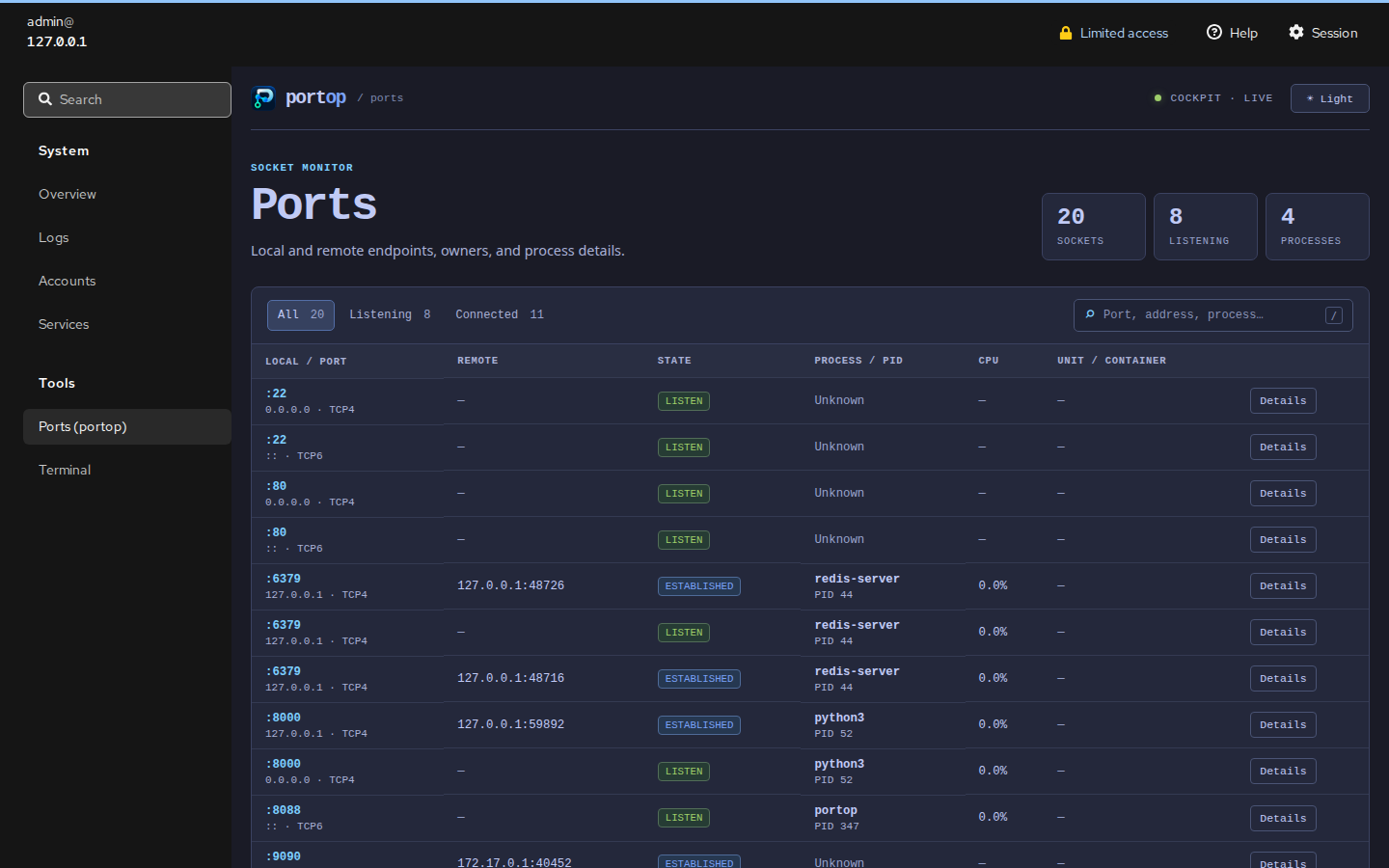
The optional Cockpit page is in cockpit/portop. It lists
ports and process details using the current Cockpit session, and can send
SIGTERM or SIGKILL after confirmation. It needs no separate web server:
Cockpit's login and your user's permissions apply. On a Linux host, install
portop and copy cockpit/portop into ~/.local/share/cockpit/portop, then
open Tools → Ports (portop). See the Cockpit setup steps.
🤝 Contributing
Pull requests are welcome — see CONTRIBUTING.md for the
branch policy and PR requirements. Short version: open PRs against
develop, not main, and run gofmt -l . && go vet ./... && go test ./...
before pushing.
📄 License
MIT — see LICENSE.
Significant stargazers

3,472 followers · starred Sep 2026

710 followers · starred Sep 2026
Similar repos


Languages
Go
75.1%
JavaScript
7.7%
CSS
7.4%
HTML
3.7%
Shell
3.2%
Python
2.7%
🔌 What's really using your ports? htop-style TUI, one keypress to kill it.
See the codeSee what people are saying
README
portop
An htop-style terminal UI (TUI) that answers the question ss, netstat
and lsof only half-answer: not just what's bound to a port, but which
process, which systemd unit, which Docker container — and a one-key way to
open, inspect or kill it, live.
| Get started | Day to day | Beyond the terminal |
|---|---|---|
| ✨ Features | ⌨️ Usage | 🌐 Web dashboard |
🆚 Why not just ss? | 🎹 Keybindings | 🔐 Dashboard sign-in |
| 📥 Installation | ⚙️ Configuration | 🖥️ Cockpit add-on |
| ✅ Requirements | 🔧 How it works | 🤝 Contributing |
Filtering to a port, checking who owns it, and the confirm-before-kill flow — all in real time.
✨ Features
👀 See what's using your ports
- Live, color-coded table:
LISTEN/ESTABLISHED/transient states, protocol and per-process CPU% (sampled liketop) are all colored at a glance. - Well-known port names:
:22shows asssh,:443ashttps, parsed straight from/etc/services. - systemd & Docker aware: every row shows the owning
.serviceunit and Docker container, resolved from cgroups — no D-Bus, no Docker SDK, no extra daemon. - Process detail view: cmdline, executable, cwd, user, RSS, thread count, start time.
- Adapts to your terminal width: drops the least useful columns first so rows never wrap, down to 80 columns.
⚡ Act on it
- Kill, with confirmation:
ktheny(SIGTERM) orf(SIGKILL) — never a stray keypress away from killing the wrong thing. - Open in the browser:
olauncheshttp(s)://localhost:PORTfor the selected row. - Instant filter/search:
f, then start typing — matches port, process name or PID as you type. - Copy to clipboard:
con the selected row.
🛎️ Stay ahead of surprises
- New-port alerts: a freshly opened listening port is highlighted the
moment it appears, with an optional desktop notification
(
--watch-new). - Baseline drift detection:
--save-baselinenow,--difflater (e.g. from a cron job or systemd timer) — exits non-zero the instant a port that wasn't in your baseline starts listening. Nothing else in this space does this as a first-class feature. - Docker Compose port audit:
--compose /path/to/projectreads the folder's Compose file(s), then reports which configured published ports are listening, unused, or already taken by another process/container. - Scriptable:
--jsonprints a clean snapshot for piping intojq, dashboards, or your own tooling. - Web dashboard:
--webshows live ports in a browser, with search, process details and confirmed SIGTERM/SIGKILL actions. Add--web-authfor a sign-in page, and serve it to other machines over HTTPS. - Cockpit add-on: the same view under Tools → Ports (portop), using Cockpit's own login and your user's permissions.
🎨 Make it yours
- Live settings screen (
,): cycle through 13 built-in themes (default, Dracula, Nord, Solarized, Gruvbox, Catppuccin, Tokyo Night, Monokai, Darcula, VS Code Dark+, Ubuntu, Rosé Pine, mono) with←/→— the whole UI re-skins as you move — and rebind any of 20 actions on the spot. Saved automatically; you never touch a file. config.ymlis there too if you'd rather hand-edit it —portop --init-configwrites a fully-commented template.
🆚 Why not just ss -tlnp?
You can. But you'll be doing all of this by hand, every time:
| ss / netstat | lsof | bandwhich | portop | |
|---|---|---|---|---|
| Live, refreshing view | ❌ | ❌ | ✅ | ✅ |
| Kill from the UI | ❌ | ❌ | ❌ | ✅ |
| Open port in browser | ❌ | ❌ | ❌ | ✅ |
| systemd unit shown | ❌ | ❌ | ❌ | ✅ |
| Docker container shown | ❌ | ❌ | ❌ | ✅ |
| New-port alerts | ❌ | ❌ | ❌ | ✅ |
| Baseline drift / audit mode | ❌ | ❌ | ❌ | ✅ |
| Docker Compose port audit | ❌ | ❌ | ❌ | ✅ |
| Fuzzy filter/search | ❌ | ❌ | ❌ | ✅ |
| Themeable / remappable | ❌ | ❌ | ❌ | ✅ |
| Browser & Cockpit views | ❌ | ❌ | ❌ | ✅ |
📥 Installation
Below, <version> means the release number without a leading v (a
v0.1.0 tag produces portop_0.1.0_linux_amd64.tar.gz, not
portop_v0.1.0_...) — check the exact asset names on the latest
release rather than
guessing.
One-line installer
curl -fsSL https://raw.githubusercontent.com/padovanl/portop/main/install.sh | sh
Detects Linux or macOS and your architecture, verifies the release checksum,
and installs to
/usr/local/bin (or ~/.local/bin if that's not writable).
All supported architectures
Every archive is named portop_<version>_<target>.tar.gz. These are the complete
release targets; Linux also gets .deb and .rpm files with the same target suffix.
| System | Architecture | Target | Packages | Requirements |
|---|---|---|---|---|
| Linux | Intel/AMD 64-bit | linux_amd64 | .tar.gz, .deb, .rpm | 64-bit x86 OS; amd64 baseline (v1). |
| Linux | ARM64 / AArch64 (64-bit) | linux_arm64 | .tar.gz, .deb, .rpm | 64-bit ARM OS; ARMv8.0 baseline. |
| Linux | ARMv7 (32-bit) | linux_armv7 | .tar.gz, .deb, .rpm | 32-bit ARM Linux with hardware floating point (VFPv3). |
| Linux | ARMv6 (32-bit) | linux_armv6 | .tar.gz, .deb, .rpm | 32-bit ARM Linux with hardware floating point (VFP); includes the CPU target used by original Pi 1 / Zero. |
| macOS | Intel (64-bit) | darwin_amd64 | .tar.gz | 64-bit Intel Mac; no 32-bit macOS build. |
| macOS | Apple Silicon (64-bit) | darwin_arm64 | .tar.gz | Native ARM64 Mac; no Rosetta required. |
ARM selection and package limitations
-
Choose for the installed OS, not just the CPU: a 64-bit board running a 32-bit OS needs
armv7(orarmv6on older CPUs), notarm64. -
The installer maps
armv6ltoarmv6,armv7l/armv8ltoarmv7, andaarch64/arm64toarm64. On Linux it checksgetconf LONG_BITto detect a 32-bit userland on an ARM64 kernel. Ifgetconfis unavailable, it uses the kernel architecture; override detection for unusual containers or OS setups:curl -fsSL https://raw.githubusercontent.com/padovanl/portop/main/install.sh -o install.sh PORTOP_ARCH=armv7 sh install.shValid overrides:
amd64,arm64,armv6,armv7; macOS accepts only the first two. -
ARMv6 and ARMv7 releases require hardware floating point. ARMv5, ARM soft-float (
armel), big-endian ARM, 32-bit x86, Windows and other unlisted targets are not supported by these releases. ARM64 requires a 64-bit OS; a 32-bit compatibility layer on a 64-bit kernel is not guaranteed. -
Both ARM32 DEBs have
armhfmetadata, but their filenames distinguisharmv6andarmv7. Pick the variant your CPU supports; install only one. Distribution support for ARMv6 varies. RPM architecture labels may be rejected by a particular distribution: use its matching package or the.tar.gz, not a forced installation. RPM labels arex86_64,aarch64,armv6hlandarmv7hl, respectively. -
Prebuilt binaries do not require Go or a C runtime installation (
CGO_ENABLED=0). Old board images may still have kernels too old for the Go runtime; see Go's OS requirements. CPU compatibility does not imply support for every historical Linux image or macOS version. -
Linux requires readable
/proc/nettables. Containers show their own network namespace; root may be needed for process ownership, and systemd/Docker enrichment is available only when those services and their metadata are accessible. -
macOS requires the system
lsofandps, can omit other users' sockets withoutsudo, and does not expose systemd, Docker Desktop VM process metadata or thread counts. Its scans may be slower; see the first-launch Gatekeeper instructions below. -
Build and emulation checks do not replace testing on physical ARM hardware or a native Mac. See validation status for what has been run.
.deb package (Debian/Ubuntu and derivatives)
Replace linux_amd64 with the target from the table above for ARM systems.
curl -fLO https://github.com/padovanl/portop/releases/latest/download/portop_<version>_linux_amd64.deb
sudo dpkg -i portop_<version>_linux_amd64.deb
Fedora / RHEL / openSUSE (RPM)
Download the .rpm for your target from Releases.
In the examples below, replace linux_amd64 with linux_arm64, linux_armv7 or
linux_armv6 as appropriate:
sudo dnf install ./portop_<version>_linux_amd64.rpm
# openSUSE: sudo zypper install ./portop_<version>_linux_amd64.rpm
macOS (Apple Silicon and Intel)
The one-line installer detects your Mac's architecture, downloads the matching archive and verifies its checksum:
curl -fsSL https://raw.githubusercontent.com/padovanl/portop/main/install.sh | sh
portop
For a manual installation, choose darwin_arm64 for Apple Silicon or
darwin_amd64 for Intel. Replace <version> with the release number:
archive="portop_<version>_darwin_arm64.tar.gz" # Intel: use darwin_amd64
curl -fLO "https://github.com/padovanl/portop/releases/latest/download/$archive"
tar -xzf "$archive"
sudo mkdir -p /usr/local/bin
sudo install -m 755 portop /usr/local/bin/portop
portop
First launch: if macOS blocks portop
The release binaries are not notarized by Apple. If you downloaded the archive with a browser, macOS may block its first launch. After checking that the binary comes from this repository's release, use the approval flow for this app:
- Try running
portop. If a “portop” Not Opened dialog appears, click Done. - Open System Settings → Privacy & Security. Find the message about portop and click Open Anyway (or Allow Anyway, depending on macOS).
- Run
portopagain if prompted, confirm Open Anyway, and authenticate when macOS asks.
This follows the first-launch guidance used by pkgtui. See also Apple's instructions for opening an app from an unidentified developer.
Visibility and platform differences
The scanner uses /usr/sbin/lsof; process details and CPU sampling use /bin/ps.
Run sudo portop to include processes belonging to other users. Without it,
some sockets can be omitted entirely. Systemd and Docker Desktop VM process
metadata are unavailable; the process detail thread count is shown as -.
Binary tarball (Linux and macOS)
Replace linux_amd64 with any target in the architecture table above.
curl -fLO https://github.com/padovanl/portop/releases/latest/download/portop_<version>_linux_amd64.tar.gz
tar -xzf portop_<version>_linux_amd64.tar.gz
sudo install -m 755 portop /usr/local/bin/portop
From source
go install github.com/padovanl/portop/cmd/portop@latest
⌨️ Usage
portop                 # launch the TUI (LISTEN + ESTABLISHED)
portop 8080             # launch the TUI pre-filtered on port 8080
portop redis            # launch the TUI pre-filtered on a process name
portop --listen          # show only listening (LISTEN) sockets
portop --json            # print one JSON snapshot and exit
portop --watch-new       # desktop-notify when a new port starts listening

portop --save-baseline   # remember which ports are currently listening
portop --diff            # compare live ports against the saved baseline
                          # (exit code 3 if something changed — great for cron)

portop --compose ./stack  # audit Compose published ports in a project folder
portop --compose ./stack --json

portop --web              # local dashboard on port 8088
portop --web --web-port 9090  # choose the web server port
portop --web --web-auth   # require sign-in; prints a generated password
Run portop --help for the full flag list.
Rows with no process/PID are owned by another user (root's
docker-proxy,systemd-resolved, ...) — the same limitationlsof/ss -phave withoutsudo. portop tells you when that's happening instead of leaving you to guess.
Docker Compose port audit
Point portop at a folder containing compose.yml, compose.yaml,
docker-compose.yml or docker-compose.yaml:
portop --compose ~/selfhosted/crawl-stack
It parses each service's ports: entries and checks fixed published ports
against the host's current listeners. Status values are:
| Status | Meaning |
|---|---|
expected | Docker reports the port on the matching Compose service/container, or the listener's container name matches. |
conflict | Something is listening, but it is not identified as the expected Compose service. |
unused | The Compose file configures the port, but nothing is listening on it. |
dynamic | Compose will choose the host port at runtime, so there is no fixed port to check. |
--compose exits 3 when it finds conflict or unused, and 0 when every
fixed port is accounted for. Add --json for scripts.
When Docker is accessible, the audit also reads Docker's published-port table
and Compose labels. That means it can identify the expected service even when
the local socket row belongs to docker-proxy. Without Docker access, it still
checks whether the port is listening, but may report a conflict because the
expected container/service cannot be confirmed. Supported ports: forms include
short syntax ("8080:80", "127.0.0.1:8080:80/udp", simple ranges) and long
syntax (published, target, host_ip, protocol). Compose profiles,
environment interpolation and complex multi-file merge semantics are not
expanded by portop itself; use the generated JSON output if you need to compare
against a custom docker compose config workflow.
Keybindings
These are the defaults — every one can be remapped, see
Configuration below. The in-app ? help always
reflects whatever's actually bound, including your overrides.
| Key | Action |
|---|---|
↑ ↓ | move the cursor |
PgUp PgDn | move one visible page at a time |
g G | jump to top / bottom |
enter | process details |
k | kill process (then y=SIGTERM, f=SIGKILL) |
o | open http(s)://localhost:PORT in the browser |
f / | filter/search by port, process or PID |
v | toggle IPv4 / IPv6 / both |
e | show/hide ESTABLISHED connections |
s | cycle sort column |
c | copy selected row to clipboard |
n | clear the new-port highlight |
r | refresh now |
, | settings — live theme picker, remap any key |
? | help |
q | quit |
Mouse support is enabled in compatible terminals: hover highlights rows, click selects, drag moves the selection, double-click opens process details, right-click opens the kill confirmation, middle-click opens the local URL, and the wheel moves through the table. Click any column heading to sort by it; click it again to reverse the order.
⚙️ Configuration
Everything below is optional — portop works with no config file at all.
Settings screen (recommended)
Press , inside portop:
- Theme:
←/→cycles through it live — the whole UI re-skins as you move, no restart, no confirmation needed. - Keybindings: pick any of the 20 actions, hit
enter, then press whatever you want it bound to.esccancels instead of capturing. - Reset keybindings to defaults at the bottom of the list, one keypress.
Every change is written to config.yml immediately — you never have to
open the file yourself.
Or hand-edit config.yml
portop --init-config # writes a fully-commented template and exits
That writes to ~/.config/portop/config.yml (pass --config /path to use a
different one). Example:
theme: tokyo-night        # default | dracula | nord | solarized | gruvbox
                          # | catppuccin | tokyo-night | monokai | darcula
                          # | vscode | ubuntu | rose-pine | mono
show_established: false   # same as always passing --listen
refresh_interval: 1s

keybindings:
  kill: ["x"]
  quit: ["q", "ctrl+c"]
Command-line flags always win over config.yml when both set the same
thing. An unknown theme name or keybinding action fails fast with a message
telling you what's valid, instead of silently doing nothing. Fields the
settings screen doesn't touch (like refresh_interval above) are left
exactly as you wrote them.
🔧 How it works
On Linux, portop reads /proc/net/{tcp,tcp6,udp,udp6} for the socket table and walks
/proc/<pid>/fd to match socket inodes to owning processes — the same
technique lsof/ss use, no root required beyond what's needed to see
other users' processes. systemd unit and Docker container association are
derived from each process's cgroup path, so no D-Bus or Docker SDK
dependency is needed; Docker container names are resolved via a couple of
read-only calls to the Docker Engine API over its unix socket when
available.
portop --compose DIR adds one Docker-specific read-only call to
/containers/json?all=1 when Docker enrichment is enabled. That gives the audit
the daemon's published-port view and Compose labels, so it can map a host port
back to the Compose service even if the listener process is docker-proxy.
On macOS, portop parses the machine-readable output of lsof for TCP/UDP
sockets and their owning processes. ps supplies cumulative CPU time and
process details; CPU usage is calculated between successive samples, once
per PID per scan. System commands run with a timeout and a fixed locale.
On both platforms, well-known port names come from /etc/services, and
baseline diffing snapshots the LISTEN set to a small JSON file under your
OS's config directory.
✅ Requirements
- Linux and macOS. Linux uses
/proc/net; macOS useslsofandps. Windows is not supported. macOS scans and CPU sampling invoke system tools and may be slower on machines with many processes. sudo/root only if you want to see sockets owned by other users (e.g. root'sdocker-proxy) — portop runs fine without it, it just can't resolve those specific rows on Linux. On macOS, sockets belonging to other users can be omitted entirely without sufficient permissions.- Go 1.24+ only if building from source.
- A terminal that reports 256-color or truecolor support. A bare
TERM=xterm(no-256colorsuffix) gets detected as a 16-color terminal, which downsamples every theme's colors and can make some hard to tell apart —export TERM=xterm-256color(orCOLORTERM=truecolor) fixes it. This is common in minimal Docker/SSH sessions.
🌐 Web dashboard
portop --web
Open the URL it prints. The dashboard refreshes every two seconds and shows local and remote endpoints, process, CPU, systemd unit and container. Details adds command line, user, memory, threads and open files. Terminate (SIGTERM) and Force kill (SIGKILL) require confirmation, and the process must still have the same start time as when you opened it.
By default the server binds to 127.0.0.1:8088 and needs no password. The
printed URL carries a per-run token in its fragment: without it, the table
is readable but process details and signals are refused. Choose another
port with --web-port 9090, or a loopback address with --web-addr.
--listen, --no-dns, --no-systemd, --no-docker and a positional
filter apply here too. Ctrl-C stops the server.
Sign-in
--web-auth puts the dashboard behind a username and password:
| Flag | Meaning |
|---|---|
--web-auth | Require sign-in. With no password set, portop generates one and prints it. |
--web-user NAME | Username (default portop). Implies --web-auth. |
--web-password PASS | Password. Implies --web-auth. Visible to other local users in ps, so prefer the variable below on shared machines. |
PORTOP_WEB_PASSWORD | Password from the environment, used when --web-password is not given. |
--web-tls-cert FILE, --web-tls-key FILE | Serve HTTPS with a PEM certificate and key. |
portop --web --web-auth
# portop web: http://127.0.0.1:8088/
# portop web: sign in as "portop"
# portop web: password: 7XK2... (generated for this run; ...)

PORTOP_WEB_PASSWORD='choose-one' portop --web --web-user admin
Sessions use an HttpOnly, SameSite=Strict cookie, last 12 hours and end
when portop stops. After five failed attempts, a client must wait a minute.
Process actions also need a per-session token, so a signed-in cookie alone
cannot be used to kill a process from another site.
Reaching the dashboard from another machine
Only a dashboard with sign-in may listen beyond loopback:
openssl req -x509 -newkey ec -pkeyopt ec_paramgen_curve:P-256 -nodes -days 365 \
  -subj "/CN=$(hostname)" -keyout portop.key -out portop.crt
PORTOP_WEB_PASSWORD='choose-one' portop --web --web-user admin \
  --web-addr 0.0.0.0:8088 --web-tls-cert portop.crt --web-tls-key portop.key
Browsers warn about a self-signed certificate until you trust it. Without
TLS, portop still starts but warns that the password and port data cross
the network unencrypted; the sign-in page says so too. An SSH tunnel
(ssh -L 8088:127.0.0.1:8088 host) to a loopback-only dashboard is an
alternative that needs no certificate. What the dashboard can see and signal
is limited by the user portop runs as.
Previewing from a checkout
go build -o ./bin/portop ./cmd/portop
./bin/portop --web --web-auth
To preview the GitHub Pages site locally, run python3 scripts/serve-pages.py
from the checkout and open http://127.0.0.1:8000/. Use --port 8001 to
choose another port; stop the server with Ctrl-C.
🖥️ Cockpit add-on
The optional Cockpit page is in cockpit/portop. It lists
ports and process details using the current Cockpit session, and can send
SIGTERM or SIGKILL after confirmation. It needs no separate web server:
Cockpit's login and your user's permissions apply. On a Linux host, install
portop and copy cockpit/portop into ~/.local/share/cockpit/portop, then
open Tools → Ports (portop). See the Cockpit setup steps.
🤝 Contributing
Pull requests are welcome — see CONTRIBUTING.md for the
branch policy and PR requirements. Short version: open PRs against
develop, not main, and run gofmt -l . && go vet ./... && go test ./...
before pushing.
📄 License
MIT — see LICENSE.
Similar repos
Significant stargazers
3,472 followers · starred Sep 2026
710 followers · starred Sep 2026
Languages
Go
75.1%
JavaScript
7.7%
CSS
7.4%
HTML
3.7%
Shell
3.2%
Python
2.7%