
See what people are saying
README

OneTUI
One TUI for them all.




Install · Quick start · Demo · Datasources · Themes · Configuration · User guide · Contributing
OneTUI is a keyboard-driven terminal browser for databases and message streams, with navigation inspired by k9s. Inspect data, run native queries with syntax highlighting and follow live messages without switching tools.
Install
GitHub Releases
Download an archive or Linux package from Releases.
Install a package with sudo apt install ./onetui-*.deb or sudo dnf install ./onetui-*.rpm. The .deb supports Debian 12+ and Ubuntu 22.04+. The .rpm supports Fedora and EL 9+. The .tar.gz links Debian/Ubuntu libraries, so use a package on other distros.
Arch Linux
Install the prebuilt .pkg.tar.zst from Releases:
sudo pacman -U ./onetui-*.pkg.tar.zst
Or build from source with the PKGBUILD:
curl -fsSLO https://raw.githubusercontent.com/syndbg/onetui/main/packaging/arch/PKGBUILD
makepkg -si
Homebrew
# For the latest from origin/main
brew install --HEAD syndbg/tap/onetui
From source
Install the build prerequisites, then:
git clone https://github.com/syndbg/onetui.git
cd onetui
cargo install --path . --locked
Add Cargo's binary directory, normally $HOME/.cargo/bin, to PATH.
Quick start
Run onetui. Press a to add a connection, fill in its fields and press F2 to save. Select it and press Enter. Set any referenced secret environment variables before launching.
Enter opens a resource or value; Esc goes back. Press ? for available actions, / to filter rows, e for a native query or f to follow where supported. See the user guide.
Demo
Each recording is one datasource, from browsing to the query editor, against the disposable demos.
PostgreSQL
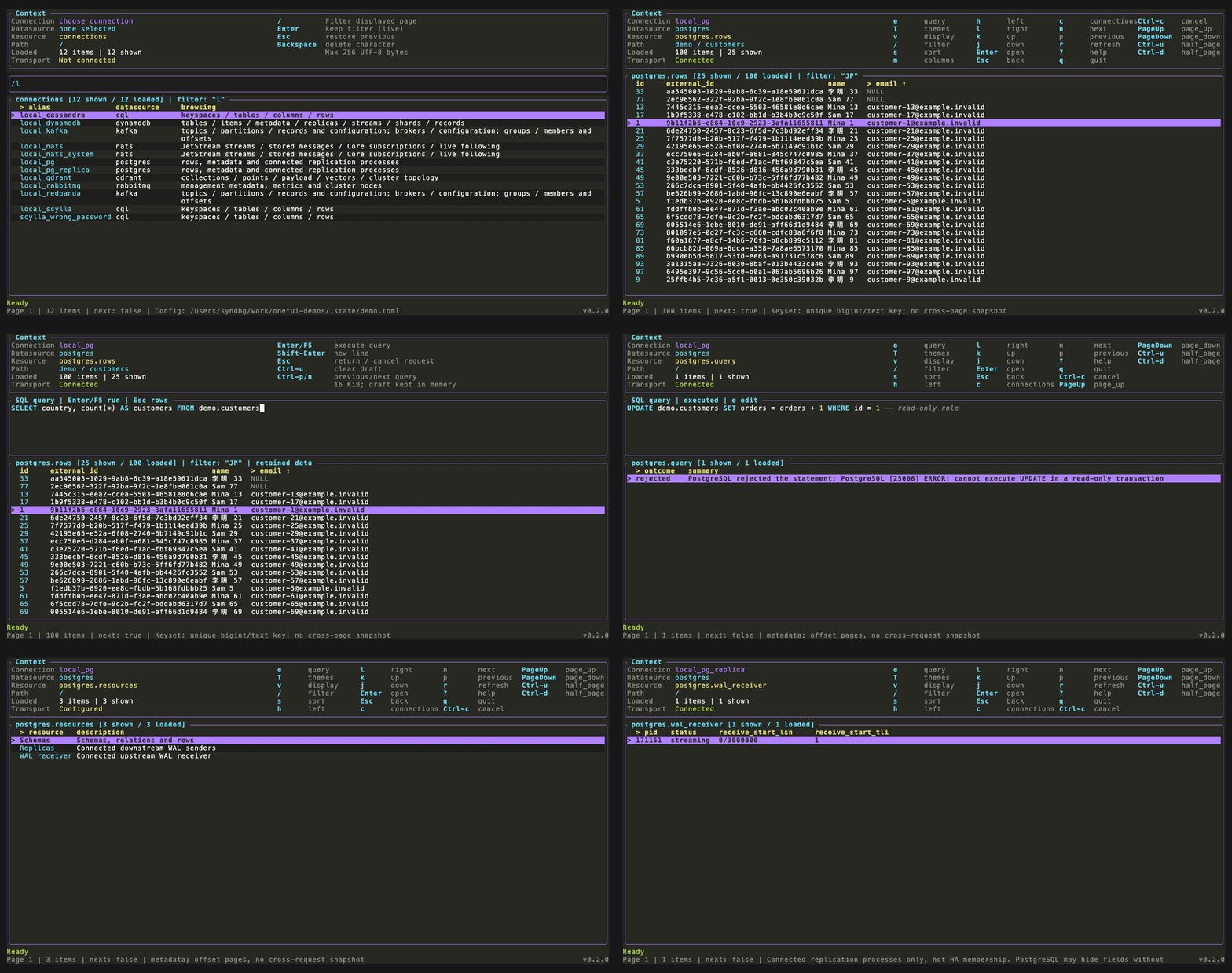
Schemas and rows, a local filter and sort, row detail and columns, a SQL read and a write rejected for the read-only role, query history, then replicas and the WAL receiver.
ScyllaDB and Cassandra
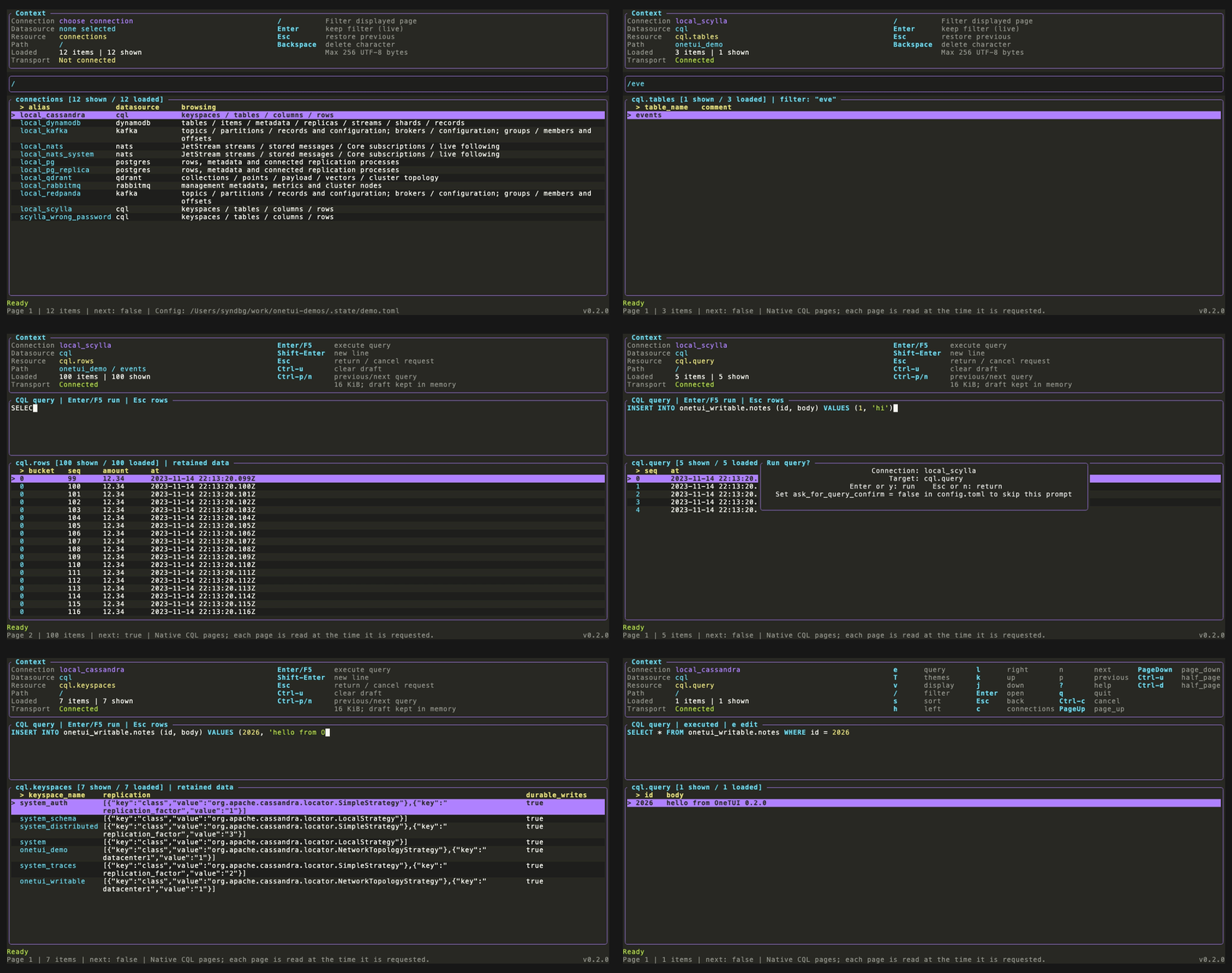
One cql connection kind for both: a connection error, keyspaces, tables, native paging, row detail, CQL reads, a rejected write, and a write applied on Cassandra.
Kafka
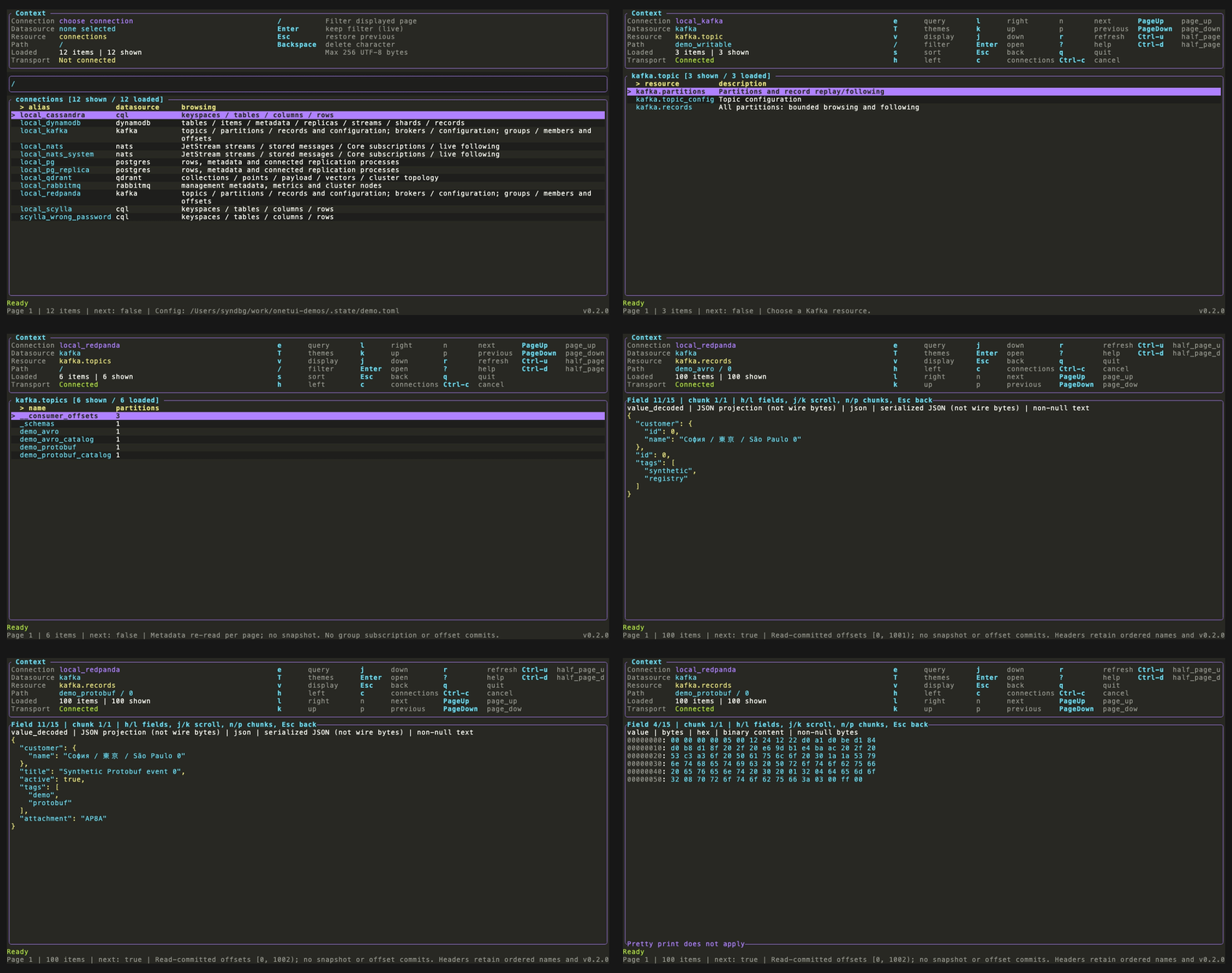
Broker configuration, a record published from the editor, then Avro and Protobuf records decoded against the schema registry, with the decoded value in full and the raw bytes as hex.
NATS
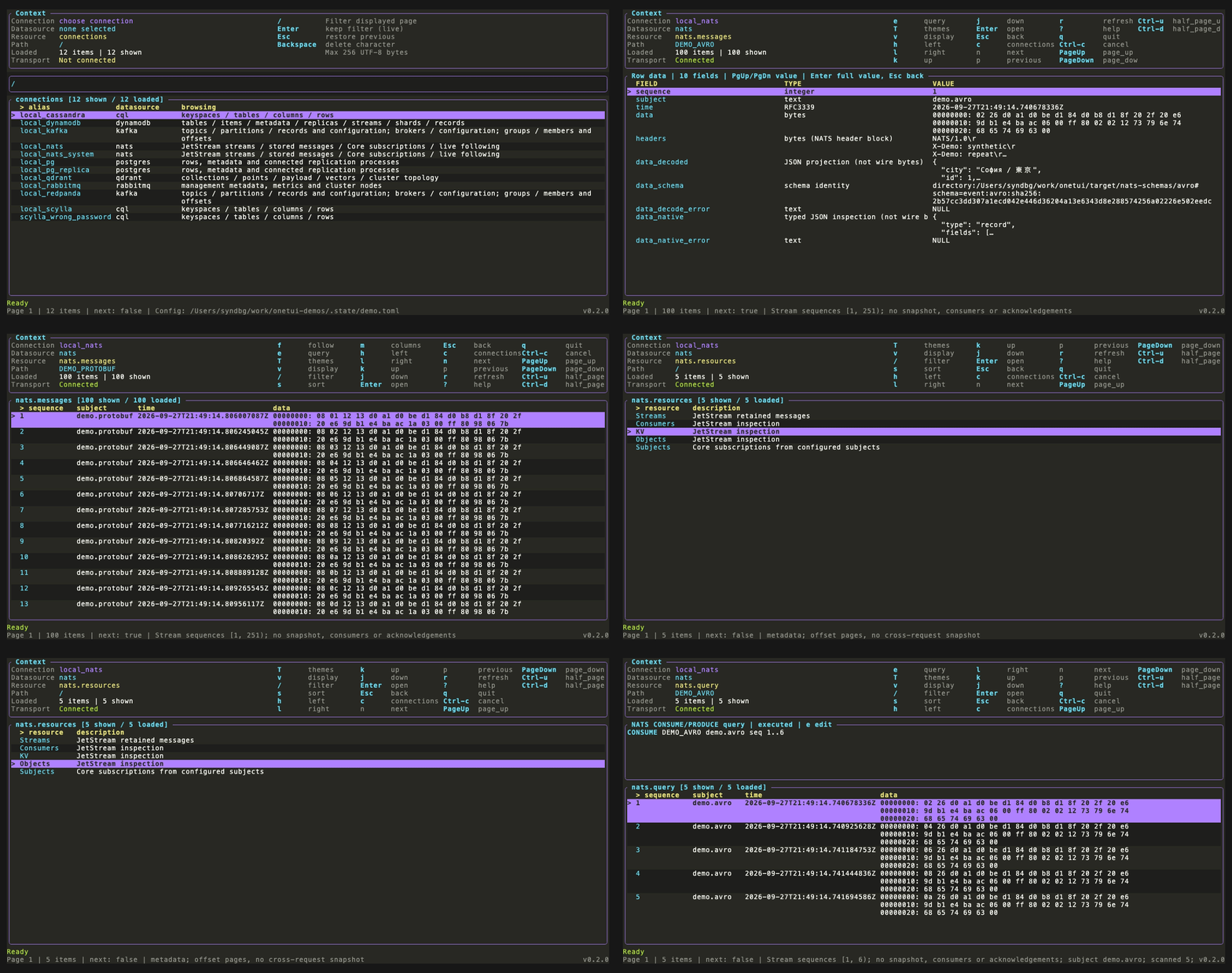
JetStream Avro and Protobuf messages decoded against their schemas, KV keys, object buckets, and a CONSUME statement.
RabbitMQ
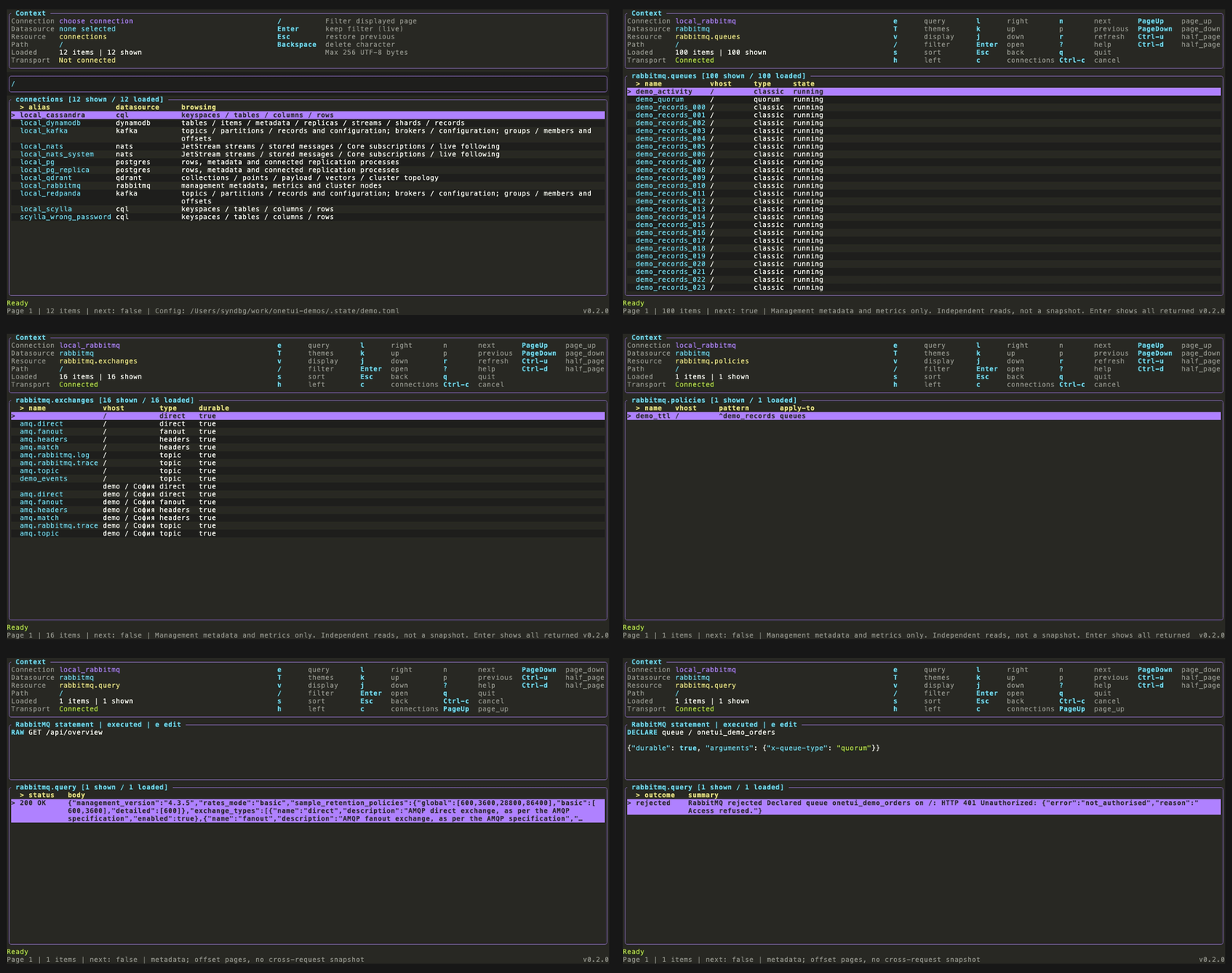
The overview, queue metrics and detail, exchanges, bindings and policies, then a management API request and a DECLARE rejected for the read-only user.
Qdrant
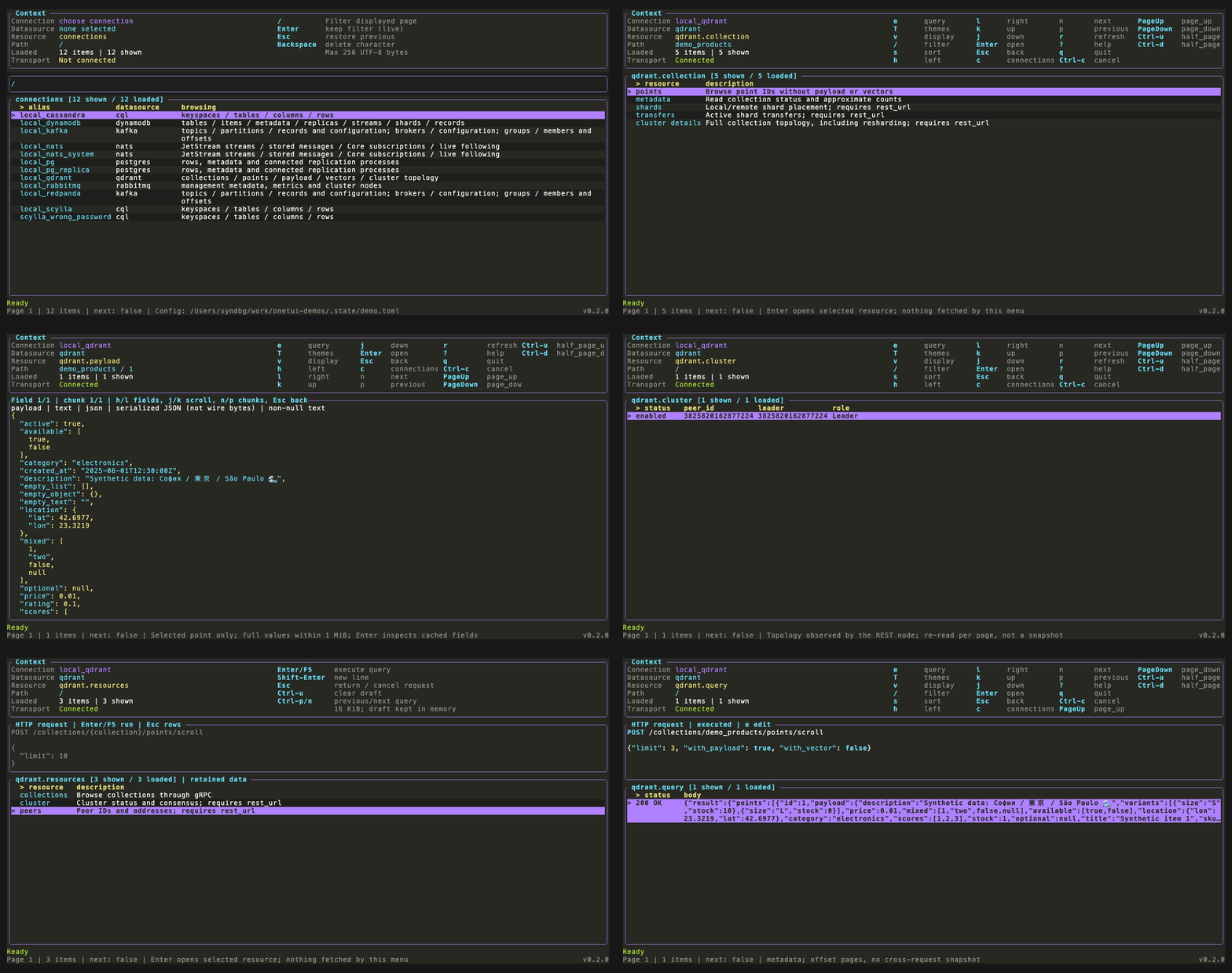
Collections, points and a point's payload, cluster state and peers, then an HTTP request from the editor.
DynamoDB
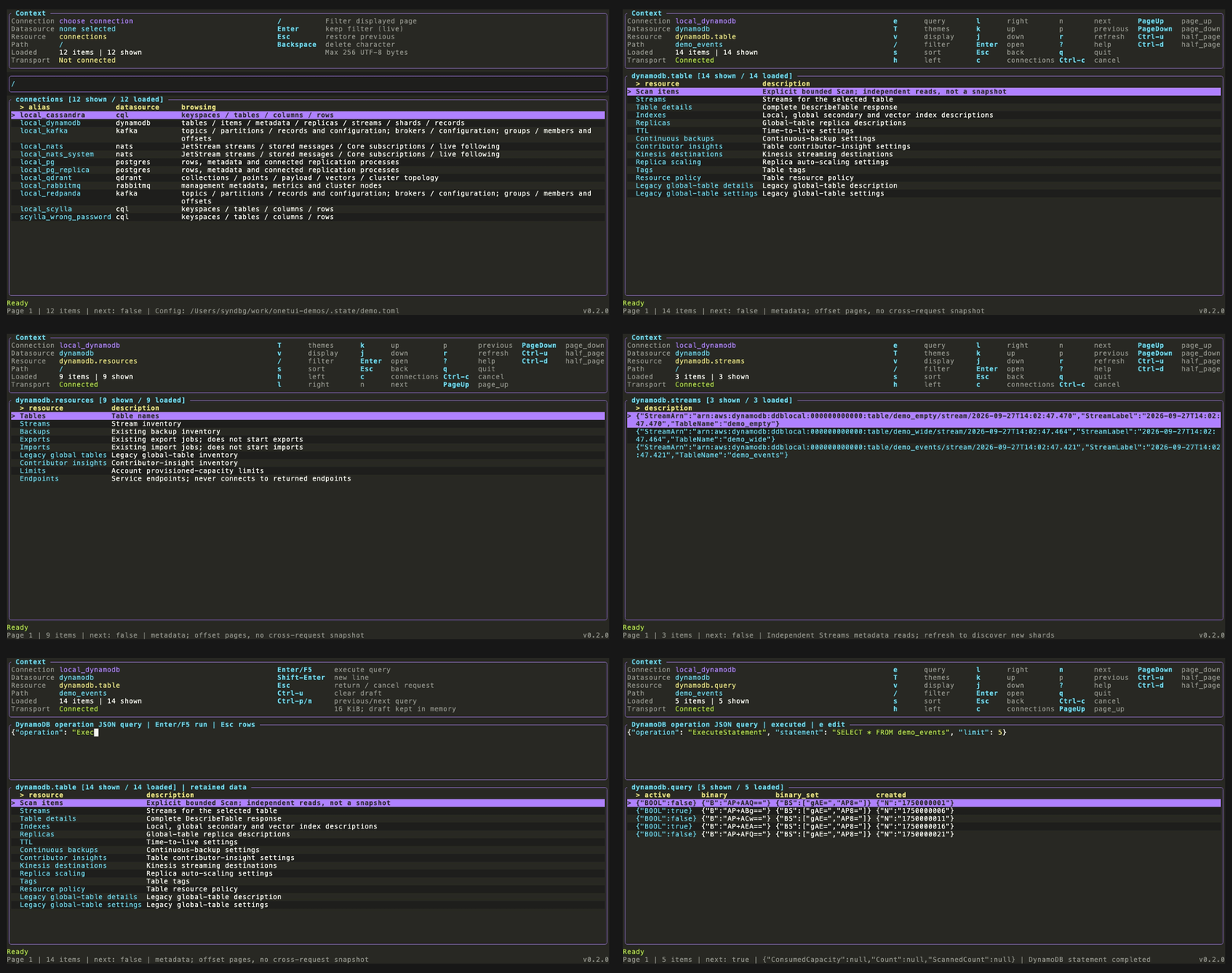
Tables, typed items, row detail, streams and shards, then PartiQL through ExecuteStatement.
See themes for every built-in theme.
Try the disposable demos from a source checkout:
make dev-up
make dev-run
make dev-traffic # optional live Kafka, Redpanda and NATS messages
See local demos for what to open. make dev-down deletes the fixture data.
Features and datasource support
| Datasource | Functionality |
|---|---|
| PostgreSQL | Tables, views, typed values, SQL and replication statistics |
| Qdrant | Collections, points, payloads, vectors, HTTP requests and topology |
| Kafka | Metadata, configuration, groups, lag, record browsing, replay, following and publishing |
| NATS | Core subscriptions, JetStream messages, replay, publishing, consumers, KV and objects |
| DynamoDB | Metadata, typed items, native reads, PartiQL, vector search and Streams |
| RabbitMQ | Management metadata, metrics, publishing and resource administration |
| ScyllaDB and Cassandra | Keyspaces, tables, typed rows with native paging, and CQL |
Kafka and NATS can decode Avro and Protobuf using files, directory catalogs, Confluent registries or Buf.
The query editor highlights each datasource's language. Value inspection also supports JSON highlighting.
Use least-privilege credentials. Queries still consume server resources.
Themes
Press T to preview ten built-in themes. Set theme in your config to keep a preference between runs. See the theme gallery.
Configuration
File location
OneTUI reads one file: explicit --config <path>, otherwise $XDG_CONFIG_HOME/onetui/config.toml, or $HOME/.config/onetui/config.toml when XDG_CONFIG_HOME is unset or invalid. Environment paths must be absolute. Files are not merged.
A missing default file opens an empty picker. The connection form creates it when you save. An explicit --config file must already exist. The footer shows the selected path.
Fields ending in _env name environment variables, not secret values. CQL, Kafka, NATS and RabbitMQ also accept literal username = "..." and password = "..." in TOML. Each field uses either a literal value or its _env form. Keep config files with literal passwords private. Use TOML for nested OAuth or decoder settings. For example:
theme = "monokai"

[connections.local_pg]
kind = "postgres"
url_env = "ONETUI_POSTGRES_URL"
Settings and checks
Use the installed CLI for current settings, examples and capabilities:
onetui --help
onetui schema
onetui schema --datasource kafka
onetui --check --connection local_pg
schema works offline. --check requires configuration and verifies the selected connection, not every resource permission. Use --config <path> to select another file or --timeout <seconds> to change the request timeout.
See connector guides for authentication and TLS. Use plaintext only for local development.
Display settings
Theme and value-display changes in the TUI last for the session. Set persistent defaults through theme and [display] in TOML. Use onetui schema for fields and defaults, or the display guide for interactive controls.
Documentation
Connector guides are linked in the datasource table above. For implementation decisions, see the ADRs.
Contributing
See CONTRIBUTING.md for development and releases. make help lists development tasks.
For bugs, include onetui --version, the datasource, reproduction steps and sanitized diagnostics in a GitHub issue. Configured secrets are redacted, but errors can contain server-returned data. Review them before sharing.
License
OneTUI is licensed under Apache-2.0. Redistributed binaries must retain the third-party notices.
Similar repos


See what people are saying
README
OneTUI
One TUI for them all.
Install · Quick start · Demo · Datasources · Themes · Configuration · User guide · Contributing
OneTUI is a keyboard-driven terminal browser for databases and message streams, with navigation inspired by k9s. Inspect data, run native queries with syntax highlighting and follow live messages without switching tools.
Install
GitHub Releases
Download an archive or Linux package from Releases.
Install a package with sudo apt install ./onetui-*.deb or sudo dnf install ./onetui-*.rpm. The .deb supports Debian 12+ and Ubuntu 22.04+. The .rpm supports Fedora and EL 9+. The .tar.gz links Debian/Ubuntu libraries, so use a package on other distros.
Arch Linux
Install the prebuilt .pkg.tar.zst from Releases:
sudo pacman -U ./onetui-*.pkg.tar.zst
Or build from source with the PKGBUILD:
curl -fsSLO https://raw.githubusercontent.com/syndbg/onetui/main/packaging/arch/PKGBUILD
makepkg -si
Homebrew
# For the latest from origin/main
brew install --HEAD syndbg/tap/onetui
From source
Install the build prerequisites, then:
git clone https://github.com/syndbg/onetui.git
cd onetui
cargo install --path . --locked
Add Cargo's binary directory, normally $HOME/.cargo/bin, to PATH.
Quick start
Run onetui. Press a to add a connection, fill in its fields and press F2 to save. Select it and press Enter. Set any referenced secret environment variables before launching.
Enter opens a resource or value; Esc goes back. Press ? for available actions, / to filter rows, e for a native query or f to follow where supported. See the user guide.
Demo
Each recording is one datasource, from browsing to the query editor, against the disposable demos.
PostgreSQL
Schemas and rows, a local filter and sort, row detail and columns, a SQL read and a write rejected for the read-only role, query history, then replicas and the WAL receiver.
ScyllaDB and Cassandra
One cql connection kind for both: a connection error, keyspaces, tables, native paging, row detail, CQL reads, a rejected write, and a write applied on Cassandra.
Kafka
Broker configuration, a record published from the editor, then Avro and Protobuf records decoded against the schema registry, with the decoded value in full and the raw bytes as hex.
NATS
JetStream Avro and Protobuf messages decoded against their schemas, KV keys, object buckets, and a CONSUME statement.
RabbitMQ
The overview, queue metrics and detail, exchanges, bindings and policies, then a management API request and a DECLARE rejected for the read-only user.
Qdrant
Collections, points and a point's payload, cluster state and peers, then an HTTP request from the editor.
DynamoDB
Tables, typed items, row detail, streams and shards, then PartiQL through ExecuteStatement.
See themes for every built-in theme.
Try the disposable demos from a source checkout:
make dev-up
make dev-run
make dev-traffic # optional live Kafka, Redpanda and NATS messages
See local demos for what to open. make dev-down deletes the fixture data.
Features and datasource support
| Datasource | Functionality |
|---|---|
| PostgreSQL | Tables, views, typed values, SQL and replication statistics |
| Qdrant | Collections, points, payloads, vectors, HTTP requests and topology |
| Kafka | Metadata, configuration, groups, lag, record browsing, replay, following and publishing |
| NATS | Core subscriptions, JetStream messages, replay, publishing, consumers, KV and objects |
| DynamoDB | Metadata, typed items, native reads, PartiQL, vector search and Streams |
| RabbitMQ | Management metadata, metrics, publishing and resource administration |
| ScyllaDB and Cassandra | Keyspaces, tables, typed rows with native paging, and CQL |
Kafka and NATS can decode Avro and Protobuf using files, directory catalogs, Confluent registries or Buf.
The query editor highlights each datasource's language. Value inspection also supports JSON highlighting.
Use least-privilege credentials. Queries still consume server resources.
Themes
Press T to preview ten built-in themes. Set theme in your config to keep a preference between runs. See the theme gallery.
Configuration
File location
OneTUI reads one file: explicit --config <path>, otherwise $XDG_CONFIG_HOME/onetui/config.toml, or $HOME/.config/onetui/config.toml when XDG_CONFIG_HOME is unset or invalid. Environment paths must be absolute. Files are not merged.
A missing default file opens an empty picker. The connection form creates it when you save. An explicit --config file must already exist. The footer shows the selected path.
Fields ending in _env name environment variables, not secret values. CQL, Kafka, NATS and RabbitMQ also accept literal username = "..." and password = "..." in TOML. Each field uses either a literal value or its _env form. Keep config files with literal passwords private. Use TOML for nested OAuth or decoder settings. For example:
theme = "monokai"

[connections.local_pg]
kind = "postgres"
url_env = "ONETUI_POSTGRES_URL"
Settings and checks
Use the installed CLI for current settings, examples and capabilities:
onetui --help
onetui schema
onetui schema --datasource kafka
onetui --check --connection local_pg
schema works offline. --check requires configuration and verifies the selected connection, not every resource permission. Use --config <path> to select another file or --timeout <seconds> to change the request timeout.
See connector guides for authentication and TLS. Use plaintext only for local development.
Display settings
Theme and value-display changes in the TUI last for the session. Set persistent defaults through theme and [display] in TOML. Use onetui schema for fields and defaults, or the display guide for interactive controls.
Documentation
Connector guides are linked in the datasource table above. For implementation decisions, see the ADRs.
Contributing
See CONTRIBUTING.md for development and releases. make help lists development tasks.
For bugs, include onetui --version, the datasource, reproduction steps and sanitized diagnostics in a GitHub issue. Configured secrets are redacted, but errors can contain server-returned data. Review them before sharing.
License
OneTUI is licensed under Apache-2.0. Redistributed binaries must retain the third-party notices.